

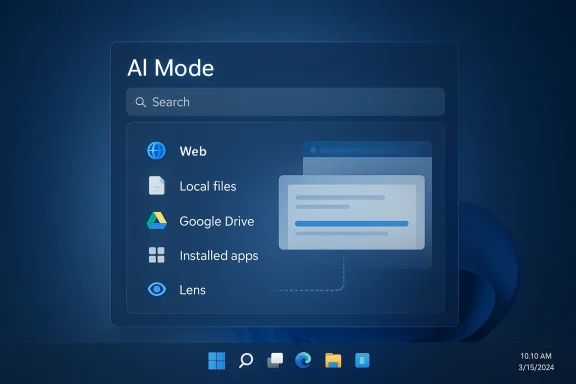
Google has launched a new Windows app that folds more of its AI strategy into a single, desktop-first experience, and the timing says a lot about where the company wants Gemini to live next. Instead of keeping Gemini confined to a browser tab or mobile app, Google is now placing it directly on the Windows desktop with a system-level shortcut, Alt + Space, and a search box that reaches across the web, local files, installed apps, Google Drive, and even the contents of your screen through Google Lens. The move is notable not just because it expands Gemini’s footprint, but because it pushes Google further into territory long associated with Windows productivity utilities, third-party launchers, and AI assistants that promise to become a user’s universal front door.
Google has spent the last two years turning Gemini from a chatbot into a broader software layer. What began as a conversational AI product has steadily expanded into Google Search, Chrome, Workspace, Drive, and mobile devices, with the company repeatedly emphasizing deeper context, better personalization, and tighter integration with Google services. The Windows app is the next logical step in that plan, because the desktop remains the place where many users still do their real work.
The company’s recent AI push has been especially focused on making Gemini more ambient and less like a destination app. In Google’s own product updates, Gemini has gained personalization features, deeper research tools, stronger connections to Google apps, and tighter access to files and documents. That arc matters here because the Windows app is not a standalone experiment in isolation; it is part of a larger effort to make Gemini appear wherever users are already spending time. Google’s announcement for the Windows app says the experience can search files, installed apps, Drive content, and the web, while AI Mode adds follow-up questions and deeper exploration.
This is also happening against a broader industry shift. AI vendors are racing to capture the “always available” layer of computing, whether through browsers, operating systems, productivity suites, or dedicated desktop launchers. Microsoft has been pushing Copilot deeper into Windows and Microsoft 365. OpenAI has focused on chat interfaces, connectors, and enterprise tools. Google, by contrast, is now trying to make Gemini feel less like a website and more like a utility that sits beside the operating system.
The rollout details are important as well. Google says the app is available globally in English and works on Windows 10 and later, not just Windows 11. That makes the launch more expansive than some Microsoft-integrated AI features, and it also suggests Google is prioritizing reach over exclusivity. For a product meant to encourage habitual use, broad compatibility is a strategic advantage.
What stands out most is that Google is not merely duplicating the browser experience on Windows. It is adding a shortcut-driven, screen-aware, file-aware workflow that tries to reduce friction. If that sounds familiar, it should. The modern desktop AI race is increasingly about shaving off seconds and switching costs, and Google clearly believes those tiny gains can create major platform loyalty.
This matters because Google’s strengths have always been distributed across many products rather than concentrated in one OS. Search, Drive, Lens, and Gemini all do different jobs, but desktop users often experience them as separate islands. The new app attempts to connect those islands with one keyboard shortcut and a single workflow. In effect, Google is betting that convenience will outweigh the cognitive cost of yet another AI entry point.
The app also reflects the growing importance of AI Mode inside Google’s ecosystem. Instead of stopping at ordinary search results, AI Mode can expand a query into a more conversational, iterative experience with follow-up prompts. That makes the app feel less like a search helper and more like a research assistant. For users who already rely on Gemini and Google’s other AI features, that kind of continuity may be more valuable than novelty.
There is also a subtle but important competitive signal here. Google is not restricting this launch to the newest Windows 11 machines, and that suggests a desire to be seen as the most broadly accessible AI layer on the desktop. Accessibility is often an underrated part of platform strategy. A feature that works on older systems can spread faster, gather more feedback, and build a larger habit base before rivals have finished polishing more exclusive experiences.
The strategic logic is straightforward. If Gemini can become the first place users look for answers, then Google gets a stronger claim on desktop attention even when users are not in Chrome or Gmail. That is a valuable position in a world where the browser is no longer the only gateway to information.
Google has historically been at a disadvantage on Windows compared with Microsoft, which owns the operating system and the default productivity stack. A Windows app gives Google a way to work around that disadvantage by creating a direct relationship with users. Instead of asking people to remember to open a website, Google can appear as a native shortcut and build a habit around it.
There is also a symbolic dimension to the launch. For years, Windows users have depended on a patchwork of launchers, search utilities, and third-party helpers to accelerate tasks. Google is now trying to occupy that mental space with a product that brings search, AI, and local context together. That makes the app feel less like an add-on and more like a candidate for “default helper” status.
The support for Windows 10 is especially notable because it broadens the practical audience beyond early adopters. Windows 10 is still present across many enterprise environments and consumer PCs, and compatibility there can matter more than flashy feature depth. A wider install base means more usage, more data on behavior, and a greater chance of becoming indispensable.
The distinction matters because consumer enthusiasm does not always translate into enterprise trust. In business settings, IT admins will want clear policies, data handling assurances, and predictable behavior. Without those, the app may become a useful personal tool that never fully crosses into managed deployment.
One of the strongest aspects of this launch is the implied continuity between web search, AI Mode, and multimodal input. A user can start with a conventional query, then expand into follow-up questions, then shift to screen analysis if needed. That makes the app feel more fluid than the old “open app, type prompt, wait” model. It is designed for the messy, iterative way people actually search when they are trying to solve a problem.
At the same time, Google is signaling that Gemini can be more than a generative assistant. When the app can inspect a local file, an app window, or a portion of the screen, it becomes a contextual interpreter. That is a materially different role from a chatbot that only knows what the user types. Context is the real product here, and the app is built to gather more of it.
Still, the experience will likely live or die on execution. If search is too slow, results too noisy, or permissions too confusing, the promise of the shortcut fades quickly. Desktop users are unforgiving about latency because they compare every new tool against muscle memory and existing keyboard shortcuts.
This also explains why Google leaned into Lens integration. Multimodal search turns the desktop from a passive canvas into something the AI can read. That makes the app potentially useful for work, school, translation, support, and research.
This is one of the clearest signs that Google wants the Windows app to be more than a desktop replica of Gemini.com. Screen awareness changes the interaction model. It lets users ask questions about what they are looking at, which is often more valuable than asking about abstract web content. In a sense, the app is trying to collapse the distance between seeing and searching.
The feature also hints at how Google sees the future of desktop assistance. Rather than having the user manually copy text or describe a screenshot, the system can interpret the visible context directly. That creates a smoother workflow, but it also increases the importance of permission controls and user trust. People are generally willing to let AI help them; they are less willing to let it inspect everything without clear boundaries.
For Google, this is a chance to make Lens feel like part of the operating rhythm of desktop computing instead of a separate mobile-centric tool. That may be one reason the company is pushing the app globally in English rather than waiting for a more elaborate multilingual launch. Google often seeds products where usage habits are already strongest, then expands later.
At the same time, the feature may also expose the limits of consumer expectations. If users assume Lens can understand everything perfectly, disappointment will follow when it misreads charts, mishandles handwriting, or misses context. That is the normal challenge of AI products: the promise arrives faster than the reliability.
This is also where Google has an opportunity to make its ecosystem feel uniquely cohesive. If Drive becomes searchable from a desktop shortcut and can be queried alongside local documents, that is a tangible productivity gain. For people already invested in Google’s services, the app reduces fragmentation.
The downside is that the feature set starts to look a lot like a cross between Windows Search, a file manager, and an AI assistant. That is powerful, but it also raises the bar. Users will expect excellent retrieval, not just plausible prose. In a search-driven product, incorrect confidence can be worse than no answer at all.
Google has been moving in this direction across Workspace as well, adding AI features to Docs, Sheets, Slides, and Drive that let Gemini pull information from files and connected services. The Windows app extends that philosophy onto a broader desktop surface. It is a reminder that Google wants Gemini to become the connective tissue between user content and user intent.
That simplicity matters because many AI tools fail not on capability, but on discoverability. A single shortcut is easier to remember than a scattered set of menus and side panels. In that sense, the app’s user experience may be more important than any individual feature.
That is a smart counterpunch, because it meets users where they already are. Google does not need to win by making the operating system itself; it can win by becoming the most useful layer sitting on top of it. If the Windows app becomes good enough, users may prefer it for search, discovery, and cross-context questions even when Microsoft’s own tools are already present.
The challenge is differentiation. If the experience merely mirrors existing Windows Search plus a chatbot, users will not switch habits. Google needs the app to feel faster, smarter, and more context-aware than the alternatives. That may be why it is leaning on Lens and AI Mode, both of which make the product feel broader than ordinary search.
There is also a platform politics angle. Google’s own products are often strongest when they are not locked to one device family. By launching on Windows 10 and later, the company avoids a narrow hardware story and instead pushes for ubiquity. That is exactly the kind of reach a company with Google’s search heritage understands well.
The irony is that Windows users may benefit most from the rivalry. When two giants compete on usability, the result is often more features, faster rollout, and better integration. The real question is whether Google can match Microsoft’s intimacy with the platform while maintaining a cleaner, more search-oriented identity.
The opportunity is not merely to win a niche among AI enthusiasts. It is to establish Gemini as a habitual layer across Windows, search, Drive, and visual context. If Google gets the experience right, the app could become the kind of tool users reach for reflexively rather than selectively.
There is a particular danger in overselling AI convenience. If the app returns uneven results, misunderstands screen content, or feels redundant next to existing Google products, it may be dismissed as another experiment rather than a real desktop utility. In the AI market, feature depth is not enough; the experience has to feel durable.
Google’s bigger challenge will be making the experience feel indispensable rather than optional. That means improving retrieval quality, tightening privacy messaging, and giving users enough confidence to let the app sit close to their work. If Google can do that, the Windows app may become one of the company’s most important consumer AI distribution channels.
Source: Engadget Google's new Windows app is yet another way to access Gemini
 Background
Google has spent the last two years turning Gemini from a chatbot into a broader software layer. What began as a conversational AI product has steadily expanded into Google Search, Chrome, Workspace, Drive, and mobile devices, with the company repeatedly emphasizing deeper context, better personalization, and tighter integration with Google services. The Windows app is the next logical step in that plan, because the desktop remains the place where many users still do their real work.The company’s recent AI push has been especially focused on making Gemini more ambient and less like a destination app. In Google’s own product updates, Gemini has gained personalization features, deeper research tools, stronger connections to Google apps, and tighter access to files and documents. That arc matters here because the Windows app is not a standalone experiment in isolation; it is part of a larger effort to make Gemini appear wherever users are already spending time. Google’s announcement for the Windows app says the experience can search files, installed apps, Drive content, and the web, while AI Mode adds follow-up questions and deeper exploration.
This is also happening against a broader industry shift. AI vendors are racing to capture the “always available” layer of computing, whether through browsers, operating systems, productivity suites, or dedicated desktop launchers. Microsoft has been pushing Copilot deeper into Windows and Microsoft 365. OpenAI has focused on chat interfaces, connectors, and enterprise tools. Google, by contrast, is now trying to make Gemini feel less like a website and more like a utility that sits beside the operating system.
The rollout details are important as well. Google says the app is available globally in English and works on Windows 10 and later, not just Windows 11. That makes the launch more expansive than some Microsoft-integrated AI features, and it also suggests Google is prioritizing reach over exclusivity. For a product meant to encourage habitual use, broad compatibility is a strategic advantage.
What stands out most is that Google is not merely duplicating the browser experience on Windows. It is adding a shortcut-driven, screen-aware, file-aware workflow that tries to reduce friction. If that sounds familiar, it should. The modern desktop AI race is increasingly about shaving off seconds and switching costs, and Google clearly believes those tiny gains can create major platform loyalty.
Overview
At a practical level, the Windows app is a compact front end for several different Google capabilities. The user presses Alt + Space, gets a search bar, and can ask for web results, AI-assisted summaries, or context pulled from files and apps. With Google Lens integrated, the app can also inspect whatever appears on the screen and help users translate text, identify information, or ask questions about visual content. That combination makes the app feel closer to a universal command bar than a traditional chatbot window.This matters because Google’s strengths have always been distributed across many products rather than concentrated in one OS. Search, Drive, Lens, and Gemini all do different jobs, but desktop users often experience them as separate islands. The new app attempts to connect those islands with one keyboard shortcut and a single workflow. In effect, Google is betting that convenience will outweigh the cognitive cost of yet another AI entry point.
The app also reflects the growing importance of AI Mode inside Google’s ecosystem. Instead of stopping at ordinary search results, AI Mode can expand a query into a more conversational, iterative experience with follow-up prompts. That makes the app feel less like a search helper and more like a research assistant. For users who already rely on Gemini and Google’s other AI features, that kind of continuity may be more valuable than novelty.
There is also a subtle but important competitive signal here. Google is not restricting this launch to the newest Windows 11 machines, and that suggests a desire to be seen as the most broadly accessible AI layer on the desktop. Accessibility is often an underrated part of platform strategy. A feature that works on older systems can spread faster, gather more feedback, and build a larger habit base before rivals have finished polishing more exclusive experiences.
What Google Is Actually Trying to Build
The app is not just a search tool. It is a workflow layer, designed to reduce the number of places users have to open before they can find something, recall something, or reason about something. That is a more ambitious objective than “desktop chatbot,” and it helps explain why Google is bundling web search, local search, Drive, and screen search into one interface.The strategic logic is straightforward. If Gemini can become the first place users look for answers, then Google gets a stronger claim on desktop attention even when users are not in Chrome or Gmail. That is a valuable position in a world where the browser is no longer the only gateway to information.
- It lowers the friction of asking questions.
- It broadens Gemini beyond chat.
- It makes Google Search feel more assistant-like.
- It turns screen content into queryable context.
- It gives Drive a more visible role on Windows.
Why Windows Matters
Windows remains the dominant desktop environment in business and a major one in consumer computing, which makes it the obvious battlefield for AI assistants that want daily relevance. Even though much of the public conversation around AI happens on phones and in web apps, the actual grind of work still happens at the desktop. That is where people search, write, compare, copy, organize, and multitask.Google has historically been at a disadvantage on Windows compared with Microsoft, which owns the operating system and the default productivity stack. A Windows app gives Google a way to work around that disadvantage by creating a direct relationship with users. Instead of asking people to remember to open a website, Google can appear as a native shortcut and build a habit around it.
There is also a symbolic dimension to the launch. For years, Windows users have depended on a patchwork of launchers, search utilities, and third-party helpers to accelerate tasks. Google is now trying to occupy that mental space with a product that brings search, AI, and local context together. That makes the app feel less like an add-on and more like a candidate for “default helper” status.
The support for Windows 10 is especially notable because it broadens the practical audience beyond early adopters. Windows 10 is still present across many enterprise environments and consumer PCs, and compatibility there can matter more than flashy feature depth. A wider install base means more usage, more data on behavior, and a greater chance of becoming indispensable.
Enterprise and Consumer Split
For consumers, the appeal is obvious: quick answers, less tab switching, and a shortcut that can search both the cloud and the device itself. For enterprises, the value proposition is trickier, because any tool that can inspect files and screen content raises management, compliance, and privacy questions. Google will likely need to prove that controls are robust enough for workplace adoption to accelerate meaningfully.The distinction matters because consumer enthusiasm does not always translate into enterprise trust. In business settings, IT admins will want clear policies, data handling assurances, and predictable behavior. Without those, the app may become a useful personal tool that never fully crosses into managed deployment.
The Gemini Experience on Desktop
The desktop version of Gemini appears to be evolving toward context-rich assistance rather than simple question-and-answer chat. That shift mirrors the broader direction of the Gemini product line, which has already added personalization, connected apps, Deep Research, and stronger file handling in other environments. On Windows, those capabilities become more valuable because users can interact with their actual work artifacts, not just a text box.One of the strongest aspects of this launch is the implied continuity between web search, AI Mode, and multimodal input. A user can start with a conventional query, then expand into follow-up questions, then shift to screen analysis if needed. That makes the app feel more fluid than the old “open app, type prompt, wait” model. It is designed for the messy, iterative way people actually search when they are trying to solve a problem.
At the same time, Google is signaling that Gemini can be more than a generative assistant. When the app can inspect a local file, an app window, or a portion of the screen, it becomes a contextual interpreter. That is a materially different role from a chatbot that only knows what the user types. Context is the real product here, and the app is built to gather more of it.
Still, the experience will likely live or die on execution. If search is too slow, results too noisy, or permissions too confusing, the promise of the shortcut fades quickly. Desktop users are unforgiving about latency because they compare every new tool against muscle memory and existing keyboard shortcuts.
Why Context Is the Real Differentiator
The most meaningful innovation is not the search bar itself. It is the fact that the app can combine screen understanding, local search, cloud search, and AI Mode in one place. That means the assistant can help users answer questions that are otherwise split across multiple apps and workflows.This also explains why Google leaned into Lens integration. Multimodal search turns the desktop from a passive canvas into something the AI can read. That makes the app potentially useful for work, school, translation, support, and research.
- Search local documents without opening each one.
- Ask about something visible on your screen.
- Pull in Google Drive content alongside local files.
- Escalate a query into AI Mode for deeper follow-up.
- Reduce dependency on manual app switching.
Google Lens and Screen Sharing
The inclusion of Google Lens gives the Windows app an important multimodal edge. Rather than restricting the assistant to typed queries, Google is enabling users to select content on screen and search it directly. That can make the tool genuinely useful in practical, everyday scenarios such as reading documents, identifying objects, translating text, or extracting information from images.This is one of the clearest signs that Google wants the Windows app to be more than a desktop replica of Gemini.com. Screen awareness changes the interaction model. It lets users ask questions about what they are looking at, which is often more valuable than asking about abstract web content. In a sense, the app is trying to collapse the distance between seeing and searching.
The feature also hints at how Google sees the future of desktop assistance. Rather than having the user manually copy text or describe a screenshot, the system can interpret the visible context directly. That creates a smoother workflow, but it also increases the importance of permission controls and user trust. People are generally willing to let AI help them; they are less willing to let it inspect everything without clear boundaries.
For Google, this is a chance to make Lens feel like part of the operating rhythm of desktop computing instead of a separate mobile-centric tool. That may be one reason the company is pushing the app globally in English rather than waiting for a more elaborate multilingual launch. Google often seeds products where usage habits are already strongest, then expands later.
Practical Use Cases
The desktop Lens integration should resonate most in situations where users are already stuck or interrupted. A dense report, a foreign-language document, an unfamiliar diagram, or an error message on screen can all become starting points for AI help. That is precisely where a quick shortcut can feel magical.At the same time, the feature may also expose the limits of consumer expectations. If users assume Lens can understand everything perfectly, disappointment will follow when it misreads charts, mishandles handwriting, or misses context. That is the normal challenge of AI products: the promise arrives faster than the reliability.
Search, Files, and Drive
Google’s decision to include both computer files and Google Drive in the app’s search scope is strategically smart. It means the product can bridge personal and cloud-based work, which is exactly how many people now manage their digital lives. The average user does not care where a file lives as long as it can be found quickly.This is also where Google has an opportunity to make its ecosystem feel uniquely cohesive. If Drive becomes searchable from a desktop shortcut and can be queried alongside local documents, that is a tangible productivity gain. For people already invested in Google’s services, the app reduces fragmentation.
The downside is that the feature set starts to look a lot like a cross between Windows Search, a file manager, and an AI assistant. That is powerful, but it also raises the bar. Users will expect excellent retrieval, not just plausible prose. In a search-driven product, incorrect confidence can be worse than no answer at all.
Google has been moving in this direction across Workspace as well, adding AI features to Docs, Sheets, Slides, and Drive that let Gemini pull information from files and connected services. The Windows app extends that philosophy onto a broader desktop surface. It is a reminder that Google wants Gemini to become the connective tissue between user content and user intent.
Search Without Switching
The core promise is to make search feel instantaneous. Pressing Alt + Space and getting answers without leaving the current window is a strong ergonomics play, especially on desktops where attention is expensive. It also makes the app easier to learn because the interaction model is simple and consistent.That simplicity matters because many AI tools fail not on capability, but on discoverability. A single shortcut is easier to remember than a scattered set of menus and side panels. In that sense, the app’s user experience may be more important than any individual feature.
- One shortcut launches the experience.
- Search spans device, Drive, and web.
- AI Mode adds iterative follow-up.
- Users stay in flow longer.
- The app reduces app-hopping fatigue.
Competitive Implications
Google’s move lands in a crowded and increasingly competitive market for desktop AI. Microsoft has the home-field advantage on Windows and continues to weave Copilot into the OS and productivity suite. OpenAI and other AI players are also pushing toward more persistent, cross-app assistants. Google’s response is to make Gemini feel less like a chat product and more like a universal launcher for information.That is a smart counterpunch, because it meets users where they already are. Google does not need to win by making the operating system itself; it can win by becoming the most useful layer sitting on top of it. If the Windows app becomes good enough, users may prefer it for search, discovery, and cross-context questions even when Microsoft’s own tools are already present.
The challenge is differentiation. If the experience merely mirrors existing Windows Search plus a chatbot, users will not switch habits. Google needs the app to feel faster, smarter, and more context-aware than the alternatives. That may be why it is leaning on Lens and AI Mode, both of which make the product feel broader than ordinary search.
There is also a platform politics angle. Google’s own products are often strongest when they are not locked to one device family. By launching on Windows 10 and later, the company avoids a narrow hardware story and instead pushes for ubiquity. That is exactly the kind of reach a company with Google’s search heritage understands well.
The Microsoft Factor
Microsoft will almost certainly interpret this as another attempt by Google to reclaim desktop attention from Redmond. The fact that Google is building a shortcut-driven launcher on Windows makes the competitive subtext impossible to miss. AI is becoming a battleground for the default input layer, and both companies know it.The irony is that Windows users may benefit most from the rivalry. When two giants compete on usability, the result is often more features, faster rollout, and better integration. The real question is whether Google can match Microsoft’s intimacy with the platform while maintaining a cleaner, more search-oriented identity.
Strengths and Opportunities
Google’s Windows app has several clear strengths, and they all come back to one theme: reducing friction. The company is taking pieces of its AI stack that already work well in isolation and arranging them into a desktop workflow that feels immediate, useful, and broad enough to matter to both casual and heavy Gemini users.The opportunity is not merely to win a niche among AI enthusiasts. It is to establish Gemini as a habitual layer across Windows, search, Drive, and visual context. If Google gets the experience right, the app could become the kind of tool users reach for reflexively rather than selectively.
- Broad compatibility with Windows 10 and newer.
- Single shortcut access through Alt + Space.
- Cross-context search across files, apps, Drive, and the web.
- Multimodal support via Google Lens and screen inspection.
- Stronger Gemini adoption among desktop-first users.
- Better ecosystem glue between Google Search and Workspace.
- Potential enterprise upside if admin and privacy controls mature.
Risks and Concerns
The app’s ambition is also its biggest risk. Any tool that tries to unify search, assistant behavior, file access, and screen analysis has to earn trust at multiple layers at once. Users need to believe it is accurate, fast, respectful of privacy, and useful enough to replace habits they already have.There is a particular danger in overselling AI convenience. If the app returns uneven results, misunderstands screen content, or feels redundant next to existing Google products, it may be dismissed as another experiment rather than a real desktop utility. In the AI market, feature depth is not enough; the experience has to feel durable.
- Privacy concerns around file, app, and screen access.
- Enterprise skepticism if governance controls are unclear.
- Accuracy risk when summarizing or interpreting content.
- Feature redundancy versus browser search and existing Gemini apps.
- User fatigue from yet another AI launcher or sidebar.
- Localization limitations because the rollout is English only.
- Trust issues if users worry about data handling or visibility.
Looking Ahead
The next few months will show whether Google’s Windows app is a genuine desktop strategy or simply the latest way to funnel users into Gemini. The early signals are promising because the app is tied to practical behavior: searching, reading, asking follow-ups, and extracting context from what is already on screen. That makes it more useful than a standalone chatbot window, and usefulness is what determines whether desktop software sticks.Google’s bigger challenge will be making the experience feel indispensable rather than optional. That means improving retrieval quality, tightening privacy messaging, and giving users enough confidence to let the app sit close to their work. If Google can do that, the Windows app may become one of the company’s most important consumer AI distribution channels.
- Expand beyond English to more languages.
- Clarify admin and privacy controls for workplace use.
- Improve screen understanding and visual search accuracy.
- Deepen integration with Drive and connected files.
- Make the shortcut experience faster and more predictive.
Source: Engadget Google's new Windows app is yet another way to access Gemini
Last edited:
