

The webinar replay from Legal IT Insider lays out a pragmatic, operationally focused answer to a pressing problem: Microsoft 365 is changing faster than many teams can safely manage, and law firms — with heightened regulatory, eDiscovery and confidentiality demands — are especially exposed. The session with James Rodd (co‑founder and CEO of ChangePilot by Empowering.Cloud) and Ally Ward (Microsoft 365 product and platform services manager at Norton Rose Fulbright) demonstrates a repeatable pattern: surface vendor signals into the collaboration spaces teams already use, apply lightweight triage and scoring, and preserve tamper‑resistant audit evidence — automating the plumbing but keeping humans in the loop for judgment.
Microsoft’s “evergreen” model means features, security updates and new capabilities arrive continuously rather than as occasional, monolithic upgrades. That cadence has operational benefits — faster security fixes, quicker feature delivery and faster innovation — but it converts what used to be a periodic upgrade project into an ongoing operational discipline. The webinar frames the problem with three headline metrics attributed to ChangePilot analytics: a 65% year‑on‑year increase in Microsoft 365 change volume, a 102% jump in Copilot‑related changes, and over 80% growth in security‑related changes. These figures are presented as trend signals to prioritise action, but they are vendor‑provided analytics and should be validated against your tenant telemetry before treating them as absolute benchmarks. Microsoft’s public commentary on Copilot and the broader Copilot ecosystem confirms rapid adoption and frequent updates, which aligns with the webinar’s high‑level picture: Copilot is expanding quickly across apps and features and generates a distinct class of tenant artifacts and admin controls that demand governance attention.
Week 1–2: Current state audit
Key operational checks:
Risk: Compromised connectors could inject false or malicious change items.
Key takeaways for law firms and regulated enterprises:
Conclusion
Evergreen change is the operating reality for modern Microsoft 365 tenants. The combination of finite human review, lightweight automation and clear audit trails is the most practical way to manage the volume and velocity of updates while preserving legal defensibility. The webinar replay and the case study from Norton Rose Fulbright provide a tested implementation pattern: adopt slowly, measure rapidly, and never outsource legal judgment to automation alone.
Source: Legal IT Insider Webinar Replay: Proactively managing evergreen change in Microsoft 365 - Legal IT Insider
 Background / Overview
Microsoft’s “evergreen” model means features, security updates and new capabilities arrive continuously rather than as occasional, monolithic upgrades. That cadence has operational benefits — faster security fixes, quicker feature delivery and faster innovation — but it converts what used to be a periodic upgrade project into an ongoing operational discipline. The webinar frames the problem with three headline metrics attributed to ChangePilot analytics: a 65% year‑on‑year increase in Microsoft 365 change volume, a 102% jump in Copilot‑related changes, and over 80% growth in security‑related changes. These figures are presented as trend signals to prioritise action, but they are vendor‑provided analytics and should be validated against your tenant telemetry before treating them as absolute benchmarks. Microsoft’s public commentary on Copilot and the broader Copilot ecosystem confirms rapid adoption and frequent updates, which aligns with the webinar’s high‑level picture: Copilot is expanding quickly across apps and features and generates a distinct class of tenant artifacts and admin controls that demand governance attention. Why evergreen change is now an operational imperative
The evergreen cloud model solves release inertia but creates three hard operational facts organisations must accept:- Changes are frequent and often shipped with default on settings.
- Vendor signals are distributed across Message Center, roadmap entries, release notes and localized rollouts; no single feed covers everything.
- For regulated organisations, triage decisions must be auditable, defensible and repeatable.
What Norton Rose Fulbright showed: a concise case study
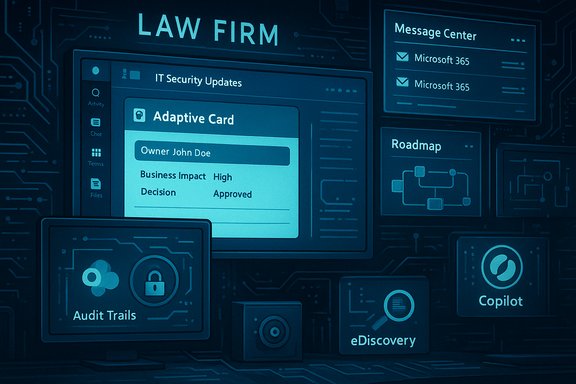
Ally Ward described a movement from a slow, manual process to a lightweight automation pipeline:- Surface Message Center and Roadmap notifications into a dedicated Teams channel used by security, IT and legal.
- Attach an adaptive card triage workflow so each item is assigned an owner, given a business‑impact score, and a decision (Mitigate / Communicate / Accept) is recorded.
- Persist triage records and supporting evidence to a governed archive (SharePoint) to preserve audit trails suitable for eDiscovery.
The ChangePilot proposition: what the product does (and what it doesn’t)
ChangePilot (Empowering.Cloud) was launched to address this operational gap. At a functional level it provides:- Automated ingestion of Microsoft change signals (Message Center, roadmap notes, release posts).
- A Teams‑centric triage UI with actions that map to business decisions.
- Evidence capture and exportable audit trails (SharePoint or tenant storage).
- Filtering, scoring and routing to reduce noise and focus human attention on high‑impact items.
- Rapid time to value: leverages Power Platform, Teams and SharePoint, so few new endpoint clients or training sessions are required.
- Auditability: triage actions are recorded in the tenant and can be produced for legal defensibility.
- Prioritisation: numeric scoring reduces the cognitive load of deciding what to escalate.
- Input quality matters: Message Center is necessary but not sufficient; some changes appear in release notes or regional rollouts first.
- Vendor lock considerations: evaluate data export and retention controls before embedding a third‑party SaaS into a legal workflow.
- Over‑automation risk: automated approvals are dangerous; the system should surface decisions, not make them, unless governance explicitly permits automated remediation.
Validating the headline numbers (technical verification and caution)
The webinar quotes the 65% and 102% growth metrics as ChangePilot analytics. Verification steps for IT teams:- Pull two identical calendared windows (e.g., last 12 months vs prior 12 months) of Message Center and Roadmap items from your tenant APIs and count discrete items by category (Security, Product, Copilot).
- Compare the counts with ChangePilot aggregate figures — you may see variations due to regional rollouts, tenant licensing, or signal filters.
- Corroborate with independent evidence: Microsoft’s public Copilot adoption and update cadence notes show rapid iteration and many discrete updates over short windows, which supports the claim that Copilot‑related activity is accelerating, even if the precise percentages vary by tenant.
Tactical playbook: a 90‑day roadmap you can implement
The webinar and accompanying community write‑ups converge on a repeatable, low‑risk roadmap you can use as a blueprint.Week 1–2: Current state audit
- Capture how Message Center items currently arrive (email, admin center console, RSS).
- Map stakeholders who see and act on updates.
- Collect a two‑week sample and measure Mean Time to Triage (MTT) and missed items.
- Use Power Automate/Azure Logic Apps to post Message Center emails into a restricted Teams channel.
- Attach an Adaptive Card with fixed triage questions: owner, business impact (0–5), security impact (0–5), default status (on/off), recommended action.
- Persist triage responses to a SharePoint list (immutable metadata + attachments).
- Run manual and automated triage in parallel to measure noise, false positives, and time saved.
- Roll out to a pilot group including security ops and legal.
- Measure KPIs: MTT, percent high‑impact items triaged within SLA, audit coverage (percent decisions with evidence), and time saved per week.
- Tune filters (sender patterns, topic taxonomies) to reduce noise.
- Add automated routing to on‑call owners for high‑impact items.
- Optional: integrate Sentinel or SIEM telemetry to correlate change events with security signals.
Prioritisation rubric and scoring — how to decide what matters
When change volume is high, focus is the only scalable defence. Use a numeric scoring model that combines:- User impact (0–5): how many users or critical groups are affected.
- Security impact (0–5): does it change threat surface or trusted connectors?
- Default status (0–5): enabled by default gets a higher weight.
- Data exposure risk (0–5): does it touch external sharing, connectors, or indexing?
- Rollout velocity (0–5): immediate / phased / scheduled.
- Score ≥ 18 → immediate review and mitigation.
- Score 12–17 → scheduled review within SLA (48–72 hours).
- Score < 12 → batch review in weekly digest.
Copilot-specific governance: what legal IT must check now
Copilot introduces new artifact classes (chat prompts, Copilot Pages/Notebooks, saved memories) and storage patterns (hidden mailbox stores, OneDrive/SharePoint pages) that have ramifications for eDiscovery and retention.Key operational checks:
- Inventory Copilot connectors and agents; document what tenant data they access, index and persist.
- Confirm where Copilot memory and saved artifacts are stored and how they appear in Purview eDiscovery / content search.
- Test retention and legal hold behavior for Copilot artifacts; default retention may differ from standard Purview rules.
- Implement pre‑approval lists and admin consent policies for connectors that access sensitive client or regulated data.
Security risks introduced by automation — and the mitigations you must insist on
Automation reduces missed items but introduces its own attack surface. The webinar pulled no punches on this; here are the principal risks and recommended mitigations.Risk: Compromised connectors could inject false or malicious change items.
- Mitigation: use certificate‑bound service principals, minimize Graph API scopes, and restrict service accounts with conditional access and MFA.
- Mitigation: restrict Teams channel membership, apply sensitivity labels and DLP rules to SharePoint evidence stores.
- Mitigation: require at least one human approval for any high‑impact action; log all automated steps and make them auditable.
- Mitigation: insist on exportable stores and customer‑owned retention controls when selecting a third‑party triage solution.
Measuring success: KPIs that matter to legal and IT leaders
Keep KPIs simple and defensible. Focus on metrics that translate into auditability and risk reduction:- Mean Time to Triage (MTT) — time from message arrival to a documented decision.
- Percent high‑impact items triaged within SLA.
- Audit coverage — percent of triage actions with stored evidence and metadata.
- Number of missed or late change events that resulted in remediation tickets.
- Time saved per week by automation vs manual triage (hours or FTE equivalent).
Procurement and vendor due diligence — the questions you must ask
Before adopting a third‑party triage product:- Where is the triage data stored and who owns the keys? (Prefer customer‑managed keys if available.
- Can you export the audit store in standard formats suitable for eDiscovery?
- Which Graph scopes are requested and are they least‑privilege?
- What retention and deletion controls exist for triage evidence?
- What SLAs exist for vendor availability and evidence integrity?
What successful teams do differently
- They treat evergreen change as an operational stream — not a project.
- They surface vendor signals into workflows teams already use (Teams, not a separate portal).
- They record decisions as evidence immediately (adaptive card + SharePoint archive).
- They keep humans in the loop for high‑impact items while automating routing and triage for volume.
- They continuously measure and recalibrate scoring thresholds rather than blindly trusting vendor aggregates.
Risks, unanswered questions and claims to verify
- The webinar’s growth percentages (65%, 102%) are directional and useful for prioritisation; validate them against your tenant logs before making governance decisions based on the absolute numbers.
- Copilot’s artifact behavior and retention rules are evolving; test eDiscovery and hold scenarios in a sandbox tenant to confirm how Purview interacts with Copilot memory and saved items. Microsoft’s own Copilot and tenant guidance confirms the complexity and the pace of change.
- Any solution that claims complete automation of risk elimination is overselling: automation can reduce human error but cannot replace legal judgment.
Final analysis and recommendation
The Legal IT Insider webinar presents a practical, defensible approach to a problem that will not disappear: Microsoft 365 will continue to ship frequent updates, and Copilot will add new artifact types and management complexity. The recommended pattern — capture vendor signals, route them into Teams, apply a concise triage rubric, record decisions in a governed evidence store — is low friction, fast to deploy and aligned with legal defensibility.Key takeaways for law firms and regulated enterprises:
- Start with a two‑week audit of Message Center traffic and triage time.
- Implement a lightweight Teams‑centric pipeline using Power Platform primitives to prove the model.
- Measure MTT and audit coverage before committing to a vendor SaaS.
- Treat vendor statistics as directional; validate with tenant telemetry.
- Prioritise exportable audit trails and least‑privilege Graph access when procuring tools.
Conclusion
Evergreen change is the operating reality for modern Microsoft 365 tenants. The combination of finite human review, lightweight automation and clear audit trails is the most practical way to manage the volume and velocity of updates while preserving legal defensibility. The webinar replay and the case study from Norton Rose Fulbright provide a tested implementation pattern: adopt slowly, measure rapidly, and never outsource legal judgment to automation alone.
Source: Legal IT Insider Webinar Replay: Proactively managing evergreen change in Microsoft 365 - Legal IT Insider
