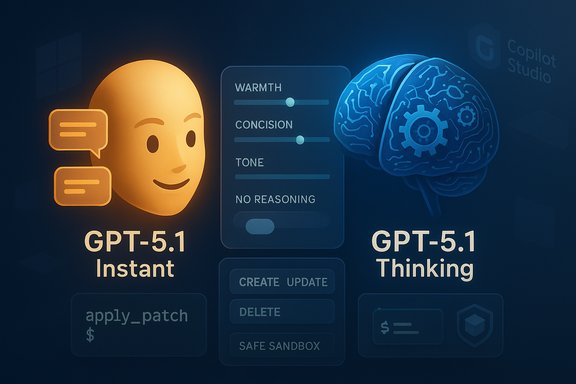
OpenAI’s newest model update, GPT‑5.1, arrived as an evolutionary rather than revolutionary step—promising faster answers for routine requests, deeper multi‑step reasoning when needed, new developer tools for editing and shell access, and a broader set of conversational personalities designed to make ChatGPT and integrated products feel warmer and more predictable.
When a major platform model is updated, the practical questions for IT teams and product builders are not just “what’s new?” but “what changes in engineering, governance, and UX do I actually need to make?” OpenAI published the GPT‑5.1 developer announcement on November 13, 2025, laying out the core design goals: adaptive reasoning, lower latency for simple tasks, a no‑reasoning mode for latency‑sensitive flows, and built‑in tools aimed at coding and automation workflows. Microsoft—one of OpenAI’s largest integration partners—made GPT‑5.1 available as an experimental option inside Microsoft Copilot Studio on November 12, 2025, enabling enterprise customers to trial the model in sandboxed agent workflows while Microsoft completes its evaluation gates. That availability highlights the immediate enterprise relevance of GPT‑5.1 for automation, Copilot agents, and business process orchestration.
OpenAI’s public benchmarks show real improvement in several areas, but internal testing is required because vendor reports are necessarily selective and dependent on particular prompts and datasets. The product’s UX changes (warmer defaults, persona presets) are small in engineering terms but large in user perception—a reminder that model productization is as much UX as model math.
Source: newztodays.com What New Features GPT-5.1 Brings to ChatGPT
 Background
When a major platform model is updated, the practical questions for IT teams and product builders are not just “what’s new?” but “what changes in engineering, governance, and UX do I actually need to make?” OpenAI published the GPT‑5.1 developer announcement on November 13, 2025, laying out the core design goals: adaptive reasoning, lower latency for simple tasks, a no‑reasoning mode for latency‑sensitive flows, and built‑in tools aimed at coding and automation workflows. Microsoft—one of OpenAI’s largest integration partners—made GPT‑5.1 available as an experimental option inside Microsoft Copilot Studio on November 12, 2025, enabling enterprise customers to trial the model in sandboxed agent workflows while Microsoft completes its evaluation gates. That availability highlights the immediate enterprise relevance of GPT‑5.1 for automation, Copilot agents, and business process orchestration. What GPT‑5.1 Adds: Feature overview
Two thinking modes: Instant and Thinking
GPT‑5.1 was designed to dynamically allocate compute and “thinking time” depending on query complexity. OpenAI describes two behavioral modes that will be used either implicitly by the model router or explicitly exposed to developers and end users:- Instant — optimized for short queries and high throughput; returns concise answers with lower latency.
- Thinking — allocated more internal reasoning effort for multi‑step, logic‑heavy, or ambiguous requests.
No‑reasoning mode for latency‑sensitive workflows
A new parameter, exposed asreasoning_effort='none' (and other levels such as low, medium, high), allows developers to run GPT‑5.1 in a no‑reasoning state. This mode prioritizes latency and deterministic tool‑calling behavior, making it suitable for high‑frequency chatbots, real‑time assistance, and parallel tool integrations where millisecond gains matter. OpenAI says none is the default on GPT‑5.1 for latency‑sensitive workloads and reports material improvements in parallel tool calling performance in early evaluations. Developer tools: apply_patch and shell
Two new tooling primitives are among the most consequential additions for engineering workflows:- apply_patch tool — enables the model to emit structured diffs (create, update, delete operations) rather than free‑text suggestions. Integrations apply the patch and return the result, enabling iterative, multi‑step edits across multiple files. This reduces fragile copy‑paste edits and improves automation reliability for codebases and documentation.
- shell tool — allows the model to propose shell commands that a host integration can execute and return outputs for further reasoning. This creates a controlled plan → execute → report loop that can be valuable for debugging, environment introspection, and scripted automation—provided hosts enforce strict execution policies and sandboxing.
Prompt caching and cost/latency optimizations
GPT‑5.1 supports extended prompt caching with retention windows up to 24 hours. Cached tokens are priced much cheaper than uncached tokens, and OpenAI positions the cache as a lever for reducing cost and latency in long, multi‑turn sessions—especially useful for coding sessions, multi‑step agents, and interactive debugging.Personality presets and conversational style controls
OpenAI broadened ChatGPT’s style presets to enable consistent brand‑or classroom‑level tones such as Friendly, Professional, Quirky, Nerdy, Candid, and others. The goal is predictable tone across scaled deployments—useful for enterprise assistants, help desks, and customer‑facing agents. Media reporting highlights the “warmer” default tone and expanded personality options as a visible product change in ChatGPT’s UI.Coding improvements and codex variants
GPT‑5.1 ships with specialized variants—gpt‑5.1‑codex and gpt‑5.1‑codex‑mini—that are optimized for long running agentic coding tasks, while the core GPT‑5.1 family focuses on balanced reasoning and conversational quality. OpenAI stresses work with startups and tooling vendors to refine code personality, steerability, and completions quality. Pricing and rate limits are reported as unchanged from GPT‑5 in the initial rollout.Benchmarks, performance claims, and what they mean
OpenAI published an evaluation appendix showing GPT‑5.1 gains over GPT‑5 on a variety of benchmarks, with improvements in coding, instruction following, and several reasoning tasks. The developer announcement includes example latency/token reductions and a table of benchmark scores demonstrating measurable but not uniform improvements across all test suites. Key observable claims and their practical implications:- OpenAI’s example shows dramatically fewer tokens and lower latency for trivial shell examples in the announcement, illustrating the model’s adaptive reasoning in microbenchmarks; this is promising for fast UI interactions but should not be accepted as a universal reduction factor for all tasks.
- The appendix lists benchmark uplifts (e.g., improvements on SWE‑bench and GPQA), but real‑world results will vary by prompt engineering, toolset, and integration details. Treat published numbers as directional, not absolute.
- Press reporting also emphasizes perceived improvements—warmer tone and more consistent persona—which matter for UX but are subjective and dependent on tuning.
Enterprise integrations and governance considerations
Microsoft Copilot ecosystem
Microsoft has rapidly made GPT‑5.1 available as an experimental option in Copilot Studio and related enterprise tooling, enabling early access for Power Platform and Copilot Studio customers. Microsoft documentation explicitly calls GPT‑5.1 experimental and warns against production use until evaluation gates close. The Copilot documentation also calls out data handling considerations for experimental models, including possible cross‑region processing that may affect compliance.Data residency and compliance
Because Microsoft flags experimental models as potentially processing data outside tenant geography, IT teams must verify data flows before enabling GPT‑5.1 for internal or regulated workloads. Enterprises should apply the same assessment checklist they use for any preview AI model:- Inventory what data will be sent to the model.
- Confirm whether telemetry or debug logs may leave tenant boundaries.
- Run privacy and security impact assessments in controlled sandboxes.
- Retain the ability to roll back agent model selections to older, approved models.
Operational risk: apply_patch and shell tools
Both the apply_patch and shell tools materially raise automation capability—and therefore operational risk. apply_patch can change multiple files across a repository; shell lets an agent propose change‑making commands. Best practices for safe rollout:- Always require explicit human approval for write/dangerous ops.
- Run generated patches in isolated CI pipelines and validate test coverage before merging.
- Restrict shell execution to well‑curated sandboxes with strict ACLs and logging.
- Monitor for drift (unexpected deletions/permission changes) and maintain audit trails for all model‑driven changes.
Practical guidance for IT teams and developers
Quick start checklist for testing GPT‑5.1 in API or Copilot Studio
- Spin up a non‑production tenant or sandbox and enable experimental model access.
- Use
reasoning_effortto evaluate Instant vs Thinking vs none; measure latency, token usage, and task success rates. - Turn on
prompt_cache_retention='24h'for multi‑turn workflows you plan to test repeatedly to measure cost reductions. - Exercise the
apply_patchtool on small, well‑covered repos and validate CI pipelines before broader usage. - Test the shell tool only in isolated environments; instrument command proposals and outputs for human review.
- Conduct privacy/compliance assessment—validate where data may be processed and stored.
Suggested testing matrix
- Functional correctness: unit tests, integration tests, behavioral tests for patches and shell outputs.
- Security: attempt to elicit sensitive data usage; confirm model does not return secrets from training.
- Cost: measure token consumption across Instant/Thinking/no‑reasoning settings for identical tasks.
- UX: measure user satisfaction and perceived tone consistency using the personality presets.
When to use each reasoning mode
- Use no‑reasoning (
none) for ultra‑low latency chat widgets, high QPS bots, and telemetry‑sensitive frontends. - Use Instant for quick instruction‑following where correctness is binary and the prompt is well‑scoped.
- Use Thinking for complex workflows, multi‑step planning, and logic‑heavy tasks that benefit from internal deliberation.
Strengths: why GPT‑5.1 matters
- Adaptive efficiency — dynamically spending compute where it matters reduces latency for most UI‑driven interactions, improving user experience without sacrificing capability for complex tasks.
- Developer ergonomics — apply_patch and a shell tool convert the model from an assistant that suggests edits into one that can propose actionable, structured changes, enabling more robust automation.
- Enterprise readiness through partners — Microsoft’s rapid experimental adoption in Copilot Studio means many organizations can trial the model inside established governance tooling.
- Persona and UX improvements — expanded style presets address an often‑ignored dimension: consistent tone across scale matters for brand and educational deployments.
Risks and limitations
- Benchmark vs. real world — published benchmark uplift is encouraging but not definitive. Performance varies with prompt design, tool integrations, and the complexity of real tasks. Treat vendor numbers as directional.
- Operational exposure from new tools — shell execution and repository patching are powerful but increase the attack surface. Human‑in‑the‑loop controls are non‑negotiable.
- Data residency uncertainty for preview models — Microsoft and OpenAI both caution that preview/experimental routes can route data differently; enterprises must validate before production rollout.
- Overtrust and hallucination risk — despite reported reductions, hallucinations can still occur on complex multi‑step workflows. Validation gates and verification stages are still required for mission‑critical outputs.
- Selective reporting in press — some media summaries compress nuanced technical tradeoffs into simple percentage claims (e.g., “half the token budget”). Those ratios come from specific tests and are not universally guaranteed; such claims should be independently validated by your own benchmarks. Flagged as not universally verified.
Operational playbook: recommended policies and controls
- Implement a model selection policy that defaults to stable, production‑approved models. Reserve experimental models for developer sandboxes only.
- Gate tool‑enabled workflows (apply_patch, shell) behind role‑based approvals and automated CI checks.
- Enable verbose logging and immutable audit trails for all model calls that perform or propose changes.
- Integrate automated test runners into any pipeline that consumes model‑generated code or repo patches.
- Use prompt caching intentionally: measure cost versus staleness for knowledge that changes frequently.
Developer tips and prompt patterns
- When using apply_patch, include the repo context and ask the model to produce a patch that includes tests; require the model to return a test plan as part of the patch metadata.
- For shell interactions, require the model to output: (1) the proposed command, (2) a one‑line safety rationale, and (3) a command dry‑run where possible.
- To control persona drift, choose a style preset and pin it in prompts; use short behavior guardrails (e.g., “Respond in Professional style and do not speculate on facts outside 2025”).
The verdict: incremental but meaningful
GPT‑5.1 is an incremental refinement of the GPT‑5 line that focuses on practical ergonomics—speed where you want it, deeper thinking where you need it, and new primitives that let models act on repositories and operating systems in controlled ways. For builders, the most impactful items are the apply_patch and shell tools plus the ability to trade reasoning effort for latency. For enterprises, Microsoft’s experimental rollout gives a clear path to early evaluation, but the experimental label and data‑processing caveats require conservative governance.OpenAI’s public benchmarks show real improvement in several areas, but internal testing is required because vendor reports are necessarily selective and dependent on particular prompts and datasets. The product’s UX changes (warmer defaults, persona presets) are small in engineering terms but large in user perception—a reminder that model productization is as much UX as model math.
Conclusion
GPT‑5.1 blends smarter routing of compute, developer‑friendly tools, and conversational refinements into a single release that emphasizes pragmatic gains for product teams and enterprises. The model’s adaptive reasoning, no‑reasoning mode, apply_patch and shell tools, plus extended prompt caching, materially change how teams will prototype and operationalize agentic workflows. However, those gains come with clear caveats: experimental availability, compliance implications for data residency, and new operational risks tied to automated repository and shell access. Organizations should adopt a measured rollout—test in sandboxes, validate with automated checks, and require human approval for effectful actions—while capturing empirical metrics for latency, token consumption, and output correctness before any production migration. If you plan to evaluate GPT‑5.1, start by enabling experimental access in a dedicated sandbox, measure Instant vs Thinking vs none on representative tasks, and instrument every step—those actions will reveal whether the promised efficiency and UX improvements hold true for your workloads.Source: newztodays.com What New Features GPT-5.1 Brings to ChatGPT