

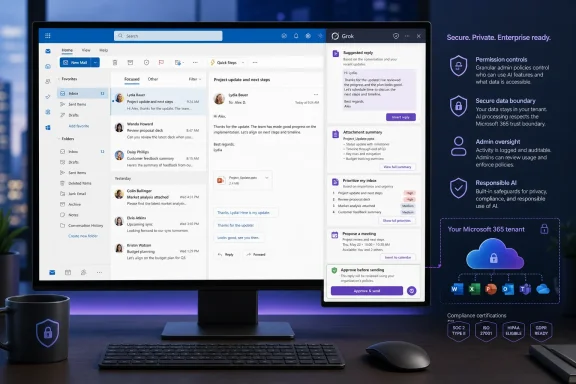
Background
Artificial intelligence has been moving steadily from standalone chat windows into the applications where people already work. Microsoft accelerated that transition with Microsoft 365 Copilot, embedding generative AI across Outlook, Word, Excel, PowerPoint, Teams, and the wider Microsoft Graph ecosystem.
xAI took a different initial path. Grok emerged as a conversational assistant associated closely with X, emphasizing real-time information, web research, and access to public conversations on the social network. Over time, however, Grok expanded beyond X into dedicated web and mobile applications, developer tools, enterprise products, connectors, scheduled automations, and integrations with third-party software.
From chatbot to connected agent
The important change is not simply that Grok can appear in an Outlook sidebar. The larger shift is that the assistant can now work with user-authorized data and perform tasks within productivity software rather than merely generating text that users copy and paste.
Earlier Outlook connectivity already allowed Grok users to search mailboxes, examine calendars, draft messages, create events, and triage email from the Grok interface. The Outlook add-in reverses that relationship: instead of bringing Outlook data into Grok, it brings Grok’s interface and capabilities directly into Outlook.
That distinction matters in daily use. Email work is highly contextual, and every application switch adds friction, increases the possibility of copying the wrong material, and makes it harder to maintain the thread, attachment, recipient list, and calendar context surrounding a message.
Microsoft’s increasingly open AI ecosystem
Microsoft remains strongly committed to its own Copilot products, but it has also become more willing to support models from multiple AI vendors across its cloud and productivity ecosystems. Grok models have appeared in Microsoft’s enterprise AI infrastructure, while Microsoft 365 administrators have gained more choices over which outside models and services may interact with organizational data.
The Grok add-in therefore does not necessarily represent Microsoft replacing Copilot. It reflects a broader transition toward model choice inside familiar applications, with employees potentially selecting assistants based on research quality, writing style, subscription access, organizational policy, or specialized capabilities.
The Five Details That Matter Most
The new Outlook integration can be reduced to five practical questions: how it installs, what it can do with messages, how much mailbox control it receives, what happens to corporate data, and who pays for access. Each point carries implications that go beyond the initial product demonstration.
1. It is distributed as a Microsoft 365 add-in
Grok for Outlook reportedly installs through Microsoft’s commercial marketplace as a standard Microsoft 365 add-in. That is a substantially cleaner route than browser extensions, locally installed automation utilities, or unofficial scripts that require users to surrender credentials.
Marketplace distribution also gives organizations a recognizable deployment framework. Administrators can assess the add-in, review requested permissions, approve or block access, and potentially deploy it to selected users or groups through established Microsoft 365 management practices.
For consumers, installation should resemble adding any other Outlook extension. For managed business tenants, however, marketplace availability does not mean that every employee will be able to install it independently. Many organizations restrict user-owned applications or require administrator approval for tools that request mailbox, calendar, identity, or file permissions.
2. Drafting is contextual but remains user-controlled
Grok can reportedly turn brief notes into complete email replies while considering the surrounding conversation. This is more useful than a generic “write an email” prompt because the assistant can account for earlier questions, commitments, names, deadlines, and tone within the selected thread.
The generated message remains a draft until the user sends it. That human approval step is essential, particularly when the reply could establish contractual expectations, disclose internal information, promise a deadline, or create a record that may later be reviewed in a legal or regulatory process.
xAI also says Grok can adapt to a user’s writing style over time. If implemented well, this could reduce one of the most obvious weaknesses of AI email tools: replies that are grammatically polished but sound nothing like the person supposedly sending them.
3. Inbox management extends beyond summarization
The add-in is positioned as more than a writing panel. It can reportedly examine multiple messages, identify conversations requiring action, archive completed threads, filter unwanted material, work with attachments, and help users locate information across their mailbox.
That moves Grok into agent territory. Summarizing an email is a reversible, low-risk activity; moving, archiving, classifying, or acting on a message changes the user’s information environment.
The practical value could be considerable for people receiving hundreds of messages per day. The risk is equally clear: an assistant that incorrectly decides a conversation is finished can hide an unresolved customer request, compliance notice, security warning, or executive instruction.
4. Privacy commitments require careful interpretation
xAI states that Outlook email and calendar information accessed through its connectors is not used to train its models. It has also made specific claims about limiting the storage of connector-processed conversation data on its servers.
These commitments address one of the first questions professionals ask about outside AI assistants: whether confidential email becomes future training material. Yet “not used for training” is only one part of enterprise privacy.
Organizations must still evaluate authentication, processing locations, diagnostic logs, retention windows, subprocessors, incident response, legal jurisdiction, encryption, support access, and whether generated responses or automation histories persist elsewhere in the service. A privacy statement can be meaningful without being sufficient for every regulated environment.
5. Access follows Grok and X subscription rules
The Outlook add-in reportedly uses existing paid Grok or X subscription entitlements rather than charging a separate Outlook fee. Eligible subscriptions may include certain X Premium and SuperGrok plans, with capability limits depending on the tier.
This structure could make the add-in feel free to people already paying for Grok access. It could also complicate enterprise adoption if employees connect individually purchased subscriptions to corporate Microsoft 365 accounts.
Consumer subscriptions, business subscriptions, and centrally managed enterprise licenses are not interchangeable merely because they can reach the same model. Companies will want consolidated billing, auditable user management, support commitments, predictable capacity, and the ability to revoke access when an employee changes roles or leaves the organization.
Installation and Compatibility
The standard add-in approach makes Grok easier to discover, but compatibility will depend on the Outlook client, Microsoft account type, tenant settings, and rollout status. Users should not assume that marketplace publication guarantees identical behavior across every Outlook environment.
New Outlook, Outlook on the web, and classic Outlook
Modern Office add-ins rely heavily on web technologies and Microsoft’s add-in framework. They generally work most consistently in Outlook on the web and the new Outlook for Windows, which share substantial architectural foundations.
Classic Outlook for Windows remains important in many organizations because of its mature offline behavior, legacy COM add-ins, local data workflows, and long-established administrative practices. Support for a particular modern add-in can vary depending on the Outlook build, mailbox configuration, embedded browser components, and APIs used by the add-in.
Users should verify the following before expecting full functionality:
- The Outlook client must support the add-in’s required API set.
- The mailbox must use a compatible Microsoft account or Exchange configuration.
- Connected experiences and marketplace access must be allowed by policy.
- The user must possess an eligible Grok subscription or organizational license.
- The Microsoft 365 administrator may need to approve requested permissions.
Mobile availability may differ as well. Outlook add-ins do not always expose the same features on Windows, the web, macOS, iOS, and Android, especially when an assistant requires attachment access or advanced message operations.
The likely setup sequence
A typical installation should follow a familiar Microsoft 365 pattern:
- The user or administrator locates the official Grok listing in the Microsoft marketplace.
- Microsoft displays the publisher identity, supported products, terms, and requested permissions.
- The user installs the add-in or submits an approval request to an administrator.
- The add-in appears in Outlook’s application bar, message toolbar, or contextual menu.
- The user signs in with an eligible Grok or X-linked account.
- Microsoft requests consent for mailbox or calendar access where required.
- Grok opens in a task pane and becomes available for supported messages and events.
Users should confirm the publisher and listing identity rather than installing similarly named tools. High-profile AI brands routinely attract unofficial extensions, and an email assistant is an especially valuable target for credential theft or data harvesting.
Email Drafting in Daily Use
Writing assistance will probably be the feature most people try first. It requires little behavioral change and offers an immediate payoff when users face repetitive correspondence, sensitive wording, or long threads.
Thread-aware replies
A contextual drafting tool can identify the request buried in a long conversation and propose a response that addresses it directly. For example, a user might provide the instruction, “Confirm Thursday, mention the revised estimate, and ask whether legal has approved the contract,” rather than composing three paragraphs manually.
The system can potentially draw from the visible thread, available attachments, calendar availability, and connected files. That produces a more grounded reply than a chatbot receiving only a pasted excerpt.
However, thread context is not automatically complete context. A conversation may omit a phone call, an internal Teams discussion, a revised spreadsheet, or an instruction from a manager. Users must treat the generated reply as a proposed synthesis, not as an authoritative account of what happened.
Style adaptation and professional identity
Writing-style adaptation could make responses less conspicuously machine-generated. Grok may learn whether a user prefers short acknowledgments, detailed explanations, formal greetings, contractions, bullet points, or direct requests.
That convenience introduces a subtle governance issue: the better an assistant imitates someone, the easier it becomes for recipients to assume the person personally wrote and verified every sentence. Employees may gradually approve drafts with less scrutiny because the language sounds familiar.
Style matching must not become responsibility laundering. The sender remains accountable for the claims, promises, attachments, recipients, and tone of the final message, regardless of how convincingly the assistant reproduces their voice.
Draft-only behavior is the right default
Keeping generated messages in draft form significantly reduces the danger of autonomous communication. It gives users an opportunity to check facts, remove confidential details, verify recipients, and correct inappropriate wording.
Even draft-only tools can cause problems if users develop “approval fatigue.” When dozens of plausible replies appear each day, clicking Send may become almost automatic.
A sensible review routine should include:
- Confirm that every named person, date, price, and deadline is correct.
- Check whether the response answers the latest message rather than an earlier point in the thread.
- Verify that no internal commentary has been exposed to an external recipient.
- Inspect the To, Cc, and Bcc fields before sending.
- Open and validate any referenced or attached file.
- Remove language that creates commitments the sender is not authorized to make.
Inbox Triage and Organization
Inbox triage is where Grok may save the most time, especially for managers, support teams, sales professionals, recruiters, and project leaders. It is also where the consequences of an incorrect decision become more serious.
Prioritizing messages that need attention
A useful email agent should distinguish between information, requests, approvals, deadlines, alerts, and conversations awaiting someone else. Traditional rules can sort messages by sender or keywords, but an AI system can interpret meaning and infer whether a response is required.
For example, “No action needed unless the figures change” and “Please object by Friday if these figures are wrong” may contain similar vocabulary but demand different handling. Language models can often recognize those distinctions more effectively than fixed filters.
The challenge is consistency. A single missed deadline notice can outweigh hundreds of correctly categorized newsletters, so users need a way to understand why a message was deprioritized and to reverse incorrect actions easily.
Archiving and filtering need guardrails
Archiving completed threads sounds harmless because archived messages remain searchable. In practice, removing a conversation from the inbox can take it out of the user’s daily awareness.
Filtering unwanted messages carries greater risk. Grok may confuse an unusual invoice, first contact from a prospective customer, automated identity alert, or terse executive request with spam.
The safest implementation would emphasize reversible actions, visible activity logs, narrow scopes, and user-defined boundaries. For example, the assistant could propose a batch of messages for archiving before executing the move, rather than silently cleaning the inbox.
Attachments create both value and exposure
Attachment analysis can eliminate tedious work. Grok could summarize a lengthy report, extract action items from meeting minutes, compare versions of a proposal, or identify the totals in an attached spreadsheet.
Attachments also contain some of an organization’s most sensitive material. Financial forecasts, legal documents, personal records, medical information, credentials, source code, and unreleased product plans commonly travel through email.
Users should assume that asking Grok to analyze a file makes the file available to the AI processing workflow, subject to the applicable service terms and architecture. Organizations may therefore permit message summarization while blocking or limiting attachment processing for particular departments.
Calendar and Scheduling Capabilities
Email and calendar work are deeply connected. A large share of business correspondence ends with a meeting, deadline, reminder, or follow-up task, making calendar access a logical extension of Grok’s Outlook role.
Finding time without manual comparison
With delegated calendar access, Grok can potentially inspect availability, identify conflicts, suggest meeting windows, and prepare invitations. This is especially useful when a message contains informal scheduling language such as “sometime after the planning review but before Friday afternoon.”
The assistant can translate that request into concrete options. It may also account for travel time, working hours, existing meetings, and time zones if those details are available and interpreted correctly.
Calendar availability does not always equal genuine availability. People block focus time inconsistently, keep personal obligations outside work calendars, and sometimes accept overlapping tentative events. Grok’s suggestion should therefore remain a recommendation rather than proof that a proposed time is appropriate.
Creating events can have external consequences
A draft email affects recipients only after the user sends it. A calendar action can immediately notify attendees, reserve rooms, trigger conferencing services, and alter other people’s schedules.
That means users should distinguish between permission to read calendars and permission to create or modify events. Least-privilege access is preferable when someone wants scheduling advice but does not need the assistant to execute changes.
Particular care is required with:
- Recurring meetings, because one mistaken edit can affect an entire series.
- Large distribution lists, because an accidental invitation may reach hundreds of people.
- Shared mailboxes and delegated calendars, where the acting identity may be unclear.
- Confidential events, whose titles and attendee lists may reveal sensitive projects.
- Cross-time-zone meetings, where daylight-saving changes can produce unexpected shifts.
Web and X Search Inside Outlook
Grok’s ability to search the web and X from within Outlook gives the add-in a distinctive position. Instead of limiting itself to private Microsoft 365 context, it can combine internal correspondence with current public information.
Research without leaving the message
A user responding to a customer could ask Grok to check a newly announced product specification, review current public discussion, or find background on an unfamiliar organization. The resulting information could then inform a draft without requiring several browser tabs.
X search may be particularly useful for fast-moving events, service outages, public statements, product reactions, and breaking news. It can expose information before traditional search indexes or formal publications have caught up.
Speed is not the same as reliability. Posts on X may be incomplete, sarcastic, impersonated, manipulated, or simply false. An assistant that combines an authoritative-looking email draft with unverified social posts can make weak evidence appear stronger than it is.
Grounding must remain visible
The most trustworthy workflow would let users distinguish information drawn from the email thread, an attachment, the open web, and X. Without clear provenance, users may not know whether a claim came from a signed contract or an anonymous social post.
This matters when Grok drafts messages involving financial decisions, security incidents, public relations, legal disputes, health matters, or personnel issues. A polished answer can conceal uncertainty unless the interface exposes its supporting context.
Users should independently verify consequential public facts before placing them in an email. AI-assisted research is most valuable as a discovery and synthesis layer, not as a replacement for primary evidence.
Privacy, Permissions, and Data Boundaries
The decisive question for enterprise buyers is not whether Grok can summarize email. It is whether the organization can permit that functionality without losing control of confidential information.
What “not used for training” means
A no-training commitment generally means customer content will not be incorporated into future general-purpose model training. That is an important protection because employees cannot realistically obtain permission from every client, colleague, or partner represented in their mailbox.
It does not necessarily mean that data never leaves Microsoft’s environment or that no transient processing occurs. An external model must receive enough context to generate the requested output unless the model runs entirely within a Microsoft-controlled boundary.
Organizations should determine:
- Where prompts, messages, and attachments are processed.
- Whether temporary copies, caches, or diagnostic records are created.
- How long operational logs remain available.
- Which personnel or subprocessors can access support data.
- Whether data crosses national or regional boundaries.
- How deletion requests and account termination are handled.
- Whether legal holds or regulatory obligations affect retention.
- Which contractual terms apply to consumer, business, and enterprise accounts.
Connectors use delegated authority
Outlook connectors generally operate with permissions granted by the signed-in user. Grok should not gain access to messages the user cannot already open, but a broad connector may still expose a very large amount of information because many employees have years of email history and access to shared resources.
Delegated access also means existing Microsoft 365 permission hygiene becomes critical. If a former project member still has access to a sensitive shared mailbox, connecting an AI assistant may make that forgotten access easier to exploit at scale.
Before deployment, administrators should review mailbox delegation, shared folders, application consent, inactive accounts, and role assignments. AI does not create every access-control problem, but it can dramatically increase the speed at which excessive access becomes useful.
Consumer and enterprise use should remain separate
Employees should not casually attach personal AI accounts to corporate mailboxes. A personal subscription may lack centralized retention, audit, offboarding, support, and contractual protections required by the employer.
Business and enterprise offerings usually exist to provide governance beyond raw model access. Features such as single sign-on, directory synchronization, consolidated administration, organizational analytics, encryption options, and dedicated data boundaries may matter more than a higher usage limit.
A secure rollout should use organization-approved identities and licenses wherever possible. When an employee leaves, administrators must be able to revoke the connection without relying on that person to remember which external services they authorized.
Enterprise Administration and Security
For IT departments, Grok for Outlook is another cloud application requesting access to a high-value data source. It should be assessed through the same security process applied to document-management tools, customer relationship platforms, and workflow automation services.
Consent and least privilege
Administrators should inspect the precise permissions requested by the production add-in rather than relying on marketing descriptions. Reading a selected message, searching the mailbox, sending mail, reading calendars, and creating events represent materially different levels of authority.
If granular consent is available, organizations should grant only the functions required by the approved use case. A research team that needs message summaries may not need autonomous send rights, while an executive assistant workflow may require calendar creation but not attachment access.
Broad permissions can be justified, but they should be explicit. Users must understand what the assistant can see and change.
Auditability and incident response
Any tool capable of modifying mail or calendars should provide useful logs. Administrators need to determine which user initiated an action, which data source the assistant accessed, what operation it attempted, whether the operation succeeded, and how to undo it.
Incident response becomes more complicated when AI systems generate content dynamically. A conventional rule performs the same operation every time its conditions match; a language model may interpret similar messages differently.
Organizations should test how they would investigate scenarios such as an incorrectly archived legal notice, a confidential attachment summarized into the wrong conversation, or an event sent to unintended recipients. If the answer depends entirely on users remembering what happened, the deployment is not mature enough for sensitive workflows.
Data-loss prevention still applies
Microsoft 365 data-loss prevention and sensitivity labels may restrict what users can share, but compatibility with external add-ins should not be assumed. Administrators must test whether labeled messages and encrypted attachments are visible to Grok and whether existing controls block prohibited transfers.
High-risk categories may require exclusion from AI processing altogether. These could include privileged legal communications, export-controlled technical information, protected health data, payment card information, unreleased financial results, and credentials.
A phased deployment offers the safest path: begin with low-risk users and read-oriented functions, monitor behavior, refine policy, and expand only when technical and legal reviews are complete.
Consumer and Small-Business Impact
Individual users and small organizations may experience the clearest immediate benefit because they often lack dedicated assistants, sophisticated email-routing systems, or formal research teams. Grok can compress several small tasks into a single prompt.
Where daily users may save time
The add-in could be particularly effective for repetitive but context-heavy work:
- It can turn rough notes into a polished customer reply.
- It can summarize a conversation that accumulated while the user was away.
- It can identify unanswered messages after a busy week.
- It can extract dates, prices, and action items from attachments.
- It can suggest meeting times based on the user’s calendar.
- It can research unfamiliar topics without leaving Outlook.
- It can rewrite a message to be shorter, warmer, firmer, or more formal.
These are incremental improvements rather than spectacular demonstrations, but incremental improvements matter in software used for hours every day. Saving two minutes on 20 messages can recover a meaningful portion of the working day.
Subscription economics may be confusing
Users already paying for an eligible Grok or X plan may see the add-in as an expansion of an existing subscription. Someone subscribing specifically for Outlook, however, will need to compare the cost and limits against Microsoft Copilot, ChatGPT-based tools, Google’s productivity AI, and specialized email assistants.
Published consumer prices can change, vary by region, and differ between web and app-store billing. The most expensive tiers are intended for heavy workloads rather than ordinary personal email.
Users should compare practical limits instead of assuming the highest-priced plan is necessary. Important questions include how many messages can be processed, which models are available, whether attachment analysis has separate limits, and whether advanced agent or automation features require an upgraded tier.
Tesla ownership does not establish an Outlook entitlement
The source report frames the integration partly for Tesla owners, but the connection should not be overstated. Grok’s relationship with Elon Musk’s companies may create audience overlap, yet owning a Tesla does not automatically mean a user has an eligible X or Grok subscription.
Likewise, vehicle connectivity and Full Self-Driving purchases are separate products with their own billing and functionality. Some Tesla users may already subscribe to X Premium or Grok for unrelated reasons, but Outlook access should be evaluated according to the actual account entitlement displayed by xAI.
The add-in is fundamentally a Microsoft 365 productivity integration, not a Tesla accessory or vehicle feature.
Competitive Implications
Grok’s entry into Outlook creates direct competition with Microsoft 365 Copilot at the point where users perform their work. This is strategically more important than another standalone chatbot release.
Copilot has the home-field advantage
Microsoft controls Outlook, Microsoft Graph, Entra identity, Purview compliance, Exchange Online, and the wider Microsoft 365 administrative environment. Copilot can therefore benefit from deep integration, consistent support, and a governance story designed around Microsoft’s existing enterprise platform.
Organizations already paying for Microsoft 365 Copilot may see little reason to introduce a second assistant. Standardization simplifies training, procurement, support, data policy, and incident response.
Grok’s opportunity lies in differentiation. Real-time X search, a distinct model personality, existing subscriber access, and potentially different research or reasoning behavior could attract users who find Copilot too constrained or who already prefer Grok’s outputs.
Outlook could become a multi-assistant workspace
The long-term outcome may not be a winner-takes-all contest. Users could employ Copilot for deeply governed internal work, Grok for rapid public research, and specialized tools for sales, support, legal review, or scheduling.
That flexibility creates a new management problem: assistant sprawl. Each tool may request overlapping mailbox access, store separate histories, apply different safety systems, and produce conflicting answers.
Enterprises will eventually need AI service catalogs that specify which assistant is approved for which data and tasks. Simply declaring one tool “the company AI” may become unrealistic as models specialize and employees bring existing subscriptions into work.
Strengths and Opportunities
Grok for Outlook has several credible advantages if the production experience matches the announced capabilities.
Practical advantages
- The add-in reduces application switching. Users can draft, research, summarize, and schedule within the email workflow they already understand.
- Contextual drafting can outperform generic text generation. Thread and calendar access allow responses to address the actual situation rather than an isolated prompt.
- Draft-only sending preserves human control. Users retain a final review point before an AI-generated message reaches recipients.
- Inbox triage tackles a genuine productivity problem. High-volume users can focus on messages that require judgment instead of manually processing every notification.
- Web and X search provide current external context. This can accelerate research during breaking events, customer inquiries, and rapidly changing discussions.
- Existing subscriptions may lower the adoption barrier. Eligible users can experiment without purchasing a separate Outlook-specific product.
- Microsoft marketplace distribution provides a familiar installation path. It is easier to evaluate and manage than unofficial extensions or pasted credentials.
- The wider Office strategy increases continuity. Grok add-ins for Word, Excel, and PowerPoint could allow work to move from email into documents, spreadsheets, and presentations with less repetition.
The greatest opportunity is not automated prose. It is the creation of a connected work agent that can interpret a message, inspect related material, research missing information, suggest a response, and prepare the next action while keeping the user in control.
Risks and Concerns
The same breadth that makes the integration useful also enlarges its risk surface.
Material concerns
- Broad mailbox permissions can expose years of sensitive correspondence. Users may authorize more access than they realize when accepting a connector prompt.
- AI-generated replies can invent facts or commitments. Fluent language does not guarantee that dates, prices, policies, or conclusions are correct.
- Incorrect triage may hide important messages. Archiving and filtering require stronger safeguards than simple summarization.
- External research can introduce misinformation. X posts and web results must not be treated as equivalent to verified internal records.
- Personal subscriptions can undermine corporate governance. Individually connected accounts may complicate auditing, retention, support, and offboarding.
- Privacy claims may not answer every compliance question. No-training assurances do not automatically resolve processing, logging, residency, or legal-access requirements.
- Users may become complacent about draft review. Repeatedly accurate suggestions can encourage automatic approval until a consequential error occurs.
- Multiple Office assistants can create policy confusion. Employees need clear guidance about which tools may process confidential, regulated, or privileged data.
- Client compatibility may be uneven. Features can differ among new Outlook, classic Outlook, the web client, macOS, and mobile applications.
- Subscription and usage limits may change. A workflow built around a consumer tier can become expensive or unreliable if entitlements are revised.
The central risk is over-delegation. Email combines identity, authority, confidential information, and external communication, making it a poor place to assume that an AI assistant’s confidence reflects accuracy.
What to Watch Next
The announcement establishes the product’s direction, but real-world value will depend on implementation details that become clearer as users and administrators test the add-in.
Marketplace availability and rollout scope
The first question is whether the official Outlook listing becomes visible consistently across regions, account types, and Microsoft 365 tenants. Marketplace publication can occur in stages, and administrators may see a product before end users do—or vice versa.
Support documentation should clarify which Outlook clients are included, whether personal Outlook.com accounts work, and whether the add-in requires Exchange Online. It should also distinguish Outlook-specific functionality from the broader Outlook connector already available in Grok’s web and mobile applications.
Permission granularity
Users should watch whether the add-in supports read-only operation, selected-message access, draft creation without send rights, and separate calendar permissions. Granular authorization would make Grok easier to approve for limited use cases.
A single all-or-nothing consent request would be less attractive to security-conscious organizations. The best design lets users and administrators match authority to actual need.
Administrative and compliance controls
Enterprise adoption will depend on centralized deployment, audit logging, data residency, retention configuration, sensitivity-label behavior, eDiscovery implications, and integration with Microsoft security controls. xAI’s business and enterprise offerings provide a foundation, but Outlook creates product-specific questions.
Organizations will also expect clear documentation about how connector data flows between Microsoft and xAI. General privacy promises are useful, but architecture and contractual commitments drive procurement decisions.
Reliability under ordinary workloads
Product demonstrations usually feature clean threads and obvious requests. Real inboxes contain broken quoting, forwarded chains, mixed languages, scanned PDFs, duplicate signatures, confidential disclaimers, inaccessible cloud links, and contradictory instructions.
The add-in’s reputation will be determined by how it handles these messy cases. Users need predictable failure behavior, clear uncertainty indicators, and easy recovery when an action is wrong.
Expansion across Microsoft 365
Grok’s Office add-ins point toward workflows that span Outlook, Word, Excel, and PowerPoint. A user might receive a report by email, analyze its spreadsheet in Excel, convert findings into a Word brief, and build a presentation without repeatedly uploading the same files.
Cross-application continuity could become Grok’s most powerful capability. It could also magnify permission and provenance problems if information moves between documents without clear indications of where it originated.
The next phase of workplace AI will be judged less by how impressively a model writes and more by how safely it acts. Grok for Outlook has the ingredients to become a useful daily assistant: contextual drafting, mailbox triage, calendar awareness, attachment analysis, and live research inside one of the world’s most important productivity applications. Its success will depend on preserving human approval, exposing data boundaries, offering administrators meaningful control, and proving that convenience does not come at the expense of accuracy or confidentiality.