

Microsoft has quietly rolled a meaningful modernization into GroupMe — the lightweight group-messaging app Microsoft inherited years ago — adding voice messages, AI-powered Copilot chat summaries, and Event Albums to make group coordination and catch-up far less painful. These changes arrive in the latest iOS release (version 15.28) and are backed by GroupMe’s official posts and App Store release notes, signaling continued investment in the app as part of Microsoft’s consumer messaging strategy.
GroupMe began as a simple, campus‑friendly group chat and survived Microsoft’s larger messaging reorganizations that saw Skype and other consumer products change shape. Over the last year GroupMe has been steadily integrated with Microsoft’s Copilot layer: the app already includes image generation and Copilot prompts in chat, and now the Copilot integration has been extended to help users catch up and manage media for events. GroupMe’s own product blog and Microsoft’s support pages make clear that Copilot features in GroupMe are opt‑in and scoped to messages users explicitly send to the assistant. This update should be read in the context of Microsoft’s broader Copilot rollout across consumer surfaces — a push that adds more AI into Windows, Edge, and Microsoft 365 while emphasizing explicit consent and UI controls. Some Copilot ideas (shared group sessions, summarization, on‑demand image generation) have migrated between GroupMe and Microsoft’s Copilot products, which helps explain why GroupMe continues to receive AI‑forward features even as other legacy apps are retired or refocused.
At the same time, Copilot features are being rolled into Copilot’s broader roadmap — the same summarization and group facilitation ideas appear in Copilot Groups, Copilot in Teams, and Edge’s agentic features. That creates an opportunity for cross‑product synergy (export summaries into a document, turn action items into to‑dos, use Copilot to generate event flyers from album photos), but also increases the need for consistent privacy, governance, and user controls across Microsoft’s product family.
The upgrade is strongest when used for social coordination and low‑stakes planning. The main responsibilities for Microsoft and GroupMe going forward are to maintain clear, discoverable privacy controls; document the behavior and storage of new media types; and ensure feature parity so cross‑platform groups don’t fracture workflows. Users and admins should approach AI summaries as a productivity boost — not as an authoritative legal or archival record — and continue basic moderation and confirmatory checks for anything that matters.
The new GroupMe update is a solid example of product triage done right: meaningful features that map to real user pain points, shipped in a manner consistent with Microsoft’s Copilot strategy and accompanied by product controls and staged rollouts. For active groups, the new capabilities should cut time spent scrolling and make event media easier to manage — provided users remain mindful of privacy settings and the limitations of AI‑generated summaries.
Source: Windows Report Microsoft Gives GroupMe a Major Upgrade With Copilot Chat Summaries and Voice Messages
 Background
GroupMe began as a simple, campus‑friendly group chat and survived Microsoft’s larger messaging reorganizations that saw Skype and other consumer products change shape. Over the last year GroupMe has been steadily integrated with Microsoft’s Copilot layer: the app already includes image generation and Copilot prompts in chat, and now the Copilot integration has been extended to help users catch up and manage media for events. GroupMe’s own product blog and Microsoft’s support pages make clear that Copilot features in GroupMe are opt‑in and scoped to messages users explicitly send to the assistant. This update should be read in the context of Microsoft’s broader Copilot rollout across consumer surfaces — a push that adds more AI into Windows, Edge, and Microsoft 365 while emphasizing explicit consent and UI controls. Some Copilot ideas (shared group sessions, summarization, on‑demand image generation) have migrated between GroupMe and Microsoft’s Copilot products, which helps explain why GroupMe continues to receive AI‑forward features even as other legacy apps are retired or refocused. What’s new in this release (practical summary)
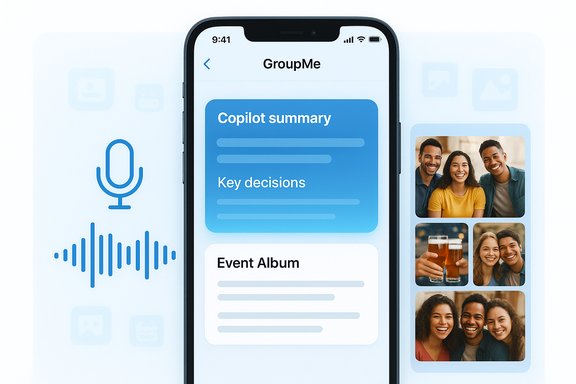
- Voice messages (Voice Notes): Record and send short audio messages directly inside chats. The App Store “What’s New” entry for GroupMe’s iOS app (version 15.28) lists “Voice Notes: Share your thoughts instantly with voice messages in chats.” This is the headline convenience feature for active groups.
- Copilot chat summaries (Chat Summaries): An AI‑powered summary banner appears in busy threads; tapping it generates a short recap that pulls out key decisions, action items, and highlights from the conversation. GroupMe’s blog announced the feature explicitly as being powered by Microsoft Copilot and intended to help users “catch up without the scroll.”
- Event Albums: GroupMe now auto‑collects photos and videos from events into a single album tied to the event, simplifying sharing and browsing of event media. The App Store release notes (15.28) list “Albums in Events,” and GroupMe’s product pages have supported shared-album flows for some time, now formalized into event albums.
- Other event and group improvements: The release also adds event end times, RSVP deadlines, improved location accuracy, and polls — all small but practical features aimed at event‑centric group use.
How the features work (user‑facing mechanics)
Voice messages: quick replies without typing
- A microphone control appears in the compose area. Users can record a short voice note and then send it into the chat stream.
- Open a chat.
- Tap the microphone icon in the compose field.
- Hold (or press) to record; release to stop and send (the expected behavior matches common voice‑note patterns in other apps).
- If supported, preview and delete before sending depending on platform UI.
Copilot chat summaries: catch up without the scroll
- In busy threads you’ll see a summary banner; tapping it asks Copilot to distill recent messages into a short recap that emphasizes decisions, to‑dos, and notable lines.
- The summary is generated on demand and surfaced as a natural‑language recap rather than a raw transcript.
Event Albums: one place for event memories
- When an event is created and attendees share media, GroupMe now creates an Event Album that aggregates photos and videos from participants.
- Organizers and attendees can browse the album, download, and share the collection outside GroupMe if desired.
Availability and rollout details (verified)
- iOS: Version 15.28 with the new features was listed on the App Store with a release date in the update notes on Dec 17, 2025; the listing explicitly mentions Voice Notes and Albums in Events. This is the first clear public record of the new features landing on iOS.
- GroupMe’s official blog published the Chat Summaries announcement on Dec 16, 2025, describing the Copilot‑powered recap workflow. That post and the App Store notes together confirm both the AI feature and the timing.
- Android / Windows / Web: GroupMe’s public “What’s New” and blog posts indicate staged rollouts and feature parity aims, but the App Store notes establish iOS availability first. Android and web builds commonly follow in the weeks after iOS rollouts; users on other platforms should expect staged updates. As of the cited posts the most concrete confirmation is iOS version 15.28. If you rely on GroupMe in mixed‑platform groups, verify that all participants have updated before depending on voice notes or event albums in a cross‑platform flow.
Verification and cross‑checks
To ensure the reporting is accurate, multiple independent sources were consulted:- The GroupMe App Store listing shows the version 15.28 “What’s New” text that lists Voice Notes and Albums in Events with the Dec 17, 2025 update metadata. This is the platform‑visible release note that users see when updating.
- GroupMe’s official blog post describing Chat Summaries was published Dec 16, 2025 and explains the Copilot‑powered summary banner and recap behavior. That is the product team’s own announcement for the feature.
- Microsoft Support documentation clarifies Copilot’s data access model in GroupMe: Copilot “can only read the messages that users decide to send” it and does not automatically read all group messages, calls, or profile details. That privacy framing matters for Chat Summaries and other Copilot actions in GroupMe.
- Independent coverage of GroupMe’s Copilot integration and the broader Copilot rollout by outlets that have tracked Microsoft’s consumer AI push provides context about how GroupMe features fit into the Copilot strategy. These sources confirm feature intent, privacy emphasis, and staged rollouts across platforms.
Strengths: why this matters for GroupMe users
- Faster, more natural replies: Voice messages let users reply quickly without typing — ideal for on‑the‑move or social contexts where short audio replies carry tone and cut down friction.
- Reduced cognitive load: Copilot chat summaries remove the “scroll fatigue” problem in busy groups. Instead of digging through dozens or hundreds of messages, a concise recap surfaces decisions and action items, saving time for students, clubs, families, and event organizers.
- Streamlined event media: Event Albums convert chaotic media sharing into one curated gallery, making it easy to collect photos and hand them off for social sharing or archival uses.
- Consistent product evolution: The rollout shows Microsoft is not abandoning smaller consumer properties; GroupMe continues to receive meaningful updates that borrow ideas across the Copilot ecosystem (image gen, summaries, group facilitation). That keeps the app relevant in niches where simplicity and group focus matter.
Risks and trade‑offs: what to watch for
- Privacy and scope creep: While Microsoft states Copilot only processes messages you explicitly send to it or mention, AI features that summarize chat threads can still raise privacy concerns in group contexts. Owners and admins need to check group permissions and consider limiting who can invoke Copilot in sensitive groups. Microsoft’s support docs note there are settings to enable/disable Copilot visibility and per‑group permissions for @Copilot. Users should review those controls.
- Accuracy and hallucination risk: Summaries produced by large‑language models are efficient but not infallible. Copilot may miss subtleties, misattribute statements, or omit context. For critical planning (dates, financial commitments, consent items), always cross‑check the summarized action items against the original thread before acting. GroupMe’s blog pitches the summaries as helpful recaps, not definitive records.
- Moderation and harmful content: AI summaries can unintentionally surface offensive content or condense toxic threads into attention-grabbing snippets. Group owners should monitor moderation tools and consider whether some conversations require manual oversight rather than automated summarization.
- Platform parity and fragmentation: Not all features land on every platform at the same time. If only iOS has voice notes and event albums immediately, Android or web users could be excluded from certain flows until parity is reached. That can confuse group members expecting uniform behavior. The App Store confirms iOS delivery for 15.28 and GroupMe’s public updates and blogs describe staged rollouts, but platform parity timelines are not always explicit.
- Data retention and exportability: The interplay of audio attachments, event albums, and AI summaries introduces new data types in GroupMe. Organizations or groups with compliance requirements should verify how long recordings and AI outputs are retained and whether they are included in standard data export processes. Microsoft’s privacy pages and GroupMe export guidance are the right starting points for administrators.
Practical guidance — settings and best practices
- If you manage groups that discuss sensitive topics, use the Copilot control settings: Profile > Settings > Copilot and, for group owners, adjust the group permissions for who can message @Copilot (options often include Everyone, Admins Only, or No One). These controls limit accidental or unwanted AI involvement.
- When using Chat Summaries for planning, treat the Copilot recap as a convenience not a compliance record: confirm deadlines, monetary commitments, and RSVP lists directly in the thread before acting.
- For cross‑platform groups, verify that everyone has updated (or knows which platform supports which feature). If you plan to use Event Albums during an event, consider asking attendees to use the app version that supports album uploads to avoid missing contributions. The App Store release notes provide the canonical update text for iOS users.
- If you are concerned about voice‑note exposure, remind group members that audio clips are content uploaded to the group and may be saved by participants; use direct messages for private audio and avoid sharing sensitive spoken information in group recordings.
Wider implications and the Copilot ecosystem
GroupMe’s new features illustrate how Microsoft is pursuing a distributed Copilot strategy: instead of building all features into a single Copilot app, the company is embedding Copilot capabilities into existing consumer surfaces where they make sense. GroupMe benefits because group chats are a natural fit for summarization, image generation, and media aggregation.At the same time, Copilot features are being rolled into Copilot’s broader roadmap — the same summarization and group facilitation ideas appear in Copilot Groups, Copilot in Teams, and Edge’s agentic features. That creates an opportunity for cross‑product synergy (export summaries into a document, turn action items into to‑dos, use Copilot to generate event flyers from album photos), but also increases the need for consistent privacy, governance, and user controls across Microsoft’s product family.
What we couldn’t verify (and caveats)
- Exact technical limits for voice notes (maximum duration, audio codec, on‑device vs cloud processing) were not published in the App Store notes or GroupMe blog at the time of writing. Those specifics may be documented in GroupMe’s help center or surfaced in platform updates; administrators with compliance needs should request the details from GroupMe support.
- The timing for Android, web, and Windows parity was not spelled out in explicit per‑platform release timelines; GroupMe’s release pages suggest staged rollouts and prior behavior indicates Android/web updates often follow iOS. Users should check their platform’s store listing and GroupMe’s updates page for the latest availability.
Final analysis — is this a meaningful upgrade?
Yes. The combination of voice messages, Copilot chat summaries, and Event Albums is a practical, user‑centric set of features that modernize GroupMe for its core audience: groups that plan events, manage teams, or coordinate informally. The changes lower friction for common tasks (replying, catching up, collecting photos) and lean on Microsoft’s Copilot investments to add value without inflating the app’s complexity.The upgrade is strongest when used for social coordination and low‑stakes planning. The main responsibilities for Microsoft and GroupMe going forward are to maintain clear, discoverable privacy controls; document the behavior and storage of new media types; and ensure feature parity so cross‑platform groups don’t fracture workflows. Users and admins should approach AI summaries as a productivity boost — not as an authoritative legal or archival record — and continue basic moderation and confirmatory checks for anything that matters.
The new GroupMe update is a solid example of product triage done right: meaningful features that map to real user pain points, shipped in a manner consistent with Microsoft’s Copilot strategy and accompanied by product controls and staged rollouts. For active groups, the new capabilities should cut time spent scrolling and make event media easier to manage — provided users remain mindful of privacy settings and the limitations of AI‑generated summaries.
Source: Windows Report Microsoft Gives GroupMe a Major Upgrade With Copilot Chat Summaries and Voice Messages
