

Cayosoft’s new Guardian Protector is a free, always-on identity threat detection tool designed to provide continuous, real-time monitoring and alerts across hybrid Microsoft identity environments including Active Directory (AD) and Entra ID (formerly Azure AD), giving organizations a low-friction way to detect privilege escalations, dormant account activations, Group Policy tampering, and other identity-layer risks before they escalate into full compromise.
Cayosoft announced Guardian Protector on October 15, 2025, positioning it as a free complement to its existing commercial products and as a community-oriented response to rising identity threats in hybrid Microsoft estates. Industry coverage and follow-up reporting, including a feature in Petri on October 22, 2025, described Guardian Protector as an always-on monitoring service that promises unlimited coverage, agentless deployment, and integration across AD, Entra ID, Microsoft 365 workloads (Teams, Intune, Exchange Online), and related services.
The launch targets a specific and growing problem: enterprises and public sector organizations continue to rely on hybrid identity fabrics — on-premises AD synchronized with Entra ID — while the attack surface expands into collaboration platforms and device management systems. Cayosoft frames the new offering as a way to close “blind spots” left by point-in-time scanners and expensive SIEM-driven implementations, delivering continuous alerts and change history at no cost.
This article examines what Guardian Protector claims to deliver, how it fits into realistic identity security architectures, the potential benefits, and the operational and security risks teams should weigh before deploying it at scale.
Guardian Protector: Alerts on Group membership changes to privileged groups and flags the event as a high-priority detection. Early warning enables admins to roll back the change and investigate the originating host, potentially preventing lateral movement.
Guardian Protector: Detects account reactivation and correlates with unusual authentication patterns, producing a contextual alert that allows rapid containment and removal.
However, teams must evaluate the offering pragmatically. Many of the most important claims are vendor-provided and should be validated in the context of each environment. Key areas to check are detection coverage, telemetry handling, integration with existing incident response pipelines, and the balance between detection and remediation capabilities. Alert fidelity and tuning efforts will determine whether Protector is an operational win or an additional source of noise.
For organizations seeking to improve their identity security posture quickly and without upfront license cost, Guardian Protector merits a pilot. Treat the pilot as a controlled experiment: measure detection quality, integration friction, and compliance suitability. If results are positive, Protector can become a powerful permanent layer in a broader identity defense-in-depth strategy — provided teams remain diligent about governance, remediation planning, and data handling.
Deployed as part of a layered identity defense — alongside Conditional Access, PAM, identity governance, and endpoint controls — Guardian Protector can be a practical, low-cost way to shorten attacker dwell time and reduce the risk of identity-driven ransomware and insider threats. Organizations that validate the tool’s coverage and align it to existing processes will get the most value; those that treat it as a stopgap without integration and governance are likely to see only partial benefits.
Source: Petri IT Knowledgebase Free Guardian Protector Tool Boosts Active Directory, Entra ID Security
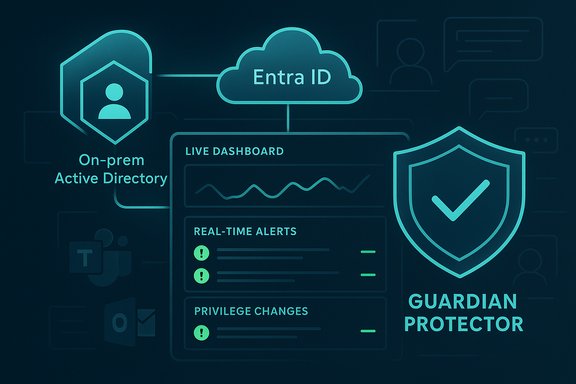 Background / Overview
Cayosoft announced Guardian Protector on October 15, 2025, positioning it as a free complement to its existing commercial products and as a community-oriented response to rising identity threats in hybrid Microsoft estates. Industry coverage and follow-up reporting, including a feature in Petri on October 22, 2025, described Guardian Protector as an always-on monitoring service that promises unlimited coverage, agentless deployment, and integration across AD, Entra ID, Microsoft 365 workloads (Teams, Intune, Exchange Online), and related services.The launch targets a specific and growing problem: enterprises and public sector organizations continue to rely on hybrid identity fabrics — on-premises AD synchronized with Entra ID — while the attack surface expands into collaboration platforms and device management systems. Cayosoft frames the new offering as a way to close “blind spots” left by point-in-time scanners and expensive SIEM-driven implementations, delivering continuous alerts and change history at no cost.
This article examines what Guardian Protector claims to deliver, how it fits into realistic identity security architectures, the potential benefits, and the operational and security risks teams should weigh before deploying it at scale.
What Guardian Protector claims to do
Core capabilities (vendor-stated)
- Real-time threat detection and alerts for identity-layer changes, including privilege escalations, reactivated dormant accounts, Group Policy Object (GPO) tampering, and other risky modifications.
- Continuous change monitoring across hybrid AD, Entra ID, Microsoft 365, Microsoft Teams, Microsoft Intune, and Exchange Online.
- Unlimited coverage — vendor materials emphasize no quotas or license caps for monitoring identity objects.
- Agentless deployment that connects using least-privileged read scopes and APIs rather than installing agents on domain controllers.
- Automatic threat intelligence updates through a Cayosoft Threat Directory to keep detection patterns tuned for emerging attack techniques.
- Community support via a dedicated Reddit community intended for administrators and security practitioners to share detection tactics and troubleshooting advice.
What Guardian Protector does not (explicitly) promise
- Instant rollback or full-forest recovery are reserved for Cayosoft’s paid Guardian editions; Protector focuses on detection and monitoring rather than automated remediation at scale.
- Full SIEM replacement — while Protector offers alerts and exportable logs, enterprises with large-scale detection engineering and compliance workloads will still typically feed events into existing SIEMs or SOAR platforms.
- Guaranteed detection of every possible identity attack vector; Vendor materials frame Protector as delivering “continuous visibility” and prioritized detections, not an infallible defense.
Why this matters: Identity is the new perimeter
Over the last several years, attackers have increasingly targeted identity systems because gaining elevated privileges or control over identity services provides easier lateral movement and persistence than many network-level exploits.- Identity-layer compromises enable rapid escalation — a single misused service account, a misapplied privileged role, or silently reactivated dormant accounts can be leveraged to deploy ransomware or exfiltrate data.
- Hybrid estates create complexity: changes can occur on-premises (AD) or in the cloud (Entra ID), and activity in collaboration services (Teams, Exchange) can be relevant to investigations but is often siloed.
- Point-in-time scanners (that run periodic assessments) and manual audits miss the window between scans where an attacker can act.
Strengths: What Guardian Protector brings to the table
1. Free, continuous monitoring lowers the entry barrier
For many small-to-medium organizations and budget-constrained teams, the cost of commercial threat detection solutions is prohibitive. A free, always-on monitor removes an economic obstacle and allows more organizations to start reducing identity blind spots immediately. This is especially relevant for:- Midmarket IT teams with limited security headcount.
- Public sector units and non-profits with strict budget constraints.
- Security-conscious engineering teams that want a no-risk way to validate the value of identity monitoring.
2. Hybrid, identity-focused detection vs. generic log scraping
Guardian Protector’s vendor messaging emphasizes agentless reads of the native APIs and change logs across the Microsoft identity stack. That approach can be more efficient and focused than noisy log ingestion and heuristic SIEM rules that require heavy customization.- Targeted identity signals (privilege changes, account reactivations, GPO edits) are directly relevant to identity compromise paths.
- Real-time alerting reduces the time between suspicious change and investigator response.
3. Unlimited monitoring removes throttling surprises
Vendor materials claim there are no quotas on the number of objects monitored. For organizations that previously worried about “hidden” ingestion caps in cloud tools, unlimited object coverage simplifies planning and eliminates the need to tier identity objects for monitoring priority.4. Community and Threat Directory support accelerate detection maturity
The combination of a vendor-run Threat Directory (continuously updated detection techniques) plus a community forum can help smaller teams learn and adopt effective detection strategies more quickly than building them from scratch.Limitations and caveats — what to be cautious about
Vendor claims vs. independent validation
Cayosoft’s messaging positions Guardian Protector as an industry-first “free, always-on” real-time identity monitor. That phrasing is a marketing claim and should be treated as such. Organizations should independently validate:- The completeness and fidelity of alerts in their environment.
- The tool’s signal-to-noise ratio (false positives).
- How well Protector integrates with existing SIEM/SOAR and incident workflows.
Detection coverage and tuning
No detection product is perfect. Teams should expect:- Some detections will require tuning to reduce false positives in noisy environments (e.g., large-scale provisioning or routine automation).
- Permissive change events (bulk updates from HR systems or identity governance activities) may generate alerts unless exceptions are configured.
- Proprietary environments with custom attribute schemas or synchronization pipelines may surface unique gaps that require additional engineering.
Privacy, telemetry, and data handling
Free tools often rely on telemetry to improve rules and threat intelligence. Before deploying, audit:- What telemetry Cayosoft collects by default.
- Whether logs or change histories are uploaded offsite.
- Data retention controls and whether exported logs can be archived into existing compliance stores.
Operational dependency and vendor trust
Introducing a free tool that becomes central to your detection posture can create operational dependencies. Consider:- What happens if you later want to migrate to a different product?
- How well can you export historical change logs and alerts for archival or compliance?
- Are important features (rollback, remediation) paywalled behind upgrades that your team will eventually need?
Deployment considerations: How to evaluate Guardian Protector in your environment
Pre-deployment checklist
- Inventory your identity footprint: on-prem AD forests, Entra ID tenants, Microsoft 365 subscriptions, and integrated workloads (Teams, Exchange Online, Intune).
- Identify least-privileged accounts or service principals that will be used to connect Guardian Protector to AD and Entra ID.
- Confirm regulatory constraints around telemetry and external connectivity.
- Prepare a test tenant or staging environment for initial evaluation.
Deployment steps (high-level)
- Download the tool from Cayosoft’s official distribution channel and validate installer checksums if provided.
- Create a least-privileged read-only account or Entra ID application permission set for the tool to use for monitoring.
- Connect Protector to each AD forest and Entra tenant in a staged manner, starting with a non-production or test domain.
- Validate baseline events by performing known safe changes (e.g., create a test user, add to a group) and confirming events and alerts appear as expected.
- Tune alert thresholds and notification pathways — route alerts to your SIEM or security operations center (SOC) playbooks.
- Evaluate the signal-to-noise ratio over a 30–60 day window and document any false positive patterns for exclusion rules.
- Formalize escalation and investigation runbooks that include playbooks for privilege escalations, account reactivation, and suspected GPO tampering.
Integration checklist
- SIEM: Confirm the format of exported alerts and whether the tool supports direct ingestion to Microsoft Sentinel, Splunk, or other SIEMs.
- SOAR: If automated response is required, confirm compatibility with orchestration platforms for triage and containment workflows.
- Ticketing: Ensure alerts can create tickets in your ITSM system for lifecycle tracking and audit.
- Forensics: Confirm that the tool preserves sufficient contextual metadata (who, what, when, where) to support forensic timelines.
Detection strategy: Practical rules and priorities to enable first
When enabling identity monitoring, prioritize the following detection classes for initial rule sets:- Privileged role changes (Domain Admins, Global Admins, Exchange Admins).
- Mass group membership modifications or bulk privilege assignments.
- Dormant account reactivation and unusual authentication patterns following reactivation.
- GPO creation, deletion, or critical edits (especially scripts and startup policies).
- Conditional Access policy changes or resets in Entra ID.
- Mass mailbox or license modifications in Exchange Online or Microsoft 365.
- Service principal or application permission escalations in Entra ID.
How Guardian Protector fits into a layered identity defense
Guardian Protector should be deployed as one layer in a multi-faceted identity security strategy. Recommended complementary controls include:- Conditional Access: Apply Zero Trust policies for risky access scenarios (MFA, device compliance, location).
- Privileged Access Management (PAM): Use just-in-time (JIT) elevation and session monitoring for administrative tasks.
- Identity Governance: Maintain periodic access reviews and enforce least privilege with role-based access control (RBAC).
- Endpoint and Network Controls: Prevent lateral movement by hardening endpoints, controlling RDP access, and using endpoint detection and response (EDR).
- Backup and Recovery: Ensure AD and tenant-level backups and disaster recovery plans are in place for rapid remediation after an incident.
Real-world scenarios: How alerts could change outcomes
Ransomware staging via identity compromise
Scenario: An attacker compromises a legacy service account and escalates privileges by adding themselves to an on-prem Domain Admin group. Without real-time monitoring, this change might go unnoticed for weeks and be leveraged to push ransomware.Guardian Protector: Alerts on Group membership changes to privileged groups and flags the event as a high-priority detection. Early warning enables admins to roll back the change and investigate the originating host, potentially preventing lateral movement.
Dormant account leveraged for persistence
Scenario: Long-unused contractor accounts are reactivated by an attacker after gaining initial foothold. Traditional periodic scans might not notice until after abuse.Guardian Protector: Detects account reactivation and correlates with unusual authentication patterns, producing a contextual alert that allows rapid containment and removal.
Risks and limitations — deeper dive
False positives and alert fatigue
Continuous monitoring raises the risk of high-volume alerts. If the product’s default tuning is conservative, teams will need to invest time to train it for their environment. Without careful tuning, alert fatigue could reduce the SOC’s ability to respond effectively.Coverage assumptions
Vendor messaging claims “continuous monitoring across AD, Entra ID, Teams, Intune, and Exchange Online.” Practical coverage depends on:- The completeness of API access granted to the monitoring account.
- Whether on-prem changes that bypass expected log channels are visible to the tool.
- Differences in change-event semantics between tenants or custom domains.
Dependency on vendor threat intelligence updates
Automatic intelligence updates are valuable, but they also create a reliance on the vendor’s feed quality. Organizations should:- Understand the update cadence and rollback processes.
- Retain a local archive of critical detection rules or mapping of rule IDs to human-readable descriptions for audits.
Escalation and remediation limits in the free tier
Guardian Protector’s free model focuses on detection. Organizations should not assume it will perform automated remediation or instant rollback; those capabilities appear to require license upgrades. If teams rely solely on Protector for detection without remediation capabilities, response time may be slower than desirable.Governance, compliance, and procurement implications
- Compliance audits often require historical proof that privileged changes were monitored and acted upon. Ensure Guardian Protector’s logs meet retention and export requirements.
- Procurement teams should model the total cost of ownership: while monitoring may be free, remediation, additional integrations, or premium features may require paid upgrades.
- Security operations should define service-level objectives (SLOs) for detection-to-investigation timelines and evaluate Protector’s output against these SLOs during the trial window.
Practical recommendations for IT teams
- Treat Guardian Protector as a risk-reduction accelerator, not a silver bullet.
- Start small: deploy to a test environment or non-production tenant first, then roll out to production forests after validating detections and tuning thresholds.
- Establish a 30–60 day evaluation period and measure:
- Number of meaningful detections (true positives).
- False positive rate.
- Mean time to acknowledge (MTTA) and mean time to remediate (MTTR) for identity alerts.
- Integrate with existing SIEM and incident response playbooks before enabling broad coverage.
- Document telemetry and data retention policies and confirm compliance with legal and regulatory requirements.
Vendor claims that warrant verification
Cayosoft markets Guardian Protector as the “only free, always-on” real-time identity monitor that provides unlimited object coverage and agentless, continuous detection. Teams should treat this as a vendor claim and verify independently:- Confirm that monitoring is indeed unlimited in your specific tenant or forest.
- Validate that alerts cover the specific identity operations that matter to your environment.
- Test the integration and export pathways to ensure historical logs can be retained to meet compliance and forensic requirements.
Competitive context: Where Guardian Protector sits in the market
The identity security vertical includes a range of tools:- Point-in-time assessment tools that produce posture reports (useful for baseline hardening).
- Commercial CIEM (Cloud Infrastructure Entitlement Management) and IAM (Identity and Access Management) solutions that enforce lifecycle and governance.
- SIEM-based detection pipelines with custom detection engineering.
- Enterprise-grade IGA and PAM platforms that control and gate privileged access.
Final assessment
Cayosoft Guardian Protector is a notable release because it lowers the barrier to continuous identity monitoring — a capability many organizations lack due to cost or complexity. The product’s emphasis on hybrid visibility across AD and Entra ID, real-time alerts, agentless deployment, and unlimited monitoring is aligned with the most urgent needs of modern identity defenders.However, teams must evaluate the offering pragmatically. Many of the most important claims are vendor-provided and should be validated in the context of each environment. Key areas to check are detection coverage, telemetry handling, integration with existing incident response pipelines, and the balance between detection and remediation capabilities. Alert fidelity and tuning efforts will determine whether Protector is an operational win or an additional source of noise.
For organizations seeking to improve their identity security posture quickly and without upfront license cost, Guardian Protector merits a pilot. Treat the pilot as a controlled experiment: measure detection quality, integration friction, and compliance suitability. If results are positive, Protector can become a powerful permanent layer in a broader identity defense-in-depth strategy — provided teams remain diligent about governance, remediation planning, and data handling.
Conclusion
Guardian Protector addresses a clear-gap in identity security: the absence of affordable, continuous, identity-layer monitoring that spans on-premises and cloud. Its free model reduces financial barriers and can materially improve detection posture for many organizations that have not yet invested in continuous identity monitoring. That value comes with responsibilities: verify the vendor’s claims in your environment, tune detections to avoid alert fatigue, and integrate alerts into mature response playbooks.Deployed as part of a layered identity defense — alongside Conditional Access, PAM, identity governance, and endpoint controls — Guardian Protector can be a practical, low-cost way to shorten attacker dwell time and reduce the risk of identity-driven ransomware and insider threats. Organizations that validate the tool’s coverage and align it to existing processes will get the most value; those that treat it as a stopgap without integration and governance are likely to see only partial benefits.
Source: Petri IT Knowledgebase Free Guardian Protector Tool Boosts Active Directory, Entra ID Security
