

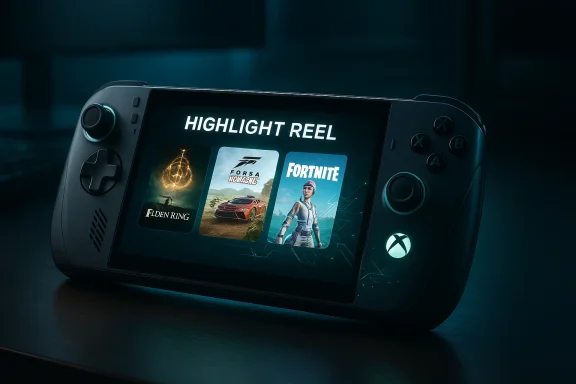
Microsoft quietly flipped a switch this week: Xbox Insiders can now test an AI-powered Highlight Reels feature on the ROG Xbox Ally X that automatically captures and stitches memorable gameplay moments into short, shareable clips — and the feature’s reliance on an on-device NPU makes it as much a hardware signal as a software one.
The ROG Xbox Ally family — the standard Xbox Ally and the higher-end ROG Xbox Ally X — arrived as purpose-built, Windows‑based handheld gaming PCs created in partnership between Microsoft and ASUS. The Ally X ships with AMD’s Ryzen AI Z2 Extreme SoC and an integrated neural processing unit (NPU) intended to accelerate AI workloads at the silicon level. Microsoft has repeatedly described the Ally X as a preview platform for fresh Xbox experiences that can scale to other Windows devices.
Microsoft’s official announcement for the preview makes two immediate points clear: the highlight reels capability is available to Xbox Insiders via the Xbox PC app’s Game Highlights (Preview) interface, and the system is designed to capture clips without taking you out of the game. The preview ships with an initial list of supported titles and relies on system capture settings (Game Bar, Gaming Copilot, or Windows Gaming settings) to operate.
Windows Central’s reporting on internal tests frames the Ally X experience as a blueprint for that next-gen direction; that’s a reasonable framing because the Ally X literary is a Windows PC engineered to feel console-like while offering PC-level extensibility. But it remains important to avoid overreach: public preview and marketing materials do not confirm an actual retail Xbox console’s final architecture. Treat such inference as plausible and strategic, not as a formal hardware announcement.
At the same time, the preview raises several operational questions. Battery and thermal impact on handhelds, interactions with anti‑cheat systems, content moderation and copyright liability, and the scope of developer controls are all open issues that deserve attention. Microsoft has started the right process — a limited Insider preview with explicit feedback channels — but real-world testing at scale will be the ultimate arbiter. If Insiders report favorable battery/thermal behavior, polished clip quality, and solid privacy controls, highlight reels could become a widely appreciated social feature and a clear preview of a next-gen Xbox hardware decision: NPUs will be a first-class requirement. If it stumbles on any of those fronts, the company can either refine on-device heuristics or fall back to a hybrid cloud approach.
Source: Windows Central A "next-gen" Xbox feature just went live for Insiders
 Background
The ROG Xbox Ally family — the standard Xbox Ally and the higher-end ROG Xbox Ally X — arrived as purpose-built, Windows‑based handheld gaming PCs created in partnership between Microsoft and ASUS. The Ally X ships with AMD’s Ryzen AI Z2 Extreme SoC and an integrated neural processing unit (NPU) intended to accelerate AI workloads at the silicon level. Microsoft has repeatedly described the Ally X as a preview platform for fresh Xbox experiences that can scale to other Windows devices.Microsoft’s official announcement for the preview makes two immediate points clear: the highlight reels capability is available to Xbox Insiders via the Xbox PC app’s Game Highlights (Preview) interface, and the system is designed to capture clips without taking you out of the game. The preview ships with an initial list of supported titles and relies on system capture settings (Game Bar, Gaming Copilot, or Windows Gaming settings) to operate.
What highlight reels actually does
The user-facing flow
- While you play a supported game on a compatible device, the system continually monitors gameplay activity and records short clips in the background.
- At the end of a play session, the captured clips are automatically assembled into a short highlight reel that you can view, edit minimally, and share from the Xbox PC app’s Game Highlights (Preview) area.
- No manual recording button presses are required; the experience is intended to be unobtrusive so players can “stay in the game.”
The AI and hardware piece
The innovation here is that the feature is explicitly tied to the device’s NPU. NPUs are specialized accelerators designed to process neural-net workloads more efficiently than a general-purpose CPU or even many GPU workloads. On the Ally X that processing is provided by the Ryzen AI Z2 Extreme platform; Microsoft and ASUS say that AI-powered features such as Automatic Super Resolution (Auto SR) and Highlight Reels are unlocked by that hardware. That means the system can analyze frames, detect “memorable” moments, and decide which clips to keep in near real time without offloading video or telemetry to the cloud.Supported games and what that list means
During the initial Insider preview Microsoft lists the following games as available to test with highlight reels:- Among Us
- Elden Ring
- Fortnite
- Forza Horizon 5
- Lies of P
- Overwatch
- Palworld
Why the NPU matters — and what it signals for next‑gen Xbox
The highlight reels preview is more than a convenience feature; it’s a public proof-of-concept for how Microsoft expects AI to be embedded in future Xbox experiences.1. On-device AI is the design choice
By executing capture, scene analysis, and clip selection locally on an NPU, Microsoft sidesteps latency, privacy, and bandwidth issues that come with cloud-based processing. This approach preserves play continuity and enables an always-on capture assistant that doesn't require streaming raw gameplay off-device for analysis. ASUS and Microsoft explicitly connected these features to the Ally X’s Ryzen AI Z2 Extreme NPU when the handhelds were announced.2. It’s a hardware hint for the next Xbox
Windows Central’s reporting — which notes internal tests and frames the Ally X as a blueprint for a next-generation Xbox that looks a lot more like a Windows PC under a console shell — reasons that the presence of NPU-dependent features on the Ally X strongly suggests the next-gen Xbox hardware will include a similar NPU. If true, that changes the performance cost and optimization model for future Xbox-first features, opening the door for other NPU-accelerated capabilities like frame-aware upscaling, real-time metadata generation, and more sophisticated capture/streaming tools. Treat this inference as credible but not official: Microsoft has confirmed NPU features on the Ally X but has not publicly detailed the complete hardware list for an unannounced console.How it works technically (what we can verify)
Microsoft’s published guidance for Insiders shows the feature integrates with existing Windows capture plumbing:- Insiders must enable background recording via Game Bar (Settings > More Settings > Widgets > Record in the background) or through Gaming Copilot or Windows Gaming settings.
- Once enabled, the Gaming Copilot/Game Bar system allows the NPU-powered service to capture short clips and assemble the highlight reel at the end of a session.
- The final reel appears inside Game Highlights (Preview) on the Xbox PC app’s game page for viewing and sharing.
Practical implications for gamers and creators
Faster sharing, less friction
For casual players and creators alike, automating the capture and assembly process reduces friction. Instead of running manual recordings, hunting for the best clip in hours of footage, and then piecing things together outside the game, highlight reels promise a near-instant digest of a session’s top moments, ready to share.Content discoverability and moderation
Automatic generation will accelerate content generation, which helps creators grow channels and drives social sharing, but it also raises moderation questions. Who owns the reels? How will music licensing, in‑game cinematics, or copyrighted soundtrack issues be handled when clips are posted to social platforms? Microsoft hasn’t published a full policy on this feature yet; those details will matter as users start to publish reels more widely. Expect standard platform rules to apply where applicable, but watch for specific guidance from Microsoft as the preview matures.Quality control and false positives
AI models are not perfect: they may misjudge which seconds are “memorable,” capture low-value moments, or miss subtle but important events (a crucial shot in competitive play, a split-second clutch). Early preview feedback from Insiders will be critical; Microsoft is explicitly asking for survey responses and Insider Hub feedback to refine detection heuristics.Developer and platform considerations
- Game engines and third-party launchers: The Ally X preview shows highlight reels working with titles installed through various storefronts. That suggests Microsoft built detection at the OS capture/session layer instead of requiring game-by-game hooks. This has obvious advantages — higher compatibility — but it also places the detection responsibility on system-level heuristics rather than developer-annotated metadata.
- Anti-cheat and competitive fairness: Background capture often interacts with anti-cheat systems. Microsoft will need to coordinate with major anti-cheat vendors and game studios to ensure highlight capture does not create security or fairness problems. This coordination was part of broader Xbox PC app changes enabling more local game installs on Arm devices earlier — a sign Microsoft is dealing with those plumbing issues now.
- Tools for devs: Over time, publishers may be given APIs to mark “moments,” set privacy flags, or supply preferred clip boundaries to improve detection quality. Microsoft’s early messaging leaves open the possibility of expanded developer controls as the feature matures.
Privacy, security, and performance trade-offs
Privacy by design — but read the fine print
On-device processing is a real privacy win: gameplay frames and metadata do not need to be sent to cloud servers for analysis. That reduces potential leakage of sensitive content and keeps personal activity local. However, any feature that creates and stores clips will interact with cloud sharing flows (when you choose to upload or share), and users must check their sharing permissions and account settings before posting. Microsoft’s preview rollout and the Insider feedback channels will likely yield more explicit privacy documentation as the feature ships more widely.Battery and thermal impact
NPUs accelerate inference at lower power than CPUs for many tasks, but they’re not free. Continuous background analysis will consume power and generate heat — a particular concern on a handheld device that already pushes the thermal envelope in sustained sessions. ASUS and Microsoft have marketed the Ally X’s larger battery and thermals as part of the reason it can host NPU-driven features; still, real-world battery-life hits will vary by game, capture frequency, and user session length. Insiders should pay attention to observed battery drain and thermal throttling during testing and report back.Security surface
Any always-on capture capability increases attack surface. Clips cached locally must be protected against unauthorized access; the sharing pipeline must authenticate and sanitize content properly. While Microsoft has deep experience with Xbox networking and content moderation, the shift toward system-level game capture on Windows devices requires renewed diligence. The developer and security communities will be watching for guidance on storage encryption, access controls, and clear audit trails for sharing.How to try it (for Insiders)
- Join the Xbox Insider Program and enroll on a device that supports the ROG Xbox Ally X preview.
- Make sure background recording is enabled: Game Bar > Settings > More Settings > Widgets > Record in the background while playing a game, or via Gaming Copilot or Windows Settings > Gaming > Captures.
- Launch a supported game from the list above, play as normal, and check Game Highlights (Preview) on the game’s page in the Xbox PC app after your session.
Broader strategic read: Xbox as a Windows-first console ecosystem
This preview is another data point in a broader shift visible across Microsoft’s recent moves: converging Xbox services and the Xbox PC app with Windows session-level experiences (the Xbox Full Screen Experience) and co-engineered hardware (the Ally family). Multiple signals — from console UI experiments to the public partnership with ASUS and AMD’s continued semi-custom work for Xbox silicon — indicate Microsoft’s next-generation strategy is to treat the “console” as a specialized Windows 11 endpoint rather than a closed OS island. That opens interesting possibilities: richer app ecosystems, PC-class services on TVs, and hardware diversity, but also coordination and consistency challenges across drivers, anti-cheat, and content platforms.Windows Central’s reporting on internal tests frames the Ally X experience as a blueprint for that next-gen direction; that’s a reasonable framing because the Ally X literary is a Windows PC engineered to feel console-like while offering PC-level extensibility. But it remains important to avoid overreach: public preview and marketing materials do not confirm an actual retail Xbox console’s final architecture. Treat such inference as plausible and strategic, not as a formal hardware announcement.
Known unknowns and what to watch next
- Expansion of supported games: Microsoft’s initial list is intentionally small. Expect more titles to be added over the next months as the team gathers traces from Insider feedback.
- Developer tooling and APIs: Will Microsoft provide hooks for devs to annotate moments, opt-out, or flag cutscenes to preserve cinematic integrity? This matters for both UX and legal clarity.
- Cross-device availability: Microsoft has suggested it intends many Ally-X features to scale across Windows devices. The timeline and performance trade-offs for PCs without dedicated NPUs remain unclear.
- Policy and moderation: Copyright and content-moderation policies for user-shared highlight reels are not yet fully described and will shape adoption among creators.
Final analysis: promising feature, important caveats
Highlight Reels on the ROG Xbox Ally X is a small, smart product move that tests several bigger ideas in one stroke. It demonstrates practical on-device AI, reduces friction for social sharing, and functions as a visible example of how Microsoft might layer AI features into future Xbox devices. The on‑device NPU approach is a sensible design choice: it improves latency, addresses many privacy concerns, and enables features that run even without a reliable cloud connection.At the same time, the preview raises several operational questions. Battery and thermal impact on handhelds, interactions with anti‑cheat systems, content moderation and copyright liability, and the scope of developer controls are all open issues that deserve attention. Microsoft has started the right process — a limited Insider preview with explicit feedback channels — but real-world testing at scale will be the ultimate arbiter. If Insiders report favorable battery/thermal behavior, polished clip quality, and solid privacy controls, highlight reels could become a widely appreciated social feature and a clear preview of a next-gen Xbox hardware decision: NPUs will be a first-class requirement. If it stumbles on any of those fronts, the company can either refine on-device heuristics or fall back to a hybrid cloud approach.
What you should do if you care
- If you own an ROG Xbox Ally X and are comfortable testing early software: join the Xbox Insider Program and try the preview; file structured feedback in the Insider Hub.
- If you’re a content creator: test the quality and licensing footprint of the reels before relying on them for polished content. Automating capture is convenient, but creators will still want manual control for professional results.
- If you’re a developer or studio: monitor the preview and consider asking Microsoft for developer controls or hooks to improve moment detection for competitive fairness and cinematic integrity.
- Everyone: watch for battery/thermal reports from Insiders before making assumptions about power-free always-on AI on handhelds.
Source: Windows Central A "next-gen" Xbox feature just went live for Insiders
