

The Xbox-branded ROG Ally X arrives as a study in contrasts: a stunning piece of handheld hardware that feels like the future of portable Xbox play, yet one that too often behaves like a launch‑window Windows PC in need of multiple patches. The reviewer experience Windows Central published captures that tension — effortless, late‑night gaming comfort collides with a tedious first‑boot, layered updates, and intermittent software glitches that make the device feel half‑finished for anyone expecting a turnkey console experience.
The ROG Xbox Ally family is a partnership between ASUS’ ROG engineering and Microsoft’s Xbox software design intent: two handheld SKUs, the base Xbox Ally and the premium Xbox Ally X, launched with the goal of marrying Windows 11 openness, Xbox Game Pass convenience, and real, local AAA performance in a single handheld chassis. Microsoft and ASUS announced preorders in late September and targeted an October 16, 2025 global launch, while MSRP positioning placed the Ally at the midrange and the Ally X at the premium $999.99 tier in the U.S. market. Hardware highlights for the Ally X that repeatedly appear in hands‑on testing and OEM materials include:
Why this matters: hand‑held hardware competing with consoles must keep the friction low. A high‑performance device will still feel like a poor purchase if the first hours with it are spent wrestling with UAC prompts, driver updates, and app accept screens rather than playing. The Xbox Full‑Screen Experience (FSE) was intended to mask much of Windows’ desktop complexity, but when the FSE and first‑boot flows are unreliable, that advantage collapses into the same Windows noise the shell was meant to hide.
But the product must also clear a perceptual bar: selling a near‑$1,000 handheld that feels finished. Right now, early adopters and reviewers are having to tolerate the kinds of rough edges that enthusiasts will accept — but mainstream buyers, gifting purchasers, and non‑technical users will likely react less forgivingly. Microsoft and ASUS have the technical foundation; what remains is disciplined delivery of reliable software patches and better first‑run polish.
For buyers who prize raw handheld performance, an upgradeable NVMe slot, and the ability to run full Windows storefronts and dock as a compact PC, the Ally X is probably worth consideration today — but with the explicit expectation that the software will iterate. For those who need a polished, pick‑up‑and‑play device immediately, waiting for the first major post‑launch update cycle is the prudent move: the hardware shines, but the software defines whether the product will be remembered as a triumph or as a $999 beta.
The Ally X’s future will be written in firmware and feature updates; if Microsoft and ASUS execute with speed and clarity, this is the device that could finally make a Windows handheld feel convincingly like an Xbox for a broad audience. If they fail to fix the most visible frustrations quickly, the device risks being remembered as an ambitious but impatient launch.
Source: Windows Central https://www.windowscentral.com/hard...-rough-for-me-right-now-but-i-see-the-vision/
 Background / Overview
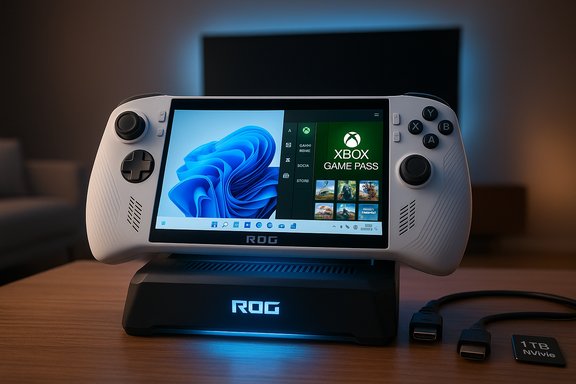
The ROG Xbox Ally family is a partnership between ASUS’ ROG engineering and Microsoft’s Xbox software design intent: two handheld SKUs, the base Xbox Ally and the premium Xbox Ally X, launched with the goal of marrying Windows 11 openness, Xbox Game Pass convenience, and real, local AAA performance in a single handheld chassis. Microsoft and ASUS announced preorders in late September and targeted an October 16, 2025 global launch, while MSRP positioning placed the Ally at the midrange and the Ally X at the premium $999.99 tier in the U.S. market. Hardware highlights for the Ally X that repeatedly appear in hands‑on testing and OEM materials include:- AMD Ryzen AI Z2 Extreme APU with Zen‑5 CPU cores and RDNA 3.5 GPU architecture, paired with an on‑device NPU.
- 24 GB LPDDR5X‑8000 RAM and a 1 TB M.2 2280 NVMe SSD (user‑serviceable).
- 7‑inch 1080p 120 Hz IPS display, 80 Wh battery in the Ally X, and USB4 (DisplayPort) docking capability on the premium model.
The first‑boot friction: what went wrong and why it matters
An unexpectedly long setup
Several reviewers and early adopters reported a frustrating setup flow: Windows 11 initial setup, layered OEM apps (Armoury Crate SE), the Xbox PC app and Game Bar, and the inevitable bundle of Windows and firmware updates can turn a simple unboxing into an all‑day chore. One reviewer described an experience that stretched from morning unboxing to evening playtime, with multiple reboots, permission prompts, and game installs interrupting the "console‑like" expectation. That restart‑heavy, update‑heavy first run undermines the promise of a seamless handheld experience.Why this matters: hand‑held hardware competing with consoles must keep the friction low. A high‑performance device will still feel like a poor purchase if the first hours with it are spent wrestling with UAC prompts, driver updates, and app accept screens rather than playing. The Xbox Full‑Screen Experience (FSE) was intended to mask much of Windows’ desktop complexity, but when the FSE and first‑boot flows are unreliable, that advantage collapses into the same Windows noise the shell was meant to hide.
Real‑world symptoms reported by reviewers
- Slow or apparently stalled downloads and installs during first‑boot, even on fast connections.
- Xbox App feeling laggy and unresponsive after shutdown→boot cycles, with additional prompts required when installing games through the Xbox ecosystem.
- A small — but noticeable — handful of units and users reporting Wi‑Fi connectivity problems that required manual troubleshooting. Those are, to be clear, anecdotal early‑unit experiences but they do amplify the perception of polish issues.
Hardware: where the Ally X really shines
Ergonomics and build
ASUS’ ROG design and Xbox‑inspired ergonomics are a genuine success: textured grips, staggered analog sticks, shoulder and trigger geometry tuned to Xbox controller feel, and a comfortable palm rest make multi‑hour sessions significantly less fatiguing than many rivals. The device’s weight (around 715g / ~1.57 lbs) and size are noticeable, but the improved balance and ergonomics mask heft better than slim, light designs that leave hands cramping after long play.Performance and thermal headroom
Benchmark testing published in hands‑on reviews shows the Ally X sitting well ahead of earlier Windows handhelds in multi‑core CPU scores and synthetic GPU results typical for a Z2 Extreme platform. Reported Geekbench/Cinebench/3DMark numbers place its sustained performance above the class average, especially when plugged in and running in Turbo/Performance mode. The larger 80 Wh battery and the two‑fan “Zero Gravity” cooling design help maintain higher clocks for longer spans than smaller devices. Real‑world gameplay: games that are well‑optimized or that support AMD upscaling (FSR/RSR) and frame generation perform impressively, with some newer titles reaching triple‑digit FPS figures in lighter settings. But modern AAA engines, particularly those built around Lumen or heavy ray tracing, still stress the handheld envelope — a reminder that physics and battery limits continue to set the practical ceiling for handheld AAA fidelity.Expandability and docking
One of the Ally X’s most practical differentiators is its docking and upgrade path:- USB4 with DisplayPort 2.1 capability enables true docked TV/monitor output.
- A full‑length M.2 2280 SSD slot allows owners to swap or upgrade storage — uncommon in many rival handhelds.
Software, ecosystem, and the “console‑like” promise
Xbox Full‑Screen Experience (FSE): promising but fragile
Microsoft’s FSE is the axis on which the Ally’s appeal rotates: it’s designed to give players a “console‑like” layer atop Windows that suppresses background noise and makes controller navigation the primary path. In practice, when it works, the FSE does deliver a cleaner launcher experience and measurable memory savings; reviewers reported freed RAM and slightly better battery life when the shell correctly suppresses background services. But review and community reporting also highlight reliability problems — boot failures into FSE, inconsistent suppression after mode switching, and a “restart tax” where the system must be rebooted to restore the trimmed state. Those software fragilities undermine the very gains that the FSE promises.Xbox App aggregation and third‑party games
The Ally attempts to aggregate Game Pass, Steam, Epic, and other storefronts into a unified library view — a noble UX goal. But aggregation is not the same as integration:- Steam and Epic games can appear in the Xbox App’s library, but installing or running them often requires dropping to the Windows desktop, installing the original launcher (Steam), and sometimes rebooting to return to the Full‑Screen Experience.
- Reviewers report that launching Steam games via the Xbox App can be long and tedious: once a Steam game is closed, you may find yourself back in Steam rather than the Xbox shell. The result is friction that interrupts the console illusion.
Multitasking and navigation quirks
FSE’s app switcher and controller‑based navigation generally work, but reviewers observed control mapping inconsistencies: LB/RB to cycle, X to close, A to resume — occasionally the bumper navigation locks up and requires a touch input, breaking the controller‑first flow. These are small technical bugs but they compound into a subjective feeling that the shell is still maturing.Networking, connectivity and real‑world reliability
A handful of early reviewer units experienced Wi‑Fi instability that required manual troubleshooting; one Windows Central reviewer spent days diagnosing and fixing a persistent wireless issue and published a troubleshooting guide for other owners. Those stories are not universal, but in a category where “it just works” expectations are high, even a small number of connectivity failures becomes a big reputational problem. The device’s Wi‑Fi 6E and Bluetooth 5.4 radios are modern on paper — but driver/firmware maturity is critical to reliable operation across a broad set of home networks and router firmware combinations. Treat reports of Wi‑Fi failures as early unit anomalies that should be addressable via firmware updates, but also as flags for cautious buyers who need a rock‑solid portable device out of the box.Battery life, NPU promises, and AI features
What to expect from battery life
Battery life is a perennial tradeoff in high‑performance handhelds. For the Ally X:- Expect roughly two hours of heavy AAA play at high settings in Performance/Turbo modes. Lighter indie titles or cloud streaming sessions extend runtime significantly.
The NPU and Auto SR: real potential, not yet a day‑one game changer
ASUS and Microsoft marketed the Ally X’s integrated NPU (with a TOPS figure cited in OEM materials) as the basis for future features like Auto Super Resolution (Auto SR) and advanced shader delivery. However, multiple independent reviews and community tests caution that NPU‑based benefits remain emergent rather than proven at launch:- Auto SR and other NPU features require coordinated OS, GPU driver, and developer support to deliver consistent quality and performance gains. Early claims are promising but still need independent validation across multiple titles.
Availability, pricing, and the holiday shopping reality
MSRP and launch cadence were broadly consistent across multiple official and trade announcements: the Ally X debuted at $999.99 ERP in the U.S., with preorders opening in late September and global availability targeted for October 16, 2025. Retail availability fluctuated at launch: some stores quickly sold out or allocated limited units, creating backorder and ship‑date slips in certain regions. One common holiday reality: several retailers listed new orders with delayed arrival windows, making the device a poor bet for guaranteed pre‑holiday delivery in some cases. If you need a handheld in hand for a specific date, check the actual retailer ETA closely and confirm SKU/stock before purchase.Strengths, risks, and the buyer’s playbook
Strengths (what makes the Ally X compelling)
- Class‑leading hardware for a single‑chassis handheld: powerful APU, 24 GB RAM, USB4 docking and 1 TB upgradeable storage.
- Excellent ergonomics and controller feel that will appeal to Xbox veterans and long‑session players.
- Deep Xbox/Games Pass integration — Game Pass remains a major value proposition for those who subscribe.
Risks and important caveats
- Software maturity: Full‑Screen Experience reliabilities, mode switching quirks, and layered update flows from Windows/OEM/Xbox can produce a less‑polished out‑of‑box feeling.
- Battery limitations in heavy native AAA play — plan for 2–3 hour sessions unless heavily capping frames or using cloud streaming.
- NPU and AI benefits are promising but not yet independently validated across broad titles — don’t buy primarily on speculative AI promises.
Practical pre‑purchase checklist (ranked)
- Confirm the exact SKU and regional MSRP where you buy; retailer allocations and pricing varied at launch.
- If you value out‑of‑box polish, wait for the first major OS/firmware update cycle and early patch notes addressing FSE and first‑boot flow issues.
- If you buy now: update Windows 11, the Xbox PC app, and Armoury Crate SE immediately and install firmware updates before heavy use.
- Buy a quality USB4/DisplayPort dock and a higher‑wattage PD charger if you plan to dock frequently for a reliable desktop experience.
- If you rely on Wi‑Fi stability, test your home router configuration or be prepared to apply vendor driver updates — some early units required troubleshooting.
Why the Ally X still matters — and what Microsoft/ASUS must deliver next
The Ally X is strategically important: it demonstrates a credible path for Microsoft to extend the Xbox brand beyond dedicated consoles and cloud streaming into fully open, Windows‑based handhelds. If Microsoft and ASUS deliver on the promised software roadmap—better per‑title profiles, docking polish, Auto SR, and a clear compatibility program—that hardware will age well and become a cornerstone of a new handheld ecosystem. Several post‑launch roadmaps published and discussed by reviewers explicitly target these exactly pain points, and transparent, fast cadence on those fixes is the single most important factor for turning early promise into mainstream success.But the product must also clear a perceptual bar: selling a near‑$1,000 handheld that feels finished. Right now, early adopters and reviewers are having to tolerate the kinds of rough edges that enthusiasts will accept — but mainstream buyers, gifting purchasers, and non‑technical users will likely react less forgivingly. Microsoft and ASUS have the technical foundation; what remains is disciplined delivery of reliable software patches and better first‑run polish.
Conclusion
The ROG Xbox Ally X offers a tantalizing glimpse of what a true Xbox handheld could become: powerful hardware, comfortable ergonomics, and a dockable ecosystem that broadens use cases far beyond casual couch play. Yet the early experience is a reminder that hardware alone does not make a modern platform — software posture, update coordination, and out‑of‑box reliability are equally decisive.For buyers who prize raw handheld performance, an upgradeable NVMe slot, and the ability to run full Windows storefronts and dock as a compact PC, the Ally X is probably worth consideration today — but with the explicit expectation that the software will iterate. For those who need a polished, pick‑up‑and‑play device immediately, waiting for the first major post‑launch update cycle is the prudent move: the hardware shines, but the software defines whether the product will be remembered as a triumph or as a $999 beta.
The Ally X’s future will be written in firmware and feature updates; if Microsoft and ASUS execute with speed and clarity, this is the device that could finally make a Windows handheld feel convincingly like an Xbox for a broad audience. If they fail to fix the most visible frustrations quickly, the device risks being remembered as an ambitious but impatient launch.
Source: Windows Central https://www.windowscentral.com/hard...-rough-for-me-right-now-but-i-see-the-vision/
