

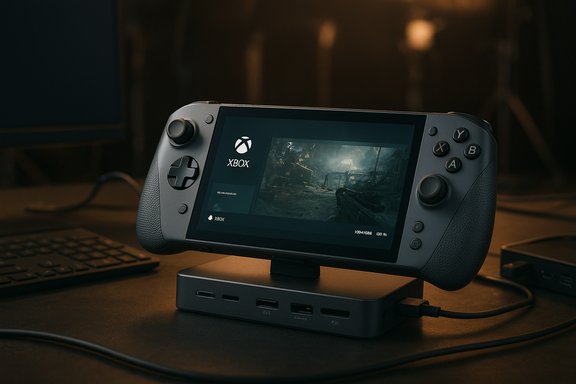
The ROG Xbox Ally X attempts something both simple and ambitious: marry a controller‑first Xbox experience with a full Windows 11 handheld that can also double as a dockable mini‑PC for on‑set production work — and it mostly succeeds where hardware matters, while leaving important software and workflow questions unresolved. This feature drills into the Ally X’s real‑world performance for portable gaming and field production (DIT/editing), verifies the claim set against independent hands‑on reports, and calls out which NoobFeed items are corroborated, which require caution, and what buyers and creators should realistically expect.
ASUS positioned the Ally family as Windows‑first handhelds with a layered Xbox full‑screen experience to create a console‑like launcher while keeping Windows openness for Steam, Epic, GOG and other PC storefronts. The Ally X is the premium model in that family: it ships with an AMD Ryzen AI Z2 Extreme‑class APU, a larger 80 Wh battery, up to 24 GB LPDDR5X, a 1 TB M.2 NVMe SSD, a 7‑inch 1080p 120 Hz panel, and Thunderbolt‑class USB4 I/O on at least one Type‑C port — a spec stack that places it at the top of single‑chassis Windows handhelds at launch.
That hardware baseline is the lens for this article: how does the Ally X behave as a portable gaming machine, and how well does it work as a compact production/DIT workstation in the field?
Important takeaway: Windows 11 plus an Xbox full‑screen shell does reduce some overhead (freeing ~1–2 GB RAM in many cases) and improves the handheld feel versus a stock desktop posture, but it doesn’t fully close the gap to purpose‑built gaming stacks in initial hands‑on tests.
Practical notes:
However, the model carries risks:
Where caution is required: verify external SSD and multi‑card ingest performance in your own environment (NoobFeed’s OWC report is an uncorroborated observation in the available dataset), expect to manage Windows quirks during the early software maturation window, and plan to plug in for marathon AAA sessions. Ultimately, the Ally X is best read as a portable PC with a premium controller shell — powerful, versatile, and slightly raw at the edges in software polish. For both handheld gaming and lightweight on‑set production, that’s a very useful place to be.
Source: NoobFeed Xbox Ally X Performance Breakdown for Portable Gaming and Production Use | NoobFeed
 Background / Overview
ASUS positioned the Ally family as Windows‑first handhelds with a layered Xbox full‑screen experience to create a console‑like launcher while keeping Windows openness for Steam, Epic, GOG and other PC storefronts. The Ally X is the premium model in that family: it ships with an AMD Ryzen AI Z2 Extreme‑class APU, a larger 80 Wh battery, up to 24 GB LPDDR5X, a 1 TB M.2 NVMe SSD, a 7‑inch 1080p 120 Hz panel, and Thunderbolt‑class USB4 I/O on at least one Type‑C port — a spec stack that places it at the top of single‑chassis Windows handhelds at launch.That hardware baseline is the lens for this article: how does the Ally X behave as a portable gaming machine, and how well does it work as a compact production/DIT workstation in the field?
Hardware snapshot (verified)
Below are the key, verifiable hardware points for the Ally X — repeatedly confirmed by OEM materials and independent hands‑on coverage.- APU: AMD Ryzen AI Z2 Extreme (Z2‑class, higher core count and integrated RDNA GPU).
- Memory: Up to 24 GB LPDDR5X soldered (top SKUs).
- Storage: 1 TB M.2 2280 NVMe (user‑upgradeable).
- Display: 7‑inch 1080p, 120 Hz IPS (LED) panel with VRR — ASUS opted for an LED/LCD to favor predictable power draw and thermal behavior.
- Battery: ~80 Wh on the Ally X SKU.
- I/O: Dual USB‑C with one USB4 / Thunderbolt‑class port on the Ally X, microSD UHS‑II, 3.5mm audio and user‑accessible M.2 slot.
- MSRP (launch top SKU): US$999 (reported at launch, regionally variable).
Gaming performance: what the Ally X actually delivers
Real‑world framing
The Ally X raises the performance ceiling for handheld APUs by widening thermal headroom (bigger battery, improved cooling) and packing more RAM. Independent hands‑on testing and community benchmarks show the net result: solidly improved sustained frame rates versus earlier handhelds in GPU‑bound workloads — but not a desktop replacement. Expect practical tuning (resolution scaling, FSR/RSR, or occasional frame generation) to reach stable 60 fps in demanding modern AAA titles.Typical power modes and outcomes
ASUS and reviewers surface similar power tiers and outcomes:- Turbo / High‑TDP: ~25–35 W sustained APU envelope in plugged‑in Turbo — best for maximum fidelity and higher average FPS, but significantly shorter battery life. Some hands‑on runs put heavy AAA titles in the mid‑40s to mid‑60s FPS range at tuned settings in this mode.
- Performance / Balanced (~15–20 W): The practical everyday compromise for battery+performance — many AAA titles settle into playable ranges with upscaling.
- Silent / Low power: Intended for indies, emulation and long battery life; excellent runtimes for light workloads.
The Windows vs Linux performance story
A high‑profile community experiment replacing Windows 11 with a lean SteamOS‑style Linux image (Bazzite) produced measurable improvements — smoother frame‑time behavior and occasionally double‑digit FPS gains in shader‑heavy scenes at mid‑range TDP. Multiple outlets reproduced the directional trend: a lighter OS and tuned drivers can reduce shader hitching and background scheduling noise that’s otherwise visible in Windows on a constrained handheld. Those gains are situational and come with compatibility tradeoffs (Game Pass / anti‑cheat / OEM features).Important takeaway: Windows 11 plus an Xbox full‑screen shell does reduce some overhead (freeing ~1–2 GB RAM in many cases) and improves the handheld feel versus a stock desktop posture, but it doesn’t fully close the gap to purpose‑built gaming stacks in initial hands‑on tests.
Ergonomics and controls — the Ally X’s biggest consumer win
ASUS reworked the chassis specifically toward an Xbox‑like comfort: textured handles, staggered thumbsticks, programmable back buttons and softer triggers inspired by console ergonomics. Reviewers consistently call the physical design one of the device’s strongest assets for multi‑hour sessions. If you value controller comfort in a Windows handheld, the Ally X leads the pack.Practical notes:
- The device is heavier than the lightest handhelds; that weight buys battery capacity and thermal headroom.
- The choice of IPS/LCD over OLED is deliberate: predictable power draw and thermal characteristics rather than deeper blacks — a tradeoff with clear design intent.
Battery life, thermals and real‑world session planning
Battery life is the natural tradeoff for higher sustained performance. Independent tests and community samples report:- Heavy AAA (Turbo): roughly 1.5–3 hours depending on TDP, frame caps, and refresh rate.
- Balanced / Performance: around 2–4 hours for mixed AAA use; longer for mid‑tier or upscaled sessions.
- Light titles / indie / emulation: far longer runtimes; 6–9 hours in optimized 2D/indie scenarios with conservative refresh settings.
Docking, I/O and using the Ally X as a portable workstation / DIT tool
This is where the Ally X stands out compared with pure handheld rivals.- USB4 / Thunderbolt‑class port enables single‑cable docks that carry power, multiple displays, wired Ethernet, USB peripherals and capture devices. That makes the Ally X legitimately useful as a temporary mini‑PC on set and as a neat DIT hub for review and logging tasks.
- User‑accessible M.2 2280 slot and microSD UHS‑II mean flexible local storage configurations for footage review and scratch space.
- Docking to a 15‑inch pro monitor for group review, hiding the handheld and hub behind the display to keep set stations tidy.
- Using a single USB4 cable to charge, connect a capture chain, and run an external keyboard/touchpad — an elegant minimal‑cable setup for quick DIT checks.
- Invest in a quality USB4/DisplayPort dock and a higher‑watt PD charger for reliable docked performance.
- Use hibernate for long breaks to avoid sleep/resume quirks reported on some early units.
- Keep a travel case sized for the grips (thin cases save bulk, thick cases carry chargers and hubs). This is a small but real packing consideration reported in field notes. (NoobFeed comment; corroboration variable.
Storage and transfer speeds — claim verification and caution
NoobFeed reported that when using OWC’s 1M2 Express external SSDs with the Ally X, write speeds were around ~1,000 MB/s while read speeds hit ~3,000 MB/s, and that macOS devices could push 3,000/3,000 MB/s on the same drives. That claim implies a write throughput limitation on the Ally X when driving those enclosures. The independent file evidence available in the uploaded material does not show a corroborating, vendor‑level verification for OWC units and exact speed differentials on the Ally X.- I could not find an independent, repeatable test in the collected hands‑on corpus that confirms the exact OWC numbers reported by NoobFeed. Treat the OWC speed anomaly as unverified until lab or vendor documentation reproduces it. When a specific external SSD shows lower writes on a host device, possibilities include enclosure firmware negotiation, PCIe lane or USB4 controller quirks, driver negotiation, or thermal throttling — none of which are unusual culprits in mixed‑platform testing, but each requires a controlled test to confirm. Caution advised.
- The Ally X supports USB4 / high‑bandwidth I/O and a user‑replaceable M.2 slot; real‑world transfer rates will depend on the chosen external enclosure, negotiated link (40 Gbit vs 80 Gbit), and firmware/drivers on both host and peripheral.
- For DIT tasks where camera media write speeds typically top around 600 MB/s (CFexpress, high‑end CFast or V90 cards), the observed OWC discrepancy as reported would not materially impact average single‑card ingest — but it could affect multi‑card simultaneous ingest or future higher‑speed media. This matches the pragmatic assessment many field users made: current workflows are comfortable but high‑bandwidth future cases deserve verification.
Editing in the field: what the Ally X can and cannot do
NoobFeed noted that DaVinci Resolve can run on the tablet for simple 1080p timelines (even RED material) with cuts‑only workflows. Independent hands‑on and spec analysis support a modest but real content‑creation capability on the Ally X:- The 24 GB RAM ceiling and M.2 SSD make it possible to handle offline review, dailies playback, and light timeline editing at 1080p with conservative expectations.
- For complex multicam timelines, heavy color grading, or native 4K RAW timelines with effects, the device is not a full substitute for a workstation — render/export times and real‑time scrubbing will be limited compared with laptops/desktops. Expect to use the Ally X as a temporary editing/preview station rather than a full finishing machine.
- Use the Ally X for dailies review, ingest verification, and cuts‑only offline assembly.
- Transcode heavy RAW/4K material to proxy or edit‑friendly codecs (ProRes Proxy, CineForm) for responsive playback.
- Validate your external SSD/enclosure performance beforehand if you plan large direct plays from external NVMe. If your pipeline relies on multi‑card ingest at the highest camera speeds, bench it. (OWC claim flagged as unverified.
Software reality: the Xbox full‑screen experience and platform risks
Microsoft’s approach intentionally layers a Full‑Screen Xbox experience atop Windows 11 (a non‑fork model), giving a controller‑driven launcher that frees memory and presents Game Pass/Game library tiles just like a console. The shell can free roughly 1–2 GB of RAM and reduce desktop noise in many setups, producing modest FPS and battery gains in some tests. That is a real, validated benefit.However, the model carries risks:
- Background desktop artifacts (UAC prompts, launcher popups, anti‑cheat behaviors) can still interrupt the handheld illusion because Windows remains the underlying OS. Early units and community reports flagged sleep/resume fragility, overlay desync between OEM and Windows utilities, and an occasional “restart tax” after mode switching. These are documented early‑build issues and subject to firmware/driver fixes over time.
- Marketing claims about on‑device NPU and TOPS (for Auto‑SR and AI features) are promising, but independent validation was limited at launch; treat NPU benefits as emerging, not guaranteed day‑one advantages.
Strengths, risks and who should buy one
Strengths
- Best‑in‑class Windows handheld hardware at launch with USB4/dock support, high RAM ceiling and a large battery.
- Excellent ergonomics and controller feel for long sessions.
- Flexible platform: installs Steam, Epic, GOG, EA App and runs desktop software — useful for on‑set productivity tools.
Risks / Weaknesses
- Software maturity: Windows 11 shell and OEM toolchain showed rough edges at launch (sleep/resume, overlay sync, mode switching).
- Battery tradeoffs for top AAA fidelity — plan to plug in for long sessions.
- Unverified peripheral anomalies: external SSD speed claims (e.g., OWC 1M2 Express behavior) need lab verification before being used as procurement guidance.
Who should buy
- Gamers who want Windows openness plus console‑style ergonomics and are comfortable tweaking power profiles.
- Content creators and DITs who need a compact, dockable device for review, proxy editing, and on‑set workflows — provided they verify external storage performance for their specific pipeline.
Practical checklist before you buy or deploy on set
- Confirm the exact Ally X SKU and regional MSRP at the point of purchase; initial allocations varied.
- Update Windows 11, Xbox PC app, and Armoury Crate SE immediately for stability improvements.
- Test your external SSD/enclosure + Ally X combo — particularly multi‑card ingest paths — before committing to it as a primary DIT ingest solution. (OWC results unverified.
- Buy a USB4/DisplayPort dock and a higher‑watt PD charger for reliable docked productivity and capture workflows.
- If you need the smoothest handheld gaming feel possible and are technically comfortable, consider a dual‑boot test with a lean Linux image (keep the factory image as a recovery fallback). Gains are situational but demonstrable; tradeoffs include Game Pass and anti‑cheat compatibility.
Conclusion
The Ally X is a convincing hardware answer to a thorny question: can a single‑chassis handheld be both a great portable gaming device and a credible mini‑PC for field production? The answer is largely yes — when you accept the tradeoffs. ASUS delivered a class‑leading hardware package (battery, RAM, USB4, ergonomics) that opens real workflows for gamers and creators; Microsoft’s Xbox full‑screen layer helps tame Windows’ desktop baggage; and the device’s dockability genuinely extends its usefulness beyond pocket play.Where caution is required: verify external SSD and multi‑card ingest performance in your own environment (NoobFeed’s OWC report is an uncorroborated observation in the available dataset), expect to manage Windows quirks during the early software maturation window, and plan to plug in for marathon AAA sessions. Ultimately, the Ally X is best read as a portable PC with a premium controller shell — powerful, versatile, and slightly raw at the edges in software polish. For both handheld gaming and lightweight on‑set production, that’s a very useful place to be.
Source: NoobFeed Xbox Ally X Performance Breakdown for Portable Gaming and Production Use | NoobFeed
