

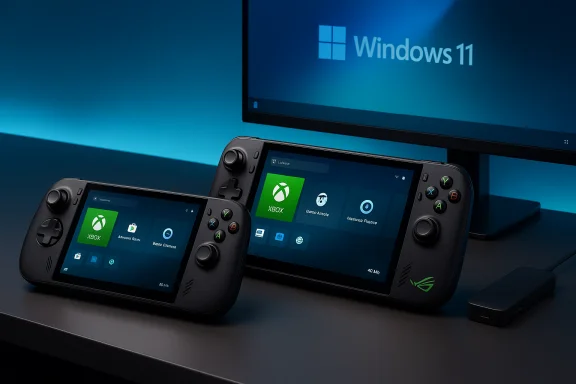
The ROG Xbox Ally family is not simply a new portable console or another gaming mini‑PC — it’s a deliberate hybrid that tries to be both, marrying ASUS ROG hardware with Microsoft’s Xbox front end on a full Windows 11 platform to deliver a controller‑first handheld that still behaves like a PC.
ASUS and Microsoft launched two closely related handhelds in October 2025: the ROG Xbox Ally (the base model) and the higher‑end ROG Xbox Ally X. Both ship as Windows 11 machines with an Xbox‑centric “Full Screen Experience” layered on top to present console‑style menus, Game Pass integration, and a controller‑first workflow — while leaving the full Windows desktop and PC launchers (Steam, Epic, GOG) accessible for power users. The split between the two models is mainly performance, memory, storage, battery capacity, and I/O capability.
In plain terms:
What that means practically:
In short:
However, the hybrid comes with tradeoffs:
The ROG Xbox Ally is a statement: Microsoft and ASUS are betting that handheld PC gaming can wear the Xbox badge and behave more like a console while preserving the openness and expandability of Windows. If you value that blend — and if you’re willing to accept the compromises it implies — the Ally family is where the mini‑PC and portable Xbox converge.
Source: Maison et Domotique Test Asus ROG Xbox Ally: mini PC or portable Xbox? Spoiler... it’s both! -
 Background / Overview
ASUS and Microsoft launched two closely related handhelds in October 2025: the ROG Xbox Ally (the base model) and the higher‑end ROG Xbox Ally X. Both ship as Windows 11 machines with an Xbox‑centric “Full Screen Experience” layered on top to present console‑style menus, Game Pass integration, and a controller‑first workflow — while leaving the full Windows desktop and PC launchers (Steam, Epic, GOG) accessible for power users. The split between the two models is mainly performance, memory, storage, battery capacity, and I/O capability.In plain terms:
- The ROG Xbox Ally aims to be a high‑quality, ergonomics‑first Windows handheld for most users.
- The ROG Xbox Ally X targets enthusiasts who want higher sustained local performance, a larger battery, more RAM and faster I/O for docking and desktop use.
What the hardware actually is (verified specs)
Both models share the same physical chassis and display but diverge significantly underneath the hood.Shared hardware (what ASUS and Microsoft ship)
- Display: 7‑inch 1080p (1920×1080) touchscreen, 120 Hz, IPS. Designed for a balance of framerate and battery life rather than OLED contrast.
- Form factor: Xbox‑inspired ergonomics — staggered thumbsticks, full ABXY face buttons, shoulder bumpers, assignable back buttons and a dedicated Xbox button to launch the full‑screen Xbox shell.
- Storage expandability: User‑accessible M.2 2280 NVMe slot and a UHS‑II microSD slot for expanded libraries.
- OS: Windows 11 Home with an Xbox full‑screen shell layered over it; not a bespoke OS.
The split: Ally vs Ally X (headline verified numbers)
- ROG Xbox Ally (base):
- Processor: AMD Ryzen Z2 A (handheld‑tuned Z2 family APU).
- RAM: 16 GB LPDDR5X (soldered).
- Storage: 512 GB M.2 NVMe (user‑upgradeable).
- Battery: ~60 Wh.
- Ports: Two USB‑C (DisplayPort alt mode/PD on at least one), microSD (UHS‑II), 3.5 mm combo jack.
- MSRP: around USD $599.99 at launch.
- ROG Xbox Ally X (premium):
- Processor: AMD Ryzen AI Z2 Extreme (branded “AI” Z2 Extreme variant).
- RAM: Up to 24 GB LPDDR5X in premium SKUs.
- Storage: 1 TB M.2 2280 NVMe (user‑upgradeable).
- Battery: ~80 Wh (larger battery for longer sustained sessions).
- Ports: USB4 / Thunderbolt‑class on one Type‑C, additional Type‑C, UHS‑II microSD, 3.5 mm jack.
- MSRP: around USD $999.99 (premium SKU).
The software story: Windows with an Xbox front end
The defining product decision here is software: the Ally family runs full Windows 11 but boots into an Xbox Full‑Screen Experience (FSE) intended to hide desktop friction and present a console‑like launcher for Game Pass and installed games. Microsoft also shipped a new Handheld Compatibility Program and other Xbox ⇄ Windows adjustments that aim to make Windows feel more console‑like on handhelds.What that means practically:
- Console convenience: Game Pass titles and Play Anywhere games that are available natively show up immediately in the Xbox shell, enabling quick downloads and controller‑first navigation.
- PC openness: Steam, Epic and other PC launchers are still fully supported — if you want to mod, tweak, or run desktop apps, the full Windows environment is there.
- Hybrid friction: Not every Xbox purchase or title is downloadable directly through the full‑screen shell; some purchases or titles still require cloud streaming or the original launcher. That introduces friction compared to a true console.
Performance, thermals, and battery: the unavoidable trade‑offs
A handheld that runs Windows and tries to push local AAA performance must trade among power, heat, and endurance. The Ally family makes explicit tradeoffs.Performance expectations
- The Ally X (Z2 Extreme, 24 GB LPDDR5X) is the clear performance leader of the two: higher core counts, higher RAM bandwidth, and a larger battery/better thermal headroom let it sustain higher clocks for longer. Reviewers’ hands‑on impressions and manufacturer claims put it near the top of Windows handheld performance at launch.
- The base Ally is tuned for efficiency: it still runs modern PC titles and Game Pass games well, but modern AAA at max settings is often out of reach unless you accept lower framerates or use upscaling tools (FSR, RSR).
Thermals and battery life
- Real‑world battery life under heavy 3D loads will typically be measured in a few hours — expect 2–3 hours in demanding AAA scenarios on either model unless you cap framerates, use power profiles, or rely on cloud streaming. The Ally X’s larger 80 Wh battery improves session length but doesn’t remove the constraint.
- Extended sessions produce warmth and can trigger thermal throttling; ASUS tuned cooling to get the most sustained throughput, but physics still apply. Plan for a device that can serve as a capable gaming handheld and a mini‑PC when docked, but not a desktop‑class sustained GPU powerhouse.
Practical performance tips
- Use performance/turbo profiles while plugged in for demanding titles and switch to Performance/Silent on battery to save runtime.
- Cap framerates where acceptable and use FSR/RSR or frame‑generation where supported to raise perceived fluidity without linear power cost.
- Prefer hibernate for long‑term state preservation — some early units reported sleep/resume quirks.
The “AI” story and how to read it (caution required)
A selling point for the Ally X is AMD’s “AI Z2 Extreme” silicon with an on‑chip NPU (neural processing unit). Microsoft and ASUS have outlined use cases such as system upscaling (Auto SR), highlight generation, and UI accelerations. However, the practical benefits today are incremental and software‑dependent rather than transformational. Multiple coverage notes that NPU/TOPS numbers and the exact behavior of AI features are inconsistently documented across vendors and third‑party databases. Treat NPU headline numbers as provisional until independent technical teardowns and benchmarks validate them.In short:
- Possible near‑term benefits: system‑level upscaling, faster background tasks, and specialized features that use low‑power inference on the NPU.
- Reality check: most games and engines won’t suddenly get huge framerate boosts from an NPU; the advantage lies in targeted system features or developer‑adopted effects. Don’t buy primarily for “AI gains” without independent validation.
Docking and expandability — mini‑PC aspirations
If you want a handheld that doubles as a mini‑PC, the Ally X brings meaningful extra value:- USB4 / Thunderbolt‑class port enables higher bandwidth docks, multi‑display, and faster wired LAN through docks, making the Ally X a more credible desktop replacement when docked.
- The user‑replaceable M.2 2280 slot is a standout for longevity. Many handhelds sacrifice full‑length NVMe slots; ASUS kept it for storage upgrades.
- Invest in a USB4/DisplayPort‑capable dock and a high‑wattage PD charger if you plan multi‑display or frequent docked workflows. The included 65W charger is serviceable for daily use but docked desktop use will benefit from more headroom.
Ergonomics and controls: where the Ally strongly delivers
A major strength across reviews and hands‑ons is the physical design. ASUS reworked the chassis to echo Xbox ergonomics — textured grips, staggered sticks, and comfortable palm rests — and overall the device earns praise for multi‑hour comfort despite being heavier than lightweight handhelds. The controls feel familiar to console players, easing adoption for Xbox veterans. Small finishing complaints surfaced (screen feel, certain plastics), but the consensus is that ASUS improved substantially over earlier ROG handhelds.Competition: where Ally sits in the market
The Ally family sits between cloud‑first handhelds and full‑blown gaming laptops:- Versus Steam Deck: Ally runs Windows natively and integrates Xbox/Game Pass; it’s pricier and trades some plug‑and‑play simplicity for PC flexibility.
- Versus Nintendo Switch 2: the Switch 2 focuses on lighter weight, detachable controllers, and Nintendo’s first‑party catalog. The Ally prioritizes PC libraries, raw handheld performance, and Game Pass convenience.
- Versus other Windows handhelds (Lenovo Legion Go 2, Aya Neo, etc.: the Ally X distinguishes itself with a larger battery, more RAM, and Thunderbolt‑class I/O. OLED rivals will retain an edge on picture quality and contrast.
Strengths — what the Ally family does very well
- Console‑first ergonomics with PC openness: comfortable controller layout plus full Windows capability.
- Game Pass integration and Xbox front end: immediate access to a large catalog and better handheld discovery for Xbox titles.
- Expandability and docking: full‑length M.2 NVMe slot and Ally X USB4 unlock desktop‑grade docking scenarios.
- Two‑tier strategy: the base Ally delivers excellent value for a Windows handheld; the Ally X is a true enthusiast option with higher memory, battery, and I/O.
Risks and weaknesses — what to beware of
- Battery life and thermals: heavy AAA play is power‑hungry; expect limited unplugged marathon sessions.
- Windows complexity: a full Windows 11 machine brings desktop artifacts — updates, drivers, anti‑cheat and occasional configuration hassles — that can undercut a console‑like immediacy.
- Software polish at launch: early firmware and FSE rough edges were reported; Microsoft and ASUS need sustained updates to smooth the experience.
- Availability and pricing volatility: the Ally X saw limited allocations and resale pressure at launch. Confirm SKU and retailer before buying.
- Unverified AI/NPU claims: marketing references to NPUs and TOPS are inconsistently documented; treat speculative AI benefits cautiously.
Buyer’s playbook — who should buy which model
- Buy the ROG Xbox Ally if:
- You want a comfortable, controller‑first Windows handheld for Steam, Game Pass, and cloud streaming without paying top tier prices.
- You value portability and ergonomics over absolute top‑end local AAA performance.
- Buy the ROG Xbox Ally X if:
- You want the most capable Windows handheld at launch, better sustained performance, a larger battery and USB4 docking for laptop/desktop replacement scenarios.
- You’re an enthusiast who values upgradeable storage and extra RAM for multi‑tasking and heavy PC workloads in a portable form factor.
- Wait or consider alternatives if:
- You prioritize the longest battery life or absolute OLED picture quality above the other features.
- You want a pick‑up‑and‑play, console‑only experience with near‑zero setup. SteamOS and cloud‑first devices remain more turnkey.
Setup and practical tips for early adopters
- Update Windows 11, the Xbox PC app, and Armoury Crate SE before heavy use — many patches improve stability and FSE behavior.
- Use the Performance/Turbo profile while plugged in and switch to Silent/Performance on battery. Cap framerate or use FSR/RSR where supported to extend runtime.
- Prefer Hibernate for long‑term off states to avoid potential sleep/resume quirks reported on early units.
- If you intend to dock frequently, buy a USB4/DisplayPort dock and a high‑wattage PD charger; the included 65W is fine for general use but docks will benefit from more headroom.
- Confirm the exact SKU code and regional configuration when purchasing — the Ally X variants were sometimes limited in allocation or sold through specific retailers.
Final assessment — mini‑PC, portable Xbox, or both?
The ROG Xbox Ally family succeeds precisely at being both a portable Xbox‑style device and a mini‑PC — with caveats. ASUS and Microsoft have built a convincing hybrid: comfortable Xbox‑style ergonomics and an Xbox full‑screen shell for instant Game Pass access, plus the full Windows 11 ecosystem, an M.2 NVMe slot, and (on the Ally X) Thunderbolt‑class I/O for docking. That combination is meaningful for players who want the flexibility to play anywhere, run PC storefronts and mods, and occasionally dock to a monitor for more desktop‑like use.However, the hybrid comes with tradeoffs:
- You accept the complexity of Windows and a shorter battery life under native AAA loads compared with cloud‑focused or OLED competitors.
- Many of the “future” features — especially NPU‑based AI features — are promising but software‑dependent and need independent validation to move from marketing to measurable user benefit.
The ROG Xbox Ally is a statement: Microsoft and ASUS are betting that handheld PC gaming can wear the Xbox badge and behave more like a console while preserving the openness and expandability of Windows. If you value that blend — and if you’re willing to accept the compromises it implies — the Ally family is where the mini‑PC and portable Xbox converge.
Source: Maison et Domotique Test Asus ROG Xbox Ally: mini PC or portable Xbox? Spoiler... it’s both! -
