

The ASUS ROG XBOX Ally X is a hardware tour de force — the most capable Windows handheld available at launch — but its full potential is repeatedly hamstrung by the realities of running Windows 11 atop a general-purpose PC stack rather than a purpose-built console OS.
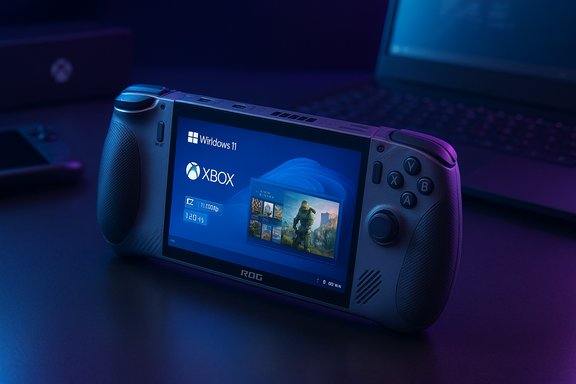
ASUS and Microsoft positioned the ROG XBOX Ally family as a two‑tier strategy: a mainstream ROG Xbox Ally and a premium ROG XBOX Ally X aimed at enthusiasts who want higher sustained performance, more RAM, and a much larger battery. The Ally X ships as a 7‑inch, 1080p 120 Hz handheld running Windows 11 with an Xbox Full‑Screen Experience layered on top to present a controller‑first launcher while preserving full PC openness.
This product launch matters because it puts a high‑end Windows handheld — with USB4 docking, an 80 Wh battery, and AMD’s Z2‑class silicon — squarely in competition with Valve’s Steam Deck ecosystem and the broader handheld PC market. The result is a device that is simultaneously the best hardware you can buy today and a reminder that great silicon needs an equally disciplined software stack to feel like a true handheld console.
However, the shell is an overlay on top of full Windows 11. That means occasional desktop artifacts — UAC prompts, background updates, and driver or launcher popups — can still interrupt gameplay. In early units some reviewers encountered hidden prompts that only become visible in Desktop mode, or overlay tools that fell out of sync (for example, Armoury Crate and the Game Bar reporting different TDP or refresh values). Those behaviors undercut the pick‑up‑and‑play promise for less technical users.
That said, switching away from Windows is not a free lunch:
But this launch also validates a central truth of handheld design: OS posture matters as much as silicon. Windows brings enormous ecosystem benefits — Game Pass, wide storefront access, and better anti‑cheat compatibility — but it also brings background services, update behavior, and overlay complexity that are magnified on a device where every hitch is perceptible. Community Linux images show measurable gains precisely because a leaner OS reduces shader hitching, compositor lag, and background noise. That contrast is not a condemnation of Windows so much as an engineering observation: to make a handheld feel like a console, software must be as disciplined as the hardware.
From a platform perspective, Microsoft’s non‑fork approach (an Xbox shell atop Windows) is strategically sensible: it preserves PC openness while attempting to deliver console polish. The risk is timing and coordination: if the shell and driver toolchain mature quickly, the Ally X’s hardware will look prescient; if not, early buyers will remember a $999 “beta.”
The tradeoff is software maturity. Windows 11 plus an Xbox full‑screen shell makes the device broadly useful, but occasional desktop artifacts, overlay synchronization issues, and update behavior prevent the Ally X from feeling as polished as console‑first rivals at launch. Community Linux images prove the hardware can run even smoother, but they also expose real ecosystem and compatibility tradeoffs. Until Microsoft and ASUS iterate the Windows handheld experience further, buyers must weigh raw hardware capability against the practical convenience of a more turnkey handheld OS.
For readers focused on the best available hardware right now — and who are willing to tolerate some Windows friction or tinker with dual‑boot setups — the ROG XBOX Ally X is the platform to chase. For those who demand immediate, flawless handheld polish out of the box, patience or a Steam Deck‑style alternative remains the safer route.
Source: overkill.wtf ROG XBOX Ally X review: Best hardware, held back by Windows
 Background / Overview
ASUS and Microsoft positioned the ROG XBOX Ally family as a two‑tier strategy: a mainstream ROG Xbox Ally and a premium ROG XBOX Ally X aimed at enthusiasts who want higher sustained performance, more RAM, and a much larger battery. The Ally X ships as a 7‑inch, 1080p 120 Hz handheld running Windows 11 with an Xbox Full‑Screen Experience layered on top to present a controller‑first launcher while preserving full PC openness.This product launch matters because it puts a high‑end Windows handheld — with USB4 docking, an 80 Wh battery, and AMD’s Z2‑class silicon — squarely in competition with Valve’s Steam Deck ecosystem and the broader handheld PC market. The result is a device that is simultaneously the best hardware you can buy today and a reminder that great silicon needs an equally disciplined software stack to feel like a true handheld console.
The hardware: a clear class leader
Design and ergonomics
ASUS reworked the Ally chassis around longer, textured grips and Xbox‑style ergonomics that prioritize comfort for multi‑hour sessions. The shoulder geometry, staggered sticks, and new “prong” grips bring the handheld closer to the feel of an Xbox controller, and users with wrist or nerve issues report significantly less fatigue compared with more compact handhelds. The device also includes two programmable back buttons on the shell for more controller‑style mapping.- Front‑firing speakers and a 3.5 mm jack keep audio flexible.
- Textured grips and a balanced weight distribution reduce wrist strain.
- A power button that doubles as a fingerprint sensor speeds login without sacrificing security.
Ports, expandability, and practical touches
ASUS upgraded the I/O on the Ally X to include USB4 (Thunderbolt‑class) on one USB‑C port and a second USB‑C 3.2 port, enabling true docking scenarios with eGPUs and multi‑display support from third‑party docks. The unit retains a user‑accessible M.2 2280 NVMe slot and a microSD UHS‑II slot for easy storage expansion — a desktop‑grade feature set in a handheld body.Specs snapshot (consistent naming)
- Processor: AMD Ryzen AI Z2 Extreme (Z2‑class APU).
- Memory: Up to 24 GB LPDDR5X‑8000 (high‑speed LPDDR5X).
- Storage: 1 TB M.2 2280 NVMe SSD (user‑upgradeable).
- Display: 7‑inch 1080p (1920×1080), 120 Hz, VRR, ~500 nits (IPS/LCD).
- Battery: 80 Wh in a ~1.5 lb (≈680 g) chassis.
- Price (MSRP): $999 (US) for the Ally X top SKU.
Performance and thermals: laptop‑class burst, handheld‑class management
Real‑world gaming behavior
Where the Ally X truly shines is sustained, practical performance for a handheld. With its higher TDP headroom and upgraded cooling, the device delivers meaningful uplift over the original Ally and many other handheld competitors in GPU‑bound scenarios. Reviewers measured the following real‑world examples (representing typical play patterns rather than peak synthetic numbers):- Turbo (35 W): Cyberpunk 2077 at 1080p Medium with FSR on Balanced holds in the mid‑50s fps range.
- Performance (≈17 W): The same title hovers around ~40 fps while keeping fan noise moderate.
- Silent / Low power (≈9 W): Light indies and less demanding games run quietly and efficiently, extending battery life dramatically.
Battery life by workload (practical guidance)
The 80 Wh pack transitions the Ally X from “desktop experiment” to travel companion, but expectations should be calibrated by game type:- Light indies (60 Hz): 8–9 hours in optimized titles; switching to 120 Hz reduces runtime by ≈3 hours.
- Mid‑tier 3D indies (Hades 2 class): 4–7 hours depending on TDP and refresh rate.
- Big AAA titles (900p–1080p): ~3 hours on Performance; ~2 hours when using a 25 W turbo preset locked at 60 fps. Plugged in at 35 W yields roughly ~24% more performance than the original ROG Ally in certain tests.
Cooling and noise
ASUS improved thermal isolation so the grips stay cool even when the exhaust fans are audible. Expect louder top‑end noise during Turbo operation (it can resemble a desktop fan), but the heat piping and layout keep thermal throttling predictable and reduce surface warmth on the areas you hold. For many players, that tradeoff — louder fans for cooler grips and steadier clocks — is preferred.Software reality check: Windows 11 is good, but still Windows
Xbox Full‑Screen Experience: a useful but incomplete shell
Microsoft’s handed‑down solution — an Xbox Full‑Screen Experience — boots the device into a controller‑first interface that aggregates Game Pass, cloud titles, and installed games across launchers. This shell reduces background noise and can free up idle resources, delivering a more “console‑like” posture for many sessions. The practical benefits are real: quicker library discovery, reduced idle RAM usage, and a cleaner primary UI.However, the shell is an overlay on top of full Windows 11. That means occasional desktop artifacts — UAC prompts, background updates, and driver or launcher popups — can still interrupt gameplay. In early units some reviewers encountered hidden prompts that only become visible in Desktop mode, or overlay tools that fell out of sync (for example, Armoury Crate and the Game Bar reporting different TDP or refresh values). Those behaviors undercut the pick‑up‑and‑play promise for less technical users.
Armoury Crate vs Game Bar: two control planes
ASUS provides Armoury Crate SE for hardware tuning while Microsoft exposes power and display controls via the Game Bar / Xbox shell. In practice the two utilities sometimes desynchronized — changing a wattage or fan curve in one utility did not always reflect immediately in the other. For a handheld that trades on simplicity, having two overlapping control planes is an obvious UX friction point; most reviewers recommended relying on Armoury Crate for definitive power and fan settings until the overlays mature.Standby, resume, and sleep improvements
One of the Ally X’s most meaningful quality‑of‑life improvements is practical sleep behavior. When configured properly, the device now resumes instantly with negligible standby drain, Wi‑Fi and controllers reconnect reliably, and Windows no longer (as widely) wakes to apply random updates mid‑travel. That alone transforms the Ally X from “desktop tethered” to a device you can actually toss in a bag and carry all day. Still, early firmware and driver versions showed variability across units, and conservative users were advised to prefer hibernate for long‑term storage until further maturity.The Linux experiments: what happens when you remove Windows?
Community testing replacing Windows with SteamOS‑style Linux images (notably Bazzite) repeatedly produced smoother frame‑time behavior, fewer shader‑hitches, and in some cases up to ≈30% higher average FPS in shader‑heavy scenes. Those gains are attributable to differences in shader compilation behavior, compositors, scheduling, and a leaner background process set on Linux.That said, switching away from Windows is not a free lunch:
- Loss of out‑of‑box Game Pass downloadability and cloud integrations for some titles.
- Anti‑cheat and multiplayer compatibility problems for many live titles.
- Potential warranty / support exposure if ASUS explicitly restricts software modifications (answers vary by region and retailer).
Strengths — what the Ally X absolutely gets right
- Hardware leadership: top‑class thermal headroom, USB4 docking, and an 80 Wh battery in a compact, well‑balanced chassis make the Ally X the most capable single‑piece Windows handheld available at launch.
- Ergonomics: controller‑first comfort that reduces hand fatigue in long sessions; programmable back buttons and Xbox button integration add real value.
- Expandability: M.2 2280 slot, dual USB‑C ports, and microSD support make this a versatile portable PC.
- Practical sleep and battery behavior: dramatically improved standby behavior over previous Windows handheld attempts makes it usable on the go.
Weaknesses and risks buyers must weigh
- Windows friction: UAC prompts hiding behind the shell, update activity, and occasional overlay mismatches undermine a seamless pick‑up‑and‑play feel. For buyers seeking a polished, console‑like experience, Valve’s Steam Deck and SteamOS remain more mature.
- Price: $999 puts the Ally X in premium territory — buyers can choose a Steam Deck OLED plus a small backlog of purchases, or a thin gaming laptop, for similar money.
- Display choice: the use of an LCD over OLED preserves predictable power draw but concedes contrast and picture “pop” to OLED rivals.
- Unverified marketing claims: ASUS and Microsoft referenced on‑device NPUs and TOPS figures for future AI features (Auto SR and similar), but these remain unverified in real workloads — buyers shouldn't purchase the device primarily for speculative AI benefits without independent validation.
Where the Ally X sits in the market
Compared with core alternatives:- Steam Deck OLED — trades raw, peak Windows compatibility for a more polished handheld OS, better out‑of‑box battery behavior in many scenarios, and a more mature driver/OS ecosystem. The Deck remains the pick for buyers who want a turnkey handheld gaming experience.
- Portable gaming laptops — may outperform in absolute CPU/GPU headroom but lose handheld ergonomics and battery scaling; Ally X hits a unique sweet spot for those who want laptop‑class features in a handheld form factor.
- Other Windows handhelds (Legion Go 2, Aya Neo) — the Ally X distinguishes itself with more RAM, USB4, and a larger 80 Wh battery; OLED contenders still win on picture quality.
Buyer’s playbook — practical advice for prospective owners
- Confirm the SKU and retailer before buying; Ally X allocations were uneven at launch and pricing fluctuated.
- Update Windows 11, the Xbox PC app, and Armoury Crate SE immediately; many post‑launch patches materially improve the full‑screen experience and driver stability.
- If you value pick‑up‑and‑play simplicity, prefer the Steam Deck or wait for further Microsoft/OEM polishing.
- Curious about Linux performance? Dual‑boot rather than wiping the factory image so you retain Game Pass and anti‑cheat compatibility as a fallback.
- Buy a USB4/DisplayPort dock and a higher‑wattage PD charger if you plan to dock frequently; the Ally X’s USB4 unlocks meaningful desktop use.
Critical analysis: promise vs. polish
The ROG XBOX Ally X is a classic hardware triumph hamstrung by software posture. ASUS’ engineering — larger battery, better cooling, improved ergonomics, and USB4 — delivers a handheld that can do things no other single‑piece handheld can do right now: dock as a compact desktop, run Windows storefronts and productivity apps, and push higher TDP envelopes for real local AAA play. Those are not small feats; they change what a handheld PC can be.But this launch also validates a central truth of handheld design: OS posture matters as much as silicon. Windows brings enormous ecosystem benefits — Game Pass, wide storefront access, and better anti‑cheat compatibility — but it also brings background services, update behavior, and overlay complexity that are magnified on a device where every hitch is perceptible. Community Linux images show measurable gains precisely because a leaner OS reduces shader hitching, compositor lag, and background noise. That contrast is not a condemnation of Windows so much as an engineering observation: to make a handheld feel like a console, software must be as disciplined as the hardware.
From a platform perspective, Microsoft’s non‑fork approach (an Xbox shell atop Windows) is strategically sensible: it preserves PC openness while attempting to deliver console polish. The risk is timing and coordination: if the shell and driver toolchain mature quickly, the Ally X’s hardware will look prescient; if not, early buyers will remember a $999 “beta.”
Conclusion
ASUS delivered an engineering statement with the ROG XBOX Ally X: unparalleled Windows handheld hardware in an ergonomically refined package. For enthusiasts who prioritize raw handheld performance, USB4 docking, and the ability to run full PC storefronts, the Ally X is today the most capable pocketable gaming PC.The tradeoff is software maturity. Windows 11 plus an Xbox full‑screen shell makes the device broadly useful, but occasional desktop artifacts, overlay synchronization issues, and update behavior prevent the Ally X from feeling as polished as console‑first rivals at launch. Community Linux images prove the hardware can run even smoother, but they also expose real ecosystem and compatibility tradeoffs. Until Microsoft and ASUS iterate the Windows handheld experience further, buyers must weigh raw hardware capability against the practical convenience of a more turnkey handheld OS.
For readers focused on the best available hardware right now — and who are willing to tolerate some Windows friction or tinker with dual‑boot setups — the ROG XBOX Ally X is the platform to chase. For those who demand immediate, flawless handheld polish out of the box, patience or a Steam Deck‑style alternative remains the safer route.
Source: overkill.wtf ROG XBOX Ally X review: Best hardware, held back by Windows
