

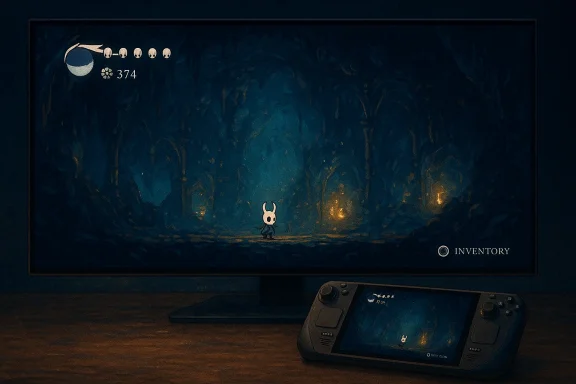
Team Cherry’s quietly delivered update to the original Hollow Knight finally gives players what a surprisingly large slice of the community has been asking for since 2017: native support for 16:10 and 21:9 aspect ratios on PC and handhelds, plus a set of practical quality‑of‑life improvements and next‑gen console ports that landed as a shadow drop during Nintendo’s Partner Direct on February 5, 2026.
Hollow Knight launched on PC in 2017 and became an indie classic through tight platforming, atmospheric art, and a sprawling Metroidvania design. Over the years, fans have requested native ultrawide and non‑16:9 support to match modern displays and handheld form factors such as the Steam Deck and Lenovo Legion Go S. Until now, players frequently relied on unofficial tweaks, mods, or forced resolutions that could introduce visual glitches or stability problems. Team Cherry’s recent update moves these widely requested display options into an official, supported patch.
At the same time, Team Cherry shadow‑dropped a refreshed Switch 2 Edition and released versions for PlayStation 5 and Xbox Series X|S. Existing owners of the PS4, Xbox One, and original Switch versions can upgrade to the next‑gen ports at no additional charge. That move bundles a modernized experience across desktop, handheld, and console hardware while continuing the studio’s recent pattern of generous upgrade paths.
Why this matters: modern handhelds and many laptops use 16:10 panels, and ultrawide setups (3440×1440, 2560×1080, etc.) are increasingly common among players who prefer wide field‑of‑view or cinematic presentation. Official support reduces the risk of visual artifacts, UI clipping, or other issues that can occur when a game assumes a strict 16:9 layout.
Simultaneously, the studio released next‑gen ports for PS5, Xbox Series X|S and a Nintendo Switch 2 Edition, which was revealed as part of the Nintendo Partner Direct on February 5 and shadow‑dropped the same day. Team Cherry stated that owners of the PS4, Xbox One and original Switch versions receive free upgrades to the next‑gen builds. Multiple outlets and the developer’s messaging confirmed the free‑upgrade policy and the day‑of release.
Recommendation: back up your save data and disable automatic updates if you rely on modded content until mod authors confirm compatibility.
Recommendation: if you use the Steam Deck, keep SteamOS and Proton up to date, and test the public beta only if you’re comfortable switching Proton versions via the Compatibility options; otherwise, wait for the stable channel.
Practical tip: try the new high‑frame presets with an FPS limiter and conservative upscaling options to find a balance between visual fidelity and battery life on handheld devices.
That said, this patch is also a reminder that modernizing a beloved indie title requires careful coordination across engines, middleware (like Proton), mod communities, and platform stores. If you run mods or depend on a particular Deck configuration, test cautiously and maintain backups. For everyone else, opt into the public beta to preview the changes or wait for the stable rollout if you prefer a worry‑free experience.
Finally, keep an eye on Team Cherry’s further communications: the studio has more planned content for Silksong and has signalled continued support for the franchise. The practical takeaway for WindowsForum readers: Hollow Knight is now better positioned for modern displays and handhelds, but as with any multi‑platform patch, a measured approach to updating your copy—especially if you rely on mods or non‑standard runtimes—will avoid headaches and preserve your playthrough.
Source: Windows Central I can finally play Hollow Knight with Steam Deck's native resolutions
 Background
Hollow Knight launched on PC in 2017 and became an indie classic through tight platforming, atmospheric art, and a sprawling Metroidvania design. Over the years, fans have requested native ultrawide and non‑16:9 support to match modern displays and handheld form factors such as the Steam Deck and Lenovo Legion Go S. Until now, players frequently relied on unofficial tweaks, mods, or forced resolutions that could introduce visual glitches or stability problems. Team Cherry’s recent update moves these widely requested display options into an official, supported patch. At the same time, Team Cherry shadow‑dropped a refreshed Switch 2 Edition and released versions for PlayStation 5 and Xbox Series X|S. Existing owners of the PS4, Xbox One, and original Switch versions can upgrade to the next‑gen ports at no additional charge. That move bundles a modernized experience across desktop, handheld, and console hardware while continuing the studio’s recent pattern of generous upgrade paths.
What changed — the headline features
Native 21:9 and 16:10 support
The single most tangible change for many players is the addition of native support for 21:9 (ultrawide) and 16:10 aspect ratios. That means no more forced letterboxing or brittle command‑line tweaks just to use your Steam Deck’s native panel or an ultrawide monitor. The public‑beta notes and multiple outlet reports confirm these options are part of the patch.Why this matters: modern handhelds and many laptops use 16:10 panels, and ultrawide setups (3440×1440, 2560×1080, etc.) are increasingly common among players who prefer wide field‑of‑view or cinematic presentation. Official support reduces the risk of visual artifacts, UI clipping, or other issues that can occur when a game assumes a strict 16:9 layout.
Inventory menus now pause the game
Perhaps the most controversial quality‑of‑life change to traditional Souls‑like and action platforming design: the game now pauses when you open inventory menus. For players who juggle handheld sessions around real‑life interruptions, this single tweak removes the constant tradeoff between “pause to deal with reality” and “risk losing progress during a boss fight.” The patch notes list this explicitly.Input system overhaul
Team Cherry upgraded Hollow Knight to the Unity Input System to improve controller support, while leaving the legacy input method available as an option. This should broaden compatibility with modern controllers, make Steam Input and platform mappings more predictable, and allow future input improvements without large engine surgery. The change is explicit in the notes and may explain improved controller parity on Switch 2, PS5 and Xbox Series ports.Visual and technical touches
The update also adds an optional dithering effect to reduce colour banding, a collection of small but meaningful gameplay fixes (for example, a softlock fix in a City of Tears grub room and tweaks to enemy and hitbox behaviour), and “various performance improvements.” These are the sort of under‑the‑hood fixes that polish the experience without changing core mechanics.The rollout: public beta, console shadow‑drop, and upgrade policy
Team Cherry pushed the PC update via a public‑beta branch on Steam and GOG, allowing players to test the new aspect ratios and other fixes before a full stable release. Opting into the beta is the standard Steam route (Library → right‑click Hollow Knight → Properties → Betas → select public‑beta). Community reporting and the official beta notes provide early confirmation of the content.Simultaneously, the studio released next‑gen ports for PS5, Xbox Series X|S and a Nintendo Switch 2 Edition, which was revealed as part of the Nintendo Partner Direct on February 5 and shadow‑dropped the same day. Team Cherry stated that owners of the PS4, Xbox One and original Switch versions receive free upgrades to the next‑gen builds. Multiple outlets and the developer’s messaging confirmed the free‑upgrade policy and the day‑of release.
Why this update matters to Windows and handheld gamers
1) It closes a nine‑year‑old gap
Hollow Knight’s original 2017 release pre‑dated the modern ubiquity of ultrawide monitors and the Steam Deck form factor. Bringing native aspect options means the visual framing and level design are now shown as intended on non‑16:9 screens, which matters for aesthetic appreciation and platforming clarity. That’s especially welcome for handheld play, where UI legibility and consistent scaling are critical.2) It reduces reliance on user workarounds
Previously, players had to resort to external tools, resolution hacks, or community patches to run Hollow Knight cleanly on ultrawide displays and handhelds. Official support removes those fragile steps and lowers the bar for less technical players to enjoy the game on modern devices. That also reduces the support burden for forums and reduces the likelihood of compatibility regressions after updates from Steam or driver stacks.3) Concrete quality‑of‑life wins
Pausing on inventory, smoother map panning, and more consistent controller behavior are immediate, practical improvements. These are not flashy changes, but they directly affect how enjoyable and manageable sessions are—especially on the go. For many players, the inventory pause alone is a larger UX win than higher frame rates or additional effects.Technical considerations and risks
Modding and engine changes
Upgrading to the Unity Input System and introducing engine‑level tweaks can break community mods or tools that depend on Unity internals. History shows that engine updates often require modders to rebuild or re‑target their code, and some community packages break until their authors issue fixes. If you run mods or tools that hook into Unity, expect short‑term compatibility problems and treat the public‑beta as a test window rather than an automatic safe upgrade.Recommendation: back up your save data and disable automatic updates if you rely on modded content until mod authors confirm compatibility.
Proton/compatibility quirks on Steam Deck and Linux
The public‑beta thread and early community reports flag that some Deck users experienced issues with cutscenes and an apparent “test pattern” during cutscenes tied to the Proton runtime selection. That suggests Proton and compatibility toolchain choices can influence the patch’s behavior on Linux‑based handhelds; some players had to manually select a compatible Proton version or wait for Proton to land fixes. This is a known, resolvable class of issue, but it’s an important caveat for Deck users who expect a plug‑and‑play experience.Recommendation: if you use the Steam Deck, keep SteamOS and Proton up to date, and test the public beta only if you’re comfortable switching Proton versions via the Compatibility options; otherwise, wait for the stable channel.
Performance vs battery tradeoffs on handhelds
Supporting higher frame rates and new effects is a win, but handhelds (including Deck and Windows handhelds) are constrained by thermal and power envelopes. Team Cherry’s updates reportedly tuned Deck‑focused presets to better balance performance and battery life, but individual experiences will vary by hardware revision, system mode, and user settings. Ultrawide support on PC is largely a matter of display and GPU capacity — running a wider render target is more GPU‑expensive and may reduce sustained frame rates unless the game uses efficient upscaling or performance presets.Practical tip: try the new high‑frame presets with an FPS limiter and conservative upscaling options to find a balance between visual fidelity and battery life on handheld devices.
Save compatibility and cross‑platform parity
Team Cherry’s free next‑gen upgrades are developer‑friendly, but cross‑platform save portability and feature parity can be messy across generations and storefronts. The update’s public notes don’t promise cross‑save migration mechanics or automatic storefront sync for every platform; players who care about cross‑platform saves should check each platform’s cloud‑save policies and make local backups. Some outlets reported free upgrades, but save migration specifics are not uniformly detailed and may be platform‑specific. Treat precise save behavior as something to verify before migrating a long playthrough.How to try the update now (practical steps)
- On Steam: Right‑click Hollow Knight in your Library → Properties → Betas → choose the public‑beta branch to opt in and download the patch. Test the 21:9 / 16:10 options from the in‑game video settings and confirm behavior.
- On Steam Deck: If you encounter cutscene or display anomalies, check the game’s Compatibility settings and experiment with Proton versions or wait for a Proton/SteamOS update; community threads are documenting which Proton build works best if problems arise.
- On consoles: the Switch 2 Edition and PS5/Xbox Series builds were released as part of the February 5 distribution; owners of the previous generation versions should see free upgrade offers via their platform stores. Check your platform’s library or store page for the free upgrade claim and follow the console‑specific download steps.
What this means for Team Cherry and the broader indie landscape
Team Cherry’s decision to backport modern display and input improvements to an older title is an encouraging sign for long‑term support of successful indie games. It demonstrates that:- Small studios can meaningfully extend the life of their catalog through careful, player‑facing updates.
- Free next‑gen upgrades build goodwill and reduce friction for players considering hardware upgrades or console migrations.
Balanced verdict: strengths and tradeoffs
Strengths
- Official ultrawide and 16:10 support eliminates community hacks and improves the visual presentation on modern hardware.
- Inventory pause is a surprising but user‑centric change that materially improves playability on handhelds and in busy real life.
- Input system upgrade positions the game for better controller parity and easier future improvements.
- Free next‑gen upgrades for console owners are a goodwill gesture that maintains continuity between generations.
Risks and downsides
- Mod compatibility may suffer short‑term breakage as developers modernize input/engine layers. Back up saves and stagger updates if you depend on community mods.
- Proton and Deck quirks show that cross‑platform rollouts still have runtime dependencies; Deck users may need to wait for compatibility toolchain patches or opt into the correct Proton runtime to avoid visual issues.
- Performance vs battery tradeoffs for handhelds means higher framerates and resolutions may come at the cost of shorter sessions unless users tune settings.
Closing thoughts and what to watch next
Team Cherry’s update is a tidy example of modern platform stewardship: incremental but meaningful improvements that respect the original game while making it feel current on today’s hardware. For players who have been waiting to play Hollow Knight on a Steam Deck, ultrawide monitor, or a Switch 2, the official 16:10 and 21:9 options remove a long‑standing pain point and make the experience both prettier and more practical.That said, this patch is also a reminder that modernizing a beloved indie title requires careful coordination across engines, middleware (like Proton), mod communities, and platform stores. If you run mods or depend on a particular Deck configuration, test cautiously and maintain backups. For everyone else, opt into the public beta to preview the changes or wait for the stable rollout if you prefer a worry‑free experience.
Finally, keep an eye on Team Cherry’s further communications: the studio has more planned content for Silksong and has signalled continued support for the franchise. The practical takeaway for WindowsForum readers: Hollow Knight is now better positioned for modern displays and handhelds, but as with any multi‑platform patch, a measured approach to updating your copy—especially if you rely on mods or non‑standard runtimes—will avoid headaches and preserve your playthrough.
Source: Windows Central I can finally play Hollow Knight with Steam Deck's native resolutions
