


cybercore
New Member
- Joined
- Jul 7, 2009
- Messages
- 15,641
- Thread Author
- #1
Link Removed
Link Removed
There may come a time when one of the computers on your network will need to be restored from a home server backup. To do this you’ll need a WHS Home Computer Restore CD and here we take a look at how to create one.
Create Home Computer Restore CD
There used to be an ISO stored in the Software folder of WHS that would allow you to create a Restore CD. If you see an image there it’s more than likely outdated. To get the new image head over to the Microsoft site and download restorecd.msi (link below).

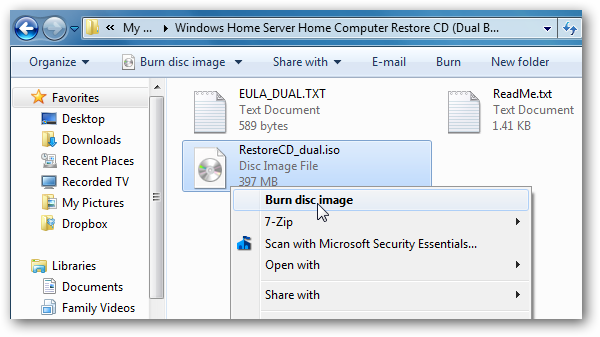
By default the image is installed to My Documents in the Windows Home Server Home Computer Restore CD (Dual Boot) folder. However, you point it to any directory on your computer you want to use. Actually you might want to send it to the Software share of WHS.

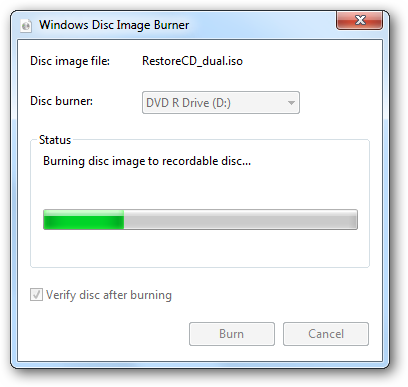
To burn the image to CD in Windows 7 you can use the built in Disc Image Burner utility.
If you’re using Vista or XP you can use the free utility ISO Recorder to burn the CD following this guide. They offer both a 32 & 64 bit version of ISO Recorder.
Picture
Once you have the the restore CD created make sure to keep it in a safe place in case you need it to restore one of the machines on your network.
Picture
It’s good to have this disc ready in case disaster strikes so you can restore a machine from WHS backups. In the near future we’ll take a look at completely restoring a computer using the Restore CD and a backup from WHS. Backing up your computer data is extremely important and WHS makes it a “set it and forget it” process. You might also be interested in learning how to Link Removed.
Link Removed due to 404 Error
Link Removed due to 404 Error
Link Removed
There may come a time when one of the computers on your network will need to be restored from a home server backup. To do this you’ll need a WHS Home Computer Restore CD and here we take a look at how to create one.
Create Home Computer Restore CD
There used to be an ISO stored in the Software folder of WHS that would allow you to create a Restore CD. If you see an image there it’s more than likely outdated. To get the new image head over to the Microsoft site and download restorecd.msi (link below).
By default the image is installed to My Documents in the Windows Home Server Home Computer Restore CD (Dual Boot) folder. However, you point it to any directory on your computer you want to use. Actually you might want to send it to the Software share of WHS.
To burn the image to CD in Windows 7 you can use the built in Disc Image Burner utility.
If you’re using Vista or XP you can use the free utility ISO Recorder to burn the CD following this guide. They offer both a 32 & 64 bit version of ISO Recorder.
Picture
Once you have the the restore CD created make sure to keep it in a safe place in case you need it to restore one of the machines on your network.
Picture
It’s good to have this disc ready in case disaster strikes so you can restore a machine from WHS backups. In the near future we’ll take a look at completely restoring a computer using the Restore CD and a backup from WHS. Backing up your computer data is extremely important and WHS makes it a “set it and forget it” process. You might also be interested in learning how to Link Removed.
Link Removed due to 404 Error
Link Removed due to 404 Error

