

Windows 3.1’s most notorious color theme — the so‑called Hot Dog Stand — was not a machinist’s prank, an inside joke, or a deliberately malicious “worst‑possible” experiment; it was simply a loud, poorly judged palette that stuck in people’s memories and then became a legend of design folklore. The story of Hot Dog Stand is useful not just because it lets us laugh at vintage UI kitsch, but because it reveals how early GUI design decisions, accessibility constraints, engineering pragmatism, and naming all combined to produce a lasting cultural artifact in the Windows lineage.
Windows 3.1 arrived at a time when graphical user interfaces were still finding common ground between functionality, resource limits, and visual flair. The operating system introduced features that feel radical in historical context — improved iconography, TrueType font support, and early theme‑like customizations — but those advances were also constrained by limited color palettes, low resolutions, and a very different set of UX expectations than modern designers face.
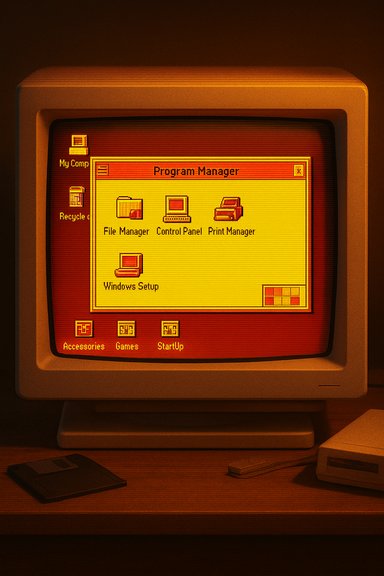
The yellow‑and‑red Hot Dog Stand scheme — a bright, saturated combination that contrasts sharply with the grey + blue default most of us associate with early Windows — became one of the visual shorthand pieces of that era. Contemporary reporting and interviews with designers who worked on early Windows builds make the origin story clearer: the theme was never intended as a joke or a design lesson in how not to build interfaces; it was a garish choice that the team included among several experimental palettes, and the memorable name and bold colors helped the scheme lodge itself in culture far beyond its original usage. This account is reported in recent retrospective coverage of Windows 3.1.
Modern accessibility thinking is far more rigorous: contrast ratios, semantics, and multi‑cue signaling (color plus text or icons) are used to ensure that interfaces work for people with a range of vision differences. Recent accessibility work in web and platform tooling demonstrates how much deeper the conversation has become: teams now use automated contrast checks, dedicated tooling, and layered cues to ensure color choices serve function as well as form. That evolution underscores why a single anecdote about a garish theme helping a few users shouldn’t be read as a justification for poor contrast or random saturation choices.
If any part of this article references claims that need direct primary documentation or verbatim transcripts from the interviews cited in contemporary reporting, those specific quotes can be double‑checked against the original articles and engineers’ posts; the retrospective accounts and engineering commentaries in the archive support the core claims summarized here but some peripheral anecdotes remain only partially verifiable in the provided material.
Source: Windows Central https://www.windowscentral.com/micr...-hotdog-stand-garish-choice-with-catchy-name/
 Background / Overview
Windows 3.1 arrived at a time when graphical user interfaces were still finding common ground between functionality, resource limits, and visual flair. The operating system introduced features that feel radical in historical context — improved iconography, TrueType font support, and early theme‑like customizations — but those advances were also constrained by limited color palettes, low resolutions, and a very different set of UX expectations than modern designers face.The yellow‑and‑red Hot Dog Stand scheme — a bright, saturated combination that contrasts sharply with the grey + blue default most of us associate with early Windows — became one of the visual shorthand pieces of that era. Contemporary reporting and interviews with designers who worked on early Windows builds make the origin story clearer: the theme was never intended as a joke or a design lesson in how not to build interfaces; it was a garish choice that the team included among several experimental palettes, and the memorable name and bold colors helped the scheme lodge itself in culture far beyond its original usage. This account is reported in recent retrospective coverage of Windows 3.1.
How Hot Dog Stand Became the UI Myth People Still Share
The ingredients of an enduring UI legend
Several ingredients are necessary for an interface detail to become a meme that outlives the software:- A visually jarring combination that stands out in screenshots and memory (Hot Dog Stand had this).
- A memorable name that people can repeat and riff on.
- Stories or quotes from insiders that offer a human explanation — or leave room for speculation.
- Ongoing nostalgia cycles: enthusiasts, emulator hobbyists, and media retrospectives keep the memory alive.
What designers at Microsoft said — the human side
Veteran designers who’ve been quoted in retrospectives remember the palette and the conversation around it. The recollections are telling: there was some snarky laughter when it was discussed internally, and some curiosity about whether to ship it, but the final decision was pragmatic — include a handful of color schemes that show a range of styles and let users pick or ignore them. The Hot Dog Stand name stuck precisely because a catchy brand name is memorable, even for something ugly. That explanation, though short, aligns with the oral histories and interviews preserved in modern coverage.Technical and Historical Context: Why Windows 3.1 Looked the Way It Did
Constraints that shaped every choice
Windows 3.1 was built for machines with limited color depth, modest VRAM, and variable display hardware. Designers had to work within:- Restricted palette sizes (16‑ or 256‑color modes were common).
- Low resolution and coarse pixel grids where color choices read differently than on modern displays.
- A need to keep UI primitives fast and deterministic across a huge range of hardware vendors.
Themes as a new feature and limited customization
Color themes in Windows 3.1 were a radically new feature for the time. Prior to that, system colors were mostly fixed and hardcoded. The ability to adjust parts of the UI was a major user empowerment step, but the tooling and the design guidelines were embryonic; early palettes were as much experiments as finished products. Designers pushed variety into the shipped set — including garish combinations — because there was curiosity about how people would respond and because the overhead of packing multiple small palettes was low compared with the value of demonstrating customizability. Contemporary interviews and coverage underline this point: themes represented a substantial usability change, and early choices were exploratory.Windows 95 Installation and the Legacy of Windows 3.1: An Engineering Tradeoff
Why Windows 95’s setup used a trimmed Windows 3.1 runtime
One of the less obvious technical footnotes in Windows history is how the Windows 95 installer worked. Engineers chose to base the GUI portion of the installer on a miniature Windows 3.1 runtime instead of writing a bespoke graphical installer or trimming down a full Windows 95 runtime. The reason was pragmatic:- A trimmed Windows 95 runtime would itself have been a large engineering project — essentially writing a new smaller OS to support the installer.
- A proven, fully debugged Windows 3.1 runtime provided a familiar, reliable platform for drawing windows, handling input, and displaying status while the system moved through setup tasks.
- Using an existing 16‑bit UI stack avoided the “write‑and‑debug‑a‑new‑graphics‑stack” cost while keeping the installer deliverable deadline realistic.
What this teaches modern engineers
That history is instructive for modern platform teams: sometimes the fastest, most reliable path to a smooth user experience is reuse of well‑known, well‑tested components rather than building a shiny but unproven new path. The tradeoffs are clear: you carry legacy constraints, but you dramatically reduce unknowns and shipping risk.Accessibility, Color Perception, and the Surprisingly Useful Side of Ugly Palettes
Did Hot Dog Stand help anyone?
Oddly enough, what many people remember as a bad aesthetic choice had a small accessibility upside for a subset of users. Some early users pointed out that certain high‑contrast, highly saturated palettes — while jarring to general sensibilities — could make interface elements easier to separate for people with particular color‑vision deficiencies. That doesn’t make the scheme “good design,” but it does complicate the narrative that all garish palettes are equally harmful.Modern accessibility thinking is far more rigorous: contrast ratios, semantics, and multi‑cue signaling (color plus text or icons) are used to ensure that interfaces work for people with a range of vision differences. Recent accessibility work in web and platform tooling demonstrates how much deeper the conversation has become: teams now use automated contrast checks, dedicated tooling, and layered cues to ensure color choices serve function as well as form. That evolution underscores why a single anecdote about a garish theme helping a few users shouldn’t be read as a justification for poor contrast or random saturation choices.
The modern design lesson
- Use multiple cues (shape, text, spacing) rather than only color to communicate.
- Validate palettes against contrast guidelines (WCAG) and test on real people with varied vision.
- Remember that memorable names and brandability can amplify even poor design choices — naming matters.
Why the Hot Dog Stand Story Still Matters to Windows Enthusiasts and Designers
It’s a cautionary tale and a nostalgic meme
Hot Dog Stand is both: a cautionary tale about the power of naming and the long tail of design decisions, and a bit of affectionate nostalgia for an era when GUIs were wild experiments. For journalists, designers, and engineers the story provides several useful reminders:- Small, visible artifacts in an OS — names, colors, default sounds — can become cultural reference points that outlast the product.
- The combination of design and engineering constraints matters: ugly choices may be rooted in practical tradeoffs, but they still shape perception.
- Oral history and the memories of practitioners are essential to understanding those choices — and are often the only record when official docs are sparse.
What the archives and veteran engineers show us
Retrospectives that interview designers and engineers provide first‑hand context that can correct the myth: the Hot Dog Stand name amplified the palette’s notoriety, but the inclusion of the palette was not an attempt to “make the worst theme” as a joke; it was simply one of several shipped choices, a garish one, whose fate was shaped by memory and media repetition. Contemporary coverage and engineering retrospectives that discuss the Windows 95 installer decision give a fuller picture of the practical pressures shaping UX decisions at the time.Strengths, Risks, and Critical Analysis
Notable strengths of the historical narrative
- The Hot Dog Stand anecdote exposes how design choices travel: a single palette becomes shorthand for an era.
- The Windows 3.1 → Windows 95 setup story is a robust example of pragmatic engineering: reuse of proven code to reduce risk.
- The history shows design evolution: from ad‑hoc theme packs to modern system‑wide theming baked with accessibility checks.
Potential risks and blind spots in the popular version of the story
- Mythmaking: Repeated retellings can add details (e.g., “designed to be the worst”) that lack primary evidence. Those embellishments should be flagged.
- Survivorship bias: We remember the Hot Dog Stand because it was memorable; many other design experiments have been forgotten (and might be just as instructive).
- Oversimplification: Presenting the palette as a “joke” misses the structural realities of limited palettes, hardware variability, and early UI tooling limits.
Practical Takeaways for Windows Users and Designers Today
For modern designers
- Favor clarity over novelty: striking palettes attract attention but must always be grounded in legibility and accessibility.
- Test broadly: run automated contrast checks and test with people across color‑vision differences.
- Treat default choices as brand signals: small defaults carry outsized reputational weight.
For Windows enthusiasts and historians
- Keep oral histories: interviews with veteran designers and engineers preserve context that code alone cannot.
- Use emulation carefully: viewing old themes on modern displays can misrepresent how they looked originally; emulate original color depths when possible.
- Remember tradeoffs: vintage design choices often emerge from hardware constraints — not malice or mischief.
Conclusion
Hot Dog Stand’s fame is a layered artifact: it’s a memorable name, it’s a striking set of colors, and it’s an example of how early UI experimentation can become a persistent cultural reference. The truth is more prosaic than the myth: the Windows 3.1 team shipped a garish color scheme among several options because the feature set was experimental and naming made it memorable; the team didn’t include it as a deliberate “worst possible theme.” At the same time, the Windows 95 setup’s reuse of a Windows 3.1 runtime shows that pragmatic engineering often shapes UI decisions as much as aesthetic judgment does. Those two strands — design memory and engineering pragmatism — together explain why Hot Dog Stand remains a talking point in Windows retrospectives today.If any part of this article references claims that need direct primary documentation or verbatim transcripts from the interviews cited in contemporary reporting, those specific quotes can be double‑checked against the original articles and engineers’ posts; the retrospective accounts and engineering commentaries in the archive support the core claims summarized here but some peripheral anecdotes remain only partially verifiable in the provided material.
Source: Windows Central https://www.windowscentral.com/micr...-hotdog-stand-garish-choice-with-catchy-name/
