

Microsoft has made AI picture creation feel less like a technical workflow and more like a conversation. In Copilot, you can describe an image in plain language, refine the result with follow-up prompts, and even transform an existing photo without opening a traditional design suite. That simplicity matters: it lowers the barrier for beginners while still giving hobbyists, marketers, and professionals a fast way to generate visuals. The core idea is straightforward—Copilot turns everyday language into images, and then lets you adjust the output step by step.
AI image generation has moved quickly from novelty to everyday utility, and Microsoft has repeatedly positioned Copilot as the approachable entry point. What used to require specialized tools, prompt jargon, and a little bit of luck now looks much closer to a normal creative task. Instead of learning layers, masks, and brush settings first, users can begin with a sentence and iterate from there. Microsoft’s own guidance emphasizes that Copilot can generate new images from text prompts or edit uploaded images with a similar conversational style.
That shift is important because the biggest barrier to AI art has never been imagination; it has been interface complexity. Many people know what they want—a cozy scene, a stylized portrait, a clean product mockup—but struggle to translate that idea into technical instructions. Microsoft’s Copilot approach is designed to reduce that friction by letting the user say what they mean in ordinary language. The result is a creative flow that feels more like collaboration than software operation.
Copilot’s image tools also reflect a broader industry movement toward multimodal AI, where the same assistant can handle text, images, and increasingly other media. Microsoft has described Copilot as relying on advanced image-generation models and offering both creation and editing experiences across its consumer products. In practical terms, that means users can ask for a fresh image, upload something existing, or refine the composition with a few more prompts. It is a notably low-friction model compared with older creative software.
The timing matters as well. Microsoft has expanded image features across Copilot, the Microsoft 365 Copilot app, Paint, and Photos-related AI experiences on supported devices. That means “make an AI picture” is no longer a single-feature story tied to one app; it is part of a larger Microsoft ecosystem strategy. For users, that creates more choice. For competitors, it raises the bar for how easy consumer-facing AI creativity must be.
Put simply, Microsoft is not just selling image generation; it is selling accessibility. The company’s framing consistently stresses that beginners do not need to be experts to get good results. That message is central to understanding why Copilot’s image tools are getting attention now. The promise is not merely that AI can make pictures, but that anyone can make them with very little overhead.
The practical distinction matters. When people hear “AI picture,” they often imagine fantasy scenes or stylized illustrations. In reality, the more common use cases may be simpler: removing a background, improving lighting, creating a mockup, or producing a visual for a presentation. Microsoft’s own examples range from photorealistic scenes to cartoons, and that flexibility is a major part of the appeal.
This split is more than a technical detail. It shapes expectations, workflow, and output quality. Generation is ideal when you want novelty, while editing is ideal when you want continuity, realism, or a specific subject preserved. Users who understand that difference usually get better results faster. That is especially true when they are trying to adapt a real photo rather than invent a new scene.
That makes Copilot feel less like a specialist tool and more like a creative utility. The real innovation is not that AI can create an image; it is that Microsoft has made the process legible to non-designers. In adoption terms, that is a huge advantage. Simplicity scales better than expertise.
The most useful thing for beginners is that the first prompt does not need to be perfect. Microsoft’s own advice encourages specificity, but it also encourages iteration. That means if the first output misses the mark, you can ask for changes like warmer lighting, a different composition, or a more realistic style. This is a better mental model than trying to cram every detail into a single “perfect” prompt.
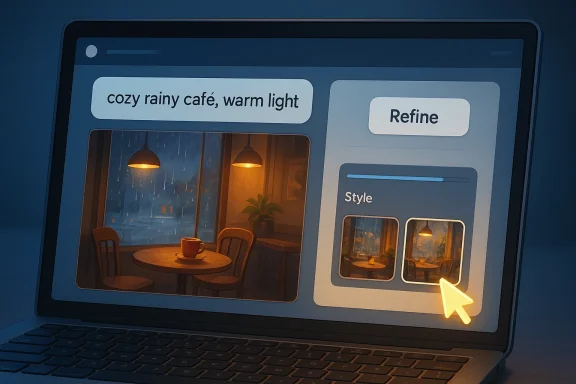
That does not mean long prompts always win. In fact, overloading a prompt with too many competing ideas can make the image less coherent. A cleaner prompt such as “a cozy reading corner in a rainy café, warm lighting, watercolor style” often works better than a paragraph that tries to specify everything at once. Precision beats volume in this context.
This is where Microsoft’s strategy becomes especially consumer-friendly. Many people do not want to become photographers or retouchers; they just want a better-looking image for a project, profile, or post. Copilot’s AI editing makes that possible with plain-English requests like “remove the background” or “make this look like golden hour.” That lowers the threshold for useful results.
This tradeoff matters for users who need brand consistency or exact product accuracy. AI can be excellent for ideation and light cleanup, but it may not always be the right tool for regulated visuals, legal documentation, or exact manufacturing references. Use the shortcut where it helps, not where precision is non-negotiable.
A good prompt often includes the subject, environment, atmosphere, and style. If you are making a portrait, you might describe pose, lighting, and backdrop. If you are making a landscape, you might describe terrain, time of day, weather, and art style. That gives Copilot enough structure to produce something coherent while still leaving room for the model’s interpretation.
Another common mistake is treating the first result as a final verdict. Microsoft’s own examples show the value of refinement, and that is the mindset users should adopt. AI image tools work best when users treat them as collaborative generators rather than one-shot vending machines. Iteration is part of the process.
That ecosystem approach is strategically smart. Casual users may start in Copilot, power users may prefer Microsoft 365, and Windows users may encounter image generation in apps they already know. Microsoft is effectively embedding AI creativity into the places where people already work. That reduces adoption friction dramatically.
That broad audience matters because it suggests Microsoft is not chasing only artistic users. It is chasing anyone who needs a visual answer quickly. That is a wider market than “AI art” alone, and it helps explain why Microsoft keeps emphasizing accessibility over artistic purity.
This is a subtle but important advantage. When image generation becomes a built-in capability rather than a separate app, users are more likely to experiment with it. Distribution is destiny in software, and Microsoft has a distribution advantage few rivals can match.
Competitors offer powerful generators, but not all of them feel as integrated into day-to-day workflows. Microsoft benefits from being where users already are: Windows, Edge, Copilot, Microsoft 365, and related apps. That ecosystem integration makes the feature more visible and more habit-forming.
That creates pressure on rivals to simplify even further. In a market where every model can produce something visually impressive, the winner may be the product that removes the most friction. Ease of use is becoming a strategic moat.
The broader market implication is that AI image generation is no longer a niche feature. It is becoming a standard expectation inside productivity software. That is a major shift because it turns image creation into a baseline capability rather than a premium specialty.
This issue becomes even more important in professional settings. Teams using AI-generated imagery for marketing, internal communications, or public-facing materials need to think about ownership, brand safety, and disclosure norms. AI makes creation faster, but it also increases the pace at which low-quality or unauthorized assets can spread.
For enterprises, the story is more nuanced. AI image generation can speed up ideation and internal communication, but it also raises questions about governance, licensing, and consistency. Microsoft 365’s structured creation flows and brand-related options suggest the company understands that business users need more than raw generation.
That dual-use design is strategically valuable. It means Microsoft can market the same underlying capability as a creative toy for one audience and a productivity accelerator for another. Few software features can bridge that gap so effectively.
The bigger question is not whether Microsoft can generate better pictures. It is whether it can keep the experience simple while improving control, trust, and consistency. If it can do that, Copilot becomes less like a novelty and more like a standard creative utility. That would be a meaningful milestone for both Microsoft and the broader AI tools market.
Source: Microsoft How to Make an AI Picture | Microsoft Copilot
 Background
AI image generation has moved quickly from novelty to everyday utility, and Microsoft has repeatedly positioned Copilot as the approachable entry point. What used to require specialized tools, prompt jargon, and a little bit of luck now looks much closer to a normal creative task. Instead of learning layers, masks, and brush settings first, users can begin with a sentence and iterate from there. Microsoft’s own guidance emphasizes that Copilot can generate new images from text prompts or edit uploaded images with a similar conversational style.That shift is important because the biggest barrier to AI art has never been imagination; it has been interface complexity. Many people know what they want—a cozy scene, a stylized portrait, a clean product mockup—but struggle to translate that idea into technical instructions. Microsoft’s Copilot approach is designed to reduce that friction by letting the user say what they mean in ordinary language. The result is a creative flow that feels more like collaboration than software operation.
Copilot’s image tools also reflect a broader industry movement toward multimodal AI, where the same assistant can handle text, images, and increasingly other media. Microsoft has described Copilot as relying on advanced image-generation models and offering both creation and editing experiences across its consumer products. In practical terms, that means users can ask for a fresh image, upload something existing, or refine the composition with a few more prompts. It is a notably low-friction model compared with older creative software.
The timing matters as well. Microsoft has expanded image features across Copilot, the Microsoft 365 Copilot app, Paint, and Photos-related AI experiences on supported devices. That means “make an AI picture” is no longer a single-feature story tied to one app; it is part of a larger Microsoft ecosystem strategy. For users, that creates more choice. For competitors, it raises the bar for how easy consumer-facing AI creativity must be.
Put simply, Microsoft is not just selling image generation; it is selling accessibility. The company’s framing consistently stresses that beginners do not need to be experts to get good results. That message is central to understanding why Copilot’s image tools are getting attention now. The promise is not merely that AI can make pictures, but that anyone can make them with very little overhead.
What Microsoft Means by an AI Picture
An AI picture is an image created or altered by artificial intelligence, usually from a text prompt, an uploaded image, or both. Microsoft’s support material describes Copilot as capable of generating images from text prompts and transforming images you upload. That means the definition is broader than “AI art”; it also includes photo edits, style changes, and compositing tasks that traditionally required manual editing skills.The practical distinction matters. When people hear “AI picture,” they often imagine fantasy scenes or stylized illustrations. In reality, the more common use cases may be simpler: removing a background, improving lighting, creating a mockup, or producing a visual for a presentation. Microsoft’s own examples range from photorealistic scenes to cartoons, and that flexibility is a major part of the appeal.
Creation vs. Editing
Copilot supports both text-to-image generation and photo editing. The first starts with a blank canvas, while the second starts with a file the user already owns or is permitted to use. Microsoft explicitly notes that uploaded images should be original or otherwise properly licensed, which is a useful reminder that AI convenience does not remove copyright or usage rights.This split is more than a technical detail. It shapes expectations, workflow, and output quality. Generation is ideal when you want novelty, while editing is ideal when you want continuity, realism, or a specific subject preserved. Users who understand that difference usually get better results faster. That is especially true when they are trying to adapt a real photo rather than invent a new scene.
- New images are best for concepts, illustrations, and mood boards.
- Edited images are best for cleanup, enhancement, and re-styling.
- Uploaded images should be owned by you or properly licensed.
- Follow-up prompts often improve the final result more than the first prompt.
Why This Matters for Everyday Users
The reason this matters is simple: most people do not need a full graphics workstation to communicate visually. A teacher may want a classroom graphic, a small business may want a social post, and a parent may want a playful birthday image. Microsoft’s approach takes those ordinary needs and maps them to a conversation instead of a software lesson.That makes Copilot feel less like a specialist tool and more like a creative utility. The real innovation is not that AI can create an image; it is that Microsoft has made the process legible to non-designers. In adoption terms, that is a huge advantage. Simplicity scales better than expertise.
How to Make an AI Picture in Copilot
Microsoft’s process is intentionally simple: open Copilot, describe the image, review the result, and refine as needed. Support guidance says users can create images in Copilot with text prompts, while Microsoft 365 Copilot additionally offers a structured image creation flow with style and shape selection. In both cases, the pattern is the same: ask, inspect, revise.The most useful thing for beginners is that the first prompt does not need to be perfect. Microsoft’s own advice encourages specificity, but it also encourages iteration. That means if the first output misses the mark, you can ask for changes like warmer lighting, a different composition, or a more realistic style. This is a better mental model than trying to cram every detail into a single “perfect” prompt.
A Simple Step-by-Step Workflow
A practical workflow usually looks like this: open Copilot in the browser, app, or Windows experience; describe the scene; review the image; and request adjustments. Microsoft’s support documentation for the Microsoft 365 Copilot app and Copilot image generation makes clear that users can start from a prompt or an uploaded image depending on what they want to accomplish.- Open Microsoft Copilot.
- Describe the image you want in plain language.
- Wait for Copilot to generate the result.
- Ask for changes if it is not quite right.
- Save or share the final image.
- Keep your first prompt focused.
- Use clear nouns and simple scene descriptions.
- Add style only when it helps.
- Refine in small steps rather than starting over.
What Good Prompts Usually Include
Microsoft recommends being as specific as possible when describing an image. A good prompt typically mentions subject, setting, mood, style, and sometimes lighting or color. The more concrete the description, the more likely Copilot is to produce something aligned with the user’s intention.That does not mean long prompts always win. In fact, overloading a prompt with too many competing ideas can make the image less coherent. A cleaner prompt such as “a cozy reading corner in a rainy café, warm lighting, watercolor style” often works better than a paragraph that tries to specify everything at once. Precision beats volume in this context.
Editing Photos with AI
One of Copilot’s strongest practical uses is photo editing. Microsoft says users can upload an image and ask Copilot to transform it, which opens the door to background changes, style shifts, lighting improvements, and creative repurposing. That is especially helpful for users who have a decent photo already but want to improve its presentation without learning complex editing software.This is where Microsoft’s strategy becomes especially consumer-friendly. Many people do not want to become photographers or retouchers; they just want a better-looking image for a project, profile, or post. Copilot’s AI editing makes that possible with plain-English requests like “remove the background” or “make this look like golden hour.” That lowers the threshold for useful results.
Common Edit Requests
Microsoft’s support examples and product pages suggest a broad set of common requests, including background removal, lighting changes, sharpening details, and style transformations. On supported Microsoft 365 Copilot experiences, users can also work from templates, brand kits, or predefined styles when creating visuals. The core idea is to let the AI do the mechanical lifting while the user focuses on intent.- Remove or replace a background.
- Improve brightness or contrast.
- Sharpen or soften the image.
- Change the image style.
- Convert a photo into an illustration or cartoon.
- Adjust mood or time-of-day appearance.
Where Editing Still Has Limits
At the same time, AI editing is not identical to traditional editing. You are not manually controlling every pixel; you are asking a model to reinterpret the image. That means some results may feel less precise than a carefully edited file in a professional tool. The payoff is speed and accessibility, not perfect deterministic control.This tradeoff matters for users who need brand consistency or exact product accuracy. AI can be excellent for ideation and light cleanup, but it may not always be the right tool for regulated visuals, legal documentation, or exact manufacturing references. Use the shortcut where it helps, not where precision is non-negotiable.
Prompting Tips That Actually Help
Microsoft’s own guidance emphasizes that richer prompts produce better images. In practice, the most effective prompts tend to be specific without becoming overcomplicated. Think of the prompt as a creative brief, not a technical command line.A good prompt often includes the subject, environment, atmosphere, and style. If you are making a portrait, you might describe pose, lighting, and backdrop. If you are making a landscape, you might describe terrain, time of day, weather, and art style. That gives Copilot enough structure to produce something coherent while still leaving room for the model’s interpretation.
The Best Prompt Pattern
The strongest prompt pattern is usually: subject + context + style + mood. Microsoft’s examples repeatedly point toward this structure, whether it is a photorealistic city skyline at sunset or a watercolor fox by a river. The reason this works is that it gives the AI a visual hierarchy instead of a bag of disconnected details.- Start with the main subject.
- Add a setting or background.
- Specify the mood or lighting.
- Choose a style only if it improves the result.
- Refine the image with follow-up prompts.
What to Avoid
The biggest prompt mistake is trying to force too much into one request. If you describe five subjects, three styles, two lighting conditions, and a dozen objects, the output can become muddled. It is better to generate a strong first draft and then iterate than to expect a perfect image from an overloaded prompt.Another common mistake is treating the first result as a final verdict. Microsoft’s own examples show the value of refinement, and that is the mindset users should adopt. AI image tools work best when users treat them as collaborative generators rather than one-shot vending machines. Iteration is part of the process.
Copilot Across Microsoft’s Creative Ecosystem
Copilot is not the only Microsoft product with image generation, but it is the most visible consumer-facing entry point. Microsoft Support also documents image creation in the Microsoft 365 Copilot app, while Paint and Photos-related experiences have their own AI-enhanced features on supported devices. The result is a layered ecosystem rather than a single standalone tool.That ecosystem approach is strategically smart. Casual users may start in Copilot, power users may prefer Microsoft 365, and Windows users may encounter image generation in apps they already know. Microsoft is effectively embedding AI creativity into the places where people already work. That reduces adoption friction dramatically.
Consumer vs. Productivity Use Cases
For consumers, the appeal is obvious: fun, fast, and easy image creation without a steep learning curve. For businesses and professionals, the value is more operational. Teams can use generated visuals for brainstorming, presentations, drafts, concept art, and lightweight marketing assets. Microsoft has repeatedly framed Copilot as useful for designers, marketers, educators, and hobbyists alike.That broad audience matters because it suggests Microsoft is not chasing only artistic users. It is chasing anyone who needs a visual answer quickly. That is a wider market than “AI art” alone, and it helps explain why Microsoft keeps emphasizing accessibility over artistic purity.
- Consumers want speed and creativity.
- Professionals want drafts and visual communication.
- Educators want easy classroom assets.
- Marketers want quick mockups and social visuals.
The Role of Microsoft 365 and Windows
Microsoft 365 Copilot adds more structured creation flows, including style and shape options, and in some cases brand kit support. That makes it more attractive for business environments where repeatability matters. Meanwhile, Windows-native features and app integrations keep the AI image story tied to the operating system itself.This is a subtle but important advantage. When image generation becomes a built-in capability rather than a separate app, users are more likely to experiment with it. Distribution is destiny in software, and Microsoft has a distribution advantage few rivals can match.
The Competitive Landscape
Microsoft’s AI picture tools sit in a crowded field, but the company’s positioning is distinctive. Rather than focusing solely on artistic ambition, Microsoft emphasizes ease, conversational use, and immediate utility. That may sound modest, but it is exactly the kind of positioning that converts mainstream users.Competitors offer powerful generators, but not all of them feel as integrated into day-to-day workflows. Microsoft benefits from being where users already are: Windows, Edge, Copilot, Microsoft 365, and related apps. That ecosystem integration makes the feature more visible and more habit-forming.
Why Integration Matters
The value of integration is not just convenience. It also changes how often people use the tool and what they use it for. If the image generator sits inside a productivity suite or a familiar app, users are more likely to make a quick visual than to switch to a separate creative platform.That creates pressure on rivals to simplify even further. In a market where every model can produce something visually impressive, the winner may be the product that removes the most friction. Ease of use is becoming a strategic moat.
- Integrated tools encourage repeated use.
- Familiar interfaces reduce learning time.
- Cross-device availability expands the audience.
- Workflow fit can matter more than raw model quality.
What Rivals Will Need to Match
To compete effectively, rivals will need more than image quality. They will need smooth onboarding, clear editing flows, strong defaults, and a trust layer that helps users know what they can upload and modify. Microsoft’s combination of explanation, accessibility, and ecosystem breadth sets a high bar.The broader market implication is that AI image generation is no longer a niche feature. It is becoming a standard expectation inside productivity software. That is a major shift because it turns image creation into a baseline capability rather than a premium specialty.
Accuracy, Rights, and Responsible Use
Microsoft’s support guidance is clear that uploaded images should be original or properly licensed. That may seem like a small footnote, but it is a crucial part of responsible AI image editing. Users should not assume that because AI can transform an image, it can also erase the legal obligations attached to that image.This issue becomes even more important in professional settings. Teams using AI-generated imagery for marketing, internal communications, or public-facing materials need to think about ownership, brand safety, and disclosure norms. AI makes creation faster, but it also increases the pace at which low-quality or unauthorized assets can spread.
What Users Should Keep in Mind
Users should treat AI imagery as a tool, not an exemption from policy or copyright rules. That means checking whether source photos can be edited, confirming that generated visuals do not mislead viewers, and avoiding uploads that violate rights or privacy expectations. Convenience is not the same as clearance.- Use owned or licensed source images.
- Review outputs for accuracy and context.
- Avoid using AI visuals where exact fidelity is critical.
- Be cautious about brand-sensitive or regulated content.
Enterprise and Consumer Impact
For consumers, Copilot’s image tools are primarily about speed and fun. They let people make birthday graphics, concept art, social visuals, or simple photo improvements without a learning curve. Microsoft has intentionally framed the experience as friendly and low pressure, which is exactly the kind of messaging that broadens adoption.For enterprises, the story is more nuanced. AI image generation can speed up ideation and internal communication, but it also raises questions about governance, licensing, and consistency. Microsoft 365’s structured creation flows and brand-related options suggest the company understands that business users need more than raw generation.
Different Needs, Same Core Engine
Consumers typically care about delight, convenience, and social sharing. Enterprises care about repeatability, brand alignment, and risk management. Copilot’s strength is that it can speak to both groups without forcing them into separate mental models. It remains the same conversational interface, but the surrounding expectations change.That dual-use design is strategically valuable. It means Microsoft can market the same underlying capability as a creative toy for one audience and a productivity accelerator for another. Few software features can bridge that gap so effectively.
Strengths and Opportunities
Microsoft’s AI picture experience has several obvious strengths, but its biggest advantage may be that it is understandable at a glance. Users do not need to decode a complex interface before seeing value. That simplicity gives Microsoft a real opportunity to normalize image generation as part of everyday computing.- Low learning curve for beginners.
- Conversational prompting instead of technical editing.
- Image creation and editing in one workflow.
- Broad ecosystem reach across Copilot, Microsoft 365, Windows, and related tools.
- Useful for consumers and professionals alike.
- Fast iteration through follow-up prompts.
- Strong distribution advantage through Microsoft’s existing user base.
Why This Is More Than a Feature
The opportunity is not just to generate images. It is to make AI creativity feel native to work and play. When users can ask for a picture the same way they ask for a summary or a rewrite, AI stops feeling like a special category and starts feeling like a normal capability. That is the kind of shift that drives mainstream adoption.Risks and Concerns
The same simplicity that makes Copilot appealing also introduces risk. Easy image generation can encourage careless use, especially when users assume the first output is good enough or that uploaded content is automatically safe to edit. Microsoft’s own documentation helps reduce some of that risk, but it cannot eliminate it entirely.- Prompt overloading can produce messy or inconsistent results.
- Rights and licensing issues still apply to uploaded images.
- Overreliance on AI may weaken manual design judgment.
- Misleading visuals can be created too quickly.
- Precision limits may frustrate professional workflows.
- Brand inconsistency may arise without careful review.
- Privacy concerns can emerge when uploading sensitive photos.
The Human Check Still Matters
AI can accelerate image creation, but it cannot replace editorial judgment. Someone still needs to decide whether an image is truthful, tasteful, on-brand, and fit for purpose. That human review is not optional when the output will be seen by customers, coworkers, students, or the public.Looking Ahead
Microsoft’s AI picture tools are likely to become more seamless, more embedded, and more context-aware. The direction of travel is clear: fewer switches, fewer prompts to explain the interface, and more ways to create visuals from the place where users are already working. As AI becomes a default layer inside Microsoft’s software stack, image creation will likely feel even more routine.The bigger question is not whether Microsoft can generate better pictures. It is whether it can keep the experience simple while improving control, trust, and consistency. If it can do that, Copilot becomes less like a novelty and more like a standard creative utility. That would be a meaningful milestone for both Microsoft and the broader AI tools market.
- More embedded image creation in Microsoft apps.
- Better prompt refinement and editing controls.
- Stronger enterprise governance features.
- Wider use of AI images in everyday productivity.
- Continued pressure on competitors to simplify their own tools.
Source: Microsoft How to Make an AI Picture | Microsoft Copilot
