

For more than a decade, Microsoft has been moving Windows away from the old idea of a neutral PC operating system and toward a managed entry point for accounts, subscriptions, cloud storage, search, advertising, and now AI services. That transition did not begin with Windows 11, and it is not reducible to one bad Start menu, one unpopular app replacement, or one hardware requirement. The real story is that Windows has changed its job description. It still runs applications, but it increasingly also steers users into Microsoft’s commercial universe.
Windows 7 occupies a strange position in PC culture. It was not revolutionary, and that was precisely its virtue. After the bloat, permission prompts, and driver headaches associated with Windows Vista, Windows 7 felt like Microsoft remembering what a desktop operating system was supposed to be: fast enough, familiar enough, and mostly content to stay out of the way.
That restraint mattered. The Start menu was compact. Jump Lists made common actions feel native rather than clever. Libraries offered a practical abstraction over scattered files without demanding that users rethink the meaning of storage. Windows Media Center, niche though it was, treated the PC as a capable local machine rather than merely a window into a web service.
Microsoft’s own 2009 pitch leaned heavily on simplification and everyday usability. That was not just marketing. It captured the bargain many users thought they had with Windows: the operating system would provide the plumbing, the user would decide what to do with the machine.
The affection for Windows 7 is therefore not just nostalgia for Aero Glass or a particular Start orb. It is nostalgia for a power relationship. The PC felt like the user’s environment, not a terminal in a larger account graph.
Windows 8 was not merely unpopular because it changed things. Windows users have adapted to plenty of change over the years. It was unpopular because it appeared to demote the desktop, the very arena where Windows had won the market.
That distinction is important. A company can redesign a product and survive the backlash if users believe the redesign is in service of their needs. Windows 8 gave many users the opposite impression: that the PC had become a strategic pawn in Microsoft’s attempt to create a tablet ecosystem.
The missing Start menu became a symbol because it condensed a larger complaint. Microsoft had not just changed a launcher. It had taken a familiar tool and made it behave like a billboard-sized interface for a different category of device.
But it was also a strategic reset. Windows was no longer merely a product sold in boxed editions or bundled with new PCs. It became a service layer, a continuously updated platform through which Microsoft could deepen the role of accounts, cloud services, app distribution, telemetry, Office subscriptions, search, and identity.
This shift fit the Satya Nadella-era Microsoft perfectly. The company’s center of gravity moved toward cloud infrastructure, recurring revenue, and services that followed users across devices. In that model, Windows was still valuable, but less as a standalone license and more as a privileged surface from which Microsoft could introduce and reinforce the rest of its ecosystem.
The tradeoff was subtle at first. A Microsoft account made syncing settings easier. OneDrive integration made backup and file roaming more convenient. Microsoft 365 replaced the old Office upgrade cycle with a subscription that many organizations preferred. Each piece could be defended individually.
Taken together, though, they changed the feel of the operating system. Windows began to behave less like infrastructure and more like a concierge — helpful, persistent, and always ready to recommend the next Microsoft thing.
The trouble is that diagnostic collection exists in the same user experience as advertising IDs, recommendations, personalized tips, app suggestions, cloud prompts, and account nudges. Even when the technical and commercial systems are distinct, they arrive at the user through the same interface: the operating system asking for more information, more permissions, and more trust.
That is why privacy debates around Windows are often emotionally charged even when the underlying settings are configurable. Users are not only asking what data is collected. They are asking whether the OS still sees them as the owner of the PC or as an addressable customer inside Microsoft’s service funnel.
Microsoft’s defenders will point out, correctly, that Apple, Google, and most modern platforms have made similar moves. That is true. But Windows carries a different historical burden because it grew up as the general-purpose operating system of the commodity PC. Its users include gamers, accountants, engineers, small businesses, schools, hobbyists, and industrial environments with very different tolerances for cloud-first assumptions.
A phone operating system can be opinionated because the phone is already a tightly managed appliance. The Windows PC was never supposed to be that simple. Its messiness was part of its freedom.
Microsoft’s security case is stronger than many critics admit. TPM-backed features can improve credential protection, BitLocker security, Windows Hello, measured boot, and other defenses that matter in a world of ransomware, firmware attacks, and credential theft. Enterprises have been asking for better hardware-rooted security for years.
But a technically defensible requirement can still have harsh consequences. For consumers and small businesses, the Windows 11 cutoff turned a software migration into a hardware judgment. PCs that were functional, repairable, and familiar suddenly became officially second-class.
That is where the resentment deepens. Microsoft can say, accurately, that unsupported configurations are not recommended. Users can reply, just as accurately, that the practical effect is to accelerate hardware replacement in a market where many PCs remain powerful enough for ordinary work.
The result is an uncomfortable collision between security modernization and platform control. Windows 11 is safer by design in several ways, but the method also gives Microsoft more authority over which PCs remain part of the supported future.
None of these is catastrophic in isolation. Many can be dismissed, disabled, hidden, or managed through policy. But their repetition creates a tone, and tone is what long-term users notice.
The old Control Panel still survives beside the modern Settings app, a duality that has become almost comic. Some configuration paths feel polished; others feel like archaeological digs. Microsoft has spent years modernizing the interface, yet the result often feels like a house where new rooms keep being added before the old wiring is fully mapped.
This matters because trust in an operating system is cumulative. Users tolerate complexity when they believe the complexity serves them. They resent it when complexity appears to conceal an agenda.
Modern Windows frequently trips that wire. When search promotes web content, when account sign-in is presented as the default path, when local workflows are wrapped in cloud onboarding, the OS stops feeling neutral. It begins to feel negotiated.
Microsoft’s answer is the new Outlook for Windows, tied naturally into Outlook.com, Microsoft 365, and the company’s broader productivity ecosystem. For many users, that will be fine. Outlook is familiar, capable in some contexts, and strategically central to Microsoft’s identity and productivity stack.
But the replacement also illustrates the modern pattern. A local or bundled app gives way to a service-shaped app. The free tier remains, but the better experience is increasingly associated with sign-ins, cloud mailboxes, cross-service integration, and paid Microsoft 365 plans promising perks such as an ad-free Outlook experience.
This is not a conspiracy. It is a business model. Microsoft is doing what platform companies do: converting occasional software transactions into ongoing relationships.
The frustration comes from the fact that Windows is not just another app. When bundled basics are retired or redirected, users experience the change as a shift in the operating system’s social contract. What once felt included now feels provisional.
For enterprise IT, the calculus is familiar. Unsupported operating systems increase exposure, complicate compliance, and create awkward exception lists. Extended security programs can buy time, but they do not change the direction of travel. Sooner or later, the fleet has to move.
For home users and small organizations, the pressure is messier. Some can upgrade to Windows 11 with little drama. Others face unsupported hardware, peripheral concerns, application compatibility worries, or simple fatigue. A decade-old PC that still handles email, documents, browsing, and light media work does not feel obsolete to its owner just because Microsoft’s support calendar says so.
That is why the Windows 10 deadline has become a flashpoint. It is not only about security patches. It is about who gets to decide when a working PC is finished.
Linux advocates see an opening here, and they are not wrong. For some users, especially those whose needs revolve around browsers, documents, coding, media playback, and older hardware, Linux has become more plausible than it was in the Windows 7 era. It is still not a universal answer, particularly for specialized Windows software and games with troublesome anti-cheat systems, but the alternative no longer feels theoretical.
The problem is that enterprise Windows and consumer Windows increasingly share the same visible design language, even when policy can suppress much of the noise. IT departments may appreciate Windows Hello for Business, BitLocker improvements, Defender integration, and Autopilot-style provisioning while still recoiling at consumer-facing prompts that make the OS look like an upsell machine.
This split personality is one reason Windows debates become so unproductive. One camp argues from the security architecture. The other argues from the lived experience of being nagged by the interface. Both are describing real Windows.
Microsoft’s challenge is that it wants Windows to be both a hardened enterprise endpoint and a growth surface for consumer services. Those missions can coexist, but not effortlessly. The more aggressively Windows promotes the ecosystem, the more it undermines the trust created by its security investments.
For administrators, the practical demand is not nostalgia. It is predictability. They want policies that work, defaults that do not change capriciously, upgrade paths that do not strand hardware unexpectedly, and user experiences that do not generate help-desk tickets because Microsoft decided to surface another onboarding flow.
The pitch is obvious: summarization, assistance, automation, natural language control, and contextual help built into the place where people already work. If implemented well, some of this could be genuinely useful. The PC has always needed better ways to bridge applications, settings, files, and workflows.
But AI also intensifies the trust problem. Users who already worry that Windows observes too much, recommends too much, and promotes too much are unlikely to welcome a more ambient assistant without asking hard questions. What does it see? What leaves the device? What is processed locally? What is retained? Which features are productivity tools, and which are subscription funnels?
Microsoft is not alone in facing those questions, but Windows again carries the weight of its legacy. The PC is where confidential documents are written, source code is built, photos are stored, taxes are filed, games are played, and businesses are run. AI features inside that environment must earn trust rather than assume it.
The company’s opportunity is real. The operating system could become more humane if AI helps users find settings, automate repetitive work, explain errors, and manage files without turning every interaction into a cloud dependency. The danger is equally real: AI could become the most sophisticated recommendation engine Windows has ever hosted.
The decline is more specific. It is a decline in restraint.
Windows used to be judged primarily by whether it enabled the user’s intent. Modern Windows is increasingly judged by whether users can distinguish their intent from Microsoft’s. That is a profound change, and it explains why even technically competent releases can generate cultural exhaustion.
The issue is not that Microsoft wants to make money from Windows. It always has. The issue is that the monetization has moved closer to the everyday surface of the operating system, where it competes with the user’s sense of ownership.
A paid license felt transactional. A subscription prompt inside the OS feels relational. A bundled app felt included. A cloud replacement feels conditional. A local search box felt private. A web-connected search experience feels mediated.
Those differences are not merely aesthetic. They shape whether Windows feels like a tool or a territory.
The concrete lessons are not complicated, but they are easy to lose in nostalgia wars and marketing language.
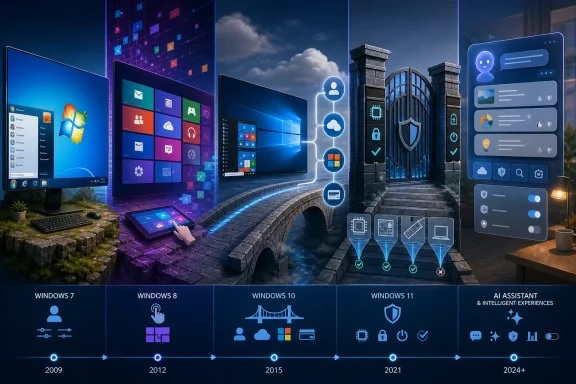 Windows 7 Became a Memory Because It Knew Its Place
Windows 7 occupies a strange position in PC culture. It was not revolutionary, and that was precisely its virtue. After the bloat, permission prompts, and driver headaches associated with Windows Vista, Windows 7 felt like Microsoft remembering what a desktop operating system was supposed to be: fast enough, familiar enough, and mostly content to stay out of the way.That restraint mattered. The Start menu was compact. Jump Lists made common actions feel native rather than clever. Libraries offered a practical abstraction over scattered files without demanding that users rethink the meaning of storage. Windows Media Center, niche though it was, treated the PC as a capable local machine rather than merely a window into a web service.
Microsoft’s own 2009 pitch leaned heavily on simplification and everyday usability. That was not just marketing. It captured the bargain many users thought they had with Windows: the operating system would provide the plumbing, the user would decide what to do with the machine.
The affection for Windows 7 is therefore not just nostalgia for Aero Glass or a particular Start orb. It is nostalgia for a power relationship. The PC felt like the user’s environment, not a terminal in a larger account graph.
Windows 8 Was the First Visible Breach of Trust
The rupture came with Windows 8, not Windows 11. In 2012, Microsoft looked at the iPad, the tablet boom, and its own weakness in mobile, then tried to drag the entire PC base into a touch-first future. The full-screen Start screen and live tiles made conceptual sense on a tablet. On a desktop with a mouse, keyboard, multiple windows, and years of user muscle memory, they felt like an operating system designed for someone else’s hardware.Windows 8 was not merely unpopular because it changed things. Windows users have adapted to plenty of change over the years. It was unpopular because it appeared to demote the desktop, the very arena where Windows had won the market.
That distinction is important. A company can redesign a product and survive the backlash if users believe the redesign is in service of their needs. Windows 8 gave many users the opposite impression: that the PC had become a strategic pawn in Microsoft’s attempt to create a tablet ecosystem.
The missing Start menu became a symbol because it condensed a larger complaint. Microsoft had not just changed a launcher. It had taken a familiar tool and made it behave like a billboard-sized interface for a different category of device.
Windows 10 Was an Apology With a Business Model Attached
Windows 10 repaired some of the visible damage. The Start menu returned. Snap Assist, virtual desktops, and a more coherent update cadence made the system feel more serious about productivity. The free upgrade offer for Windows 7 and Windows 8.1 users, beginning in July 2015, looked like an unusually generous course correction.But it was also a strategic reset. Windows was no longer merely a product sold in boxed editions or bundled with new PCs. It became a service layer, a continuously updated platform through which Microsoft could deepen the role of accounts, cloud services, app distribution, telemetry, Office subscriptions, search, and identity.
This shift fit the Satya Nadella-era Microsoft perfectly. The company’s center of gravity moved toward cloud infrastructure, recurring revenue, and services that followed users across devices. In that model, Windows was still valuable, but less as a standalone license and more as a privileged surface from which Microsoft could introduce and reinforce the rest of its ecosystem.
The tradeoff was subtle at first. A Microsoft account made syncing settings easier. OneDrive integration made backup and file roaming more convenient. Microsoft 365 replaced the old Office upgrade cycle with a subscription that many organizations preferred. Each piece could be defended individually.
Taken together, though, they changed the feel of the operating system. Windows began to behave less like infrastructure and more like a concierge — helpful, persistent, and always ready to recommend the next Microsoft thing.
Telemetry Turned Maintenance Into a Relationship
Modern Windows is deeply instrumented, and Microsoft argues that diagnostic data supports security, reliability, compatibility, and product improvement. That argument is not frivolous. Operating systems at Windows scale are impossible to maintain well without telemetry, crash data, driver signals, update failure reports, and some understanding of how features perform in the real world.The trouble is that diagnostic collection exists in the same user experience as advertising IDs, recommendations, personalized tips, app suggestions, cloud prompts, and account nudges. Even when the technical and commercial systems are distinct, they arrive at the user through the same interface: the operating system asking for more information, more permissions, and more trust.
That is why privacy debates around Windows are often emotionally charged even when the underlying settings are configurable. Users are not only asking what data is collected. They are asking whether the OS still sees them as the owner of the PC or as an addressable customer inside Microsoft’s service funnel.
Microsoft’s defenders will point out, correctly, that Apple, Google, and most modern platforms have made similar moves. That is true. But Windows carries a different historical burden because it grew up as the general-purpose operating system of the commodity PC. Its users include gamers, accountants, engineers, small businesses, schools, hobbyists, and industrial environments with very different tolerances for cloud-first assumptions.
A phone operating system can be opinionated because the phone is already a tightly managed appliance. The Windows PC was never supposed to be that simple. Its messiness was part of its freedom.
Windows 11 Made the Strategy Harder to Ignore
Windows 11 did not invent the ecosystem-first version of Windows, but it made the direction more obvious. It launched in October 2021 as a free upgrade for eligible Windows 10 PCs, but eligibility became the operative word. TPM 2.0, Secure Boot, supported CPUs, and Microsoft’s security baseline excluded a large number of machines that could still run Windows 10 acceptably.Microsoft’s security case is stronger than many critics admit. TPM-backed features can improve credential protection, BitLocker security, Windows Hello, measured boot, and other defenses that matter in a world of ransomware, firmware attacks, and credential theft. Enterprises have been asking for better hardware-rooted security for years.
But a technically defensible requirement can still have harsh consequences. For consumers and small businesses, the Windows 11 cutoff turned a software migration into a hardware judgment. PCs that were functional, repairable, and familiar suddenly became officially second-class.
That is where the resentment deepens. Microsoft can say, accurately, that unsupported configurations are not recommended. Users can reply, just as accurately, that the practical effect is to accelerate hardware replacement in a market where many PCs remain powerful enough for ordinary work.
The result is an uncomfortable collision between security modernization and platform control. Windows 11 is safer by design in several ways, but the method also gives Microsoft more authority over which PCs remain part of the supported future.
The Start Menu Became a Storefront for Priorities
The most revealing parts of modern Windows are often the small interruptions. A prompt to finish setting up a Microsoft account. A OneDrive backup recommendation. A Microsoft 365 trial. A browser preference nudge. A search box that blurs the boundary between local files and web results. A Start menu that sometimes feels less like a launcher than a recommendations surface.None of these is catastrophic in isolation. Many can be dismissed, disabled, hidden, or managed through policy. But their repetition creates a tone, and tone is what long-term users notice.
The old Control Panel still survives beside the modern Settings app, a duality that has become almost comic. Some configuration paths feel polished; others feel like archaeological digs. Microsoft has spent years modernizing the interface, yet the result often feels like a house where new rooms keep being added before the old wiring is fully mapped.
This matters because trust in an operating system is cumulative. Users tolerate complexity when they believe the complexity serves them. They resent it when complexity appears to conceal an agenda.
Modern Windows frequently trips that wire. When search promotes web content, when account sign-in is presented as the default path, when local workflows are wrapped in cloud onboarding, the OS stops feeling neutral. It begins to feel negotiated.
Outlook Shows How Replacement Became a Revenue Pattern
The retirement of Windows Mail, Calendar, and People at the end of 2024 is a small story that explains the larger one. Those apps were never beloved by everyone, and they were hardly the crown jewels of Windows. Still, they represented a familiar operating-system promise: basic personal information tools included with the machine.Microsoft’s answer is the new Outlook for Windows, tied naturally into Outlook.com, Microsoft 365, and the company’s broader productivity ecosystem. For many users, that will be fine. Outlook is familiar, capable in some contexts, and strategically central to Microsoft’s identity and productivity stack.
But the replacement also illustrates the modern pattern. A local or bundled app gives way to a service-shaped app. The free tier remains, but the better experience is increasingly associated with sign-ins, cloud mailboxes, cross-service integration, and paid Microsoft 365 plans promising perks such as an ad-free Outlook experience.
This is not a conspiracy. It is a business model. Microsoft is doing what platform companies do: converting occasional software transactions into ongoing relationships.
The frustration comes from the fact that Windows is not just another app. When bundled basics are retired or redirected, users experience the change as a shift in the operating system’s social contract. What once felt included now feels provisional.
Windows 10’s End Turned Preference Into a Deadline
Windows 10 support ended on October 14, 2025, and that date transformed a long-running preference into an operational decision. Users who preferred Windows 10 could no longer treat that preference as merely aesthetic. Without regular free security updates, staying put became a risk management problem.For enterprise IT, the calculus is familiar. Unsupported operating systems increase exposure, complicate compliance, and create awkward exception lists. Extended security programs can buy time, but they do not change the direction of travel. Sooner or later, the fleet has to move.
For home users and small organizations, the pressure is messier. Some can upgrade to Windows 11 with little drama. Others face unsupported hardware, peripheral concerns, application compatibility worries, or simple fatigue. A decade-old PC that still handles email, documents, browsing, and light media work does not feel obsolete to its owner just because Microsoft’s support calendar says so.
That is why the Windows 10 deadline has become a flashpoint. It is not only about security patches. It is about who gets to decide when a working PC is finished.
Linux advocates see an opening here, and they are not wrong. For some users, especially those whose needs revolve around browsers, documents, coding, media playback, and older hardware, Linux has become more plausible than it was in the Windows 7 era. It is still not a universal answer, particularly for specialized Windows software and games with troublesome anti-cheat systems, but the alternative no longer feels theoretical.
Enterprise IT Wants Security Without the Consumer Theater
Administrators are not sentimental about Windows 7 in quite the same way enthusiasts are. They remember imaging pain, driver models, Group Policy sprawl, malware cleanup, and the bad old days of unmanaged local admin rights. Modern Windows brings real gains: better identity integration, stronger endpoint security, improved management hooks, virtualization-based protections, and cloud management options that can reduce operational drag.The problem is that enterprise Windows and consumer Windows increasingly share the same visible design language, even when policy can suppress much of the noise. IT departments may appreciate Windows Hello for Business, BitLocker improvements, Defender integration, and Autopilot-style provisioning while still recoiling at consumer-facing prompts that make the OS look like an upsell machine.
This split personality is one reason Windows debates become so unproductive. One camp argues from the security architecture. The other argues from the lived experience of being nagged by the interface. Both are describing real Windows.
Microsoft’s challenge is that it wants Windows to be both a hardened enterprise endpoint and a growth surface for consumer services. Those missions can coexist, but not effortlessly. The more aggressively Windows promotes the ecosystem, the more it undermines the trust created by its security investments.
For administrators, the practical demand is not nostalgia. It is predictability. They want policies that work, defaults that do not change capriciously, upgrade paths that do not strand hardware unexpectedly, and user experiences that do not generate help-desk tickets because Microsoft decided to surface another onboarding flow.
AI Is the Next Layer of the Same Argument
Copilot and AI integration are not random add-ons to the Windows story. They are the next expression of the same strategic arc. If Windows became a portal to Microsoft accounts, cloud storage, search, and Office, it is now becoming a portal to Microsoft’s AI layer.The pitch is obvious: summarization, assistance, automation, natural language control, and contextual help built into the place where people already work. If implemented well, some of this could be genuinely useful. The PC has always needed better ways to bridge applications, settings, files, and workflows.
But AI also intensifies the trust problem. Users who already worry that Windows observes too much, recommends too much, and promotes too much are unlikely to welcome a more ambient assistant without asking hard questions. What does it see? What leaves the device? What is processed locally? What is retained? Which features are productivity tools, and which are subscription funnels?
Microsoft is not alone in facing those questions, but Windows again carries the weight of its legacy. The PC is where confidential documents are written, source code is built, photos are stored, taxes are filed, games are played, and businesses are run. AI features inside that environment must earn trust rather than assume it.
The company’s opportunity is real. The operating system could become more humane if AI helps users find settings, automate repetitive work, explain errors, and manage files without turning every interaction into a cloud dependency. The danger is equally real: AI could become the most sophisticated recommendation engine Windows has ever hosted.
The Real Decline Is a Loss of Restraint
Calling this the “decline of Windows” is tempting, but the phrase can mislead. Windows has not collapsed technically. It remains the dominant desktop operating system, the center of PC gaming, a cornerstone of enterprise computing, and a platform with extraordinary backward compatibility. Many of its modern security and management features are better than what came before.The decline is more specific. It is a decline in restraint.
Windows used to be judged primarily by whether it enabled the user’s intent. Modern Windows is increasingly judged by whether users can distinguish their intent from Microsoft’s. That is a profound change, and it explains why even technically competent releases can generate cultural exhaustion.
The issue is not that Microsoft wants to make money from Windows. It always has. The issue is that the monetization has moved closer to the everyday surface of the operating system, where it competes with the user’s sense of ownership.
A paid license felt transactional. A subscription prompt inside the OS feels relational. A bundled app felt included. A cloud replacement feels conditional. A local search box felt private. A web-connected search experience feels mediated.
Those differences are not merely aesthetic. They shape whether Windows feels like a tool or a territory.
The Windows 10 Deadline Exposes the New Bargain
The transition from Windows 10 to Windows 11 is the clearest test yet of Microsoft’s modern bargain with users. The company can argue that the future requires stronger hardware security, deeper cloud integration, and an AI-ready platform. Users can accept some of that while still objecting to the feeling that the OS has become a funnel.The concrete lessons are not complicated, but they are easy to lose in nostalgia wars and marketing language.
- Windows 7 remains beloved because it largely behaved like infrastructure rather than an ecosystem gateway.
- Windows 8 was the first major sign that Microsoft would redesign the PC around strategic priorities that many desktop users did not share.
- Windows 10 restored familiarity while normalizing Windows as a continuously updated service platform tied more closely to Microsoft accounts, telemetry, and subscriptions.
- Windows 11 strengthened Microsoft’s security baseline but also made hardware eligibility a central source of user frustration.
- The retirement of built-in apps such as Mail and Calendar shows how basic Windows functions are being re-channeled into service-oriented replacements.
- The end of Windows 10 support turned the philosophical debate into a practical decision about security, hardware replacement, extended updates, or migration away from Windows.
References
- Primary source: igor´sLAB
Published: Sun, 24 May 2026 04:00:00 GMT
Windows in Transition: From Tool to Entry Point into the Microsoft Ec…
For a long time, Windows was the operating system that was expected to do one thing above all: run.www.igorslab.de - Official source: support.microsoft.com
Windows 10 support has ended on October 14, 2025 | Microsoft Support
Windows 10 support ends on October 14, 2025. Upgrade to Windows 11 now to ensure continued security and feature updates. Learn more about the transition.support.microsoft.com - Official source: news.microsoft.com
Microsoft Simplifies the PC With Windows 7 - Source
New PC operating system available worldwide today. news.microsoft.com
- Official source: blogs.microsoft.com
Your free upgrade is here: Windows 10 launches with worldwide fan celebrations, #UpgradeYourWorld and more - The Official Microsoft Blog
On July 29, Microsoft will make Windows 10 available, across 190 countries, as a free upgrade or with new PCs and tablets. “We are excited to bring Windows 10 and its many innovations to the world,” Windows and Devices Group Corporate Vice President Yusuf Mehdi said in a blog post. “Windows 10...blogs.microsoft.com - Official source: learn.microsoft.com
Windows 10 reaching end of support - Microsoft Lifecycle | Microsoft Learn
Announcing Windows 10 reaching end of support.learn.microsoft.com - Related coverage: tomshardware.com
Microsoft persuades Mail and Calendar users to migrate to Outlook — Mail and Calendar app will cease to work after December 31 | Tom's Hardware
Mail and Calendar app will soon be added to Microsoft's list of defunct apps.www.tomshardware.com
- Related coverage: techradar.com
End of an era: Microsoft is planning to phase out Windows 11’s Mail and Calendar apps by the end of this year | TechRadar
Microsoft’s Mail and Calendar apps to be phased out in favor of Outlookwww.techradar.com - Official source: blogs.windows.com
Windows 11 available on October 5
Today, we are thrilled to announce Windows 11 will start to become available on October 5, 2021. On this day, the free upgrade to Windows 11 will begin rolling out to eligible Windows 10 PCs and PCs that come pre-loaded with Windows 11 will start toblogs.windows.com - Related coverage: windowscentral.com
Windows 10 reaches end of support: Discover how to keep your device secure beyond October 2025 | Windows Central
Windows 10 support ended on Tuesday, October 14. That means Windows 10 PCs will no longer receive security updates automatically, and you must take action to ensure these devices remain secure when connected to the internet.www.windowscentral.com - Related coverage: as.com
Cómo seguir usando Windows 10 después del fin del soporte en octubre de 2025: así funciona el programa ESU de Microsoft - Meristation
Microsoft continuará ofreciendo una alternativa para los usuarios de Windows 10 tras el cese del soporte oficial. Así funciona el programa ESU de W10.as.com - Related coverage: time.com
Microsoft Windows 10: Release Date, Features and More
Windows 10, Microsoft's new operating system, launches July 29.time.com - Related coverage: phys.org
- Official source: download.microsoft.com
- Related coverage: transparity.com
