

MakeUseOf’s account of switching to Linux without losing a Windows workflow is really a story about Windows Subsystem for Linux becoming the migration layer Microsoft probably did not intend it to be: a way to learn Linux habits while keeping Windows as the safety net. The paradox is that WSL was built to make Windows more attractive to developers, but for many users it also makes Linux less intimidating. It does not eliminate the trade-offs of changing operating systems, but it turns the switch from a cliff jump into a long, reversible ramp.
The old Windows-versus-Linux argument was framed as identity politics for computers. You were a Windows user, a Linux user, or one of the haunted souls maintaining a dual-boot setup and praying the bootloader survived the next update. That framing never matched how most people actually work.
Most users are not attached to kernels; they are attached to routines. They know where their files live, which terminal command opens a project, how their editor behaves, which keyboard shortcuts are burned into muscle memory, and which apps will not surprise them at 4:55 p.m. on a deadline. Switching operating systems is hard because it breaks continuity.
That is why the MakeUseOf piece lands. Its argument is not that WSL is a better Linux than Linux, because it is not. Its argument is that WSL is good enough to preserve the parts of a Windows workflow that matter while letting Linux tooling quietly become normal.
WSL 2 takes a different route. It runs a real Linux kernel inside a lightweight virtualized environment, but Microsoft hides enough of the plumbing that it feels less like launching another machine and more like opening another shell. That distinction matters. The less ceremony there is, the more likely users are to reach for Linux tools casually rather than treating them as a special excursion.
The integration is the product. Linux can call Windows executables; Windows can browse into Linux distributions through File Explorer; VS Code can run its interface on Windows while its development backend lives in Linux. For developers, sysadmins, and power users, that is not a gimmick. It is the difference between “I have Linux available” and “Linux is part of my workstation.”
WSL’s Windows integration is convenient, but the Windows and Linux file systems are not interchangeable performance zones. Running dependency installs, builds, searches, and Git-heavy operations against files mounted from the Windows side can be noticeably slower than keeping project files under the Linux home directory. The smooth workflow comes from respecting the boundary, not pretending it does not exist.
This is the kind of compromise WSL asks users to learn. It is deeply integrated, but not magically unified. The best experience comes when Windows remains the desktop and app platform, while Linux owns the development workspace. Once that model clicks, the setup stops feeling hybrid in the bad sense and starts feeling hybrid in the useful sense.
That arrangement solves a problem that used to push users toward full Linux installs or full VMs. Web development, Python work, Node.js tooling, container workflows, and shell scripting often assume a Unix-like environment. Windows has improved enormously, but many development ecosystems still feel most natural on Linux.
With WSL, users do not have to choose between a polished Windows desktop and a Linux-native toolchain. They can type
This does not mean every Linux desktop application suddenly feels native in the deepest sense. There are still edges around theming, performance, input, scaling, and hardware-dependent workloads. But the important shift is that graphical Linux apps no longer require a separate mental mode.
That matters for migration. A user trying GIMP, a Linux file manager, a database GUI, or a desktop text editor inside Windows is not merely testing an app. They are testing whether their daily habits can survive outside the Microsoft ecosystem. WSLg makes those experiments cheap.
WSL was that answer. It told developers they could keep Windows without giving up Linux workflows. For Microsoft, especially in an Azure-first world, that made perfect sense.
But bridges do not control traffic direction. The MakeUseOf piece captures the irony: the more a Windows user lives inside WSL, the less alien a full Linux install becomes. Bash muscle memory develops. The Linux file tree becomes familiar. Package managers stop feeling risky. Services, dotfiles, shells, SSH keys, and container workflows become everyday objects.
At that point, moving to native Linux is not a total reinvention. It is more like removing the Windows wrapper.
There is also a philosophical difference. WSL gives you a Linux userspace inside a Windows-governed machine. Native Linux gives you the whole stack. For some users, that distinction is academic; for others, it is the whole point.
The performance question is similarly nuanced. WSL 2 is fast enough for a great deal of real work, and often dramatically more convenient than a traditional VM. But workloads involving huge builds, memory pressure, file-system crossings, GPU quirks, or long-running service stacks may expose the abstraction. WSL narrows the gap; it does not abolish physics.
In that world, the operating system is still important, but it is less absolute. What matters is whether the workstation can host the user’s workflow without friction. WSL gives Windows users a Linux-native lane without forcing them to abandon the rest of their setup.
That is especially valuable for people who are curious about Linux but not ready to burn down years of accumulated comfort. You can learn Bash while still using Windows apps. You can move projects into an ext4-backed WSL distro while keeping Explorer nearby. You can try Linux GUI tools while your familiar desktop remains intact.
This is not cowardice. It is good migration design.
Source: MakeUseOf I switched to Linux without losing my Windows workflow — here's how WSL made that possible
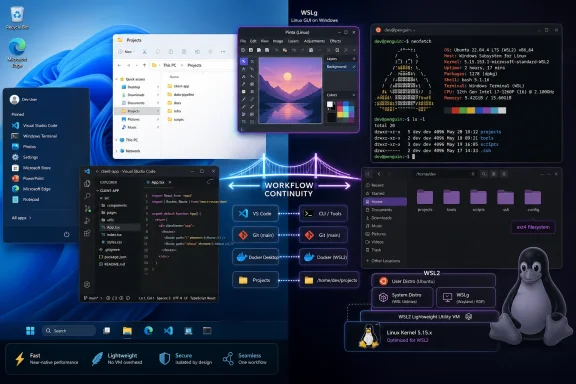 WSL Turns the Operating-System Switch Into a Workflow Problem
The old Windows-versus-Linux argument was framed as identity politics for computers. You were a Windows user, a Linux user, or one of the haunted souls maintaining a dual-boot setup and praying the bootloader survived the next update. That framing never matched how most people actually work.Most users are not attached to kernels; they are attached to routines. They know where their files live, which terminal command opens a project, how their editor behaves, which keyboard shortcuts are burned into muscle memory, and which apps will not surprise them at 4:55 p.m. on a deadline. Switching operating systems is hard because it breaks continuity.
That is why the MakeUseOf piece lands. Its argument is not that WSL is a better Linux than Linux, because it is not. Its argument is that WSL is good enough to preserve the parts of a Windows workflow that matter while letting Linux tooling quietly become normal.
The Clever Trick Is That WSL Feels Less Like a VM Than a Room Next Door
Traditional virtual machines solve compatibility by creating a second computer inside the first one. That is powerful, but it is also psychologically and operationally separate. You allocate RAM, assign storage, manage windows inside windows, install guest tools, and remember that copy-paste, file sharing, GPU access, and networking may all have their own little moods.WSL 2 takes a different route. It runs a real Linux kernel inside a lightweight virtualized environment, but Microsoft hides enough of the plumbing that it feels less like launching another machine and more like opening another shell. That distinction matters. The less ceremony there is, the more likely users are to reach for Linux tools casually rather than treating them as a special excursion.
The integration is the product. Linux can call Windows executables; Windows can browse into Linux distributions through File Explorer; VS Code can run its interface on Windows while its development backend lives in Linux. For developers, sysadmins, and power users, that is not a gimmick. It is the difference between “I have Linux available” and “Linux is part of my workstation.”
The File-System Boundary Is Where the Magic Gets Real
One of the most useful details in the MakeUseOf piece is also one of the least glamorous: keep Linux projects inside the Linux file system. That advice separates people who merely install WSL from people who actually enjoy using it.WSL’s Windows integration is convenient, but the Windows and Linux file systems are not interchangeable performance zones. Running dependency installs, builds, searches, and Git-heavy operations against files mounted from the Windows side can be noticeably slower than keeping project files under the Linux home directory. The smooth workflow comes from respecting the boundary, not pretending it does not exist.
This is the kind of compromise WSL asks users to learn. It is deeply integrated, but not magically unified. The best experience comes when Windows remains the desktop and app platform, while Linux owns the development workspace. Once that model clicks, the setup stops feeling hybrid in the bad sense and starts feeling hybrid in the useful sense.
VS Code Became the Diplomat Between Two Worlds
Visual Studio Code deserves special mention because it is the piece that makes WSL feel ordinary rather than exotic. The Remote - WSL model lets the editor behave like a Windows application while the actual project context runs inside Linux. The window, menus, fonts, and desktop integration remain familiar; the shell, language tooling, package managers, and runtime environment are Linux-native.That arrangement solves a problem that used to push users toward full Linux installs or full VMs. Web development, Python work, Node.js tooling, container workflows, and shell scripting often assume a Unix-like environment. Windows has improved enormously, but many development ecosystems still feel most natural on Linux.
With WSL, users do not have to choose between a polished Windows desktop and a Linux-native toolchain. They can type
code . from a WSL terminal and get both. It is hard to overstate how much that lowers the emotional cost of experimentation.WSLg Made the Terminal-Only Compromise Less Necessary
For years, the implicit bargain was simple: WSL was for command-line work. If you wanted graphical Linux apps, you either reached for a VM, configured an X server, or accepted that the experience would feel like a science project. WSLg changed that equation by making Linux GUI applications appear on the Windows desktop with far less user effort.This does not mean every Linux desktop application suddenly feels native in the deepest sense. There are still edges around theming, performance, input, scaling, and hardware-dependent workloads. But the important shift is that graphical Linux apps no longer require a separate mental mode.
That matters for migration. A user trying GIMP, a Linux file manager, a database GUI, or a desktop text editor inside Windows is not merely testing an app. They are testing whether their daily habits can survive outside the Microsoft ecosystem. WSLg makes those experiments cheap.
Microsoft Built a Bridge, and Bridges Work in Both Directions
Microsoft’s strategic reason for WSL was obvious enough: keep developers on Windows. For years, the gravitational pull of Linux and macOS in development was a problem for Windows. If modern programming meant living in Bash, deploying to Linux servers, building containers, and using open-source tools that assumed POSIX conventions, Windows needed a credible answer.WSL was that answer. It told developers they could keep Windows without giving up Linux workflows. For Microsoft, especially in an Azure-first world, that made perfect sense.
But bridges do not control traffic direction. The MakeUseOf piece captures the irony: the more a Windows user lives inside WSL, the less alien a full Linux install becomes. Bash muscle memory develops. The Linux file tree becomes familiar. Package managers stop feeling risky. Services, dotfiles, shells, SSH keys, and container workflows become everyday objects.
At that point, moving to native Linux is not a total reinvention. It is more like removing the Windows wrapper.
The Native Linux Install Still Has a Case
None of this makes WSL a complete replacement for Linux on bare metal. It is not meant to be one. Users who need the cleanest possible performance profile, direct hardware access, low-level system control, kernel development, specialized networking, or a full Linux desktop environment will still find limits.There is also a philosophical difference. WSL gives you a Linux userspace inside a Windows-governed machine. Native Linux gives you the whole stack. For some users, that distinction is academic; for others, it is the whole point.
The performance question is similarly nuanced. WSL 2 is fast enough for a great deal of real work, and often dramatically more convenient than a traditional VM. But workloads involving huge builds, memory pressure, file-system crossings, GPU quirks, or long-running service stacks may expose the abstraction. WSL narrows the gap; it does not abolish physics.
The Real Winner Is the User Who Refuses the False Choice
The best reading of WSL is not that it proves Windows is better than Linux or Linux is better than Windows. It proves that the old desktop OS boundary is increasingly badly matched to modern work. The browser is cross-platform. Development targets are often Linux. Collaboration tools are cloud-based. Editors sync settings. Containers blur runtime assumptions.In that world, the operating system is still important, but it is less absolute. What matters is whether the workstation can host the user’s workflow without friction. WSL gives Windows users a Linux-native lane without forcing them to abandon the rest of their setup.
That is especially valuable for people who are curious about Linux but not ready to burn down years of accumulated comfort. You can learn Bash while still using Windows apps. You can move projects into an ext4-backed WSL distro while keeping Explorer nearby. You can try Linux GUI tools while your familiar desktop remains intact.
This is not cowardice. It is good migration design.
The bottom line
WSL’s importance is not that it lets Windows pretend to be Linux. Its importance is that it lets users change their working habits before they change their operating system.- WSL 2 runs a real Linux kernel in a lightweight virtualized environment, which makes it far more compatible than the original translation-layer approach.
- The best WSL performance usually comes from storing Linux projects inside the WSL distribution’s own file system rather than working across
/mnt/c. - VS Code’s WSL integration is one of the strongest examples of Windows and Linux sharing one practical development workflow.
- WSLg makes graphical Linux applications usable from the Windows desktop without the old X-server ritual.
- WSL is not a full substitute for native Linux, especially for hardware-sensitive, memory-heavy, or desktop-first Linux use cases.
- The biggest benefit is psychological: users can build Linux habits gradually instead of treating migration as an all-or-nothing event.
Source: MakeUseOf I switched to Linux without losing my Windows workflow — here's how WSL made that possible
