

A home Wi-Fi router can often act as a lightweight file server, DNS filter, VPN gateway, print server, dynamic DNS client, firewall, switch, and sometimes even a camera recorder, depending on its hardware, firmware, and vendor software. That makes the little plastic box in the hallway less like a radio for laptops and more like the control plane for a modern household network. The catch is that many of these powers are hidden behind bad interfaces, vague marketing, or firmware that treats advanced users as a liability. The router is becoming the home server most people already own, but not necessarily the one they understand.
Consumer networking has spent two decades flattening the word router into a synonym for Wi-Fi. That is understandable: for most households, the visible improvement from one generation to the next has been wireless speed, coverage, and the number of bars in the bedroom. The box may route packets, hand out IP addresses, run a firewall, translate addresses, and maintain a local DNS cache, but the customer experiences it as “the thing that makes the internet work.”
That framing now undersells what even midrange routers can do. USB ports that once looked like afterthoughts can expose storage across the LAN. DNS settings can become crude but useful content controls. VPN features can push an entire household’s outbound traffic through a commercial provider or let a traveling user tunnel back into home resources.
The result is a strange mismatch between capability and expectation. The router is the one device that already sits at the junction between every phone, laptop, console, TV, camera, printer, and smart plug in the house. Yet it is also the device many users touch only when power-cycling it after the internet goes sideways.
That gap matters because the home network is no longer just a convenience layer. It is where work devices, personal backups, media libraries, security cameras, guest gadgets, and low-trust IoT hardware all collide. A router that can segment, filter, share, and tunnel traffic is not a luxury appliance; it is the first serious administrative tool most people encounter.
It is not a real NAS in the way a Synology, QNAP, TrueNAS box, or carefully built home server is a real NAS. There is usually no drive redundancy, no serious snapshot system, no robust app ecosystem, and no expectation that the router’s CPU will handle indexing, encryption, and multi-user transfers gracefully. Still, for a single-drive share on a small LAN, the convenience is real.
The biggest limitation is performance. A router that can advertise gigabit Ethernet or Wi-Fi 6 does not automatically have the CPU, memory, USB controller, or file-sharing stack to push storage traffic at impressive rates. Many users discover that the router’s USB share is fast enough for documents and occasional media playback, but sluggish compared with even a modest dedicated NAS.
Security is the other quiet tradeoff. SMB sharing is useful precisely because Windows understands it natively, but a carelessly exposed file share is not something you want reachable from the internet. The sane configuration is local-only, behind the router’s firewall, with accounts and permissions if the firmware supports them.
For WindowsForum readers, the practical lesson is simple: router-as-NAS is excellent as a convenience tier, not as a backup strategy. If the only copy of your family photos lives on a single external disk hanging off a warm consumer router, you have not solved storage. You have merely moved the single point of failure to a different shelf.
This is not magic, and it is not comprehensive security. DNS filtering blocks name resolution, not every possible path to content. A determined user can change DNS settings, use encrypted DNS, connect through a VPN, switch to cellular data, or access services by other means. But as a baseline control for kids’ devices, guest networks, or households that want to reduce accidental exposure to malware and adult content, DNS filtering is still useful.
More technical users can go further with Pi-hole, Technitium, AdGuard Home, or dnsmasq-based setups on OpenWrt. Those allow custom blocklists, local hostnames, per-client policies, and better visibility into what devices are actually requesting. That last part is often the revelation: the smart TV, cheap camera, or mystery IoT plug may be far chattier than expected.
The router-level approach is powerful because it changes the administrative unit from “device” to “network.” Instead of asking whether every laptop, phone, and tablet has the right settings, the router becomes the default policy source. For families and small offices, that is the difference between a security idea and an enforceable habit.
But DNS policy should not be confused with identity-aware access control. It is a coarse filter, not a compliance system. If the requirement is auditing, authentication, retention, or legal-grade reporting, a consumer router with a filtered DNS setting is not enough.
Those are genuinely useful capabilities. A router-level VPN client can cover streaming sticks, consoles, TVs, and other devices that do not run VPN apps well. A router-level VPN server can provide secure access to home servers, NAS shares, lab machines, or management interfaces without exposing those services directly to the public internet.
The danger is the phrase “hide from your ISP,” which is technically narrow and rhetorically oversized. A VPN can prevent the ISP from seeing the specific destination sites in the same way it normally would, but it shifts trust to the VPN provider and does not erase tracking by logged-in accounts, browser fingerprints, cookies, app telemetry, DNS leaks, or payment trails. It changes who can observe what; it does not make a household invisible.
Performance is another constraint. Encrypting traffic for an entire network is CPU work, and many consumer routers have historically been weak at it. WireGuard has improved the equation because it is leaner than older VPN stacks, but hardware still matters. A gigabit internet plan routed through a low-end VPN-capable router can turn into a much slower connection in practice.
The better use case for many enthusiasts is inbound access. If you run Home Assistant, a NAS, a media server, a Proxmox host, or a few lab VMs, a VPN back home is cleaner than a mess of forwarded ports. The router becomes the gatekeeper, and the internet sees fewer open doors.
Some routers can act as print servers, either through stock firmware or projects like OpenWrt using CUPS or simpler raw printing services. The printer plugs into the router, the router exposes it on the LAN, and the household prints without buying a new wireless model. It is a small act of technological refusal: the printer is not obsolete merely because its networking is.
This is also where compatibility becomes messy. Printer drivers, bidirectional status reporting, scanning functions on multifunction devices, and vendor utilities may not behave the same way through a router-based print server. Basic printing is much easier to salvage than the full “all-in-one” feature set.
Still, for Windows users with a sturdy monochrome laser printer, router-based sharing can be a sensible fix. It keeps e-waste out of the closet and avoids replacing good hardware with a Wi-Fi-enabled device that may be worse in every other respect.
The broader point is that routers can absorb small infrastructure roles. They are always on, already network-connected, and usually placed centrally. That makes them natural hosts for lightweight services that do not justify a full server.
Running a dynamic DNS updater in a Docker container works. Running it on a NAS works. Running it on a tiny VM works. But the router is often the most logical place for the job because it is the device that directly sees the WAN address and knows when it changes.
That matters for reliability. A containerized updater depends on the host, the container runtime, the network path, and the configuration all behaving. A router-integrated updater can be simpler: when the WAN IP changes, it tells the dynamic DNS provider. For the user, the domain keeps resolving to the right place.
The limitation, as usual, is vendor support. Some routers support only a few dynamic DNS providers. Some bury the feature in advanced menus. Some offer it only through the vendor’s own cloud service, which may be convenient but creates another dependency. Enthusiast firmware usually offers more flexibility, but at the cost of comfort and warranty simplicity.
For self-hosters, dynamic DNS is not just a convenience; it is part of the identity layer of the home network. Once a router also handles VPN, firewall rules, reverse proxy features, or certificate automation, it starts to look less like a consumer appliance and more like a small edge platform.
OpenWrt is especially important in this conversation because it proves how much latent capability exists in commodity hardware. With the right device and enough storage, a router can gain packages for SMB sharing, VPN, dynamic DNS, ad blocking, printer services, VLANs, traffic shaping, and monitoring. The hardware may still be modest, but the software stops treating the user like a passenger.
The tradeoff is responsibility. Flashing third-party firmware can brick hardware, break vendor mesh features, complicate updates, and expose configuration choices that casual users should not touch casually. A powerful router interface is also a powerful way to misconfigure a network.
Commercial prosumer platforms solve some of that by packaging advanced features into friendlier management systems. Ubiquiti’s UniFi gear, for example, has pushed many home-lab users toward routers that also manage switches, access points, cameras, VLANs, VPNs, and firewall rules from one interface. MikroTik offers tremendous depth at low prices, but with a learning curve that can feel like being handed the keys to a small ISP.
The real lesson is that the router market is splitting. At one end are app-driven mesh systems optimized for painless coverage and minimal user choice. At the other are small network appliances that acknowledge the home is becoming a tiny enterprise. Many households need something in the middle, and that middle is still uneven.
This is the part of the “your router can do everything” story that deserves skepticism. Extra services increase attack surface. A file server, VPN daemon, print service, web admin panel, and dynamic DNS client are all pieces of software that can have bugs. The fact that they run on a router does not make them safer.
Firmware updates therefore matter more than feature count. A router that has not received security updates in years should not be entrusted with more jobs simply because its admin page still offers them. Old hardware may still route packets, but old firmware can become the soft underbelly of the network.
Default exposure is equally important. Remote administration should usually be off. UPnP should be treated with caution. SMB shares should stay local. VPN access should use strong authentication. Guest and IoT networks should be isolated from PCs and NAS devices wherever possible.
For Windows households, the router is increasingly part of endpoint security whether users realize it or not. Defender, BitLocker, browser sandboxing, and Windows Update matter, but they do not compensate for a network edge that quietly sends DNS to an attacker, forwards ports unexpectedly, or runs abandoned firmware.
That shift tracks how households actually use connectivity. A home may contain a corporate laptop, a school Chromebook, a gaming PC, a NAS, smart speakers, surveillance cameras, smart locks, solar equipment, streaming boxes, and a dozen phones and tablets. Treating all of that as one flat trusted network is convenient, but it is increasingly indefensible.
The router is the obvious place to impose order. A guest SSID can keep visitors away from file shares. An IoT VLAN can prevent a cheap camera from seeing a work laptop. A VPN can provide private access to home services. DNS logs can reveal which device is phoning home to a suspicious domain.
This is not about turning every home user into a sysadmin. It is about recognizing that network complexity has arrived whether the interface admits it or not. The best consumer routers will make safe patterns easy and dangerous patterns obvious.
Microsoft’s world intersects here more than it may first appear. Windows file sharing depends on network discovery, firewall profiles, SMB versions, credentials, and name resolution. Remote Desktop, WSL-hosted services, Hyper-V labs, Windows Subsystem for Linux experiments, and dev machines all behave better when the network foundation is intentional rather than accidental.
A dedicated NAS remains better for serious storage. A real firewall appliance is better for complex policies. A small server is better for containers and self-hosted applications. A managed switch is better for larger wired networks. The router can cover gaps, but it should not become a junk drawer for every half-remembered infrastructure idea.
The better mental model is tiering. Let the router handle the tasks that are naturally edge-centric: DHCP, DNS forwarding, firewall rules, VLANs, VPN entry, dynamic DNS, and perhaps lightweight USB sharing or printer service. Move heavy storage, transcoding, backups, databases, and automation platforms to machines designed to fail less dramatically.
This distinction becomes more important as internet speeds climb. A household with 2Gbps fiber, Wi-Fi 7, multiple 2.5GbE clients, and security cameras can overwhelm assumptions that were fine in the 100Mbps era. The router’s CPU, memory, switch fabric, thermal design, and firmware efficiency all matter.
The hidden danger is not that users will expect too little from their routers. It is that they will expect the wrong things. A router can be a capable network appliance without being a substitute for every server in the rack.
That is uncomfortable for a market trained by big numbers on retail boxes. AX5400, BE11000, and multi-gig labels are easier to sell than “receives timely firmware updates” or “supports sane network segmentation.” Yet the latter may have more impact on whether the router remains useful and safe over five years.
This is where enthusiast and small-business gear has an advantage. It tends to assume the user may want logs, policies, static leases, multiple networks, VPN profiles, and firmware visibility. The consumer market is catching up, but unevenly, often with advanced features gated behind cloud accounts or subscriptions.
The future router will look less like a standalone gadget and more like an edge controller. It will manage radios, switches, cameras, phones, storage, DNS, identity, and remote access. Some vendors will do that openly and locally; others will do it through cloud dashboards and recurring services. Users should notice the difference.
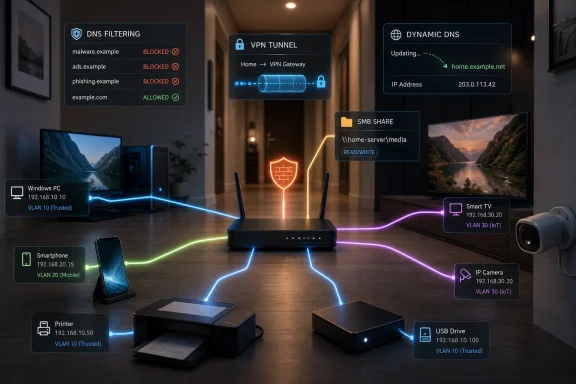 The Router Was Never Just an Access Point
Consumer networking has spent two decades flattening the word router into a synonym for Wi-Fi. That is understandable: for most households, the visible improvement from one generation to the next has been wireless speed, coverage, and the number of bars in the bedroom. The box may route packets, hand out IP addresses, run a firewall, translate addresses, and maintain a local DNS cache, but the customer experiences it as “the thing that makes the internet work.”That framing now undersells what even midrange routers can do. USB ports that once looked like afterthoughts can expose storage across the LAN. DNS settings can become crude but useful content controls. VPN features can push an entire household’s outbound traffic through a commercial provider or let a traveling user tunnel back into home resources.
The result is a strange mismatch between capability and expectation. The router is the one device that already sits at the junction between every phone, laptop, console, TV, camera, printer, and smart plug in the house. Yet it is also the device many users touch only when power-cycling it after the internet goes sideways.
That gap matters because the home network is no longer just a convenience layer. It is where work devices, personal backups, media libraries, security cameras, guest gadgets, and low-trust IoT hardware all collide. A router that can segment, filter, share, and tunnel traffic is not a luxury appliance; it is the first serious administrative tool most people encounter.
USB Storage Turns the Router Into a Poor Man’s NAS
The most approachable hidden feature is also one of the oldest: plug a USB hard drive into the router and share it over the network. On routers that support SMB file sharing, that external drive can appear to Windows PCs as a network share. For a household that wants a central stash for photos, installers, documents, or media files, this is the cheapest version of network-attached storage.It is not a real NAS in the way a Synology, QNAP, TrueNAS box, or carefully built home server is a real NAS. There is usually no drive redundancy, no serious snapshot system, no robust app ecosystem, and no expectation that the router’s CPU will handle indexing, encryption, and multi-user transfers gracefully. Still, for a single-drive share on a small LAN, the convenience is real.
The biggest limitation is performance. A router that can advertise gigabit Ethernet or Wi-Fi 6 does not automatically have the CPU, memory, USB controller, or file-sharing stack to push storage traffic at impressive rates. Many users discover that the router’s USB share is fast enough for documents and occasional media playback, but sluggish compared with even a modest dedicated NAS.
Security is the other quiet tradeoff. SMB sharing is useful precisely because Windows understands it natively, but a carelessly exposed file share is not something you want reachable from the internet. The sane configuration is local-only, behind the router’s firewall, with accounts and permissions if the firmware supports them.
For WindowsForum readers, the practical lesson is simple: router-as-NAS is excellent as a convenience tier, not as a backup strategy. If the only copy of your family photos lives on a single external disk hanging off a warm consumer router, you have not solved storage. You have merely moved the single point of failure to a different shelf.
DNS Filtering Is the Blunt Instrument That Still Works
Routers also sit in the perfect position to enforce DNS choices for a whole household. Change the router’s DNS servers, and every normally configured client on the network can inherit that policy. That is why services like OpenDNS FamilyShield remain attractive: instead of installing parental-control software on every device, the network can use filtered resolvers that block categories of sites before a browser ever connects.This is not magic, and it is not comprehensive security. DNS filtering blocks name resolution, not every possible path to content. A determined user can change DNS settings, use encrypted DNS, connect through a VPN, switch to cellular data, or access services by other means. But as a baseline control for kids’ devices, guest networks, or households that want to reduce accidental exposure to malware and adult content, DNS filtering is still useful.
More technical users can go further with Pi-hole, Technitium, AdGuard Home, or dnsmasq-based setups on OpenWrt. Those allow custom blocklists, local hostnames, per-client policies, and better visibility into what devices are actually requesting. That last part is often the revelation: the smart TV, cheap camera, or mystery IoT plug may be far chattier than expected.
The router-level approach is powerful because it changes the administrative unit from “device” to “network.” Instead of asking whether every laptop, phone, and tablet has the right settings, the router becomes the default policy source. For families and small offices, that is the difference between a security idea and an enforceable habit.
But DNS policy should not be confused with identity-aware access control. It is a coarse filter, not a compliance system. If the requirement is auditing, authentication, retention, or legal-grade reporting, a consumer router with a filtered DNS setting is not enough.
Whole-Home VPN Is Useful, but It Is Not a Privacy Force Field
The VPN feature is where router marketing most often gets ahead of reality. Some routers can act as VPN clients, sending all outbound household traffic through a commercial VPN service. Others can act as VPN servers, allowing a laptop or phone outside the house to tunnel back into the LAN. Better platforms can do both, sometimes with per-device or per-network rules.Those are genuinely useful capabilities. A router-level VPN client can cover streaming sticks, consoles, TVs, and other devices that do not run VPN apps well. A router-level VPN server can provide secure access to home servers, NAS shares, lab machines, or management interfaces without exposing those services directly to the public internet.
The danger is the phrase “hide from your ISP,” which is technically narrow and rhetorically oversized. A VPN can prevent the ISP from seeing the specific destination sites in the same way it normally would, but it shifts trust to the VPN provider and does not erase tracking by logged-in accounts, browser fingerprints, cookies, app telemetry, DNS leaks, or payment trails. It changes who can observe what; it does not make a household invisible.
Performance is another constraint. Encrypting traffic for an entire network is CPU work, and many consumer routers have historically been weak at it. WireGuard has improved the equation because it is leaner than older VPN stacks, but hardware still matters. A gigabit internet plan routed through a low-end VPN-capable router can turn into a much slower connection in practice.
The better use case for many enthusiasts is inbound access. If you run Home Assistant, a NAS, a media server, a Proxmox host, or a few lab VMs, a VPN back home is cleaner than a mess of forwarded ports. The router becomes the gatekeeper, and the internet sees fewer open doors.
The Old Printer Gets a Second Life at the Edge
Printer sharing is less glamorous than VPNs, but it is exactly the kind of home-network problem a router is well positioned to solve. Many reliable laser printers outlive the era in which their connectivity made sense. A USB-only Brother or HP may still print perfectly, but nobody wants to keep a desktop PC awake just to serve it.Some routers can act as print servers, either through stock firmware or projects like OpenWrt using CUPS or simpler raw printing services. The printer plugs into the router, the router exposes it on the LAN, and the household prints without buying a new wireless model. It is a small act of technological refusal: the printer is not obsolete merely because its networking is.
This is also where compatibility becomes messy. Printer drivers, bidirectional status reporting, scanning functions on multifunction devices, and vendor utilities may not behave the same way through a router-based print server. Basic printing is much easier to salvage than the full “all-in-one” feature set.
Still, for Windows users with a sturdy monochrome laser printer, router-based sharing can be a sensible fix. It keeps e-waste out of the closet and avoids replacing good hardware with a Wi-Fi-enabled device that may be worse in every other respect.
The broader point is that routers can absorb small infrastructure roles. They are always on, already network-connected, and usually placed centrally. That makes them natural hosts for lightweight services that do not justify a full server.
Dynamic DNS Belongs on the Device That Notices the Address Change First
Dynamic DNS is another router feature that looks boring until it saves you from a broken homelab. Most residential internet connections do not guarantee a permanent public IP address. If you host services from home, even privately behind a VPN, you need some way for a domain name to follow your changing address.Running a dynamic DNS updater in a Docker container works. Running it on a NAS works. Running it on a tiny VM works. But the router is often the most logical place for the job because it is the device that directly sees the WAN address and knows when it changes.
That matters for reliability. A containerized updater depends on the host, the container runtime, the network path, and the configuration all behaving. A router-integrated updater can be simpler: when the WAN IP changes, it tells the dynamic DNS provider. For the user, the domain keeps resolving to the right place.
The limitation, as usual, is vendor support. Some routers support only a few dynamic DNS providers. Some bury the feature in advanced menus. Some offer it only through the vendor’s own cloud service, which may be convenient but creates another dependency. Enthusiast firmware usually offers more flexibility, but at the cost of comfort and warranty simplicity.
For self-hosters, dynamic DNS is not just a convenience; it is part of the identity layer of the home network. Once a router also handles VPN, firewall rules, reverse proxy features, or certificate automation, it starts to look less like a consumer appliance and more like a small edge platform.
Firmware Decides Whether the Hardware Becomes a Platform
The difference between a forgettable router and a useful network appliance is often software. Two boxes with similar radios, ports, and processors can feel entirely different depending on whether the firmware exposes serious controls or hides them behind a phone app with three toggles. This is why communities around OpenWrt, pfSense, OPNsense, UniFi, MikroTik, and small x86 firewall appliances have become so influential.OpenWrt is especially important in this conversation because it proves how much latent capability exists in commodity hardware. With the right device and enough storage, a router can gain packages for SMB sharing, VPN, dynamic DNS, ad blocking, printer services, VLANs, traffic shaping, and monitoring. The hardware may still be modest, but the software stops treating the user like a passenger.
The tradeoff is responsibility. Flashing third-party firmware can brick hardware, break vendor mesh features, complicate updates, and expose configuration choices that casual users should not touch casually. A powerful router interface is also a powerful way to misconfigure a network.
Commercial prosumer platforms solve some of that by packaging advanced features into friendlier management systems. Ubiquiti’s UniFi gear, for example, has pushed many home-lab users toward routers that also manage switches, access points, cameras, VLANs, VPNs, and firewall rules from one interface. MikroTik offers tremendous depth at low prices, but with a learning curve that can feel like being handed the keys to a small ISP.
The real lesson is that the router market is splitting. At one end are app-driven mesh systems optimized for painless coverage and minimal user choice. At the other are small network appliances that acknowledge the home is becoming a tiny enterprise. Many households need something in the middle, and that middle is still uneven.
The Security Boundary Is Moving Into the Living Room
The more a router can do, the more it becomes a security boundary. That is both good and bad. Good, because centralized controls can isolate untrusted devices, block unwanted traffic, and reduce exposed services. Bad, because a compromised or unpatched router is catastrophic: it sees the traffic, controls DNS, brokers access, and often runs with long-lived administrator credentials.This is the part of the “your router can do everything” story that deserves skepticism. Extra services increase attack surface. A file server, VPN daemon, print service, web admin panel, and dynamic DNS client are all pieces of software that can have bugs. The fact that they run on a router does not make them safer.
Firmware updates therefore matter more than feature count. A router that has not received security updates in years should not be entrusted with more jobs simply because its admin page still offers them. Old hardware may still route packets, but old firmware can become the soft underbelly of the network.
Default exposure is equally important. Remote administration should usually be off. UPnP should be treated with caution. SMB shares should stay local. VPN access should use strong authentication. Guest and IoT networks should be isolated from PCs and NAS devices wherever possible.
For Windows households, the router is increasingly part of endpoint security whether users realize it or not. Defender, BitLocker, browser sandboxing, and Windows Update matter, but they do not compensate for a network edge that quietly sends DNS to an attacker, forwards ports unexpectedly, or runs abandoned firmware.
The Enterprise Playbook Is Shrinking Into Consumer Gear
What is striking about these router features is how many come from the enterprise vocabulary. VLANs, VPNs, DNS policy, network storage, print services, traffic shaping, intrusion detection, WAN failover, and centralized management were once the language of office networks. Now they appear in home routers, creator studios, remote-work setups, and homelabs.That shift tracks how households actually use connectivity. A home may contain a corporate laptop, a school Chromebook, a gaming PC, a NAS, smart speakers, surveillance cameras, smart locks, solar equipment, streaming boxes, and a dozen phones and tablets. Treating all of that as one flat trusted network is convenient, but it is increasingly indefensible.
The router is the obvious place to impose order. A guest SSID can keep visitors away from file shares. An IoT VLAN can prevent a cheap camera from seeing a work laptop. A VPN can provide private access to home services. DNS logs can reveal which device is phoning home to a suspicious domain.
This is not about turning every home user into a sysadmin. It is about recognizing that network complexity has arrived whether the interface admits it or not. The best consumer routers will make safe patterns easy and dangerous patterns obvious.
Microsoft’s world intersects here more than it may first appear. Windows file sharing depends on network discovery, firewall profiles, SMB versions, credentials, and name resolution. Remote Desktop, WSL-hosted services, Hyper-V labs, Windows Subsystem for Linux experiments, and dev machines all behave better when the network foundation is intentional rather than accidental.
The Router Should Not Become a Junk Drawer
There is a temptation, once you discover these features, to make the router run everything. That is not always wise. The router’s most important job is still routing, firewalling, and keeping the network stable. If a USB disk indexer, VPN tunnel, or print daemon can starve the device under load, the whole household feels it.A dedicated NAS remains better for serious storage. A real firewall appliance is better for complex policies. A small server is better for containers and self-hosted applications. A managed switch is better for larger wired networks. The router can cover gaps, but it should not become a junk drawer for every half-remembered infrastructure idea.
The better mental model is tiering. Let the router handle the tasks that are naturally edge-centric: DHCP, DNS forwarding, firewall rules, VLANs, VPN entry, dynamic DNS, and perhaps lightweight USB sharing or printer service. Move heavy storage, transcoding, backups, databases, and automation platforms to machines designed to fail less dramatically.
This distinction becomes more important as internet speeds climb. A household with 2Gbps fiber, Wi-Fi 7, multiple 2.5GbE clients, and security cameras can overwhelm assumptions that were fine in the 100Mbps era. The router’s CPU, memory, switch fabric, thermal design, and firmware efficiency all matter.
The hidden danger is not that users will expect too little from their routers. It is that they will expect the wrong things. A router can be a capable network appliance without being a substitute for every server in the rack.
The Little Box by the Modem Is Now a Policy Decision
The practical upshot is that buying a router has become less about maximum advertised Wi-Fi speed and more about what kind of network you want to run. Coverage still matters, and radio performance still matters. But firmware lifecycle, advanced feature support, update history, VLAN handling, VPN throughput, USB behavior, and management clarity deserve a place in the decision.That is uncomfortable for a market trained by big numbers on retail boxes. AX5400, BE11000, and multi-gig labels are easier to sell than “receives timely firmware updates” or “supports sane network segmentation.” Yet the latter may have more impact on whether the router remains useful and safe over five years.
This is where enthusiast and small-business gear has an advantage. It tends to assume the user may want logs, policies, static leases, multiple networks, VPN profiles, and firmware visibility. The consumer market is catching up, but unevenly, often with advanced features gated behind cloud accounts or subscriptions.
The future router will look less like a standalone gadget and more like an edge controller. It will manage radios, switches, cameras, phones, storage, DNS, identity, and remote access. Some vendors will do that openly and locally; others will do it through cloud dashboards and recurring services. Users should notice the difference.
The Features Worth Enabling Before You Buy More Hardware
Before adding another Raspberry Pi, mini PC, NAS, or subscription service, it is worth auditing the router already running the network. The feature may be there, half-hidden under “advanced,” “services,” or “security.” The right answer is not always to use it, but it is almost always worth knowing whether it exists.- A router USB port can provide useful SMB storage for casual sharing, but it should not be treated as a redundant backup system.
- Router-level DNS filtering can protect the whole household from some categories of unwanted content, but it is a baseline control rather than a tamper-proof security system.
- A VPN server on the router is often safer and cleaner than exposing home services directly to the internet.
- A router-based VPN client can cover devices that cannot run VPN apps, but it shifts trust to the VPN provider and may reduce throughput.
- Dynamic DNS belongs naturally on the router because the router is usually first to know when the public WAN address changes.
- Advanced router features are only as trustworthy as the firmware that maintains them, so update history should matter as much as raw Wi-Fi speed.
References
- Primary source: How-To Geek
Published: 2026-05-23T17:31:07.654420
Your router isn’t just for Wi-Fi—here’s everything else it can do
Your Wi-Fi router can do way more than you think www.howtogeek.com
- Related coverage: support.opendns.com

OpenDNS - Cisco Community
Ask questions not covered by support articles and documentation.
support.opendns.com
- Related coverage: openwrt.org
