

A renewed HP 8300 office PC still looks appealing at first glance: Intel Core i7, 16GB of RAM, a 2TB hard drive paired with a 480GB SSD, Windows 10, and HDMI output all sound like a lot of machine for the money. But in 2026, the real story is more complicated than the spec sheet suggests. The combination of an aging business-class platform, refurbished pricing, and a now-outdated operating system means buyers need to separate value from viability.
The HP 8300 line was originally built as a corporate desktop workhorse, not a flashy consumer machine. That heritage still matters because it explains why these systems often survive for years in the secondary market: they were designed for reliability, serviceability, and predictable fleet deployment rather than cutting-edge performance. In refurbished form, they continue to appeal to home office users, students, and small businesses that want a dependable box for spreadsheets, email, video calls, light editing, and basic multitasking.
The listing’s headline specs are the kind that catch the eye of bargain hunters. A quad-core Intel Core i7, 16GB of memory, and dual-drive storage can feel generous, especially when paired with a discrete Nvidia 710 and HDMI output. For everyday office work, the SSD will make the machine feel much faster than an old hard-drive-only PC, while the large HDD provides bulk storage for documents, photos, and archives.
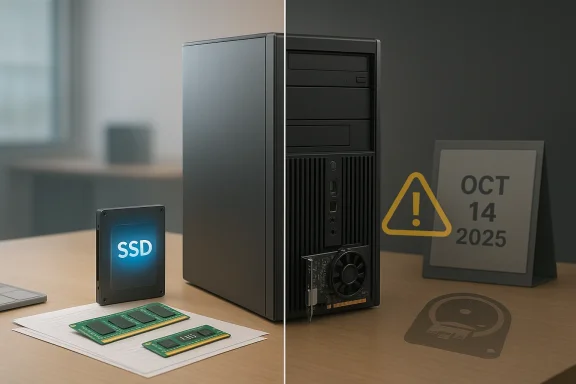
Still, the biggest issue is not the processor or the storage. It is the platform’s age and the software environment around it. Microsoft ended support for Windows 10 on October 14, 2025, which means a machine advertised with Windows 10 is now operating beyond its free support window unless the buyer has a separate update path or accepts the risks of running an unsupported OS. That changes the value equation sharply, especially for business use.
The renewed-desktop market has also become more crowded and more confusing. Sellers frequently bundle legacy business systems with SSD upgrades, extra RAM, and modest graphics cards to create the impression of modern relevance. In practice, these builds can still be very useful, but only if buyers understand what they are actually getting: not a current-generation PC, but a retrofitted former-office desktop optimized for price rather than future-proofing.
The renewed listing’s use of a Core i7 is worth noting, but it is also somewhat vague. On this generation, “i7” usually means a four-core, eight-thread chip from Intel’s Ivy Bridge era, such as the i7-3770 family, which was impressive in its day and remains adequate for routine office work. It is not equivalent to a modern i7 in architecture, efficiency, or integrated graphics capability.
There is a practical market for this type of hardware. People who mainly need a desktop for browser-based work, accounting packages, remote desktop sessions, and local file storage can still get solid utility from it. The risk is that many buyers overestimate how much headroom a decade-old desktop actually provides when the operating system, software ecosystem, and security baseline have all moved on.
But performance is not just about CPU throughput. Older business desktops often use older memory standards, older storage buses, and older platform controllers. Even with an SSD, the machine won’t feel as fluid under heavier loads as a more recent system with a newer CPU architecture, faster integrated graphics, and modern storage interfaces.
That said, the Nvidia 710 is not a serious performance card. It is best viewed as a display adapter, not a creative or gaming solution. If the seller’s marketing hints at “graphics support” in a broad sense, that should not be mistaken for modern GPU capability.
The downside is that the HDD is still a mechanical drive. It is slower, noisier, and more failure-prone than flash storage. In a refurbished desktop, the condition of that 2TB drive matters a great deal. If it has a high operating-hours count or unknown prior history, the real-world reliability may be far lower than the listing implies.
That concern is amplified because storage failures usually show up after the purchase window, not before. A machine can look excellent on arrival and still fail months later. For a home office or small-business buyer, that is not an academic issue—it can become a lost-work and data-recovery problem.
For businesses, the issue is even sharper. Unsupported operating systems create compliance headaches, insurance questions, and potential audit problems. If this HP 8300 is being pitched as a “small business” desktop, Windows 10 is no longer a neutral feature—it is a liability unless the buyer has a formal mitigation strategy.
That distinction matters because refurbished sellers often market broad compatibility but do not always emphasize lifecycle risk. A machine can be technically functional and still strategically obsolete. Those are not the same thing.
A low-end graphics card like the Nvidia 710 can further simplify multi-monitor use, especially if the seller has already configured HDMI for the buyer. For spreadsheet-heavy work, email triage, and basic admin tasks, extra screen space is often more useful than a faster GPU.
But there is a drawback to that convenience. Legacy ports can also signal an older internal platform and a slower upgrade path. Buyers who prioritize forward compatibility may find that the machine solves today’s problem while creating tomorrow’s replacement problem.
If the use case is narrow and the budget is strict, the HP 8300’s price-to-utility ratio can still be decent. The machine is good enough for many light workloads, and in some cases the buyer simply needs a stable desktop right away.
This is especially true for business buyers. A system that costs less today but needs replacement sooner, consumes more electricity, and runs on an unsupported OS can become expensive in disguise. Refurbished desktops can absolutely be worth it, but only if the buyer calculates total cost of ownership instead of just purchase price.
The catch is that enterprise buyers have to think beyond raw function. Security policy, software support, and device lifecycle all matter. A business desktop that runs unsupported Windows 10 in 2026 is hard to justify unless it is isolated, temporary, or part of a controlled migration plan.
If the machine is deployed in a business context, the cost of support can outweigh the bargain price quickly. A cheap desktop that causes one data problem or one productivity outage can erase the savings from the original purchase. That is why procurement teams tend to be conservative about older hardware, even when the spec sheet looks generous.
Older desktops can be especially good for users who are not chasing gaming or premium design. They tend to be sturdier, easier to service, and less expensive to replace if something goes wrong. That is a quiet advantage that newer ultracompact machines sometimes lack.
If the computer will be used by kids, seniors, or less technical users, the support status deserves serious thought. A low purchase price does not compensate for a weak security posture. In that sense, the machine is only as good as the discipline around it.
For budget buyers, the next year will likely sharpen the divide between good enough for now and good enough for longer. Systems like this HP can still be useful, but only if the user accepts that they are buying a bridge, not a destination. That distinction will matter more and more as software support tightens and security expectations rise.
Source: ruhrkanal.news https://ruhrkanal.news/Core-I7-16GB-RAM-2TB-HDD-480GB-SSD-Windows-10-HDMI-913576/
 Overview
The HP 8300 line was originally built as a corporate desktop workhorse, not a flashy consumer machine. That heritage still matters because it explains why these systems often survive for years in the secondary market: they were designed for reliability, serviceability, and predictable fleet deployment rather than cutting-edge performance. In refurbished form, they continue to appeal to home office users, students, and small businesses that want a dependable box for spreadsheets, email, video calls, light editing, and basic multitasking.The listing’s headline specs are the kind that catch the eye of bargain hunters. A quad-core Intel Core i7, 16GB of memory, and dual-drive storage can feel generous, especially when paired with a discrete Nvidia 710 and HDMI output. For everyday office work, the SSD will make the machine feel much faster than an old hard-drive-only PC, while the large HDD provides bulk storage for documents, photos, and archives.
Still, the biggest issue is not the processor or the storage. It is the platform’s age and the software environment around it. Microsoft ended support for Windows 10 on October 14, 2025, which means a machine advertised with Windows 10 is now operating beyond its free support window unless the buyer has a separate update path or accepts the risks of running an unsupported OS. That changes the value equation sharply, especially for business use.
The renewed-desktop market has also become more crowded and more confusing. Sellers frequently bundle legacy business systems with SSD upgrades, extra RAM, and modest graphics cards to create the impression of modern relevance. In practice, these builds can still be very useful, but only if buyers understand what they are actually getting: not a current-generation PC, but a retrofitted former-office desktop optimized for price rather than future-proofing.
What the HP 8300 Really Is
The HP Compaq Elite 8300 family was a mainstream business PC platform built around third-generation Intel Core processors and office-friendly I/O. Official QuickSpecs show the system offered USB 3.0, DisplayPort, VGA, Ethernet, and multiple chassis formats, reflecting its role in corporate deployments where manageability and standardization mattered more than style.Business DNA, not consumer flash
That legacy is important because it explains both the strengths and limits of the machine. HP designed this family for call centers, administrative desks, and branch offices where uptime and easy replacement were priorities. The result is a desktop with decent thermals, serviceable components, and broad accessory compatibility, but also one that predates the modern shift to NVMe storage, USB-C, Wi‑Fi 6, and integrated security features common in newer fleets.The renewed listing’s use of a Core i7 is worth noting, but it is also somewhat vague. On this generation, “i7” usually means a four-core, eight-thread chip from Intel’s Ivy Bridge era, such as the i7-3770 family, which was impressive in its day and remains adequate for routine office work. It is not equivalent to a modern i7 in architecture, efficiency, or integrated graphics capability.
Why refurbishers keep selling it
These machines are easy to refurbish because the platform is standardized and parts are plentiful. Add RAM, swap in an SSD, clean the chassis, reinstall Windows, and the machine becomes visually and functionally presentable for a fraction of the cost of a new office tower. That is why the HP 8300 remains common on marketplace listings even now.There is a practical market for this type of hardware. People who mainly need a desktop for browser-based work, accounting packages, remote desktop sessions, and local file storage can still get solid utility from it. The risk is that many buyers overestimate how much headroom a decade-old desktop actually provides when the operating system, software ecosystem, and security baseline have all moved on.
- Strengths: durable business platform, easy servicing, inexpensive refurbishment
- Limits: older CPU generation, legacy motherboard features, aging power efficiency
- Best fit: basic office use, family desktop tasks, secondary workstation
- Not ideal for: modern gaming, heavy creative work, long-term enterprise deployment
Performance Expectations in 2026
On paper, 16GB of RAM and a 480GB SSD are the most immediately useful parts of the configuration. They will do more to improve day-to-day responsiveness than the brand of processor does, because most users feel lag first when the system is waiting on disk access. The SSD will help Windows boot quickly, launch programs faster, and keep routine multitasking feeling snappier than a hard-drive-only machine.Where the i7 still helps
The old quad-core Core i7 still has enough muscle for web browsing, email, document editing, light photo work, and basic conferencing. In a purely mechanical sense, a four-core, eight-thread chip can keep several modern apps open at once without immediately collapsing under light workloads. For a user who keeps their desktop use disciplined, it can still feel respectable.But performance is not just about CPU throughput. Older business desktops often use older memory standards, older storage buses, and older platform controllers. Even with an SSD, the machine won’t feel as fluid under heavier loads as a more recent system with a newer CPU architecture, faster integrated graphics, and modern storage interfaces.
What the Nvidia 710 changes
The inclusion of a basic Nvidia 710 graphics card is a small but meaningful detail. It gives the machine HDMI output and may help with multi-monitor support, which is useful for office setups and simple productivity workflows. It also reduces reliance on the integrated graphics of the older Intel platform, which are comparatively limited.That said, the Nvidia 710 is not a serious performance card. It is best viewed as a display adapter, not a creative or gaming solution. If the seller’s marketing hints at “graphics support” in a broad sense, that should not be mistaken for modern GPU capability.
Practical workload fit
A well-maintained HP 8300 with these upgrades is still credible for:- Office suites and browser-based SaaS tools
- Accounting and bookkeeping software
- PDF handling and document management
- Streaming and video conferencing
- Light image editing and basic home use
- Modern AAA gaming
- 4K video editing
- Heavy virtualization
- Large data science workloads
- Long-term software platforms that expect newer instructions or a newer OS
Storage: The Real Selling Point
The most attractive part of this configuration may be the storage mix. A 2TB hard drive provides plenty of room for media, local backups, scanned documents, and archived project files, while a 480GB SSD gives the operating system and applications a faster landing zone. That hybrid approach remains common in refurbished systems because it offers both speed and capacity without pushing the price too high.SSD plus HDD still makes sense
For budget-conscious users, this arrangement is still sensible. The SSD handles the operating system and everyday apps, while the HDD absorbs the bulk of large, infrequently accessed files. This can be especially useful in small offices where users keep locally stored records, family photos, or project folders that would otherwise crowd a smaller SSD.The downside is that the HDD is still a mechanical drive. It is slower, noisier, and more failure-prone than flash storage. In a refurbished desktop, the condition of that 2TB drive matters a great deal. If it has a high operating-hours count or unknown prior history, the real-world reliability may be far lower than the listing implies.
Why storage health matters more in refurbished PCs
Refurbished listings often celebrate capacity more than condition. But in used hardware, storage age is not a footnote; it is a central risk factor. SSD endurance matters, and HDD wear matters even more because moving parts can fail unpredictably. A buyer should ideally ask whether the drives were tested for health, bad sectors, or wear level before being sold.That concern is amplified because storage failures usually show up after the purchase window, not before. A machine can look excellent on arrival and still fail months later. For a home office or small-business buyer, that is not an academic issue—it can become a lost-work and data-recovery problem.
Storage summary
- 480GB SSD: the most important upgrade for day-to-day speed
- 2TB HDD: useful for mass storage, but the least durable part of the setup
- Hybrid design: practical, but only if drive health is verified
- Backup strategy: essential, because refurbished storage is always a trust exercise
Windows 10 Changes the Equation
The listing’s biggest weakness in 2026 is its operating system. Microsoft’s official support lifecycle ended for Windows 10 on October 14, 2025, which means the OS no longer receives free security updates or mainstream support. Microsoft’s own guidance now points users toward Windows 11 or replacement hardware if the PC is not eligible for a secure upgrade path.Why that matters now
For casual users, running Windows 10 beyond support may seem manageable at first. The desktop still boots, apps still run, and the machine may feel unchanged from yesterday. But the security model has changed underneath it. Over time, vulnerabilities accumulate, browser and application vendors may reduce support, and any machine connected to the internet becomes a more attractive target.For businesses, the issue is even sharper. Unsupported operating systems create compliance headaches, insurance questions, and potential audit problems. If this HP 8300 is being pitched as a “small business” desktop, Windows 10 is no longer a neutral feature—it is a liability unless the buyer has a formal mitigation strategy.
Consumer versus enterprise impact
Consumers may accept more risk if the machine is used offline, for simple tasks, or as a low-stakes family PC. Even then, users should understand that they are stepping outside the default Microsoft support umbrella. Enterprises and self-employed professionals, by contrast, should treat Windows 10 on this hardware as a transition state, not a finished deployment.That distinction matters because refurbished sellers often market broad compatibility but do not always emphasize lifecycle risk. A machine can be technically functional and still strategically obsolete. Those are not the same thing.
What buyers should think about
- Is the PC intended for short-term use only?
- Can the software workload move to a supported OS?
- Is the machine isolated from sensitive data?
- Does the business have a replacement timeline?
- Is the low purchase price worth the support risk?
Connectivity and Display Flexibility
The presence of HDMI output is a practical selling point, especially for a refurbished office desktop. It reduces setup friction, makes it easier to connect modern monitors and TVs, and helps avoid adapter hunting for casual buyers. For a home office, simple connectivity is often just as important as raw speed.Multi-monitor potential
The HP 8300 platform was designed with office monitors in mind, and official documentation confirms configurations with VGA and DisplayPort outputs, as well as USB 3.0 on the rear panel. That heritage makes the system naturally friendly to dual-display workflows, even if the exact port arrangement depends on the specific case and refurbishment package.A low-end graphics card like the Nvidia 710 can further simplify multi-monitor use, especially if the seller has already configured HDMI for the buyer. For spreadsheet-heavy work, email triage, and basic admin tasks, extra screen space is often more useful than a faster GPU.
Legacy ports still have value
Older business desktops frequently include the kind of ports that newer consumer towers omit. USB-A, legacy display outputs, and standard Ethernet remain valuable in small offices where peripherals are mixed and older accessories are still in circulation. That can make the HP 8300 surprisingly convenient for a practical user.But there is a drawback to that convenience. Legacy ports can also signal an older internal platform and a slower upgrade path. Buyers who prioritize forward compatibility may find that the machine solves today’s problem while creating tomorrow’s replacement problem.
Connectivity highlights
- HDMI: easy monitor hookup
- USB 3.0: useful for external drives and faster peripherals
- Ethernet: still ideal for office stability
- Legacy display ports: helpful in mixed-device environments
- Discrete GPU: useful mainly for output flexibility, not performance
Refurbished Value vs New-PC Value
The core selling message of the listing is obvious: much lower price than a new desktop, but enough hardware to feel “powerful” for general use. That formula still works, which is why refurbished systems continue to sell well. The question is whether the savings remain compelling once support status and age are factored in.Why the price can still look attractive
A new desktop with a current processor, SSD, warranty, and modern OS can cost several times more than a refurbished office tower. For households or micro-businesses with a tight budget, that delta can be the difference between buying now and waiting months. Refurbished gear also lets buyers extract value from enterprise hardware that once would have been written off.If the use case is narrow and the budget is strict, the HP 8300’s price-to-utility ratio can still be decent. The machine is good enough for many light workloads, and in some cases the buyer simply needs a stable desktop right away.
Where the comparison starts to break down
The problem is that modern low-cost desktops now offer much better efficiency, much longer support life, and more security headroom. Even modest current-generation systems often outperform older i7-based machines while consuming less power and staying supported for longer. That means a newer PC may be the better long-term value, even if the upfront price is higher.This is especially true for business buyers. A system that costs less today but needs replacement sooner, consumes more electricity, and runs on an unsupported OS can become expensive in disguise. Refurbished desktops can absolutely be worth it, but only if the buyer calculates total cost of ownership instead of just purchase price.
A practical decision framework
- Decide whether the PC is for short-term or long-term use.
- Check whether the operating system will remain supported.
- Verify storage health and warranty coverage.
- Compare power consumption with a newer alternative.
- Consider the cost of replacement within 12–24 months.
Enterprise Use: Good for a Corner, Not the Center
Small businesses often buy refurbished desktops because they need reliable machines at scale without turning every workstation into a major capital expense. The HP 8300 fits that mindset better than most consumer desktops because it came from a business lineage and still feels more serviceable than many cheap retail towers.When it makes sense in the office
As a secondary office PC, a checkout station, a spare machine, or a low-intensity task terminal, this system can still be perfectly adequate. A local nonprofit, part-time office, or side-business operation might find it useful where workloads are simple and budgets are tight. If the machine is used for document management, inventory lookup, or cloud-based tools, the hardware may be enough.The catch is that enterprise buyers have to think beyond raw function. Security policy, software support, and device lifecycle all matter. A business desktop that runs unsupported Windows 10 in 2026 is hard to justify unless it is isolated, temporary, or part of a controlled migration plan.
Compliance and maintenance issues
Refurbished business PCs can also bring hidden administrative costs. They may need BIOS updates, image reconfiguration, storage replacements, driver cleanup, or endpoint-security adjustments. That is manageable for a hobbyist or small office with technical confidence, but it is not free.If the machine is deployed in a business context, the cost of support can outweigh the bargain price quickly. A cheap desktop that causes one data problem or one productivity outage can erase the savings from the original purchase. That is why procurement teams tend to be conservative about older hardware, even when the spec sheet looks generous.
Enterprise checklist
- Confirm OS support strategy
- Verify warranty terms from the refurbisher
- Test SSD and HDD health
- Confirm monitor and peripheral compatibility
- Budget for replacement within a short cycle
Consumer Use: Better for Practicality Than Excitement
For home users, the renewed HP 8300 is easiest to understand as a family desktop or general-purpose work machine. It is not built to impress, but it may quietly do the job without drama. That can be valuable in a world where many people simply need a PC that opens a browser, runs Office, and streams video.The family-PC argument
The dual-drive setup is attractive for household use because it provides room for files and photos while keeping the system responsive. Multiple users can share it for homework, browsing, printing, and basic organization. With HDMI output, it can also be used easily in a living room or a study setup without special adapters.Older desktops can be especially good for users who are not chasing gaming or premium design. They tend to be sturdier, easier to service, and less expensive to replace if something goes wrong. That is a quiet advantage that newer ultracompact machines sometimes lack.
The safety caveat
The major issue for consumers is again Windows 10. A family PC often sees a mix of users, downloads, browser sessions, and casual software installation, which raises exposure. Running an unsupported OS means the machine must be treated carefully, with updates, backups, and sensible browsing habits.If the computer will be used by kids, seniors, or less technical users, the support status deserves serious thought. A low purchase price does not compensate for a weak security posture. In that sense, the machine is only as good as the discipline around it.
Consumer-fit summary
- Good for schoolwork and internet use
- Fine for home productivity and media
- Less ideal for gaming or creative work
- Riskier if multiple users are careless with downloads
- Best if paired with strong backup habits
Strengths and Opportunities
The renewed HP 8300 remains attractive because it solves a real problem: getting a usable desktop into service quickly and cheaply. For the right buyer, the combination of business-grade build, usable performance, and generous storage can still be compelling. The opportunity lies in matching the machine to the correct workload and accepting that its role is practical, not premium.- Low upfront cost compared with new desktops
- Business-class chassis that was designed for reliability
- 16GB RAM is enough for everyday multitasking
- SSD + HDD hybrid storage offers speed and capacity
- HDMI output simplifies display setup
- USB 3.0 and legacy ports support mixed peripherals
- Refurbished marketplace availability makes replacement parts and similar units easy to find
Risks and Concerns
The most serious concern is that the PC ships with Windows 10, which is now beyond Microsoft’s free support period as of October 14, 2025. That alone makes the system a questionable choice for security-sensitive users. Add aging hardware, unknown drive wear, and the possibility of inconsistent refurbishment quality, and the bargain starts to look more conditional than absolute.- Unsupported operating system creates security risk
- Older CPU platform limits long-term usefulness
- HDD reliability may be uncertain in refurbished units
- Power efficiency will lag behind newer desktops
- Marketing language can overstate real-world performance
- Potential warranty limits may reduce buyer protection
- Enterprise compliance concerns make it weak for business rollout
Looking Ahead
The renewed desktop market is likely to keep thriving because it serves a practical need: affordable computing with reasonable performance. But as support deadlines pass and hardware ages further, the value of older systems like the HP 8300 will increasingly depend on how honestly they are marketed and how carefully they are used. The sweet spot is shrinking.For budget buyers, the next year will likely sharpen the divide between good enough for now and good enough for longer. Systems like this HP can still be useful, but only if the user accepts that they are buying a bridge, not a destination. That distinction will matter more and more as software support tightens and security expectations rise.
- Monitor whether the seller offers a real warranty or only a limited guarantee
- Confirm the health of both the SSD and HDD before trusting the system with data
- Consider whether Windows 10 support risk is acceptable for the intended use
- Compare the machine against newer entry-level desktops before deciding
- Treat the PC as a short- to medium-term value purchase, not a long-term platform
Source: ruhrkanal.news https://ruhrkanal.news/Core-I7-16GB-RAM-2TB-HDD-480GB-SSD-Windows-10-HDMI-913576/
Last edited:
