

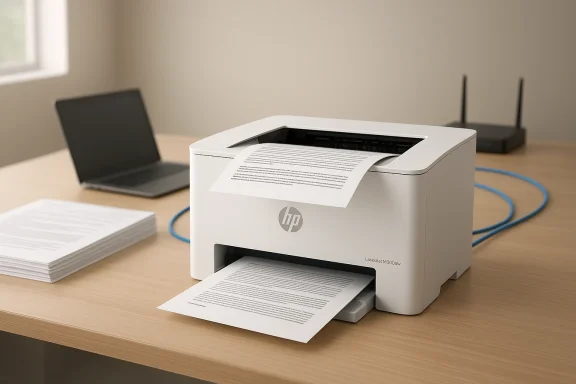
HP's LaserJet M209dw is the kind of no-frills office hardware that quietly does its job: compact, inexpensive to buy, and laser-focused on producing crisp black‑and‑white documents without a lot of fuss. What it sacrifices in extras—no scanner, no color, no touchscreen—it makes up for in size, speed, and text clarity, making it a tempting option for micro‑offices, solo practitioners, and businesses that still live and die by printed invoices, contracts, and forms.
The market for small monochrome lasers is crowded, but two trends shape buyers’ decisions today: footprint and total cost of ownership. Small offices want printers that won’t dominate a desk but still deliver reliable pages at a predictable running cost. HP positions the M209dw as a compact, network‑ready monochrome laser that can sit on a shelf or a desktop and serve a handful of users — a product engineered around a single promise: fast, dependable black‑and‑white text printing. That promise is supported by HP's security and management features aimed at business buyers, and by an ecosystem of JetIntelligence toner cartridges designed to balance performance and anti‑fraud protection.
This review evaluates the M209dw across four practical axes: design and setup, printing performance and quality, running costs (consumables and energy), and operational concerns (connectivity, security, and maintenance). Wherever possible, I cross‑checked HP’s published specs and retailer pricing to present a verifiable assessment of what owners should expect to pay and how the printer performs in daily use.
The aesthetic is deliberately conservative: no glossy trims, no fancy touch panel, and only a handful of physical buttons (power, cancel, resume, wireless) and an LED status bar. That pared‑back approach keeps manufacturing costs down and reduces potential failure points, but it also means you’ll rely on a phone or PC for guided setup and status feedback via the HP Smart app or the embedded web server. If you want a printer that tells you everything at a glance, this is not it.
What to watch for: HP’s dynamic security technology is intended to protect print quality and guard against counterfeit or otherwise incompatible supplies. However, it also means that some compatible or remanufactured cartridges may be blocked or subject to functionality limitations if firmware updates extend or change those protections. Businesses that depend on aftermarket costs savings should factor this into total cost calculations.
1.) Take the cartridge list price (e.g., $64.99 for the standard W1340A).
2.) Divide by the ISO yield (1,100 pages) = roughly $0.059 per page.
3.) For high‑yield: $104.99 / 2,400 ≈ $0.044 per page.
These estimates understate real costs when you factor in pages with higher coverage, toner waste, maintenance kits, or environmental disposal. They also don’t account for potential discounts from bulk procurement or enterprise supply contracts. Still, as a rule of thumb: a high‑yield HP cartridge usually gives you the lowest per‑page cost from the OEM, and the initial starter cartridge is small enough that many first‑time users will buy an OEM replacement sooner than expected.
Practical tip: If you expect steady, heavy monochrome volume, factor the high‑yield cartridge into your budget and consider suppliers and service contracts that offer predictable restocking and recycling. For intermittent personal use, the standard cartridge remains sensible.
Another operational caveat is the minimal local UI: without a full display, troubleshooting sometimes requires the HP Smart app or logging into the printer’s embedded web server. That’s fine for IT‑savvy teams but can be a small annoyance for deskbound users who prefer on‑device menus.
It is not, however, a universal solution. Its lack of scanning capability, starter‑toner limits, and OEM cartridge protections create budget and procurement questions that deserve attention before purchase. If you account for those trade‑offs and align the M209dw with the appropriate user profile, you’ll find a dependable, affordable micro‑laser that will quietly keep paperwork flowing without fanfare.
Source: PC Guide HP LaserJet M209dw review: a cheap and crisp printer for small businesses
 Background
The market for small monochrome lasers is crowded, but two trends shape buyers’ decisions today: footprint and total cost of ownership. Small offices want printers that won’t dominate a desk but still deliver reliable pages at a predictable running cost. HP positions the M209dw as a compact, network‑ready monochrome laser that can sit on a shelf or a desktop and serve a handful of users — a product engineered around a single promise: fast, dependable black‑and‑white text printing. That promise is supported by HP's security and management features aimed at business buyers, and by an ecosystem of JetIntelligence toner cartridges designed to balance performance and anti‑fraud protection.This review evaluates the M209dw across four practical axes: design and setup, printing performance and quality, running costs (consumables and energy), and operational concerns (connectivity, security, and maintenance). Wherever possible, I cross‑checked HP’s published specs and retailer pricing to present a verifiable assessment of what owners should expect to pay and how the printer performs in daily use.
Overview: where the M209dw sits in your office
- Intended audience: small teams, home offices, reception desks — environments that print largely text documents and occasional greyscale graphics.
- What it does well: sharp text, automatic duplexing, small footprint, and solid network options (dual‑band Wi‑Fi, Ethernet, USB).
- What it does not do: no scanning or copying, no color, no large paper cassette or multi‑tray support, and limited onboard controls (no large display).
Design and build quality
A compact, utilitarian cube
The M209dw is built around a compact, mostly white chassis with gray accents and a measured footprint that makes it one of the more desk‑friendly laser models. It’s small enough to sit on a crowded counter and light enough (around 5.6 kg / 12.3–12.35 lb) to move without two people. HP’s published dimensions reflect a shallow depth and modest height that help this unit slip into small spaces.The aesthetic is deliberately conservative: no glossy trims, no fancy touch panel, and only a handful of physical buttons (power, cancel, resume, wireless) and an LED status bar. That pared‑back approach keeps manufacturing costs down and reduces potential failure points, but it also means you’ll rely on a phone or PC for guided setup and status feedback via the HP Smart app or the embedded web server. If you want a printer that tells you everything at a glance, this is not it.
Practical serviceability
HP includes a rear access panel and a top lid that opens to the toner compartment. Toner cartridges are long and straightforward to replace; the cartridge and drum are integrated, reducing the number of replaceable parts but raising the cost of each supply swap. The paper path is accessible enough to clear jams without tools, and the output tray has a small fold‑out page support. These are simple, effective touches that help when uptime matters.Setup and connectivity
App‑guided or driver‑only setup
Setup is intentionally simple: the HP Smart app detects nearby devices and walks you through wireless or wired configuration. The app nudges users to register for fuller cloud services, but registration isn’t mandatory to print from local devices. For IT teams, standard driver installation offers a straightforward path without introducing the HP cloud ecosystem. HP also supports AirPrint, Mopria, and Wi‑Fi Direct for mobile printing scenarios.Business‑grade network options and security
For a small desktop laser, the M209dw carries a surprisingly robust set of networking and security features. It supports dual‑band Wi‑Fi, 10/100 Ethernet, and USB‑B for direct PC connections. On the security side, HP lists features such as Secure Boot, runtime code integrity checks, and configurable TLS/SSL settings. HP’s modern printers also implement dynamic cartridge security measures to help detect and block non‑HP chips — a point to consider if you plan to use third‑party or refilled toner.What to watch for: HP’s dynamic security technology is intended to protect print quality and guard against counterfeit or otherwise incompatible supplies. However, it also means that some compatible or remanufactured cartridges may be blocked or subject to functionality limitations if firmware updates extend or change those protections. Businesses that depend on aftermarket costs savings should factor this into total cost calculations.
Print quality and day‑to‑day performance
Text: crisp, confident, and reliable
If your work is 90% type and forms, the M209dw delivers. Fonts render with sharp edges, small point sizes remain legible, and grids, tables, and legal forms print with the kind of precision you expect from a laser engine. This is where monochrome lasers still outperform inkjets for office workflows. Multiple reviews and HP’s own claims line up: the M209dw is optimized for text and monochrome business documents.Graphics and images: acceptable, not exceptional
The unit prints greyscale images and charts, but it is not designed for photo or graphics fidelity. Expect dark, high‑contrast images with limited gradient smoothness: the first half of a gradual grey ramp will often look nearly uniform until darker tones kick in. For presentations that need crisp photographs, a color laser or high‑quality inkjet is still preferable. Several independent reviews confirmed this limitation during hands‑on tests.Speed and responsiveness
HP and most resellers list the M209dw at up to 29–30 ppm for black printing, with first‑page‑out times in the 6–7 second range from ready state. Real‑world throughput depends on job complexity, network latency, and whether the printer is waking from a low‑power state. Duplex jobs naturally take longer per sheet; measured duplex throughput is slower but still satisfactory for typical office workloads.Paper handling and daily capacity
The M209dw uses a single 150‑sheet input tray and offers an output capacity of about 100 sheets. It supports envelopes and a range of paper weights up to 163 g/m², and it includes automatic two‑sided printing. For many small offices, 150 sheets is sufficient for day‑to‑day work; for departments printing hundreds of pages daily, a larger tray or more frequent refilling will be necessary. The maximum recommended monthly duty cycle runs into the thousands (HP lists a high duty ceiling), but HP’s recommended monthly volumes are far lower — the machine is intended for light to moderate use rather than heavy production printing.Consumables, pricing, and total cost of ownership
This section is the most consequential for buyers: lasers are cheap to buy but expensive to run if you don’t choose consumables wisely.What comes in the box
HP ships the M209dw with a starter black toner cartridge that HP and retailers list at roughly ~700 pages. That starter cartridge gets you printing quickly but means a replacement will likely be required sooner than the standard cartridge yield would suggest.Cartridge options and verified pricing
HP supplies the M209dw with JetIntelligence cartridges identified in HP’s database as the W1340A (standard) and W1340X (high‑yield), with published yields of approximately 1,100 pages and 2,400 pages respectively under ISO testing. Retailers including CDW, Staples, and large marketplace resellers list the standard cartridge around $64–$66 and the high‑yield around $104–$105, pricing that broadly matches market listings at the time of writing. These figures produce an effective per‑page cost (simple math, no subscription discounts) in the region of ~$0.06 per page for the standard cartridge and ~$0.04 per page for the high‑yield option at 5% coverage. Use of third‑party or remanufactured cartridges can lower per‑page cost but carries compatibility and warranty trade‑offs that HP’s dynamic security may affect.Calculating real running costs
A conservative way to estimate running cost:1.) Take the cartridge list price (e.g., $64.99 for the standard W1340A).
2.) Divide by the ISO yield (1,100 pages) = roughly $0.059 per page.
3.) For high‑yield: $104.99 / 2,400 ≈ $0.044 per page.
These estimates understate real costs when you factor in pages with higher coverage, toner waste, maintenance kits, or environmental disposal. They also don’t account for potential discounts from bulk procurement or enterprise supply contracts. Still, as a rule of thumb: a high‑yield HP cartridge usually gives you the lowest per‑page cost from the OEM, and the initial starter cartridge is small enough that many first‑time users will buy an OEM replacement sooner than expected.
Practical tip: If you expect steady, heavy monochrome volume, factor the high‑yield cartridge into your budget and consider suppliers and service contracts that offer predictable restocking and recycling. For intermittent personal use, the standard cartridge remains sensible.
Security, firmware, and long‑term caveats
HP ships modern printers with a growing set of firmware‑level protections: secure boot, signed firmware, and runtime integrity checks. These features are valuable because printers today are networked devices that can be an attack surface in an office network. HP also enforces dynamic cartridge security to ensure OEM cartridge integrity — a double‑edged sword that protects print quality but can block some remanufactured cartridges after firmware updates. Administrators should plan firmware update strategies and choose supply sources that align with their organizational security and procurement policies.Another operational caveat is the minimal local UI: without a full display, troubleshooting sometimes requires the HP Smart app or logging into the printer’s embedded web server. That’s fine for IT‑savvy teams but can be a small annoyance for deskbound users who prefer on‑device menus.
How the M209dw stacks up: practical comparisons
- Against entry‑level inkjets: the M209dw prints text far more crisply and costs less per page than most cartridge inkjets at typical office coverage levels, although ink‑tank (EcoTank) solutions may offer lower per‑page costs at low purchase volumes.
- Against other micro lasers: the M209dw is competitive on speed, footprint, and feature set (duplex, Wi‑Fi, Ethernet). It lags multi‑function models or more expensive lasers in terms of expandability (no multi‑tray or ADF) and scanning capability.
- Against fleet printers: if you need central management, higher monthly duty cycles, or staples like an ADF or service contracts bundled in, stepping up to a larger LaserJet or managed service may be more economical long term.
Strengths and notable positives
- Excellent text quality: laser precision for professional documents.
- Compact footprint: fits in constrained offices where space matters.
- Automatic duplexing: saves paper and is standard at this entry price point.
- Solid connectivity: USB, Ethernet, dual‑band Wi‑Fi, and mobile printing support.
- Reasonable OEM running costs when using high‑yield cartridges: high‑yield options lower per‑page cost meaningfully.
Risks, limitations, and areas of concern
- Starter cartridge capacity is low: the included ~700‑page starter pushes early consumable purchases. Buyers should budget for a replacement soon after deployment.
- Dynamic cartridge security: OEM protections can block aftermarket supplies; this raises procurement and TCO considerations for buyers who prefer remanufactured cartridges.
- No scanner or color options: fundamentally limits the device’s versatility. If your workflows include scanning or color proofs, you’ll need an additional device.
- Limited local UI and controls: lack of a sizable display means more reliance on the HP Smart app or web admin for configuration and troubleshooting.
Verdict: who should buy this printer?
Buy the HP LaserJet M209dw if:- Your workflow is dominated by documents, forms, and legal pages printed in black and white.
- You need a space‑efficient laser that can be networked to serve a small team.
- You prefer OEM supplies and value security features above maximal consumable flexibility.
- You require scanning, color, or higher paper capacities out of the box.
- You need the absolute lowest per‑page cost regardless of supplier (in which case large‑capacity ink‑tank models or multi‑function fleet lasers may be preferable).
- You plan to rely on non‑HP toner cartridges and want to avoid potential compatibility restrictions.
Practical buying and deployment checklist
- Decide expected monthly page volume and buy the high‑yield cartridge if you print regularly. This minimizes per‑page cost.
- If you plan to use third‑party toner, test compatibility in a controlled setting before deploying a fleet, and pin firmware update policies to avoid unexpected cartridge rejections.
- Allocate space not just for the printer but for paper handling — the top output and fold‑out support need clearance for longer print runs.
- Use the embedded web server for network configuration and admin account hardening; enable automatic firmware updates if you want the latest security patches but be aware this may affect third‑party supplies.
Final thoughts
The HP LaserJet M209dw does a small number of things very well: it prints clear, precise monochrome pages quickly, in a compact package with sensible network and security features. For buyers whose document workflows are dominated by black‑and‑white text and who value a small footprint over multifunction capabilities, the M209dw represents a pragmatic, cost‑sensible choice.It is not, however, a universal solution. Its lack of scanning capability, starter‑toner limits, and OEM cartridge protections create budget and procurement questions that deserve attention before purchase. If you account for those trade‑offs and align the M209dw with the appropriate user profile, you’ll find a dependable, affordable micro‑laser that will quietly keep paperwork flowing without fanfare.
Source: PC Guide HP LaserJet M209dw review: a cheap and crisp printer for small businesses

