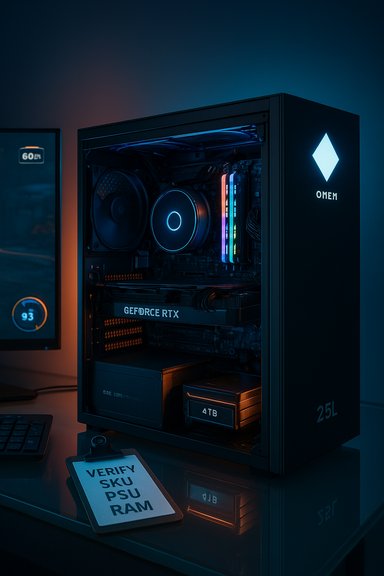
The HP OMEN 25L GT15 listing that’s circulating on marketplace pages promises a high‑end, turnkey gaming desktop built around a 14th‑Gen Intel Core i7 and NVIDIA’s mid‑range Blackwell GPU — but the headline specs and the listing source require careful verification before anyone types a credit card number. This analysis verifies the core hardware claims, cross‑references independent technical specifications, highlights what the configuration does well for gamers and creators, and lists practical checks and cautionary points every buyer should confirm before purchase.
HP’s OMEN 25L family has long been a mainstream gaming tower that balances upgradeability with a compact footprint and aggressive pricing. The GT15 label in third‑party listings appears to be a marketing SKU used by some resellers to denote gaming‑oriented configurations rather than a single, canonical HP model string. Several marketplace listings (including reseller pages) advertise an OMEN 25L configured with an Intel Core i7‑14700KF, 64GB DDR5, 4TB NVMe, and a GeForce RTX 5060 Ti or similar RTX 50‑series GPUs, often bundled with keyboard, mouse, and Windows 11 Home. However, the exact seller page you referenced could not be programmatically verified and may be a marketplace aggregation, so treat the original URL as unconfirmed until the seller provides a full, itemized spec sheet.
This article verifies the CPU and GPU hardware against manufacturer and independent databases, inspects what 64GB DDR5 + 4TB NVMe means in practical use, explores likely power and cooling implications, and gives a buyer’s checklist you can use to validate any prebuilt OMEN 25L configuration before purchase.
If those checks are clean — confirmed 16GB GPU VRAM if you plan heavy 1440p work, a reputable 650–750W (or larger) modular PSU, and clear HP warranty coverage — the build is a strong, modern prebuilt option that balances gaming and content‑creation needs without immediately forcing component swaps. If any key piece of information is missing or the seller cannot provide verified part numbers, step back and compare builds from authorized retailers or well‑known system integrators.
The bottom line: the listed OMEN 25L GT15 configuration is technically plausible and promising based on verified Intel and NVIDIA hardware specifications, but the real‑world value and longevity depend on PSU, GPU VRAM variant, cooling, and warranty details that the marketplace listing does not always disclose. Insist on itemized part numbers and OEM warranty confirmation before completing the purchase.
Source: Gamespresso Gamespresso: Gaming News & Reviews
 Background / Overview
HP’s OMEN 25L family has long been a mainstream gaming tower that balances upgradeability with a compact footprint and aggressive pricing. The GT15 label in third‑party listings appears to be a marketing SKU used by some resellers to denote gaming‑oriented configurations rather than a single, canonical HP model string. Several marketplace listings (including reseller pages) advertise an OMEN 25L configured with an Intel Core i7‑14700KF, 64GB DDR5, 4TB NVMe, and a GeForce RTX 5060 Ti or similar RTX 50‑series GPUs, often bundled with keyboard, mouse, and Windows 11 Home. However, the exact seller page you referenced could not be programmatically verified and may be a marketplace aggregation, so treat the original URL as unconfirmed until the seller provides a full, itemized spec sheet.This article verifies the CPU and GPU hardware against manufacturer and independent databases, inspects what 64GB DDR5 + 4TB NVMe means in practical use, explores likely power and cooling implications, and gives a buyer’s checklist you can use to validate any prebuilt OMEN 25L configuration before purchase.
Hardware claims: what’s provably accurate
Intel Core i7‑14700KF — desktop flagship for the value‑minded
The Intel Core i7‑14700KF is a 20‑core (8 Performance + 12 Efficient) desktop CPU with 28 threads, launched as part of Intel’s Raptor Lake Refresh family. Published specifications show a base frequency around 3.4 GHz and boost up to roughly 5.5–5.6 GHz; memory support includes DDR4 and DDR5 with DDR5 speeds commonly listed to 5600 MT/s. The chip is an unlocked KF part (no integrated GPU) and requires a socket LGA1700 motherboard. What that means in practice: the i7‑14700KF delivers strong single‑threaded performance and excellent multi‑threaded throughput for gaming, streaming, and content creation workflows, placing it one rung below Core i9 flagships but well above mainstream Core i5 parts.NVIDIA GeForce RTX 5060 Ti — the new midrange Blackwell part
NVIDIA’s RTX 5060 Ti is an official member of the GeForce 50‑series (Blackwell). The card launched in mid‑April and is offered in 8GB and 16GB GDDR7 variants depending on board partners. The 5060 Ti increases CUDA core counts relative to prior 40‑series midrange parts and adds DLSS 4/frame generation features present in the 50‑series. Manufacturer published specs and independent GPU databases list a TGP in the ~160–180 W range for desktop variants and a 128‑bit memory bus with GDDR7 memory. Independent reviews place the RTX 5060 Ti as a strong 1080p and reasonable 1440p performer with generational uplift on ray tracing and AI features versus previous midrange cards. Expect notably better frame generation and AI‑upsampling quality compared with older GPUs, but VRAM capacity (8GB on some SKUs) can limit future‑proofing at high resolution with large texture settings.Verified system spec summary (claims vs. checked facts)
- CPU: Intel Core i7‑14700KF — 20 cores / 28 threads; unlocked desktop chip, no iGPU. Verified.
- GPU: NVIDIA GeForce RTX 5060 Ti — Blackwell midrange GPU; available in 8GB and 16GB GDDR7 variants; desktop TGP ~160–180 W. Verified as a real SKU from NVIDIA and independent databases.
- RAM: 64GB DDR5 — plausible and commonly offered in high‑end prebuilt builds; benefits creators and heavy multitaskers (verify dual‑channel populated configuration vs. single‑stick). For gaming alone, 16–32GB is the practical baseline.
- Storage: 4TB NVMe SSD — this is a high‑capacity, fast storage claim; confirm whether it’s PCIe Gen4 or Gen5 and the SSD model (Samsung, WD, etc. before assuming peak performance.
- OS / Bundle: Windows 11 Home, keyboard & mouse — standard for retail OMEN configs; verify included warranty length with the seller. Market listings often bundle peripherals.
Performance expectations: gaming and creation
Gaming
The i7‑14700KF paired with an RTX 5060 Ti will be more than sufficient for high‑frame‑rate competitive 1080p gaming and will handle modern AAA titles at 1440p with adjusted settings. Expect headroom for 100+ FPS in many esports titles at 1080p and solid 60–120 FPS in less GPU‑bound AAA titles at 1440p depending on settings. Frame generation and DLSS 4 features on the RTX 5060 Ti will elevate perceived performance, particularly when using upscaling technologies. However, an 8GB VRAM SKU of the 5060 Ti can become a bottleneck in texture‑heavy 1440p or 4K scenarios, and long‑term, 8GB GPUs are more vulnerable to future AAA titles’ VRAM demands. If the particular seller’s SKU uses the 8GB variant, expect to lean more on DLSS/frame generation at higher resolutions.Content creation and multitasking
With 64GB DDR5, this OMEN configuration is well‑positioned for multitasking, video editing, and streaming. The i7’s 20 cores provide excellent multi‑threaded throughput for encoding and rendering tasks, making the build attractive to streamers who also produce local recordings or creators who run editing suites. That memory capacity largely future‑proofs the machine for multi‑app workloads, browser tabs, VMs, and editing large timelines.Thermals, power, and upgradeability — the practical risks
Power draw and PSU sizing
Combining an i7‑14700KF (which can draw well into the 200+ W PL2 envelope under heavy Turbo conditions) with an RTX 5060 Ti (TGP ~160–180 W) means the peak system draw under stress can be substantial once you add motherboard VRMs, drives, fans, and possible liquid cooling pumps. While a theoretical minimum PSU might be listed at 450–550W for the GPU alone, a practical, safe recommendation for this combo — especially if future GPU upgrades are possible — is to have at least a 650–750W quality, 80 PLUS Gold PSU. This is an inference based on published CPU and GPU power envelopes and standard advice for headroom on prebuilt systems; buyers should insist the seller discloses the exact PSU model and rating.Cooling and case airflow
Compact OMEN 25L chassis variants can be airflow‑efficient, but high TDP CPUs and midrange GPUs place a premium on cooling. Confirm whether the system uses an adequate CPU cooler (air cooler size or AIO liquid cooler) and whether there’s a multi‑fan intake/exhaust configuration. Overclocking or sustained heavy encoding will push thermals — check the seller’s cooling spec and whether the case has room for upgrades. If the prebuilt uses a small proprietary PSU or tight cable harnessing, that can complicate later component swaps.Upgrade path and warranty tradeoffs
OMEN towers generally offer reasonable upgradeability (standard ATX/mATX boards and full‑sized PSUs in many SKUs), but vendor‑specific SKUs or reseller‑reboxed units may include proprietary cabling. Verify:- Motherboard form factor and CPU socket (LGA1700 standard for i7‑14700KF).
- Number of free DIMM slots (is the 64GB in 2×32 or 4×16?.
- Number and type of M.2 slots (can you add a secondary NVMe later?.
- PSU model and whether it is modular and standard ATX size.
Pricing and market context
Marketplace listings for OMEN 25L GT15 variants with i7‑14700KF + RTX 5060 Ti show prices generally in the mid‑to‑high thousands of dollars depending on RAM and storage choices; example reseller listings at different times show prices ranging from roughly $2,200 to $2,800 depending on GPU and bundled options. These price points align with other RTX 50‑series prebuilds that pair powerful Intel CPUs with midrange Blackwell GPUs and large NVMe/DRAM configurations. Always compare the full configured price (including shipping, taxes, and any bundled warranty) to the cost of buying parts separately and assembling or using reputable system integrators.Strengths — where this configuration shines
- Raw CPU performance: The i7‑14700KF gives excellent single‑thread and multi‑thread performance that benefits games, streaming, and creation workflows.
- High RAM capacity: 64GB DDR5 is generous and future‑proof for creators, heavy multitaskers, and streamers running multiple resource‑hungry apps.
- Large, fast storage: A 4TB NVMe boot/game drive removes the need for secondary storage for many users and accelerates load times and project handling — but check the drive’s generation and controller.
- Newer GPU features: The RTX 5060 Ti benefits from Blackwell‑era improvements: DLSS 4/frame generation, better ray tracing per watt, and modern driver support.
Risks & trade‑offs — what to watch for
- VRAM limits on 8GB cards: If the specific RTX 5060 Ti SKU is the 8GB variant, VRAM will become a constraint for texture‑heavy titles at 1440p/4K. Confirm whether the card is 8GB or 16GB.
- PSU and thermals omission: Retail listings sometimes omit the PSU brand/wattage and the specific CPU cooler. Lack of disclosure is a red flag; request explicit PSU model and cooling specs.
- SKU inconsistencies across marketplaces: Identical model names are often used for different internal SKUs. Price listings across marketplaces (eBay, Walmart, reseller sites) can reflect divergent internals — verify the exact SKU string and parts list.
- Third‑party seller warranty caveats: Not all marketplace sellers offer the same returns or OEM warranty support; confirm HP warranty coverage or accepted RMA process.
Practical buyer checklist — before you click “Buy”
- Confirm the exact SKU string and ask the seller for a full, itemized parts list (motherboard model, PSU model, CPU cooler, SSD model, GPU vendor & VRAM).
- Verify the GPU VRAM size: 8GB vs 16GB matters for long‑term 1440p/4K gaming.
- Ask for PSU make, wattage, and efficiency rating (80 PLUS Gold recommended). If PSU is <650W or unknown, demand clarification.
- Confirm memory configuration: is 64GB installed as 2×32GB or 4×16GB? Dual‑channel populated with spare slots is preferable.
- Request SSD model and PCIe generation (Gen4 vs Gen5) — that affects real‑world throughput.
- Confirm warranty duration, who services RMAs (HP or the reseller), and whether return shipping is covered.
- Compare the configured price with DIY component cost + assembly — sometimes the difference is small once sales, shipping, and warranty are included.
Final analysis and recommendation
The advertised OMEN 25L GT15 configuration with an Intel Core i7‑14700KF, 64GB DDR5, 4TB NVMe, and an RTX 5060 Ti is a compelling combination on paper: it pairs a powerful desktop CPU with a modern midrange GPU and large fast storage, making it an excellent choice for multitasking gamers who stream or creators who edit video. The RTX 5060 Ti brings Blackwell‑era AI and frame‑generation advantages, and 64GB of DDR5 gives substantial multitasking and content‑creation headroom. That said, the practical value depends entirely on the specific GPU VRAM variant, the PSU and cooling specifics, and whether the seller provides a verifiable OEM‑backed warranty. Marketplace pages sometimes reuse model names for different builds, and the precise Gamespresso listing you referred to could not be validated automatically; treat the listing as unverified until the seller furnishes an itemized spec sheet and PSU/cooler details. Always demand manufacturer or reseller confirmation of parts and warranty before purchase.If those checks are clean — confirmed 16GB GPU VRAM if you plan heavy 1440p work, a reputable 650–750W (or larger) modular PSU, and clear HP warranty coverage — the build is a strong, modern prebuilt option that balances gaming and content‑creation needs without immediately forcing component swaps. If any key piece of information is missing or the seller cannot provide verified part numbers, step back and compare builds from authorized retailers or well‑known system integrators.
The bottom line: the listed OMEN 25L GT15 configuration is technically plausible and promising based on verified Intel and NVIDIA hardware specifications, but the real‑world value and longevity depend on PSU, GPU VRAM variant, cooling, and warranty details that the marketplace listing does not always disclose. Insist on itemized part numbers and OEM warranty confirmation before completing the purchase.
Source: Gamespresso Gamespresso: Gaming News & Reviews