

ZOTAC’s new MAGNUS EN275060TC squeezes a full desktop-class GeForce RTX 5060 Ti into a chassis that’s physically smaller than many RTX cards themselves, and that design decision changes the mini‑PC conversation in ways both exciting and cautionary.
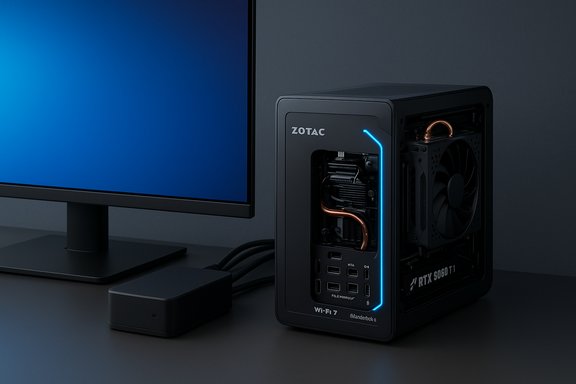
Mini PCs have matured from utility boxes for media playback into legitimate gaming and creator rigs. Manufacturers have been pushing the envelope by stuffing more powerful silicon — often mobile CPUs and compact desktop GPUs — into ever-smaller envelopes. ZOTAC’s MAGNUS EN275060TC is the clearest expression yet of that trend: a 2.65‑liter barebones mini PC that pairs a desktop‑class NVIDIA GeForce RTX 5060 Ti with an Intel Core Ultra 7 255HX processor and full modern I/O, all in a box measuring roughly 210 × 203 × 62.2 mm.
At a glance the MAGNUS is remarkable for three reasons:
Why this matters: desktop variants of the same‑named GPU often run faster than their laptop counterparts because they have higher core counts, higher clocks, and a much larger power envelope. Expect the desktop 5060 Ti to land solidly above laptop 5060 implementations in raw rasterization and ray‑tracing workloads — typically in the mid‑teens percentage performance advantage in like‑for‑like scenarios, and larger gains in GPU‑limited scenes.
The 255HX is built to deliver strong multi‑threaded throughput with a generous power envelope (maximum turbo power in the region of 160 W on mobile platforms with sufficient cooling). In a system like the MAGNUS, this CPU gives excellent single‑threaded responsiveness for games and high throughput for content creation tasks that can make use of many cores.
Value considerations:
However, the package is not without compromise. Thermal and acoustic realities impose limits on sustained performance, and the irrevocable integration of the GPU narrows upgrade paths. The product sits squarely as a premium, convenience‑driven choice: pay more for space efficiency and design; accept tradeoffs in long‑duration thermal headroom and future upgradeability.
If the priorities are compactness, RTX 50 Series features, and a modern I/O stack, ZOTAC’s MAGNUS is among the best mini PCs built for those needs. If your priorities are quiet operation, maximum long‑term upgradeability, or the absolute best sustained throughput per dollar, a traditional SFF or full tower will still be the smarter route.
Source: Windows Central Smaller than the GPU itself — ZOTAC somehow crams a desktop RTX 5060 Ti into this tiny PC
 Background / Overview
Mini PCs have matured from utility boxes for media playback into legitimate gaming and creator rigs. Manufacturers have been pushing the envelope by stuffing more powerful silicon — often mobile CPUs and compact desktop GPUs — into ever-smaller envelopes. ZOTAC’s MAGNUS EN275060TC is the clearest expression yet of that trend: a 2.65‑liter barebones mini PC that pairs a desktop‑class NVIDIA GeForce RTX 5060 Ti with an Intel Core Ultra 7 255HX processor and full modern I/O, all in a box measuring roughly 210 × 203 × 62.2 mm.At a glance the MAGNUS is remarkable for three reasons:
- It uses a desktop RTX 5060 Ti (the same GB206 family chip used across Nvidia’s RTX 50 Series), rather than a laptop variant.
- It pairs that GPU with one of Intel’s high‑end mobile Ultra chips (the Core Ultra 7 255HX), blending desktop graphics with a performance mobile CPU.
- It packs robust connectivity — Wi‑Fi 7, Thunderbolt 4, dual 2.5GbE, multiple DisplayPort outputs — into a chassis that fits behind a monitor or in a tight studio setup.
Hardware deep dive
GPU — Desktop‑class RTX 5060 Ti in a tiny chassis
ZOTAC’s choice to include a desktop RTX 5060 Ti is the headline. The desktop RTX 5060 Ti is configured from NVIDIA’s GB206 GPU and, in its desktop 5060 Ti form, commonly ships with 4,608 CUDA cores, 16 GB of GDDR7 memory on a 128‑bit bus, and a board power (TBP/TGP) around 180 W. That combination gives the card a strong balance of compute throughput, ray‑tracing resources, and high‑speed VRAM bandwidth for modern gaming and real‑time AI features.Why this matters: desktop variants of the same‑named GPU often run faster than their laptop counterparts because they have higher core counts, higher clocks, and a much larger power envelope. Expect the desktop 5060 Ti to land solidly above laptop 5060 implementations in raw rasterization and ray‑tracing workloads — typically in the mid‑teens percentage performance advantage in like‑for‑like scenarios, and larger gains in GPU‑limited scenes.
CPU — Intel Core Ultra 7 255HX
Inside the MAGNUS is Intel’s Core Ultra 7 255HX, a high‑power mobile silicon from Intel’s Ultra Series. The 255HX is a 20‑core part (8 Performance cores + 12 Efficient cores) with a peak single‑core turbo up to 5.2 GHz and a reported peak AI throughput substantially higher than some early reports suggested. Official Intel specifications list an overall peak TOPS (INT8) number at 33 TOPS, which is materially different from some secondary coverage that reported a 13 TOPS NPU — that lower number appears to be a misquote or mistake in those reports.The 255HX is built to deliver strong multi‑threaded throughput with a generous power envelope (maximum turbo power in the region of 160 W on mobile platforms with sufficient cooling). In a system like the MAGNUS, this CPU gives excellent single‑threaded responsiveness for games and high throughput for content creation tasks that can make use of many cores.
Memory and storage
ZOTAC configures the MAGNUS for laptop‑style, user‑upgradable memory and storage:- Memory: 2 × DDR5 slots supporting DDR5‑6400 CSODIMM or DDR5‑5600 SO‑DIMM, upgradable to 96 GB (ZOTAC ships one memory module in some SKUs).
- Storage: Dual M.2 2280 slots, including an M.2 PCIe 5.0 ×4 slot and a secondary M.2 PCIe 4.0 ×4 / SATA slot, allowing NVMe drives with very high sequential throughput.
I/O and networking
The MAGNUS punches well above its weight for connectivity:- 3 × DisplayPort 2.1b + 1 × HDMI (allowing up to quad‑display setups)
- 2 × Thunderbolt 4 / USB4 Type‑C
- 5 × USB‑A 3.2 Gen 2 (10 Gbps)
- Dual 2.5 GbE LAN ports
- Wi‑Fi 7 and Bluetooth 5.4
- UHS‑II SD card reader on some SKUs
Size and cooling architecture
ZOTAC lists chassis dimensions of 210 × 203 × 62.2 mm (8.27 × 7.99 × 2.45 in), giving the case a total internal volume of about 2.65 liters. For comparison, ZOTAC’s own Twin Edge RTX 5060 Ti cards measure in the 8.7 × 4.7 × 1.6 in range — meaning the GPU the company sells separately is actually bigger than the entire Magnus case footprint in one axis. To reconcile that, ZOTAC engineers redesigned the board layout and cooling — using a custom PCB, bespoke heatpipe and vapor chamber routing, carefully arranged blowers, and tightly integrated airflow channels to move heat from the GPU and CPU to external vents without exhausting precious internal volume.What ZOTAC changed compared to a standard desktop GPU build
- Custom, compact PCB and power delivery that fits the small chassis profile.
- Shared or highly optimized cooling channels that prioritize heat extraction from both GPU and CPU.
- Use of a high‑wattage external AC‑DC adapter (ZOTAC specifies a 20 V / 330 W adapter) rather than an internal ATX power supply to save internal space.
- Tweaked BIOS/firmware to balance CPU boost behavior and GPU sustained clocks to avoid thermal runaway in a constrained enclosure.
Why a desktop GPU matters — performance and features
Using the desktop RTX 5060 Ti instead of a mobile variant brings three concrete advantages:- Higher raw compute: More CUDA cores and higher clocks translate directly into better rasterization and ray‑tracing throughput.
- Bigger VRAM options: Desktop cards are available in 16 GB GDDR7 configurations, which reduces thrashing in high‑resolution textures and complex scenes.
- Full feature set: Desktop RTX 50 Series cards benefit from the full implementation of Blackwell’s RT and Tensor cores and support advanced features like DLSS 4 with Multi‑Frame Generation (MFG), which can dramatically increase framerates without obvious fidelity loss in compatible titles.
Thermals, power, and the real‑world limits
Packing a ~180 W GPU and a 100–160 W mobile CPU into a 2.65 L box forces tradeoffs:- Power headroom: ZOTAC pairs the system with a 330 W external adapter. In theory that leaves some headroom for peak bursts, but sustained combined GPU + CPU draws at full load can force automatic power limits or frequency reductions to stay within the adapter’s and chassis’ thermal tolerances.
- Thermal throttling risk: Small enclosures struggle to remove heat from high‑power silicon over long sessions. Expect short‑term, turbo‑boosted peak performance followed by controlled reductions in boost clocks during multi‑hour rendering or fully ray‑traced 4K gaming sessions.
- Noise: To evacuate concentrated heat from both components, fans must spin faster and generate more noise than a larger, better‑ventilated case. For studio environments where silence matters, this could be a deal breaker.
- Sustained performance variability: Gaming scenarios that rely on bursty GPU loads (e.g., titles using DLSS 4) will perform better than sustained, GPU‑intensive workloads (e.g., long path‑traced sequences or GPU‑bound encoding), where thermal limits bite.
Upgradeability and serviceability
One of the key advantages of mini PCs over gaming laptops is easier serviceability. ZOTAC preserves that to an extent:- User‑replaceable RAM: SODIMM slots allow aftermarket upgrades to max out at 96 GB.
- Dual M.2 slots: Add or swap NVMe storage without special tools.
- GPU non‑replaceable: The desktop GPU is integrated into the chassis — you cannot replace it with a larger discrete card later. That locks GPU upgrade path and increases long‑term obsolescence risk relative to a traditional desktop.
Who should buy the ZOTAC MAGNUS EN275060TC?
- Content creators who need a compact editing/preview workstation with multi‑monitor output and fast GPU‑accelerated effects, but who don’t require a desktop tower’s upgradeability.
- Space‑constrained gamers who want near‑desktop RTX 50 Series performance on a desk with minimal footprint.
- Streamers and capture setups where a small box behind a camera or monitor is preferable to a tower.
- Buyers who want maximum future upgradeability (the sealed GPU is a limit).
- Users who demand whisper‑quiet operation under sustained heavy loads.
- Cost‑conscious buyers who can assemble a small desktop with similar components for less money.
Pricing and value — the hard truth
ZOTAC has yet to publish uniform U.S. pricing for the MAGNUS EN275060TC at the time of this piece. Retail listings in Europe put the barebones price in the approximately €1,600–€1,965 range depending on region and seller. Because units are listed as barebones (you must add RAM and NVMe storage), final street prices for a ready‑to‑use system will be higher.Value considerations:
- The desktop RTX 5060 Ti alone has a manufacturer‑suggested price in the low‑to‑mid hundreds of dollars for the standalone card, but the premium here is the engineering to fit that chip into a sub‑3L chassis along with a high‑end Intel Ultra CPU and robust I/O.
- Building a similarly capable small‑form‑factor PC yourself (mini‑ITX, discrete RTX 5060 Ti, mobile/desktop CPU alternatives) may be cheaper but requires parts availability, SFF design experience, and time.
- For a buyer who prizes convenience, minimal desk footprint, and the ability to operate a near‑desktop RTX 50 Series experience without a tower, the MAGNUS may justify its premium.
- Decide if GPU upgradeability is a priority. If yes — do not buy.
- Add up the cost of a MAGNUS barebones + RAM + NVMe and compare to buying an SFF build or gaming laptop with equivalent GPU and CPU.
- Consider noise and thermal expectations in your setup (office, bedroom, studio).
- Confirm warranty/support and regional pricing before purchase.
Strengths — what ZOTAC nailed
- Engineering ambition: Squeezing a desktop RTX 5060 Ti and a 20‑core Ultra CPU into 2.65 liters is a notable mechanical and thermal engineering achievement.
- Modern I/O: Thunderbolt 4, Wi‑Fi 7, dual 2.5GbE, and triple DP plus HDMI deliver laptop‑class and desktop‑class connectivity in a single small box.
- User‑serviceable memory and storage: The barebones approach keeps upgrade options for RAM/SSD open without complex teardown.
- Leverages DLSS 4: Because the RTX 50 Series GPU supports DLSS 4 with Multi‑Frame Generation, this machine can deliver high frame rates without requiring peak GPU clocks all the time — exactly the sort of feature that helps thermally constrained designs perform acceptably.
Weaknesses and risks — what to watch out for
- Sustained thermal limits: Small chassis are always a compromise. Expect lower sustained clocks under prolonged heavy GPU + CPU loads compared to towers with large airflow.
- Noise under load: Fans will need to push more air; the tradeoff is higher acoustic output during demanding scenes.
- Non‑replaceable GPU: The integrated desktop GPU cannot be swapped later, so the machine has a shorter upgrade horizon compared to a full desktop.
- Price sensitivity: Given the premium for engineering, price‑conscious buyers may find better per‑dollar value in gaming laptops or custom SFF desktops.
- Regional pricing variability and availability: Early listings in Europe show a wide price spread; a US MSRP or street price may vary significantly due to tariffs, shipping, and channel markups.
- Potential firmware/driver teething issues: New designs that combine novel cooling and power configurations can suffer early BIOS/driver updates to refine thermal curves and fan control — purchasers should expect firmware updates in the weeks/months after release.
Practical advice and expectations
- For gaming, expect excellent 1440p performance and solid 4K performance in titles that support DLSS 4 and Multi‑Frame Generation. Where MFG applies, playable 4K framerates become realistic without maxing GPU clocks constantly.
- For creative workloads, the machine is a strong compact workstation for GPU‑accelerated tasks (render previews, GPU encoders, AI upscaling), but multi‑hour renders may yield lower average throughput than a desktop workstation with the same GPU due to thermal/power limits.
- If you rely on silence, measure noise expectations carefully through retailer demos or early reviews. Buyers sensitive to acoustics should prefer tower systems with larger, slower fans.
- Confirm whether you’re buying a barebones SKU (add RAM/SSD) or a pre‑installed version; retail listings vary.
Conclusion — a bold, pragmatic take
ZOTAC’s MAGNUS EN275060TC is an audacious engineering statement: it proves you can deliver desktop‑class RTX 50 Series performance in a literal shoebox. For users who need a small desktop replacement with outstanding connectivity, high‑end GPU features (DLSS 4, advanced ray tracing), and the convenience of a compact, serviceable chassis, the MAGNUS is a compelling option.However, the package is not without compromise. Thermal and acoustic realities impose limits on sustained performance, and the irrevocable integration of the GPU narrows upgrade paths. The product sits squarely as a premium, convenience‑driven choice: pay more for space efficiency and design; accept tradeoffs in long‑duration thermal headroom and future upgradeability.
If the priorities are compactness, RTX 50 Series features, and a modern I/O stack, ZOTAC’s MAGNUS is among the best mini PCs built for those needs. If your priorities are quiet operation, maximum long‑term upgradeability, or the absolute best sustained throughput per dollar, a traditional SFF or full tower will still be the smarter route.
Source: Windows Central Smaller than the GPU itself — ZOTAC somehow crams a desktop RTX 5060 Ti into this tiny PC
