

HyperX’s Alloy Rise 75 Wireless promises a near‑ultimate blend of customization, long battery life, and modern wireless flexibility — and on paper it mostly delivers — but a handful of quirky software and stability issues, plus a high initial MSRP that’s since softened, make this one of those peripherals you should buy with a clear checklist rather than on impulse.
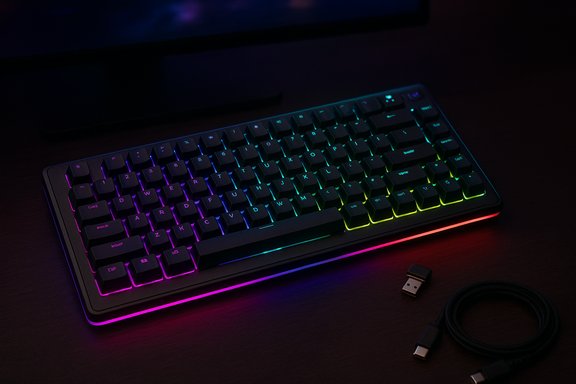
The Alloy Rise 75 Wireless is HyperX’s premium 75% mechanical keyboard offering targeted at gamers and enthusiasts who want a compact layout with full customization. Its headline features include hot‑swappable HyperX Red linear switches, a gasket‑mounted chassis, per‑key RGB with side light strips, a magnetic aluminum top plate and swappable badge, an ambient light sensor that can auto‑adjust brightness, and tri‑mode connectivity (2.4 GHz, Bluetooth, and wired USB‑C). HyperX advertises up to 80 hours of battery life with backlighting and up to 1,500 hours with backlighting disabled — figures that have been repeated across official pages and reviews. The product launched in the upper end of the premium keyboard bracket, with an MSRP that pushed it into direct competition with high‑end wireless boards. That initial pricing made reviewers keenly critical, because at that level stability and refinement are non‑negotiable. Over the last year HyperX has repeatedly discounted the Alloy Rise 75 Wireless, and the keyboard is frequently available in the $100–$150 range through official and retail channels — a fact that changes the value calculus significantly.
HyperX’s Alloy Rise 75 Wireless lands squarely in the “very good, but bring patience” category: buy it for the features and the battery, but buy it on sale — and be ready to spend a little time on firmware and software housekeeping to get the most out of what is otherwise one of the most flexible 75% wireless keyboards on the market.
Source: Windows Central https://www.windowscentral.com/accessories/keyboards/hyperx-alloy-rise-75-wireless-review/
 Background
The Alloy Rise 75 Wireless is HyperX’s premium 75% mechanical keyboard offering targeted at gamers and enthusiasts who want a compact layout with full customization. Its headline features include hot‑swappable HyperX Red linear switches, a gasket‑mounted chassis, per‑key RGB with side light strips, a magnetic aluminum top plate and swappable badge, an ambient light sensor that can auto‑adjust brightness, and tri‑mode connectivity (2.4 GHz, Bluetooth, and wired USB‑C). HyperX advertises up to 80 hours of battery life with backlighting and up to 1,500 hours with backlighting disabled — figures that have been repeated across official pages and reviews. The product launched in the upper end of the premium keyboard bracket, with an MSRP that pushed it into direct competition with high‑end wireless boards. That initial pricing made reviewers keenly critical, because at that level stability and refinement are non‑negotiable. Over the last year HyperX has repeatedly discounted the Alloy Rise 75 Wireless, and the keyboard is frequently available in the $100–$150 range through official and retail channels — a fact that changes the value calculus significantly. What the Windows Central review found (summary)
- The Alloy Rise 75 Wireless is feature‑rich and highly customizable, from hot‑swappable switches and double‑shot PBT keycaps to a magnetic top plate and changeable badge. It’s one of the more modular mainstream keyboards available.
- The layout is a compact 75% design — useful for many, but missing the full right‑side modifier cluster some typists prefer (shortened right Shift, missing Del and right Ctrl in some layouts). The board does retain a function row and a dedicated volume dial.
- Connectivity and battery are strengths: HyperX’s tri‑mode system is flexible, and real‑world battery life is very good. HyperX’s spec of up to 80 hours with RGB and 1,500 hours without is consistent with manufacturer testing and independent long‑use reports.
- Software and firmware are where Windows Central — and other reviewers — ran into trouble. Dynamic lighting interactions on Windows, NGENUITY app quirks, and occasional disconnections or odd behavior required resets, firmware updates, and fiddling to resolve. Those hiccups aren’t day‑to‑day blockers for everyone but they do reduce the polish expected at a high price point.
- The typing feel and performance were praised as very good overall, but the acoustic profile is sharper / metallic compared with the “creamy” sounds hobbyists prize in premium gasket designs. The reviewer concluded the keyboard is much easier to recommend when it’s on sale.
Verifying the technical claims
Battery life and battery capacity
HyperX lists a >6000 mAh Li‑ion polymer battery, with testing figures of up to 80 hours with RGB active (at 50% brightness in HyperX’s tests) and up to 1,500 hours with RGB off. Those claims appear consistently on HyperX product pages and on authorized retail pages. Independent reviews have reproduced long battery runtimes in everyday use (multiple days of working/typing sessions without recharge when RGB is minimal or off). Note that “up to” is a lab‑style phrase — real-world runtime will vary with polling, profile usage, Bluetooth vs 2.4 GHz, macro usage, and brightness.Connectivity and polling / input performance
HyperX documents 1,000 Hz polling rate for the keyboard. Independent tests and reviews report low latency in 2.4 GHz mode and wired mode; reviewers mostly found performance suitable for gaming. That said, latency and real‑world responsiveness are still influenced by host factors (USB drivers, interference, and software profiles). For competitive users, wired or a well‑placed 2.4 GHz dongle remains the safest choice.Build and customization
The magnetic aluminum top plate and swappable badge are unusual in the mainstream segment and genuinely add to the “modular” feel. Hot‑swappable switches and double‑shot PBT keycaps are confirmed on HyperX pages and multiple reviews. The gasket mount construction is part of the typing feel and is widely reported in hands‑on testing. The accessory ecosystem (top plates, badges) is an extra cost but real — HyperX has sold accessory packs in its store.Cross‑checking what other reviews and community feedback say
- How‑To‑Geek’s review praised the customization and battery but called out NGENUITY and a bug tied to Windows Dynamic Lighting that could lock the board’s settings until disabled; the fix required a combination of resetting the board and toggling Dynamic Lighting off. That mirrors Windows Central’s experience with intermittent software interactions.
- RTINGS focused on latency and build‑quality metrics for this family of boards and noted good latency but some variability in build tolerances and deck flex in certain units. Their benchmarking suggests the Alloy Rise family hits strong gaming performance markers, but build consistency can vary batch to batch.
- Retail and deal trackers, plus HyperX’s store, confirm the device has been widely discounted — frequently to the $100–$140 range — which is an important context for the product’s assessment. At discounted prices the Alloy Rise 75 Wireless competes more favorably with alternatives where the stability trade‑offs are easier to accept.
- Community threads and forum reports document recurring issues: a minority of users experience random disconnects on 2.4 GHz, firmware update problems, and the Dynamic Lighting conflict on Windows that prevents RGB/shortcut behavior until resolved. These posts are consistent and persistent enough to be noticed, though many owners use the keyboard without incident. If you rely on rock‑solid reliability (important in ranked competitive play), those forum reports are worth weighing.
Strengths — what the Alloy Rise 75 Wireless gets very right
- Customization and modularity: Hot‑swappable switches, double‑shot PBT keycaps, a magnetic top plate, swappable badges, and per‑key RGB make the board unusually personalizable for a mass‑market product. That’s a real advantage for people who like to tinker.
- Battery endurance: If you heavily favor long cord‑free sessions or dislike frequent recharging, the large battery and efficient modes are remarkable. The ability to push into multi‑day runtimes by disabling RGB is a practical strength.
- Feature set: Ambient light sensor, volume dial, 10 onboard profiles, tri‑mode wireless, and software programmability (when NGENUITY cooperates) make this a very packed keyboard for its size.
- Good overall typing and gaming feel: The gasket mount and HyperX Red linear switches create a fast, pleasant cadence for both typing and gaming; reviewers consistently found the board comfortable and responsive.
Weaknesses and risks you should not ignore
- Software fragility: NGENUITY and firmware interactions are the most common source of user frustration. Reported symptoms include lighting not applying, FN shortcuts failing, and the need to reset or disable Windows Dynamic Lighting to restore normal function. These are fixable but require patience and occasional troubleshooting.
- Intermittent wireless drops for some users: While not universal, forum reports of 2.4 GHz disconnects are concerning for competitive players. Proper troubleshooting (receiver placement, avoiding USB3 noise, firmware updates) mitigates many cases, but the risk exists.
- Sound profile and build nuance: The acoustic signature is sharper / more metallic than some enthusiasts prefer, and a few reviewers noted minor deck flex or finish inconsistencies on certain units. Those are small but noticeable to pickup buyers who prize perfect build.
- Accessory cost creep: The modular design encourages add‑ons (top plates, badge packs) that are sold separately; the marketing shows these accessories prominently and they add to the total cost if you want the fully customized look. Badge packs, for example, are an accessory HyperX sells at separate price points.
Practical buying checklist
- If you want this keyboard, prefer to buy it on sale. The unit’s feature set is strong at typical discounted prices (~$100–$140), but it’s a harder sell at the original MSRP.
- Use wired or keep the 2.4 GHz dongle on a USB extension/desktop‑facing port to minimize radio interference. Prioritize a rear motherboard port rather than a front hub or crowded USB hub.
- After unboxing, update firmware and the NGENUITY app immediately. If you hit lighting or shortcut issues, try toggling Windows Dynamic Lighting (Personalization) off and perform a keyboard reset per HyperX documentation (or the FN+Space method noted in user reports).
- If you’re a competitive gamer who can’t tolerate any risk of momentary disconnects, prefer a well‑tested wired board or a different wireless model with documented long‑term stability in your specific environment.
Step‑by‑step troubleshooting quick guide (concise)
- Update NGENUITY and keyboard firmware via HyperX’s official channels.
- Plug the 2.4 GHz dongle into a rear USB port or use a short USB‑A extension to position it on the desk.
- If RGB or shortcuts misbehave, check Windows → Personalization → Dynamic Lighting and disable “Use Dynamic Lighting on my devices.”
- If problems persist, perform a hardware reset (hold FN + Space — note that official reset key combos may vary; consult HyperX docs) and reinstall software.
- If disconnects continue, test wired mode to rule out hardware defects and contact HyperX support for RMA if issues remain.
How the Alloy Rise 75 Wireless compares to alternatives
- At full MSRP it competes with top‑tier wireless boards from other mainstream brands — where firmware polish and absolute stability are often differentiators. Discounted, however, it undercuts many premium rivals on price while delivering comparable specs and extra modularity. That makes it a value‑driven pick on sale, but a riskier pick at full price.
- If you prize absolute quiet reliability and the smoothest possible software experience, other vendors with more mature utility ecosystems may be preferable. If you want customization and features for the money, the Alloy Rise 75 Wireless is compelling when discounted.
Final assessment — who this keyboard is for (and who it isn’t)
- You should buy this if:
- You want a highly customizable 75% wireless mechanical keyboard with hot‑swappable switches and long battery life.
- You're comfortable doing light troubleshooting (firmware updates, toggling Dynamic Lighting) when necessary.
- You can find it at discounted retail prices (~$100–$150), where the value proposition is strong.
- You should not buy this if:
- You need absolute out‑of‑box perfection and rock‑solid wireless stability with no troubleshooting.
- You are an enthusiast who prioritizes the absolute creamiest gasket sound profile and meticulous, boutique build tolerances.
- You will pay full MSRP without expecting any discounts; at that price there are stiffer challengers that trade features for ironclad reliability.
Bottom line
The HyperX Alloy Rise 75 Wireless is a bold, well‑specified keyboard that brings features normally reserved for enthusiast kits into a mainstream, retail‑ready package. When it’s on sale, it is an excellent value: you get hot‑swappable switches, a 6,000 mAh battery that can stretch into hundreds of hours, per‑key RGB and ambient sensing, and a modular fashion/branding system most competitors don’t offer at the price point. But that advantage is tempered by software and firmware quirks that still crop up enough to be noticed, and a handful of community reports about wireless instability that recommend some cautiousness for latency‑sensitive buyers. If you approach this board prepared to update firmware, position the dongle correctly, and accept that you might need a little troubleshooting to get perfect behavior, the Alloy Rise 75 Wireless will repay you with flexibility and long runtimes. If you demand flawless, zero‑maintenance wireless performance at all times, wait for a price drop or consider alternative boards with a longer track record of software stability.HyperX’s Alloy Rise 75 Wireless lands squarely in the “very good, but bring patience” category: buy it for the features and the battery, but buy it on sale — and be ready to spend a little time on firmware and software housekeeping to get the most out of what is otherwise one of the most flexible 75% wireless keyboards on the market.
Source: Windows Central https://www.windowscentral.com/accessories/keyboards/hyperx-alloy-rise-75-wireless-review/
