

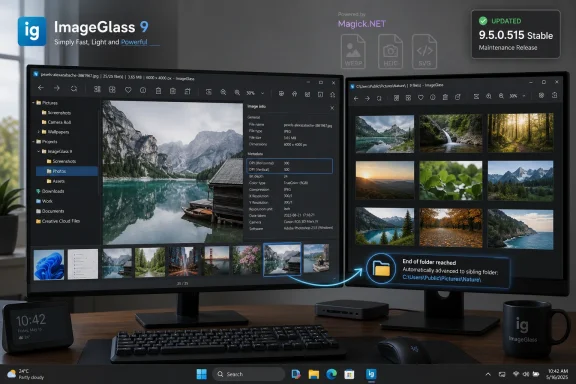
ImageGlass 9.5.0.515 was released on May 14, 2026, for Windows 10 and Windows 11 as a stable maintenance update that adds DPI display tags, sibling-folder navigation, Magick.NET 14.13.0, and two practical Windows integration fixes. The headline is not that a lightweight image viewer gained a few new switches. It is that ImageGlass 9 has crossed from active feature work into maintenance mode while ImageGlass 10 becomes the project’s future. For Windows users who chose ImageGlass precisely because it stayed fast, portable, and unintrusive, that transition matters.
ImageGlass has always occupied a specific lane in the Windows ecosystem: faster and cleaner than the built-in Photos app for many everyday workflows, less sprawling than a full editor, and friendlier to modern formats than the classic utilities many power users still keep around. Version 9.5.0.515 does not try to reinvent that formula. It tightens the sort of things people notice only when they break.
The first user-facing addition is DPI information in image information tags. That sounds minor until you remember how often Windows users deal with screenshots, print assets, scanned documents, and mixed-density images without wanting to open a full editor just to confirm basic metadata. For photographers, designers, documentation writers, and support staff, surfacing DPI in the viewer is the kind of small convenience that removes a surprising number of context switches.
The second addition is more workflow-oriented: ImageGlass can now automatically move to a sibling directory when the viewer reaches the end of the current image list. That is a power-user feature disguised as a preference. Anyone reviewing folders of exported images, camera dumps, design revisions, or sorted wallpapers knows the friction of hitting the last file, backing out, opening the next folder, and rebuilding the rhythm.
The update also moves ImageGlass to Magick.NET 14.13.0, which matters because image viewers live and die by their format-handling stack. The modern image world is not just JPEG and PNG anymore. It is WEBP, HEIC, SVG, RAW files, animated GIFs, high-DPI assets, and formats that arrive from phones, browsers, design tools, and messaging apps with very different assumptions about metadata and decoding.
That trust is partly about speed. A photo viewer that hesitates, promotes cloud features, or changes behavior after an OS update feels out of place on a machine maintained by someone who cares about predictability. ImageGlass has built its reputation on being quick, visually restrained, and customizable without behaving like a platform.
It is also about format coverage. Windows users now receive images from iPhones, Android devices, web apps, cameras, scanners, game capture tools, and AI image generators. A lightweight viewer that opens more than 80 formats is not a luxury; it is a hedge against the growing fragmentation of image workflows.
But trust is also about distribution. ImageGlass remains open source and free for personal and commercial use outside the Store version, while the Microsoft Store build functions as a paid support path. That split is awkward only if one assumes open-source software should be financially invisible. In practice, it gives users a choice: download the classic build, run a portable version, or pay through the Store to support the project and simplify acquisition.
ImageGlass 9.5 does not solve the conceptual mess. It does something more modest and more useful: it exposes a piece of information closer to where the user is already looking. That is often the difference between a tool that feels fluent and one that sends you spelunking through properties dialogs and external editors.
The secondary-monitor fix belongs to the same family. The changelog says ImageGlass had a bug where the app window progressively shrank every time it was opened on a secondary monitor. That is the kind of defect that seems comic from the outside and maddening from the inside. It punishes the exact users most likely to rely on ImageGlass: people with multi-monitor setups, mixed DPI panels, and long sessions of repetitive visual review.
Windows scaling bugs often reveal themselves only in these edge cases. A developer can test on a single laptop panel and miss the lived reality of a sysadmin using a dock, a designer using a calibrated external display, or a support technician switching between local and remote sessions. Fixing this sort of behavior is not glamorous, but it is central to whether a Windows utility feels professional.
That matters for WindowsForum readers because file organization remains one of the last places where local workflows still beat cloud-first abstraction. A folder full of screenshots, dump logs, diagrams, installer images, or UI captures is a real working surface. The viewer’s job is not merely to display pixels; it has to preserve momentum through the file system.
Auto-switching to a sibling directory will not fit everyone. Some users want hard stops at folder boundaries because those boundaries encode meaning. But making the behavior optional is the right compromise, and it is exactly the sort of preference that keeps a lightweight utility from becoming patronizing.
It also reinforces ImageGlass’s difference from more consumer-facing viewers. Microsoft Photos is designed around libraries, galleries, cloud-adjacent experiences, and simplified consumption. ImageGlass is still fundamentally a file-system tool. That distinction is not old-fashioned; it is what many technical users actually need.
If an app fails when invoked from Search, it feels broken at the operating-system boundary. The user does not care whether the fault sits in shell integration, app startup arguments, packaging, or Windows behavior. They searched, clicked, and the program failed.
For software like ImageGlass, those edges are especially important because many users install it to replace something Microsoft already provides. The bar is not merely “does it open images?” The bar is “does it behave like it belongs on Windows?” Fixing Search launch behavior helps answer that question.
The broader lesson is that mature desktop software is often improved less by marquee features than by sanding down invocation paths. File associations, context menus, Start menu shortcuts, drag-and-drop, portable mode, per-user installation, and Search all shape the user’s impression before an image is even rendered.
That is not unique to ImageGlass. Every image viewer that handles broad format support is effectively a front end to a deep stack of parsers, codecs, metadata handlers, and rendering paths. Security-minded users should treat that stack with respect, because image files are not passive in the way casual users imagine. They are structured input, and structured input has a long history of exposing bugs.
This is where steady dependency updates matter. A small open-source viewer is not automatically safer than a built-in app, nor is it automatically riskier. The practical question is whether the project keeps its decoding components current, fixes Windows integration bugs, and gives users a trustworthy path to obtain builds.
ImageGlass’s own release messaging warns users to download only from official sources, which is good advice in a software category full of repackagers, download portals, and lookalike installers. A viewer that becomes a default handler is worth acquiring carefully. Convenience is not a substitute for provenance.
That is a rational move for a long-running project. Maintaining a stable branch while building the next generation gives conservative users somewhere to stand. It also prevents the current release from becoming a moving target just as the developer explores larger architectural or interface changes elsewhere.
For users, though, maintenance mode changes the upgrade calculus. If ImageGlass 9 already fits your workflow, 9.5.0.515 looks like a sensible update: it fixes real annoyances, improves metadata visibility, and keeps the format stack moving. If you are waiting for bigger changes, the signal is clear: watch ImageGlass 10 instead.
For administrators, the distinction is useful. A maintenance-mode branch can be easier to package and standardize because the feature surface should be calmer. That does not remove the need for testing, especially around file associations and image formats, but it suggests a lower risk of surprise UI shifts.
The ARM64 build is equally notable. Windows on Arm is no longer just a curiosity, and utilities that ignore it increasingly feel incomplete. A native or dedicated ARM64 package signals that the project is paying attention to where Windows hardware is moving, not just where it has historically been.
Portability also aligns with ImageGlass’s role as a low-friction viewer. If a technician needs to inspect a folder of images on a machine without disturbing installed defaults, a portable viewer is ideal. If a user wants to keep the app synced across machines as part of a toolkit, the same applies.
The tradeoff is that portable apps can sit outside some of the management expectations enterprises prefer. They may not update through the same channels, may not participate in standard inventory cleanly, and may require more deliberate handling. That is not a flaw in ImageGlass; it is the normal bargain of portable software.
ImageGlass’s model tries to thread that needle. The classic version remains free and open source, while the Store version and donations provide support routes. That is not unusual anymore, but it still produces occasional confusion because users encounter a paid Store listing and assume the app itself has become commercial-only.
The more honest framing is that small software needs revenue paths that do not corrupt the product. Ads, bundled offers, download-site wrappers, telemetry-heavy freemium models, and abandoned donation buttons all have obvious downsides. A paid Store version is not perfect, but it is at least legible.
For Windows enthusiasts, this is the part worth defending. The platform is healthier when independent utilities can survive without becoming shovelware. If users want lightweight tools that respect local workflows, some of those users will need to support the maintainers who keep them alive.
Microsoft has nudged Windows toward services, accounts, cloud libraries, and app-store distribution. Browser-based tools have eaten many casual image tasks. Phones now perform much of the capture, editing, and sharing that once happened on PCs. Against that backdrop, a desktop image viewer has to justify its existence with speed, clarity, and control.
ImageGlass does that by staying focused. It is not a DAM system. It is not Photoshop. It is not trying to become a social gallery, cloud sync client, or AI editing suite. Its value is that it opens images quickly, moves through folders cleanly, supports a wide range of formats, and gives technical users enough knobs without burying the core task.
Version 9.5.0.515 reinforces that identity. DPI tags, folder traversal, Search launch fixes, and multi-monitor corrections are not flashy because the product itself is not trying to be flashy. It is trying to be dependable.
Source: Neowin ImageGlass 9.5.0.515
 ImageGlass 9.5 Is a Small Update With a Large Signal
ImageGlass has always occupied a specific lane in the Windows ecosystem: faster and cleaner than the built-in Photos app for many everyday workflows, less sprawling than a full editor, and friendlier to modern formats than the classic utilities many power users still keep around. Version 9.5.0.515 does not try to reinvent that formula. It tightens the sort of things people notice only when they break.The first user-facing addition is DPI information in image information tags. That sounds minor until you remember how often Windows users deal with screenshots, print assets, scanned documents, and mixed-density images without wanting to open a full editor just to confirm basic metadata. For photographers, designers, documentation writers, and support staff, surfacing DPI in the viewer is the kind of small convenience that removes a surprising number of context switches.
The second addition is more workflow-oriented: ImageGlass can now automatically move to a sibling directory when the viewer reaches the end of the current image list. That is a power-user feature disguised as a preference. Anyone reviewing folders of exported images, camera dumps, design revisions, or sorted wallpapers knows the friction of hitting the last file, backing out, opening the next folder, and rebuilding the rhythm.
The update also moves ImageGlass to Magick.NET 14.13.0, which matters because image viewers live and die by their format-handling stack. The modern image world is not just JPEG and PNG anymore. It is WEBP, HEIC, SVG, RAW files, animated GIFs, high-DPI assets, and formats that arrive from phones, browsers, design tools, and messaging apps with very different assumptions about metadata and decoding.
The Viewer Wars Were Really About Trust
Microsoft’s Photos app has improved over the years, but the reason utilities like ImageGlass, IrfanView, XnView, JPEGView, and qView continue to attract loyal users is not nostalgia. It is trust. A viewer is one of those deceptively intimate tools that touches local files constantly, becomes a default handler, and sits between the user and every image they open.That trust is partly about speed. A photo viewer that hesitates, promotes cloud features, or changes behavior after an OS update feels out of place on a machine maintained by someone who cares about predictability. ImageGlass has built its reputation on being quick, visually restrained, and customizable without behaving like a platform.
It is also about format coverage. Windows users now receive images from iPhones, Android devices, web apps, cameras, scanners, game capture tools, and AI image generators. A lightweight viewer that opens more than 80 formats is not a luxury; it is a hedge against the growing fragmentation of image workflows.
But trust is also about distribution. ImageGlass remains open source and free for personal and commercial use outside the Store version, while the Microsoft Store build functions as a paid support path. That split is awkward only if one assumes open-source software should be financially invisible. In practice, it gives users a choice: download the classic build, run a portable version, or pay through the Store to support the project and simplify acquisition.
The DPI Fix Speaks to a Windows Problem Microsoft Never Fully Solved
The addition of DPI tags lands in a Windows world that has spent more than a decade wrestling with scaling. High-DPI laptops, multi-monitor desktops, 4K displays, remote sessions, and mixed scaling percentages have made image dimensions and display dimensions easy to confuse. A file can be 3000 pixels wide, tagged at 96 DPI, intended for 300 DPI print, and viewed on a 150 percent scaled display — all while the user simply wants to know whether it is suitable for a document.ImageGlass 9.5 does not solve the conceptual mess. It does something more modest and more useful: it exposes a piece of information closer to where the user is already looking. That is often the difference between a tool that feels fluent and one that sends you spelunking through properties dialogs and external editors.
The secondary-monitor fix belongs to the same family. The changelog says ImageGlass had a bug where the app window progressively shrank every time it was opened on a secondary monitor. That is the kind of defect that seems comic from the outside and maddening from the inside. It punishes the exact users most likely to rely on ImageGlass: people with multi-monitor setups, mixed DPI panels, and long sessions of repetitive visual review.
Windows scaling bugs often reveal themselves only in these edge cases. A developer can test on a single laptop panel and miss the lived reality of a sysadmin using a dock, a designer using a calibrated external display, or a support technician switching between local and remote sessions. Fixing this sort of behavior is not glamorous, but it is central to whether a Windows utility feels professional.
Folder Navigation Is Where Power Users Live
The new sibling-directory auto-switch setting is the release’s most interesting quality-of-life change because it acknowledges that image viewing is rarely a single-file activity. Most users do not open one image in isolation. They browse a sequence, compare variants, delete rejects, inspect assets, or move through a folder tree assembled by another app.That matters for WindowsForum readers because file organization remains one of the last places where local workflows still beat cloud-first abstraction. A folder full of screenshots, dump logs, diagrams, installer images, or UI captures is a real working surface. The viewer’s job is not merely to display pixels; it has to preserve momentum through the file system.
Auto-switching to a sibling directory will not fit everyone. Some users want hard stops at folder boundaries because those boundaries encode meaning. But making the behavior optional is the right compromise, and it is exactly the sort of preference that keeps a lightweight utility from becoming patronizing.
It also reinforces ImageGlass’s difference from more consumer-facing viewers. Microsoft Photos is designed around libraries, galleries, cloud-adjacent experiences, and simplified consumption. ImageGlass is still fundamentally a file-system tool. That distinction is not old-fashioned; it is what many technical users actually need.
Search Integration Fixes the Doorway, Not the Living Room
The second bug fix resolves an error when opening ImageGlass from Windows Search results. That sounds less colorful than a shrinking window, but it is arguably more important for adoption. Defaults and file associations get all the attention, yet Windows Search remains one of the main launch paths for normal users and administrators alike.If an app fails when invoked from Search, it feels broken at the operating-system boundary. The user does not care whether the fault sits in shell integration, app startup arguments, packaging, or Windows behavior. They searched, clicked, and the program failed.
For software like ImageGlass, those edges are especially important because many users install it to replace something Microsoft already provides. The bar is not merely “does it open images?” The bar is “does it behave like it belongs on Windows?” Fixing Search launch behavior helps answer that question.
The broader lesson is that mature desktop software is often improved less by marquee features than by sanding down invocation paths. File associations, context menus, Start menu shortcuts, drag-and-drop, portable mode, per-user installation, and Search all shape the user’s impression before an image is even rendered.
Magick.NET Is the Hidden Dependency That Makes the Promise Credible
Updating Magick.NET to 14.13.0 is easy to skim past, but it is a foundational part of the release. ImageGlass’s promise depends heavily on its ability to open many image formats reliably. The more formats an app supports, the more it inherits the complexity and risk of the libraries that decode them.That is not unique to ImageGlass. Every image viewer that handles broad format support is effectively a front end to a deep stack of parsers, codecs, metadata handlers, and rendering paths. Security-minded users should treat that stack with respect, because image files are not passive in the way casual users imagine. They are structured input, and structured input has a long history of exposing bugs.
This is where steady dependency updates matter. A small open-source viewer is not automatically safer than a built-in app, nor is it automatically riskier. The practical question is whether the project keeps its decoding components current, fixes Windows integration bugs, and gives users a trustworthy path to obtain builds.
ImageGlass’s own release messaging warns users to download only from official sources, which is good advice in a software category full of repackagers, download portals, and lookalike installers. A viewer that becomes a default handler is worth acquiring carefully. Convenience is not a substitute for provenance.
Maintenance Mode Is Not Bad News, But It Changes the Bet
The most consequential line in the ImageGlass 9.5 announcement is not a feature at all. Version 9 has officially entered maintenance mode. From here, the 9.x branch is expected to receive bug fixes and stability updates, while new feature development shifts toward ImageGlass 10.That is a rational move for a long-running project. Maintaining a stable branch while building the next generation gives conservative users somewhere to stand. It also prevents the current release from becoming a moving target just as the developer explores larger architectural or interface changes elsewhere.
For users, though, maintenance mode changes the upgrade calculus. If ImageGlass 9 already fits your workflow, 9.5.0.515 looks like a sensible update: it fixes real annoyances, improves metadata visibility, and keeps the format stack moving. If you are waiting for bigger changes, the signal is clear: watch ImageGlass 10 instead.
For administrators, the distinction is useful. A maintenance-mode branch can be easier to package and standardize because the feature surface should be calmer. That does not remove the need for testing, especially around file associations and image formats, but it suggests a lower risk of surprise UI shifts.
The Portable Build Still Matters in 2026
The submitted release notes highlight portable downloads, including x64 and ARM64 builds. That is not a nostalgic detail. Portable Windows software remains valuable in labs, support environments, locked-down workstations, and personal toolkits where users want a known utility without a full installation footprint.The ARM64 build is equally notable. Windows on Arm is no longer just a curiosity, and utilities that ignore it increasingly feel incomplete. A native or dedicated ARM64 package signals that the project is paying attention to where Windows hardware is moving, not just where it has historically been.
Portability also aligns with ImageGlass’s role as a low-friction viewer. If a technician needs to inspect a folder of images on a machine without disturbing installed defaults, a portable viewer is ideal. If a user wants to keep the app synced across machines as part of a toolkit, the same applies.
The tradeoff is that portable apps can sit outside some of the management expectations enterprises prefer. They may not update through the same channels, may not participate in standard inventory cleanly, and may require more deliberate handling. That is not a flaw in ImageGlass; it is the normal bargain of portable software.
ImageGlass Is Becoming a Case Study in Sustainable Small Software
The open-source desktop utility world has a sustainability problem. Users want polish, security updates, modern format support, good Windows integration, portable builds, native packages, theme support, and no ads. They also often resist paying for any of it.ImageGlass’s model tries to thread that needle. The classic version remains free and open source, while the Store version and donations provide support routes. That is not unusual anymore, but it still produces occasional confusion because users encounter a paid Store listing and assume the app itself has become commercial-only.
The more honest framing is that small software needs revenue paths that do not corrupt the product. Ads, bundled offers, download-site wrappers, telemetry-heavy freemium models, and abandoned donation buttons all have obvious downsides. A paid Store version is not perfect, but it is at least legible.
For Windows enthusiasts, this is the part worth defending. The platform is healthier when independent utilities can survive without becoming shovelware. If users want lightweight tools that respect local workflows, some of those users will need to support the maintainers who keep them alive.
The Real Competition Is Not Another Viewer
It is tempting to compare ImageGlass feature-by-feature against IrfanView, XnView MP, qView, nomacs, JPEGView, or Microsoft Photos. Those comparisons are useful, but they miss the larger contest. The real competition is whether local, user-controlled desktop software can still feel modern enough to remain the default choice.Microsoft has nudged Windows toward services, accounts, cloud libraries, and app-store distribution. Browser-based tools have eaten many casual image tasks. Phones now perform much of the capture, editing, and sharing that once happened on PCs. Against that backdrop, a desktop image viewer has to justify its existence with speed, clarity, and control.
ImageGlass does that by staying focused. It is not a DAM system. It is not Photoshop. It is not trying to become a social gallery, cloud sync client, or AI editing suite. Its value is that it opens images quickly, moves through folders cleanly, supports a wide range of formats, and gives technical users enough knobs without burying the core task.
Version 9.5.0.515 reinforces that identity. DPI tags, folder traversal, Search launch fixes, and multi-monitor corrections are not flashy because the product itself is not trying to be flashy. It is trying to be dependable.
The Practical Read on 9.5.0.515
For most existing ImageGlass 9 users, this update looks like an easy recommendation, particularly if they use secondary monitors, launch apps through Windows Search, review images across folder trees, or care about visible DPI metadata. The update is modest, but modest is not a criticism when a project is preparing a larger generational transition.- ImageGlass 9.5.0.515 is a stable Windows 10 and Windows 11 release dated May 14, 2026.
- The update adds DPI data support in image information tags and an optional setting to continue into sibling folders at the end of an image list.
- The release updates Magick.NET to 14.13.0, which matters for ImageGlass’s broad file-format support.
- The two listed bug fixes address progressive window shrinking on secondary monitors and errors when launching ImageGlass from Windows Search results.
- ImageGlass 9 is now in maintenance mode, so users seeking new major features should watch ImageGlass 10 while stability-focused users can remain on the 9.x branch.
- Users should download from official project channels rather than third-party repackagers, especially because image viewers commonly become default file handlers.
Source: Neowin ImageGlass 9.5.0.515
