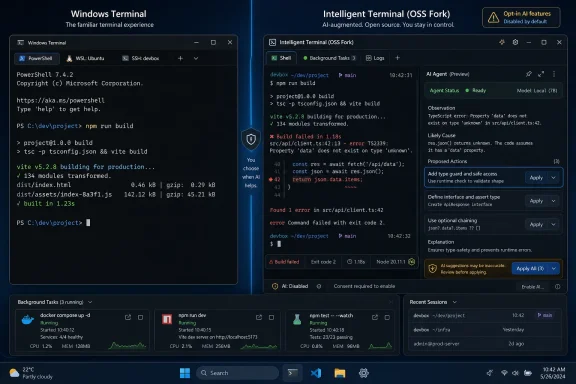
Microsoft announced Intelligent Terminal 0.1 on June 2, 2026, as an open-source experimental fork of Windows Terminal for Windows users, adding native AI agent integration while leaving the standard Windows Terminal app installed separately and unchanged for people who do not want agent features. That split is the most important part of the announcement, and also the most revealing. Microsoft has learned, at least temporarily, that the terminal is not the place to surprise power users with a new assistant. The company is still betting that AI belongs in the command line, but this time it is making the bet in a side room rather than renovating the main house while everyone is still inside.
Intelligent Terminal is not a feature update to Windows Terminal. It is a fork: a separate application, a separate install, and for now a separate risk surface for users who want to experiment with agent-driven workflows. You can install it from the Microsoft Store, use WinGet, or go to the GitHub repository, but you do not wake up to find your existing terminal suddenly wearing a Copilot badge.
That distinction matters because Windows Terminal has become one of Microsoft’s rare recent Windows-era successes: modern, fast enough, open source, and broadly accepted by users who otherwise flinch when Redmond says it has improved something. It unified Command Prompt, PowerShell, WSL, Azure Cloud Shell, tabs, profiles, GPU-accelerated rendering, and a modern settings model without turning the tool into a marketing surface. For many admins and developers, it is the Microsoft app that mostly stays out of the way.
Intelligent Terminal changes the posture. It treats the terminal not just as a place where commands run, but as a context stream an agent can observe, explain, and potentially act upon. That is a more ambitious idea than a chatbot bolted onto the side of a text window, and it is also a more dangerous one if implemented carelessly.
Microsoft’s pitch is that the agent pane is aware of the shell output, can detect errors, can suggest fixes, can launch background tasks, and can be configured to work with GitHub Copilot CLI by default or another Agent Client Protocol-compatible agent. In plain English: it wants to be the assistant that sees what failed, understands enough of the session to help, and saves you the ritual of copying an error into a browser tab or chat window.
There is a real product idea there. There is also a familiar 2026 fatigue problem. The industry has spent the past two years turning “AI” into a coating applied to every interface, whether or not the underlying workflow improved. Microsoft’s challenge with Intelligent Terminal is proving that this is not another coating.
By shipping Intelligent Terminal as a separate app, Microsoft avoids the immediate backlash that would come from placing agent hooks directly into mainline Windows Terminal. It also gives the Windows command-line team room to experiment without making every conservative enterprise admin, open-source purist, and security reviewer feel like a beta tester.
This is the lesson Microsoft did not always apply during the Copilot push. Windows users have repeatedly objected less to optional new features than to feeling that the operating system is being reoriented around a service they did not ask for. The difference between “available” and “inserted” is not semantic. It is the line between product choice and platform coercion.
A fork also solves a technical-politics problem. Windows Terminal has a broad constituency: developers, sysadmins, Linux-on-Windows users, students, cloud engineers, help desk staff, hobbyists, and people who just want a nicer Command Prompt. Intelligent Terminal’s audience is narrower. It is for people already using AI agents as part of their development or operations workflow, or at least curious enough to tolerate experimental behavior in exchange for tighter integration.
That gives Microsoft a clean answer to skeptics: if you do not want an agentic terminal, nothing changes. The standard Windows Terminal remains. Terminal Chat in Canary is being deprecated, but the mainstream app is not being transformed into Intelligent Terminal by stealth.
The catch is that forks have a way of becoming futures. A separate experimental app today can become a proving ground for tomorrow’s default behavior, especially when the feature aligns with the company’s strategic direction. Microsoft has not said Intelligent Terminal is replacing Windows Terminal, and it would be foolish to read the announcement as a secret migration plan. But users are right to watch the boundary, because Microsoft’s AI strategy has consistently favored expansion once a feature finds internal momentum.
Intelligent Terminal is different because it treats the AI assistant less like a chat feature and more like an agent runtime. The older model was “ask a question about the command line.” The new model is “let an agent sit next to the command line, consume context, manage sessions, and potentially run or suggest work.” That is a bigger conceptual leap than the branding suggests.
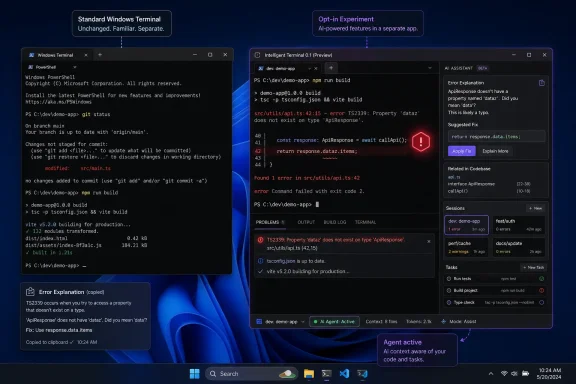
The automatic error detection is the most concrete example. When a command fails, Intelligent Terminal can detect the failure, light up an indicator, and open the agent pane with the error context already loaded. Depending on configuration, it can merely identify the issue or go further and suggest fixes.
For anyone who has debugged a broken package install, an invalid PowerShell parameter, a missing environment variable, or a failed WSL command, the appeal is obvious. The terminal is already where the pain appears. If an assistant can interpret the failure without losing session context, it could shave minutes off routine troubleshooting and make command-line work less hostile to newer users.
But that same context is what raises the stakes. Terminal output is not always harmless. It can include paths, usernames, hostnames, internal repository names, build logs, tokens accidentally printed by scripts, cloud resource identifiers, private endpoints, and error traces that say more than they should. An agent that sees the terminal can be useful precisely because it sees the terminal; that is also why administrators will ask what it sees, when it sends data, where that data goes, and how policy can contain it.
That does not mean agents should never touch a terminal. It means the design has to respect the terminal’s old contract: the user types a precise instruction, the machine does precisely what was asked, and the consequences are legible. An AI layer that interrupts that contract without clarity will not be forgiven by the people who live in shells all day.
Microsoft appears to understand at least part of that risk. The announcement emphasizes visibility: an agent status bar, a docked pane, session management, shortcuts to show or hide the agent, and separate background tabs for complex tasks. In other words, the agent is not meant to be a mysterious daemon whispering behind the terminal; it is supposed to have a visible control surface.
That is the right instinct. If an agent is running, the user should know. If it is watching context, the user should know. If it is acting in a background tab, the user should be able to inspect that work, stop it, and understand what happened. The more agentic the workflow becomes, the more boring and explicit the interface must be.
The danger is not only catastrophic failure. It is subtle automation drift: an agent that suggests a command with the wrong flag, assumes a Linux behavior that differs under PowerShell, misses a corporate proxy setting, invents a package name, or treats a production shell like a local sandbox. Most command-line disasters are not Hollywood-grade AI rebellions. They are small mistakes executed with confidence.
The Command Palette integration is especially telling. By typing a prompt through the palette, the user can ask about the current terminal session while letting the agent start in the background, rather than blocking the active shell. That is a small workflow detail, but it reflects an understanding of how command-line users actually work: they do not want the terminal to become a chat app; they want help without losing the thread.
The agent pane also mirrors a broader shift in developer tools. VS Code, JetBrains IDEs, GitHub Copilot, Cursor, cloud dev environments, and code review tools are all moving from suggestion engines toward agentic systems that can inspect projects, run commands, make changes, and iterate. The terminal is the obvious missing interface because so much real development work eventually becomes a shell command.
That said, the terminal is also where IDE-level abstractions fall apart. A code editor knows the workspace. A terminal may be connected to a local machine, a WSL distribution, a container, a remote host, a cloud shell, or a production server reached through an SSH hop. Context can change with a profile, a tab, a directory, or a prompt. If Intelligent Terminal cannot model that boundary clearly, it will be useful for toy workflows and risky for serious ones.
The best version of this product would be conservative by default. It would explain before acting, ask before running commands, surface the exact command it intends to execute, preserve logs, and make approval prompts unambiguous. The worst version would optimize for demo magic: a prompt goes in, a cascade of hidden terminal activity happens, and the user is left to reverse-engineer the outcome.
Enterprise IT has spent years trying to limit unapproved SaaS usage, prevent credential leakage, classify sensitive data, and stop employees from pasting internal logs into external tools. An agent-aware terminal sits directly on top of the workflows where sensitive operational data appears. That does not make it unacceptable, but it does make policy support non-negotiable.
Microsoft says GitHub Copilot CLI is the default agent experience and that other ACP-compatible agents can be configured. That flexibility is good for developers, but it complicates management. A corporate environment may approve Copilot Business or Enterprise under specific data-handling terms while forbidding random local or third-party agents. Another shop may prefer a local model for privacy reasons. A regulated organization may need logging, audit trails, or a hard off switch.
The fact that Intelligent Terminal is separate helps here too. Enterprises can simply avoid deploying it while they evaluate the model. The standard Windows Terminal remains available, familiar, and easier to approve because it does not carry the same AI agent implications. In managed environments, separation is not just a user preference; it is a procurement and compliance feature.
Still, Microsoft should expect administrators to ask for more than reassurance. They will want Group Policy, Intune settings, package controls, network egress clarity, agent allow lists, disable switches, and documentation that explains what context is sent where. If Intelligent Terminal becomes popular among developers, shadow adoption will happen unless organizations can manage it cleanly.
A terminal with an agent is not another autocomplete feature. It is a privileged workflow assistant sitting at the edge of code, infrastructure, secrets, and production operations. That deserves enterprise-grade controls from the beginning, not after the first embarrassing incident.
But it would be too easy to dismiss Intelligent Terminal as another case of “AI in everything.” The command line is one of the places where assistance can be genuinely useful, because the interface is powerful but unforgiving, documentation is scattered, and errors are often cryptic. If an AI system can reduce context switching, explain failures, and help users learn commands instead of blindly copying them, the terminal is a sensible target.
The problem is trust. Microsoft has to earn trust not by saying “agent” but by showing restraint. Users are more likely to accept an assistant that appears when summoned, discloses its context, and leaves the core tool untouched. They are less likely to accept one that feels inevitable, promotional, or impossible to remove.
This is why the separate-app decision should not be treated as a minor implementation note. It is the strongest argument Microsoft has. Intelligent Terminal is opt-in, experimental, and isolated from the beloved mainline terminal. That does not eliminate skepticism, but it gives skepticism a safe place to coexist with experimentation.
The fork also protects Windows Terminal’s reputation. Microsoft can take bigger swings in Intelligent Terminal without turning every Windows Terminal user into a stakeholder in the AI debate. If the experiment succeeds, there will be evidence. If it fails, the damage is contained.
That matters because the AI tooling market is fragmenting. Developers are not standardizing on one assistant. Some use Copilot because it is integrated with GitHub and Microsoft’s developer stack. Others use local models for privacy, Claude-powered tools for coding workflows, OpenAI-based CLIs, bespoke internal agents, or whatever their employer has approved this quarter. A terminal that only spoke to one assistant would become another product silo.
By leaning into an agent protocol, Microsoft can frame Intelligent Terminal as infrastructure rather than a Copilot billboard. That is a better story for power users. It suggests that the terminal team understands the shell as a neutral workspace where users choose tools, not merely as another surface for Microsoft 365-style bundling.
Of course, defaults matter. GitHub Copilot CLI being the default experience gives Microsoft’s own ecosystem the prime position. That is hardly surprising; GitHub is Microsoft-owned, Copilot is a central pillar of the company’s developer strategy, and Build-season announcements have made clear that agents are now the preferred vocabulary for software productivity.
The question is whether the protocol support remains first-class or becomes a checkbox. If Intelligent Terminal works smoothly with Copilot but awkwardly with everything else, users will notice. Command-line communities are unusually sensitive to lock-in because the terminal’s culture is built on composability. The product will get more goodwill if it behaves like a terminal citizen rather than a subscription funnel.
The agent status bar is a reasonable compromise. It gives users a persistent indicator without taking over the window. It can show whether error detection is available, provide access to the agent pane, and open a session management panel when multiple agents or background tasks are active.
The session management piece may become more important than the chat itself. Anyone who has used agentic coding tools knows the failure mode: a tool starts tasks, opens terminals, leaves processes running, and the user gradually loses track of which action came from which prompt. Microsoft’s promise that Intelligent Terminal can show active agents, past sessions, long-running tasks, and completed work is a practical response to that mess.
But the product must be careful not to make the terminal feel administratively heavier. If every failed command lights up like a dashboard alert, if every routine typo invites an assistant, or if the agent panel constantly competes for attention, experienced users will turn it off. The command line already has enough noise.
The best AI interface in a terminal may be one that is mostly invisible until asked, then extremely explicit once invoked. It should be quiet, inspectable, reversible where possible, and humble about uncertainty. The moment it starts acting like it knows better than the operator, it will lose the audience most capable of evaluating it.
A shell session can contain secrets and sensitive operational state. A suggested command can be destructive. A background task can consume resources or alter files. An agent can misunderstand directory context, environment variables, or target systems. Those are not hypothetical AI ethics concerns; they are ordinary sysadmin risks amplified by automation.
The responsible model is layered. Users should be able to see what context is shared. They should approve commands before execution. Organizations should be able to restrict agents. Sensitive environments should have easy disablement. Logs should make it clear which actions were user-entered and which were agent-suggested or agent-run. The app should not normalize blind execution.
There is also a documentation burden. Microsoft needs to explain plainly whether terminal content is sent to an external service, under what trigger, with what retention assumptions, and how different configured agents alter that behavior. The older Terminal Chat documentation emphasized that communication occurred when the user entered a message and that chat history was not saved after the session ended. Intelligent Terminal’s agent model will need similarly clear statements, updated for a more active workflow.
Power users will experiment regardless. Enterprises will not, at least not at scale, without written assurances and controls. The more useful Intelligent Terminal becomes, the more urgent that governance story becomes.
That is worth saying because Microsoft’s recent Windows feature strategy has often blurred the line between an optional capability and a platform direction. Copilot buttons, AI summaries, cloud-tied features, account nudges, and Start menu experiments have all contributed to a sense that Windows is becoming less a neutral operating system and more a distribution channel for Microsoft’s current priorities. Intelligent Terminal avoids that trap for now.
This restraint should be rewarded, even by skeptics. Not because every AI feature is good, but because optionality is good. Forking the app says Microsoft recognizes that the terminal audience is not a passive consumer audience. These are users who notice defaults, inspect settings, read release notes, and remember when a useful tool becomes a strategy vehicle.
The community reaction will likely remain split. Some developers will install Intelligent Terminal immediately and test whether the agent can explain real errors better than a browser search. Some admins will forbid it until controls exist. Some users will reject it on principle because they are tired of AI branding. All three reactions are rational.
The right question is not whether everyone should want an AI terminal. They should not. The right question is whether Microsoft can build an agentic terminal for the people who do want one without degrading the tool relied on by people who do not. Intelligent Terminal’s separate release is a promising answer, but only an early one.
 Microsoft Puts the Agent Beside the Shell, Not Inside It
Intelligent Terminal is not a feature update to Windows Terminal. It is a fork: a separate application, a separate install, and for now a separate risk surface for users who want to experiment with agent-driven workflows. You can install it from the Microsoft Store, use WinGet, or go to the GitHub repository, but you do not wake up to find your existing terminal suddenly wearing a Copilot badge.That distinction matters because Windows Terminal has become one of Microsoft’s rare recent Windows-era successes: modern, fast enough, open source, and broadly accepted by users who otherwise flinch when Redmond says it has improved something. It unified Command Prompt, PowerShell, WSL, Azure Cloud Shell, tabs, profiles, GPU-accelerated rendering, and a modern settings model without turning the tool into a marketing surface. For many admins and developers, it is the Microsoft app that mostly stays out of the way.
Intelligent Terminal changes the posture. It treats the terminal not just as a place where commands run, but as a context stream an agent can observe, explain, and potentially act upon. That is a more ambitious idea than a chatbot bolted onto the side of a text window, and it is also a more dangerous one if implemented carelessly.
Microsoft’s pitch is that the agent pane is aware of the shell output, can detect errors, can suggest fixes, can launch background tasks, and can be configured to work with GitHub Copilot CLI by default or another Agent Client Protocol-compatible agent. In plain English: it wants to be the assistant that sees what failed, understands enough of the session to help, and saves you the ritual of copying an error into a browser tab or chat window.
There is a real product idea there. There is also a familiar 2026 fatigue problem. The industry has spent the past two years turning “AI” into a coating applied to every interface, whether or not the underlying workflow improved. Microsoft’s challenge with Intelligent Terminal is proving that this is not another coating.
The Fork Is the Product Strategy
The smartest decision in this release is not the agent pane, the status bar, or the shortcut keys. It is the fork.By shipping Intelligent Terminal as a separate app, Microsoft avoids the immediate backlash that would come from placing agent hooks directly into mainline Windows Terminal. It also gives the Windows command-line team room to experiment without making every conservative enterprise admin, open-source purist, and security reviewer feel like a beta tester.
This is the lesson Microsoft did not always apply during the Copilot push. Windows users have repeatedly objected less to optional new features than to feeling that the operating system is being reoriented around a service they did not ask for. The difference between “available” and “inserted” is not semantic. It is the line between product choice and platform coercion.
A fork also solves a technical-politics problem. Windows Terminal has a broad constituency: developers, sysadmins, Linux-on-Windows users, students, cloud engineers, help desk staff, hobbyists, and people who just want a nicer Command Prompt. Intelligent Terminal’s audience is narrower. It is for people already using AI agents as part of their development or operations workflow, or at least curious enough to tolerate experimental behavior in exchange for tighter integration.
That gives Microsoft a clean answer to skeptics: if you do not want an agentic terminal, nothing changes. The standard Windows Terminal remains. Terminal Chat in Canary is being deprecated, but the mainstream app is not being transformed into Intelligent Terminal by stealth.
The catch is that forks have a way of becoming futures. A separate experimental app today can become a proving ground for tomorrow’s default behavior, especially when the feature aligns with the company’s strategic direction. Microsoft has not said Intelligent Terminal is replacing Windows Terminal, and it would be foolish to read the announcement as a secret migration plan. But users are right to watch the boundary, because Microsoft’s AI strategy has consistently favored expansion once a feature finds internal momentum.
Terminal Chat Was a Prototype; Intelligent Terminal Is a Declaration
Microsoft has already been testing the idea of AI in the terminal through Terminal Chat in Windows Terminal Canary. That feature let users connect to GitHub Copilot, Azure OpenAI, or OpenAI, then ask questions about commands, shell behavior, or error messages while staying in the terminal context. It was explicitly experimental and did not include its own model.Intelligent Terminal is different because it treats the AI assistant less like a chat feature and more like an agent runtime. The older model was “ask a question about the command line.” The new model is “let an agent sit next to the command line, consume context, manage sessions, and potentially run or suggest work.” That is a bigger conceptual leap than the branding suggests.
The automatic error detection is the most concrete example. When a command fails, Intelligent Terminal can detect the failure, light up an indicator, and open the agent pane with the error context already loaded. Depending on configuration, it can merely identify the issue or go further and suggest fixes.
For anyone who has debugged a broken package install, an invalid PowerShell parameter, a missing environment variable, or a failed WSL command, the appeal is obvious. The terminal is already where the pain appears. If an assistant can interpret the failure without losing session context, it could shave minutes off routine troubleshooting and make command-line work less hostile to newer users.
But that same context is what raises the stakes. Terminal output is not always harmless. It can include paths, usernames, hostnames, internal repository names, build logs, tokens accidentally printed by scripts, cloud resource identifiers, private endpoints, and error traces that say more than they should. An agent that sees the terminal can be useful precisely because it sees the terminal; that is also why administrators will ask what it sees, when it sends data, where that data goes, and how policy can contain it.
The Command Line Is a Terrible Place to Be Vague
Graphical apps can sometimes survive fuzzy assistance. A photo editor can suggest an enhancement, a document app can rewrite a paragraph, and a meeting assistant can summarize a transcript with tolerable ambiguity. The command line is less forgiving. Commands mutate systems, delete files, change permissions, deploy workloads, rotate secrets, and restart services.That does not mean agents should never touch a terminal. It means the design has to respect the terminal’s old contract: the user types a precise instruction, the machine does precisely what was asked, and the consequences are legible. An AI layer that interrupts that contract without clarity will not be forgiven by the people who live in shells all day.
Microsoft appears to understand at least part of that risk. The announcement emphasizes visibility: an agent status bar, a docked pane, session management, shortcuts to show or hide the agent, and separate background tabs for complex tasks. In other words, the agent is not meant to be a mysterious daemon whispering behind the terminal; it is supposed to have a visible control surface.
That is the right instinct. If an agent is running, the user should know. If it is watching context, the user should know. If it is acting in a background tab, the user should be able to inspect that work, stop it, and understand what happened. The more agentic the workflow becomes, the more boring and explicit the interface must be.
The danger is not only catastrophic failure. It is subtle automation drift: an agent that suggests a command with the wrong flag, assumes a Linux behavior that differs under PowerShell, misses a corporate proxy setting, invents a package name, or treats a production shell like a local sandbox. Most command-line disasters are not Hollywood-grade AI rebellions. They are small mistakes executed with confidence.
Developers May Be the First Real Audience
Microsoft’s announcement frames Intelligent Terminal around the way developers use agents today, and that is probably the right initial market. Developers already copy terminal output into Copilot, ChatGPT, Claude, Gemini, Stack Overflow, GitHub issues, and internal Slack channels. They already ask assistants to explain build failures, package conflicts, test errors, and syntax oddities. Intelligent Terminal pulls that loop closer to the source.The Command Palette integration is especially telling. By typing a prompt through the palette, the user can ask about the current terminal session while letting the agent start in the background, rather than blocking the active shell. That is a small workflow detail, but it reflects an understanding of how command-line users actually work: they do not want the terminal to become a chat app; they want help without losing the thread.
The agent pane also mirrors a broader shift in developer tools. VS Code, JetBrains IDEs, GitHub Copilot, Cursor, cloud dev environments, and code review tools are all moving from suggestion engines toward agentic systems that can inspect projects, run commands, make changes, and iterate. The terminal is the obvious missing interface because so much real development work eventually becomes a shell command.
That said, the terminal is also where IDE-level abstractions fall apart. A code editor knows the workspace. A terminal may be connected to a local machine, a WSL distribution, a container, a remote host, a cloud shell, or a production server reached through an SSH hop. Context can change with a profile, a tab, a directory, or a prompt. If Intelligent Terminal cannot model that boundary clearly, it will be useful for toy workflows and risky for serious ones.
The best version of this product would be conservative by default. It would explain before acting, ask before running commands, surface the exact command it intends to execute, preserve logs, and make approval prompts unambiguous. The worst version would optimize for demo magic: a prompt goes in, a cascade of hidden terminal activity happens, and the user is left to reverse-engineer the outcome.
Sysadmins Will Judge the Feature by Its Blast Radius
For administrators, the question is not whether Intelligent Terminal can explain an error. The question is whether it can be governed.Enterprise IT has spent years trying to limit unapproved SaaS usage, prevent credential leakage, classify sensitive data, and stop employees from pasting internal logs into external tools. An agent-aware terminal sits directly on top of the workflows where sensitive operational data appears. That does not make it unacceptable, but it does make policy support non-negotiable.
Microsoft says GitHub Copilot CLI is the default agent experience and that other ACP-compatible agents can be configured. That flexibility is good for developers, but it complicates management. A corporate environment may approve Copilot Business or Enterprise under specific data-handling terms while forbidding random local or third-party agents. Another shop may prefer a local model for privacy reasons. A regulated organization may need logging, audit trails, or a hard off switch.
The fact that Intelligent Terminal is separate helps here too. Enterprises can simply avoid deploying it while they evaluate the model. The standard Windows Terminal remains available, familiar, and easier to approve because it does not carry the same AI agent implications. In managed environments, separation is not just a user preference; it is a procurement and compliance feature.
Still, Microsoft should expect administrators to ask for more than reassurance. They will want Group Policy, Intune settings, package controls, network egress clarity, agent allow lists, disable switches, and documentation that explains what context is sent where. If Intelligent Terminal becomes popular among developers, shadow adoption will happen unless organizations can manage it cleanly.
A terminal with an agent is not another autocomplete feature. It is a privileged workflow assistant sitting at the edge of code, infrastructure, secrets, and production operations. That deserves enterprise-grade controls from the beginning, not after the first embarrassing incident.
AI Fatigue Is Not the Same Thing as AI Rejection
The early reaction to Intelligent Terminal is predictable because the mood around AI tooling has changed. In 2023 and 2024, “AI-powered” still carried novelty. By 2026, for many users, it often reads as warning label, upsell, telemetry concern, or product-manager reflex. Microsoft is launching into that exhaustion.But it would be too easy to dismiss Intelligent Terminal as another case of “AI in everything.” The command line is one of the places where assistance can be genuinely useful, because the interface is powerful but unforgiving, documentation is scattered, and errors are often cryptic. If an AI system can reduce context switching, explain failures, and help users learn commands instead of blindly copying them, the terminal is a sensible target.
The problem is trust. Microsoft has to earn trust not by saying “agent” but by showing restraint. Users are more likely to accept an assistant that appears when summoned, discloses its context, and leaves the core tool untouched. They are less likely to accept one that feels inevitable, promotional, or impossible to remove.
This is why the separate-app decision should not be treated as a minor implementation note. It is the strongest argument Microsoft has. Intelligent Terminal is opt-in, experimental, and isolated from the beloved mainline terminal. That does not eliminate skepticism, but it gives skepticism a safe place to coexist with experimentation.
The fork also protects Windows Terminal’s reputation. Microsoft can take bigger swings in Intelligent Terminal without turning every Windows Terminal user into a stakeholder in the AI debate. If the experiment succeeds, there will be evidence. If it fails, the damage is contained.
The Agent Client Protocol Bet Is Bigger Than One App
The mention of Agent Client Protocol compatibility is easy to skip, but it may be one of the more strategically important details. Microsoft is not merely wiring a single Copilot chat box into a terminal. It is signaling that Intelligent Terminal can be a client for different agent command-line tools, including custom or local agents.That matters because the AI tooling market is fragmenting. Developers are not standardizing on one assistant. Some use Copilot because it is integrated with GitHub and Microsoft’s developer stack. Others use local models for privacy, Claude-powered tools for coding workflows, OpenAI-based CLIs, bespoke internal agents, or whatever their employer has approved this quarter. A terminal that only spoke to one assistant would become another product silo.
By leaning into an agent protocol, Microsoft can frame Intelligent Terminal as infrastructure rather than a Copilot billboard. That is a better story for power users. It suggests that the terminal team understands the shell as a neutral workspace where users choose tools, not merely as another surface for Microsoft 365-style bundling.
Of course, defaults matter. GitHub Copilot CLI being the default experience gives Microsoft’s own ecosystem the prime position. That is hardly surprising; GitHub is Microsoft-owned, Copilot is a central pillar of the company’s developer strategy, and Build-season announcements have made clear that agents are now the preferred vocabulary for software productivity.
The question is whether the protocol support remains first-class or becomes a checkbox. If Intelligent Terminal works smoothly with Copilot but awkwardly with everything else, users will notice. Command-line communities are unusually sensitive to lock-in because the terminal’s culture is built on composability. The product will get more goodwill if it behaves like a terminal citizen rather than a subscription funnel.
The User Interface Has to Stay Boring
The screenshots and feature descriptions point to a restrained interface: a status bar, a pane, keyboard shortcuts, and management controls. That is the right direction. The terminal is not a canvas for delight. It is a workspace where predictability is a feature.The agent status bar is a reasonable compromise. It gives users a persistent indicator without taking over the window. It can show whether error detection is available, provide access to the agent pane, and open a session management panel when multiple agents or background tasks are active.
The session management piece may become more important than the chat itself. Anyone who has used agentic coding tools knows the failure mode: a tool starts tasks, opens terminals, leaves processes running, and the user gradually loses track of which action came from which prompt. Microsoft’s promise that Intelligent Terminal can show active agents, past sessions, long-running tasks, and completed work is a practical response to that mess.
But the product must be careful not to make the terminal feel administratively heavier. If every failed command lights up like a dashboard alert, if every routine typo invites an assistant, or if the agent panel constantly competes for attention, experienced users will turn it off. The command line already has enough noise.
The best AI interface in a terminal may be one that is mostly invisible until asked, then extremely explicit once invoked. It should be quiet, inspectable, reversible where possible, and humble about uncertainty. The moment it starts acting like it knows better than the operator, it will lose the audience most capable of evaluating it.
The Security Model Cannot Be an Afterthought
Microsoft’s current framing emphasizes user choice and experimentation, but security will determine whether Intelligent Terminal moves beyond enthusiasts. The company is placing an agent next to a high-authority interface. Even when the app itself does not grant new privileges, it can influence a user who already has them.A shell session can contain secrets and sensitive operational state. A suggested command can be destructive. A background task can consume resources or alter files. An agent can misunderstand directory context, environment variables, or target systems. Those are not hypothetical AI ethics concerns; they are ordinary sysadmin risks amplified by automation.
The responsible model is layered. Users should be able to see what context is shared. They should approve commands before execution. Organizations should be able to restrict agents. Sensitive environments should have easy disablement. Logs should make it clear which actions were user-entered and which were agent-suggested or agent-run. The app should not normalize blind execution.
There is also a documentation burden. Microsoft needs to explain plainly whether terminal content is sent to an external service, under what trigger, with what retention assumptions, and how different configured agents alter that behavior. The older Terminal Chat documentation emphasized that communication occurred when the user entered a message and that chat history was not saved after the session ended. Intelligent Terminal’s agent model will need similarly clear statements, updated for a more active workflow.
Power users will experiment regardless. Enterprises will not, at least not at scale, without written assurances and controls. The more useful Intelligent Terminal becomes, the more urgent that governance story becomes.
Windows Terminal Survives Because Microsoft Did Not Touch It
The most immediate relief for WindowsForum readers is simple: Windows Terminal is still Windows Terminal. If you use it for PowerShell, Command Prompt, WSL, SSH, Azure tooling, package management, scripting, or daily administration, this announcement does not require you to change anything.That is worth saying because Microsoft’s recent Windows feature strategy has often blurred the line between an optional capability and a platform direction. Copilot buttons, AI summaries, cloud-tied features, account nudges, and Start menu experiments have all contributed to a sense that Windows is becoming less a neutral operating system and more a distribution channel for Microsoft’s current priorities. Intelligent Terminal avoids that trap for now.
This restraint should be rewarded, even by skeptics. Not because every AI feature is good, but because optionality is good. Forking the app says Microsoft recognizes that the terminal audience is not a passive consumer audience. These are users who notice defaults, inspect settings, read release notes, and remember when a useful tool becomes a strategy vehicle.
The community reaction will likely remain split. Some developers will install Intelligent Terminal immediately and test whether the agent can explain real errors better than a browser search. Some admins will forbid it until controls exist. Some users will reject it on principle because they are tired of AI branding. All three reactions are rational.
The right question is not whether everyone should want an AI terminal. They should not. The right question is whether Microsoft can build an agentic terminal for the people who do want one without degrading the tool relied on by people who do not. Intelligent Terminal’s separate release is a promising answer, but only an early one.
The Tuesday-After-Build Lesson for Windows Users
Intelligent Terminal 0.1 is less important as a finished product than as a signal of where Microsoft thinks developer tooling is headed. The company believes agents belong not only in editors and cloud dashboards, but also in the command-line loop where work is built, broken, diagnosed, and deployed.- Intelligent Terminal is a separate experimental fork of Windows Terminal, not a replacement for the standard app.
- Microsoft is deprecating Terminal Chat in Windows Terminal Canary and directing AI-in-terminal experimentation toward the new fork.
- GitHub Copilot CLI is the default agent experience, but the app is designed to work with Agent Client Protocol-compatible alternatives.
- The most practical early features are context-aware error detection, an agent pane, Command Palette prompting, and agent session management.
- The biggest unresolved questions are governance, data handling, command approval, and how well non-Copilot agents will work in practice.
- The standard Windows Terminal remains the safer default for users and organizations that do not want AI agents near their shell sessions.
References
- Primary source: Windows Central
Published: 2026-06-02T21:20:08.259696
- Official source: learn.microsoft.com

Terminal Chat
Learn how to setup and use Terminal Chat in Windows Terminal Canary.learn.microsoft.com - Official source: devblogs.microsoft.com

Announcing Intelligent Terminal 0.1
Today we're announcing Intelligent Terminal version 0.1, an open-source experimental fork of Windows Terminal with native agent integration. Get started devblogs.microsoft.com
- Related coverage: phoronix.com
Microsoft Announces Open-Source "Intelligent Terminal" - Phoronix
 www.phoronix.com
- Official source: docs.github.com
Asking GitHub Copilot questions in Windows Terminal - GitHub Enterprise Cloud Docs
You can use Copilot in Windows Terminal to get suggestions and explanations for the command line. docs.github.com
- Official source: techcommunity.microsoft.com
- Related coverage: p2pexams.com
- Official source: download.microsoft.com