

IObit’s Uninstaller 5 lands as a hard‑working entry in the crowded Windows cleanup category, packing new modules for startup control, residual cleanup, secure file shredding and deeper removal of stubborn software — and it arrives at a moment when weekly app roundups like BetaNews’ “Best Windows apps this week” are reminding users that the right combination of lightweight utilities often delivers more everyday value than one‑click optimization promises.
Windows users have long relied on a blend of native tools (Disk Cleanup, Storage Sense, Task Manager) and third‑party utilities (Revo Uninstaller, CCleaner, BleachBit) to reclaim space, remove bloat and manage startup behavior. The market for uninstallers and system cleaners is crowded and competitive: vendors add features like browser plugin removal, install monitoring and “deep” cleanup to differentiate themselves. IObit Uninstaller 5 is a product of that arms race — an incremental but feature‑rich update focused on making deep removal and routine cleanup accessible to average users while preserving some advanced controls for power users. Meanwhile, editorial roundups that curate “best apps” for Windows each week — such as the BetaNews series — act as a steady reminder that targeted, well‑maintained utilities (PowerToys, optimized file‑managers, lightweight cleaners) are often preferable to monolithic optimization suites. These curated lists help users pick safe, effective tools and avoid software that promises dramatic gains but delivers little or risk.
IObit Uninstaller 5 is a useful evolution of a long‑standing tool: capable, convenient and full of practical features. Its value depends on cautious use and a sensible maintenance strategy that favors backups, selective action and an awareness of vendor history. For many users, pairing a modern uninstaller with a curated set of small, single‑purpose utilities — the very apps highlighted in weekly editorials — yields the safest and most durable path to a faster, cleaner Windows PC.
Source: BetaNews https://betanews.com/article/iobit-....com/series/best-windows-apps-this-week-190/]
 Background
Windows users have long relied on a blend of native tools (Disk Cleanup, Storage Sense, Task Manager) and third‑party utilities (Revo Uninstaller, CCleaner, BleachBit) to reclaim space, remove bloat and manage startup behavior. The market for uninstallers and system cleaners is crowded and competitive: vendors add features like browser plugin removal, install monitoring and “deep” cleanup to differentiate themselves. IObit Uninstaller 5 is a product of that arms race — an incremental but feature‑rich update focused on making deep removal and routine cleanup accessible to average users while preserving some advanced controls for power users. Meanwhile, editorial roundups that curate “best apps” for Windows each week — such as the BetaNews series — act as a steady reminder that targeted, well‑maintained utilities (PowerToys, optimized file‑managers, lightweight cleaners) are often preferable to monolithic optimization suites. These curated lists help users pick safe, effective tools and avoid software that promises dramatic gains but delivers little or risk. What IObit Uninstaller 5 brings to the table
New modules and visible feature upgrades
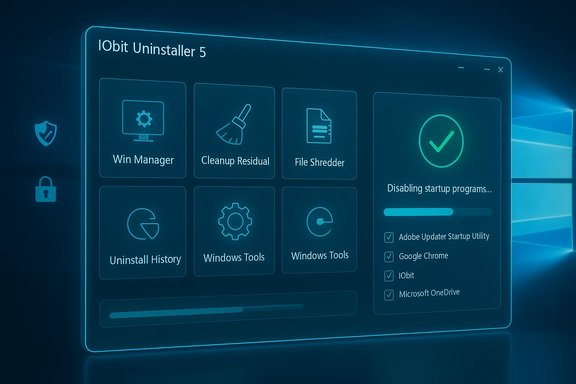
IObit Uninstaller 5 expands beyond simple uninstall routines with several notable additions:- Win Manager — a unified control panel for startup programs, running processes, and Windows Update batch removal. This mimics common Task Manager capabilities while adding convenience for batch operations.
- Cleanup Residual — scans for leftover files from previous uninstallations, invalid shortcuts and Windows Update cache debris, targeting disk bloat that the default Windows uninstaller leaves behind.
- Uninstall History — locates and exposes leftover uninstall logs so you can decide whether remnants should be removed.
- File Shredder — secure deletion for confidential files, beyond standard recycle bin removal. This adds a privacy‑focused option for users who need irreversible deletion.
- Windows Tools — shortcuts to system applets (Services, Task Scheduler, Regedit) to make advanced troubleshooting more accessible.
- Improved plugin and antivirus removal — better detection and removal of Chrome plugins (including non‑store installs) and more aggressive removal of stubborn applications, including some antivirus packages that resist conventional uninstallers.
- UI polish and skins — a refreshed interface and new themes to modernize the user experience.
What it’s designed to fix — real‑world targets
- Orphaned files and registry keys left behind by regular uninstallers.
- Browser toolbars, injected programs and malicious or unwanted extensions.
- Startup clutter and background processes that slow boot and responsiveness.
- Small‑to‑medium disk reclaiming where caches, logs and installers have accumulated.
- Secure deletion needs for sensitive data.
How IObit Uninstaller 5 compares with alternatives
Against Windows’ built‑in tools
Windows 10/11 provide basic cleanup and startup controls: Storage Sense, Disk Cleanup, Task Manager and Settings → Apps. IObit’s advantage is aggregation and deeper scanning:- Consolidation: one interface for startup, residual cleanup and uninstall history beats hopping between Settings, Disk Cleanup and Task Manager.
- Aggressive leftover scanning: finds traces that Windows’ built‑ins don’t target by design (deleted app folders, orphaned registry keys).
- Convenience: bundled tools like File Shredder or quick access to Windows applets reduce context switching.
Against established third‑party uninstallers
- Revo Uninstaller — Deep cleanup, monitoring during installs, reliable backups and strong reputation among power users. Revo’s undo safety net is a plus.
- GeekUninstaller — Lightweight and portable, great for quick removal without installing another service.
- IObit Uninstaller — adds broad functionality (win manager, file shredder) and a friendlier modern UI, but sits closer to the “suite” model with more features and potentially more telemetry.
Trust, telemetry and the reputation issue — what you must know
IObit’s historical context
IObit is a large vendor with many system utilities (Advanced SystemCare, Driver Booster). The company’s products have historically been flagged as Potentially Unwanted Programs (PUPs) by some security vendors, or at least have produced contentious detections and disputes with antimalware firms. These flags often stem from aggressive marketing behaviors, bundled offers during installation, or telemetry/behavior patterns that heuristics flag — not necessarily from active maliciousness. Nonetheless, the history matters for trust‑conscious users and administrators.Evidence from security vendors and community threads
- Malwarebytes documents a generic detection category for IObit‑related PUPs and has historically flagged some IObit products under PUP classifications. This is an ongoing source of friction between vendors.
- Community and support threads show users encountering PUP/quarantine events and debates about whether detections are false positives or legitimate concerns; this has included back‑and‑forth public claims between IObit and some security firms. These disputes are real and have recurred over multiple product releases.
Practical implications
- Install from official sources only (IObit’s site or reputable download portals) and verify publisher metadata when possible.
- Expect the product to request elevated privileges or install a service to perform deep cleanup — necessary for some functionality but raises the usual privilege scope concerns.
- Be cautious with any product that bundles optional offers during installation; opt‑out of extras you don’t want.
- If you run enterprise endpoints, test IObit tools in a controlled environment first and consider vendor whitelisting or alternative vendor‑approved tools for managed deployments.
Practical, safe workflows for IObit Uninstaller 5
Before you run anything: safety first
- Create a System Restore point or full image backup.
- Back up any files and note installed app lists (Settings → Apps → Export if needed).
- Install from an official distribution channel and verify the publisher. Avoid third‑party bundles.
Step‑by‑step checklist to use IObit Uninstaller 5 safely
- Launch IObit Uninstaller and review the startup items suggested for disabling. Deselect anything you don’t recognize before applying changes.
- Use the Cleanup Residual scan but review the deletion list — uncheck browser profile items or session data you wish to keep.
- For software you want removed completely, enable the advanced/forced uninstall and allow the tool to scan for leftovers; keep the created backup or restore point.
- Use File Shredder only for files you fully intend to remove: shredding is non‑reversible.
- After major removals, reboot and verify critical functionality (browsers, security suites, virtual machines).
- If a security product flags components, consult both vendor documentation and IObit support; do not automatically assume malice, but do verify using VirusTotal and multiple antimalware engines when unsure.
When to avoid aggressive cleaning
- Business workstations with managed software stacks (Line‑of‑Business apps, drivers, vendor agents).
- Systems used for development where environment consistency matters.
- Machines where you rely on browser sessions, saved logins, or specialized user data that a bulk cleanup could remove.
Broader perspective: curated app lists vs. one‑click optimizers
BetaNews’ ongoing “Best Windows apps this week” series is a useful antidote to “install this one tool and your PC will be new again” marketing claims. Curated lists emphasize:- Small, focused utilities that do one job well (PowerToys, specialized launchers, concise disk analyzers).
- Regular updates and active maintenance from developers.
- Community feedback and transparent changelogs.
Technical caveats and unverifiable claims — read this before you act
- Claims that an uninstaller will "restore your PC to like‑new performance" are exaggerated. Cleaning caches and removing startup items often delivers perceptible short‑term responsiveness improvements, but lasting performance gains usually require hardware upgrades (SSD, more RAM) or driver fixes. Treat cleanup suites as a convenience, not a cure.
- Some community‑reported numerical gains (disk space reclaimed, benchmark deltas) are valid on cluttered systems but are highly dependent on the test machine’s state. If a review claims large, reproducible benchmarks across diverse hardware, flag it as unverified until the methodology and sample size are disclosed.
- Historical PUP flags against IObit products are documented; however, PUP designations are not synonymous with malware. They reflect a mix of packaging/behavior and vendor heuristics. Use multiple antimalware engines to assess risk if you see warnings.
Recommendations for Windows users and IT admins
- Home users: consider IObit Uninstaller 5 if you want a capable, all‑in‑one uninstaller with extras (file shredder, startup manager). Use it with backups and review screens before deleting. Couple it with trustworthy single‑purpose tools from curated lists (PowerToys, WinDirStat) for maximum control and minimal risk.
- Power users: prefer tools you can audit and that support portable operation (Revo, GeekUninstaller, Autoruns). Use Sysinternals for forensic tasks. Reserve IObit for times when a convenient GUI workflow is worth the tradeoff of installing a privileged service.
- IT admins and enterprises: avoid wholesale deployment of consumer cleanup suites without testing. Use Group Policy, Intune, or documented Microsoft tools for managed maintenance. If you evaluate IObit, test it in a lab, confirm behavior with endpoint protection stacks, and consider vendor support options for enterprise licensing.
Final analysis — strengths, risks, and the practical verdict
IObit Uninstaller 5 is a competent, feature‑rich update that consolidates several maintenance tasks in one place. Its strengths are clear:- Feature breadth: Win Manager, residual cleanup, file shredding and deep uninstall make it a versatile maintenance companion.
- Usability: A refined UI and straightforward workflows lower the barrier for non‑technical users.
- Practical utility: On cluttered or older systems, routine use can reclaim significant space and trim startup overhead.
- Reputation and PUP history: Past disputes between IObit and antimalware vendors mean some users will see detections or encounter trust concerns. Evaluate in context and scan with multiple engines if unsure.
- Privilege surface: Deep cleanup requires elevated rights and services; those increase potential impact if the installer or updates are compromised.
- Over‑optimization temptation: One‑click “fix all” mentalities can lead to removing items users later miss (browser sessions, saved installers). Always review proposed changes.
Quick start checklist (one page)
- Backup first: create a System Restore point and save critical files.
- Download from the official site or reputable portals; verify publisher metadata.
- Review cleanup lists before confirming deletions.
- Use File Shredder selectively — irreversible.
- If flagged by antimalware, verify with multiple engines and official vendor guidance before uninstalling or whitelisting.
- Complement IObit with curated utilities from weekly roundups for targeted tasks (disk analysis, portable uninstallers, launchers).
IObit Uninstaller 5 is a useful evolution of a long‑standing tool: capable, convenient and full of practical features. Its value depends on cautious use and a sensible maintenance strategy that favors backups, selective action and an awareness of vendor history. For many users, pairing a modern uninstaller with a curated set of small, single‑purpose utilities — the very apps highlighted in weekly editorials — yields the safest and most durable path to a faster, cleaner Windows PC.
Source: BetaNews https://betanews.com/article/iobit-....com/series/best-windows-apps-this-week-190/]
