

Portable writing no longer has to mean balancing a full laptop on a café table or typing long notes on a phone. The current crop of tablets offers four distinctly different ways to capture ideas, annotate research, draft articles, and turn rough notes into organized work: an e-ink notebook built for concentration, a large Android slate aimed at students, a broadly capable iPad, and a Windows-powered Surface designed to replace a lightweight laptop.
For writers, the important question is not simply which tablet has the fastest processor or the sharpest display. It is whether the device creates a frictionless path from idea to usable document. That means considering the pen experience, keyboard options, battery life, portability, file management, app compatibility, display behavior outdoors, and the hidden cost of accessories.
The Amazon Kindle Scribe Colorsoft, Lenovo Idea Tab Pro, Apple iPad with the A16 chip, and 12-inch Microsoft Surface Pro all make a credible case for writing on the go. Yet they are not interchangeable. Each is best suited to a particular kind of writer—and buying the wrong category can turn a promising mobile workstation into an expensive device that stays at home.
A novelist who wants to brainstorm without incoming notifications has very different needs from a university student marking up lecture slides. A Windows user editing long Word documents may need desktop-class software, while a journalist working between appointments may value instant wake-up, 5G connectivity, and a reliable notes app above everything else.
Before looking at the hardware, it is useful to divide mobile writing into four common workflows:
That distinction matters because a tablet that excels at handwriting can be frustrating for keyboard-heavy work, while a tablet that runs desktop apps can be unnecessarily expensive and heavy for someone who only needs a digital notebook.
Its appeal is immediate for writers who struggle with digital distractions. Unlike a typical iPad, Android tablet, or Windows PC, it does not invite constant app switching, endless notification checks, or social media detours. That limitation is also its defining strength.
For a writer, the practical value is straightforward:
For writers who collect interview notes, editorial feedback, scanned documents, research PDFs, or handwritten outlines, that capability is significant. A digital notebook only becomes useful when its contents can be found again. Searchable notes and organized workspaces help prevent the classic problem of having dozens of notebooks full of good ideas that are effectively lost.
The device can also export notes in formats that are more useful beyond the Kindle ecosystem. However, buyers should view it primarily as a place to capture, read, annotate, and organize writing—not as a full production environment for publishing finished work.
It is also important to set expectations around color e-ink. Color output is useful for highlighting and diagrams, but it is not equivalent to the vivid, high-refresh display found on a traditional tablet. The screen is designed for calm readability, not video editing, gaming, or visually intensive creative work.
The Scribe Colorsoft makes the most sense for:
For students and writers who want a large digital canvas for notes, readings, research, and streaming, it is arguably the most practical value-oriented choice in this group.
That larger workspace changes how a tablet feels during actual writing. On an 11-inch device, a virtual keyboard or note-taking toolbar can consume a noticeable share of the available canvas. On a 12.7-inch device, it becomes more realistic to keep a source document visible while drafting notes alongside it.
The tablet’s MediaTek Dimensity 8300 platform provides ample performance for everyday productivity, reading, streaming, note-taking, and multitasking. It is not positioned as a Windows laptop replacement, but it is substantially more capable than a basic consumption-first Android tablet.
A writer can capture a research excerpt, annotate it quickly, save it, and return to the material later. A student can mark a screenshot of a lecture slide without needing to reconstruct the context in a separate app. A professional can annotate a visual, sign off on a draft, or build a rough checklist directly on the screen.
The Idea Tab Pro also supports a pen experience with pressure sensitivity, tilt recognition, and palm rejection when paired with the appropriate Lenovo stylus. As with many Android tablets, buyers should carefully check whether the pen is included in the package or sold separately, as bundles vary by retailer and region.
File management is generally capable, yet it can feel more restrictive than Windows when handling large batches of assets, specialized document types, obscure browser extensions, or complex publication workflows. Keyboard quality also depends heavily on the accessory chosen.
There is another practical consideration: configuration differences. Storage and memory specifications can vary by market and retail bundle. Anyone considering an Idea Tab Pro should verify the exact model number, RAM amount, included accessories, and software support policy before purchasing.
For writers who want a large-screen Android tablet for study, research, annotation, and casual keyboard drafting, though, the Idea Tab Pro has a compelling balance of size, performance, and cost.
It is the safest recommendation for someone who wants one device that can handle handwriting, typing, research, video calls, reading, content consumption, and occasional creative work.
That responsiveness matters more than benchmark numbers for writers. A mobile device succeeds when it wakes quickly, opens the correct document without delay, keeps notes synced, and does not become sluggish during a long working session.
The iPad’s Liquid Retina display measures 11 inches diagonally in Apple’s marketing language, though the actual rectangular viewing area is slightly smaller due to rounded corners. It is sharp, bright, color-accurate, and highly versatile. Unlike e-ink, it is excellent for viewing images, websites, video clips, digital magazines, and rich documents.
That is a meaningful caveat. The iPad can absolutely serve as a handwritten notebook, but buyers should not assume every Apple Pencil feature is available on every iPad model. The cost of the stylus is also separate from the tablet price.
For many writers, the USB-C Apple Pencil remains enough. It supports basic handwriting, drawing, and annotation and is convenient for apps such as Apple Notes, Goodnotes, Notability, OneNote, Microsoft Word, PDF Expert, and numerous scriptwriting or planning tools.
A good keyboard case turns the iPad into a compact writing machine. A poor one creates flex, cramped keys, connection issues, and a top-heavy design that undermines the device’s portability.
Writers should budget for the full setup:
Writers who use simple cloud-first tools may never feel that limitation. Writers who work in desktop Word with complex formatting, need specialized CMS tools, use professional transcription software, rely on multiple external displays, or keep intricate folder structures may eventually hit iPadOS boundaries.
Still, for most mobile writing scenarios, the iPad A16 is the most adaptable choice. It handles the greatest number of tasks gracefully, even if it does not offer the pure focus of e-ink or the desktop familiarity of Windows.
For WindowsForum readers, this is the most consequential device in the lineup because it does not ask users to adapt their workflow to a mobile operating system. It brings Windows to the tablet form factor.
Its 12-inch display is large enough for productive typing and document review while keeping the device more compact than traditional 13-inch laptops. The built-in 165-degree full-friction kickstand is one of the Surface line’s best features, allowing the tablet to stand in laptop-like positions or recline for handwriting and drawing.
With the optional Surface Pro 12-inch Keyboard, the device transitions into a compact laptop setup. Remove the keyboard, and it becomes a tablet for reading, marking up documents, sketching ideas, or using Windows ink features.
For writers who take handwritten notes but still need desktop software, this combination is particularly appealing. It can serve as a OneNote notebook in a meeting, then open the same notes beside a full Word document later in the day.
This is where the Surface Pro differs most clearly from the iPad. Apple offers a more streamlined tablet experience, but the Surface Pro offers a more familiar Windows productivity environment. The trade-off is that Windows still feels more complex on a touch display than iPadOS or a dedicated e-ink notebook platform.
This is not a reason to dismiss the Surface Pro. It is a reason to verify the exact tools required before buying. Anyone who depends on a particular VPN client, printer driver, audio interface, browser extension, transcription tool, or workplace application should confirm Windows on Arm support in advance.
The Surface Pro also becomes significantly more expensive once its keyboard and pen are added. The tablet itself may be slim, but a fully equipped setup is a premium purchase.
Choose the Kindle Scribe Colorsoft if the goal is to write by hand, read deeply, annotate documents, and reduce distractions. It is the best option for writers who want a modern notebook rather than a compact computer.
Choose the Lenovo Idea Tab Pro if a large screen, flexible Android apps, student-friendly note-taking, and value matter most. It is an especially sensible choice for research-heavy work, lecture notes, and PDF annotation.
Choose the iPad A16 if the priority is versatility. It is the strongest general-purpose tablet for writers who want handwriting, keyboard drafting, excellent apps, media features, and easy portability in one polished device.
Choose the Microsoft Surface Pro if full Windows software and laptop-like productivity are essential. It is the most capable option for writers who need desktop Word, conventional file management, broad peripheral support, and a tablet that can take the place of a lightweight notebook PC.
No device eliminates the need to think about accessories, backups, cloud synchronization, or software habits. But the right combination of pen, keyboard, storage, and writing app can make a tablet genuinely liberating. For writers who work wherever an idea appears, that freedom is far more valuable than another inch of screen space or another few points on a performance chart.
For writers, the important question is not simply which tablet has the fastest processor or the sharpest display. It is whether the device creates a frictionless path from idea to usable document. That means considering the pen experience, keyboard options, battery life, portability, file management, app compatibility, display behavior outdoors, and the hidden cost of accessories.
The Amazon Kindle Scribe Colorsoft, Lenovo Idea Tab Pro, Apple iPad with the A16 chip, and 12-inch Microsoft Surface Pro all make a credible case for writing on the go. Yet they are not interchangeable. Each is best suited to a particular kind of writer—and buying the wrong category can turn a promising mobile workstation into an expensive device that stays at home.
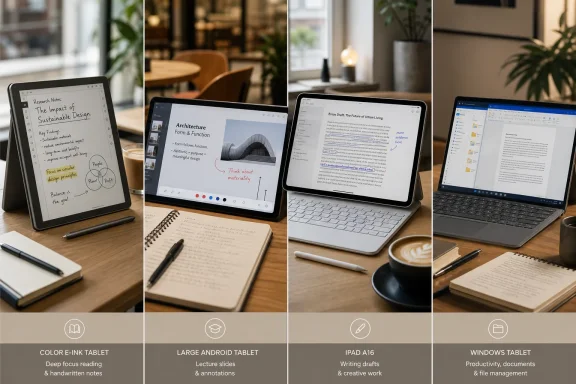 The Best Tablet for Writing Depends on How You Work
A novelist who wants to brainstorm without incoming notifications has very different needs from a university student marking up lecture slides. A Windows user editing long Word documents may need desktop-class software, while a journalist working between appointments may value instant wake-up, 5G connectivity, and a reliable notes app above everything else.Before looking at the hardware, it is useful to divide mobile writing into four common workflows:
- Distraction-free handwriting and reading: Journaling, outlining, annotating PDFs, reviewing drafts, and collecting ideas.
- Student note-taking: Marking lecture slides, creating color-coded notes, storing readings, and moving documents between devices.
- Flexible creation: Writing articles, scripts, newsletters, social posts, and lightweight multimedia work.
- Laptop-style productivity: Running full desktop apps, working in complex documents, managing files, and using multiple browser tabs.
That distinction matters because a tablet that excels at handwriting can be frustrating for keyboard-heavy work, while a tablet that runs desktop apps can be unnecessarily expensive and heavy for someone who only needs a digital notebook.
Amazon Kindle Scribe Colorsoft: The Focused Digital Notebook
The Kindle Scribe Colorsoft is the most unusual option in this group because it is not trying to be a conventional tablet. It is an e-ink writing device with Kindle reading features, a large paper-like screen, and software designed around notes, books, documents, and focused annotation.Its appeal is immediate for writers who struggle with digital distractions. Unlike a typical iPad, Android tablet, or Windows PC, it does not invite constant app switching, endless notification checks, or social media detours. That limitation is also its defining strength.
A Writing-First Design
The Scribe Colorsoft uses an approximately 11-inch glare-free color e-ink display, giving it the proportions of a paper notebook rather than a small e-reader. Its color technology is intended for softer visual output than a conventional LCD or OLED panel, making it better suited to long reading and extended note-taking sessions in bright environments.For a writer, the practical value is straightforward:
- Handwritten notes are easier to keep separate from browsing and messaging distractions.
- Color-coded pen and highlighting tools improve organization.
- E-ink remains readable outdoors without fighting reflections.
- The pen-on-screen experience is designed to feel less slippery than writing on untreated glass.
- Battery life is measured in weeks for lighter writing and reading habits rather than hours.
Search, Organization, and Document Markup
The strongest productivity additions are not merely cosmetic. The Kindle Scribe platform includes notebook search, quick-note tools, document folders, PDF annotation, and cloud-oriented document workflows. Support for importing documents through services such as Google Drive and Microsoft OneDrive makes it more practical for reviewing material that began life on a Windows PC.For writers who collect interview notes, editorial feedback, scanned documents, research PDFs, or handwritten outlines, that capability is significant. A digital notebook only becomes useful when its contents can be found again. Searchable notes and organized workspaces help prevent the classic problem of having dozens of notebooks full of good ideas that are effectively lost.
The device can also export notes in formats that are more useful beyond the Kindle ecosystem. However, buyers should view it primarily as a place to capture, read, annotate, and organize writing—not as a full production environment for publishing finished work.
Where the Scribe Colorsoft Falls Short
The Kindle Scribe Colorsoft is not ideal for writers who spend hours producing polished, keyboard-driven copy. Its software environment is intentionally narrow, and it lacks the broad app library and multitasking capabilities of iPadOS, Android, or Windows 11.It is also important to set expectations around color e-ink. Color output is useful for highlighting and diagrams, but it is not equivalent to the vivid, high-refresh display found on a traditional tablet. The screen is designed for calm readability, not video editing, gaming, or visually intensive creative work.
The Scribe Colorsoft makes the most sense for:
- Journal writers
- Authors who outline by hand
- Editors reviewing PDFs
- Students who prefer handwritten notes
- Readers who annotate books and documents
- Professionals who need a focused meeting notebook
Lenovo Idea Tab Pro: Big-Screen Note-Taking Without Premium Pricing
The Lenovo Idea Tab Pro occupies a valuable middle ground. It has a large 12.7-inch 3K display, Android flexibility, pen support, strong everyday performance, and a price that can be substantially lower than premium iPads and Windows convertibles.For students and writers who want a large digital canvas for notes, readings, research, and streaming, it is arguably the most practical value-oriented choice in this group.
A Large Canvas for Notes and Study Material
A 12.7-inch screen is not small by tablet standards. It gives the Idea Tab Pro enough room to display lecture slides, PDFs, split-screen apps, web research, and handwritten notes without constantly zooming in and out.That larger workspace changes how a tablet feels during actual writing. On an 11-inch device, a virtual keyboard or note-taking toolbar can consume a noticeable share of the available canvas. On a 12.7-inch device, it becomes more realistic to keep a source document visible while drafting notes alongside it.
The tablet’s MediaTek Dimensity 8300 platform provides ample performance for everyday productivity, reading, streaming, note-taking, and multitasking. It is not positioned as a Windows laptop replacement, but it is substantially more capable than a basic consumption-first Android tablet.
Easy Jot and the Value of Fast Annotation
Lenovo’s note-taking features are central to the device’s appeal. The Easy Jot workflow allows users to write over screenshots or notes, then preserve those annotations as image or PDF files. That may sound simple, but it aligns closely with the way students and mobile workers actually handle information.A writer can capture a research excerpt, annotate it quickly, save it, and return to the material later. A student can mark a screenshot of a lecture slide without needing to reconstruct the context in a separate app. A professional can annotate a visual, sign off on a draft, or build a rough checklist directly on the screen.
The Idea Tab Pro also supports a pen experience with pressure sensitivity, tilt recognition, and palm rejection when paired with the appropriate Lenovo stylus. As with many Android tablets, buyers should carefully check whether the pen is included in the package or sold separately, as bundles vary by retailer and region.
Why It Is Not a Perfect Laptop Alternative
Android has become much better for tablet productivity, but it still presents compromises for writers who depend on desktop-grade applications. Microsoft 365, Google Docs, Notion, Obsidian, Evernote, OneNote, and many writing tools are available, but their mobile versions do not always match the full desktop experience.File management is generally capable, yet it can feel more restrictive than Windows when handling large batches of assets, specialized document types, obscure browser extensions, or complex publication workflows. Keyboard quality also depends heavily on the accessory chosen.
There is another practical consideration: configuration differences. Storage and memory specifications can vary by market and retail bundle. Anyone considering an Idea Tab Pro should verify the exact model number, RAM amount, included accessories, and software support policy before purchasing.
For writers who want a large-screen Android tablet for study, research, annotation, and casual keyboard drafting, though, the Idea Tab Pro has a compelling balance of size, performance, and cost.
Apple iPad A16: The Most Flexible Mainstream Writing Tablet
The 11-inch iPad with the A16 chip is the broadest all-rounder of the four. It combines a fast mobile processor, mature tablet software, an excellent app ecosystem, strong battery life, a bright Liquid Retina display, optional cellular connectivity, and access to a wide range of keyboards and styluses.It is the safest recommendation for someone who wants one device that can handle handwriting, typing, research, video calls, reading, content consumption, and occasional creative work.
Performance Is Not the Main Story—Responsiveness Is
The A16 chip is more than powerful enough for mainstream writing workloads. Drafting in Microsoft Word, working in Google Docs, editing notes, browsing with many tabs, participating in video meetings, reading PDFs, and organizing files should all feel fast and immediate.That responsiveness matters more than benchmark numbers for writers. A mobile device succeeds when it wakes quickly, opens the correct document without delay, keeps notes synced, and does not become sluggish during a long working session.
The iPad’s Liquid Retina display measures 11 inches diagonally in Apple’s marketing language, though the actual rectangular viewing area is slightly smaller due to rounded corners. It is sharp, bright, color-accurate, and highly versatile. Unlike e-ink, it is excellent for viewing images, websites, video clips, digital magazines, and rich documents.
Apple Pencil Compatibility Requires Attention
The iPad A16 supports the Apple Pencil (USB-C) and the first-generation Apple Pencil with the required USB-C adapter. It does not offer the same stylus feature set as the higher-end iPad Air and iPad Pro lines that support newer Pencil models.That is a meaningful caveat. The iPad can absolutely serve as a handwritten notebook, but buyers should not assume every Apple Pencil feature is available on every iPad model. The cost of the stylus is also separate from the tablet price.
For many writers, the USB-C Apple Pencil remains enough. It supports basic handwriting, drawing, and annotation and is convenient for apps such as Apple Notes, Goodnotes, Notability, OneNote, Microsoft Word, PDF Expert, and numerous scriptwriting or planning tools.
The Keyboard Accessory Question
The iPad becomes substantially more useful for long-form writing when paired with a physical keyboard. Apple’s own keyboard accessories are polished but can be expensive, while third-party options vary dramatically in key feel, trackpad quality, weight, Bluetooth reliability, and protective coverage.A good keyboard case turns the iPad into a compact writing machine. A poor one creates flex, cramped keys, connection issues, and a top-heavy design that undermines the device’s portability.
Writers should budget for the full setup:
- iPad
- Stylus, if handwriting is important
- Keyboard case or standalone keyboard
- Protective case
- Possibly cellular service or a hotspot plan
The iPad’s Limits for Serious Desktop Work
iPadOS remains more constrained than Windows or macOS for advanced multitasking, file handling, browser extensions, peripheral support, and specialized software. It is a very good writing tablet, but it is not a universal PC replacement.Writers who use simple cloud-first tools may never feel that limitation. Writers who work in desktop Word with complex formatting, need specialized CMS tools, use professional transcription software, rely on multiple external displays, or keep intricate folder structures may eventually hit iPadOS boundaries.
Still, for most mobile writing scenarios, the iPad A16 is the most adaptable choice. It handles the greatest number of tasks gracefully, even if it does not offer the pure focus of e-ink or the desktop familiarity of Windows.
Microsoft Surface Pro: The Windows Writer’s Tablet
The 12-inch Microsoft Surface Pro is the most compelling option for writers who need a tablet that behaves like a genuine Windows PC. With a Snapdragon X Plus eight-core processor, 16GB of RAM in common configurations, solid-state storage, a 165-degree kickstand, and Windows 11, it is designed for people who want both touch-first portability and a familiar desktop work environment.For WindowsForum readers, this is the most consequential device in the lineup because it does not ask users to adapt their workflow to a mobile operating system. It brings Windows to the tablet form factor.
A Real Windows Environment in a Compact Body
The Surface Pro can run full desktop versions of Microsoft Word, OneNote, Outlook, Edge, File Explorer, Adobe Acrobat, and many other Windows applications. That makes it particularly useful for long reports, document-heavy projects, editorial workflows, and business writing.Its 12-inch display is large enough for productive typing and document review while keeping the device more compact than traditional 13-inch laptops. The built-in 165-degree full-friction kickstand is one of the Surface line’s best features, allowing the tablet to stand in laptop-like positions or recline for handwriting and drawing.
With the optional Surface Pro 12-inch Keyboard, the device transitions into a compact laptop setup. Remove the keyboard, and it becomes a tablet for reading, marking up documents, sketching ideas, or using Windows ink features.
Pen Support and Better Digital Inking
The Surface Pro supports the Surface Slim Pen and Microsoft Pen Protocol accessories. The Slim Pen can be stored and charged with compatible accessories, and supported configurations include haptic feedback that can make writing feel more tactile.For writers who take handwritten notes but still need desktop software, this combination is particularly appealing. It can serve as a OneNote notebook in a meeting, then open the same notes beside a full Word document later in the day.
This is where the Surface Pro differs most clearly from the iPad. Apple offers a more streamlined tablet experience, but the Surface Pro offers a more familiar Windows productivity environment. The trade-off is that Windows still feels more complex on a touch display than iPadOS or a dedicated e-ink notebook platform.
The Arm Compatibility Caveat
The Snapdragon X Plus model uses Windows on Arm, which has made major progress but still deserves careful consideration. Many modern applications run natively or through emulation, and mainstream writing tools are generally well served. However, older utilities, specialized drivers, niche peripherals, legacy plug-ins, and certain enterprise applications may not behave exactly as they do on an Intel-based Windows PC.This is not a reason to dismiss the Surface Pro. It is a reason to verify the exact tools required before buying. Anyone who depends on a particular VPN client, printer driver, audio interface, browser extension, transcription tool, or workplace application should confirm Windows on Arm support in advance.
The Surface Pro also becomes significantly more expensive once its keyboard and pen are added. The tablet itself may be slim, but a fully equipped setup is a premium purchase.
Choosing the Right Writing Tablet
The best tablet for writing is ultimately the one that fits the work rather than the one with the most impressive specification sheet.Choose the Kindle Scribe Colorsoft if the goal is to write by hand, read deeply, annotate documents, and reduce distractions. It is the best option for writers who want a modern notebook rather than a compact computer.
Choose the Lenovo Idea Tab Pro if a large screen, flexible Android apps, student-friendly note-taking, and value matter most. It is an especially sensible choice for research-heavy work, lecture notes, and PDF annotation.
Choose the iPad A16 if the priority is versatility. It is the strongest general-purpose tablet for writers who want handwriting, keyboard drafting, excellent apps, media features, and easy portability in one polished device.
Choose the Microsoft Surface Pro if full Windows software and laptop-like productivity are essential. It is the most capable option for writers who need desktop Word, conventional file management, broad peripheral support, and a tablet that can take the place of a lightweight notebook PC.
No device eliminates the need to think about accessories, backups, cloud synchronization, or software habits. But the right combination of pen, keyboard, storage, and writing app can make a tablet genuinely liberating. For writers who work wherever an idea appears, that freedom is far more valuable than another inch of screen space or another few points on a performance chart.
References
- Primary source: Lifehacker
Published: 2026-07-24T03:41:42+00:00
Loading…
au.lifehacker.com