

On November 10, 2025, a short thread on the DesignTAXI community — asking simply “Is Microsoft Copilot down?” — surfaced amid a small wave of user reports and confusion, but multiple independent monitoring services and incident records show no widespread Copilot outage at that time; the signals point instead to isolated client- or tenant-level issues, transient routing/authentication failures, or local caching problems rather than a global service failure.
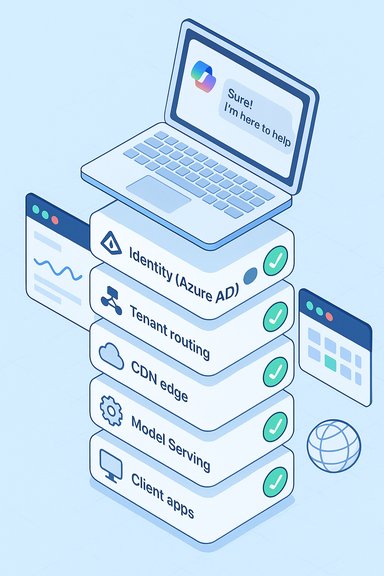
Microsoft Copilot (the Microsoft 365–integrated assistant) is now deeply embedded across Office apps, Teams, Outlook, and a standalone Copilot app on Windows and web surfaces. Its architecture ties together identity (Azure AD / Entra), tenant isolation, model‑serving infrastructure, and web/CDN routing — which means problems can look like “Copilot is down” even when only one element in the chain is misbehaving. This complexity is important to keep front-of-mind when interpreting community reports and short-lived error spikes.
Worries about Copilot availability are not new: Microsoft and third‑party status monitors have documented multiple Copilot-related incidents across 2024–2025 that were rooted in code regressions, configuration or routing changes, and occasional token/identity problems. Those earlier incidents provide a playbook for how to verify, triage, and remediate the symptoms community members see when Copilot seems unreliable.
Appendix — Quick troubleshooting cheat sheet (copyable)
Source: DesignTAXI Community Is Microsoft Copilot down? [November 10, 2025]
 Background / Overview
Microsoft Copilot (the Microsoft 365–integrated assistant) is now deeply embedded across Office apps, Teams, Outlook, and a standalone Copilot app on Windows and web surfaces. Its architecture ties together identity (Azure AD / Entra), tenant isolation, model‑serving infrastructure, and web/CDN routing — which means problems can look like “Copilot is down” even when only one element in the chain is misbehaving. This complexity is important to keep front-of-mind when interpreting community reports and short-lived error spikes.Worries about Copilot availability are not new: Microsoft and third‑party status monitors have documented multiple Copilot-related incidents across 2024–2025 that were rooted in code regressions, configuration or routing changes, and occasional token/identity problems. Those earlier incidents provide a playbook for how to verify, triage, and remediate the symptoms community members see when Copilot seems unreliable.
What happened on November 10, 2025 — short summary
- A DesignTAXI community thread posted on November 10 raised a basic question: “Is Microsoft Copilot down?”; posts like this typically appear when users experience inability to reach Copilot chat or get repeated error messages.
- Real‑time external monitors showed Microsoft 365 and the Copilot service were operational on November 10, 2025, with no large‑scale incident flagged at the time. Status aggregator checks recorded normal service health.
- Historical context: Microsoft had several high‑visibility outages in the prior weeks (notably an Azure / Microsoft 365 incident in late October that affected many services), so community sensitivity to any hiccup is elevated and generates faster, louder reporting even for small or localized issues.
Why a short community post can feel like a big problem
Small symptoms, big perception
When a single user in a shared workspace or community experiences an error — an endless “Coming soon” banner, a “Sorry, I couldn’t respond” Copilot reply, or an HTTP 5xx in the browser — the report spreads quickly and creates the impression of a large outage. Many of those symptoms arise from localized conditions:- Browser caching or stale tokens
- Tenant‑level routing quirks
- Regional CDN or edge routing hiccups
- Client app removal or OS update side effects (e.g., Copilot app being uninstalled by an update)
- Misapplied tenant policies or conditional access blocks
The role of recent major outages
A major outage that impacts Microsoft cloud infrastructure leaves a residual sensitivity in the ecosystem. The October 29, 2025 Azure/Microsoft 365 disruption is a perfect example: its broad impact and heavy press coverage made users and admins more alert to any service irregularity afterwards — meaning smaller incidents get escalated faster and are perceived as more severe.How to verify whether Copilot is actually down for you
If the Copilot interface fails or returns repeated errors, follow this prioritized checklist to separate local problems from a genuine service outage:- Check official tenant service health in the Microsoft 365 admin center (Service health / Message Center) for any active incident notices tied to Copilot or Microsoft 365. Microsoft surfaces Copilot-specific items under targeted listings.
- Visit independent status aggregators (StatusGator, IsDown, etc. for a faster crowd-signal view of any trending reports. These tools are not perfect but provide a quick cross-check.
- Try alternate Copilot entry points: copilot.microsoft.com, the Microsoft 365 web app, Teams desktop, or Word/Excel desktop clients. If Copilot works from one endpoint but not another, the issue is likely a portal‑specific routing or client problem.
- Test from another network and device (cellular hotspot and an incognito browser are fast options) to rule out local ISP, DNS, or corporate firewall interference.
- Clear caches, sign out and back in, or re-install the Copilot app if it was removed by a Windows update — community incidents have shown app uninstalls can happen inadvertently during some OS updates.
The technical causes that most commonly explain Copilot failures
1. Configuration deployments and regressions
Large cloud services push frequent config and code changes. A deployment that unintentionally flips a routing rule, CDN policy, or feature flag can quickly manifest as errors for many users. Rapid rollback is the common mitigation; repeated rollbacks, however, point to weaknesses in pre‑deployment validation.2. Identity and token validation issues
Copilot depends on Azure AD/Entra tokens and tenant isolation. If token issuance or validation experiences hiccups, clients will be stuck at sign-in or authorization steps even while other services remain healthy. These symptoms often look like endless redirects, “coming soon” messages, or authorization loops.3. Regional routing or network faults
Carrier peering changes, CDN anomalies, or regional network events can make services inaccessible from particular geographies or ISPs. These are sometimes visible as spikes in DownDetector-style reports from one region while other regions remain unaffected.4. Backend model-serving load or throttling
Heavy loads on model-serving endpoints (the LLM backends Copilot uses) can lead to “busy” or degraded responses. These are generally accompanied by backend error telemetry and sometimes require scaling or throttling adjustments to resolve.5. Client-side regressions and cached config
Browser caches or client apps holding onto stale configuration can keep users stuck even after service-side fixes are applied. Clearing caches or reauthenticating often resolves these long-tail user-visible symptoms.Practical guidance for users and IT administrators
For everyday users
- Try an alternate client (copilot.microsoft.com, Teams desktop, or Office desktop apps). If an alternate surface works, save work there and wait for official updates.
- Clear browser cache, sign out and sign back in, or test in incognito mode. These quick steps often resolve token or cache mismatches.
- Reinstall the Copilot app from the Microsoft Store if a Windows update removed it; Microsoft has previously acknowledged this class of issue.
For tenant administrators
- Immediately check the Microsoft 365 admin center (Service health) and Message Center for any active incident or advisory specifically flagged as Copilot or Copilot Chat. Microsoft added dedicated Copilot service listings to make these communications clearer.
- Correlate your tenant’s Azure AD sign‑in logs and conditional access policy changes to identify authentication failures.
- Where available, open a support ticket with Microsoft and provide timestamps, sample user IDs (masked where appropriate), and precise error messages to speed diagnosis.
- Maintain fallbacks for critical workflows: for example, ensure meeting notes and minutes can be created outside Copilot-dependent flows during high‑risk windows.
The reliability picture — strengths and persistent risks
Notable strengths
- Microsoft runs extensive telemetry and rapid rollback capabilities that, in prior incidents, helped restore service within hours. Their incident response playbook is mature and quick to deploy fixes when root causes are identified.
- Dedicated Copilot service listings and messaging have improved administrative visibility into Copilot-specific incidents, which helps tenants respond quicker.
Persistent risks and user impact
- Copilot’s heavy coupling with identity and model-serving backends creates multiple failure modes. When one layer fails (identity, CDN, model endpoint) the visible symptom is the same for users: “Copilot is down.” This coupling increases cognitive load for triage.
- High-profile cloud infrastructure incidents (like the October Azure Front Door problem) create cascading impacts across many Microsoft services and heighten user sensitivity to any disruption. Such events also reveal third‑party and cross‑service dependencies that are harder to remediate quickly.
- For enterprises that instrument Copilot into critical workflows (automated drafting, meeting summarization, or live decision support), repeated or prolonged outages translate into measurable operational risk and potential SLA exposure. Historical incident notes emphasize this concern.
Recommended actions to lower future exposure
- Treat Copilot-adoption decisions as change control items. Pilot broadly, measure impact, and keep a rollback plan for critical tenants.
- Implement multi-channel incident communication plans: email, non‑Microsoft backup conferencing links, and a shared status page accessible outside the Microsoft tenant to coordinate during outages.
- For high-dependency scenarios, maintain alternative automation pathways (scripts, on‑device macros, or other assistants) that can be invoked when Copilot is unavailable.
- Monitor both Microsoft’s official notices and independent status aggregators (Downdetector / StatusGator / IsDown) to get both the authoritative and the crowd-sourced perspectives. Use correlation, not single-source alarm triggers, when deciding to escalate.
How to read community threads like the DesignTAXI post intelligently
Community posts asking “Is Copilot down?” perform an essential early-warning function, but they require context:- Look for timestamps, screenshots, and exact error messages in posts. Those details help determine whether the problem is a local client error (e.g., a browser 401/403) or a broader backend outage (widespread 5xx errors).
- If multiple independent monitoring sites and the Microsoft Service Health pages report green, treat the community report as a localized issue and follow troubleshooting steps before declaring a global outage.
- Community threads are invaluable for surfacing new symptoms quickly, but they are noisy; pair them with telemetry from admins and independent monitors for an accurate operational picture.
When the signals disagree: what to do
Sometimes the Microsoft status page shows “healthy” while users — including a subset of an organization — still experience failures. In that case:- Assume the issue is tenant-, region-, or client-specific.
- Capture and export relevant diagnostics: network traces, exact HTTP responses, and time-stamped screenshots.
- Escalate to Microsoft support and provide the captured telemetry and logs to speed investigation.
- Keep users informed with internal communications and temporary workaround instructions (e.g., “use desktop app X while we investigate”).
Final analysis and takeaways
The DesignTAXI thread on November 10, 2025 is a reminder that a single forum post can trigger disproportionate concern — especially after a period of high-profile cloud outages. At the time of the post, independent status checks and Microsoft’s public signals indicated no global Copilot outage; the likely explanation for the user experience was a local or tenant‑specific problem, or a short‑lived edge/identity glitch. That said, the broader pattern is unmistakable: Copilot’s deep integration across identity, web portals, and AI model infrastructure increases both its utility and its operational surface area. Organizations and users should assume a non‑zero risk of transient interruptions and plan accordingly — with multi-surface fallbacks, clear admin runbooks, and monitoring linked to both Microsoft’s Service Health and independent crowd-sourced indicators. In short: on November 10, 2025, Copilot was not demonstrably down at global scale; most signals point to isolated issues that mirror the kinds of transient failures seen repeatedly in 2024–2025. The right response for users is measured troubleshooting; for administrators it’s rapid telemetry correlation and, where necessary, an escalation to Microsoft with precise logs and timestamps.Appendix — Quick troubleshooting cheat sheet (copyable)
- Check: Microsoft 365 admin center > Service health.
- Cross‑check: StatusGator / IsDown for crowd signals.
- Quick fixes: sign out/sign in, clear browser cache, try incognito, try a different network.
- If desktop app missing: reinstall Copilot from Microsoft Store (Windows).
- Admin escalation: collect tenant logs, sample user IDs, timestamps, and HTTP error responses before opening a Microsoft support ticket.
Source: DesignTAXI Community Is Microsoft Copilot down? [November 10, 2025]
