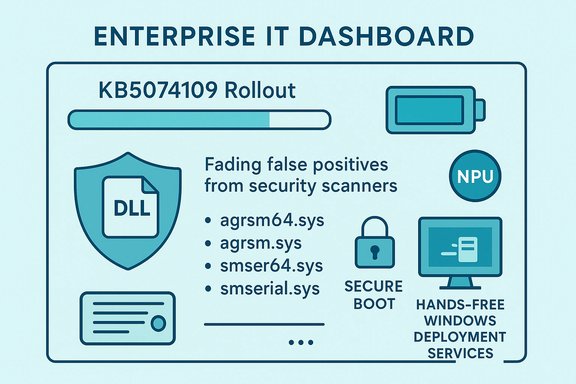
Microsoft’s January cumulative update, KB5074109, delivered more than routine security fixes — among the notable changes it updates the Windows-packaged SQLite runtime winsqlite3.dll to stop noisy false‑positive security alerts that some third‑party scanners were incorrectly raising. This single-line fix sits inside a much larger, operationally significant rollup that also addresses NPU battery-drain behavior, removes legacy modem drivers, prepares for a phased Secure Boot certificate rotation, and hardens Windows Deployment Services against unauthenticated hands‑free imaging. The update is part of the January 13, 2026 Patch Tuesday and should be treated as a high‑priority baseline change that demands careful piloting in managed environments.
KB5074109 is a combined Servicing Stack Update (SSU) plus Latest Cumulative Update (LCU) for Windows 11 that advances affected SKUs to OS Build 26200.7623 (25H2) and 26100.7623 (24H2). It was published as the January 13, 2026 cumulative and bundles security patches, servicing improvements, and several operational fixes that will materially affect both consumer devices and enterprise fleets. The winsqlite3.dll change—while compact—is an important practical remediation for a noisy operational problem: when a widely deployed system DLL is flagged by endpoint scanners, the resulting quarantines and alerts can cascade through SOC workflows.
This article explains what changed, why winsqlite3.dll triggered alerts in the first place, how Microsoft fixed it inside KB5074109, the operational consequences for administrators, and recommended mitigation steps for security teams and IT operations. The analysis cross‑references Microsoft’s rollup behavior and corroborating community reporting to give administrators an actionable understanding of benefits, risks, and next steps.
Source: Windows Report https://windowsreport.com/microsoft...-security-alerts-triggered-by-winsqlite3-dll/
 Background / Overview
KB5074109 is a combined Servicing Stack Update (SSU) plus Latest Cumulative Update (LCU) for Windows 11 that advances affected SKUs to OS Build 26200.7623 (25H2) and 26100.7623 (24H2). It was published as the January 13, 2026 cumulative and bundles security patches, servicing improvements, and several operational fixes that will materially affect both consumer devices and enterprise fleets. The winsqlite3.dll change—while compact—is an important practical remediation for a noisy operational problem: when a widely deployed system DLL is flagged by endpoint scanners, the resulting quarantines and alerts can cascade through SOC workflows.This article explains what changed, why winsqlite3.dll triggered alerts in the first place, how Microsoft fixed it inside KB5074109, the operational consequences for administrators, and recommended mitigation steps for security teams and IT operations. The analysis cross‑references Microsoft’s rollup behavior and corroborating community reporting to give administrators an actionable understanding of benefits, risks, and next steps.
What KB5074109 changes — concise list
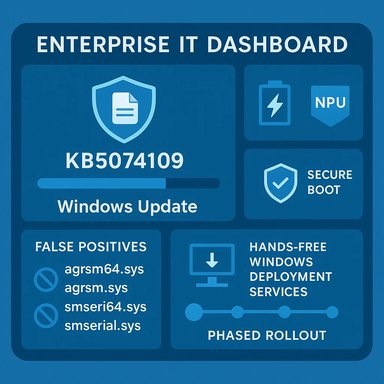
- Updates Windows’ bundled SQLite runtime, winsqlite3.dll, to reduce false‑positive vulnerability detections from third‑party security scanners and EDR rules. This change addresses scanner noise while leaving application‑embedded sqlite3.dll instances (those shipped inside app folders) outside Windows Update’s scope.
- Fixes a power‑state bug affecting some Neural Processing Units (NPUs) where the NPU could remain powered while idle, leading to measurable battery drain on certain AI‑accelerated devices.
- Removes several legacy modem drivers from the in‑box Windows image (agrsm64.sys, agrsm.sys, smserl64.sys, smserial.sys) due to documented vulnerabilities in those signed drivers. Organizations using that legacy hardware must remediate before deployment.
- Introduces telemetry and a phased mechanism to push new Secure Boot certificates to eligible devices ahead of mid‑2026 expirations, using update success telemetry to gate enrollment. Administrators should validate OEM firmware readiness.
- Hardens Windows Deployment Services (WDS) hands‑free behavior by adding event logging and a registry knob, with a plan to flip the default to secure (block unauthenticated Unattend.xml retrieval) in April 2026. The change is framed as CVE‑relevant hardening against improper access to unattended answer files.
- Patches a broad set of CVEs across the platform (independent reporting places the count around 112–114 CVEs for this rollup), including at least one actively exploited Desktop Window Manager issue observed in the wild. The security portion alone makes timely deployment a priority.
Deep dive: winsqlite3.dll and false positives
What winsqlite3.dll is — and what it is not
winsqlite3.dll is the Windows-supplied, system‑level SQLite runtime that various components and shipped apps may call. It is updated by Windows Update when Microsoft ships a corrected or hardened build. This is distinct from application‑supplied sqlite3.dll files that reside within an application’s directory and are the responsibility of the app vendor to update. Confusing these two is the most common source of wasted effort after scanner alerts: updating Windows will fix the winsqlite3.dll located in system folders, but it will not touch sqlite3.dll copies bundled inside third‑party apps. Administrators must therefore treat alerts from endpoint scanners as one of two classes: system DLL detections and application‑scoped DLL detections.Why scanners flagged winsqlite3.dll
Modern vulnerability scanners and EDRs detect binaries by a combination of heuristics: signature patterns, matched CVE indicators, heuristic memory‑corruption signatures, or generic rule matches for potentially vulnerable code sequences. A mismatch between Microsoft’s build metadata and scanner signature expectations — or the appearance of a vulnerable function pattern that scanners associate with a known CVE — can cause a “false positive.” In practice, a false positive on a system DLL like winsqlite3.dll is highly disruptive: • Alerts flood SIEMs; • EDR quarantines may block services that call SQLite; • Automated remediation playbooks can inadvertently cascade into availability incidents. KB5074109 includes a targeted winsqlite3.dll refresh specifically intended to eliminate the conditions that produced these detections.What Microsoft changed (technical summary)
Microsoft updated the Windows‑packaged SQLite component to a build that no longer matches the problematic signatures or heuristics third‑party tools were using to claim a vulnerability. The exact binary differences are not publicly enumerated in line‑by‑line patches for third‑party scanner rules, but the practical outcome reported across multiple community sources is that the Windows Update patch clears the system‑level detections while leaving app‑level sqlite3.dll instances unchanged. Administrators should therefore verify detection location before assuming a global remediation.Practical guidance: scanning and verification
After installing KB5074109, perform the following verification steps:- Re-scan affected endpoints with the organization’s vulnerability scanner and EDR to confirm that winsqlite3.dll detections have cleared. If alerts persist, check whether the detection points to a system path (e.g., C:\Windows\System32\winsqlite3.dll) or an application folder (e.g., C:\Program Files\Vendor\App\sqlite3.dll).
- If detections are targeting application-bundled sqlite3.dll files, contact the application vendor or update the application package—Windows Update will not update those binaries.
- Coordinate with EDR/AV vendors: confirm that the vendor has updated their detection signatures to acknowledge the patched winsqlite3.dll. Most vendors will publish advisory notes or signature revisions after Microsoft confirms the root cause.
- If a security product quarantined winsqlite3.dll before the patch, follow vendor guidance for safe restore or reimage, and ensure the device receives KB5074109 before re-enabling the service. Document any exceptions to avoid repeated quarantines.
Operational impacts and risks beyond winsqlite3.dll
KB5074109 bundles multiple operationally relevant changes that require more than routine testing.NPU power management fix
Modern laptops increasingly include Neural Processing Units (NPUs) to accelerate local AI workloads. A bug causing some NPUs to remain powered while idle produced measurable battery life regressions on certain devices. KB5074109 fixes the NPU idle-state transitions, restoring expected battery profiles on affected hardware. For organizations running mixed hardware fleets, include NPU and non‑NPU machines in pilot rings to validate both battery and performance behavior.Legacy modem driver removal and device compatibility
Removing the Agere/serial modem drivers from the in‑box OS image (agrsm64.sys, agrsm.sys, smserl64.sys, smserial.sys) is intentional security hardening: those signed drivers have documented vulnerabilities that are attractive for local privilege escalation and BYOVD (bring‑your‑own‑vulnerable‑driver) techniques. The trade‑off is real: any device that depends on those specific in‑box drivers will stop functioning after the update. Organizations that run specialized equipment or legacy telephony hardware should inventory for presence of those drivers and plan for compensated remediation before broad deployment.WDS hands‑free hardening (CVE‑class impact)
Windows Deployment Services’ hands‑free mode for unattended deployments historically served Unattend.xml files over unauthenticated channels. KB5074109 introduces new logging and a registry control (AllowHandsFreeFunctionality) and will flip the default to block unauthenticated Unattend retrievals in April 2026. This change is CVE‑motivated and reduces an attack surface where unattended files containing secrets were retrievable by adjacent attackers on the network. Organizations that rely on WDS automation will need to migrate imaging workflows or accept the operational risk of a temporary registry override while mitigating access.AVD regression and Known Issue Rollback (KIR)
Within hours of KB5074109’s rollout, community reports documented Azure Virtual Desktop (AVD) authentication failures on some clients. Microsoft acknowledged the regression and coordinated a Known Issue Rollback (KIR) and mitigations for affected customers. The incident is a reminder that even security‑focused cumulative updates can interact unexpectedly with cloud authentication paths and service-side logic. Enterprises using AVD should validate client connectivity early in pilots and be ready to apply vendor-provided mitigations or pause deployment on affected builds.Recommended deployment and remediation playbook
The following step‑by‑step plan is designed for administrators managing mixed fleets and security teams that must balance patching urgency with operational risk.- Inventory
- Identify devices that host legacy modem hardware or application-bundled sqlite3.dll copies.
- Identify WDS servers that use hands‑free Unattend workflows.
- Tag NPU‑equipped devices for targeted battery testing.
- Pilot
- Deploy KB5074109 to a small, hardware‑diverse pilot ring that includes laptops with NPUs, imaging servers, AVD clients, and a cross‑section of OEM firmware versions.
- Verify Secure Boot enrollment behavior on a sample set of OEM platforms.
- Validate security tooling
- Coordinate with EDR/AV vendors to confirm they do not flag the new winsqlite3.dll build.
- Re-run vulnerability scans against pilot machines and validate that system‑level winsqlite3.dll detections are cleared.
- WDS hardening
- If you rely on hands‑free WDS, set AllowHandsFreeFunctionality to 0 on non‑critical servers and migrate workflows to secure alternatives (Autopilot, ConfigMgr, or scripted WinPE flows) before April 2026.
- Add SIEM alerts for the new WDS diagnostics logging channel to detect insecure retrieval attempts.
- Rollout and monitoring
- Phase deployments after pilot validation, and maintain a rollback plan (uninstall KB or use device restore images) for critical systems.
- Monitor update telemetry, authentication logs (for AVD), and firmware Secure Boot messages to detect edge failures.
- Post‑deploy verification
- Re-scan the fleet; escalate any remaining sqlite3.dll detections to application vendors.
- Confirm battery behavior on NPU devices and validate that Secure Boot certificate enrollment does not impede boot on test hardware.
Strengths and trade‑offs: critical analysis
Strengths
- Targeted operational fixes: KB5074109 fixes a concrete NPU power bug and a noisy winsqlite3.dll detection, both of which translate into immediate user and SOC benefits — fewer battery complaints and fewer false‑positive alerts.
- Security‑first pruning: Removing vulnerable legacy drivers reduces kernel‑level risk vectors and is an appropriate long‑term security decision even if it hurts legacy compatibility.
- Pragmatic boot certificate strategy: The telemetry‑gated Secure Boot certificate rollout acknowledges firmware heterogeneity and reduces the risk of mass boot failures by staging certificate enrollment.
- Managed WDS hardening: Publishing registry controls, event logging, and a clear phased timeline is an operationally responsible way to harden mass‑deployment surfaces without surprising administrators.
Trade‑offs and risks
- Operational friction: Removing in‑box drivers will immediately break niche legacy devices. For environments with specialized hardware, this creates remediation cost and downtime risk.
- Unexpected regressions: The AVD authentication regression demonstrates that even carefully targeted platform fixes can have knock‑on effects in cloud service interactions, requiring KIRs and emergency mitigations. This raises the bar for piloting.
- Scanner vendor dependence: Fixing winsqlite3.dll in Windows is only half the battle — security vendors must update signatures and EDR rules to prevent repeat false positives. Security teams should budget time for vendor coordination.
- Certificate rollout complexity: Though telemetry gating reduces risk, firmware diversity means administrators must still validate OEM firmware behavior; in rare cases, certificate changes can lead to boot or update enrollment anomalies.
Detection, triage, and incident response playbook for security teams
- Triage alerts: Immediately determine whether a winsqlite3.dll detection is for the system binary path or an application copy. System path hits are likely fixed by KB5074109; application hits require vendor action.
- Coordinate with vendors: Open an incident with EDR/AV vendors if their rules quarantined winsqlite3.dll. Request signature revisions or allowlist guidance that references Microsoft’s KB patch timeline.
- Document and automate: Make a documented, auditable exception path to restore winsqlite3.dll from quarantine on patched endpoints and prevent re-quarantining while vendor signatures propagate. Include this in runbooks for SOC playbooks.
- Re‑scan after patching: Schedule a fleet-wide re‑scan after a controlled rollout to confirm removals of false positives and to detect any lingering application‑scoped sqlite3.dll issues that must be escalated to app owners.
What to watch next (signals and timelines)
- April 2026 WDS default flip: If your organization still relies on unauthenticated hands‑free imaging, plan to migrate or accept a documented temporary exception before Microsoft flips the default to block this behavior.
- Secure Boot certificate enrollment window: Mid‑2026 certificate expirations drive the phased enrollment timeline; monitor OEM firmware advisories and test certificate enrollment on representative devices well before production rollout.
- EDR/AV signature updates: Track AV vendor advisories and coordinate signature refreshes; security tooling updates will finally quiet noisy winsqlite3.dll alerts and restore normal SOC workflows.
- Community telemetry for regressions: Keep an eye on community reporting channels for any widespread regressions similar to the AVD issue; these early signals typically precede vendor advisories and KIRs.
Conclusion
KB5074109 is more than a simple “DLL fix” — it’s a substantive January baseline that patches a broad set of CVEs, resolves practical battery and reliability regressions, prepares Windows fleets for Secure Boot certificate rotations, removes dangerous legacy drivers, and hardens deployment tooling. The winsqlite3.dll update specifically addresses the immediate operational pain of false‑positive security alerts, but successful resolution depends on coordinated action: administrators must patch, re‑scan, and work with application vendors and EDR/AV providers to clear any remaining alerts and prevent disruptive quarantines. At the same time, the bundle of changes in KB5074109 makes careful piloting essential; the combination of firmware‑level certificate work, driver removal, and WDS behavioral change creates realistic risk for legacy hardware and specialized deployment workflows. Treat KB5074109 as a high‑priority, multi‑facet update: test broadly, stage prudently, and coordinate with vendors to avoid surprises in production.Source: Windows Report https://windowsreport.com/microsoft...-security-alerts-triggered-by-winsqlite3-dll/