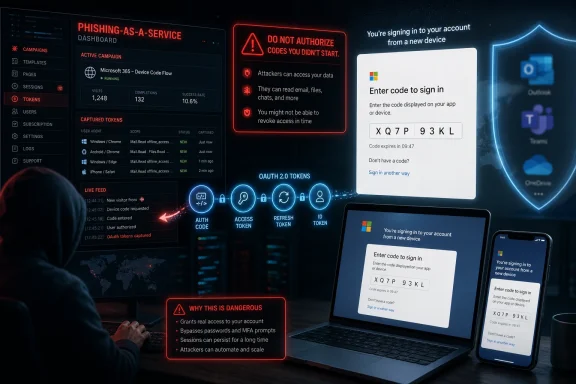
The FBI’s Internet Crime Complaint Center warned in May 2026 that Kali365, a phishing-as-a-service platform first seen in April, is targeting Microsoft 365 users by abusing OAuth device-code authentication to capture access tokens and bypass multifactor authentication without stealing passwords. The warning matters because the attack does not ask victims to type credentials into a fake login page. It asks them to do something more dangerous: complete a real Microsoft sign-in flow for an attacker’s device. That turns a familiar anti-phishing lesson—“check the URL”—into insufficient advice.
For years, the average Microsoft 365 phishing story had a reliable shape. A victim received a fake SharePoint notice, clicked a link, landed on a counterfeit Microsoft login page, and handed over a password. Defenders could train users to spot odd domains, block lookalike sites, and lean on multifactor authentication as the seat belt that caught failures.
Kali365 attacks are more unnerving because they remove much of that visible fakery. The victim is typically directed to a legitimate Microsoft verification page and told to enter a device code. The page is real, the Microsoft branding is real, and the authentication process behaves as designed.
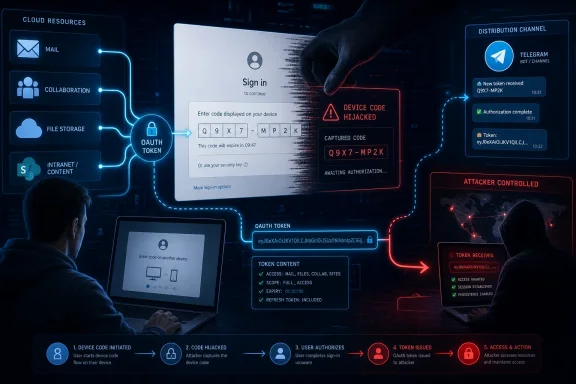
That is not a bypass in the Hollywood sense of breaking Microsoft’s encryption or cracking a password database. It is an abuse of trust choreography. The attacker initiates a device authorization flow, persuades the user to complete it, and receives tokens that can open the victim’s Microsoft 365 world.
This is why the FBI warning deserves more attention than the usual “new phishing scam” headline. Kali365 is not merely another kit in the spammer toolbox. It is a reminder that modern identity systems are now so complex that the weak point is often not the password, but the user’s understanding of what they are authorizing.
That architecture is useful precisely because tokens are powerful. A token can tell a service, in effect, that authentication has happened and that access has been granted. Depending on the token, the app, the tenant controls, and the permissions involved, that can be enough to read mail, access files, maintain sessions, and move quietly through cloud services.
Device-code authentication was built for constrained devices: televisions, conference-room systems, printers, command-line tools, and hardware that cannot comfortably display a full browser login. One device shows a code; the user enters that code on another device where signing in is easier. The security model assumes the user understands which device is being authorized.
Kali365 weaponizes the gap between that assumption and workplace reality. If a phishing email says a document, Teams notice, or cloud workflow requires entering a code, many users will treat the code like a one-time password. In fact, they may be authorizing the attacker’s session.
This distinction matters for defenders because it changes the model from credential theft to authorization abuse. In a classic phishing case, MFA may block the attacker after a stolen password is used from a new device. In device-code phishing, the victim is tricked into completing the very flow that grants the attacker’s device access.
That is why the attack can feel so unfair to ordinary users. They did not ignore MFA. They may have completed it exactly as trained. The problem is that the context of the prompt was poisoned before Microsoft’s authentication stack ever got involved.
Security teams have spent the past decade telling organizations to adopt MFA, and that advice remains correct. But Kali365 exposes the weakness of treating MFA as the finish line. Authentication proves that a user participated; it does not automatically prove that the user understood the transaction.
The underground economy has learned the same lesson as legitimate software vendors: package complexity behind a subscription interface and adoption rises. A low-skilled operator no longer needs to build infrastructure, understand OAuth deeply, or write polished lures from scratch. The platform turns identity abuse into a workflow.
That is the real escalation. Device-code phishing is not brand new, and Microsoft 365 token theft has been a growing concern for years. What Kali365 represents is operational convenience. It takes a technique that requires timing, social engineering, and identity knowledge, then productizes it for a broader criminal customer base.
The reported pricing—hundreds of dollars per month rather than nation-state budgets—also tells the story. If a kit can compromise even a handful of mailboxes at a small company, the attacker may gain invoice data, internal documents, contact lists, and enough trust to launch business email compromise. The return on investment does not require a spectacular breach.
From the user’s perspective, the safety signals are confusing. The site is Microsoft’s. The code is short-lived and official-looking. The request may be wrapped in familiar workplace language: review this file, approve this Teams access, reconnect your session, open this shared document.
The moment the user enters the code and completes the required authentication, the attacker’s device is authorized. The attacker does not need the password. Depending on the token and tenant configuration, the attacker may gain persistent access to Outlook, Teams, OneDrive, SharePoint, and other services connected through Microsoft 365 identity.
The elegance of the scheme is also its defense problem. There may be no malicious attachment, no obviously fake Microsoft domain, and no password submitted to a counterfeit form. The most suspicious artifact is the business process itself: an unsolicited request to enter a device code.
Once inside, attackers can search old mail for sensitive files, identify trusted relationships, and launch follow-on phishing from a real account. That second wave is often more convincing than the first because it comes from a known colleague or supplier. In many breaches, the first stolen mailbox is less valuable for its contents than for the legitimacy it lends to the next message.
Teams and OneDrive raise the stakes further. Teams chats may contain operational detail never meant for email retention. OneDrive and SharePoint can hold contracts, spreadsheets, customer exports, engineering documents, and credentials accidentally saved in plain sight. Microsoft 365 is not one app; it is the nervous system of many organizations.
That is why token theft is so damaging. A password reset alone may not be enough if active sessions and refresh tokens remain valid. Incident responders must think in terms of session revocation, consent review, suspicious app access, mailbox rules, forwarding settings, and lateral movement.
But enterprise security is full of features that make sense in isolation and become dangerous at scale. The problem is not that device-code flow exists. The problem is that many tenants historically treated it as background plumbing rather than a high-risk authentication path that deserves explicit governance.
Microsoft’s own guidance now pushes organizations toward blocking device-code flow wherever possible, usually through Conditional Access. That recommendation is revealing. It means the safest default for most organizations is not “train users harder,” but “reduce the number of times this flow can succeed.”
The hard part is exceptions. Teams Rooms, shared devices, developers using command-line tools, and some provisioning workflows may depend on device-code authentication. Turning it off without inventory can break legitimate operations. Leaving it open everywhere turns a niche convenience into a tenant-wide phishing surface.
In reality, many organizations still do not know where device-code flow is used. A Teams room may rely on it during registration. A service desk process may depend on it for reprovisioning. A developer tool may use it because it is easier than browser-based authentication in a terminal session.
That uncertainty is what attackers exploit indirectly. Security teams delay enforcement because they fear breaking things. Attackers do not need every tenant to be vulnerable forever; they need enough tenants to postpone cleanup long enough for campaigns to run.
The lesson is not that every organization should flip the switch blindly this afternoon. The lesson is that device-code flow deserves the same governance once applied to legacy authentication protocols. If a flow is rarely needed and frequently abused, “enabled by default because nobody complained” is not a security strategy.
That sentence is more useful than telling users to “watch for suspicious emails.” The whole point of the attack is that the final Microsoft page may not be suspicious. The suspicious part is the request that led the user there.
Organizations should also stop treating all MFA prompts as benign friction. Prompt fatigue attacks already trained defenders to worry when users approve sign-ins they did not initiate. Device-code phishing belongs in the same mental bucket. If the user did not start the sign-in, the correct answer is to stop.
The challenge is that workflows have taught employees to obey strange authentication rituals. Cloud software constantly asks people to reconnect accounts, approve access, confirm sessions, and follow links from automated messages. Attackers succeed because the modern workplace has normalized interruption.
But the bigger payoff is usually organizational. Microsoft 365 business tenants provide attackers with richer data and more ways to monetize access. A single compromised employee account may become a launchpad for invoice fraud, payroll diversion, vendor impersonation, or reconnaissance against executives.
Small businesses sit in the worst position. They use the same cloud identity machinery as enterprises but often lack dedicated identity engineers, security operations staff, and mature logging. They may have MFA enabled and assume that means the major risk is handled.
That assumption is now out of date. For small organizations, the practical advice is blunt: review tenant security defaults, use Conditional Access where licensing allows, investigate whether device-code flow can be blocked, and treat unexpected device-code prompts as account compromise attempts.
Cybercrime has become SaaS-like because SaaS won. Criminal operators borrow the language and mechanics of legitimate software: subscriptions, dashboards, templates, customer support, feature updates, and tiered pricing. Kali365 is disturbing not because criminals discovered Telegram, but because identity attacks now have product-market fit.
That industrialization changes defender economics. A technique that once appeared in targeted campaigns can be rented, copied, localized, and sprayed across industries. Once a kit abstracts away the hard parts, the limiting factor becomes social engineering reach rather than technical capability.
This is where AI-generated lures add pressure. The phrase should not be treated as magic; plenty of phishing was effective before large language models. But automated, fluent, role-specific messaging makes it easier to scale believable pretexts across languages, industries, and business functions.
That difference matters because responsibility for this attack cannot be pushed entirely onto employees. If a tenant allows device-code flow broadly, and if users are constantly exposed to confusing authentication prompts, then a successful phish is not merely an individual mistake. It is a predictable outcome of permissive configuration and overloaded trust signals.
A serious response starts with logs. Security teams should review device-code authentication events, especially for privileged users, unusual locations, unfamiliar devices, and unexpected applications. They should inspect active sessions, revoke suspicious tokens, review OAuth grants, and look for mailbox rules or forwarding behavior that suggests post-compromise persistence.
They should also rehearse the incident path. When a user reports that they entered a device code, the help desk should not respond as if this were a simple password reset. The right playbook is token-centric: revoke sessions, reset credentials if needed, review sign-ins, check consent and app activity, and hunt for downstream abuse.
Kali365 does not disprove the passwordless project. It does, however, show that removing passwords does not remove social engineering. Attackers adapt from stealing secrets to manipulating ceremonies.
The future of identity security will depend less on whether users can memorize better passwords and more on whether authentication flows are bound to the right device, the right app, the right context, and the right intent. A user approving access for a device they do not control is still a security failure, even if no password changes hands.
That is why device-bound credentials, phishing-resistant MFA, and tighter app consent governance matter. The industry needs authentication that is not only hard to steal, but hard to misdirect. The user should not be the routing layer for an attacker’s session.
 The Phishing Page Is Gone, and That Is the Point
For years, the average Microsoft 365 phishing story had a reliable shape. A victim received a fake SharePoint notice, clicked a link, landed on a counterfeit Microsoft login page, and handed over a password. Defenders could train users to spot odd domains, block lookalike sites, and lean on multifactor authentication as the seat belt that caught failures.Kali365 attacks are more unnerving because they remove much of that visible fakery. The victim is typically directed to a legitimate Microsoft verification page and told to enter a device code. The page is real, the Microsoft branding is real, and the authentication process behaves as designed.
That is not a bypass in the Hollywood sense of breaking Microsoft’s encryption or cracking a password database. It is an abuse of trust choreography. The attacker initiates a device authorization flow, persuades the user to complete it, and receives tokens that can open the victim’s Microsoft 365 world.
This is why the FBI warning deserves more attention than the usual “new phishing scam” headline. Kali365 is not merely another kit in the spammer toolbox. It is a reminder that modern identity systems are now so complex that the weak point is often not the password, but the user’s understanding of what they are authorizing.
OAuth Turns Consent Into the Prize
OAuth is one of those technologies most users encounter constantly and almost never think about. It is the plumbing behind “sign in with Microsoft,” cloud app integrations, mobile app sessions, and delegated access to mail, files, calendars, and other resources. In ordinary use, it reduces password exposure by letting an app receive a token rather than the user’s raw password.That architecture is useful precisely because tokens are powerful. A token can tell a service, in effect, that authentication has happened and that access has been granted. Depending on the token, the app, the tenant controls, and the permissions involved, that can be enough to read mail, access files, maintain sessions, and move quietly through cloud services.
Device-code authentication was built for constrained devices: televisions, conference-room systems, printers, command-line tools, and hardware that cannot comfortably display a full browser login. One device shows a code; the user enters that code on another device where signing in is easier. The security model assumes the user understands which device is being authorized.
Kali365 weaponizes the gap between that assumption and workplace reality. If a phishing email says a document, Teams notice, or cloud workflow requires entering a code, many users will treat the code like a one-time password. In fact, they may be authorizing the attacker’s session.
MFA Was Never a Magic Spell
The most dangerous sentence in the Kali365 story is also the most easily misunderstood: attackers can bypass multifactor authentication. That does not mean MFA is useless. It means MFA can be satisfied by the victim during a legitimate sign-in flow and still result in the wrong party getting the benefit.This distinction matters for defenders because it changes the model from credential theft to authorization abuse. In a classic phishing case, MFA may block the attacker after a stolen password is used from a new device. In device-code phishing, the victim is tricked into completing the very flow that grants the attacker’s device access.
That is why the attack can feel so unfair to ordinary users. They did not ignore MFA. They may have completed it exactly as trained. The problem is that the context of the prompt was poisoned before Microsoft’s authentication stack ever got involved.
Security teams have spent the past decade telling organizations to adopt MFA, and that advice remains correct. But Kali365 exposes the weakness of treating MFA as the finish line. Authentication proves that a user participated; it does not automatically prove that the user understood the transaction.
Phishing-as-a-Service Makes the Weird Attack Routine
The FBI’s warning describes Kali365 as a phishing-as-a-service platform distributed through Telegram, with features that reportedly include AI-generated lures, automated campaign templates, real-time tracking dashboards, and OAuth token capture. That description is important because it shows how a once-specialized technique becomes mass-market crime.The underground economy has learned the same lesson as legitimate software vendors: package complexity behind a subscription interface and adoption rises. A low-skilled operator no longer needs to build infrastructure, understand OAuth deeply, or write polished lures from scratch. The platform turns identity abuse into a workflow.
That is the real escalation. Device-code phishing is not brand new, and Microsoft 365 token theft has been a growing concern for years. What Kali365 represents is operational convenience. It takes a technique that requires timing, social engineering, and identity knowledge, then productizes it for a broader criminal customer base.
The reported pricing—hundreds of dollars per month rather than nation-state budgets—also tells the story. If a kit can compromise even a handful of mailboxes at a small company, the attacker may gain invoice data, internal documents, contact lists, and enough trust to launch business email compromise. The return on investment does not require a spectacular breach.
The Attack Looks Mundane Until It Is Too Late
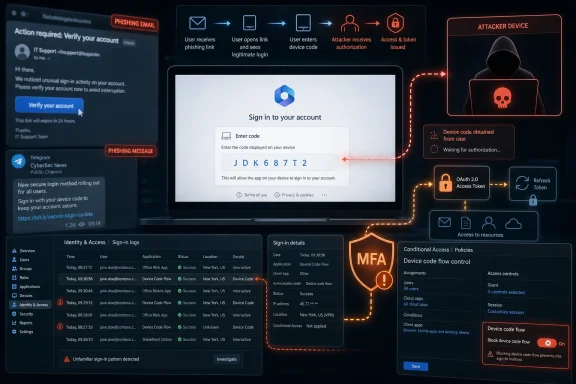
The typical Kali365-style attack is short, plausible, and corrosively ordinary. A user receives an email impersonating a cloud provider, collaboration tool, or document-sharing service. The message contains a device code and instructions to visit Microsoft’s verification page.From the user’s perspective, the safety signals are confusing. The site is Microsoft’s. The code is short-lived and official-looking. The request may be wrapped in familiar workplace language: review this file, approve this Teams access, reconnect your session, open this shared document.
The moment the user enters the code and completes the required authentication, the attacker’s device is authorized. The attacker does not need the password. Depending on the token and tenant configuration, the attacker may gain persistent access to Outlook, Teams, OneDrive, SharePoint, and other services connected through Microsoft 365 identity.
The elegance of the scheme is also its defense problem. There may be no malicious attachment, no obviously fake Microsoft domain, and no password submitted to a counterfeit form. The most suspicious artifact is the business process itself: an unsolicited request to enter a device code.
Outlook Is the Beachhead, Not Just a Mailbox
Consumer coverage often frames the risk as someone “getting into your Outlook.” For enterprise defenders, Outlook is only the starting point. A compromised mailbox is a map of the organization: invoices, vendors, internal jargon, calendar patterns, executives, HR workflows, legal discussions, and password-reset trails.Once inside, attackers can search old mail for sensitive files, identify trusted relationships, and launch follow-on phishing from a real account. That second wave is often more convincing than the first because it comes from a known colleague or supplier. In many breaches, the first stolen mailbox is less valuable for its contents than for the legitimacy it lends to the next message.
Teams and OneDrive raise the stakes further. Teams chats may contain operational detail never meant for email retention. OneDrive and SharePoint can hold contracts, spreadsheets, customer exports, engineering documents, and credentials accidentally saved in plain sight. Microsoft 365 is not one app; it is the nervous system of many organizations.
That is why token theft is so damaging. A password reset alone may not be enough if active sessions and refresh tokens remain valid. Incident responders must think in terms of session revocation, consent review, suspicious app access, mailbox rules, forwarding settings, and lateral movement.
Microsoft’s Legitimate Convenience Became an Enterprise Liability
It would be easy, and wrong, to say Microsoft simply created a bad feature. Device-code flow exists for real scenarios. Conference-room devices, shared Teams hardware, command-line tools, and other limited-input environments need practical ways to authenticate without forcing users through impossible interfaces.But enterprise security is full of features that make sense in isolation and become dangerous at scale. The problem is not that device-code flow exists. The problem is that many tenants historically treated it as background plumbing rather than a high-risk authentication path that deserves explicit governance.
Microsoft’s own guidance now pushes organizations toward blocking device-code flow wherever possible, usually through Conditional Access. That recommendation is revealing. It means the safest default for most organizations is not “train users harder,” but “reduce the number of times this flow can succeed.”
The hard part is exceptions. Teams Rooms, shared devices, developers using command-line tools, and some provisioning workflows may depend on device-code authentication. Turning it off without inventory can break legitimate operations. Leaving it open everywhere turns a niche convenience into a tenant-wide phishing surface.
The Admin Fix Is Simple Until It Meets Reality
The cleanest administrative response is to restrict or block device-code flow using Microsoft Entra Conditional Access policies. In a mature tenant, admins can place the policy in report-only mode, review sign-in logs, identify legitimate use cases, scope exceptions tightly, and then move enforcement to blocking mode. That is the theory.In reality, many organizations still do not know where device-code flow is used. A Teams room may rely on it during registration. A service desk process may depend on it for reprovisioning. A developer tool may use it because it is easier than browser-based authentication in a terminal session.
That uncertainty is what attackers exploit indirectly. Security teams delay enforcement because they fear breaking things. Attackers do not need every tenant to be vulnerable forever; they need enough tenants to postpone cleanup long enough for campaigns to run.
The lesson is not that every organization should flip the switch blindly this afternoon. The lesson is that device-code flow deserves the same governance once applied to legacy authentication protocols. If a flow is rarely needed and frequently abused, “enabled by default because nobody complained” is not a security strategy.
User Training Needs a New Sentence
Traditional phishing training taught users to inspect links, distrust attachments, and be wary of login pages. Those lessons still matter, but Kali365 requires a sharper instruction: never enter a device code from an unsolicited email, Teams message, chat, or document prompt unless you personally initiated the sign-in on a device in front of you.That sentence is more useful than telling users to “watch for suspicious emails.” The whole point of the attack is that the final Microsoft page may not be suspicious. The suspicious part is the request that led the user there.
Organizations should also stop treating all MFA prompts as benign friction. Prompt fatigue attacks already trained defenders to worry when users approve sign-ins they did not initiate. Device-code phishing belongs in the same mental bucket. If the user did not start the sign-in, the correct answer is to stop.
The challenge is that workflows have taught employees to obey strange authentication rituals. Cloud software constantly asks people to reconnect accounts, approve access, confirm sessions, and follow links from automated messages. Attackers succeed because the modern workplace has normalized interruption.
The Consumer Risk Is Real but Different
Kali365 coverage often names Outlook, Teams, and OneDrive, which naturally alarms individual Microsoft account users. The everyday-user risk is real, especially for freelancers, small-business owners, and anyone who uses Microsoft services as their primary identity hub. A stolen account can expose personal files, tax documents, contacts, photos, and recovery emails for other services.But the bigger payoff is usually organizational. Microsoft 365 business tenants provide attackers with richer data and more ways to monetize access. A single compromised employee account may become a launchpad for invoice fraud, payroll diversion, vendor impersonation, or reconnaissance against executives.
Small businesses sit in the worst position. They use the same cloud identity machinery as enterprises but often lack dedicated identity engineers, security operations staff, and mature logging. They may have MFA enabled and assume that means the major risk is handled.
That assumption is now out of date. For small organizations, the practical advice is blunt: review tenant security defaults, use Conditional Access where licensing allows, investigate whether device-code flow can be blocked, and treat unexpected device-code prompts as account compromise attempts.
Telegram Is the Marketplace, Not the Root Cause
Reports that Kali365 is promoted through Telegram will tempt some readers toward the usual platform-blame cycle. Telegram matters because it is a common distribution and support channel for cybercrime services. But focusing too much on the marketplace misses the larger industrial shift.Cybercrime has become SaaS-like because SaaS won. Criminal operators borrow the language and mechanics of legitimate software: subscriptions, dashboards, templates, customer support, feature updates, and tiered pricing. Kali365 is disturbing not because criminals discovered Telegram, but because identity attacks now have product-market fit.
That industrialization changes defender economics. A technique that once appeared in targeted campaigns can be rented, copied, localized, and sprayed across industries. Once a kit abstracts away the hard parts, the limiting factor becomes social engineering reach rather than technical capability.
This is where AI-generated lures add pressure. The phrase should not be treated as magic; plenty of phishing was effective before large language models. But automated, fluent, role-specific messaging makes it easier to scale believable pretexts across languages, industries, and business functions.
The FBI Warning Is Also a Message to IT Leadership
The FBI’s public service announcement is written for broad awareness, but its real audience includes CIOs, CISOs, managed service providers, and administrators who can change tenant policy. Users can be told not to enter codes. Administrators can make many of those codes useless.That difference matters because responsibility for this attack cannot be pushed entirely onto employees. If a tenant allows device-code flow broadly, and if users are constantly exposed to confusing authentication prompts, then a successful phish is not merely an individual mistake. It is a predictable outcome of permissive configuration and overloaded trust signals.
A serious response starts with logs. Security teams should review device-code authentication events, especially for privileged users, unusual locations, unfamiliar devices, and unexpected applications. They should inspect active sessions, revoke suspicious tokens, review OAuth grants, and look for mailbox rules or forwarding behavior that suggests post-compromise persistence.
They should also rehearse the incident path. When a user reports that they entered a device code, the help desk should not respond as if this were a simple password reset. The right playbook is token-centric: revoke sessions, reset credentials if needed, review sign-ins, check consent and app activity, and hunt for downstream abuse.
The Passwordless Future Has Its Own Phishing Problem
Microsoft and the broader industry have been pushing toward passwordless authentication for good reasons. Passwords are reused, phished, leaked, guessed, sprayed, and sold. Passkeys, hardware-backed credentials, and stronger device-bound authentication can remove entire categories of credential theft.Kali365 does not disprove the passwordless project. It does, however, show that removing passwords does not remove social engineering. Attackers adapt from stealing secrets to manipulating ceremonies.
The future of identity security will depend less on whether users can memorize better passwords and more on whether authentication flows are bound to the right device, the right app, the right context, and the right intent. A user approving access for a device they do not control is still a security failure, even if no password changes hands.
That is why device-bound credentials, phishing-resistant MFA, and tighter app consent governance matter. The industry needs authentication that is not only hard to steal, but hard to misdirect. The user should not be the routing layer for an attacker’s session.
This Is Where the Code Prompt Becomes the Red Flag
Kali365’s practical lesson is narrow enough to be teachable and broad enough to affect nearly every Microsoft 365 tenant. The code prompt is no longer an obscure login convenience. It is now a high-value social engineering object.- If a user did not personally start a device sign-in, they should not enter a device code, even on a real Microsoft page.
- Microsoft 365 administrators should inventory device-code flow usage before deciding which exceptions, if any, are truly necessary.
- Conditional Access can restrict or block device-code flow, but organizations should test policies in report-only mode before enforcement.
- A suspected Kali365 compromise should trigger token and session revocation, not just a password reset.
- MFA remains essential, but it should be paired with phishing-resistant methods and policies that reduce risky authentication flows.
- Small businesses and managed service providers should treat this as a tenant-configuration issue, not merely a user-awareness campaign.
References
- Primary source: Rolling Out
Published: 2026-06-15T13:24:07.757535

FBI issues urgent warning over 5 dangerous Microsoft 365
The FBI warns Microsoft 365 users of a dangerous phishing scheme called Kali365 that bypasses multifactor authentication without needing a password.rollingout.com - Independent coverage: Jang
Published: 2026-06-15T13:12:07.757824
FBI issues urgent warning: New ‘Kali365’ scam targets Microsoft 365 users
The FBI has issued an urgent warning regarding a sophisticated new phishing platform called “Kali365” that is successfully targeting Microsoft 365 users.Unlike typical scams that aim to steal your password, this tool bypasses...jang.com.pk - Related coverage: techradar.com

FBI warns of Kali phishing scam hitting Microsoft OAuth tokens — warns 'Kali365 lowers the barrier of entry, providing less-technical attackers access to AI-generated phishing lures' | TechRadar
A new phishing kit is being offered on Telegramwww.techradar.com - Related coverage: techrepublic.com

FBI Warns: ‘Kali365’ Phishing Service Targets Microsoft 365 Accounts
The FBI warned that Kali365 can hijack Microsoft 365 accounts by abusing device code authentication and capturing OAuth tokens.www.techrepublic.com
- Related coverage: techtimes.com

Microsoft 365 Phishing Kit Kali365 Bypasses MFA: FBI Warns Hundreds of Organizations Targeted
Microsoft 365 phishing attacks now bypass MFA entirely: a criminal subscription service called Kali365 tricks users into granting account access through legitimate Microsoft login pages, lettingwww.techtimes.com - Related coverage: theregister.com

FBI warns of Kali365 as device code phishing soars
MFA? No problem, says crimeware that tricks users into handing attackers the keys to M365www.theregister.com
- Related coverage: cybersecuritydive.com

FBI warns about PhaaS platform used to access Microsoft 365 environments | Cybersecurity Dive
Device code phishing enabled hackers to bypass multifactor authentication without credentials.www.cybersecuritydive.com
- Related coverage: malwarebytes.com

Kali365 phishing kit bypasses MFA and steals Microsoft logins | Malwarebytes
The FBI has warned that attackers are using a new phishing kit to gain long-term access to Microsoft Outlook, Teams, and OneDrive accounts.www.malwarebytes.com - Related coverage: thecybersignal.com

FBI Warns of Kali365 Phishing Kit Stealing Microsoft 365 Tokens
The FBI's IC3 warned of Kali365, a Telegram-sold phishing kit that runs device-code phishing to steal Microsoft 365 OAuth tokens after victims pass MFA. www.thecybersignal.com
- Related coverage: brightnexus.com

FBI Warns of Kali365 Phishing Platform Targeting Microsoft 365 Accounts | Bright Nexus
SeverityHigh Detail The Federal Bureau of Investigation (FBI) has issued a warning regarding an emerging phishing-as-a-service (PhaaS) platform known as “Kali36www.brightnexus.com
- Related coverage: purpleshieldsecurity.com

FBI Warns of Kali365 Phishing Kit Hijacking Microsoft 365
The FBI warns Kali365, a phishing-as-a-service kit, hijacks Microsoft 365 tokens and bypasses MFA. What it means for your business and how to respond. www.purpleshieldsecurity.com
- Related coverage: cyberscoop.com

FBI warns about fast-growing phishing kit targeting Microsoft 365 users | CyberScoop
Kali365, which was first observed in April, abuses legitimate Microsoft device authorization pages to grant persistent access to cybercriminal-controlled applications. cyberscoop.com
- Related coverage: kiplinger.com

New Scam Targets Microsoft Users, FBI Warns. Here's How to Protect Yourself | Kiplinger
This phishing scam doesn't rely on a fake website. Instead, it tricks users into approving access themselves.www.kiplinger.com - Related coverage: itpro.com

FBI warns Microsoft 365 users about another phishing as a service attack – here's how to avoid it | IT Pro
Kali365 platform is serious enough to garner a warning from the FBIwww.itpro.com