Microsoft patched a production coding error in several Microsoft 365 Android apps after Enclave researchers said malicious apps on the same device could silently obtain account tokens and impersonate signed-in users. The flaw, dubbed FlagLeft, is not another password story; it is a reminder that modern Microsoft 365 compromise often begins after login. For WindowsForum readers, the uncomfortable part is that the weak link was not a shady sideloaded APK or a gullible user, but a trusted Microsoft mobile app shipping with a development flag still enabled.
The Microsoft 365 security pitch has long depended on a simple promise: sign in once, let the ecosystem handle the rest, and rely on the platform to keep that convenience from becoming a liability. On Android, that means Word, Excel, PowerPoint, OneNote, Loop, Copilot and related apps can share authentication state so users are not forced through repeated login prompts every time they move between documents and services.
That is a reasonable design goal. It is also a high-value target. Once the thing being shared is not just a session preference but an account token, the machinery that decides who is allowed to ask becomes the security boundary.
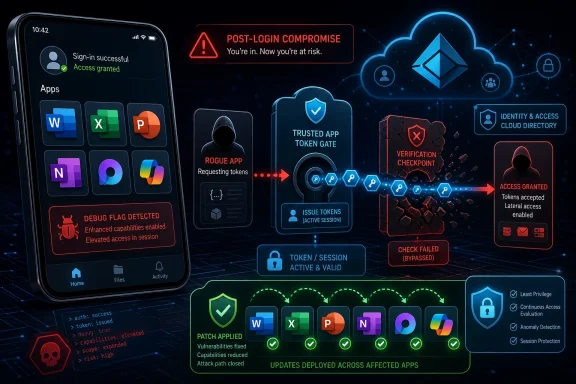
According to Enclave, FlagLeft weakened that boundary because a debug-mode setting was left enabled in production builds of multiple Microsoft 365 Android apps. The setting reportedly disabled a check that should have verified whether the requesting application was trusted before handing over tokens.
That distinction matters. This was not described as an attack that required the user to type a password into a fake page, approve a suspicious MFA prompt, or grant broad Android permissions to a malicious app. Enclave said a test app installed on the same device could request Microsoft account tokens quietly and then act as the signed-in user.
That is precisely why the finding lands so badly. Enterprises can build phishing-resistant authentication programs, deploy conditional access, push mobile device management profiles, and train users not to approve suspicious prompts. None of that fully compensates for a trusted first-party app weakening its own token gatekeeping.
The affected apps named in reporting include Word, PowerPoint, Excel, Microsoft 365 Copilot, Microsoft Loop and OneNote for Android. Those are not fringe clients. They sit directly inside the daily workflow of employees who read attachments on phones, review spreadsheets in meetings, summarize notes with Copilot and open shared documents from Teams or Outlook.
The practical risk is easy to understand. If a malicious Android app can obtain refreshable Microsoft 365 tokens from a signed-in Office app, the attacker may not need the victim’s password at all. The prize is the authenticated state that comes after password and MFA have already done their work.
The Microsoft 365 threat model has shifted toward token abuse because tokens are what cloud services actually honor after authentication. Passwords open the door; tokens keep the session alive. A stolen token can let an attacker act inside a cloud tenant while sidestepping many of the rituals users associate with login security.
That is why FlagLeft feels like part of a larger pattern rather than an isolated Android mishap. The same week’s security conversation also included warnings about Kali365, a phishing-as-a-service platform reported to target Microsoft 365 environments by abusing OAuth device-code authentication and capturing access tokens. Kali365 and FlagLeft are different animals, but they point at the same prey.
One path tricks the user into completing a legitimate Microsoft authentication flow for the attacker’s benefit. The other allegedly exploited a production error inside Microsoft’s Android apps. In both cases, the attacker wants the post-login artifact, not necessarily the password.
That is an important distinction for Windows administrators. The employee who reads a Word document on an Android phone may be accessing the same SharePoint libraries, OneDrive files, Teams content and Copilot-connected enterprise data that are governed by Entra ID policies on the desktop. Mobile access is not a side channel anymore; it is part of the production identity perimeter.
The old mental model treated phones as companion devices. The new model treats them as authenticated endpoints with real access to corporate data. A compromised mobile token can matter just as much as a compromised browser session on a laptop.
This is especially true in organizations that allow bring-your-own-device access with limited management. If personal Android devices can sign into Microsoft 365 apps, then patch status, app provenance, device health and token revocation become enterprise concerns whether IT likes it or not.
A single bad flag can be more dangerous than a sprawling code defect because it changes the operating mode of otherwise mature security logic. The code may know how to check whether a token request comes from a trusted app, but that knowledge is useless if production is told not to enforce it.
This is where the story becomes less about Android and more about release engineering. Secure defaults are only secure if they survive the build pipeline, testing process and release gates. For a company of Microsoft’s scale, production debug settings in identity-adjacent code should be treated as a release-blocking event, not a post-disclosure embarrassment.
The uncomfortable inference is that mobile app security assurance did not catch a condition that researchers later found meaningful enough to demonstrate with a test app. That does not mean exploitation occurred in the wild. It does mean the control that should have prevented accidental exposure was not strong enough.
But every frictionless handoff is also a trust decision. When Word can help Excel avoid another login, the system must know the request really came from Excel. When OneNote participates in the same account family, the brokered token flow must distinguish between a trusted Microsoft app and a random app installed from elsewhere.
That is the bargain Microsoft and its customers are making. The platform gets to be seamless only if identity checks are boringly reliable. A production debug flag breaks the bargain because it turns convenience into an ambient entitlement.
This is not an argument against single sign-on. It is an argument against treating SSO plumbing as invisible infrastructure that can be validated after the fact. The more invisible the authentication experience becomes, the more rigorous the internal boundaries must be.
The harder problem is unmanaged access. Many organizations have a split estate: tightly controlled corporate phones for some staff, loosely governed personal devices for others, and a long tail of exceptions for executives, contractors and field workers. Those exceptions are often where mobile identity risk hides.
Administrators should also assume that patching the app does not automatically answer the historical exposure question. If a token was obtained before the fix, the response depends on token lifetime, refresh behavior, revocation and telemetry. That makes sign-in logs, risky user detections, device compliance state and unusual app access patterns more important than a simple “we updated the app” checkbox.
This is where Microsoft 365 administrators need to think in terms of token hygiene. Password resets alone are not a complete remedy for token theft scenarios. Session revocation, refresh-token invalidation, conditional access re-evaluation and app consent review all belong in the response playbook.
That means organizations should revisit which devices may enroll in Microsoft 365, which apps may access corporate data, and whether app protection policies are mandatory or merely recommended. It also means reviewing whether Android devices must be compliant before receiving access, and whether personal devices should be allowed to use full Office apps with corporate accounts at all.
There is a cultural challenge here. Many companies have spent years making Microsoft 365 available everywhere because that was the point of cloud productivity. Now the security model has to mature without destroying the mobility users expect.
The answer is not to panic-ban Android or retreat to desktops. The answer is to reduce ambiguity. If a phone is part of the Microsoft 365 access plane, it should be inventoried, patched, policy-controlled and visible to security operations.
That scale creates systemic risk. A mistake in a Microsoft 365 Android app is not just a mobile bug; it is a potential identity issue across enterprises that have standardized on Microsoft’s cloud. A misused OAuth flow is not just an authentication oddity; it becomes a repeatable tradecraft pattern because so many tenants support the same workflows.
Microsoft has spent the past several years talking about secure-by-design engineering, identity hardening and a renewed security culture. Those commitments matter, but incidents like this test whether the message is reaching the release pipelines that ship everyday client apps.
For customers, the lesson is not that Microsoft 365 is uniquely unsafe. It is that Microsoft 365 is uniquely central. When one vendor becomes the document editor, email system, collaboration hub, identity provider and AI interface, even narrow bugs can carry wide operational consequences.
That does not mean FlagLeft gave attackers magical access to everything in a tenant. Microsoft 365 permissions still matter, and a token generally inherits the user’s scope. But modern assistants can make over-permissioned accounts more dangerous by lowering the effort required to locate sensitive material.
This is the permission sprawl problem in a new costume. Many organizations still have broad SharePoint access, stale Teams memberships, permissive OneDrive sharing and weak data classification. Token theft turns those governance shortcuts into immediate exposure.
Copilot makes this more urgent because it rewards clean access boundaries. If identity is compromised, the AI layer may help the wrong party understand the environment faster. That is not a reason to reject Copilot; it is a reason to fix identity and data governance before treating AI rollout as just another license upgrade.
Token-centered attacks exploit that gap. They operate in the space between “the user authenticated correctly” and “the service should continue trusting this session.” That space is where refresh tokens, device claims, app identifiers, network location, user risk and conditional access enforcement all intersect.
For defenders, the signal set has to become richer. A mobile token used in a strange context, a sudden change in resource access, a refresh pattern inconsistent with normal device behavior, or an app identity that does not match expected clients may matter more than another successful MFA record.
This is also where logging costs and licensing tiers become uncomfortable. The organizations most likely to need deep identity telemetry are not always the ones with the budget, staff or licensing to retain and analyze it well. Microsoft’s ecosystem gives administrators many controls, but the best controls are too often scattered across portals, SKUs and policy layers.
FlagLeft is a reminder that cloud identity depends on client integrity. The authentication service can be well designed, the tenant policies can be carefully written, and the user can do everything right, yet a client-side implementation mistake can still create a path to account abuse.
That is not a counsel of despair. It is a reason to layer controls. Conditional access, device compliance, app protection policies, token revocation, least privilege, data governance and anomaly detection are all compensating structures for the fact that no single client, vendor or sign-in event deserves unlimited trust.
The most mature organizations will use this incident to test assumptions. They will ask how quickly mobile apps update, whether unmanaged Android devices can access sensitive data, whether token revocation procedures are rehearsed, and whether security teams can distinguish normal mobile Office activity from suspicious token use.
 Microsoft’s Mobile Trust Model Just Took a Hit
The Microsoft 365 security pitch has long depended on a simple promise: sign in once, let the ecosystem handle the rest, and rely on the platform to keep that convenience from becoming a liability. On Android, that means Word, Excel, PowerPoint, OneNote, Loop, Copilot and related apps can share authentication state so users are not forced through repeated login prompts every time they move between documents and services.That is a reasonable design goal. It is also a high-value target. Once the thing being shared is not just a session preference but an account token, the machinery that decides who is allowed to ask becomes the security boundary.
According to Enclave, FlagLeft weakened that boundary because a debug-mode setting was left enabled in production builds of multiple Microsoft 365 Android apps. The setting reportedly disabled a check that should have verified whether the requesting application was trusted before handing over tokens.
That distinction matters. This was not described as an attack that required the user to type a password into a fake page, approve a suspicious MFA prompt, or grant broad Android permissions to a malicious app. Enclave said a test app installed on the same device could request Microsoft account tokens quietly and then act as the signed-in user.
The Bug Was Small; the Blast Radius Was Not
Security failures often sound exotic from a distance and painfully mundane up close. Here, the alleged root cause was not a cryptographic breakthrough or a zero-click baseband exploit. It was a production configuration mistake: a development switch that should not have survived release.That is precisely why the finding lands so badly. Enterprises can build phishing-resistant authentication programs, deploy conditional access, push mobile device management profiles, and train users not to approve suspicious prompts. None of that fully compensates for a trusted first-party app weakening its own token gatekeeping.
The affected apps named in reporting include Word, PowerPoint, Excel, Microsoft 365 Copilot, Microsoft Loop and OneNote for Android. Those are not fringe clients. They sit directly inside the daily workflow of employees who read attachments on phones, review spreadsheets in meetings, summarize notes with Copilot and open shared documents from Teams or Outlook.
The practical risk is easy to understand. If a malicious Android app can obtain refreshable Microsoft 365 tokens from a signed-in Office app, the attacker may not need the victim’s password at all. The prize is the authenticated state that comes after password and MFA have already done their work.
Token Theft Is Becoming the Main Event
For years, account security advice was organized around credential theft. Use strong passwords. Do not reuse them. Turn on MFA. Detect impossible travel. Block legacy authentication. Those are still valid controls, but they no longer describe the whole fight.The Microsoft 365 threat model has shifted toward token abuse because tokens are what cloud services actually honor after authentication. Passwords open the door; tokens keep the session alive. A stolen token can let an attacker act inside a cloud tenant while sidestepping many of the rituals users associate with login security.
That is why FlagLeft feels like part of a larger pattern rather than an isolated Android mishap. The same week’s security conversation also included warnings about Kali365, a phishing-as-a-service platform reported to target Microsoft 365 environments by abusing OAuth device-code authentication and capturing access tokens. Kali365 and FlagLeft are different animals, but they point at the same prey.
One path tricks the user into completing a legitimate Microsoft authentication flow for the attacker’s benefit. The other allegedly exploited a production error inside Microsoft’s Android apps. In both cases, the attacker wants the post-login artifact, not necessarily the password.
Android Was the Stage, but Microsoft 365 Was the Target
It is tempting to file this under “mobile app bug” and move on. That would be too narrow. The device was Android, but the target was Microsoft 365 identity.That is an important distinction for Windows administrators. The employee who reads a Word document on an Android phone may be accessing the same SharePoint libraries, OneDrive files, Teams content and Copilot-connected enterprise data that are governed by Entra ID policies on the desktop. Mobile access is not a side channel anymore; it is part of the production identity perimeter.
The old mental model treated phones as companion devices. The new model treats them as authenticated endpoints with real access to corporate data. A compromised mobile token can matter just as much as a compromised browser session on a laptop.
This is especially true in organizations that allow bring-your-own-device access with limited management. If personal Android devices can sign into Microsoft 365 apps, then patch status, app provenance, device health and token revocation become enterprise concerns whether IT likes it or not.
The Debug Flag Is the Governance Failure
The most damning part of the FlagLeft story is not merely that a bug existed. Bugs exist in every large software estate. The more serious question is how a development behavior that weakened account-token validation reportedly made it into production across several major Microsoft apps.A single bad flag can be more dangerous than a sprawling code defect because it changes the operating mode of otherwise mature security logic. The code may know how to check whether a token request comes from a trusted app, but that knowledge is useless if production is told not to enforce it.
This is where the story becomes less about Android and more about release engineering. Secure defaults are only secure if they survive the build pipeline, testing process and release gates. For a company of Microsoft’s scale, production debug settings in identity-adjacent code should be treated as a release-blocking event, not a post-disclosure embarrassment.
The uncomfortable inference is that mobile app security assurance did not catch a condition that researchers later found meaningful enough to demonstrate with a test app. That does not mean exploitation occurred in the wild. It does mean the control that should have prevented accidental exposure was not strong enough.
Convenience Keeps Colliding With Containment
Shared sign-in across Microsoft 365 apps is useful because users hate repeated authentication prompts. Administrators hate them too, because excessive prompts drive support tickets, bad workarounds and MFA fatigue. The entire modern productivity suite is built on reducing friction.But every frictionless handoff is also a trust decision. When Word can help Excel avoid another login, the system must know the request really came from Excel. When OneNote participates in the same account family, the brokered token flow must distinguish between a trusted Microsoft app and a random app installed from elsewhere.
That is the bargain Microsoft and its customers are making. The platform gets to be seamless only if identity checks are boringly reliable. A production debug flag breaks the bargain because it turns convenience into an ambient entitlement.
This is not an argument against single sign-on. It is an argument against treating SSO plumbing as invisible infrastructure that can be validated after the fact. The more invisible the authentication experience becomes, the more rigorous the internal boundaries must be.
Patching Is Necessary, but It Is Not the Whole Job
Microsoft has reportedly fixed the vulnerabilities, which makes app updates the first order of business. Managed Android fleets should force updates for the affected Microsoft 365 apps, and organizations should verify that users are not sitting on stale versions because of deferred updates, broken Play Store access or unsupported device policies.The harder problem is unmanaged access. Many organizations have a split estate: tightly controlled corporate phones for some staff, loosely governed personal devices for others, and a long tail of exceptions for executives, contractors and field workers. Those exceptions are often where mobile identity risk hides.
Administrators should also assume that patching the app does not automatically answer the historical exposure question. If a token was obtained before the fix, the response depends on token lifetime, refresh behavior, revocation and telemetry. That makes sign-in logs, risky user detections, device compliance state and unusual app access patterns more important than a simple “we updated the app” checkbox.
This is where Microsoft 365 administrators need to think in terms of token hygiene. Password resets alone are not a complete remedy for token theft scenarios. Session revocation, refresh-token invalidation, conditional access re-evaluation and app consent review all belong in the response playbook.
Enterprise IT Has to Treat Phones Like Identity Infrastructure
Mobile device management used to be sold as a way to enforce PINs, wipe lost phones and keep corporate email inside a container. That framing is now too small. If mobile apps can hold or broker cloud access tokens, then mobile management is identity management.That means organizations should revisit which devices may enroll in Microsoft 365, which apps may access corporate data, and whether app protection policies are mandatory or merely recommended. It also means reviewing whether Android devices must be compliant before receiving access, and whether personal devices should be allowed to use full Office apps with corporate accounts at all.
There is a cultural challenge here. Many companies have spent years making Microsoft 365 available everywhere because that was the point of cloud productivity. Now the security model has to mature without destroying the mobility users expect.
The answer is not to panic-ban Android or retreat to desktops. The answer is to reduce ambiguity. If a phone is part of the Microsoft 365 access plane, it should be inventoried, patched, policy-controlled and visible to security operations.
Microsoft’s Security Reputation Is Still Fighting Its Own Scale
Microsoft’s security problem is rarely a lack of talent or tooling. It is scale. The company ships operating systems, cloud platforms, identity services, productivity apps, developer tools, AI assistants and mobile clients into almost every kind of organization on earth.That scale creates systemic risk. A mistake in a Microsoft 365 Android app is not just a mobile bug; it is a potential identity issue across enterprises that have standardized on Microsoft’s cloud. A misused OAuth flow is not just an authentication oddity; it becomes a repeatable tradecraft pattern because so many tenants support the same workflows.
Microsoft has spent the past several years talking about secure-by-design engineering, identity hardening and a renewed security culture. Those commitments matter, but incidents like this test whether the message is reaching the release pipelines that ship everyday client apps.
For customers, the lesson is not that Microsoft 365 is uniquely unsafe. It is that Microsoft 365 is uniquely central. When one vendor becomes the document editor, email system, collaboration hub, identity provider and AI interface, even narrow bugs can carry wide operational consequences.
The AI Layer Raises the Stakes
The inclusion of Microsoft 365 Copilot among the affected Android apps is notable even if the core issue is not an AI vulnerability. Copilot changes the value of authenticated access because it can summarize, retrieve and reason over enterprise data the user is allowed to see. If an attacker can act as that user, the account’s data reach may become easier to exploit.That does not mean FlagLeft gave attackers magical access to everything in a tenant. Microsoft 365 permissions still matter, and a token generally inherits the user’s scope. But modern assistants can make over-permissioned accounts more dangerous by lowering the effort required to locate sensitive material.
This is the permission sprawl problem in a new costume. Many organizations still have broad SharePoint access, stale Teams memberships, permissive OneDrive sharing and weak data classification. Token theft turns those governance shortcuts into immediate exposure.
Copilot makes this more urgent because it rewards clean access boundaries. If identity is compromised, the AI layer may help the wrong party understand the environment faster. That is not a reason to reject Copilot; it is a reason to fix identity and data governance before treating AI rollout as just another license upgrade.
Security Teams Need Better Signals Than “MFA Was Enabled”
One of the most damaging myths in cloud security is that MFA success equals account safety. MFA proves that an authentication event met policy at a point in time. It does not prove every subsequent token use is benign.Token-centered attacks exploit that gap. They operate in the space between “the user authenticated correctly” and “the service should continue trusting this session.” That space is where refresh tokens, device claims, app identifiers, network location, user risk and conditional access enforcement all intersect.
For defenders, the signal set has to become richer. A mobile token used in a strange context, a sudden change in resource access, a refresh pattern inconsistent with normal device behavior, or an app identity that does not match expected clients may matter more than another successful MFA record.
This is also where logging costs and licensing tiers become uncomfortable. The organizations most likely to need deep identity telemetry are not always the ones with the budget, staff or licensing to retain and analyze it well. Microsoft’s ecosystem gives administrators many controls, but the best controls are too often scattered across portals, SKUs and policy layers.
The Patch Is a Reminder, Not a Resolution
There is a natural desire to treat patched vulnerabilities as closed stories. The vendor fixed it, the app stores distribute updates, the fleet catches up, and the industry moves on. That cycle is necessary, but it misses the strategic lesson.FlagLeft is a reminder that cloud identity depends on client integrity. The authentication service can be well designed, the tenant policies can be carefully written, and the user can do everything right, yet a client-side implementation mistake can still create a path to account abuse.
That is not a counsel of despair. It is a reason to layer controls. Conditional access, device compliance, app protection policies, token revocation, least privilege, data governance and anomaly detection are all compensating structures for the fact that no single client, vendor or sign-in event deserves unlimited trust.
The most mature organizations will use this incident to test assumptions. They will ask how quickly mobile apps update, whether unmanaged Android devices can access sensitive data, whether token revocation procedures are rehearsed, and whether security teams can distinguish normal mobile Office activity from suspicious token use.
The Android Office Bug Turns Identity Hygiene Into the Real Deliverable
The concrete response to FlagLeft is not dramatic, but it is urgent. Administrators should make sure the affected Android apps are updated, then use the incident as a forcing function to tighten the identity controls that determine how much damage any future token exposure can do.- Organizations should verify that Word, Excel, PowerPoint, OneNote, Microsoft 365 Copilot, Loop and Microsoft 365 Android apps are updated across managed fleets and high-risk unmanaged devices.
- Security teams should review sign-in and token activity for unusual mobile access patterns, especially around accounts with broad SharePoint, OneDrive, Teams or administrative reach.
- Conditional access policies should treat mobile device compliance and app protection as core identity controls rather than optional endpoint-management extras.
- Incident-response playbooks should include session revocation and refresh-token invalidation, not only password resets and MFA resets.
- Administrators should reassess whether personal Android devices should have full Microsoft 365 access when device health, patch status and app inventory are unknown.
- Data owners should reduce overbroad permissions because stolen tokens are only as damaging as the access they inherit.
References
- Primary source: redmondmag.com
Published: Fri, 05 Jun 2026 16:01:39 GMT
Microsoft 365 Android Coding Error Put Account Tokens at Risk -- Redmondmag.com
A coding error in several Microsoft 365 Android apps could have allowed a malicious app on the same device to silently obtain account tokens and act as the signed-in user, according to new research from Enclave.redmondmag.com - Related coverage: kiplinger.com
New Scam Targets Microsoft Users, FBI Warns. Here's How to Protect Yourself | Kiplinger
This phishing scam doesn't rely on a fake website. Instead, it tricks users into approving access themselves.www.kiplinger.com - Related coverage: techrepublic.com
FBI Warns: ‘Kali365’ Phishing Service Targets Microsoft 365 Accounts
The FBI warned that Kali365 can hijack Microsoft 365 accounts by abusing device code authentication and capturing OAuth tokens.www.techrepublic.com
- Related coverage: techradar.com
FBI warns Microsoft 365 is being bombarded with new phishing emails | TechRadar
Here is how to keep your organization safe against the Kali365 phishing threatwww.techradar.com - Related coverage: thecybersignal.com
FBI Warns of Kali365 Phishing Kit Stealing Microsoft 365 Tokens
The FBI's IC3 warned of Kali365, a Telegram-sold phishing kit that runs device-code phishing to steal Microsoft 365 OAuth tokens after victims pass MFA. www.thecybersignal.com
- Related coverage: safebrowz.com
FBI Kali365 Warning 2026: Why OAuth Device-Code Phishing Slips Past MFA | SafeBrowz
The FBI's May 2026 PSA260521 advisory on Kali365 phishing-as-a-service is a watershed moment for Microsoft 365 security. SafeBrowz unpacks the OAuth device-code flow abuse, why MFA does not stop it, and how our 3-layer detection engine catches the landing pages.safebrowz.com
- Related coverage: cybersecuritydive.com
FBI warns about PhaaS platform used to access Microsoft 365 environments | Cybersecurity Dive
Device code phishing enabled hackers to bypass multifactor authentication without credentials.www.cybersecuritydive.com
- Related coverage: gblock.app
FBI Warns: Kali365 PhaaS Bypasses Microsoft 365 MFA Via Device Code
The FBI just warned that Kali365 is the first Microsoft 365 phishing service that bypasses MFA without ever asking for a password—victims complete the real Microsoft login flow themselves and hand over OAuth tokens that survive every additional check. www.gblock.app
- Related coverage: en.cryptonomist.ch
Kali365 Microsoft 365 phishing: FBI warns of OAuth token theft
Kali365 Microsoft 365 phishing is designed to steal Microsoft 365 OAuth tokens and bypass MFA, the FBI says, using Telegram kits. en.cryptonomist.ch
- Related coverage: purpleshieldsecurity.com
FBI Warns of Kali365 Phishing Kit Hijacking Microsoft 365
The FBI warns Kali365, a phishing-as-a-service kit, hijacks Microsoft 365 tokens and bypasses MFA. What it means for your business and how to respond. www.purpleshieldsecurity.com
- Related coverage: windowsreport.com
FBI Warns Kali365 Can Bypass Microsoft 365 MFA Using OAuth Tokens
The FBI warns that Kali365 phishing attacks can bypass Microsoft 365 MFA by stealing OAuth session tokens through device code phishing. windowsreport.com
- Related coverage: itpro.com
Warning issued as surge in OAuth device code phishing leads to M365 account takeovers | IT Pro
Successful attacks enable full M365 account access, opening the door to data theft, lateral movement, and persistent compromisewww.itpro.com - Official source: microsoft.com
</rdf:Alt> </dc:title> <dc:description> <rdf:Alt> <rdf:li xml:lang="x-default"/> </rdf:Alt> </dc:description> <dc:creator> <rdf:Seq> <rdf:li>Lukas V
</rdf:Alt> </dc:description> <dc:creator> <rdf:Seq> <rdf:li>Lukas Velushwww.microsoft.com
- Related coverage: docs.enclave.io