

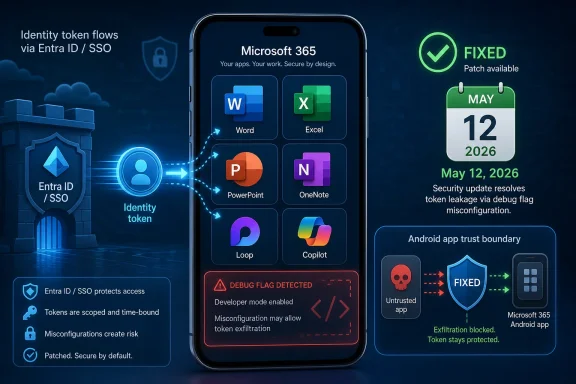
Microsoft patched a token-access flaw in six Microsoft 365 apps for Android on May 12, 2026, after researchers found that a production debug setting could let another installed Android app request Microsoft account tokens without user interaction. The affected apps were Word, Excel, PowerPoint, OneNote, Microsoft Loop, and Microsoft 365 Copilot; Teams was not reported as affected. The bug is now fixed, but its disclosure on June 2 gives IT departments a familiar problem in a sharper form: mobile productivity apps are no longer edge clients. They are identity brokers, document portals, AI front ends, and, when misconfigured, a direct path into the work account.
The uncomfortable part of this incident is not that a Microsoft 365 mobile app had a vulnerability. Large software products do. The uncomfortable part is that the reported failure mode sits exactly where enterprise IT has been trained to place trust: inside the polished first-party app, behind the familiar Microsoft sign-in flow, and beneath the user’s awareness.
According to the public reporting, Enclave traced the issue to a debug flag left enabled in production builds. That setting reportedly caused the vulnerable apps to skip a protection that should have prevented untrusted Android apps from obtaining Microsoft account tokens. In plain English, the thing designed to make Microsoft apps work smoothly together was too willing to talk to software outside the family.
That distinction matters. This was not the classic Android horror story of a flashlight app asking for every permission under the sun. The proof-of-concept scenario described by researchers did not need a suspicious permission prompt or a fake Microsoft login screen. It depended on an already installed app on the same device being able to ask a vulnerable Microsoft app for tokens and receive something useful.
For IT teams, that changes the mental model. The question is not only whether users can be phished into entering passwords. It is whether a mobile app ecosystem has accumulated enough trust relationships that a small implementation mistake can turn single sign-on convenience into an access-control shortcut.
The affected app list shows the breadth of the problem. Word, Excel, PowerPoint, and OneNote are obvious document gateways. Loop is part of Microsoft’s newer collaboration fabric. Microsoft 365 Copilot is the AI layer Microsoft wants embedded across daily work. A token issue in that cluster is not merely an app bug; it is a governance event.
Microsoft Teams reportedly was not affected, which is important because Teams has become the nervous system of many organizations. But the absence of Teams should not make admins shrug. The affected apps still touch sensitive files, notes, presentations, spreadsheets, and AI-assisted workflows that can summarize or expose business context faster than any single document search.
The issue also lands as Microsoft continues to push deeper into Android-based enterprise scenarios. Whether through managed devices, frontline-worker deployments, mobile app management, or broader productivity ambitions, Microsoft increasingly depends on Android being a trustworthy endpoint for identity-rich work. That means Android app governance now belongs in the same conversation as Windows patching, browser hardening, and identity protection.
That is why this incident should not be dismissed because it did not involve password theft. A stolen token can be more useful than a stolen password in an environment with multifactor authentication, conditional access, and passwordless flows. The user may have done everything right: used the official app, completed the official sign-in, and never saw a prompt that looked wrong.
The Enclave disclosure identified the tokens as part of Microsoft’s Family of Client IDs model, commonly shortened to FOCI. The purpose of that model is usability: Microsoft first-party apps can share authentication state so a user who signs into Word does not have to repeat the full sign-in ceremony in Excel or PowerPoint. In normal operation, that is a productivity feature.
But productivity features become security boundaries when they move tokens around. If the wrong app can participate in that exchange, the convenience layer becomes an attack surface. This is the pattern administrators should internalize: the more invisible authentication becomes to the user, the more rigor the platform and app vendor must apply to deciding who is allowed to benefit from it.
That is the kind of attack path defenders dislike most. It does not necessarily create the visible signals that help a help desk or user spot trouble. There may be no fake login page to report, no new consent dialog to question, and no strange file attachment to detonate in a sandbox. From the user’s perspective, the Microsoft app remains the Microsoft app.
SecurityWeek described a malicious update to an already installed Android app as one plausible route. That should ring alarms for organizations that allow broad third-party app installation on devices used for work. A benign app today can become a risky app tomorrow if its developer account is compromised, its ownership changes, its ad SDK goes rogue, or its update pipeline is abused.
This is where unmanaged bring-your-own-device programs can become deceptively fragile. If a personal Android phone has access to corporate Microsoft 365 data but is otherwise treated as a private app playground, the organization is betting heavily on every consumer app on that phone remaining harmless. That was never a great bet. Token-sharing vulnerabilities make it worse.
For consumers, the advice is simple: update the affected Microsoft apps from Google Play. For enterprises, “update the app” is only the first line of the checklist. The more important question is whether admins can prove that the affected versions are gone from devices that have access to corporate data.
That proof is not automatic in every environment. Fully managed Android Enterprise devices give IT teams better visibility and enforcement. App protection policies can help on unmanaged devices, but they do not magically inventory every personal app or every version state with the same precision as a managed fleet. The risk is highest where companies allow Microsoft 365 access from loosely governed Android devices and rely mostly on user behavior to keep things current.
The absence of confirmed in-the-wild exploitation is reassuring, but it is not exculpatory. Public technical disclosure changes the risk environment. Once the bug class, affected apps, and general mechanism are known, defenders should assume that opportunistic actors will at least test whether old versions remain in use.
That does not mean this flaw created some unique Copilot-only disaster scenario. The reported issue was about token access, not a model escaping its sandbox or inventing new permissions. But Copilot’s presence raises the stakes because AI tools can compress the value of access. A token that opens a document store is bad; a token that enables an assistant to help navigate sensitive work context may be worse in practice.
This is the part of the mobile AI story that vendors tend to underplay. AI features are marketed as smarter interfaces, but security teams have to treat them as accelerators of exposure. If a compromised session can reach data through an AI-enhanced workflow, the attacker may need less time and less domain knowledge to extract meaning from the account.
Microsoft is not alone in facing this problem. Every vendor embedding AI into productivity software is binding identity, data access, and inference more tightly together. The lesson from this Android flaw is that the underlying mobile authentication plumbing has to be boringly correct before the AI layer can be safely ambitious.
“No known exploitation” often means no public confirmation, not definitive proof that no one tried. Token misuse can be hard to identify after the fact, particularly if access appears to come through legitimate Microsoft identity flows. Depending on logging configuration, retention windows, and license tier, some organizations may not have the telemetry they would need to confidently reconstruct mobile-token abuse.
That uncertainty should shape the response. Most organizations do not need to launch a full incident response war room over every Android user who had Word installed in April. They do need to identify higher-risk populations: executives, finance staff, legal teams, administrators, developers with access to code and secrets, and users in environments where unmanaged Android devices are common.
For those groups, a targeted review of sign-in activity and anomalous access patterns is reasonable. Admins should look for unusual mobile client activity, suspicious geography, impossible travel, abnormal access to mail or files, and unexpected third-party app behavior around the relevant window. The goal is not panic. It is disciplined skepticism.
The practical control set is broader. Admins should enforce managed app distribution where possible, require app updates, restrict access from devices that fail basic integrity checks, and use conditional access policies that distinguish between known-good and loosely controlled devices. They should also revisit whether personal devices should have the same access to Microsoft 365 data as enrolled corporate devices.
This incident also argues for tightening app installation norms on work-capable Android devices. It is not realistic to ban every consumer app on personal phones, but it is realistic to require stronger controls for users with privileged or sensitive access. If a device can open corporate mail, files, notes, and Copilot, the organization has a legitimate interest in the software environment surrounding those apps.
The harder conversation is cultural. BYOD programs became popular because they reduced hardware costs and made users happy. But the security boundary is not the device owner’s preference; it is the corporate account. If the account can carry sensitive data into an unmanaged app ecosystem, IT has to be willing to say that convenience has limits.
That gap is where this incident should focus attention. The difference between a fixed vulnerability and a remediated environment is verification. If an organization cannot answer which Android devices ran vulnerable builds before May 12, which devices have updated since, and which users still have access from stale app versions, then its Microsoft 365 mobile governance is more hope than control.
This is not a Microsoft-only problem, but Microsoft’s footprint makes it consequential. Word, Excel, PowerPoint, OneNote, Loop, and Copilot are not niche apps. They are precisely the apps users install when they want to work from a phone. A vulnerability in that set has a long tail because installation counts are huge and update behavior is uneven.
The fix is not glamorous. It is inventory, enforcement, telemetry, and exception management. IT teams should make sure their mobile device management or mobile application management platform can see app versions, push updates, block outdated clients, and report compliance in a way that survives an audit.
The Microsoft flaw reportedly lived inside a shared SDK, which is why the misconfiguration appeared across multiple apps. That is efficient engineering until it is not. Shared components reduce duplication and create consistent behavior, but they also replicate mistakes at scale.
This is the same trade-off Windows administrators know from shared libraries, drivers, browser engines, and identity providers. Centralization makes patching easier once the problem is known, but it also means a single defect can become a fleetwide pattern. In the Microsoft 365 Android case, the affected apps differed, but the vulnerable behavior came from common authentication plumbing.
That should push vendors toward stronger release gates for security-sensitive flags. Debug settings are supposed to help developers observe and test behavior. They should not be able to silently alter production access-control decisions without automated checks screaming somewhere in the pipeline.
But speed after discovery does not erase the pre-discovery concern. The core question is how a debug setting that affected token-sharing behavior shipped in production across several major Android apps. For a company whose enterprise pitch depends heavily on identity trust, that is the kind of process failure customers are entitled to scrutinize.
Microsoft has been pushing customers toward a Zero Trust model for years: verify explicitly, use least privilege, assume breach. This incident is a reminder that those principles apply to Microsoft’s own app-to-app relationships too. A trusted app should not become a universal token dispenser because a flag was left on.
The better reading is not that Microsoft 365 on Android is unsafe. It is that the security of Microsoft 365 now depends on many smaller trust decisions that happen below the level most users and even many admins can see. That is exactly why governance has to move from slogans to instrumentation.
The right operational response is narrow but firm. Organizations should verify that affected apps are updated, identify users who had vulnerable versions installed, and apply extra scrutiny where mobile access intersects with sensitive roles. They should also use this moment to test whether their current tooling can answer basic questions quickly.
 A One-Line Mistake Turned Mobile SSO Into a Trust Problem
The uncomfortable part of this incident is not that a Microsoft 365 mobile app had a vulnerability. Large software products do. The uncomfortable part is that the reported failure mode sits exactly where enterprise IT has been trained to place trust: inside the polished first-party app, behind the familiar Microsoft sign-in flow, and beneath the user’s awareness.According to the public reporting, Enclave traced the issue to a debug flag left enabled in production builds. That setting reportedly caused the vulnerable apps to skip a protection that should have prevented untrusted Android apps from obtaining Microsoft account tokens. In plain English, the thing designed to make Microsoft apps work smoothly together was too willing to talk to software outside the family.
That distinction matters. This was not the classic Android horror story of a flashlight app asking for every permission under the sun. The proof-of-concept scenario described by researchers did not need a suspicious permission prompt or a fake Microsoft login screen. It depended on an already installed app on the same device being able to ask a vulnerable Microsoft app for tokens and receive something useful.
For IT teams, that changes the mental model. The question is not only whether users can be phished into entering passwords. It is whether a mobile app ecosystem has accumulated enough trust relationships that a small implementation mistake can turn single sign-on convenience into an access-control shortcut.
Microsoft 365 on Android Is Not a Side Channel Anymore
There was a time when mobile Office apps were treated as companion software: convenient for reading a document in a taxi, lightly editing a deck before a meeting, or triaging email between flights. That era is gone. On Android, Microsoft 365 apps now sit in the same operational universe as Entra ID, Intune app protection policies, SharePoint, OneDrive, Outlook data, Copilot workflows, and conditional access rules.The affected app list shows the breadth of the problem. Word, Excel, PowerPoint, and OneNote are obvious document gateways. Loop is part of Microsoft’s newer collaboration fabric. Microsoft 365 Copilot is the AI layer Microsoft wants embedded across daily work. A token issue in that cluster is not merely an app bug; it is a governance event.
Microsoft Teams reportedly was not affected, which is important because Teams has become the nervous system of many organizations. But the absence of Teams should not make admins shrug. The affected apps still touch sensitive files, notes, presentations, spreadsheets, and AI-assisted workflows that can summarize or expose business context faster than any single document search.
The issue also lands as Microsoft continues to push deeper into Android-based enterprise scenarios. Whether through managed devices, frontline-worker deployments, mobile app management, or broader productivity ambitions, Microsoft increasingly depends on Android being a trustworthy endpoint for identity-rich work. That means Android app governance now belongs in the same conversation as Windows patching, browser hardening, and identity protection.
Tokens Are the Prize Because Passwords Are No Longer the Whole Game
The industry has spent years teaching users not to type passwords into suspicious sites. That remains good advice, but modern attacks increasingly aim at the artifacts created after authentication. Tokens are attractive because they can represent a signed-in session, carry scopes, and sometimes persist long enough to be abused before defenders notice.That is why this incident should not be dismissed because it did not involve password theft. A stolen token can be more useful than a stolen password in an environment with multifactor authentication, conditional access, and passwordless flows. The user may have done everything right: used the official app, completed the official sign-in, and never saw a prompt that looked wrong.
The Enclave disclosure identified the tokens as part of Microsoft’s Family of Client IDs model, commonly shortened to FOCI. The purpose of that model is usability: Microsoft first-party apps can share authentication state so a user who signs into Word does not have to repeat the full sign-in ceremony in Excel or PowerPoint. In normal operation, that is a productivity feature.
But productivity features become security boundaries when they move tokens around. If the wrong app can participate in that exchange, the convenience layer becomes an attack surface. This is the pattern administrators should internalize: the more invisible authentication becomes to the user, the more rigor the platform and app vendor must apply to deciding who is allowed to benefit from it.
The Attack Path Was Quiet, Which Is Why It Matters
The reported proof of concept is especially relevant because it sounds boring. An attacker would not need to crash the phone, jailbreak the device, or trick the user into approving an obviously dangerous permission. A malicious or compromised app already present on the Android device could request tokens from vulnerable Microsoft apps and send them out.That is the kind of attack path defenders dislike most. It does not necessarily create the visible signals that help a help desk or user spot trouble. There may be no fake login page to report, no new consent dialog to question, and no strange file attachment to detonate in a sandbox. From the user’s perspective, the Microsoft app remains the Microsoft app.
SecurityWeek described a malicious update to an already installed Android app as one plausible route. That should ring alarms for organizations that allow broad third-party app installation on devices used for work. A benign app today can become a risky app tomorrow if its developer account is compromised, its ownership changes, its ad SDK goes rogue, or its update pipeline is abused.
This is where unmanaged bring-your-own-device programs can become deceptively fragile. If a personal Android phone has access to corporate Microsoft 365 data but is otherwise treated as a private app playground, the organization is betting heavily on every consumer app on that phone remaining harmless. That was never a great bet. Token-sharing vulnerabilities make it worse.
The CVEs Are Fixed, but the Admin Work Is Not Done
Microsoft issued fixes on May 12, 2026, and assigned CVEs covering the affected apps, including Microsoft 365 Copilot for Android, Word for Android, PowerPoint for Android, and Microsoft Office components that include Word and Excel for Android. Public reporting indicates most fixes moved through Microsoft’s Patch Tuesday process, with PowerPoint’s patched build pushed through Google Play the same day.For consumers, the advice is simple: update the affected Microsoft apps from Google Play. For enterprises, “update the app” is only the first line of the checklist. The more important question is whether admins can prove that the affected versions are gone from devices that have access to corporate data.
That proof is not automatic in every environment. Fully managed Android Enterprise devices give IT teams better visibility and enforcement. App protection policies can help on unmanaged devices, but they do not magically inventory every personal app or every version state with the same precision as a managed fleet. The risk is highest where companies allow Microsoft 365 access from loosely governed Android devices and rely mostly on user behavior to keep things current.
The absence of confirmed in-the-wild exploitation is reassuring, but it is not exculpatory. Public technical disclosure changes the risk environment. Once the bug class, affected apps, and general mechanism are known, defenders should assume that opportunistic actors will at least test whether old versions remain in use.
Copilot Makes the Blast Radius Harder to Explain Away
The inclusion of Microsoft 365 Copilot for Android is not just another app name in the list. Copilot is where Microsoft is concentrating an enormous amount of enterprise value, and it is also where access context can become unusually rich. AI assistants are useful precisely because they can surface, summarize, and correlate information across documents, messages, meetings, and organizational knowledge.That does not mean this flaw created some unique Copilot-only disaster scenario. The reported issue was about token access, not a model escaping its sandbox or inventing new permissions. But Copilot’s presence raises the stakes because AI tools can compress the value of access. A token that opens a document store is bad; a token that enables an assistant to help navigate sensitive work context may be worse in practice.
This is the part of the mobile AI story that vendors tend to underplay. AI features are marketed as smarter interfaces, but security teams have to treat them as accelerators of exposure. If a compromised session can reach data through an AI-enhanced workflow, the attacker may need less time and less domain knowledge to extract meaning from the account.
Microsoft is not alone in facing this problem. Every vendor embedding AI into productivity software is binding identity, data access, and inference more tightly together. The lesson from this Android flaw is that the underlying mobile authentication plumbing has to be boringly correct before the AI layer can be safely ambitious.
“No Exploitation Known” Is Not the Same as “No Exposure”
There is a predictable rhythm to vulnerability disclosure. The vendor patches. The researcher publishes. The CVEs circulate. Then comes the phrase every admin wants to hear: no evidence of exploitation in the wild. That phrase is useful, but it should not be treated as a sleep aid.“No known exploitation” often means no public confirmation, not definitive proof that no one tried. Token misuse can be hard to identify after the fact, particularly if access appears to come through legitimate Microsoft identity flows. Depending on logging configuration, retention windows, and license tier, some organizations may not have the telemetry they would need to confidently reconstruct mobile-token abuse.
That uncertainty should shape the response. Most organizations do not need to launch a full incident response war room over every Android user who had Word installed in April. They do need to identify higher-risk populations: executives, finance staff, legal teams, administrators, developers with access to code and secrets, and users in environments where unmanaged Android devices are common.
For those groups, a targeted review of sign-in activity and anomalous access patterns is reasonable. Admins should look for unusual mobile client activity, suspicious geography, impossible travel, abnormal access to mail or files, and unexpected third-party app behavior around the relevant window. The goal is not panic. It is disciplined skepticism.
Mobile App Management Has to Catch Up With Identity Reality
Many organizations still treat mobile device management as a policy nuisance: passcodes, encryption, jailbreak detection, maybe a wipe command. That is too narrow for modern Microsoft 365. The mobile app is now an identity participant, a data broker, and sometimes an AI client.The practical control set is broader. Admins should enforce managed app distribution where possible, require app updates, restrict access from devices that fail basic integrity checks, and use conditional access policies that distinguish between known-good and loosely controlled devices. They should also revisit whether personal devices should have the same access to Microsoft 365 data as enrolled corporate devices.
This incident also argues for tightening app installation norms on work-capable Android devices. It is not realistic to ban every consumer app on personal phones, but it is realistic to require stronger controls for users with privileged or sensitive access. If a device can open corporate mail, files, notes, and Copilot, the organization has a legitimate interest in the software environment surrounding those apps.
The harder conversation is cultural. BYOD programs became popular because they reduced hardware costs and made users happy. But the security boundary is not the device owner’s preference; it is the corporate account. If the account can carry sensitive data into an unmanaged app ecosystem, IT has to be willing to say that convenience has limits.
Patch Verification Is the Boring Discipline That Keeps Winning
The Microsoft ecosystem has trained administrators to live by Patch Tuesday, but mobile apps do not always fit neatly into the same operational muscle memory. Desktop Windows updates are tracked, reported, deferred, ringed, and audited. Android app updates are often left to app stores, user settings, battery conditions, OEM quirks, and whether the device is managed at all.That gap is where this incident should focus attention. The difference between a fixed vulnerability and a remediated environment is verification. If an organization cannot answer which Android devices ran vulnerable builds before May 12, which devices have updated since, and which users still have access from stale app versions, then its Microsoft 365 mobile governance is more hope than control.
This is not a Microsoft-only problem, but Microsoft’s footprint makes it consequential. Word, Excel, PowerPoint, OneNote, Loop, and Copilot are not niche apps. They are precisely the apps users install when they want to work from a phone. A vulnerability in that set has a long tail because installation counts are huge and update behavior is uneven.
The fix is not glamorous. It is inventory, enforcement, telemetry, and exception management. IT teams should make sure their mobile device management or mobile application management platform can see app versions, push updates, block outdated clients, and report compliance in a way that survives an audit.
The Android Boundary Was Always Shared With Everyone Else on the Phone
Android’s app sandbox is one of the platform’s foundational security promises. Apps should not casually read each other’s private data. But enterprise mobile security has always involved more than the OS sandbox, because work apps interact through intents, account brokers, browser sessions, authenticators, notification surfaces, clipboard controls, document providers, and vendor SDKs.The Microsoft flaw reportedly lived inside a shared SDK, which is why the misconfiguration appeared across multiple apps. That is efficient engineering until it is not. Shared components reduce duplication and create consistent behavior, but they also replicate mistakes at scale.
This is the same trade-off Windows administrators know from shared libraries, drivers, browser engines, and identity providers. Centralization makes patching easier once the problem is known, but it also means a single defect can become a fleetwide pattern. In the Microsoft 365 Android case, the affected apps differed, but the vulnerable behavior came from common authentication plumbing.
That should push vendors toward stronger release gates for security-sensitive flags. Debug settings are supposed to help developers observe and test behavior. They should not be able to silently alter production access-control decisions without automated checks screaming somewhere in the pipeline.
Microsoft’s Response Was Fast; Its Ecosystem Still Needs Guardrails
By the public timeline, Microsoft confirmed and fixed the reported issues quickly. That matters. A vendor that patches before technical details become public gives defenders a fair chance, and in this case the fixes landed before Enclave’s June disclosure.But speed after discovery does not erase the pre-discovery concern. The core question is how a debug setting that affected token-sharing behavior shipped in production across several major Android apps. For a company whose enterprise pitch depends heavily on identity trust, that is the kind of process failure customers are entitled to scrutinize.
Microsoft has been pushing customers toward a Zero Trust model for years: verify explicitly, use least privilege, assume breach. This incident is a reminder that those principles apply to Microsoft’s own app-to-app relationships too. A trusted app should not become a universal token dispenser because a flag was left on.
The better reading is not that Microsoft 365 on Android is unsafe. It is that the security of Microsoft 365 now depends on many smaller trust decisions that happen below the level most users and even many admins can see. That is exactly why governance has to move from slogans to instrumentation.
The Checklist Belongs on the Mobile Side of the House
For WindowsForum readers, the instinct may be to file this under Android news and move on. That would be a mistake. The exposed resource is not an Android account; it is the Microsoft 365 work identity that also touches Windows, SharePoint, OneDrive, Exchange, Teams, Copilot, and admin portals.The right operational response is narrow but firm. Organizations should verify that affected apps are updated, identify users who had vulnerable versions installed, and apply extra scrutiny where mobile access intersects with sensitive roles. They should also use this moment to test whether their current tooling can answer basic questions quickly.
The Debug Flag Became a Governance Test
This is the practical readout IT teams should take from the incident:- Organizations should confirm that Word, Excel, PowerPoint, OneNote, Microsoft Loop, and Microsoft 365 Copilot for Android are updated on any device allowed to access work accounts.
- Administrators should treat unmanaged Android devices as a higher-risk category when they combine Microsoft 365 access with broad third-party app installation.
- Security teams should review sign-in and resource-access activity for sensitive users who ran affected app versions before the May 12, 2026 fixes.
- Mobile app governance should include version enforcement, app protection policies, device integrity checks, and clear rules for privileged users.
- The absence of public exploitation should reduce panic, not eliminate verification.
- Copilot’s presence in the affected set is a reminder that AI-enabled productivity apps inherit the full risk of the identity systems beneath them.
References
- Primary source: TechRepublic
Published: Thu, 04 Jun 2026 15:56:15 GMT
Microsoft 365 Android Apps Had a Token Flaw IT Teams Should Check Now - TechRepublic
Microsoft patched a Microsoft 365 Android flaw that exposed account tokens across six apps. Here’s what IT teams should check now.www.techrepublic.com
- Related coverage: neuracybintel.com
NeuraCyb - Cybersecurity Intelligence & Investigation
Cybersecurity Intelligence and Investigation Platform www.neuracybintel.com
- Related coverage: securityweek.com
Exclusive: How One Line of Code Put Billions of Microsoft Android App Downloads at Risk - SecurityWeek
SecurityWeek Exclusive: Researchers discovered a debug mode flaw in six Microsoft Android apps that could have enabled exploitation.www.securityweek.com
- Related coverage: thecybersignal.com
One Debug Flag Exposed Microsoft Android Account Tokens
A debug flag left on in Microsoft's Android Office apps let other apps read account tokens, exposing billions of installs. Microsoft has patched the flaws. www.thecybersignal.com
- Related coverage: diamatix.com
Microsoft 365 Android Apps Exposed Account Tokens Through Debug Mode
A debug mode left enabled in Microsoft 365 Android apps allowed token exposure risk. Microsoft patched the issue affecting Word, Excel, PowerPoint, Copilot, Loop, and OneNote.diamatix.com - Related coverage: windowsforum.com
CVE-2026-41100 Copilot Android Spoofing: What Enterprises Should Do | Windows Forum
Microsoft has disclosed CVE-2026-41100 as a spoofing vulnerability in Microsoft 365 Copilot for Android, with the advisory appearing in the Microsoft...windowsforum.com
- Related coverage: darkreading.com
Coding Error Exposes Microsoft 365 Accounts to Takeover
A disabled security setting meant to protect authentication across Android versions of key apps paved the way for attackers to steal logins and data.www.darkreading.com
