

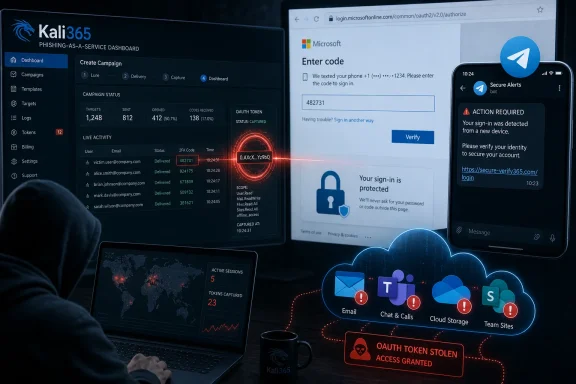
The FBI warned in May 2026 that Kali365, a phishing-as-a-service platform distributed largely through Telegram, is targeting Microsoft 365 accounts by abusing legitimate Microsoft device-code authentication to capture OAuth tokens and bypass ordinary multifactor authentication protections. The warning matters because this is not yesterday’s fake-login-page scam with a cleaner coat of paint. It is a reminder that cloud identity has become the new perimeter, and attackers are learning to walk through the front door by persuading users to unlock it for them.
For years, the canonical Microsoft 365 phishing story was easy to explain. A user received a convincing email, clicked a fake Office or SharePoint link, typed a password into a counterfeit page, and possibly handed over a one-time MFA code before realizing something was wrong. Security awareness training, password managers, domain reputation tools, and multifactor authentication were all built around that model.
Kali365 attacks a different assumption. It does not need to steal the password if it can trick the victim into completing a real Microsoft authentication flow. The victim may see a legitimate Microsoft verification page, enter a short code, and believe they are approving access to a document, workspace, or collaboration service.
That is the uncomfortable part. The user is not necessarily ignoring a browser warning or typing credentials into a misspelled domain. In the version of the attack described by the FBI and security researchers, the malicious work happens around the authentication flow rather than inside a visibly fake Microsoft page.
The target is the OAuth token, the small but powerful artifact that lets cloud apps stay connected without asking the user to sign in every few minutes. In normal use, this is what makes Microsoft 365 tolerable. In malicious use, it becomes a bearer instrument for access to mail, files, chats, and other cloud resources.
That matters because the distance between “possible” and “common” in cybercrime is often a user interface. A technique that once required careful operator knowledge becomes much more dangerous when it is wrapped in dashboards, templates, Telegram support channels, and AI-generated lures. The FBI’s warning is not merely that a clever attack exists. It is that the attack has been productized.
The kit reportedly appeared in April 2026 and was advertised through Telegram channels, where cybercrime tooling increasingly behaves like a gray-market SaaS business. The pitch is brutally simple: give operators a way into Microsoft 365 without needing to intercept passwords, defeat every MFA prompt in real time, or build phishing infrastructure from scratch.
That is why small businesses and managed-service-provider customers should pay attention. They are often too mature to be defenseless but not large enough to have dedicated identity threat-hunting teams. Kali365 sits in that gap, aiming at organizations that have enabled MFA and assumed the story ended there.
In a Kali365-style attack, the criminal initiates the sign-in attempt from their own side and sends the victim the code. The lure may claim to come from a trusted file-sharing, document-management, or productivity service. The victim is told to go to Microsoft’s real verification page and enter the code.
At that moment, the usual mental checklist breaks down. The page is legitimate. The domain may be legitimate. The browser lock icon is irrelevant because the user is not on the attacker’s website. A password manager may not object because there is no obvious credential theft page to detect.
Once the user completes the flow, the attacker can obtain tokens tied to the session or application context. Depending on the permissions and controls in place, that can open access to Outlook, Teams, OneDrive, SharePoint, and other Microsoft 365 resources. From the platform’s perspective, the user participated in a valid authentication flow.
This is the subtle shift administrators need to internalize. The problem is not that MFA failed in the crude sense. The problem is that the attacker found a way to make the user satisfy the authentication requirement for the attacker’s session.
But the industry’s marketing around MFA has been too simple for too long. “Enable MFA” became the security equivalent of “eat your vegetables”: true, important, and insufficient as a complete plan. Kali365 exploits the gap between MFA as a checkbox and identity security as a system.
The stronger lesson is that authentication events now need context. Where is the sign-in coming from? What flow is being used? Is the device managed? Is the user being asked to approve something unusual? Is a refresh token being issued under conditions that make sense for the organization?
Microsoft Entra Conditional Access can help here, particularly where organizations restrict or block device-code flow if they do not need it. But this is not a one-click decision for every tenant. Some legitimate tools, scripts, devices, or legacy workflows may rely on device-code authentication, and blocking it without an audit can create self-inflicted outages.
That is the trade-off administrators live with every day. The most dangerous identity features are often legitimate features with broad compatibility. Attackers do not need Microsoft to make a mistake when they can abuse the parts of Microsoft 365 designed to make authentication smoother.
A compromised mailbox gives criminals a map of relationships. They can study invoice patterns, vendor contacts, recurring projects, executive tone, legal correspondence, and customer disputes. They can wait for the right moment to redirect a payment or insert themselves into an existing thread.
Teams and OneDrive widen the blast radius. Internal chats may reveal operational details that never appear in email. Shared files may contain contracts, tax records, customer lists, credentials, architecture diagrams, or HR material. A single account can become a skeleton key to the informal knowledge layer of a business.
This is why small and midsize organizations are especially exposed. They often run Microsoft 365 as the operational center of the company, but they may not have advanced logging retention, continuous token revocation playbooks, or staff trained to identify suspicious OAuth grants. A stolen token can live in the uncomfortable space between “the password was changed” and “the attacker is actually gone.”
Incident response for this class of attack has to include session revocation. Administrators should review sign-in logs, revoke refresh tokens, inspect enterprise applications and consent grants, and check for suspicious inbox rules or forwarding settings. The attacker may have added persistence that survives the user’s first attempt to recover the account.
Users should also check recovery contact information, recent Teams activity, OneDrive sharing links, and mailbox rules. A subtle forwarding rule can quietly leak future correspondence. A malicious inbox rule can hide replies from a finance team. A shared file link can keep data exposed even after the original authentication event is closed.
For organizations, the harder question is scope. If one user entered a code, who else received the lure? Did the attacker send internal messages from the compromised account? Were additional users prompted to authenticate? Did the account access sensitive files after compromise?
The uncomfortable answer is that identity incidents increasingly look like cloud investigations, not desktop cleanups. There may be no infected workstation to reimage. The attacker may never have touched the victim’s device in a traditional malware sense. The evidence lives in audit logs, token events, application grants, mailbox configuration, and cloud activity.
That is exactly where generative tools help. They reduce the telltale awkwardness of mass phishing and make it easier to produce variations for different industries, roles, and regions. A fake SharePoint message to a law office should not sound like a fake Teams message to a construction firm, and AI makes that tailoring cheaper.
The result is not necessarily a brilliant con. It is a more mundane one, which may be worse. The best phishing emails increasingly do not look dramatic. They look like another ordinary work interruption in a day already full of ordinary work interruptions.
Security training has to adapt to that reality. Teaching users to spot broken English and obviously fake domains is no longer enough. The new lesson is behavioral: do not enter a device code unless you initiated the sign-in and understand which device or app is requesting it.
That discovery phase matters. A blanket block can be the right answer, but only after administrators understand the business impact. The better approach is to audit sign-ins, identify legitimate use, then restrict the flow through Conditional Access where feasible.
Microsoft’s identity stack gives defenders more levers than many small businesses realize. Conditional Access can evaluate authentication flows, device compliance, location, risk, and application context. Entra logs can reveal unusual sign-in patterns. Defender and related tools can surface suspicious OAuth activity, depending on licensing and configuration.
Licensing, however, remains the awkward subtext. The tenants most likely to be harmed by this class of attack are not always the tenants paying for the richest identity protection features. That is an old cloud security problem: the baseline product is easy to buy, while the best defensive telemetry can sit behind higher-tier subscriptions or require expertise to operate well.
Still, there are practical steps available even before an organization buys another security SKU. Administrators can review consent settings, limit user consent to applications, monitor risky sign-ins, enforce phishing-resistant MFA where possible, and create an internal rule that unexpected device-code prompts are treated as security events rather than user confusion.
That advice cuts through the attacker’s greatest advantage. The scam borrows legitimacy from Microsoft’s real login page, but it still depends on the victim accepting a code they did not request. The code is the handoff. Slow down there, and the chain breaks.
Organizations should make that rule visible. Put it in onboarding materials, help-desk scripts, phishing simulations, and internal security bulletins. Users do not need a lecture on OAuth grants to understand that a code from an unexpected message is dangerous.
The help desk also needs a no-shame path for reporting. If users fear punishment, they will wait, rationalize, or quietly change their password and hope for the best. In token-theft scenarios, lost time is access time. A fast report is more valuable than a perfect user.
For WindowsForum readers, the lesson is practical rather than theatrical. This is not a reason to abandon Microsoft 365, nor is it evidence that MFA was a mistake. It is a reason to treat identity configuration as production infrastructure, with the same seriousness once reserved for firewalls, patch management, and endpoint imaging.
The most concrete takeaways are narrow enough to act on and broad enough to matter:
 The Password Was Not the Prize This Time
For years, the canonical Microsoft 365 phishing story was easy to explain. A user received a convincing email, clicked a fake Office or SharePoint link, typed a password into a counterfeit page, and possibly handed over a one-time MFA code before realizing something was wrong. Security awareness training, password managers, domain reputation tools, and multifactor authentication were all built around that model.Kali365 attacks a different assumption. It does not need to steal the password if it can trick the victim into completing a real Microsoft authentication flow. The victim may see a legitimate Microsoft verification page, enter a short code, and believe they are approving access to a document, workspace, or collaboration service.
That is the uncomfortable part. The user is not necessarily ignoring a browser warning or typing credentials into a misspelled domain. In the version of the attack described by the FBI and security researchers, the malicious work happens around the authentication flow rather than inside a visibly fake Microsoft page.
The target is the OAuth token, the small but powerful artifact that lets cloud apps stay connected without asking the user to sign in every few minutes. In normal use, this is what makes Microsoft 365 tolerable. In malicious use, it becomes a bearer instrument for access to mail, files, chats, and other cloud resources.
Kali365 Turns a Specialist Trick Into a Subscription Product
Kali365 is best understood less as a single scam than as a commercialization layer around a known technique. Device-code phishing has been discussed in security circles for years, but phishing-as-a-service changes the economics. It packages the tradecraft, the lures, the automation, and the token capture into something less technical criminals can rent.That matters because the distance between “possible” and “common” in cybercrime is often a user interface. A technique that once required careful operator knowledge becomes much more dangerous when it is wrapped in dashboards, templates, Telegram support channels, and AI-generated lures. The FBI’s warning is not merely that a clever attack exists. It is that the attack has been productized.
The kit reportedly appeared in April 2026 and was advertised through Telegram channels, where cybercrime tooling increasingly behaves like a gray-market SaaS business. The pitch is brutally simple: give operators a way into Microsoft 365 without needing to intercept passwords, defeat every MFA prompt in real time, or build phishing infrastructure from scratch.
That is why small businesses and managed-service-provider customers should pay attention. They are often too mature to be defenseless but not large enough to have dedicated identity threat-hunting teams. Kali365 sits in that gap, aiming at organizations that have enabled MFA and assumed the story ended there.
Microsoft’s Legitimate Login Flow Becomes the Social Engineering Surface
The device-code flow exists for good reasons. Some devices do not have practical keyboards or browsers, so they display a short code and ask the user to complete authentication on another device. Anyone who has signed into a TV app by typing a code into a phone has used a version of this pattern.In a Kali365-style attack, the criminal initiates the sign-in attempt from their own side and sends the victim the code. The lure may claim to come from a trusted file-sharing, document-management, or productivity service. The victim is told to go to Microsoft’s real verification page and enter the code.
At that moment, the usual mental checklist breaks down. The page is legitimate. The domain may be legitimate. The browser lock icon is irrelevant because the user is not on the attacker’s website. A password manager may not object because there is no obvious credential theft page to detect.
Once the user completes the flow, the attacker can obtain tokens tied to the session or application context. Depending on the permissions and controls in place, that can open access to Outlook, Teams, OneDrive, SharePoint, and other Microsoft 365 resources. From the platform’s perspective, the user participated in a valid authentication flow.
This is the subtle shift administrators need to internalize. The problem is not that MFA failed in the crude sense. The problem is that the attacker found a way to make the user satisfy the authentication requirement for the attacker’s session.
MFA Still Matters, But the Slogan Has Expired
It would be a mistake to read the FBI warning as proof that multifactor authentication is useless. MFA still blocks enormous volumes of credential-stuffing, password reuse, and basic phishing attacks. Turning it off because token theft exists would be like removing seat belts because airbags are imperfect.But the industry’s marketing around MFA has been too simple for too long. “Enable MFA” became the security equivalent of “eat your vegetables”: true, important, and insufficient as a complete plan. Kali365 exploits the gap between MFA as a checkbox and identity security as a system.
The stronger lesson is that authentication events now need context. Where is the sign-in coming from? What flow is being used? Is the device managed? Is the user being asked to approve something unusual? Is a refresh token being issued under conditions that make sense for the organization?
Microsoft Entra Conditional Access can help here, particularly where organizations restrict or block device-code flow if they do not need it. But this is not a one-click decision for every tenant. Some legitimate tools, scripts, devices, or legacy workflows may rely on device-code authentication, and blocking it without an audit can create self-inflicted outages.
That is the trade-off administrators live with every day. The most dangerous identity features are often legitimate features with broad compatibility. Attackers do not need Microsoft to make a mistake when they can abuse the parts of Microsoft 365 designed to make authentication smoother.
The Inbox Is Only the First Crime Scene
Once an attacker gains access to a Microsoft 365 account, the first visible consequence may be email compromise. But Outlook is rarely the endgame. It is a reconnaissance platform, a fraud engine, and a launchpad.A compromised mailbox gives criminals a map of relationships. They can study invoice patterns, vendor contacts, recurring projects, executive tone, legal correspondence, and customer disputes. They can wait for the right moment to redirect a payment or insert themselves into an existing thread.
Teams and OneDrive widen the blast radius. Internal chats may reveal operational details that never appear in email. Shared files may contain contracts, tax records, customer lists, credentials, architecture diagrams, or HR material. A single account can become a skeleton key to the informal knowledge layer of a business.
This is why small and midsize organizations are especially exposed. They often run Microsoft 365 as the operational center of the company, but they may not have advanced logging retention, continuous token revocation playbooks, or staff trained to identify suspicious OAuth grants. A stolen token can live in the uncomfortable space between “the password was changed” and “the attacker is actually gone.”
Token Theft Changes the Cleanup Job
The old advice after phishing was straightforward: change the password, enable MFA, and warn contacts. That advice is now dangerously incomplete. If a token or session remains valid, a password change alone may not evict the attacker quickly enough.Incident response for this class of attack has to include session revocation. Administrators should review sign-in logs, revoke refresh tokens, inspect enterprise applications and consent grants, and check for suspicious inbox rules or forwarding settings. The attacker may have added persistence that survives the user’s first attempt to recover the account.
Users should also check recovery contact information, recent Teams activity, OneDrive sharing links, and mailbox rules. A subtle forwarding rule can quietly leak future correspondence. A malicious inbox rule can hide replies from a finance team. A shared file link can keep data exposed even after the original authentication event is closed.
For organizations, the harder question is scope. If one user entered a code, who else received the lure? Did the attacker send internal messages from the compromised account? Were additional users prompted to authenticate? Did the account access sensitive files after compromise?
The uncomfortable answer is that identity incidents increasingly look like cloud investigations, not desktop cleanups. There may be no infected workstation to reimage. The attacker may never have touched the victim’s device in a traditional malware sense. The evidence lives in audit logs, token events, application grants, mailbox configuration, and cloud activity.
AI Makes the Lure Less Clumsy and More Ordinary
The AI element in Kali365 should not be overhyped into science fiction. Attackers do not need artificial general intelligence to write a convincing email. They need believable phrasing, decent grammar, plausible urgency, and enough personalization to get the user to act.That is exactly where generative tools help. They reduce the telltale awkwardness of mass phishing and make it easier to produce variations for different industries, roles, and regions. A fake SharePoint message to a law office should not sound like a fake Teams message to a construction firm, and AI makes that tailoring cheaper.
The result is not necessarily a brilliant con. It is a more mundane one, which may be worse. The best phishing emails increasingly do not look dramatic. They look like another ordinary work interruption in a day already full of ordinary work interruptions.
Security training has to adapt to that reality. Teaching users to spot broken English and obviously fake domains is no longer enough. The new lesson is behavioral: do not enter a device code unless you initiated the sign-in and understand which device or app is requesting it.
The Admin Answer Is Policy, Telemetry, and Restraint
For IT teams, the response begins with knowing whether device-code flow is actually needed. Many organizations will find that it is rarely used. Others will discover that a handful of legitimate workflows depend on it, especially in environments with command-line tools, older devices, or specialized operational practices.That discovery phase matters. A blanket block can be the right answer, but only after administrators understand the business impact. The better approach is to audit sign-ins, identify legitimate use, then restrict the flow through Conditional Access where feasible.
Microsoft’s identity stack gives defenders more levers than many small businesses realize. Conditional Access can evaluate authentication flows, device compliance, location, risk, and application context. Entra logs can reveal unusual sign-in patterns. Defender and related tools can surface suspicious OAuth activity, depending on licensing and configuration.
Licensing, however, remains the awkward subtext. The tenants most likely to be harmed by this class of attack are not always the tenants paying for the richest identity protection features. That is an old cloud security problem: the baseline product is easy to buy, while the best defensive telemetry can sit behind higher-tier subscriptions or require expertise to operate well.
Still, there are practical steps available even before an organization buys another security SKU. Administrators can review consent settings, limit user consent to applications, monitor risky sign-ins, enforce phishing-resistant MFA where possible, and create an internal rule that unexpected device-code prompts are treated as security events rather than user confusion.
The User Rule Is Brutally Simple
The most important user-facing rule is also the least technical: never enter a Microsoft device code that arrived unexpectedly by email, Teams, chat, or text. If you did not start the sign-in on a device in front of you, the code is not yours to enter.That advice cuts through the attacker’s greatest advantage. The scam borrows legitimacy from Microsoft’s real login page, but it still depends on the victim accepting a code they did not request. The code is the handoff. Slow down there, and the chain breaks.
Organizations should make that rule visible. Put it in onboarding materials, help-desk scripts, phishing simulations, and internal security bulletins. Users do not need a lecture on OAuth grants to understand that a code from an unexpected message is dangerous.
The help desk also needs a no-shame path for reporting. If users fear punishment, they will wait, rationalize, or quietly change their password and hope for the best. In token-theft scenarios, lost time is access time. A fast report is more valuable than a perfect user.
The Warning Windows Admins Should Actually Carry Forward
Kali365 is not important because it is the only phishing kit targeting Microsoft 365. It is important because it shows where the center of gravity has moved: from stealing credentials to manipulating authorization. The cloud account is the workstation now, and the token is often more valuable than the password.For WindowsForum readers, the lesson is practical rather than theatrical. This is not a reason to abandon Microsoft 365, nor is it evidence that MFA was a mistake. It is a reason to treat identity configuration as production infrastructure, with the same seriousness once reserved for firewalls, patch management, and endpoint imaging.
The most concrete takeaways are narrow enough to act on and broad enough to matter:
- Users should never enter a Microsoft device code unless they personally initiated the sign-in on a device or app they recognize.
- Administrators should audit whether device-code authentication is used in their tenant before deciding whether to restrict or block it.
- Password resets after suspected compromise should be paired with token and session revocation, mailbox rule review, and OAuth consent inspection.
- Small businesses should assume a compromised Microsoft 365 account can expose email, files, chats, invoices, and customer data, not just the user’s inbox.
- Security training should explicitly cover device-code phishing because traditional fake-login-page advice does not fully address this attack.
- Reports to IT or law enforcement should include phishing messages, timestamps, suspicious sign-ins, IP information where available, and details about affected devices or accounts.
References
- Primary source: Rolling Out
Published: 2026-06-28T21:12:10.418318
Loading…
rollingout.com - Official source: microsoft.com
Inside an AI‑enabled device code phishing campaign | Microsoft Security Blog
A new wave of device code phishing shows how threat actors are scaling account compromise using AI and end‑to‑end automation. This campaign goes beyond traditional phishing by generating live authentication codes on demand, enabling higher success rates and sustained post‑compromise access.www.microsoft.com - Official source: learn.microsoft.com
Loading…
learn.microsoft.com - Related coverage: spycloud.com
Loading…
spycloud.com - Related coverage: purpleshieldsecurity.com
FBI Warns of Kali365 Phishing Kit Hijacking Microsoft 365
The FBI warns Kali365, a phishing-as-a-service kit, hijacks Microsoft 365 tokens and bypasses MFA. What it means for your business and how to respond. www.purpleshieldsecurity.com
- Related coverage: windowsreport.com
FBI Warns Kali365 Can Bypass Microsoft 365 MFA Using OAuth Tokens
The FBI warns that Kali365 phishing attacks can bypass Microsoft 365 MFA by stealing OAuth session tokens through device code phishing. windowsreport.com
- Related coverage: gblock.app
FBI Warns: Kali365 PhaaS Bypasses Microsoft 365 MFA Via Device Code
The FBI just warned that Kali365 is the first Microsoft 365 phishing service that bypasses MFA without ever asking for a password—victims complete the real Microsoft login flow themselves and hand over OAuth tokens that survive every additional check. www.gblock.app
- Related coverage: cybersecuritydive.com
FBI warns about PhaaS platform used to access Microsoft 365 environments | Cybersecurity Dive
Device code phishing enabled hackers to bypass multifactor authentication without credentials.www.cybersecuritydive.com
- Related coverage: techradar.com
FBI warns of Kali phishing scam hitting Microsoft OAuth tokens — warns 'Kali365 lowers the barrier of entry, providing less-technical attackers access to AI-generated phishing lures' | TechRadar
A new phishing kit is being offered on Telegramwww.techradar.com - Related coverage: cyberscoop.com
FBI warns about fast-growing phishing kit targeting Microsoft 365 users | CyberScoop
Kali365, which was first observed in April, abuses legitimate Microsoft device authorization pages to grant persistent access to cybercriminal-controlled applications. cyberscoop.com
- Related coverage: overe.io
Kali365 Device Code Phishing Attacks Target Microsoft 365 OAuth Authentication | Microsoft 365 Threat Advisory | Overe
The FBI and Microsoft are warning about Kali365 device code phishing attacks targeting Microsoft 365 tenants through OAuth token theft and Device Code Flow abuse. Learn how to reduce exposure using Conditional Access controls and authentication hardening. www.overe.io
- Related coverage: hackread.com
Loading…
hackread.com - Related coverage: kiplinger.com
New Scam Targets Microsoft Users, FBI Warns. Here's How to Protect Yourself | Kiplinger
This phishing scam doesn't rely on a fake website. Instead, it tricks users into approving access themselves.www.kiplinger.com - Related coverage: itpro.com
FBI warns Microsoft 365 users about another phishing as a service attack – here's how to avoid it | IT Pro
Kali365 platform is serious enough to garner a warning from the FBIwww.itpro.com - Related coverage: labs.cloudsecurityalliance.org
OAuth Device Code Phishing Hits 340+ Microsoft 365 Organizations
PDF documentlabs.cloudsecurityalliance.org
- Related coverage: static.obstracts.com
Loading…
static.obstracts.com