

The FBI warned in May 2026 that Kali365, a phishing-as-a-service platform first seen in April, is being used to compromise Microsoft 365 accounts by abusing OAuth device-code authentication and stealing access tokens for Outlook, Teams, OneDrive, and related cloud services.
That sentence is the dry version. The more uncomfortable version is that Kali365 is not really a “Microsoft password” story at all. It is a story about attackers learning to live inside the same identity plumbing that enterprises have spent years teaching users to trust.
For Windows shops, managed service providers, and Microsoft 365 administrators, the warning lands at a bad moment. Multifactor authentication has finally become the default expectation across much of the business world, and yet Kali365 demonstrates how quickly criminals move once the industry standardizes on a defensive pattern. The attack does not smash through MFA so much as walk around it, carrying a legitimate token on the way out.
Traditional phishing asked the victim to type a password into the wrong place. The defensive answer was obvious enough: train users to inspect links, deploy MFA, block suspicious domains, and assume that a password alone should no longer be enough to open the door. Kali365 changes the geometry of the attack by sending the user to a real Microsoft authentication page.
That is why this class of attack is so insidious. The user is not necessarily ignoring the usual warnings. The browser may show a Microsoft-owned domain, the sign-in prompt may look familiar, and the MFA challenge may arrive through the expected channel.
The trick sits in the device-code flow. This OAuth mechanism exists for devices that are awkward to type into, such as conference-room systems, shared devices, smart displays, and command-line or limited-input scenarios. One device starts the authentication process, another device completes it, and the token is returned to the original requester.
In a legitimate workflow, that is convenience. In Kali365’s hands, it becomes delegation fraud. The attacker initiates the flow, sends the victim the code, and convinces the victim to complete the login on Microsoft’s real infrastructure. When the victim signs in and satisfies MFA, the resulting token can be captured by the attacker’s side of the flow.
This is the crucial inversion: the victim is not giving away a password; the victim is authorizing the attacker’s session.
That shift matters because tokens are meant to reduce friction. They are what allow Outlook to keep syncing, Teams to stay signed in, OneDrive to continue working, and mobile apps to avoid prompting the user every fifteen minutes. The token is not a bug in the system; it is how the system maintains a session.
Kali365’s power comes from treating that session as the asset. If an attacker can obtain a valid OAuth token, the account may look authenticated from the platform’s point of view. MFA has already happened. The “impossible” part of the login has already been satisfied.
This is why users can do something that feels safe and still lose control of their account. They may never type their password into a fake web form. They may approve the expected MFA prompt. They may even believe they have behaved cautiously because the sign-in page was genuine.
For administrators, that makes post-authentication monitoring much more important. The interesting signal is not merely whether MFA was present. It is whether the authentication flow made sense, whether the client or device was expected, whether a token is being used from an unusual environment, and whether account activity after login resembles the user’s actual work.
That is the real acceleration here. A single operator who understands OAuth device-code abuse is dangerous. A platform that lets less sophisticated criminals run the same play at scale is much worse.
The reported use of Telegram for distribution fits the broader pattern of commoditized cybercrime. The barrier to entry drops, campaign volume rises, and defenders see repeated variations of the same attack across different tenants and industries. The same basic technique can be dressed up as a Teams notification, a voicemail alert, a shared document, a compliance message, or a collaboration request.
AI-generated phishing lures add another layer of nuisance. They do not need to be brilliant to be effective. They only need to be grammatically plausible, contextually familiar, and good enough to survive the few seconds a busy employee spends deciding whether a message is real.
This is why “security awareness” alone cannot carry the defensive burden. Training matters, especially around device codes, but Kali365 is built to exploit ordinary work habits. It meets users where Microsoft 365 already lives: email, chat, documents, meetings, and identity prompts.
Some organizations use device-code flow for Teams Rooms, shared Teams devices, Android-based collaboration hardware, printers, developer tooling, and other cases where a full browser-based sign-in is inconvenient or impossible. In those environments, a blanket block may break real business processes.
But Microsoft’s own guidance has moved in the direction defenders should now assume: allow device-code flow only where it is clearly needed, and block it wherever possible. That is not a subtle recommendation. It reflects a reality that many tenants have far more authentication surface area than they actually use.
The uncomfortable administrative task is discovery. Before enforcement, security teams need to understand whether device-code flow is being used legitimately, by whom, from where, and for what application. Report-only Conditional Access policies can help expose the dependency map before administrators move to a hard block.
That is where many smaller organizations will struggle. They may not have dedicated identity engineers. They may rely on an MSP. They may have inherited years of Microsoft 365 defaults, exceptions, legacy devices, shared accounts, and undocumented workflows. Kali365 punishes that kind of drift.
It does not. It raises the cost of certain attacks. Criminals then choose different attacks.
Kali365 belongs to the same strategic family as adversary-in-the-middle phishing kits, malicious OAuth apps, session-cookie theft, and consent phishing. Each technique tries to capture the authenticated state rather than merely the secret that starts authentication. The attacker wants the proof that the user has already passed the test.
That distinction is more than academic. If an organization measures its identity security by MFA enrollment percentages alone, it will miss the post-MFA threat model. A tenant can be “100 percent MFA enabled” and still be vulnerable to token replay, rogue app consent, device-code phishing, and weak Conditional Access design.
The stronger answer is phishing-resistant authentication. Passkeys, FIDO2 security keys, Windows Hello for Business, certificate-based authentication, device compliance, and token protection all push the environment toward credentials that are harder to relay or reuse. These are not magic either, but they change the attacker’s economics in a way SMS codes and push approvals often do not.
For high-risk users, administrators, finance staff, help-desk personnel, and anyone with broad mailbox or file access, the old MFA baseline should now be treated as the floor. The more sensitive the role, the less acceptable it is to rely on authentication methods that can be socially engineered into authorizing someone else’s session.
Outlook gives attackers years of business context: invoices, negotiations, HR communications, password-reset trails, customer contacts, legal correspondence, and internal politics. Teams adds live collaboration patterns, names of colleagues, project channels, and the tone of internal communication. OneDrive and SharePoint can expose documents that never would have been sent as attachments.
From there, the attack can become fraud, espionage, ransomware preparation, or lateral movement. A trusted account can send convincing internal messages. It can join conversations. It can search for finance workflows. It can look for VPN instructions, privileged-access requests, cyber-insurance documents, backups, incident-response plans, and vendor portals.
This is why token theft is so attractive. The first compromise does not need to be spectacular. It only needs to be quiet enough to give the attacker time.
Administrators should assume that the mailbox is a reconnaissance engine. If an account is compromised, remediation should not stop at password reset. Tokens must be revoked, sessions terminated, suspicious OAuth grants reviewed, mailbox rules inspected, forwarding checked, MFA methods audited, and recent sign-ins correlated with activity in Exchange, Teams, SharePoint, OneDrive, Entra, and Defender logs.
That is the genius of the attack. Kali365 does not need to counterfeit the entire Microsoft identity experience. It borrows enough of the real one to make the compromise blend in.
Security teams should therefore look for the mismatch between the user’s intent and the authentication flow. Did a finance employee suddenly use device-code authentication when they have never used it before? Did a refresh token appear in a context unrelated to any known Teams device or approved tool? Did a sign-in originate through a flow that the organization does not officially support?
The answer is not to drown analysts in alerts. The answer is to remove unnecessary flow options so the remaining signals become meaningful. If device-code authentication is blocked for most users, then attempts to use it become easier to interpret. If app consent is restricted, rogue OAuth activity becomes less routine. If privileged roles require phishing-resistant authentication, the highest-value accounts are less exposed to commodity kits.
Security is often sold as a pile of products, but Kali365 is a reminder that architecture matters more. The shape of the tenant determines whether an attack path is a common road or a locked gate.
The most practical personal rule is simple: never enter a device code unless you personally initiated the sign-in on a device in front of you. If an email, Teams message, voicemail alert, or document-sharing notice tells you to enter a code somewhere, treat that as suspicious by default.
That advice may sound blunt, but it is exactly the kind of blunt rule users need. Link inspection is messy. Sender verification can be spoofed or socially engineered. Branding can be copied. The device-code rule is cleaner: if you did not start the login, do not finish it.
Users who suspect compromise should review recent sign-ins, remove unfamiliar devices, revoke active sessions where possible, change passwords, check MFA methods, and look for suspicious inbox rules or forwarding. In a workplace, they should report the incident immediately rather than trying to quietly fix it themselves. A token-theft incident is not just a personal inconvenience; it may be an organizational foothold.
That creates a dangerous asymmetry. Attackers can standardize their playbook across tenants. Defenders must negotiate exceptions, budgets, device inventories, and user habits one customer at a time.
The MSP response should be template-driven but not careless. A default policy set should include report-only assessment for device-code flow, a path to blocking it broadly, scoped exceptions for known Teams devices or approved workflows, restricted user consent to applications, admin consent review, session revocation procedures, mailbox-rule monitoring, and stronger authentication for privileged and financial roles.
The commercial conversation matters too. Customers who believe “we have MFA” means “we are covered” need a more honest explanation. MFA is still necessary, but identity security now includes controlling authentication flows, monitoring tokens, reviewing OAuth grants, and reducing the number of places where a user can be tricked into authorizing an attacker.
Kali365 gives MSPs a grim but useful teaching moment. It turns an abstract identity-security lecture into a concrete question: do you know whether your tenant allows the authentication flow this phishing kit abuses?
Microsoft has already provided Conditional Access controls and guidance for blocking device-code flow, including accommodations for Teams device scenarios. That is useful, but the broader pattern remains familiar: a risky capability exists for compatibility and convenience, attackers abuse it at scale, and administrators are told to tune policies after the fact.
Enterprise software vendors often defend this model by pointing to legitimate use cases. They are not wrong. The problem is that attackers also love legitimate use cases because legitimate use cases are allowed through the front door.
The direction of travel should be tighter defaults, clearer tenant exposure reporting, and stronger warnings when high-risk flows are enabled broadly. If device-code authentication is rarely used by many organizations and frequently abused by attackers, tenants should not have to discover that fact from an incident report.
Microsoft’s managed Conditional Access policies are a step in that direction. But the secure default should be more than an available policy. It should be a product posture that assumes most organizations do not have unlimited identity-engineering capacity.
That shift changes the defender’s mental model. The perimeter is no longer the office network. The endpoint is not always the decisive battlefield. The mailbox, identity provider, token service, app-consent model, and collaboration graph are now part of the attack surface.
This is why Windows administrators need to care even when the exploit is not a Windows vulnerability. Microsoft 365 identity sits underneath Windows management, endpoint security, Entra-joined devices, Intune, Defender, Teams, SharePoint, Azure resources, and a growing list of business processes. A cloud identity compromise can become an endpoint problem, a data-loss problem, a compliance problem, and a ransomware problem.
The industry’s language has not fully caught up. “Phishing” still sounds like a bad link and a stolen password. Kali365 is better understood as identity-flow hijacking packaged for the masses.
That distinction should shape budgets and priorities. Buying another awareness module will not solve a token problem. Neither will assuming that MFA enrollment is the finish line. The defensive program has to reach into policy design, application governance, sign-in telemetry, session controls, and incident response.
That should actually make the response more disciplined. The fix is not to chase every branded kit. The fix is to close the class of exposure.
Administrators should inventory device-code use, block it where possible, and make exceptions boring, documented, and narrow. They should reduce user consent to OAuth apps, require admin approval where appropriate, and review existing app grants for suspicious or stale access. They should treat unexpected device-code authentication as a meaningful identity event rather than background noise.
They should also rehearse token-theft response. If the first time a team revokes sessions, invalidates refresh tokens, inspects OAuth grants, and hunts mailbox rules is during an active compromise, the attacker has already won time.
The FBI’s public-service announcement is therefore less a thunderbolt than a deadline. It tells organizations that a known weak point has crossed from specialist abuse into commodity tooling.
That sentence is the dry version. The more uncomfortable version is that Kali365 is not really a “Microsoft password” story at all. It is a story about attackers learning to live inside the same identity plumbing that enterprises have spent years teaching users to trust.
For Windows shops, managed service providers, and Microsoft 365 administrators, the warning lands at a bad moment. Multifactor authentication has finally become the default expectation across much of the business world, and yet Kali365 demonstrates how quickly criminals move once the industry standardizes on a defensive pattern. The attack does not smash through MFA so much as walk around it, carrying a legitimate token on the way out.
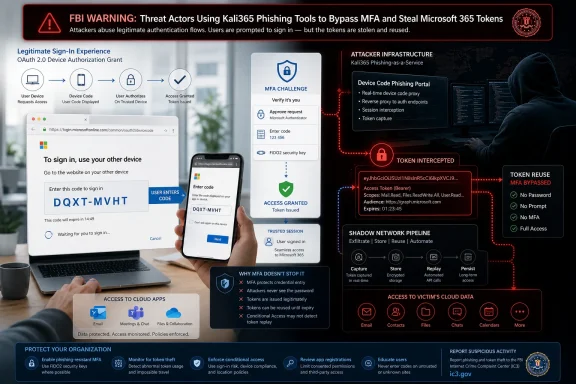 Kali365 Turns the Login Flow Into the Phishing Site
Traditional phishing asked the victim to type a password into the wrong place. The defensive answer was obvious enough: train users to inspect links, deploy MFA, block suspicious domains, and assume that a password alone should no longer be enough to open the door. Kali365 changes the geometry of the attack by sending the user to a real Microsoft authentication page.That is why this class of attack is so insidious. The user is not necessarily ignoring the usual warnings. The browser may show a Microsoft-owned domain, the sign-in prompt may look familiar, and the MFA challenge may arrive through the expected channel.
The trick sits in the device-code flow. This OAuth mechanism exists for devices that are awkward to type into, such as conference-room systems, shared devices, smart displays, and command-line or limited-input scenarios. One device starts the authentication process, another device completes it, and the token is returned to the original requester.
In a legitimate workflow, that is convenience. In Kali365’s hands, it becomes delegation fraud. The attacker initiates the flow, sends the victim the code, and convinces the victim to complete the login on Microsoft’s real infrastructure. When the victim signs in and satisfies MFA, the resulting token can be captured by the attacker’s side of the flow.
This is the crucial inversion: the victim is not giving away a password; the victim is authorizing the attacker’s session.
The Password Was Never the Prize
The security industry has spent a decade telling users and executives that passwords are the weak link. That remains true, but it is no longer the whole story. Modern Microsoft 365 compromise increasingly targets the artifacts created after authentication: access tokens, refresh tokens, OAuth grants, and rogue application permissions.That shift matters because tokens are meant to reduce friction. They are what allow Outlook to keep syncing, Teams to stay signed in, OneDrive to continue working, and mobile apps to avoid prompting the user every fifteen minutes. The token is not a bug in the system; it is how the system maintains a session.
Kali365’s power comes from treating that session as the asset. If an attacker can obtain a valid OAuth token, the account may look authenticated from the platform’s point of view. MFA has already happened. The “impossible” part of the login has already been satisfied.
This is why users can do something that feels safe and still lose control of their account. They may never type their password into a fake web form. They may approve the expected MFA prompt. They may even believe they have behaved cautiously because the sign-in page was genuine.
For administrators, that makes post-authentication monitoring much more important. The interesting signal is not merely whether MFA was present. It is whether the authentication flow made sense, whether the client or device was expected, whether a token is being used from an unusual environment, and whether account activity after login resembles the user’s actual work.
Phishing-as-a-Service Makes the Hard Part Boring
The FBI’s warning frames Kali365 as a phishing-as-a-service platform, and that phrase should not be dismissed as marketing jargon. PhaaS offerings industrialize the parts of cybercrime that used to require skill, infrastructure, and patience. They package lures, templates, dashboards, token capture, and victim tracking into something closer to a subscription product.That is the real acceleration here. A single operator who understands OAuth device-code abuse is dangerous. A platform that lets less sophisticated criminals run the same play at scale is much worse.
The reported use of Telegram for distribution fits the broader pattern of commoditized cybercrime. The barrier to entry drops, campaign volume rises, and defenders see repeated variations of the same attack across different tenants and industries. The same basic technique can be dressed up as a Teams notification, a voicemail alert, a shared document, a compliance message, or a collaboration request.
AI-generated phishing lures add another layer of nuisance. They do not need to be brilliant to be effective. They only need to be grammatically plausible, contextually familiar, and good enough to survive the few seconds a busy employee spends deciding whether a message is real.
This is why “security awareness” alone cannot carry the defensive burden. Training matters, especially around device codes, but Kali365 is built to exploit ordinary work habits. It meets users where Microsoft 365 already lives: email, chat, documents, meetings, and identity prompts.
Microsoft’s Device-Code Convenience Has Become an Enterprise Liability
Device-code authentication is not a flaw in the simplistic sense. It is a legitimate flow designed for legitimate scenarios. That is precisely why blocking it can be more complicated than telling administrators to flip a switch and move on.Some organizations use device-code flow for Teams Rooms, shared Teams devices, Android-based collaboration hardware, printers, developer tooling, and other cases where a full browser-based sign-in is inconvenient or impossible. In those environments, a blanket block may break real business processes.
But Microsoft’s own guidance has moved in the direction defenders should now assume: allow device-code flow only where it is clearly needed, and block it wherever possible. That is not a subtle recommendation. It reflects a reality that many tenants have far more authentication surface area than they actually use.
The uncomfortable administrative task is discovery. Before enforcement, security teams need to understand whether device-code flow is being used legitimately, by whom, from where, and for what application. Report-only Conditional Access policies can help expose the dependency map before administrators move to a hard block.
That is where many smaller organizations will struggle. They may not have dedicated identity engineers. They may rely on an MSP. They may have inherited years of Microsoft 365 defaults, exceptions, legacy devices, shared accounts, and undocumented workflows. Kali365 punishes that kind of drift.
MFA Still Matters, But the Slogan Has Expired
It would be a mistake to conclude that MFA is broken or useless. MFA still blocks enormous volumes of credential stuffing, password spraying, and basic phishing. The problem is the lazy slogan that MFA “stops account takeover.”It does not. It raises the cost of certain attacks. Criminals then choose different attacks.
Kali365 belongs to the same strategic family as adversary-in-the-middle phishing kits, malicious OAuth apps, session-cookie theft, and consent phishing. Each technique tries to capture the authenticated state rather than merely the secret that starts authentication. The attacker wants the proof that the user has already passed the test.
That distinction is more than academic. If an organization measures its identity security by MFA enrollment percentages alone, it will miss the post-MFA threat model. A tenant can be “100 percent MFA enabled” and still be vulnerable to token replay, rogue app consent, device-code phishing, and weak Conditional Access design.
The stronger answer is phishing-resistant authentication. Passkeys, FIDO2 security keys, Windows Hello for Business, certificate-based authentication, device compliance, and token protection all push the environment toward credentials that are harder to relay or reuse. These are not magic either, but they change the attacker’s economics in a way SMS codes and push approvals often do not.
For high-risk users, administrators, finance staff, help-desk personnel, and anyone with broad mailbox or file access, the old MFA baseline should now be treated as the floor. The more sensitive the role, the less acceptable it is to rely on authentication methods that can be socially engineered into authorizing someone else’s session.
The Inbox Is the Beachhead, Not the Endgame
The visible target in Kali365 reporting is Microsoft 365, especially Outlook, Teams, and OneDrive. That framing is accurate, but it understates the operational risk. A compromised Microsoft 365 account is rarely just an email problem.Outlook gives attackers years of business context: invoices, negotiations, HR communications, password-reset trails, customer contacts, legal correspondence, and internal politics. Teams adds live collaboration patterns, names of colleagues, project channels, and the tone of internal communication. OneDrive and SharePoint can expose documents that never would have been sent as attachments.
From there, the attack can become fraud, espionage, ransomware preparation, or lateral movement. A trusted account can send convincing internal messages. It can join conversations. It can search for finance workflows. It can look for VPN instructions, privileged-access requests, cyber-insurance documents, backups, incident-response plans, and vendor portals.
This is why token theft is so attractive. The first compromise does not need to be spectacular. It only needs to be quiet enough to give the attacker time.
Administrators should assume that the mailbox is a reconnaissance engine. If an account is compromised, remediation should not stop at password reset. Tokens must be revoked, sessions terminated, suspicious OAuth grants reviewed, mailbox rules inspected, forwarding checked, MFA methods audited, and recent sign-ins correlated with activity in Exchange, Teams, SharePoint, OneDrive, Entra, and Defender logs.
The Attack Looks Normal Because Normal Was the Weapon
One of the hardest parts of defending against device-code phishing is that many of the individual actions resemble legitimate behavior. A user signs in. MFA succeeds. Microsoft issues a token. Cloud services accept it. Logs show authentication, but not necessarily an obvious “password stolen” event.That is the genius of the attack. Kali365 does not need to counterfeit the entire Microsoft identity experience. It borrows enough of the real one to make the compromise blend in.
Security teams should therefore look for the mismatch between the user’s intent and the authentication flow. Did a finance employee suddenly use device-code authentication when they have never used it before? Did a refresh token appear in a context unrelated to any known Teams device or approved tool? Did a sign-in originate through a flow that the organization does not officially support?
The answer is not to drown analysts in alerts. The answer is to remove unnecessary flow options so the remaining signals become meaningful. If device-code authentication is blocked for most users, then attempts to use it become easier to interpret. If app consent is restricted, rogue OAuth activity becomes less routine. If privileged roles require phishing-resistant authentication, the highest-value accounts are less exposed to commodity kits.
Security is often sold as a pile of products, but Kali365 is a reminder that architecture matters more. The shape of the tenant determines whether an attack path is a common road or a locked gate.
Home Users Are Not the Main Target, But They Are Not Exempt
The FBI warning and industry reporting naturally emphasize organizations, because Microsoft 365 business tenants provide richer targets and better criminal returns. Still, individual Microsoft users should pay attention. Personal accounts, small-business tenants, freelancers, contractors, and nonprofit administrators often sit outside mature enterprise monitoring.The most practical personal rule is simple: never enter a device code unless you personally initiated the sign-in on a device in front of you. If an email, Teams message, voicemail alert, or document-sharing notice tells you to enter a code somewhere, treat that as suspicious by default.
That advice may sound blunt, but it is exactly the kind of blunt rule users need. Link inspection is messy. Sender verification can be spoofed or socially engineered. Branding can be copied. The device-code rule is cleaner: if you did not start the login, do not finish it.
Users who suspect compromise should review recent sign-ins, remove unfamiliar devices, revoke active sessions where possible, change passwords, check MFA methods, and look for suspicious inbox rules or forwarding. In a workplace, they should report the incident immediately rather than trying to quietly fix it themselves. A token-theft incident is not just a personal inconvenience; it may be an organizational foothold.
The MSP Problem Is Bigger Than One Phishing Kit
For managed service providers, Kali365 is especially uncomfortable because it attacks the identity layer shared across customers. MSPs often manage many Microsoft 365 tenants with varying levels of maturity, inconsistent Conditional Access baselines, and customers who may resist additional licensing or user friction until after an incident.That creates a dangerous asymmetry. Attackers can standardize their playbook across tenants. Defenders must negotiate exceptions, budgets, device inventories, and user habits one customer at a time.
The MSP response should be template-driven but not careless. A default policy set should include report-only assessment for device-code flow, a path to blocking it broadly, scoped exceptions for known Teams devices or approved workflows, restricted user consent to applications, admin consent review, session revocation procedures, mailbox-rule monitoring, and stronger authentication for privileged and financial roles.
The commercial conversation matters too. Customers who believe “we have MFA” means “we are covered” need a more honest explanation. MFA is still necessary, but identity security now includes controlling authentication flows, monitoring tokens, reviewing OAuth grants, and reducing the number of places where a user can be tricked into authorizing an attacker.
Kali365 gives MSPs a grim but useful teaching moment. It turns an abstract identity-security lecture into a concrete question: do you know whether your tenant allows the authentication flow this phishing kit abuses?
Microsoft’s Burden Is to Make the Secure Path the Default
Microsoft is not the villain in this story, but it is not a bystander either. When a platform becomes the default productivity and identity layer for a huge portion of the global economy, obscure authentication flows become mass-market attack surfaces. Defaults matter.Microsoft has already provided Conditional Access controls and guidance for blocking device-code flow, including accommodations for Teams device scenarios. That is useful, but the broader pattern remains familiar: a risky capability exists for compatibility and convenience, attackers abuse it at scale, and administrators are told to tune policies after the fact.
Enterprise software vendors often defend this model by pointing to legitimate use cases. They are not wrong. The problem is that attackers also love legitimate use cases because legitimate use cases are allowed through the front door.
The direction of travel should be tighter defaults, clearer tenant exposure reporting, and stronger warnings when high-risk flows are enabled broadly. If device-code authentication is rarely used by many organizations and frequently abused by attackers, tenants should not have to discover that fact from an incident report.
Microsoft’s managed Conditional Access policies are a step in that direction. But the secure default should be more than an available policy. It should be a product posture that assumes most organizations do not have unlimited identity-engineering capacity.
The Kali365 Lesson Fits in a Larger Cybercrime Shift
Kali365 is not an isolated innovation. It is part of a wider movement away from crude credential theft and toward authenticated-session theft, consent abuse, and cloud-native persistence. Attackers are following the enterprise into SaaS.That shift changes the defender’s mental model. The perimeter is no longer the office network. The endpoint is not always the decisive battlefield. The mailbox, identity provider, token service, app-consent model, and collaboration graph are now part of the attack surface.
This is why Windows administrators need to care even when the exploit is not a Windows vulnerability. Microsoft 365 identity sits underneath Windows management, endpoint security, Entra-joined devices, Intune, Defender, Teams, SharePoint, Azure resources, and a growing list of business processes. A cloud identity compromise can become an endpoint problem, a data-loss problem, a compliance problem, and a ransomware problem.
The industry’s language has not fully caught up. “Phishing” still sounds like a bad link and a stolen password. Kali365 is better understood as identity-flow hijacking packaged for the masses.
That distinction should shape budgets and priorities. Buying another awareness module will not solve a token problem. Neither will assuming that MFA enrollment is the finish line. The defensive program has to reach into policy design, application governance, sign-in telemetry, session controls, and incident response.
The Practical Reading of the FBI Warning Is Narrower Than the Panic
There is a temptation, whenever a new phishing kit gets a name, to treat it as a singular monster. That is not quite right. Kali365 matters because it packages and scales a technique that defenders already knew was dangerous.That should actually make the response more disciplined. The fix is not to chase every branded kit. The fix is to close the class of exposure.
Administrators should inventory device-code use, block it where possible, and make exceptions boring, documented, and narrow. They should reduce user consent to OAuth apps, require admin approval where appropriate, and review existing app grants for suspicious or stale access. They should treat unexpected device-code authentication as a meaningful identity event rather than background noise.
They should also rehearse token-theft response. If the first time a team revokes sessions, invalidates refresh tokens, inspects OAuth grants, and hunts mailbox rules is during an active compromise, the attacker has already won time.
The FBI’s public-service announcement is therefore less a thunderbolt than a deadline. It tells organizations that a known weak point has crossed from specialist abuse into commodity tooling.
The Concrete Moves Windows Shops Should Make This Week
The right response to Kali365 is not panic, but it is also not another all-hands reminder to “be careful with email.” The attack abuses a specific Microsoft 365 authentication path, and that means defenders have specific levers to pull.- Organizations should audit device-code authentication in Entra sign-in logs before assuming that blocking it will not affect production workflows.
- Administrators should move toward blocking device-code flow by default, using narrow and documented exceptions for approved devices or tools that genuinely require it.
- Security teams should train users never to enter a device code unless they personally initiated the sign-in on a device they are actively setting up.
- Tenants should restrict OAuth app consent, review existing grants, and investigate unfamiliar applications with access to mail, files, calendars, or Teams data.
- Incident-response playbooks should include revoking sessions and tokens, removing rogue OAuth grants, checking mailbox rules and forwarding, and reviewing recent account activity across Microsoft 365 services.
- High-risk users should be moved toward phishing-resistant authentication rather than treated as fully protected by conventional MFA alone.
References
- Primary source: Memeburn
Published: Mon, 01 Jun 2026 09:14:15 GMT
Loading…
memeburn.com - Related coverage: techradar.com

FBI warns of Kali phishing scam hitting Microsoft OAuth tokens
A new phishing kit is being offered on Telegram allowing even newbie hackers an easy way to grab OAuth tokens.www.techradar.com
- Related coverage: itpro.com

FBI warns Microsoft 365 users about another phishing as a service attack – here's how to avoid it
Kali365 platform is serious enough to garner a warning from the FBI www.itpro.com
- Related coverage: ahmandonk.com
Loading…
ahmandonk.com - Related coverage: ebisuda.net
Loading…
www.ebisuda.net - Related coverage: windowsreport.com
Loading…
windowsreport.com
- Related coverage: orbitindonesia.com
Loading…
orbitindonesia.com - Related coverage: teufelswerk.net

FBI warnt vor „Kali365“: Neue Phishing-Plattform umgeht Multi-Faktor-Authentifizierung in Microsoft 365
Das Federal Bureau of Investigation (FBI) hat am 21. Mai 2026 eine öffentliche Sicherheitswarnung zu einer neuen „Phishing-as-a-Service“-Plattform namens teufelswerk.net
- Related coverage: gblock.app
Loading…
www.gblock.app - Related coverage: thecybersignal.com

FBI Warns of Kali365 Phishing Kit Stealing Microsoft 365 Tokens
The FBI's IC3 warned of Kali365, a Telegram-sold phishing kit that runs device-code phishing to steal Microsoft 365 OAuth tokens after victims pass MFA. www.thecybersignal.com
- Related coverage: techgenyz.com
Loading…
techgenyz.com - Related coverage: huntress.com
Loading…
www.huntress.com - Related coverage: bleepingcomputer.com
Loading…
www.bleepingcomputer.com - Official source: learn.microsoft.com
Loading…
learn.microsoft.com - Related coverage: axios.com
Loading…
www.axios.com