

On May 21, 2026, the FBI warned that Kali365, a phishing-as-a-service platform promoted through Telegram, is being used to hijack Microsoft 365 accounts by abusing Microsoft’s legitimate device-code sign-in flow and capturing OAuth tokens instead of passwords. That distinction matters because it moves the attack away from the old ritual of fake login pages and stolen credentials. The user may visit a real Microsoft page, complete real authentication, and still hand the attacker access. For Windows users and Microsoft 365 administrators, the uncomfortable lesson is that MFA is not a magic shield when the attacker convinces the victim to authorize the wrong session.
Kali365 is not interesting because it invents a new cryptographic break. It is interesting because it packages a known weakness in human workflow into something less technical criminals can rent, run, and scale. The phishing kit reportedly offers AI-generated lures, campaign automation, tracking dashboards, and token-capture features aimed at Microsoft 365 environments. That is the modern phishing economy in miniature: fewer artisanal scams, more subscription software for criminals.
The scam’s genius is also its tell. A Microsoft device code should appear only when you are deliberately signing in to a device or app that needs that flow. If a code arrives through an email, Teams message, shared-document notice, invoice alert, or voicemail lure, the safest assumption is that someone else started the login and wants you to finish it for them.
For years, security awareness training has taught users to look for fake login pages, misspelled domains, suspicious certificate warnings, and password prompts that feel out of place. That advice still has value, but Kali365 belongs to a more dangerous generation of attacks because it does not need the victim to type a password into a counterfeit Microsoft page. It can send the victim to a legitimate Microsoft verification page and let Microsoft do the reassuring.
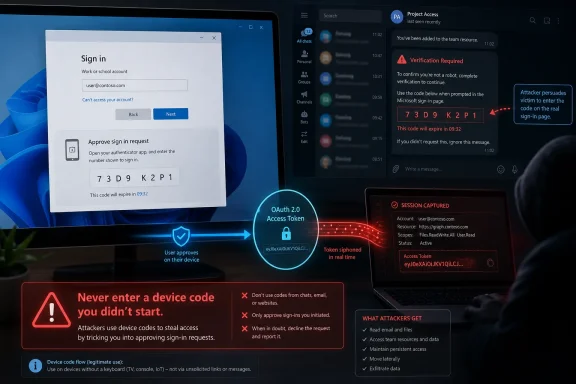
The abused mechanism is OAuth device-code authentication. It exists for sensible reasons: some devices have poor keyboards, limited browsers, or awkward input systems. A smart TV, printer, meeting-room device, or command-line tool may show a short code, then ask the user to complete sign-in on a separate device with a normal browser. Once the user signs in and approves the code, the original device receives tokens that allow access.
In the malicious version, the “original device” belongs to the attacker. The victim receives a lure that says a document, voicemail, invoice, or collaboration request requires verification. The message includes a code and directs the victim to Microsoft’s real device-login page. The victim enters the code, completes the expected Microsoft prompts, and unknowingly authorizes the attacker’s session.
That is why calling this simply an “MFA bypass” can be misleading. MFA is not necessarily defeated by technical evasion; it is satisfied in the wrong context. The user performs the authentication ceremony correctly, but the ceremony binds their account to a session they did not intend to approve.
This distinction should change how organizations talk about phishing. A user can do many of the “right” things — check the domain, use a password manager, complete MFA only on a Microsoft page — and still lose if the decision they are making is not “should I log in?” but “whose login am I approving?”
Kali365 reportedly emerged in April 2026 and spread primarily through Telegram channels. That detail matters because Telegram has become a marketplace, support desk, and advertising venue for many lower-tier cybercrime services. A kit that used to require a capable operator can now be pitched like a SaaS product: pay, configure, launch.
The most important feature is not the AI-generated phishing copy, even if that is the flashiest part. The real value is automation around OAuth token capture. Tokens are the useful output of a successful device-code phish because they can allow access to Microsoft 365 services without the attacker ever learning the victim’s password.
Access tokens and refresh tokens are not exotic to Microsoft 365. They are part of the machinery that lets Outlook, Teams, OneDrive, Office apps, mobile clients, and web sessions avoid asking for a password every few minutes. In normal use, they reduce friction. In an attacker’s hands, they can provide a foothold that persists until the session is revoked, the token expires, policy blocks the flow, or defenders intervene.
That is the core of the FBI’s concern. Kali365 lowers the skill floor for a class of attack that already works well against organizations that rely on MFA but have not tightened the authentication flows around it. The scam does not need to break into Microsoft. It needs to borrow Microsoft’s own login ceremony and persuade the user to complete it.
That is what makes device-code phishing so hard to explain in a thirty-second awareness slide. The red flag is not necessarily the page. The red flag is the context in which the user was asked to visit it. If the user did not initiate a sign-in to a device, app, meeting-room system, or command-line tool, the presence of a code is itself suspicious.
This matters for password managers as well. A password manager can help prevent credential theft by refusing to autofill on fake domains. But in a device-code attack, the user may authenticate at a Microsoft-owned domain, so domain matching does not save them. The problem is not that the user gave a password to the wrong site; the problem is that the user gave approval to the wrong device.
MFA fatigue attacks taught users to treat unexpected push prompts as dangerous. Device-code phishing requires the same mental model. A code is not harmless just because it is short, temporary, and entered on a trusted page. It is a request to bind authentication to a session somewhere else.
The old advice was “never type your password into a page you did not expect.” The new advice has to be sharper: never complete an authentication flow you did not start.
That is why this style of compromise is especially dangerous for small and mid-sized businesses. A single account can expose enough context for invoice fraud, payroll diversion, vendor impersonation, or internal phishing. The attacker does not need to sound like a stranger when they can read how the victim writes, who they talk to, and which projects are underway.
Large enterprises at least tend to have security operations teams, telemetry pipelines, and conditional access expertise, although they are not immune. Smaller organizations often run Microsoft 365 with a handful of administrators, default policies, and a belief that “we turned on MFA” means the identity problem is mostly solved. Kali365 attacks the gap between that belief and the actual configuration.
The scam also punishes organizations that train users only on password theft. Employees may know not to enter a password after clicking a suspicious invoice link. Fewer have been told that entering a device code on a real Microsoft page can authorize an attacker’s session. Attackers prefer these blind spots because they do not require brute force; they require surprise.
For IT administrators, the incident response concern is not just whether the password was changed. If OAuth tokens were issued, the defensive question becomes whether sessions and refresh tokens were revoked, whether suspicious applications or devices were authorized, whether inbox rules were added, and whether the attacker used the access to pivot elsewhere.
Modern identity attacks increasingly target the session after authentication, the prompt before authentication, or the authorization grant around authentication. Adversary-in-the-middle phishing kits steal session cookies. Consent phishing abuses app permissions. Device-code phishing tricks users into approving tokens for attacker-controlled sessions. All of these attacks treat the password as less important than the access it unlocks.
That is why administrators need to think in terms of authentication flows, token lifetime, sign-in risk, device compliance, session revocation, and least privilege. Microsoft Entra Conditional Access is not just an upsell box in the admin center; for many tenants, it is where the difference between “MFA enabled” and “identity hardened” begins.
Microsoft’s own documentation has increasingly treated device-code flow as high risk. The company recommends allowing it only where necessary and blocking it wherever possible. That is not because the flow is inherently malicious, but because the legitimate use cases are narrower than the attack surface it creates.
The policy question is therefore straightforward: does your tenant actually need device-code flow for ordinary users? If the answer is no, leaving it broadly available is a bet that every user will correctly identify every malicious code request. That is not a bet most administrators should want to make.
The important word is “close.” Some organizations really do use device-code flow for legitimate purposes. Teams Rooms, shared Teams devices, conference-room hardware, Android-based meeting devices, developer tools, and some legacy workflows may rely on it. A careless block can create help desk noise or lock out a business process that was invisible until it broke.
That is why Microsoft recommends report-only testing and sign-in log review before enforcement. Administrators should inventory current device-code usage, identify legitimate dependencies, and scope exceptions as narrowly as possible. The exception should not become a shadow default for half the company.
Emergency access accounts require special care. Break-glass accounts are meant to survive policy mistakes, and excluding them from certain Conditional Access policies can prevent self-inflicted lockouts. But those accounts must be protected, monitored, and reviewed because any exclusion also creates a security responsibility.
Authentication transfer deserves attention as well. Microsoft describes it as a way to transfer authenticated state between devices, such as scanning a QR code in a desktop app to move sign-in state to mobile. The FBI’s guidance to block authentication transfer policies fits the same broader theme: reduce cross-device authentication shortcuts unless the organization has a clear reason to allow them.
Users should be suspicious of any message that connects a device code to a file, voicemail, invoice, shared document, Teams notice, or account verification demand. Urgency is another giveaway. A document that expires soon, a voicemail that must be reviewed immediately, or an account that will be locked unless verified is often just the emotional wrapper around a technical trap.
If someone has already entered a code, speed matters. The immediate response should include signing out of all sessions, revoking suspicious app access, changing the password, reviewing recovery information, checking forwarding and inbox rules, and inspecting recent sign-ins. In a work account, the user should notify IT immediately rather than quietly hoping nothing happened.
Administrators should assume that an entered code may have produced valid tokens. That changes the response from a password reset to a session and token cleanup. It also means looking at mailbox rules, OAuth grants, recent file access, Teams activity, and any signs of lateral phishing from the compromised account.
The human habit remains the first line of defense because device-code phishing is ultimately a social engineering attack. But relying only on habits is not enough. The right endpoint for user training is a tenant policy that makes the dangerous path unavailable to most people most of the time.
But device-code phishing is not primarily solved by installing another consumer security product. The central failure path runs through identity configuration, user context, and token issuance. If the victim is directed to a real Microsoft page, a traditional “bad website” model is already on uncomfortable ground.
That does not mean endpoint protection is useless. Malware, malicious attachments, credential theft, browser abuse, and known phishing infrastructure remain daily threats. But administrators should resist turning Kali365 into a shopping list when the highest-leverage mitigation may be sitting in Entra Conditional Access.
The industry has a habit of treating every new phishing kit as proof that users need more products. Sometimes they need less permissive defaults. If device-code flow is rarely used in a tenant and frequently abused by attackers, the rational move is to block or tightly restrict it, not to hope a browser plug-in recognizes every lure.
For WindowsForum readers, that distinction is important. Enthusiasts and sysadmins are often the people relatives, clients, and coworkers call after a compromise. The most useful answer is not “buy this.” It is “here is the setting to audit, here is the flow to block, and here is the behavior users need to recognize.”
The company has already moved in the right direction by giving Conditional Access more control over authentication flows and by recommending that device-code flow be blocked wherever possible. Microsoft-managed Conditional Access policies that block risky flows can help tenants that otherwise would never discover the setting. More opinionated defaults are often what separate a secure feature from a secure deployment.
Still, Microsoft faces the same tension that defines modern enterprise software: compatibility keeps old workflows alive, while attackers exploit the long tail of what remains enabled. A meeting-room device, a printer, a developer CLI, and a phishing kit may all lean on the same broad mechanism. The administrator is left to sort legitimate convenience from unacceptable exposure.
There is also a user-interface problem. Authentication prompts need to explain not only that a sign-in is happening, but what device, app, location, and session will receive access. Number matching improved push MFA by forcing users to notice context. Device-code flows need the same kind of anti-confusion design pressure.
Microsoft’s Digital Crimes Unit actions against phishing-as-a-service operations show that the company understands the ecosystem problem. Disrupting criminal infrastructure matters. But infrastructure takedowns are episodic, while authentication design is daily. The best long-term defense is making the scam less reliable before law enforcement ever names the next kit.
The next campaign may have a different name, a different Telegram pitch, or a more polished lure. It may target device codes, OAuth grants, QR-based authentication transfer, session cookies, or some other convenience feature that was designed for legitimate users and discovered by criminals. The pattern will be the same: make the user complete a real-looking security step in the wrong context.
For Microsoft users, the rule is simple enough to teach at home and at work: never enter a device code unless you initiated the sign-in. For administrators, the answer is more structural: audit the flow, block it where you can, monitor it where you cannot, and treat tokens as the new crown jewels. MFA remains essential, but Kali365 is a reminder that the future of account security will be decided less by whether users have a second factor and more by whether attackers can trick them into using it for someone else.
Kali365 is not interesting because it invents a new cryptographic break. It is interesting because it packages a known weakness in human workflow into something less technical criminals can rent, run, and scale. The phishing kit reportedly offers AI-generated lures, campaign automation, tracking dashboards, and token-capture features aimed at Microsoft 365 environments. That is the modern phishing economy in miniature: fewer artisanal scams, more subscription software for criminals.
The scam’s genius is also its tell. A Microsoft device code should appear only when you are deliberately signing in to a device or app that needs that flow. If a code arrives through an email, Teams message, shared-document notice, invoice alert, or voicemail lure, the safest assumption is that someone else started the login and wants you to finish it for them.
 The Password Was Never the Prize
For years, security awareness training has taught users to look for fake login pages, misspelled domains, suspicious certificate warnings, and password prompts that feel out of place. That advice still has value, but Kali365 belongs to a more dangerous generation of attacks because it does not need the victim to type a password into a counterfeit Microsoft page. It can send the victim to a legitimate Microsoft verification page and let Microsoft do the reassuring.The abused mechanism is OAuth device-code authentication. It exists for sensible reasons: some devices have poor keyboards, limited browsers, or awkward input systems. A smart TV, printer, meeting-room device, or command-line tool may show a short code, then ask the user to complete sign-in on a separate device with a normal browser. Once the user signs in and approves the code, the original device receives tokens that allow access.
In the malicious version, the “original device” belongs to the attacker. The victim receives a lure that says a document, voicemail, invoice, or collaboration request requires verification. The message includes a code and directs the victim to Microsoft’s real device-login page. The victim enters the code, completes the expected Microsoft prompts, and unknowingly authorizes the attacker’s session.
That is why calling this simply an “MFA bypass” can be misleading. MFA is not necessarily defeated by technical evasion; it is satisfied in the wrong context. The user performs the authentication ceremony correctly, but the ceremony binds their account to a session they did not intend to approve.
This distinction should change how organizations talk about phishing. A user can do many of the “right” things — check the domain, use a password manager, complete MFA only on a Microsoft page — and still lose if the decision they are making is not “should I log in?” but “whose login am I approving?”
Kali365 Turns a Niche Abuse Case Into a Service Business
The FBI’s warning places Kali365 in the increasingly crowded category of phishing-as-a-service, or PhaaS. That label can sound like vendor jargon, but it captures a real shift in criminal operations. Attackers no longer need to build every component of a campaign themselves; they can subscribe to tooling that handles lures, templates, infrastructure, dashboards, and credential or token collection.Kali365 reportedly emerged in April 2026 and spread primarily through Telegram channels. That detail matters because Telegram has become a marketplace, support desk, and advertising venue for many lower-tier cybercrime services. A kit that used to require a capable operator can now be pitched like a SaaS product: pay, configure, launch.
The most important feature is not the AI-generated phishing copy, even if that is the flashiest part. The real value is automation around OAuth token capture. Tokens are the useful output of a successful device-code phish because they can allow access to Microsoft 365 services without the attacker ever learning the victim’s password.
Access tokens and refresh tokens are not exotic to Microsoft 365. They are part of the machinery that lets Outlook, Teams, OneDrive, Office apps, mobile clients, and web sessions avoid asking for a password every few minutes. In normal use, they reduce friction. In an attacker’s hands, they can provide a foothold that persists until the session is revoked, the token expires, policy blocks the flow, or defenders intervene.
That is the core of the FBI’s concern. Kali365 lowers the skill floor for a class of attack that already works well against organizations that rely on MFA but have not tightened the authentication flows around it. The scam does not need to break into Microsoft. It needs to borrow Microsoft’s own login ceremony and persuade the user to complete it.
The Real Microsoft Page Is the Trap
Most people have been trained to distrust weird links. Kali365 exploits the more complicated truth that a legitimate link can participate in an illegitimate workflow. The Microsoft page may be real, the browser padlock may be real, the login prompt may be real, and the resulting compromise may still be real.That is what makes device-code phishing so hard to explain in a thirty-second awareness slide. The red flag is not necessarily the page. The red flag is the context in which the user was asked to visit it. If the user did not initiate a sign-in to a device, app, meeting-room system, or command-line tool, the presence of a code is itself suspicious.
This matters for password managers as well. A password manager can help prevent credential theft by refusing to autofill on fake domains. But in a device-code attack, the user may authenticate at a Microsoft-owned domain, so domain matching does not save them. The problem is not that the user gave a password to the wrong site; the problem is that the user gave approval to the wrong device.
MFA fatigue attacks taught users to treat unexpected push prompts as dangerous. Device-code phishing requires the same mental model. A code is not harmless just because it is short, temporary, and entered on a trusted page. It is a request to bind authentication to a session somewhere else.
The old advice was “never type your password into a page you did not expect.” The new advice has to be sharper: never complete an authentication flow you did not start.
Microsoft 365 Is the Perfect Target Because It Is the Office
A compromised Microsoft 365 account is rarely just an inbox. It is identity, communications, file storage, calendar, chat history, collaboration context, and often the launchpad into other business systems. Outlook gives attackers conversation history and a trusted sending address. Teams gives them internal relationships and real-time collaboration. OneDrive and SharePoint give them documents, invoices, contracts, HR files, and technical artifacts.That is why this style of compromise is especially dangerous for small and mid-sized businesses. A single account can expose enough context for invoice fraud, payroll diversion, vendor impersonation, or internal phishing. The attacker does not need to sound like a stranger when they can read how the victim writes, who they talk to, and which projects are underway.
Large enterprises at least tend to have security operations teams, telemetry pipelines, and conditional access expertise, although they are not immune. Smaller organizations often run Microsoft 365 with a handful of administrators, default policies, and a belief that “we turned on MFA” means the identity problem is mostly solved. Kali365 attacks the gap between that belief and the actual configuration.
The scam also punishes organizations that train users only on password theft. Employees may know not to enter a password after clicking a suspicious invoice link. Fewer have been told that entering a device code on a real Microsoft page can authorize an attacker’s session. Attackers prefer these blind spots because they do not require brute force; they require surprise.
For IT administrators, the incident response concern is not just whether the password was changed. If OAuth tokens were issued, the defensive question becomes whether sessions and refresh tokens were revoked, whether suspicious applications or devices were authorized, whether inbox rules were added, and whether the attacker used the access to pivot elsewhere.
MFA Still Matters, But It Is Not the Whole Control Plane
The wrong lesson from Kali365 would be to conclude that MFA is broken and therefore optional. MFA still blocks enormous volumes of password-spray, credential-stuffing, and basic phishing attacks. The better lesson is that MFA is a control, not a strategy.Modern identity attacks increasingly target the session after authentication, the prompt before authentication, or the authorization grant around authentication. Adversary-in-the-middle phishing kits steal session cookies. Consent phishing abuses app permissions. Device-code phishing tricks users into approving tokens for attacker-controlled sessions. All of these attacks treat the password as less important than the access it unlocks.
That is why administrators need to think in terms of authentication flows, token lifetime, sign-in risk, device compliance, session revocation, and least privilege. Microsoft Entra Conditional Access is not just an upsell box in the admin center; for many tenants, it is where the difference between “MFA enabled” and “identity hardened” begins.
Microsoft’s own documentation has increasingly treated device-code flow as high risk. The company recommends allowing it only where necessary and blocking it wherever possible. That is not because the flow is inherently malicious, but because the legitimate use cases are narrower than the attack surface it creates.
The policy question is therefore straightforward: does your tenant actually need device-code flow for ordinary users? If the answer is no, leaving it broadly available is a bet that every user will correctly identify every malicious code request. That is not a bet most administrators should want to make.
Conditional Access Is Where the Warning Becomes Action
The FBI’s most practical recommendation is also the one many users will never see: restrict device-code flow. In Microsoft Entra ID, administrators can create Conditional Access policies that target authentication flows and block device-code authentication for users, groups, or resources. For tenants that do not need the flow, the desired end state is close to a unilateral block.The important word is “close.” Some organizations really do use device-code flow for legitimate purposes. Teams Rooms, shared Teams devices, conference-room hardware, Android-based meeting devices, developer tools, and some legacy workflows may rely on it. A careless block can create help desk noise or lock out a business process that was invisible until it broke.
That is why Microsoft recommends report-only testing and sign-in log review before enforcement. Administrators should inventory current device-code usage, identify legitimate dependencies, and scope exceptions as narrowly as possible. The exception should not become a shadow default for half the company.
Emergency access accounts require special care. Break-glass accounts are meant to survive policy mistakes, and excluding them from certain Conditional Access policies can prevent self-inflicted lockouts. But those accounts must be protected, monitored, and reviewed because any exclusion also creates a security responsibility.
Authentication transfer deserves attention as well. Microsoft describes it as a way to transfer authenticated state between devices, such as scanning a QR code in a desktop app to move sign-in state to mobile. The FBI’s guidance to block authentication transfer policies fits the same broader theme: reduce cross-device authentication shortcuts unless the organization has a clear reason to allow them.
The User-Level Defense Is Boring, Which Is Why It Works
For individual Microsoft account holders and unmanaged small businesses, the strongest advice is almost embarrassingly simple: do not enter a Microsoft device code unless you personally started the sign-in. That rule is easy to remember and hard for this scam to defeat. The attacker’s whole workflow depends on making an unsolicited code feel routine.Users should be suspicious of any message that connects a device code to a file, voicemail, invoice, shared document, Teams notice, or account verification demand. Urgency is another giveaway. A document that expires soon, a voicemail that must be reviewed immediately, or an account that will be locked unless verified is often just the emotional wrapper around a technical trap.
If someone has already entered a code, speed matters. The immediate response should include signing out of all sessions, revoking suspicious app access, changing the password, reviewing recovery information, checking forwarding and inbox rules, and inspecting recent sign-ins. In a work account, the user should notify IT immediately rather than quietly hoping nothing happened.
Administrators should assume that an entered code may have produced valid tokens. That changes the response from a password reset to a session and token cleanup. It also means looking at mailbox rules, OAuth grants, recent file access, Teams activity, and any signs of lateral phishing from the compromised account.
The human habit remains the first line of defense because device-code phishing is ultimately a social engineering attack. But relying only on habits is not enough. The right endpoint for user training is a tenant policy that makes the dangerous path unavailable to most people most of the time.
The Security Industry Keeps Selling Add-Ons While the Control Is in the Tenant
The CyberGuy version of the warning wraps the core advice in a familiar consumer-security bundle: antivirus, data removal services, exposure scans, and affiliate offers. Some of those tools may have value in specific contexts. Phishing protection can block malicious pages, and reducing public personal data can make scams less tailored.But device-code phishing is not primarily solved by installing another consumer security product. The central failure path runs through identity configuration, user context, and token issuance. If the victim is directed to a real Microsoft page, a traditional “bad website” model is already on uncomfortable ground.
That does not mean endpoint protection is useless. Malware, malicious attachments, credential theft, browser abuse, and known phishing infrastructure remain daily threats. But administrators should resist turning Kali365 into a shopping list when the highest-leverage mitigation may be sitting in Entra Conditional Access.
The industry has a habit of treating every new phishing kit as proof that users need more products. Sometimes they need less permissive defaults. If device-code flow is rarely used in a tenant and frequently abused by attackers, the rational move is to block or tightly restrict it, not to hope a browser plug-in recognizes every lure.
For WindowsForum readers, that distinction is important. Enthusiasts and sysadmins are often the people relatives, clients, and coworkers call after a compromise. The most useful answer is not “buy this.” It is “here is the setting to audit, here is the flow to block, and here is the behavior users need to recognize.”
Microsoft’s Burden Is Bigger Than Publishing Guidance
Microsoft is not a passive bystander here. Device-code flow is a legitimate OAuth mechanism, and many Microsoft services depend on identity flows that balance usability and security. But when a legitimate flow becomes a repeat criminal favorite, documentation and admin controls are only part of the answer.The company has already moved in the right direction by giving Conditional Access more control over authentication flows and by recommending that device-code flow be blocked wherever possible. Microsoft-managed Conditional Access policies that block risky flows can help tenants that otherwise would never discover the setting. More opinionated defaults are often what separate a secure feature from a secure deployment.
Still, Microsoft faces the same tension that defines modern enterprise software: compatibility keeps old workflows alive, while attackers exploit the long tail of what remains enabled. A meeting-room device, a printer, a developer CLI, and a phishing kit may all lean on the same broad mechanism. The administrator is left to sort legitimate convenience from unacceptable exposure.
There is also a user-interface problem. Authentication prompts need to explain not only that a sign-in is happening, but what device, app, location, and session will receive access. Number matching improved push MFA by forcing users to notice context. Device-code flows need the same kind of anti-confusion design pressure.
Microsoft’s Digital Crimes Unit actions against phishing-as-a-service operations show that the company understands the ecosystem problem. Disrupting criminal infrastructure matters. But infrastructure takedowns are episodic, while authentication design is daily. The best long-term defense is making the scam less reliable before law enforcement ever names the next kit.
The Admin Checklist Hidden Inside the FBI Warning
The practical response to Kali365 is not panic; it is narrowing the gap between what users think MFA does and what the tenant actually enforces. A short review of device-code exposure will tell many organizations whether they are carrying unnecessary risk.- Organizations should audit Microsoft Entra sign-in logs for device-code flow usage before deciding which accounts or workflows truly need exceptions.
- Tenants that do not require device-code flow should block it with Conditional Access rather than relying on users to reject every unexpected code.
- Any legitimate device-code exceptions should be documented, scoped to specific accounts or device scenarios, and reviewed regularly.
- Security training should explicitly tell users that a real Microsoft verification page can still be part of a scam if the device code was unsolicited.
- Incident response playbooks should treat accidental device-code approval as a token and session compromise, not merely a password event.
- Small businesses using Microsoft 365 should verify who can manage Conditional Access and emergency access accounts before a crisis forces the issue.
The Next Phish Will Look Even More Legitimate
Kali365 is a useful warning precisely because it is not a freak event. It is part of a broader movement toward attacks that abuse legitimate identity workflows, cloud trust, and user consent rather than crude password theft. As Microsoft 365 becomes the operating layer for office life, attackers will keep aiming at the seams between security prompts and human assumptions.The next campaign may have a different name, a different Telegram pitch, or a more polished lure. It may target device codes, OAuth grants, QR-based authentication transfer, session cookies, or some other convenience feature that was designed for legitimate users and discovered by criminals. The pattern will be the same: make the user complete a real-looking security step in the wrong context.
For Microsoft users, the rule is simple enough to teach at home and at work: never enter a device code unless you initiated the sign-in. For administrators, the answer is more structural: audit the flow, block it where you can, monitor it where you cannot, and treat tokens as the new crown jewels. MFA remains essential, but Kali365 is a reminder that the future of account security will be decided less by whether users have a second factor and more by whether attackers can trick them into using it for someone else.
References
- Primary source: Kurt the CyberGuy
Published: 2026-06-30T16:12:12.027631
Loading…
cyberguy.com - Official source: learn.microsoft.com
Authentication flows as a condition in Conditional Access policy - Microsoft Entra ID | Microsoft Learn
Learn how authentication flows provide a seamless experience across all application and device typeslearn.microsoft.com - Official source: microsoft.com
Inside an AI‑enabled device code phishing campaign | Microsoft Security Blog
A new wave of device code phishing shows how threat actors are scaling account compromise using AI and end‑to‑end automation. This campaign goes beyond traditional phishing by generating live authentication codes on demand, enabling higher success rates and sustained post‑compromise access.www.microsoft.com - Related coverage: cybersecuritydive.com
FBI warns about PhaaS platform used to access Microsoft 365 environments | Cybersecurity Dive
Device code phishing enabled hackers to bypass multifactor authentication without credentials.www.cybersecuritydive.com
- Related coverage: purpleshieldsecurity.com
FBI Warns of Kali365 Phishing Kit Hijacking Microsoft 365
The FBI warns Kali365, a phishing-as-a-service kit, hijacks Microsoft 365 tokens and bypasses MFA. What it means for your business and how to respond. www.purpleshieldsecurity.com
- Related coverage: overe.io
Kali365 Device Code Phishing Attacks Target Microsoft 365 OAuth Authentication | Microsoft 365 Threat Advisory | Overe
The FBI and Microsoft are warning about Kali365 device code phishing attacks targeting Microsoft 365 tenants through OAuth token theft and Device Code Flow abuse. Learn how to reduce exposure using Conditional Access controls and authentication hardening. www.overe.io
- Related coverage: techradar.com
FBI warns of Kali phishing scam hitting Microsoft OAuth tokens — warns 'Kali365 lowers the barrier of entry, providing less-technical attackers access to AI-generated phishing lures' | TechRadar
A new phishing kit is being offered on Telegramwww.techradar.com - Related coverage: windowsreport.com
FBI Warns Kali365 Can Bypass Microsoft 365 MFA Using OAuth Tokens
The FBI warns that Kali365 phishing attacks can bypass Microsoft 365 MFA by stealing OAuth session tokens through device code phishing. windowsreport.com
- Related coverage: safebrowz.com
FBI Kali365 Warning 2026: Why OAuth Device-Code Phishing Slips Past MFA | SafeBrowz
The FBI's May 2026 PSA260521 advisory on Kali365 phishing-as-a-service is a watershed moment for Microsoft 365 security. SafeBrowz unpacks the OAuth device-code flow abuse, why MFA does not stop it, and how our 3-layer detection engine catches the landing pages.safebrowz.com - Related coverage: giganectar.com
FBI warns Kali365 steals Microsoft 365 OAuth tokens and bypasses MFA for as little as $250 a month - GigaNectar
Kali365 hijacks Microsoft 365 accounts via OAuth token theft — no password needed, MFA bypassed. The FBI warned six industries were hit in April alone. Here's what to do now.giganectar.com - Related coverage: gblock.app
FBI Warns: Kali365 PhaaS Bypasses Microsoft 365 MFA Via Device Code
The FBI just warned that Kali365 is the first Microsoft 365 phishing service that bypasses MFA without ever asking for a password—victims complete the real Microsoft login flow themselves and hand over OAuth tokens that survive every additional check. www.gblock.app
- Related coverage: kiplinger.com
New Scam Targets Microsoft Users, FBI Warns. Here's How to Protect Yourself | Kiplinger
This phishing scam doesn't rely on a fake website. Instead, it tricks users into approving access themselves.www.kiplinger.com