

The KAMRUI Mini PC E3B 11 Pro just reappeared on the market as a standout budget mini‑PC option for productive desktops, offering an uncommon combination of an AMD Ryzen Embedded V2748 8‑core processor, 16GB of DDR4, a 512GB M.2 SSD and triple 4K display support — all while undercutting many compact tower builds during a period of volatile memory pricing.
Mini‑PCs have graduated from simple thin‑client appliances to genuinely useful workhorses for everyday productivity, light content creation and desktop consolidation. The industry shift toward smaller form factors is timely: DRAM and NAND market pressures have made discrete tower builds more expensive and sometimes slower to assemble, pushing buyers toward factory‑built mini systems that offer decent memory and storage at competitive bundled pricing. Recent reporting has flagged sizable memory price swings that have increased component costs across desktops and laptops, leaving many buyers to reassess the value proposition of compact, preconfigured systems.
KAMRUI’s E3B lineup — and specifically the E3B 11 Pro configuration — targets that opening: a compact chassis with internal expandability, Windows 11 Pro preinstalled, and a family of AMD CPU options including the embedded V2748 SKU that balances multicore throughput with low platform power. The current promotional price reported across coverage cut the asking price to roughly $339, a substantial markdown from earlier MSRPs and an aggressive positioning against similarly specced compact PCs.
However, the risks are equally tangible. KAMRUI’s direct‑to‑consumer model produces great prices but can carry uneven support and variable real‑world reliability reports in community forums. The compact chassis and embedded CPU topology mean sustained heavy compute loads will be thermally constrained. And, as with any bargain hardware, procurement channel and warranty confirmation are non‑negotiable steps before purchase.
If you want a space‑efficient desktop that will reliably handle office suites, web apps, simultaneous video calls and light content work — and you prefer to avoid the immediate ramp cost of sourcing RAM at current volatile market prices — the E3B 11 Pro is worth serious consideration. If your work demands heavy, sustained compute or enterprise‑grade support, evaluate higher‑tier mini‑PCs or small form‑factor desktops from mainstream OEMs instead.
The KAMRUI Mini PC E3B 11 Pro is an attractive, pragmatic choice for anyone prioritizing a small footprint, multiple high‑resolution displays and immediate out‑of‑box productivity at a sharply reduced price. As always with value‑priced import mini‑PCs, buy carefully: confirm the exact configuration, verify the seller and plan a routine post‑purchase test and firmware check. If you follow those steps, this model delivers a remarkably capable workspace replacement for many modern office users.
Source: Windows Central This Mini-PC is great for productivity while costing less than PC towers
 Background / Overview
Mini‑PCs have graduated from simple thin‑client appliances to genuinely useful workhorses for everyday productivity, light content creation and desktop consolidation. The industry shift toward smaller form factors is timely: DRAM and NAND market pressures have made discrete tower builds more expensive and sometimes slower to assemble, pushing buyers toward factory‑built mini systems that offer decent memory and storage at competitive bundled pricing. Recent reporting has flagged sizable memory price swings that have increased component costs across desktops and laptops, leaving many buyers to reassess the value proposition of compact, preconfigured systems.KAMRUI’s E3B lineup — and specifically the E3B 11 Pro configuration — targets that opening: a compact chassis with internal expandability, Windows 11 Pro preinstalled, and a family of AMD CPU options including the embedded V2748 SKU that balances multicore throughput with low platform power. The current promotional price reported across coverage cut the asking price to roughly $339, a substantial markdown from earlier MSRPs and an aggressive positioning against similarly specced compact PCs.
What the KAMRUI E3B 11 Pro actually ships with
Core specifications at a glance
- CPU: AMD Ryzen Embedded V2748 — 8 cores / 16 threads, base ~2.9 GHz, boost up to ~4.25–4.3 GHz, 35 W TDP (configurable).
- Memory: 16GB DDR4 (factory‑installed, dual SO‑DIMM slots supported, up to 64GB with compatible modules; specified as DDR4‑3200 on some SKUs).
- Storage: 512GB M.2 SSD (one NVMe‑capable slot plus an additional M.2 slot on many E3B boards; storage capacity expandability is supported).
- Graphics: Radeon Vega integrated graphics (V2748 pairs with Vega 7 execution units, GPU clocks up to ~1.6 GHz).
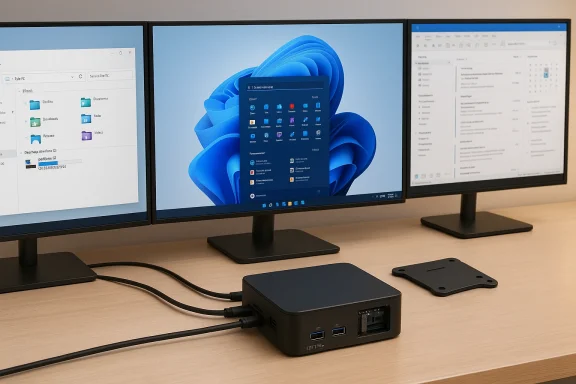
- Video outputs: HDMI 2.0, DisplayPort 1.4b, and a full‑featured USB‑C (DP alt‑mode) — the box supports up to three simultaneous 4K@60Hz displays.
- Networking: Wi‑Fi 6 + Bluetooth 5.2 and a Gigabit Ethernet port.
- OS: Windows 11 Pro preinstalled on retail units.
How the Ryzen Embedded V2748 performs in productivity workloads
CPU architecture and expectations
The V2748 is a member of AMD’s Ryzen Embedded V2000 family built on Zen 2 “Renoir” silicon. With 8 cores and SMT that exposes 16 threads, it is engineered to deliver solid multithreaded throughput at a nominal platform power of ~35 W. Benchmarks for the V2000 series historically show strong per‑watt efficiency for office applications, browser multitasking, virtual machines and video transcoding at modest resolutions. The chip’s integrated Radeon Vega GPU gives it basic graphics acceleration for codecs, UI composition and lightweight GPU‑assisted editing.Practical implications for everyday work
In practical terms, expect the E3B 11 Pro to handle:- Multiple office applications and large browser sessions with dozens of tabs.
- Video conferencing (camera, background blur, shared screen) alongside chat apps.
- Light‑to‑moderate photo and video editing tasks at 1080p timelines.
- Running virtual machines for testing or development at modest allocations.
Storage, memory, and the value proposition in a constrained market
RAM and the memory market context
The E3B’s factory 16GB DDR4 configuration is the most practical baseline for modern productivity. With the broader memory market experiencing volatility — including periods of rapid DRAM and NAND price inflation linked to AI datacenter demand and supply reallocation — a preinstalled dual‑channel 16GB kit can be a compelling value versus sourcing RAM on today’s fluctuating retail channels. That context helps explain why small systems like the E3B have become attractive alternatives to custom tower builds during tight memory supply windows.SSD performance and expandability
KAMRUI lists the E3B with a 512GB M.2 SSD (one slot usually NVMe capable) and indicates a second M.2 slot for expansion on many SKUs. That provides a fast boot drive and room to add a large NVMe later, without returning the system to the vendor. For users who need bulk storage, consider pairing an internal NVMe with a high‑capacity external NVMe enclosure or a networked NAS.Connectivity, displays, and docking potential
Three 4K displays — how realistic is that?
KAMRUI specifies support for up to three independent 4K@60Hz displays using the HDMI 2.0 port, DP1.4b port and the full‑featured USB‑C port (DP Alt Mode). In practice, integrated Vega graphics can drive multiple high‑resolution panels for office‑style workflows (email, spreadsheets, browsers, design tools and video playback). For GPU‑accelerated rendering or 3D gaming across three 4K screens, the integrated GPU will quickly show limits; for productivity and multitasking, however, this is one of the strongest features in the category.I/O and peripherals
The E3B’s port selection — multiple USB3.2 Type‑A ports (including 10Gbps front ports), a 10/100/1000 LAN jack, and full‑featured USB‑C with PD and DisplayPort functionality — makes the unit behave like a compact dock and desktop in one. That means fewer dongles, better peripheral support and a cleaner desk footprint for laptop‑switchers or small office users.Real‑world strengths: what this configuration gets right
- Cost-to-spec: At the reported promotional price (around $339), the E3B 11 Pro undercuts many mini towers and ultraportable desktops that would cost more once memory and NVMe prices are factored in. That makes it a compelling “no fuss” productivity machine.
- Compactness + VESA mount: The included VESA bracket turns the PC into a near‑invisible part of a clean workstation, which is especially valuable in small offices and shared spaces.
- Triple‑monitor support for desks: Being able to run three 4K displays from a single small box transforms windowed workflows — spreadsheets, dev IDEs, Slack, research tabs — and eliminates the need for a separate docking station in many setups.
- Upgradeability (RAM & NVMe): Dual SO‑DIMM slots and multiple M.2 slots give a credible upgrade path that keeps the platform relevant longer than soldered laptop alternatives.
Real‑world risks, caveats and red flags
Brand and reliability track record
KAMRUI is one of several direct‑to‑consumer mini‑PC vendors that offer competitive pricing by keeping margins thin. That model can produce bargains, but it has tradeoffs: forum reports and community threads show a mix of satisfied buyers and users who experienced early failures, returns or protracted support interactions. Some community posts cite units returned under warranty or uncertain long‑term reliability; others report trouble obtaining driver or BIOS updates. Prospective buyers should weigh price against those risks and confirm return and warranty terms before purchasing.Firmware, driver and security hygiene
Lower‑cost PC vendors sometimes ship with vendor‑specific BIOS builds and driver packages that lag mainstream OEMs. That can present compatibility woes (especially for corporate imaging workflows or specialized hardware) and raises a minor but non‑zero risk around supply‑chain/firmware trustworthiness. We recommend:- Checking for official BIOS/drivers from the vendor immediately after unboxing.
- Performing a fresh Windows 11 installation if you require a known baseline image for security.
- Running standard post‑purchase checks (memory test, SMART SSD health check).
Thermal limits and sustained performance
The Ryzen Embedded V2748 is specified at a 35 W TDP, which is excellent for efficiency but also means sustained heavy multicore workloads will be constrained by platform thermal limits in a compact chassis. Mini‑PCs must manage heat through case design and fan curves; under heavy continuous loads (for example, long video exports or repeated VM snapshots), expect some degree of throttling relative to an air‑cooled desktop. If your workflow is frequently CPU‑saturated for extended intervals, a larger desktop with active cooling and higher sustained power will remain faster.Warranty and retail channel considerations
Units purchased from marketplace sellers can sometimes be grey‑market or carry restricted warranty terms. Newegg listings and manufacturer store pages often outline return windows and warranty contacts; read those before you buy. If buying on Amazon or a third‑party marketplace, verify that the seller is “KAMRUI official store” or an authorized reseller to reduce the risk of unsupported units.Use cases where the E3B 11 Pro shines — and where it doesn’t
Ideal scenarios
- Productivity power user: Multiple 4K monitors, heavy browser tab usage, spreadsheets, and remote meetings are a natural fit.
- Home office consolidation: Replace a laptop + dock with a small, low‑noise, always‑on system that frees desk space.
- Light creative work & encoding: 1080p editing, light color grading, and single‑camera livestreaming are feasible, especially with hardware acceleration engaged.
Less suitable scenarios
- Serious gaming or GPU‑heavy workflows: Integrated Vega 7 is fine for 2D indie titles and older esports titles, but modern AAA games at high framerates or multi‑panel gaming will be limited. The box is not a gaming rig.
- Sustained compute workloads: Large render farms, high‑resolution color grading, or extended simulation jobs will prefer higher‑TDP desktop parts and discrete GPUs.
Alternatives and how the E3B compares
When evaluating value, compare the E3B against:- Factory mini‑PCs from established OEMs (Intel NUC, ASUS PN, Lenovo Tiny) — these often have stronger support and warranty but carry a price premium.
- Barebone or BTO mini systems where you provide RAM and SSD — potentially better long‑term value if you can source memory at reasonable prices.
- Cloud desktop / workstation services for occasional heavy workloads — a software option if local hardware is budget constrained.
Buying checklist — what to verify before you click
- Confirm the exact SKU and included RAM/SSD — some E3B variants ship with different Ryzen options and memory sizes. Always match the listing to the spec you expect.
- Verify seller and warranty — prefer the manufacturer’s store or a verified reseller; inspect return windows.
- Check for BIOS and driver downloads on the vendor site — ensure you can get updates and support resources.
- Prepare to run post‑purchase tests: memory stress test, disk health and a fresh Windows update cycle. This catches DOA or early failures within return windows.
- If you plan to expand RAM, buy matched DDR4 SO‑DIMMs rated for 3200 MT/s (as supported by the Ryzen Embedded V2748) to preserve dual‑channel performance.
Final assessment: value, risk, and who should buy
For buyers seeking a low‑cost, compact productivity machine that delivers real multicore performance and supports multiple 4K displays, the KAMRUI E3B 11 Pro represents very strong value — particularly when promotional pricing drops it into the low‑to‑mid three‑hundreds. The platform’s strengths are clear: multicore Zen 2 performance, real‑world upgradeability, flexible I/O, and a configuration tuned for multi‑monitor office workflows.However, the risks are equally tangible. KAMRUI’s direct‑to‑consumer model produces great prices but can carry uneven support and variable real‑world reliability reports in community forums. The compact chassis and embedded CPU topology mean sustained heavy compute loads will be thermally constrained. And, as with any bargain hardware, procurement channel and warranty confirmation are non‑negotiable steps before purchase.
If you want a space‑efficient desktop that will reliably handle office suites, web apps, simultaneous video calls and light content work — and you prefer to avoid the immediate ramp cost of sourcing RAM at current volatile market prices — the E3B 11 Pro is worth serious consideration. If your work demands heavy, sustained compute or enterprise‑grade support, evaluate higher‑tier mini‑PCs or small form‑factor desktops from mainstream OEMs instead.
Quick pro/con summary
- Pros:
- Excellent price‑to‑spec when promotions are active; strong multicore performance for productivity.
- Triple 4K outputs and full‑featured USB‑C make it a great single‑box desk hub.
- Expandable RAM and storage via SO‑DIMM and multiple M.2 slots.
- Cons:
- Vendor reliability and support reports are mixed; check seller and warranty carefully.
- Thermal and sustained performance limits due to low‑power embedded CPU in a mini chassis.
- Not built for demanding AAA gaming or heavy GPU compute workloads.
The KAMRUI Mini PC E3B 11 Pro is an attractive, pragmatic choice for anyone prioritizing a small footprint, multiple high‑resolution displays and immediate out‑of‑box productivity at a sharply reduced price. As always with value‑priced import mini‑PCs, buy carefully: confirm the exact configuration, verify the seller and plan a routine post‑purchase test and firmware check. If you follow those steps, this model delivers a remarkably capable workspace replacement for many modern office users.
Source: Windows Central This Mini-PC is great for productivity while costing less than PC towers
