

Microsoft has admitted that a servicing change introduced in mid‑2025 can leave core Windows 11 shell components unusable on certain enterprise and non‑persistent deployments — an admission that crystallizes months of help‑desk chaos, emergency workarounds and a broader conversation about whether modular delivery and aggressive AI ambitions have displaced the hard engineering work of making Windows reliably updateable.
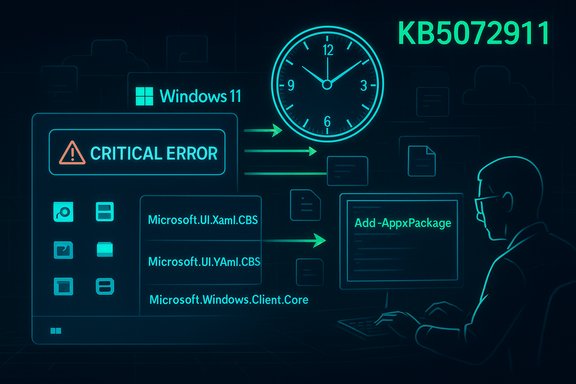
Since Windows moved large parts of the modern desktop into modular AppX/MSIX packages rendered via XAML (the Extensible Application Markup Language), Microsoft has enjoyed the agility of smaller, faster UI updates — but it also introduced a critical lifecycle dependency: updated XAML packages must be registered into a user session before XAML‑hosted shell processes initialize. When that ordering fails, the results are not subtle: the Start menu can show a “critical error,” the taskbar can be blank or missing even though explorer.exe appears to run, Settings may silently refuse to open, and XAML‑hosted apps crash on launch. Microsoft documents this exact failure mode in its support advisory KB5072911. The vendor’s bulletin places the triggering change in the July 2025 cumulative servicing wave (community tracking identifies KB5062553 as one of the initiating rollups) and says the problem affects Windows 11 24H2 and 25H2 devices when updates are applied before a user session is established — for example, during first sign‑in after provisioning or in non‑persistent VDI/Cloud PC sessions. Microsoft confirms it is working on a resolution and has published manual mitigations for IT administrators to use in the meantime.
Source: TechSpot Windows updates keep breaking, and Microsoft's "agentic OS" isn't helping
 Background / Overview
Since Windows moved large parts of the modern desktop into modular AppX/MSIX packages rendered via XAML (the Extensible Application Markup Language), Microsoft has enjoyed the agility of smaller, faster UI updates — but it also introduced a critical lifecycle dependency: updated XAML packages must be registered into a user session before XAML‑hosted shell processes initialize. When that ordering fails, the results are not subtle: the Start menu can show a “critical error,” the taskbar can be blank or missing even though explorer.exe appears to run, Settings may silently refuse to open, and XAML‑hosted apps crash on launch. Microsoft documents this exact failure mode in its support advisory KB5072911. The vendor’s bulletin places the triggering change in the July 2025 cumulative servicing wave (community tracking identifies KB5062553 as one of the initiating rollups) and says the problem affects Windows 11 24H2 and 25H2 devices when updates are applied before a user session is established — for example, during first sign‑in after provisioning or in non‑persistent VDI/Cloud PC sessions. Microsoft confirms it is working on a resolution and has published manual mitigations for IT administrators to use in the meantime. What KB5072911 actually says
Key facts Microsoft disclosed
- The advisory explicitly applies to Windows 11 version 24H2 and 25H2 and identifies the problem as a registration timing issue affecting XAML dependency packages.
- Affected scenarios are the first user logon after provisioning and every logon in non‑persistent OS installations (pooled VDI, instant clones, Windows 365 Cloud PCs) where app packages are installed at sign‑in.
- Microsoft lists the specific package families implicated (for example, Microsoft.Windows.Client.CBS, Microsoft.UI.Xaml.CBS, Microsoft.Windows.Client.Core) and describes the symptom set: Start menu failures, blank taskbar, Explorer crashes, shellhost.exe crashes and XAML app crashes.
Microsoft’s immediate guidance
Microsoft published two practical mitigations in KB5072911:- Manual re‑registration of the updated XAML packages in the user session using Add‑AppxPackage -Register for the relevant appxmanifest.xml files, then restarting SiHost so the Immersive Shell can consume the packages.
- A synchronous logon wrapper (batch+PowerShell) suitable for non‑persistent environments that registers packages synchronously before explorer.exe launches, ensuring the registration step completes before shell processes start.
Technical anatomy: why modular UI + servicing produced a race condition
How the modern shell is delivered
- Modern Windows delivers many UI surfaces as packaged AppX/MSIX bundles containing XAML manifests and binaries. This allows targeted updates of the Start menu, Settings, or other pieces independently of a monolithic explorer.exe.
- Servicing replaces files on disk and then must (re)register packages so COM/XAML activation resolves for the interactive session. When registration completes asynchronously, there’s an implicit ordering dependency: register → start shell. If the shell starts first, activation fails.
The race
- The defect is classic: a timing/ordering (race) condition between package registration and shell process initialization. In provisioning workflows there’s little slack between update application and first sign‑in; in non‑persistent VDI the packages are installed and registered at each logon — a perfect reproduction vector for a registration lag. Community troubleshooting and enterprise reproductions mapped the same behaviour Microsoft later documented in KB5072911.
Who is affected (scope and risk profile)
Most at risk
- Enterprise imaging pipelines that apply updates as part of provisioning and hand a device to the first user immediately afterward.
- Non‑persistent VDI farms, instant clone pools and Cloud PCs where packages are provisioned at each logon; these environments can see the failure on every user session until mitigated.
Less likely
- Consumer or persistent single‑user devices are very unlikely to reproduce the condition because registration can finish during normal idle time and the interactive session is persistent. Microsoft explicitly says consumer devices should be safe in most cases.
Operational impact
- When the shell fails to initialize correctly at scale, the result is immediate productivity loss, surging help‑desk tickets and emergency workarounds — from rolling back updates and re‑imaging fleets to deploying synchronous logon scripts across thousands of seats. Community and forum evidence show admins spent months juggling ad‑hoc mitigations before Microsoft posted the advisory.
The practical mitigations — step‑by‑step for administrators
The Microsoft KB gives explicit commands and a sample logon wrapper. Administrators should test these in a non‑production pilot ring before broad deployment.- Manual re‑registration (interactive session)
- Open an elevated PowerShell session in the affected user session.
- Run the registration commands for each missing package:
- Add-AppxPackage -Register -Path 'C:\Windows\SystemApps\MicrosoftWindows.Client.CBS_cw5n1h2txyewy\appxmanifest.xml' -DisableDevelopmentMode
- Add-AppxPackage -Register -Path 'C:\Windows\SystemApps\Microsoft.UI.Xaml.CBS_8wekyb3d8bbwe\appxmanifest.xml' -DisableDevelopmentMode
- Add-AppxPackage -Register -Path 'C:\Windows\SystemApps\MicrosoftWindows.Client.Core_cw5n1h2txyewy\appxmanifest.xml' -DisableDevelopmentMode
- Restart SiHost (ShellHost) or sign the user out and back in if required.
- Non‑persistent environment (synchronous logon script)
- Microsoft publishes a sample batch wrapper that calls PowerShell to run the above Add‑AppxPackage commands synchronously before explorer.exe launches; the wrapper intentionally blocks until registration completes so the shell won’t race ahead. Deploy the script via your VDI provisioning mechanism or group policy logon script.
- Recommended operational checklist
- Pilot updates in a representative ring that includes non‑persistent images.
- Implement the synchronous logon wrapper in pooled desktop images as a temporary measure.
- Monitor Release Health and Microsoft’s advisory for a permanent servicing patch.
- Document rollback and re‑imaging procedures and brief help‑desk teams on the registration workaround to triage incidents quickly.
What this reveals about Microsoft’s servicing model and the agentic OS push
Microsoft’s public messaging that Windows is “evolving into an agentic OS” — a platform that hosts multiple localized AI agents and persistent, context‑aware services — has amplified community scrutiny of the company’s priorities. Critics argue that promising first‑class AI agents while the basic shell and update delivery mechanisms are brittle undermines user trust and increases enterprise risk. Independent reporting and reaction threads show a growing disconnect between executive AI messaging and the day‑to‑day reliability issues admins face. There are two engineering lessons here:- Modularity alone is not a substitute for robust orchestration — when you decouple components you add lifecycle complexity that must be orchestrated and observed under production‑representative conditions. The failure in KB5072911 is a textbook example of an unguarded lifecycle dependency.
- Ambitious platform pivots (agentic AI, persistent agents, Copilot expansion) increase the attack surface and the vector space for reliability regressions. When basic UI surfaces and update recovery tooling are unstable, adding autonomous agents that can act on user data and system state compounds risk. Community voices captured on forums and industry reporting frame this as a non‑trivial governance problem: ship new features only after demonstrating adherence to conservative reliability metrics.
Security context: recent LNK vulnerability and transparency concerns
The KB5072911 incident joins a string of servicing and security incidents that have raised enterprise concern about Microsoft’s transparency and patching quality. An important example is CVE‑2025‑9491, an LNK handling vulnerability tracked by multiple CVE databases and reported as exploited in the wild; the public conversation focused on both the severity of active exploitation and the timeliness and clarity of vendor remediation. Independent vulnerability databases and analysis firms documented exploitation campaigns and assessed risk profiles while communities sought verifiable documentation of Microsoft’s remediation steps. Enterprises rightly push for:- Clear, public KBs that include exact mitigations and impacted builds (which Microsoft has done for KB5072911);
- Faster, measurable telemetry about how many devices are affected and which update channels are blocked; and
- Transparent timelines for permanent fixes rather than prolonged ambiguity that forces administrators into manual, error‑prone mitigations. Community thread aggregates show administrators demanding device‑scale impact metrics and an official permanent servicing patch timeline.
Strengths and weak points in Microsoft’s response
Notable strengths
- Microsoft published a detailed, actionable advisory (KB5072911) naming implicated packages, symptoms and precise PowerShell commands — concrete guidance is always preferable to silence. This allowed administrators to create deterministic mitigations rather than guessing at causes.
- The guidance includes a pragmatic synchronous logon wrapper targeted at non‑persistent environments — exactly the scenario most affected. That shows the vendor is aware of operational realities in enterprise imaging and VDI.
Critical weaknesses and risks
- The delay between the initial community reports (July–October 2025) and the formal advisory (published November–December updates) left many enterprises to discover and operate ad‑hoc workarounds at scale, increasing risk and support costs. Forum evidence documents months of help‑desk triage and emergency rollbacks.
- The root problem is structural: packaging UI as modular components is sensible, but it requires much stronger pre‑deployment testing in the exact provisioning patterns used by enterprise imaging and non‑persistent VDI — a failure to do so suggests testing gaps or telemetry blind spots.
- There’s no public ETA for a permanent fix at the time of Microsoft’s advisory; lacking device‑scale impact numbers, administrators must choose between conservative rollout holds, broad mitigations, or risky blind deployments. The absence of those metrics is a real operational problem.
Recommendations for IT teams and power users
- Treat non‑persistent images and provisioning pipelines as a separate risk domain. Pilot updates in a ring that mirrors production provisioning exactly — including first sign‑in and pooled VDI scenarios.
- Implement Microsoft’s synchronous registration wrapper for VDI until a permanent servicing patch is released; package the script into your image build pipeline for consistency. Test the script thoroughly for performance and race conditions in your environment.
- Prepare rollback and re‑image playbooks. If a provisioning wave begins generating large numbers of incidents, be ready to pause the rollout and revert to a known‑good image.
- Demand clearer telemetry. Enterprises should ask Microsoft for concrete device‑scale metrics (how many devices failed, which SKUs/builds, distribution by deployment type) and an ETA for a permanent fix before mass rollout. Forum evidence shows admins view such metrics as essential for risk calculation.
- Balance AI adoption with operational conservatism. The agentic OS vision is compelling but should be staged behind proven reliability guarantees. Prioritize platform stability and observable release health before enabling new agentic features broadly.
Broader implications: product strategy, trust and the Windows ecosystem
This incident is a microcosm of a larger tension: Microsoft is simultaneously pushing aggressive AI platformization of Windows while moving to a modular, service‑oriented update cadence. Both strategies are correct in isolation — modular delivery gives pace, and AI agents promise productivity improvements — but their combined effect demands a higher bar for orchestration, observability and conservative rollout defaults.- For enterprises, the message is plain: new platform paradigms require stronger operational guardrails. Risk management must include representative provisioning tests, automated registration verification, and contingency plans for rapid rollback.
- For Microsoft, the takeaways are equally clear. Shipping modular updates without robust, production‑representative testing of provisioning and non‑persistent scenarios invites repeated regressions. Building an “agentic OS” on top of brittle update surfaces will amplify costs, user frustration and governance headaches if the core servicing model is not first hardened.
Conclusion
KB5072911 is an important, if uncomfortable, admission: modular servicing improved agility but introduced a fragile lifecycle dependency that can incapacitate the interactive Windows desktop in certain enterprise workflows. Microsoft’s immediate mitigations — manual Add‑AppxPackage re‑registration and a synchronous logon wrapper — are helpful and necessary, but they are workarounds rather than system cures. Administrators must combine careful pilot testing, deployment conservatism and the vendor’s temporary scripts while demanding transparent device‑scale metrics and a clear timeline for a permanent fix. Until the underlying registration race is resolved and rollout telemetry improves, the promise of an agentic, AI‑native Windows will continue to clash with the urgent practicalities of keeping millions of users productive.Source: TechSpot Windows updates keep breaking, and Microsoft's "agentic OS" isn't helping
