

Microsoft’s February 10, 2026 cumulative update, KB5075941 (OS Build 22631.6649), is notable less for the routine security and stability fixes it delivers than for the way it ties into a looming platform-wide event: the scheduled expiration of Microsoft’s Secure Boot certificates that begins in June 2026. This update consolidates a series of January fixes, refreshes Windows’ boot manager signing on devices already prepared to receive the new certificate chain, and embeds telemetry-targeting logic designed to phase the rollout of the replacement certificates safely. For administrators and advanced users, KB5075941 is a pivotal checkpoint — it’s both a maintenance update and a staging ground for a certificate transition that could affect the ability of some devices to boot securely if not handled correctly.
Secure Boot is a UEFI firmware feature that validates the integrity of components that run before the operating system loads. Microsoft has historically relied on three Microsoft-supplied certificates (commonly referred to by their 2011 issuance year) placed in the Secure Boot databases in firmware: a Platform Key (PK) controlled by OEMs, Key Exchange Key(s) (KEK), and the Signature Database (DB) that holds trusted signers. Those 2011 certificates — including Microsoft Corporation KEK CA 2011 and Microsoft UEFI CA 2011 — are set to begin expiring in mid-2026, with a staggered window that extends into October 2026.
To avoid a hard cutover that would leave devices unable to receive pre-boot updates or to trust updated boot components, Microsoft and the OEM ecosystem prepared a set of replacement certificates issued in 2023 (the “CA 2023” family). Over the past year Microsoft has been rolling these 2023 certificates to newer hardware via firmware and Windows updates, and KB5075941 formalizes part of that effort by updating Boot Manager code on devices that already have the Windows UEFI CA 2023 certificate present in their firmware-managed Secure Boot DB.
This model balances safety and scale. It acknowledges that firmware ecosystems are heterogeneous and that a one‑size‑fits‑all update could introduce unacceptable risk. It also places responsibility on administrators to ensure devices with restricted update pathways are addressed proactively.
For IT teams, the time to act is now: inventory devices, validate recovery procedures, confirm BitLocker key backups, test the updates on pilots, and ensure OEM firmware updates are on your radar. For advanced consumers and power users, verify whether your device already contains the Windows UEFI CA 2023 certificate, back up your BitLocker keys, and create validated recovery media.
If you leave the transition to chance, the risk isn’t abstract: it’s the potential for Secure Boot violations, halted firmware updates, and unpatchable pre‑boot vulnerabilities. KB5075941 gives both the mechanism and the warning — use them to move your fleet and your devices from risk to resilience before June 2026.
Source: Microsoft Support February 10, 2026—KB5075941 (OS Build 22631.6649) - Microsoft Support
 Background
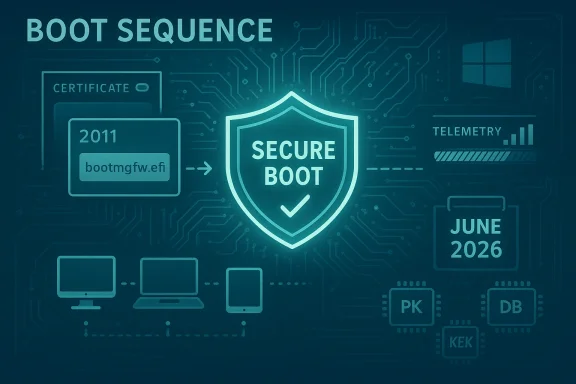
Secure Boot is a UEFI firmware feature that validates the integrity of components that run before the operating system loads. Microsoft has historically relied on three Microsoft-supplied certificates (commonly referred to by their 2011 issuance year) placed in the Secure Boot databases in firmware: a Platform Key (PK) controlled by OEMs, Key Exchange Key(s) (KEK), and the Signature Database (DB) that holds trusted signers. Those 2011 certificates — including Microsoft Corporation KEK CA 2011 and Microsoft UEFI CA 2011 — are set to begin expiring in mid-2026, with a staggered window that extends into October 2026.To avoid a hard cutover that would leave devices unable to receive pre-boot updates or to trust updated boot components, Microsoft and the OEM ecosystem prepared a set of replacement certificates issued in 2023 (the “CA 2023” family). Over the past year Microsoft has been rolling these 2023 certificates to newer hardware via firmware and Windows updates, and KB5075941 formalizes part of that effort by updating Boot Manager code on devices that already have the Windows UEFI CA 2023 certificate present in their firmware-managed Secure Boot DB.
What KB5075941 actually does
Summary of the package
KB5075941 is a cumulative security update for Windows 11, version 23H2 (Build 22631). It:- Delivers security fixes carried forward from earlier January updates.
- Updates Boot Manager on devices that already have the Windows UEFI CA 2023 certificate installed in the Secure Boot DB by replacing the older 2011-signed bootmgfw.efi with a 2023-signed bootmgfw.efi.
- Adds broad targeting telemetry into Windows quality updates so devices only receive the new Secure Boot certificates after reporting sufficient successful update signals (a phased rollout).
- Addresses non-Secure Boot issues including Desktop Window Manager (DWM) restarts, File Explorer folder renaming quirks when desktop.ini uses LocalizedResourceName, font updates for GB18030‑2022A coverage, a fix for dxgmms2.sys-related KERNEL_SECURITY_CHECK_FAILURE crashes, Virtual Secure Mode (VSM) shutdown/hibernation restarts, and Microsoft Defender SmartScreen Application Reputation event logging.
Secure Boot-specific behavior
- The update will only perform the Boot Manager replacement on devices that already contain the Windows UEFI CA 2023 certificate in the firmware-managed DB.
- If users or administrators have reset Secure Boot DB entries or toggled Secure Boot off and back on in firmware, devices may encounter a Secure Boot violation condition after the update. Microsoft recommends creating Secure Boot recovery media as the remedy for those rare cases.
- Windows updates will carry targeting data to ensure a staged rollout; devices must show “sufficient successful update signals” before receiving the new certificates automatically. This is designed to reduce risk by avoiding mass deployment to devices that show signs of incompatibility.
Why this matters: technical and operational implications
The problem at scale
Secure Boot certificates are cryptographic roots that allow signing and verification of pre-boot components. When those root certificates expire, devices that rely on them cannot validate updates to boot components, which in turn prevents Microsoft from patching the pre-boot attack surface. If left unaddressed, the consequence is twofold:- Devices may enter a degraded security state where pre-boot security updates are not possible.
- Firmware or OS-level changes that rely on updated signatures could fail validation, producing boot errors, Secure Boot violations, or blocks on certain functionality.
- Enterprises with large fleets and strict compliance requirements.
- Gaming systems and anti-cheat stacks that depend on Secure Boot for kernel and boot integrity.
- Dual‑boot and Linux users that rely on shim chains signed against Microsoft’s certificates (the change affects trust relationships outside of Windows as well).
- Embedded devices, servers, and specialized hardware where firmware updates are rarer or tightly controlled.
The timing
Microsoft’s published timeline shows the 2011 CAs begin expiring in June 2026 and finish by October 2026. That gives a roughly four-month window to ensure devices have the new 2023 certificates applied before the older roots stop being valid for signing updates to pre-boot components.The targeted, phased approach
Rather than pushing certificates to every device indiscriminately, Microsoft’s strategy in KB5075941 and companion guidance is to evaluate devices’ “update signals” and only apply the new certificates once a device demonstrates it can accept the change safely. This helps avoid large-scale failure events but also requires administrators to be proactive in monitoring and remediation for any machines that do not progress through the targeted pipeline.Detailed technical explanation: what’s changing in firmware and boot files
Certificates and databases: PK, KEK, DB, DBX
- PK (Platform Key): the highest root controlled by the OEM; it authorizes KEK changes.
- KEK (Key Exchange Key): signs updates to DB and DBX; Microsoft owns a KEK that has to be refreshed from 2011 to 2023.
- DB (Signature Database): holds the list of trusted signing certificates for bootloaders and EFI apps; the new Windows UEFI CA 2023 belongs here.
- DBX (Revoked Signature Database): lists revoked signatures and is used to block known-bad boot components.
Boot manager signing change
KB5075941 replaces the older boot manager binary signed by the 2011 key (bootmgfw.efi) with a version signed by the Windows UEFI CA 2023 — but only on machines that already have the 2023 certificate in their DB. This internal swap matters because it ensures the boot manager is signed by a certificate whose chain won’t expire in 2026, preserving the ability to sign and deliver future pre-boot updates.Practical checks and mitigations for administrators and advanced users
Below are hands-on checks and steps you can take now to prepare and reduce risk.Quick inventory and triage (recommended first pass)
- Identify machines with Secure Boot enabled and list firmware versions and OEM models.
- Prioritize machines manufactured before 2018; those are most likely to have firmware that hasn’t been updated since the 2011 certificates were the norm.
- Tag devices using specialized or vendor-supplied firmware (industrial, POS, embedded) for extra attention.
How to check whether your device already contains the Windows UEFI CA 2023 certificate
- Open an elevated PowerShell or Command Prompt.
- Mount the EFI system partition:
- mountvol S: /s
- Copy the Windows boot manager to a local path:
- copy S:\EFI\Microsoft\Boot\bootmgfw.efi C:\bootmgfw_2023.efi
- Inspect the file’s digital signature:
- Right-click the copy in File Explorer → Properties → Digital Signatures tab.
- Verify the certificate chain includes Windows UEFI CA 2023.
If Secure Boot changes trigger BitLocker prompts
- Firmware or UEFI updates that change Secure Boot collections will commonly trigger BitLocker recovery. Before performing any firmware updates or manual KEK/DB work:
- Suspend BitLocker temporarily, or
- Ensure BitLocker recovery keys (Azure AD, AD, or saved offline) are accessible.
- After the update or certificate enrollment, re‑enable or resume BitLocker.
If you need to force the Windows Secure Boot update pipeline (enterprise)
Microsoft provides mechanisms for IT to manage Secure Boot certificate updates at scale, including guidance for enrolling devices and controlling rollouts. Techniques include:- Using Windows Update for Business and device management tooling to track which devices have received the certificate updates.
- In special cases, enabling the scheduled Secure Boot update task or manipulating registry keys to allow the update to proceed (advanced admin intervention recommended only after testing).
Creating Secure Boot recovery media
Microsoft recommends creating Secure Boot recovery media in advance to recover systems that land in a Secure Boot violation state. A recovery USB with the appropriate Windows Recovery Environment can enable repair or reconfiguration of DB/KEK values, but the exact steps vary by OEM and platform. If you manage many machines, document a validated recovery procedure and store test recovery media physically at reachable locations.Step-by-step checklist (prioritized)
- Inventory devices with Secure Boot enabled and record firmware versions and OEM models.
- Verify BitLocker keys are backed up and accessible for each device before changes.
- Identify devices that already include Windows UEFI CA 2023 by checking the bootmgfw.efi signature.
- Ensure Windows Update is enabled and devices are eligible to receive quality updates.
- For devices that do not have the 2023 certificates and do not auto-update via Windows Update, contact OEM for a UEFI/BIOS update or plan for manual enrollment where documented by the vendor.
- Test the certificate update and bootmgfw.efi replacement on a pilot set before broad rollout.
- Create and validate Secure Boot recovery media and document recovery steps.
- Monitor your device fleet for update telemetry and for KB5075941 installation success or Secure Boot violations.
- Communicate to stakeholders (end users, help desk, security teams) about potential BitLocker recovery prompts and the mitigation steps.
- Keep firmware and all pre-boot components up to date through coordinated OEM updates.
Known pain points and risk scenarios
BitLocker and recovery key pain for end users
A common friction point during UEFI or Secure Boot changes is BitLocker recovery. If recovery keys are not centrally stored or easy to retrieve, users will be blocked from booting and help desks will be inundated.Older firmware and devices without OEM updates
Many older motherboards and embedded devices do not receive frequent firmware updates. For such hardware, the only options may be manual Secure Boot key enrollment (complex and risky), OEM firmware release, or eventual hardware replacement.Linux and dual-boot complications
Linux distributions that rely on a signed shim linked to Microsoft’s signing keys may be affected if the new certificates are not present. Some distributions include code to handle multiple signing chains, but mismatches in OEM firmware support for the new CA can force Linux users to either disable Secure Boot or reconfigure shim chains — neither ideal for security or usability.Anti-cheat and gaming software
Several anti-cheat solutions rely on Secure Boot for kernel-level trust. A broken Secure Boot chain could produce false positives or prevent games from launching. Gaming PCs should be prioritized for testing since a seemingly small certificate change can have an outsized user impact.Servers, IoT, and specialized hardware
Servers and IoT devices often have long firmware lifecycles and different maintenance channels. Microsoft’s Windows Update–based push may not reach these devices; instead, OEM firmware updates, manual processes, or vendor-specific management flows will be required.Microsoft’s rollout strategy and why gradual matters
KB5075941 emphasizes a data-driven, phased delivery. Windows quality updates will now include targeting signals that allow Microsoft to identify whether a device is a good candidate for certificate updates. The benefit is clear: roll out to devices that already demonstrate compatibility, reducing the risk of mass outage. The downside: reliance on telemetry means administrators must actively monitor devices that don’t receive updates, and those lagging devices may require manual intervention.This model balances safety and scale. It acknowledges that firmware ecosystems are heterogeneous and that a one‑size‑fits‑all update could introduce unacceptable risk. It also places responsibility on administrators to ensure devices with restricted update pathways are addressed proactively.
What to watch for in the weeks and months ahead
- Watch for OEM firmware releases that explicitly mention Windows UEFI CA 2023 or Secure Boot certificate updates.
- Test the KB5075941 deployment on representative hardware, focusing on machines with third-party option ROMs, custom boot managers, or nonstandard secure-boot configurations.
- Track help desk logs for BitLocker recovery prompts, Secure Boot violations, and boot manager signature mismatches.
- Expect vendor guidance pages (motherboard, laptop OEMs) to publish tailored instructions and BIOS updates; plan to coordinate those updates outside of the normal monthly patch cycle if required.
- For Linux and dual‑boot setups, prepare to adjust shim configuration or enroll additional certificates if the vendor guidance recommends it.
Final analysis: strengths, trade-offs, and recommendations
KB5075941 and Microsoft’s broader Secure Boot certificate program demonstrate several strengths:- Proactive mitigation: Microsoft’s phased rollout and the creation of 2023 certificates prevent a hard security cliff when 2011 CAs expire.
- Targeted safety: Using telemetry to gate rollout reduces the chance of breaking mass numbers of systems.
- Transparency: The guidance explains the certificate types, explains the risk of not updating, and gives administrators steps to verify signatures and take action.
- Operational complexity: Administrators must juggle firmware updates, BitLocker management, OEM coordination, and forensic recovery plans.
- Heterogeneity of firmware: Devices from different vendors and different vintage will behave differently, and some may require manual key enrollment or hardware replacement.
- Potential for user disruption: Even with a phased rollout, BitLocker recoveries, Secure Boot violation states, and anti-cheat incompatibilities can create high-volume support incidents.
- Start with inventory, pilot, and recovery validation now — not later.
- Ensure BitLocker keys are backed up centrally and that help desk staff can retrieve them quickly.
- Use the phased rollout to control risk: pilot on nonproduction devices, then broaden after positive results.
- Coordinate with OEMs for any devices that cannot be updated via Windows Update.
- Test gaming and Linux scenarios where shim chains or anti-cheat stacks are involved.
Conclusion
KB5075941 is more than a routine cumulative update. It is a tactical piece in a platform-wide effort to migrate Secure Boot trust from a set of aging 2011 certificates to a modern 2023 certificate family — an essential step to preserve the integrity of Windows’ pre-boot security model as the 2011 roots approach expiration in mid-to-late 2026. Microsoft’s staged approach and the Boot Manager signature updates are designed to minimize disruption, but they place a premium on preparation, telemetry monitoring, and collaboration with hardware vendors.For IT teams, the time to act is now: inventory devices, validate recovery procedures, confirm BitLocker key backups, test the updates on pilots, and ensure OEM firmware updates are on your radar. For advanced consumers and power users, verify whether your device already contains the Windows UEFI CA 2023 certificate, back up your BitLocker keys, and create validated recovery media.
If you leave the transition to chance, the risk isn’t abstract: it’s the potential for Secure Boot violations, halted firmware updates, and unpatchable pre‑boot vulnerabilities. KB5075941 gives both the mechanism and the warning — use them to move your fleet and your devices from risk to resilience before June 2026.
Source: Microsoft Support February 10, 2026—KB5075941 (OS Build 22631.6649) - Microsoft Support
