

Microsoft’s release of KB5082242, the Safe OS Dynamic Update for Windows 11, version 23H2, arrives at a moment when recovery media, setup binaries, and boot trust are becoming just as important as the everyday security patches users see in Windows Update. The April 14, 2026 package is not a headline feature drop, but it is one of those quietly essential maintenance updates that can make the difference between a smooth upgrade path and a broken recovery experience. More importantly, it lands against the backdrop of Microsoft’s warning that Secure Boot certificates used by most Windows devices begin expiring in June 2026, a deadline that gives this release extra strategic weight.
At first glance, a Safe OS Dynamic Update sounds narrow and technical, and that is exactly why it matters. These updates are aimed at the Windows Recovery Environment and the setup process, not the operating system shell users interact with every day. In practice, they help keep feature updates and recovery tools aligned with current servicing requirements, which is especially important for a platform that has to keep booting, repairing, and upgrading across a huge range of hardware configurations.
That context matters because Windows 11 version 23H2 is no longer just a consumer desktop branch. It remains relevant across Home, Pro, Enterprise, Education, multi-session, IoT Enterprise, and SE variants, and Microsoft’s own Secure Boot guidance explicitly includes Windows 11 23H2 among the affected versions that may need certificate updates before the 2011-era trust chain expires. The result is that a seemingly modest WinRE-related update is being issued into a broader security transition that spans firmware, boot loaders, and enterprise management workflows. (support.microsoft.com)
The important story here is not that KB5082242 introduces flashy new features. It is that Microsoft is reinforcing the plumbing underneath Windows at a time when the boot trust model itself is changing. The company says most devices will receive the new 2023 Secure Boot certificates automatically, but it also warns that organizations managing their own fleets may need to act directly to avoid compliance and boot-security problems after the current certificates begin to age out in June and October 2026. (support.microsoft.com)
There is also a pattern worth noting. Microsoft has repeatedly appended the Secure Boot expiration notice to recent Windows release notes, including multiple 2025 and 2026 updates across Windows 10, Windows Server, and Windows 11. That suggests the company is no longer treating the certificate rollover as a niche documentation item; it is now a standing operational concern attached to routine servicing. In plain English, the clock is ticking, and Microsoft is using ordinary update channels to make sure people notice.
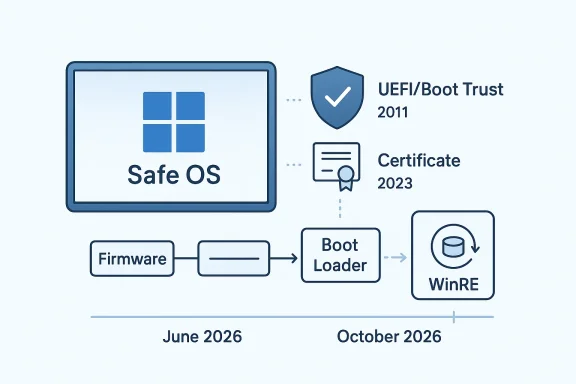
For Windows 11 version 23H2, this class of update usually arrives as part of the normal servicing ecosystem, but the April 2026 timing gives it a second life as a preparatory step. Microsoft’s Secure Boot guidance says current Microsoft certificates issued in 2011 are set to start expiring in June 2026, with the broader trust chain aging out by October 2026. Updating WinRE and setup assets ahead of that transition helps reduce friction when devices are later asked to ingest firmware or certificate changes. (support.microsoft.com)
For enterprise teams, the significance is even greater. A fleet with inconsistent recovery components can behave unpredictably during servicing, especially if deployment rings include older hardware, virtualized hosts, or devices that have not been routinely refreshed. In other words, maintenance debt in WinRE becomes upgrade risk later.
That is more than an administrative footnote. Secure Boot is a root-of-trust mechanism that verifies firmware modules, boot loaders, and related components before the OS takes over. Microsoft notes that Secure Boot was first introduced in Windows 8 to defend against bootkits and other pre-OS malware, and the company now frames the certificate renewal as necessary to keep that trust chain intact. When that chain ages out, the device may still boot, but it loses the ability to receive new protections for the early boot process. (support.microsoft.com)
The practical consequence is a split between basic operability and security completeness. A device may continue starting normally even if it misses the 2023 certificates, but Microsoft warns it will no longer receive new protections for Boot Manager, Secure Boot databases, revocation lists, and future boot-level mitigations. That distinction is crucial because it means this is not just a “will it boot?” question; it is a “will it remain fully protected?” question. (support.microsoft.com)
This is a subtle but important design change. It reflects a maturing Secure Boot model that is trying to preserve compatibility while tightening control. Finer-grained trust is often the right answer in infrastructure security, even if it is harder to explain to end users.
The company also notes that devices lacking the newer certificates will still start and continue receiving normal Windows updates. That is a reassuring detail, but only to a point. The absence of normal boot-component protections can still leave holes in scenarios involving BitLocker hardening, third-party boot loaders, or any workflow that depends on Secure Boot trust being current and intact. (support.microsoft.com)
This is where the distinction between functional continuity and security continuity becomes central. Many organizations will be tempted to read “the PC still boots” as “everything is fine.” Microsoft’s guidance says otherwise. In the company’s framing, a machine can remain serviceable while quietly losing one of its most important security guarantees. That is a risk profile administrators should recognize before the deadline, not after. (support.microsoft.com)
Microsoft’s guidance for IT professionals explicitly calls for testing firmware, monitoring device updates, initiating deployment, and diagnosing issues as part of the rollout process. That wording alone tells you the company views this as a lifecycle project, not a checkbox. (support.microsoft.com)
It also aligns with the fact that Windows 11 version 23H2 is an aging branch. Microsoft support notes and press coverage indicate consumer editions of 23H2 reached end of servicing in November 2025, while Enterprise and Education continue longer. Even without citing the broader lifecycle story as the core issue, the update cadence makes clear that Microsoft is treating 23H2 as part of a managed wind-down and transition environment rather than a platform getting major new investment.
A Safe OS Dynamic Update in that context is less about innovation and more about stability preservation. Microsoft wants the upgrade path, recovery stack, and boot trust chain all to stay coherent while the underlying OS branch moves through its servicing phase. That is the kind of maintenance that rarely generates excitement, but it is exactly the sort of work that keeps large fleets from falling apart at the worst possible time.
For home users, the main benefit of KB5082242 is invisible reliability. If setup or recovery tools are more current, then feature updates and repair operations are less likely to hit weird edge cases. The Secure Boot certificate issue will also likely be handled with minimal user input on well-maintained systems, which is probably the best possible outcome for a broad consumer base.
For enterprises, the problem is scale. Even if Microsoft automates much of the rollout, a big fleet can still contain exceptions: devices with customized firmware, systems running in virtualized environments, PCs whose Secure Boot state has been altered, and assets that miss maintenance windows for months. Those are the machines that turn a broad policy change into a project tracker item. (support.microsoft.com)
Consumers are unlikely to care about the certificate names, and they should not need to. But IT departments should care about the exact certificate chain, the storage location in KEK or DB, and whether the new 2023 certificates have been staged in firmware. That is a different operational universe entirely.
Microsoft has been using Dynamic Updates for years to refine Windows setup media and recovery assets. In the 23H2 line, these updates have been released regularly, suggesting a commitment to making the installation and repair path more dependable across monthly servicing cycles. KB5082242 fits squarely into that tradition, even if it may not receive much public attention.
The broader significance is that Windows is increasingly maintained as a moving system stack, not a static release. Recovery, setup, boot trust, and monthly cumulative updates now interact continuously. That is a sensible architecture for a modern operating system, but it also means every layer has to stay current or the next layer can fail in surprising ways.
In practice, that means the humble WinRE update is doing more than polishing setup files. It is helping ensure the tools used to recover Windows can also survive the coming Secure Boot shift. That is defensive maintenance, and it is often the least glamorous work in enterprise IT.
A final concern is that the migration window is finite. June 2026 is close enough that planning should already be underway, yet many organizations still treat certificate management as a background concern. That is a mistake. Boot trust does not forgive procrastination.
The next milestone to watch is how smoothly organizations can inventory Secure Boot status across their fleets. Microsoft’s own playbook emphasizes verification, deployment, monitoring, and remediation, which tells us the company expects some friction. That is not necessarily a warning sign; it is an acknowledgment that boot trust lives at the intersection of firmware, OS servicing, and hardware diversity. (support.microsoft.com)
KB5082242 may be a small update on paper, but it sits inside a much larger security migration that will shape Windows servicing through 2026. The practical lesson is straightforward: recovery tooling, firmware trust, and monthly updates are now inseparable parts of the same security story. Devices that keep all three current will be in the best position to avoid disruption, while those that ignore the quiet warnings may discover too late that the boot path is where the next failure begins.
Source: Microsoft Support KB5082242: Safe OS Dynamic Update for Windows 11, version 23H2: April 14, 2026 - Microsoft Support
 Overview
At first glance, a Safe OS Dynamic Update sounds narrow and technical, and that is exactly why it matters. These updates are aimed at the Windows Recovery Environment and the setup process, not the operating system shell users interact with every day. In practice, they help keep feature updates and recovery tools aligned with current servicing requirements, which is especially important for a platform that has to keep booting, repairing, and upgrading across a huge range of hardware configurations.That context matters because Windows 11 version 23H2 is no longer just a consumer desktop branch. It remains relevant across Home, Pro, Enterprise, Education, multi-session, IoT Enterprise, and SE variants, and Microsoft’s own Secure Boot guidance explicitly includes Windows 11 23H2 among the affected versions that may need certificate updates before the 2011-era trust chain expires. The result is that a seemingly modest WinRE-related update is being issued into a broader security transition that spans firmware, boot loaders, and enterprise management workflows. (support.microsoft.com)
The important story here is not that KB5082242 introduces flashy new features. It is that Microsoft is reinforcing the plumbing underneath Windows at a time when the boot trust model itself is changing. The company says most devices will receive the new 2023 Secure Boot certificates automatically, but it also warns that organizations managing their own fleets may need to act directly to avoid compliance and boot-security problems after the current certificates begin to age out in June and October 2026. (support.microsoft.com)
There is also a pattern worth noting. Microsoft has repeatedly appended the Secure Boot expiration notice to recent Windows release notes, including multiple 2025 and 2026 updates across Windows 10, Windows Server, and Windows 11. That suggests the company is no longer treating the certificate rollover as a niche documentation item; it is now a standing operational concern attached to routine servicing. In plain English, the clock is ticking, and Microsoft is using ordinary update channels to make sure people notice.
What KB5082242 Is Really Doing
A Safe OS Dynamic Update is most valuable when users never notice it. Its purpose is to refresh the Windows Recovery Environment, setup components, and supporting binaries so that upgrades and repair operations work against the latest known-good bits. That is especially relevant for systems that need to move between releases, repair themselves after a failed install, or create installation media that has to remain viable for months.For Windows 11 version 23H2, this class of update usually arrives as part of the normal servicing ecosystem, but the April 2026 timing gives it a second life as a preparatory step. Microsoft’s Secure Boot guidance says current Microsoft certificates issued in 2011 are set to start expiring in June 2026, with the broader trust chain aging out by October 2026. Updating WinRE and setup assets ahead of that transition helps reduce friction when devices are later asked to ingest firmware or certificate changes. (support.microsoft.com)
Why Safe OS updates matter
The Safe OS layer is the environment Windows uses when it is not fully booted into the normal desktop. If a PC cannot access this layer properly, then recovery becomes harder, and feature updates become more fragile. That is why these updates often show up quietly but have outsized operational impact.For enterprise teams, the significance is even greater. A fleet with inconsistent recovery components can behave unpredictably during servicing, especially if deployment rings include older hardware, virtualized hosts, or devices that have not been routinely refreshed. In other words, maintenance debt in WinRE becomes upgrade risk later.
The connection to servicing quality
Microsoft has been treating Dynamic Updates as one of the key mechanisms for improving the update experience during installation and recovery. The company’s release notes for earlier 23H2 Safe OS updates show a steady cadence of recovery-environment fixes, indicating that this is not a one-off patch but a recurring servicing stream. KB5082242 fits that pattern as another incremental reinforcement of the install path.- Keeps recovery and setup binaries in sync with current servicing needs.
- Reduces the odds of install-time regressions.
- Supports smoother feature-update and repair scenarios.
- Helps prepare systems for changes in boot trust infrastructure.
The Secure Boot Backdrop
The real reason KB5082242 deserves attention is the Secure Boot certificate transition looming behind it. Microsoft says the certificates issued in 2011 — including the Microsoft Corporation KEK CA 2011, Microsoft Windows Production PCA 2011, and Microsoft Corporation UEFI CA 2011 — begin expiring in June 2026 and would expire fully by October 2026. New 2023 certificates are being rolled out to preserve Secure Boot continuity and ensure devices can keep receiving the full set of early-boot protections. (support.microsoft.com)That is more than an administrative footnote. Secure Boot is a root-of-trust mechanism that verifies firmware modules, boot loaders, and related components before the OS takes over. Microsoft notes that Secure Boot was first introduced in Windows 8 to defend against bootkits and other pre-OS malware, and the company now frames the certificate renewal as necessary to keep that trust chain intact. When that chain ages out, the device may still boot, but it loses the ability to receive new protections for the early boot process. (support.microsoft.com)
The practical consequence is a split between basic operability and security completeness. A device may continue starting normally even if it misses the 2023 certificates, but Microsoft warns it will no longer receive new protections for Boot Manager, Secure Boot databases, revocation lists, and future boot-level mitigations. That distinction is crucial because it means this is not just a “will it boot?” question; it is a “will it remain fully protected?” question. (support.microsoft.com)
What changes in 2023 certificates
Microsoft’s guidance says the renewal is not a one-to-one swap in every case. The Microsoft Corporation UEFI CA 2011 renewal is split into separate certificates for boot loaders and option ROMs, allowing finer control over what hardware and software are trusted. That matters because some systems need trust for option ROMs without granting trust to third-party boot loaders, and Microsoft explicitly calls out that distinction. (support.microsoft.com)This is a subtle but important design change. It reflects a maturing Secure Boot model that is trying to preserve compatibility while tightening control. Finer-grained trust is often the right answer in infrastructure security, even if it is harder to explain to end users.
What Microsoft expects from devices
Microsoft says most Windows devices will receive the updated certificates automatically, and many OEMs will also provide firmware updates when needed. But the company also emphasizes that organization-managed environments may need hands-on deployment, monitoring, and remediation. That means the burden is not evenly distributed: consumer PCs are likely to glide through the transition, while enterprise fleets may need planning, testing, and staged rollout. (support.microsoft.com)- Consumer devices: mostly automated handling.
- Managed fleets: planning and compliance work.
- Older hardware: higher chance of firmware edge cases.
- Virtualized systems: special validation may be required.
What Microsoft Says About the Impact
Microsoft’s own support language is unusually direct. It warns that once the 2011 certificates expire, security updates for boot components will no longer be possible, which can compromise boot security and push devices out of compliance. That is a strong statement, and it suggests that Microsoft wants admins to treat the transition as a scheduled operational project rather than a passive background change. (support.microsoft.com)The company also notes that devices lacking the newer certificates will still start and continue receiving normal Windows updates. That is a reassuring detail, but only to a point. The absence of normal boot-component protections can still leave holes in scenarios involving BitLocker hardening, third-party boot loaders, or any workflow that depends on Secure Boot trust being current and intact. (support.microsoft.com)
This is where the distinction between functional continuity and security continuity becomes central. Many organizations will be tempted to read “the PC still boots” as “everything is fine.” Microsoft’s guidance says otherwise. In the company’s framing, a machine can remain serviceable while quietly losing one of its most important security guarantees. That is a risk profile administrators should recognize before the deadline, not after. (support.microsoft.com)
The enterprise compliance angle
For enterprises, Secure Boot certificate expiration is not just a patching issue. It touches compliance baselines, imaging practices, remote management, and incident response readiness. If boot-time trust is stale, then a device may fail audits or become harder to trust during a forensic event.Microsoft’s guidance for IT professionals explicitly calls for testing firmware, monitoring device updates, initiating deployment, and diagnosing issues as part of the rollout process. That wording alone tells you the company views this as a lifecycle project, not a checkbox. (support.microsoft.com)
The consumer angle
Consumers, by contrast, will mostly experience this as another background Windows maintenance event they never asked for. That is probably appropriate, because manual certificate management would be unreasonably complex for most home users. Still, the consumer story is not entirely trivial, because devices that are older, custom-built, or maintained in unusual ways may not be served cleanly by the default automation path. Quiet does not always mean simple.Why Microsoft Is Doing This Now
The timing makes sense when viewed against the broader Windows servicing calendar. Microsoft has been steadily warning about Secure Boot certificate expiration across monthly updates, which suggests a deliberate effort to normalize the message months in advance. That is smart operational communication, because certificate rollover problems are easiest to prevent when the ecosystem is warned early and repeatedly.It also aligns with the fact that Windows 11 version 23H2 is an aging branch. Microsoft support notes and press coverage indicate consumer editions of 23H2 reached end of servicing in November 2025, while Enterprise and Education continue longer. Even without citing the broader lifecycle story as the core issue, the update cadence makes clear that Microsoft is treating 23H2 as part of a managed wind-down and transition environment rather than a platform getting major new investment.
A Safe OS Dynamic Update in that context is less about innovation and more about stability preservation. Microsoft wants the upgrade path, recovery stack, and boot trust chain all to stay coherent while the underlying OS branch moves through its servicing phase. That is the kind of maintenance that rarely generates excitement, but it is exactly the sort of work that keeps large fleets from falling apart at the worst possible time.
Historical context matters
Secure Boot has been part of Windows since Windows 8, and Microsoft has not had to refresh this foundation at scale until now. That long interval is one reason the 2026 expiration matters so much: these are not routine annual renewals, but the first major shift in the original trust model. The fact that Microsoft is updating the same certificate families used since the Windows 8 era shows how long-lived and foundational this infrastructure really is. (support.microsoft.com)- The original trust model has lasted more than a decade.
- The new certificates represent continuity, not reinvention.
- Microsoft is trying to avoid a forced trust reset.
- Administrators get a narrow but workable migration window.
Enterprise vs. Consumer Impact
The split between enterprise and consumer impact is likely to be the most important real-world story over the next few months. Consumer PCs will mostly benefit from Microsoft’s default automation, OEM firmware collaboration, and ordinary Windows Update behavior. Managed devices, however, live in a different world where imaging standards, BIOS settings, device health policies, and deployment tools all affect how smoothly this transition goes. (support.microsoft.com)For home users, the main benefit of KB5082242 is invisible reliability. If setup or recovery tools are more current, then feature updates and repair operations are less likely to hit weird edge cases. The Secure Boot certificate issue will also likely be handled with minimal user input on well-maintained systems, which is probably the best possible outcome for a broad consumer base.
For enterprises, the problem is scale. Even if Microsoft automates much of the rollout, a big fleet can still contain exceptions: devices with customized firmware, systems running in virtualized environments, PCs whose Secure Boot state has been altered, and assets that miss maintenance windows for months. Those are the machines that turn a broad policy change into a project tracker item. (support.microsoft.com)
Where enterprise needs differ
Enterprises also have a stronger incentive to validate the change before June 2026. A certificate rollover that affects boot security can interact with privileged access workflows, compliance tooling, and incident response expectations. If a device cannot receive updates to revocation lists or boot protections, that becomes a governance issue as much as a technical one.Consumers are unlikely to care about the certificate names, and they should not need to. But IT departments should care about the exact certificate chain, the storage location in KEK or DB, and whether the new 2023 certificates have been staged in firmware. That is a different operational universe entirely.
Deployment realities
Microsoft’s IT guidance lays out a deployment playbook that includes verifying Secure Boot status, understanding how updates are deployed, preparing the environment, and monitoring event logs. That is an explicit invitation to treat the migration as a fleet-management exercise rather than a passive patch rollout. The deeper message is that “automatic” still needs supervision. (support.microsoft.com)The Role of WinRE and Dynamic Update
If Secure Boot is the trust chain, then WinRE is the repair path. The two are not identical, but they are increasingly related because a compromised or stale recovery stack can complicate the very updates that are meant to preserve boot security. That is why Safe OS Dynamic Updates continue to matter even when they appear bureaucratic or incremental.Microsoft has been using Dynamic Updates for years to refine Windows setup media and recovery assets. In the 23H2 line, these updates have been released regularly, suggesting a commitment to making the installation and repair path more dependable across monthly servicing cycles. KB5082242 fits squarely into that tradition, even if it may not receive much public attention.
The broader significance is that Windows is increasingly maintained as a moving system stack, not a static release. Recovery, setup, boot trust, and monthly cumulative updates now interact continuously. That is a sensible architecture for a modern operating system, but it also means every layer has to stay current or the next layer can fail in surprising ways.
Why this matters for imaging and repair
Organizations that still rely on older installation media or inconsistent recovery environments may find that their imaging processes age badly just when they need them most. If the recovery environment is stale, it can struggle to apply newer servicing assumptions, and that becomes even riskier when certificate and firmware transitions are happening at the same time.In practice, that means the humble WinRE update is doing more than polishing setup files. It is helping ensure the tools used to recover Windows can also survive the coming Secure Boot shift. That is defensive maintenance, and it is often the least glamorous work in enterprise IT.
Strengths and Opportunities
Microsoft’s handling of this transition has several obvious strengths. It is early, it is repeated, and it is being surfaced in ordinary update channels rather than hidden in a one-time announcement. That gives both consumers and administrators a chance to adapt before the hard expiration dates arrive.- Early warning cadence gives organizations time to test.
- Automatic handling should reduce friction for most home users.
- Separate 2023 certificates enable more precise trust decisions.
- Ongoing Dynamic Updates improve recovery and setup resilience.
- Enterprise guidance provides a roadmap for managed fleets.
- OEM involvement increases the likelihood of firmware support.
- Clear expiration dates make planning more concrete.
Risks and Concerns
The biggest risk is complacency. A device that still boots can lull users and even some administrators into thinking nothing meaningful has changed, when in reality the machine may be losing the ability to receive new boot-level protections. That distinction will be easy to miss until it becomes a problem.- Silent exposure if devices miss the certificate rollover.
- Mixed fleet states may create compliance headaches.
- Older firmware could fail to apply the new certificates cleanly.
- Virtualized and special-purpose systems may need separate validation.
- User confusion is likely because the device may still appear healthy.
- Operational drift can occur if inventory data is incomplete.
- Recovery media may lag behind the live OS if not refreshed.
A final concern is that the migration window is finite. June 2026 is close enough that planning should already be underway, yet many organizations still treat certificate management as a background concern. That is a mistake. Boot trust does not forgive procrastination.
Looking Ahead
Over the next several months, the most important question is not whether Microsoft continues to publish updates. It is whether those updates successfully move the ecosystem from 2011-era trust anchors to the newer 2023 certificates before the old ones age out. The answer will vary by device class, OEM, and management maturity, which means the industry is likely to see an uneven but manageable transition rather than a single dramatic event. (support.microsoft.com)The next milestone to watch is how smoothly organizations can inventory Secure Boot status across their fleets. Microsoft’s own playbook emphasizes verification, deployment, monitoring, and remediation, which tells us the company expects some friction. That is not necessarily a warning sign; it is an acknowledgment that boot trust lives at the intersection of firmware, OS servicing, and hardware diversity. (support.microsoft.com)
What to watch next
- Further Microsoft support updates tied to Secure Boot certificate rollout.
- OEM firmware revisions that add or refine 2023 certificate support.
- Enterprise tooling updates in Intune, remediation scripts, and deployment guides.
- Signs that WinRE and setup dynamic updates continue to arrive on schedule.
- Any reports of edge cases involving older hardware, virtualization, or custom boot loaders.
KB5082242 may be a small update on paper, but it sits inside a much larger security migration that will shape Windows servicing through 2026. The practical lesson is straightforward: recovery tooling, firmware trust, and monthly updates are now inseparable parts of the same security story. Devices that keep all three current will be in the best position to avoid disruption, while those that ignore the quiet warnings may discover too late that the boot path is where the next failure begins.
Source: Microsoft Support KB5082242: Safe OS Dynamic Update for Windows 11, version 23H2: April 14, 2026 - Microsoft Support
