

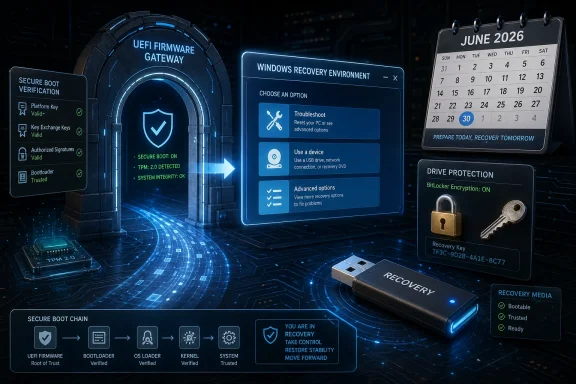
Microsoft released KB5084812 on April 30, 2026, as a Safe OS Dynamic Update for Windows 11 versions 24H2 and 25H2, improving the Windows Recovery Environment while repeating an increasingly urgent warning that Secure Boot certificates used by most Windows devices begin expiring in June 2026. The update itself is small in description but large in implication: Microsoft is quietly preparing the recovery and boot chain for one of the most consequential trust transitions in the modern Windows era. For users, it should arrive automatically; for IT departments, it is a reminder that the firmware layer is no longer a sleepy backwater beneath the operating system. The calendar is now part of the threat model.
KB5084812 is not a flashy feature release. It does not bring a new Start menu experiment, a Copilot rearrangement, or a visible desktop behavior that will light up screenshots across social media. Microsoft describes it plainly: an update that makes improvements to the Windows Recovery Environment, or WinRE, for Windows 11 versions 24H2 and 25H2.
That phrasing is easy to skip, but it sits in one of the most sensitive parts of the Windows servicing stack. WinRE is the place Windows turns to when the normal boot path fails, when BitLocker recovery is needed, when startup repair runs, when reset and recovery options become the last line between a user and a dead machine. Updating that environment is less glamorous than changing the shell, but it is often more important.
The notable detail in KB5084812 is not merely the WinRE version bump to 10.0.26100.8309. It is the Secure Boot warning Microsoft placed prominently in the article. Secure Boot certificates used by most Windows devices are set to expire starting in June 2026, and devices that do not receive the appropriate updates may lose the ability to boot securely.
That warning has appeared elsewhere in Microsoft’s guidance, but its presence here matters because Safe OS updates live close to the recovery path. Microsoft is effectively telling administrators to stop treating boot trust as background plumbing. The boot chain has a maintenance deadline, and it is arriving on operational calendars, not theoretical security roadmaps.
That is why KB5084812 being automatically delivered through Windows Update is both reassuring and slightly misleading. For a well-managed, internet-connected Windows 11 fleet with healthy recovery partitions and standard servicing practices, this should be routine. The update downloads, installs, and does not require a reboot after application.
But Safe OS updates are also a reminder that Windows is not one thing. There is the Windows users see, the Windows that services itself, the Windows that boots, and the Windows that recovers when the first three go wrong. Enterprises that image devices, manipulate recovery partitions, deploy custom media, or maintain disconnected systems do not get to assume that one monthly patch cycle touches every layer equally.
Microsoft also says the update cannot be removed once applied to a Windows image. That is normal for this class of servicing, but it sharpens the point: these are infrastructure updates, not optional preferences. Once the boot and recovery substrate moves forward, the operating assumption is that the platform is moving with it.
The certificates now causing concern date back to the original Secure Boot era. After roughly fifteen years of service, those trust anchors are reaching the end of their planned lifespan. Microsoft has been preparing replacements, including newer 2023-era certificate authorities, but the transition is inherently delicate because it spans firmware, operating system servicing, OEM implementation, and sometimes third-party bootloaders.
This is not just a Windows enthusiast problem. Secure Boot databases live in UEFI firmware, and the trust chain can affect Windows, Windows Server, recovery tools, deployment environments, Linux distributions, hypervisors, security products, and specialized appliances. The point of Secure Boot is to be strict; the risk of a certificate transition is that strictness can become fragility when state differs across millions of machines.
Microsoft’s public message is that most devices should update through normal servicing. That is plausible for mainstream Windows 11 hardware still receiving updates and firmware support. The uncomfortable category is the long tail: older devices, tightly controlled enterprise images, servers with cautious firmware policies, dual-boot machines, industrial PCs, lab systems, and anything that has spent years proving that “unchanged” is sometimes the only synonym for “working.”
Version 24H2 was already a major platform release, and 25H2 continues Microsoft’s newer pattern of smaller enablement-style transitions layered over shared servicing foundations. From an administrator’s perspective, that shared foundation is convenient: the same Safe OS update can cover both versions. From a security perspective, it also means Microsoft can push boot and recovery changes across the active Windows 11 base with fewer branch-specific complications.
The Secure Boot certificate deadline cuts across version numbers, but newer Windows releases are better positioned to receive the staged transition. Devices running supported versions, receiving cumulative updates, and accepting firmware updates have the clearest path. Devices frozen on old builds or held outside normal servicing channels may not fail immediately in an obvious way, but they are the systems most likely to surprise their owners when a recovery event, firmware change, or bootloader update exposes stale trust state.
There is also a messaging layer here. Microsoft has spent years encouraging organizations to modernize Windows deployment, adopt cloud-aware management, and stop treating endpoint state as a static artifact. The Secure Boot certificate transition is a case study in why. A PC is not secure because it was imaged correctly in 2022; it is secure because firmware, boot policy, recovery tooling, drivers, and the OS continue to evolve together.
The more realistic risk is messier and more familiar to IT pros. Some devices will update cleanly. Some will require OEM firmware that has not been deployed. Some will report confusing Secure Boot states. Some will pass normal health checks until a boot component changes. Some will sit in storage, on a shelf, or in a lab, missing the updates everyone assumed they had received.
That unevenness is where operational pain lives. A single unbootable executive laptop creates an emergency. A small percentage of branch-office devices falling into degraded recovery behavior creates a support wave. A server estate requiring coordinated firmware, operating system, and Secure Boot database changes creates a change-management exercise that cannot be improvised in the week before expiration.
Microsoft’s warning is therefore less about panic and more about inventory. Organizations need to know which devices have the updated Secure Boot certificates, which firmware versions support them, which systems are excluded from normal Windows Update flows, and which recovery media or deployment images still rely on old assumptions. The device that boots perfectly today may still be carrying tomorrow’s maintenance debt.
But Windows estates are full of secondary boot paths. There are USB recovery drives, task sequence media, offline images, golden images, WinPE environments, bare-metal deployment workflows, disaster-recovery kits, and vendor service tools. These artifacts often lag behind production because they are used only when something has already gone wrong.
That lag becomes dangerous when the thing being updated is boot trust. A stale recovery stick or old deployment image may not behave predictably on a system whose firmware database has moved forward. Conversely, a device with stale firmware or old Secure Boot certificates may not cooperate with newer signed components. The failure mode is not always dramatic; sometimes it is simply a recovery tool that no longer loads when it is most needed.
KB5084812’s WinRE focus should nudge administrators toward a broader audit. If the built-in recovery environment is being updated, the external recovery and deployment ecosystem should not be ignored. Every organization has a dusty corner of the Windows lifecycle where old boot media goes to become future incident response pain.
The operating system can stage many changes, but firmware owns key parts of the Secure Boot database. OEMs control platform firmware behavior. Microsoft controls Windows boot components and its certificate authorities. Enterprises control policy, update rings, and deployment timing. Third parties may control bootloaders, endpoint security agents, recovery tools, or anti-cheat systems that depend on Secure Boot enforcement.
This is why certificate rotation is such a high-stakes maintenance event. In a web browser, certificate expiration can break a site. In a boot chain, certificate expiration can alter whether a machine trusts the code needed to start. The abstraction is similar, but the blast radius feels different when the screen is black and the help desk script begins with firmware menus.
Microsoft has been gradually normalizing this kind of cross-layer servicing. Pluton, virtualization-based security, kernel-mode code integrity, TPM-backed identity, BitLocker, and Secure Boot all live in the space where hardware state and Windows policy intersect. The Secure Boot certificate transition is not an exception to Windows modernization; it is a preview of the kind of lifecycle management Windows now requires.
That does not mean consumers are irrelevant to the story. Enthusiasts are often the people most likely to dual-boot, experiment with Linux distributions, modify firmware settings, run alternative bootloaders, or keep older hardware alive past its vendor’s preferred retirement date. Those users should be more attentive than the average Windows owner.
The Secure Boot transition also arrives in a culture where many power users reflexively distrust firmware updates. That skepticism is not irrational; bad firmware can be hard to roll back, and OEM release notes are often vague. But skipping firmware indefinitely is becoming less viable when firmware participates directly in platform security and boot trust.
There is a practical middle ground. Do not install mystery firmware five minutes before an important trip. Do not ignore it for three years either. Check the OEM support channel, confirm the machine is on AC power, back up recovery keys, and treat firmware as part of the patching routine rather than as an exotic last resort.
The first challenge is visibility. Many organizations know their Windows build numbers far better than their firmware state. They can report cumulative update compliance but struggle to answer whether a fleet has the updated Secure Boot Signature Database. That gap is exactly where a certificate transition can become a support incident.
The second challenge is sequencing. Firmware updates often require reboots, maintenance windows, vendor coordination, and sometimes hands-on recovery planning. Servers make this more complex because uptime expectations, clustered workloads, and hardware certification matrices slow everything down. Microsoft’s separate server guidance exists because the server estate is not merely “Windows clients, but louder.”
The third challenge is exception handling. Some machines will be isolated. Some will be managed by business units. Some will be embedded in labs or factories. Some will run workloads certified only against specific firmware and OS combinations. The operational question is not whether the average device updates successfully; it is whether the outliers are known before they become urgent.
This is where user experience and cryptographic correctness collide. A device that demands a recovery key after a legitimate firmware or boot trust update may be behaving securely. The problem is operational readiness: users may not have their recovery keys, help desks may be overwhelmed, and administrators may not have warned anyone that a security update could look like a lockout.
The Secure Boot certificate transition should therefore be paired with BitLocker hygiene. Organizations should confirm recovery key escrow, test representative hardware, understand PCR binding behavior, and communicate clearly before broad firmware deployments. The worst time to discover missing recovery keys is during a fleet-wide boot trust refresh.
Home users should make the same move in miniature. Before firmware updates or major platform changes, confirm that BitLocker recovery keys are saved to the Microsoft account or otherwise stored safely. The point is not to fear the update; it is to avoid turning a routine security transition into a self-inflicted recovery drama.
The Microsoft UEFI CA has historically mattered beyond Windows because it has signed third-party bootloaders and EFI applications. As that trust moves from 2011-era certificates to newer authorities, third-party ecosystems need to be ready as well. Mainstream distributions have had time to prepare, but custom boot stacks and older install media may not fare as gracefully.
This does not mean Secure Boot should be disabled as a universal workaround. Disabling it may get a stubborn bootloader running, but it also removes a meaningful layer of pre-OS protection and can affect features or games that expect Secure Boot to be enabled. The better answer is to update the boot chain intentionally.
For WindowsForum readers, this is the familiar tension between control and maintainability. The more customized the machine, the more responsibility shifts from Microsoft and the OEM to the owner. Secure Boot lets users run a more trustworthy platform, but it does not absolve power users from understanding what they have asked firmware to trust.
But small patches are often how large migrations become real. A support article gains an “Important” warning. A recovery component gets a version bump. A previously abstract date becomes two months away. Then, suddenly, the platform transition is no longer something security architects discuss in planning decks; it is something Windows Update is actively preparing devices to survive.
The April 30 timing is also hard to ignore. With certificates beginning to expire in June 2026, Microsoft is in the final runway. That does not mean disaster is imminent. It does mean that organizations still discovering the issue for the first time are late to the inventory phase and should move quickly into validation.
The better reading of KB5084812 is therefore as a flare. The update says: the recovery layer is being serviced, the Secure Boot clock is ticking, and the Windows 11 servicing train is moving. If your estate is on the train, this may be uneventful. If your estate is standing beside the tracks with a custom image from last year, now is the time to notice.
The broader lesson of KB5084812 is that Windows security has moved below the desktop and into the machinery that decides whether the desktop is allowed to exist at all. Microsoft can automate much of that transition for ordinary PCs, but it cannot inventory every forgotten image, update every neglected firmware branch, or recover every missing BitLocker key on behalf of administrators. June 2026 should not become a boot crisis, and for well-maintained systems it probably will not; the real test is whether the Windows ecosystem can treat trust anchors as living infrastructure before the next expiration date turns another quiet certificate into front-page operational news.
Source: Microsoft Support KB5084812: Safe OS Dynamic Update for Windows 11, versions 24H2 and 25H2: April 30, 2026 - Microsoft Support
 Microsoft Ships a Recovery Update With a Boot-Time Warning Attached
KB5084812 is not a flashy feature release. It does not bring a new Start menu experiment, a Copilot rearrangement, or a visible desktop behavior that will light up screenshots across social media. Microsoft describes it plainly: an update that makes improvements to the Windows Recovery Environment, or WinRE, for Windows 11 versions 24H2 and 25H2.That phrasing is easy to skip, but it sits in one of the most sensitive parts of the Windows servicing stack. WinRE is the place Windows turns to when the normal boot path fails, when BitLocker recovery is needed, when startup repair runs, when reset and recovery options become the last line between a user and a dead machine. Updating that environment is less glamorous than changing the shell, but it is often more important.
The notable detail in KB5084812 is not merely the WinRE version bump to 10.0.26100.8309. It is the Secure Boot warning Microsoft placed prominently in the article. Secure Boot certificates used by most Windows devices are set to expire starting in June 2026, and devices that do not receive the appropriate updates may lose the ability to boot securely.
That warning has appeared elsewhere in Microsoft’s guidance, but its presence here matters because Safe OS updates live close to the recovery path. Microsoft is effectively telling administrators to stop treating boot trust as background plumbing. The boot chain has a maintenance deadline, and it is arriving on operational calendars, not theoretical security roadmaps.
Safe OS Updates Are Boring Until They Are the Only Thing That Works
The phrase Safe OS Dynamic Update sounds like something designed to repel casual attention. In practice, it is part of the machinery Microsoft uses to keep setup, recovery, and the preinstallation environment current. When Windows upgrades, repairs itself, or drops into recovery, those components need current drivers, binaries, and security fixes just as the running operating system does.That is why KB5084812 being automatically delivered through Windows Update is both reassuring and slightly misleading. For a well-managed, internet-connected Windows 11 fleet with healthy recovery partitions and standard servicing practices, this should be routine. The update downloads, installs, and does not require a reboot after application.
But Safe OS updates are also a reminder that Windows is not one thing. There is the Windows users see, the Windows that services itself, the Windows that boots, and the Windows that recovers when the first three go wrong. Enterprises that image devices, manipulate recovery partitions, deploy custom media, or maintain disconnected systems do not get to assume that one monthly patch cycle touches every layer equally.
Microsoft also says the update cannot be removed once applied to a Windows image. That is normal for this class of servicing, but it sharpens the point: these are infrastructure updates, not optional preferences. Once the boot and recovery substrate moves forward, the operating assumption is that the platform is moving with it.
The 2011 Trust Anchor Is Finally Aging Out
Secure Boot arrived in the Windows 8 era as part of a broader push to defend the earliest moments of system startup. Its purpose is simple enough to explain and devilishly complex to administer at scale: only trusted, signed boot components should run before the operating system takes control. If malware can win before Windows loads, endpoint detection tools and operating system hardening arrive late to the fight.The certificates now causing concern date back to the original Secure Boot era. After roughly fifteen years of service, those trust anchors are reaching the end of their planned lifespan. Microsoft has been preparing replacements, including newer 2023-era certificate authorities, but the transition is inherently delicate because it spans firmware, operating system servicing, OEM implementation, and sometimes third-party bootloaders.
This is not just a Windows enthusiast problem. Secure Boot databases live in UEFI firmware, and the trust chain can affect Windows, Windows Server, recovery tools, deployment environments, Linux distributions, hypervisors, security products, and specialized appliances. The point of Secure Boot is to be strict; the risk of a certificate transition is that strictness can become fragility when state differs across millions of machines.
Microsoft’s public message is that most devices should update through normal servicing. That is plausible for mainstream Windows 11 hardware still receiving updates and firmware support. The uncomfortable category is the long tail: older devices, tightly controlled enterprise images, servers with cautious firmware policies, dual-boot machines, industrial PCs, lab systems, and anything that has spent years proving that “unchanged” is sometimes the only synonym for “working.”
Windows 11 24H2 and 25H2 Are the Front Line of a Platform Transition
KB5084812 targets Windows 11 24H2 and 25H2, which places it squarely in Microsoft’s current client platform rather than the aging Windows 10 estate. That distinction matters. Windows 11 is where Microsoft is aligning its security baseline, hardware expectations, and servicing model for the next several years.Version 24H2 was already a major platform release, and 25H2 continues Microsoft’s newer pattern of smaller enablement-style transitions layered over shared servicing foundations. From an administrator’s perspective, that shared foundation is convenient: the same Safe OS update can cover both versions. From a security perspective, it also means Microsoft can push boot and recovery changes across the active Windows 11 base with fewer branch-specific complications.
The Secure Boot certificate deadline cuts across version numbers, but newer Windows releases are better positioned to receive the staged transition. Devices running supported versions, receiving cumulative updates, and accepting firmware updates have the clearest path. Devices frozen on old builds or held outside normal servicing channels may not fail immediately in an obvious way, but they are the systems most likely to surprise their owners when a recovery event, firmware change, or bootloader update exposes stale trust state.
There is also a messaging layer here. Microsoft has spent years encouraging organizations to modernize Windows deployment, adopt cloud-aware management, and stop treating endpoint state as a static artifact. The Secure Boot certificate transition is a case study in why. A PC is not secure because it was imaged correctly in 2022; it is secure because firmware, boot policy, recovery tooling, drivers, and the OS continue to evolve together.
The Real Risk Is Not Mass Bricking, but Uneven Readiness
The nightmare scenario is easy to imagine: June arrives, certificates expire, and fleets of Windows PCs refuse to boot. That is not the most likely outcome for ordinary, patched consumer systems. Microsoft has had years to prepare, and the Secure Boot ecosystem has strong incentives to avoid a visible catastrophe.The more realistic risk is messier and more familiar to IT pros. Some devices will update cleanly. Some will require OEM firmware that has not been deployed. Some will report confusing Secure Boot states. Some will pass normal health checks until a boot component changes. Some will sit in storage, on a shelf, or in a lab, missing the updates everyone assumed they had received.
That unevenness is where operational pain lives. A single unbootable executive laptop creates an emergency. A small percentage of branch-office devices falling into degraded recovery behavior creates a support wave. A server estate requiring coordinated firmware, operating system, and Secure Boot database changes creates a change-management exercise that cannot be improvised in the week before expiration.
Microsoft’s warning is therefore less about panic and more about inventory. Organizations need to know which devices have the updated Secure Boot certificates, which firmware versions support them, which systems are excluded from normal Windows Update flows, and which recovery media or deployment images still rely on old assumptions. The device that boots perfectly today may still be carrying tomorrow’s maintenance debt.
Recovery Media and Deployment Images Deserve as Much Attention as Laptops
One of the easiest mistakes in a transition like this is focusing only on running endpoints. That is understandable because laptops and desktops are visible. They check in to management systems, install monthly updates, and generate compliance dashboards.But Windows estates are full of secondary boot paths. There are USB recovery drives, task sequence media, offline images, golden images, WinPE environments, bare-metal deployment workflows, disaster-recovery kits, and vendor service tools. These artifacts often lag behind production because they are used only when something has already gone wrong.
That lag becomes dangerous when the thing being updated is boot trust. A stale recovery stick or old deployment image may not behave predictably on a system whose firmware database has moved forward. Conversely, a device with stale firmware or old Secure Boot certificates may not cooperate with newer signed components. The failure mode is not always dramatic; sometimes it is simply a recovery tool that no longer loads when it is most needed.
KB5084812’s WinRE focus should nudge administrators toward a broader audit. If the built-in recovery environment is being updated, the external recovery and deployment ecosystem should not be ignored. Every organization has a dusty corner of the Windows lifecycle where old boot media goes to become future incident response pain.
Microsoft’s Servicing Model Is Becoming Firmware-Aware by Necessity
For years, Windows Update was understood mainly as an operating system pipeline. It delivered patches, drivers, feature updates, and occasionally firmware from OEMs. But Secure Boot certificate replacement exposes a deeper truth: modern Windows servicing has to coordinate trust across hardware and software boundaries.The operating system can stage many changes, but firmware owns key parts of the Secure Boot database. OEMs control platform firmware behavior. Microsoft controls Windows boot components and its certificate authorities. Enterprises control policy, update rings, and deployment timing. Third parties may control bootloaders, endpoint security agents, recovery tools, or anti-cheat systems that depend on Secure Boot enforcement.
This is why certificate rotation is such a high-stakes maintenance event. In a web browser, certificate expiration can break a site. In a boot chain, certificate expiration can alter whether a machine trusts the code needed to start. The abstraction is similar, but the blast radius feels different when the screen is black and the help desk script begins with firmware menus.
Microsoft has been gradually normalizing this kind of cross-layer servicing. Pluton, virtualization-based security, kernel-mode code integrity, TPM-backed identity, BitLocker, and Secure Boot all live in the space where hardware state and Windows policy intersect. The Secure Boot certificate transition is not an exception to Windows modernization; it is a preview of the kind of lifecycle management Windows now requires.
The Consumer Advice Is Simple, but Not Trivial
For home users, the guidance is refreshingly boring: keep Windows Update enabled, install firmware updates from the PC maker when offered, and avoid disabling Secure Boot unless there is a specific, understood reason. Most supported Windows 11 systems should receive what they need without manual certificate surgery.That does not mean consumers are irrelevant to the story. Enthusiasts are often the people most likely to dual-boot, experiment with Linux distributions, modify firmware settings, run alternative bootloaders, or keep older hardware alive past its vendor’s preferred retirement date. Those users should be more attentive than the average Windows owner.
The Secure Boot transition also arrives in a culture where many power users reflexively distrust firmware updates. That skepticism is not irrational; bad firmware can be hard to roll back, and OEM release notes are often vague. But skipping firmware indefinitely is becoming less viable when firmware participates directly in platform security and boot trust.
There is a practical middle ground. Do not install mystery firmware five minutes before an important trip. Do not ignore it for three years either. Check the OEM support channel, confirm the machine is on AC power, back up recovery keys, and treat firmware as part of the patching routine rather than as an exotic last resort.
Enterprise IT Has to Treat June 2026 as a Change Window, Not a Date on a Blog
The enterprise version of this story is more demanding. IT departments should not wait for a user-visible failure to discover whether Secure Boot certificate updates landed. They need reporting, test rings, firmware baselines, recovery validation, and a plan for devices that cannot or will not update cleanly.The first challenge is visibility. Many organizations know their Windows build numbers far better than their firmware state. They can report cumulative update compliance but struggle to answer whether a fleet has the updated Secure Boot Signature Database. That gap is exactly where a certificate transition can become a support incident.
The second challenge is sequencing. Firmware updates often require reboots, maintenance windows, vendor coordination, and sometimes hands-on recovery planning. Servers make this more complex because uptime expectations, clustered workloads, and hardware certification matrices slow everything down. Microsoft’s separate server guidance exists because the server estate is not merely “Windows clients, but louder.”
The third challenge is exception handling. Some machines will be isolated. Some will be managed by business units. Some will be embedded in labs or factories. Some will run workloads certified only against specific firmware and OS combinations. The operational question is not whether the average device updates successfully; it is whether the outliers are known before they become urgent.
BitLocker, PCRs, and the Hidden Cost of Boot Change
Any boot-chain change invites a second-order concern: BitLocker. Because BitLocker can bind disk unlock behavior to measured boot state, changes in firmware, bootloaders, Secure Boot configuration, or platform measurements can trigger recovery key prompts. That is not a bug so much as the point of measured boot, but it can feel like failure when it appears unexpectedly.This is where user experience and cryptographic correctness collide. A device that demands a recovery key after a legitimate firmware or boot trust update may be behaving securely. The problem is operational readiness: users may not have their recovery keys, help desks may be overwhelmed, and administrators may not have warned anyone that a security update could look like a lockout.
The Secure Boot certificate transition should therefore be paired with BitLocker hygiene. Organizations should confirm recovery key escrow, test representative hardware, understand PCR binding behavior, and communicate clearly before broad firmware deployments. The worst time to discover missing recovery keys is during a fleet-wide boot trust refresh.
Home users should make the same move in miniature. Before firmware updates or major platform changes, confirm that BitLocker recovery keys are saved to the Microsoft account or otherwise stored safely. The point is not to fear the update; it is to avoid turning a routine security transition into a self-inflicted recovery drama.
The Linux and Dual-Boot Edge Case Is Not an Edge to Everyone
Secure Boot has always had a complicated relationship with non-Windows operating systems. Many Linux distributions support Secure Boot through Microsoft-signed shim loaders or their own signing chains, but the details vary. Enthusiasts who dual-boot, developers who test multiple platforms, and organizations that run mixed environments should not assume that “Windows updated fine” means every boot path remains healthy.The Microsoft UEFI CA has historically mattered beyond Windows because it has signed third-party bootloaders and EFI applications. As that trust moves from 2011-era certificates to newer authorities, third-party ecosystems need to be ready as well. Mainstream distributions have had time to prepare, but custom boot stacks and older install media may not fare as gracefully.
This does not mean Secure Boot should be disabled as a universal workaround. Disabling it may get a stubborn bootloader running, but it also removes a meaningful layer of pre-OS protection and can affect features or games that expect Secure Boot to be enabled. The better answer is to update the boot chain intentionally.
For WindowsForum readers, this is the familiar tension between control and maintainability. The more customized the machine, the more responsibility shifts from Microsoft and the OEM to the owner. Secure Boot lets users run a more trustworthy platform, but it does not absolve power users from understanding what they have asked firmware to trust.
KB5084812 Is a Small Patch in a Large Trust Migration
It would be easy to overstate KB5084812 as the Secure Boot certificate fix. It is not. Microsoft describes it as a Safe OS Dynamic Update that improves WinRE, and its article carries a warning about the broader certificate expiration. The certificate transition itself is a larger program involving Windows updates, firmware readiness, Microsoft guidance, OEM participation, and administrative validation.But small patches are often how large migrations become real. A support article gains an “Important” warning. A recovery component gets a version bump. A previously abstract date becomes two months away. Then, suddenly, the platform transition is no longer something security architects discuss in planning decks; it is something Windows Update is actively preparing devices to survive.
The April 30 timing is also hard to ignore. With certificates beginning to expire in June 2026, Microsoft is in the final runway. That does not mean disaster is imminent. It does mean that organizations still discovering the issue for the first time are late to the inventory phase and should move quickly into validation.
The better reading of KB5084812 is therefore as a flare. The update says: the recovery layer is being serviced, the Secure Boot clock is ticking, and the Windows 11 servicing train is moving. If your estate is on the train, this may be uneventful. If your estate is standing beside the tracks with a custom image from last year, now is the time to notice.
The April 30 Patch Leaves Administrators With Concrete Homework
The Secure Boot certificate story can sound abstract until it is translated into tasks. KB5084812 narrows the problem by reminding administrators that recovery, firmware trust, and OS servicing have to be checked together, not as separate chores owned by separate teams.- Administrators should verify that Windows 11 24H2 and 25H2 devices receive KB5084812 and that WinRE reports version 10.0.26100.8309 after installation.
- Organizations should inventory Secure Boot certificate state across representative hardware instead of relying only on Windows cumulative update compliance.
- Firmware updates from OEMs should be tested and deployed deliberately, especially on systems that may require firmware support before newer Secure Boot certificates can be applied.
- BitLocker recovery keys should be escrowed and tested before broad boot-chain or firmware changes are rolled out.
- Recovery media, deployment images, WinPE environments, and offline servicing workflows should be refreshed so they do not become the weak link during a post-June recovery event.
- Dual-boot and specialized bootloader environments should be validated separately because their trust paths may differ from standard Windows-only systems.
The broader lesson of KB5084812 is that Windows security has moved below the desktop and into the machinery that decides whether the desktop is allowed to exist at all. Microsoft can automate much of that transition for ordinary PCs, but it cannot inventory every forgotten image, update every neglected firmware branch, or recover every missing BitLocker key on behalf of administrators. June 2026 should not become a boot crisis, and for well-maintained systems it probably will not; the real test is whether the Windows ecosystem can treat trust anchors as living infrastructure before the next expiration date turns another quiet certificate into front-page operational news.
Source: Microsoft Support KB5084812: Safe OS Dynamic Update for Windows 11, versions 24H2 and 25H2: April 30, 2026 - Microsoft Support
