
Microsoft’s April 2026 Windows security update is more than a routine Patch Tuesday rollup; it is a servicing package that reflects how much more operationally complex Windows updating has become. The support guidance for KB5083769 makes one point especially clear: this update can be delivered as standalone MSU files that must be handled in a specific order, either together through DISM or one by one in sequence. For administrators, that is not a footnote — it is a reminder that modern Windows patching now lives as much in deployment choreography as in the update payload itself.
Microsoft’s documentation for KB5083769 places this update in the center of the April 2026 servicing cycle for Windows 11, including the arm64 package path and explicit offline-installation instructions. The company says admins can download the MSU files from the Microsoft Update Catalog and either install them together with DISM or install them individually in the required order. That dual-path guidance is a tell: Microsoft is not merely publishing a normal cumulative update, but one with dependencies that matter enough to document in detail.
That approach fits the broader Windows servicing direction of 2026. Recent Windows update packages have increasingly mixed cumulative servicing, hotpatch baselines, dynamic update components, and image maintenance instructions, making patch management less like a simple monthly ritual and more like release engineering. The file search results around earlier Windows 11 servicing changes show the same pattern: multi-MSU delivery, explicit ordering, and package-specific install methods are becoming part of the normal operational language.
In practical terms, KB5083769 matters not only because it is a security update, but because it confirms that Microsoft expects administrators to understand package dependencies, offline servicing, and deployment sequencing. That matters for enterprises that still stage updates through golden images, WSUS-connected workflows, or controlled pilot rings. It also matters for individual power users who sideload updates on disconnected machines and need to respect the order Microsoft specifies.
The update also lands in a particularly sensitive moment for Windows maintenance. The file search results point to a month with broader security pressure, including Secure Boot certificate planning, hotpatch baseline behavior, and the ongoing shift toward more granular update delivery. Even where KB5083769 is only one piece of the picture, it sits inside a larger servicing strategy where the health of the platform depends on careful sequencing more than ever before.
This is a natural extension of how Windows itself is serviced. Microsoft’s more recent update guidance increasingly includes offline installation commands, image-mount instructions, and support for both running systems and mounted installation media. That is not accidental complexity; it is Microsoft acknowledging that Windows now lives across desktops, laptops, virtual machines, offline images, and managed fleets that do not all update the same way.
The file results also show a broader 2026 security backdrop. Earlier in the year, Windows saw a high volume of vulnerability disclosures and emergency response cycles, which raised the operational stakes for every subsequent monthly release. In that environment, a security update is never just about what it fixes today; it is also about how confidently it can be deployed across all the places Windows now runs.
Another important backdrop is Secure Boot certificate rotation. The search results note the looming June 26, 2026 expiration of original 2011 certificates and explain that Microsoft has been staging the transition gradually. That gives April’s baseline update extra significance: for many environments, this is not just another cumulative package, but part of a larger platform trust refresh that will shape the rest of the year.
For enterprises, this is the difference between a routine maintenance window and a postmortem. A failed patch is not just a missed update; it can complicate compliance reporting, create inconsistent security posture across rings, and generate support calls that look like application defects when they are really servicing mistakes. The documentation’s insistence on order is therefore an operational warning as much as a technical one.
In other words, Windows is becoming more like an engineered platform and less like a static product. The best outcome is still invisibility for users, but the path to invisibility is now more technical than it used to be. The April 2026 update is a clean example of that trend.
The documentation also distinguishes between updating a running PC and servicing installation media. For a live system, Microsoft provides DISM and Add-WindowsPackage examples. For offline media, it points admins to update Windows installation media with Dynamic Update, and it warns that SafeOS or Setup Dynamic Update packages should match the same month as the KB whenever possible. That is an important detail because it signals that image maintenance is still a first-class concern in the Windows ecosystem.
The appeal of this method is obvious in managed environments. It compresses the decision tree, lowers the risk of installing the wrong package first, and gives administrators a single servicing operation to validate in logs. For many organizations, that is the difference between a controlled rollout and a troubleshooting exercise.
That kind of strict sequencing is not a casual recommendation. It usually indicates that the second package depends on servicing state established by the first one, which means skipping, reversing, or collapsing the order can produce inconsistent results. In enterprise change management, those are exactly the scenarios that lead to “it worked on one ring but not another” incidents.
The update also reinforces the value of ring-based rollout. Pilot devices, validation rings, and broader production rings can catch package-order problems before they contaminate the whole fleet. In the modern Windows servicing model, those rings are not just about finding bugs; they are about verifying that Microsoft’s install choreography behaves properly inside a real enterprise environment.
For administrators, that matters because DISM gives them a repeatable command path. In a world where updates can arrive as multi-piece packages, repeatability is the difference between compliance and chaos. It is also easier to document, audit, and reproduce when you need to reconstruct what happened on a machine after the fact.
There is also a compliance angle. Security reporting assumes the patch state is coherent. If a package chain is incomplete, the machine may appear current in one dashboard while failing a lower-level servicing check in another. The result is a false sense of security, which is often worse than an obvious failure because it hides in plain sight.
Still, the consumer angle should not be dismissed. The fact that Microsoft publishes explicit offline installation instructions tells us that enthusiasts, home lab users, and repair technicians still matter to the servicing ecosystem. Anyone maintaining an ARM64 machine, a disconnected laptop, or a test image will need to respect the same package order as a corporate admin.
That also means troubleshooting becomes more technical for advanced users. If one MSU installs and the next one fails, the cause may not be corruption or a broken download. It may simply be that the servicing baseline was never properly established, which is why the order matters in the first place.
There is a caveat, though. When Microsoft relies on controlled sequencing, mistakes in manual installation are more likely to produce error messages or incomplete servicing states. If users are patching by hand, especially on offline systems, they should follow the order exactly rather than assuming the installer will sort it out later.
The note about Dynamic Update is especially important. Microsoft advises matching SafeOS Dynamic Update or Setup Dynamic Update packages to the same month as the KB where possible, and using the most recently published version if a same-month package is not available. That is a practical rule that can save administrators from building images with stale setup components.
That same reality also explains why package order matters so much in image workflows. Once an image is mounted and modified, the cost of a mistake multiplies. A clean installation sequence is therefore not just convenient; it is a safeguard against carrying a bad baseline forward into dozens or hundreds of devices.
The update also lands near other platform-level maintenance pressure points. The search results note the ongoing Secure Boot certificate rollout and the June 2026 deadline for original certificates. That is not the same thing as a vulnerability fix, but it has the same operational flavor: ignore it, and the cost appears later in a more painful form.
In that environment, Microsoft’s method guidance is itself part of the security story. If the install sequence is wrong, the machine may be partially serviced or inconsistently secured. That is why the instructions around DISM and package order should be read as security controls, not merely convenience tips.
The update also highlights a broader opportunity for Microsoft: if the company continues to document multi-package servicing this carefully, it can reduce support friction and improve trust in Windows Update. When administrators know exactly how Microsoft expects a patch to be deployed, they can build more reliable processes around it. That matters because reliability is now as much a product feature as any user-facing UI change.
There is also a governance risk. Mixed baselines can make compliance data noisy and may lead teams to believe a system is fully patched when only part of the servicing chain actually landed. That kind of blind spot is exactly what security teams want to avoid, particularly in a month when broader Windows security pressure remains elevated.
The second item to watch is how this update fits into the June 2026 Secure Boot certificate transition. Microsoft has been staging that change gradually, and April’s baseline likely serves as part of the runway for the rest of the rollout. If certificate readiness continues to advance smoothly, administrators may avoid the kind of last-minute scramble that often makes firmware transitions miserable.
Source: Microsoft - Message Center April 14, 2026—KB5083769 (OS Builds 26200.8246 and 26100.8246) - Microsoft Support
 Overview
Microsoft’s documentation for KB5083769 places this update in the center of the April 2026 servicing cycle for Windows 11, including the arm64 package path and explicit offline-installation instructions. The company says admins can download the MSU files from the Microsoft Update Catalog and either install them together with DISM or install them individually in the required order. That dual-path guidance is a tell: Microsoft is not merely publishing a normal cumulative update, but one with dependencies that matter enough to document in detail.That approach fits the broader Windows servicing direction of 2026. Recent Windows update packages have increasingly mixed cumulative servicing, hotpatch baselines, dynamic update components, and image maintenance instructions, making patch management less like a simple monthly ritual and more like release engineering. The file search results around earlier Windows 11 servicing changes show the same pattern: multi-MSU delivery, explicit ordering, and package-specific install methods are becoming part of the normal operational language.
In practical terms, KB5083769 matters not only because it is a security update, but because it confirms that Microsoft expects administrators to understand package dependencies, offline servicing, and deployment sequencing. That matters for enterprises that still stage updates through golden images, WSUS-connected workflows, or controlled pilot rings. It also matters for individual power users who sideload updates on disconnected machines and need to respect the order Microsoft specifies.
The update also lands in a particularly sensitive moment for Windows maintenance. The file search results point to a month with broader security pressure, including Secure Boot certificate planning, hotpatch baseline behavior, and the ongoing shift toward more granular update delivery. Even where KB5083769 is only one piece of the picture, it sits inside a larger servicing strategy where the health of the platform depends on careful sequencing more than ever before.
Background
Windows Update used to feel relatively simple from the outside: a monthly cumulative update, a reboot, and a new build number. That model still exists in spirit, but the reality has changed. Microsoft now distributes not just security fixes, but separate servicing components, feature rollouts, image updates, and targeted fixes that can have order dependencies. The April 2026 package fits that reality by requiring administrators to think in terms of package chains rather than a single monolithic installer.This is a natural extension of how Windows itself is serviced. Microsoft’s more recent update guidance increasingly includes offline installation commands, image-mount instructions, and support for both running systems and mounted installation media. That is not accidental complexity; it is Microsoft acknowledging that Windows now lives across desktops, laptops, virtual machines, offline images, and managed fleets that do not all update the same way.
The file results also show a broader 2026 security backdrop. Earlier in the year, Windows saw a high volume of vulnerability disclosures and emergency response cycles, which raised the operational stakes for every subsequent monthly release. In that environment, a security update is never just about what it fixes today; it is also about how confidently it can be deployed across all the places Windows now runs.
Another important backdrop is Secure Boot certificate rotation. The search results note the looming June 26, 2026 expiration of original 2011 certificates and explain that Microsoft has been staging the transition gradually. That gives April’s baseline update extra significance: for many environments, this is not just another cumulative package, but part of a larger platform trust refresh that will shape the rest of the year.
Why package order matters
When Microsoft says a KB contains more than one MSU file and that they must be installed in a specific order, it usually means one package lays the groundwork for another. That may involve prerequisite servicing, component updates, or an intermediate package that unlocks the final payload. If that order is ignored, the install may fail, partially apply, or leave the machine on a mixed baseline.For enterprises, this is the difference between a routine maintenance window and a postmortem. A failed patch is not just a missed update; it can complicate compliance reporting, create inconsistent security posture across rings, and generate support calls that look like application defects when they are really servicing mistakes. The documentation’s insistence on order is therefore an operational warning as much as a technical one.
How Microsoft is changing the maintenance contract
The modern servicing contract assumes admins will handle more moving pieces. In the last year of Windows 11 releases, Microsoft has increasingly used language that presumes familiarity with DISM, PowerShell-based package installation, and image servicing. That is a real shift from the old consumer-first narrative, where the ideal update almost disappeared into the background.In other words, Windows is becoming more like an engineered platform and less like a static product. The best outcome is still invisibility for users, but the path to invisibility is now more technical than it used to be. The April 2026 update is a clean example of that trend.
What Microsoft Says to Do
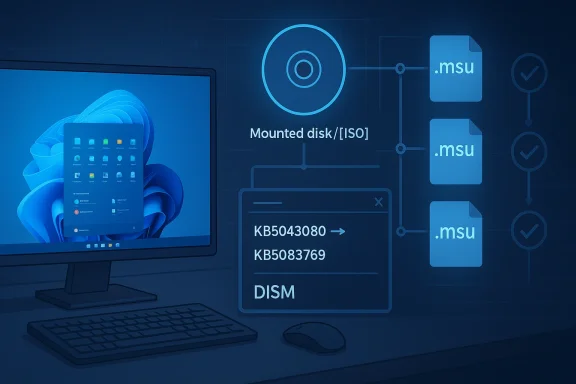
Microsoft’s guidance gives administrators two supported methods for KB5083769. Method 1 is the simpler operational choice: download all MSU files for the KB, put them in one folder, and let DISM discover and install the prerequisite package as needed. Method 2 is more manual: install each MSU individually and strictly in the order Microsoft specifies.The documentation also distinguishes between updating a running PC and servicing installation media. For a live system, Microsoft provides DISM and Add-WindowsPackage examples. For offline media, it points admins to update Windows installation media with Dynamic Update, and it warns that SafeOS or Setup Dynamic Update packages should match the same month as the KB whenever possible. That is an important detail because it signals that image maintenance is still a first-class concern in the Windows ecosystem.
Method 1: one folder, one servicing pass
Method 1 is the cleaner route for most IT teams. By staging all relevant MSU files together, administrators let DISM resolve prerequisite installation in the background while applying the target update. That reduces the chance of human error and is usually easier to automate in scripts or deployment tooling.The appeal of this method is obvious in managed environments. It compresses the decision tree, lowers the risk of installing the wrong package first, and gives administrators a single servicing operation to validate in logs. For many organizations, that is the difference between a controlled rollout and a troubleshooting exercise.
Method 2: explicit order for explicit control
Method 2 exists for teams that prefer full manual control or are working in constrained environments where individual package application is easier to verify. Microsoft’s own order matters here: the prerequisite package, KB5043080, must be applied before KB5083769. The file search results show that the two MSU filenames are explicitly listed in that sequence, which removes ambiguity about how the chain should be installed.That kind of strict sequencing is not a casual recommendation. It usually indicates that the second package depends on servicing state established by the first one, which means skipping, reversing, or collapsing the order can produce inconsistent results. In enterprise change management, those are exactly the scenarios that lead to “it worked on one ring but not another” incidents.
- Download all relevant MSU files before beginning the install.
- Keep every required package in the same folder when using Method 1.
- Apply KB5043080 before KB5083769 if installing individually.
- Use DISM or Add-WindowsPackage to maintain servicing consistency.
- Verify logs after each deployment stage.
Enterprise Deployment Implications
For enterprise IT, the most important lesson here is that update compliance and deployment correctness are no longer the same thing. A device can show as patched in one management layer while still missing a prerequisite or holding a misordered package chain underneath. That is why KB5083769 should be treated as a controlled deployment, not a fire-and-forget patch.The update also reinforces the value of ring-based rollout. Pilot devices, validation rings, and broader production rings can catch package-order problems before they contaminate the whole fleet. In the modern Windows servicing model, those rings are not just about finding bugs; they are about verifying that Microsoft’s install choreography behaves properly inside a real enterprise environment.
Why DISM still matters
DISM is one of those tools that usually gets noticed only when something goes wrong. In releases like KB5083769, though, it becomes central because Microsoft explicitly uses it as a supported way to let the installer resolve prerequisites. That makes DISM not just a troubleshooting utility, but a deployment primitive.For administrators, that matters because DISM gives them a repeatable command path. In a world where updates can arrive as multi-piece packages, repeatability is the difference between compliance and chaos. It is also easier to document, audit, and reproduce when you need to reconstruct what happened on a machine after the fact.
Mixed baselines and why they are dangerous
Mixed baselines are one of the least glamorous problems in Windows operations, but they are among the most expensive. If one cohort gets both packages and another gets only part of the chain, support teams may see inconsistent behavior that looks random from the outside. That creates noise in incident handling and makes root-cause analysis slower than it should be.There is also a compliance angle. Security reporting assumes the patch state is coherent. If a package chain is incomplete, the machine may appear current in one dashboard while failing a lower-level servicing check in another. The result is a false sense of security, which is often worse than an obvious failure because it hides in plain sight.
- Validate the exact package order before automation.
- Keep servicing logs for audit and rollback analysis.
- Use a pilot ring to catch chain-dependency issues.
- Compare reporting across management tools, not just one console.
- Re-check offline images after package injection.
Consumer Impact
Most consumers will never see the package-order complexity that sits behind KB5083769, and that is by design. If Windows Update delivers the package successfully, the user experience is supposed to be boring: install, reboot, move on. In that sense, the best consumer patch is the one that never becomes a topic of conversation.Still, the consumer angle should not be dismissed. The fact that Microsoft publishes explicit offline installation instructions tells us that enthusiasts, home lab users, and repair technicians still matter to the servicing ecosystem. Anyone maintaining an ARM64 machine, a disconnected laptop, or a test image will need to respect the same package order as a corporate admin.
Why enthusiasts should pay attention
Home users often assume package ordering is only an enterprise concern, but that is not always true. If you install from the Update Catalog, rebuild an image, or maintain a dual-boot or recovery workflow, you can run straight into these same sequencing rules. In those cases, the documentation is not abstract policy; it is the difference between a clean install and a failed one.That also means troubleshooting becomes more technical for advanced users. If one MSU installs and the next one fails, the cause may not be corruption or a broken download. It may simply be that the servicing baseline was never properly established, which is why the order matters in the first place.
What ordinary users will notice
For average users, the main visible effect of April’s update will likely be the usual security-update experience: a reboot, a changed build number, and hopefully no drama. The value of the patch is largely preventive and invisible. That invisibility, however, is exactly what consumers want from a monthly security update.There is a caveat, though. When Microsoft relies on controlled sequencing, mistakes in manual installation are more likely to produce error messages or incomplete servicing states. If users are patching by hand, especially on offline systems, they should follow the order exactly rather than assuming the installer will sort it out later.
Image Servicing and Offline Media
Microsoft’s inclusion of installation-media guidance is one of the most useful parts of the KB. It recognizes that Windows is still deployed through mounted images, recovery media, and enterprise provisioning pipelines. That means the April 2026 update is not just a live-system patch; it is part of the image-maintenance lifecycle too.The note about Dynamic Update is especially important. Microsoft advises matching SafeOS Dynamic Update or Setup Dynamic Update packages to the same month as the KB where possible, and using the most recently published version if a same-month package is not available. That is a practical rule that can save administrators from building images with stale setup components.
Offline image maintenance is still strategic
It is easy to think of offline image servicing as a legacy practice, but it is still central in enterprise rollouts, factory imaging, and disaster recovery. A bad image can propagate problems at scale, which is why Microsoft is careful to preserve clear guidance for mounted offline media.That same reality also explains why package order matters so much in image workflows. Once an image is mounted and modified, the cost of a mistake multiplies. A clean installation sequence is therefore not just convenient; it is a safeguard against carrying a bad baseline forward into dozens or hundreds of devices.
Practical image workflow takeaways
Administrators working with installation media should treat the April KB as part of a broader image-health process. The update is not isolated, and Microsoft’s guidance suggests that the supporting Dynamic Update pieces matter nearly as much as the main payload. That is a strong signal that image currency remains an operational priority.- Match Dynamic Update packages to the same month when possible.
- Use the most recent SafeOS or Setup Dynamic Update if needed.
- Mount and service images carefully to avoid stale setup components.
- Confirm the post-service state before reusing an image.
- Keep track of build and package versions in image documentation.
Security Context
Even though the file search results do not enumerate the full April CVE list in the KB excerpt, the security context around this release is easy to understand: Windows 2026 has already seen a brisk pace of vulnerability disclosure and emergency servicing. That means every monthly cumulative update carries more weight than a simple quality rollup would in a calmer cycle.The update also lands near other platform-level maintenance pressure points. The search results note the ongoing Secure Boot certificate rollout and the June 2026 deadline for original certificates. That is not the same thing as a vulnerability fix, but it has the same operational flavor: ignore it, and the cost appears later in a more painful form.
Security is now a choreography problem
Modern Windows security is no longer just about patched binaries. It is about timing, baselines, image state, and whether a package chain is installed in the exact order the servicing stack expects. That is a far more fragile model than the old “download the patch and install it” era, but it is also more capable of supporting Windows at its current scale.In that environment, Microsoft’s method guidance is itself part of the security story. If the install sequence is wrong, the machine may be partially serviced or inconsistently secured. That is why the instructions around DISM and package order should be read as security controls, not merely convenience tips.
Strengths and Opportunities
The biggest strength of KB5083769 is that Microsoft is being explicit about servicing requirements instead of leaving admins to reverse-engineer them. Clear package-order guidance lowers deployment risk, especially in complex enterprise environments where offline images, pilot rings, and automation scripts all intersect. It also gives advanced users a precise, reproducible path to follow rather than a vague “install the update” directive.The update also highlights a broader opportunity for Microsoft: if the company continues to document multi-package servicing this carefully, it can reduce support friction and improve trust in Windows Update. When administrators know exactly how Microsoft expects a patch to be deployed, they can build more reliable processes around it. That matters because reliability is now as much a product feature as any user-facing UI change.
- Clear dependency order reduces install failures.
- DISM support gives admins a repeatable servicing path.
- Offline media guidance helps image teams stay current.
- The update fits modern enterprise automation workflows.
- Explicit instructions reduce guesswork for advanced users.
- Better documentation can improve trust in Windows servicing.
- The package structure reflects a more mature servicing model.
Risks and Concerns
The main concern is that package ordering is easy to get wrong, especially in environments where multiple technicians, scripts, or management tools touch the same deployment. If the prerequisite MSU is skipped or the order is reversed, the result may be a failed install, a partial state, or a support issue that is harder to diagnose than a normal patch failure. That risk is especially important in large fleets where one mistake can propagate quickly.There is also a governance risk. Mixed baselines can make compliance data noisy and may lead teams to believe a system is fully patched when only part of the servicing chain actually landed. That kind of blind spot is exactly what security teams want to avoid, particularly in a month when broader Windows security pressure remains elevated.
- Manual sequencing increases the chance of operator error.
- Partial deployment can create mixed security baselines.
- Offline image workflows are vulnerable to stale components.
- Reporting can look healthy even when servicing is incomplete.
- Troubleshooting becomes harder when multiple tools disagree.
- Strict servicing rules increase admin workload.
- Failure to validate images can spread problems downstream.
Looking Ahead
The most important thing to watch next is whether KB5083769 behaves cleanly across the deployment spectrum. That includes standard Windows Update installs, DISM-driven enterprise rollouts, and offline media servicing. If the patch proves stable in all three paths, it will strengthen Microsoft’s case that the new servicing model is manageable rather than merely complicated.The second item to watch is how this update fits into the June 2026 Secure Boot certificate transition. Microsoft has been staging that change gradually, and April’s baseline likely serves as part of the runway for the rest of the rollout. If certificate readiness continues to advance smoothly, administrators may avoid the kind of last-minute scramble that often makes firmware transitions miserable.
What administrators should monitor
- Whether Method 1 succeeds cleanly across all target devices.
- Whether Method 2 behaves predictably in offline and manual installs.
- Whether image servicing with Dynamic Update stays consistent.
- Whether any fleet segments report mixed or partial baselines.
- Whether Secure Boot certificate rollout continues on schedule.
Source: Microsoft - Message Center April 14, 2026—KB5083769 (OS Builds 26200.8246 and 26100.8246) - Microsoft Support
Last edited:
