

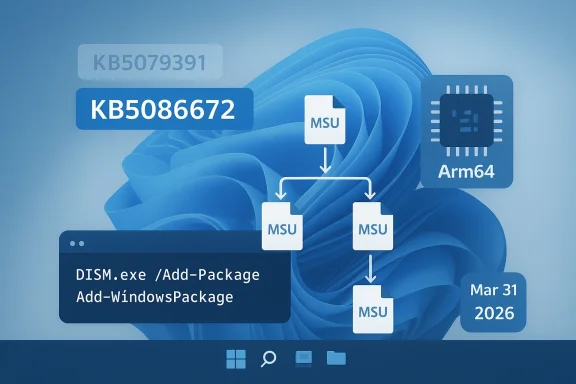
Microsoft has released the March 2026 Windows non-security preview update, and the Arm64 path for manual deployment is more nuanced than a typical single-package MSU. In the update article, Microsoft says the standalone package is available from the Microsoft Update Catalog and that the KB contains multiple MSU files that must be installed in a specific order, either all together with DISM or one-by-one in sequence. The preview release is KB5086672, and it is the fix-up release that follows the late-March out-of-band correction for an installation issue in KB5079391. (support.microsoft.com)
Microsoft’s monthly servicing model now has a fairly predictable rhythm, but the last week of March 2026 is a reminder that predictability is not the same thing as simplicity. The company issued the March 26, 2026 preview update KB5079391 for Windows 11 version 24H2 and 25H2, then replaced it with March 31, 2026 out-of-band update KB5086672 after identifying an installation issue. Microsoft explicitly says KB5079391 is no longer being offered to new devices because KB5086672 includes the same improvements plus a fix for the install problem. (support.microsoft.com)
This matters because preview updates are no longer just “optional quality fixes.” They are often the proving ground for the next month’s security rollup, and Microsoft’s own servicing language makes that clear. The company uses preview releases to validate production-quality improvements before those same changes are folded into the broader monthly update cadence. In practice, that means enterprises, IT admins, and power users who test preview builds are often testing the future shape of Patch Tuesday.
The March 31 OOB release also highlights a less glamorous but operationally important part of Windows maintenance: package choreography. Microsoft says the KB includes multiple MSU files that require installation in order, and it provides two supported methods. One method is to install all packages together from the same folder with DISM, while the other is to install each MSU individually in the correct sequence. That is a strong signal that this is not a “double-click and go” update for every environment. (support.microsoft.com)
For most consumers, Windows Update abstracts all of this away. For IT departments, imaging workflows, offline servicing, and Arm64 fleets, the story is different. The exact package order matters because the servicing stack and prerequisite payloads have to land cleanly before the target update can be applied. Microsoft has been pushing more of this complexity into catalog-based and DISM-based servicing for years, especially as Windows updates have grown more modular and more architecture-specific.
There is also a practical shift in how the update is delivered. Microsoft’s guidance for the Arm64 package makes clear that the standalone payload is distributed via the Update Catalog and may include prerequisite MSU files that must be installed in order. The methods are not unusual in isolation, but the fact that Microsoft spells them out in the KB itself suggests it expects some administrators to need direct package-level handling. (support.microsoft.com)
That means the package order is not a trivial detail. It is the difference between a clean offline install and a failed deployment that leaves the image partially serviced. For enterprise imaging teams, those failures create hidden costs: extra validation cycles, rollback risks, and more time spent auditing whether the servicing state is consistent across machines. That is the part most home users never see. (support.microsoft.com)
Key takeaways:
This is not the first time Microsoft has had to pull a preview and replace it with an out-of-band fix. Windows servicing has become more iterative, and the trade-off is clear: Microsoft can move faster to ship improvements, but the testing burden shifts more heavily onto the release pipeline and early adopters. The preview model gives Microsoft a real-world validation window, but sometimes that window is also where the bugs are found.
There is also a subtle distinction between “optional preview” and “out-of-band” that matters for enterprise policy. Optional previews are normally intended for validation, while out-of-band releases are usually reserved for corrective action outside the normal schedule. When Microsoft repackages a preview’s changes into an OOB update, it is effectively saying the original content was valuable enough to preserve, but the delivery vehicle was not.
The likely operational lesson is simple:
This is part of a wider trend: Windows servicing on Arm64 is no longer exotic, but it still has enough edge cases to demand close attention. Microsoft’s own examples use DISM.exe and Add-WindowsPackage, which are the tools most likely to be used in enterprise imaging, offline servicing, and scripted deployments. Those are not consumer-friendly pathways; they are administrator pathways. (support.microsoft.com)
That matters even more when servicing installation media. Microsoft says dynamic update packages should match the same month as the KB where possible, and if a SafeOS or Setup Dynamic Update from the same month is not available, admins should use the most recently published version of each. That guidance reflects the reality of Windows deployment: servicing images is as much about compatibility alignment as it is about patching. (support.microsoft.com)
Useful admin implications:
Enterprises, however, face a different calculus. A preview release that later turns into an OOB corrective package can disrupt patch windows, change approval logic, and force administrators to revisit test results. If the original preview was already staged in a pilot ring, the new package has to be revalidated, especially if the organization uses offline media or Arm64 hardware. (support.microsoft.com)
The consumer side of the equation is simpler but not irrelevant. Because preview updates are optional, many users never touch them, which reduces exposure to installation regressions. But the same users may later receive the corrective content through a broader release channel, meaning the preview failure still affects them indirectly through timing and perception. That is one reason Microsoft cares so much about preview telemetry.
In short:
Microsoft has also simplified update titles on Windows 11, a sign that it wants the update experience to feel less opaque to ordinary users. Under the new naming scheme, monthly preview non-security updates are identified more cleanly in Settings and update history. That simplification does not change the underlying servicing logic, but it does make the update process feel more approachable and less like a cryptic maintenance ritual.
The March 31 KB fits that pattern exactly. Microsoft kept the content, corrected the packaging problem, and issued a new build number. That is a textbook example of modern Windows servicing: the payload and the delivery mechanism are both subjects of iteration. The lesson for admins is to stop thinking of “the update” as a single artifact. It is often a system of artifacts. (support.microsoft.com)
A practical reading of the model:
That is particularly relevant in an era where Microsoft is trying to make Windows on Arm feel mainstream. The more common Arm64 devices become, the less tolerance there is for confusing manual-install paths or update regressions. A release like KB5086672 is therefore not just a patch; it is part of the trust infrastructure behind a broader platform shift. Trust is the real compatibility layer. (support.microsoft.com)
For endpoint-management vendors, the implication is even sharper. Products that abstract Windows update sequencing, package validation, and offline deployment will look more valuable whenever Microsoft ships a multi-package KB. The admin who can automate the whole chain is less likely to build brittle scripts or rely on manual catalog downloads. That is a small operational win, but over thousands of devices it becomes a major support cost differentiator. (support.microsoft.com)
Bottom line:
The opportunity here is broader than one KB. If Microsoft continues to tighten the preview-to-OOB correction loop, enterprises may gain confidence that troublesome releases will be replaced quickly and cleanly. That could make pilot-ring validation more effective and reduce the fear of testing optional updates. Speed, in this case, is a reliability feature. (support.microsoft.com)
A second concern is that multi-MSU servicing increases the chance of human error. Ordering mistakes, mismatched package versions, or incomplete catalog downloads can turn a routine patch into a lengthy troubleshooting exercise. These risks are manageable, but they are very real in offline or air-gapped environments. (support.microsoft.com)
Finally, there is the broader perception issue: every replace-and-reissue cycle reinforces the idea that Windows updates are complicated. That perception is not always fair, but it is persistent, and it affects IT willingness to adopt preview channels. Microsoft’s challenge is to keep proving that the benefit of early fixes outweighs the inconvenience of occasional reissues.
Main risks to watch:
There is also a broader second-order question: how often will Microsoft need to use out-of-band corrections to repair late-cycle preview problems? One isolated case is an operational blip. A pattern would suggest that the preview pipeline is becoming more important, but also more brittle, as Microsoft layers in more complex update mechanisms. That is the tension at the heart of modern Windows servicing. (support.microsoft.com)
Source: Microsoft - Message Center March 31, 2026—KB5086672 (OS Builds 26200.8117 and 26100.8117) Out-of-band - Microsoft Support
 Background
Microsoft’s monthly servicing model now has a fairly predictable rhythm, but the last week of March 2026 is a reminder that predictability is not the same thing as simplicity. The company issued the March 26, 2026 preview update KB5079391 for Windows 11 version 24H2 and 25H2, then replaced it with March 31, 2026 out-of-band update KB5086672 after identifying an installation issue. Microsoft explicitly says KB5079391 is no longer being offered to new devices because KB5086672 includes the same improvements plus a fix for the install problem. (support.microsoft.com)This matters because preview updates are no longer just “optional quality fixes.” They are often the proving ground for the next month’s security rollup, and Microsoft’s own servicing language makes that clear. The company uses preview releases to validate production-quality improvements before those same changes are folded into the broader monthly update cadence. In practice, that means enterprises, IT admins, and power users who test preview builds are often testing the future shape of Patch Tuesday.
The March 31 OOB release also highlights a less glamorous but operationally important part of Windows maintenance: package choreography. Microsoft says the KB includes multiple MSU files that require installation in order, and it provides two supported methods. One method is to install all packages together from the same folder with DISM, while the other is to install each MSU individually in the correct sequence. That is a strong signal that this is not a “double-click and go” update for every environment. (support.microsoft.com)
For most consumers, Windows Update abstracts all of this away. For IT departments, imaging workflows, offline servicing, and Arm64 fleets, the story is different. The exact package order matters because the servicing stack and prerequisite payloads have to land cleanly before the target update can be applied. Microsoft has been pushing more of this complexity into catalog-based and DISM-based servicing for years, especially as Windows updates have grown more modular and more architecture-specific.
What Microsoft Changed
The headline change is straightforward: KB5086672 is the new March 2026 out-of-band update for Windows 11 version 24H2 and 25H2, and it supersedes the earlier preview KB5079391 for affected devices. Microsoft’s note is explicit that this newer release includes all improvements and features from the preview update while also resolving the installation issue that prompted the replacement. That makes KB5086672 both a fix and a consolidation point. (support.microsoft.com)There is also a practical shift in how the update is delivered. Microsoft’s guidance for the Arm64 package makes clear that the standalone payload is distributed via the Update Catalog and may include prerequisite MSU files that must be installed in order. The methods are not unusual in isolation, but the fact that Microsoft spells them out in the KB itself suggests it expects some administrators to need direct package-level handling. (support.microsoft.com)
Why the sequencing matters
The sequencing requirement is a reminder that not all Windows updates are equally self-contained. In checkpoint-style servicing, one package can depend on another, and Microsoft’s catalog packaging often reflects that dependency chain. The company’s own documentation for checkpoint cumulative updates explains that administrators may need to copy the target MSU from the catalog and service it through DISM or a similar mechanism.That means the package order is not a trivial detail. It is the difference between a clean offline install and a failed deployment that leaves the image partially serviced. For enterprise imaging teams, those failures create hidden costs: extra validation cycles, rollback risks, and more time spent auditing whether the servicing state is consistent across machines. That is the part most home users never see. (support.microsoft.com)
Key takeaways:
- KB5086672 is the replacement for the March 26 preview where the install bug was found. (support.microsoft.com)
- Microsoft says to use either all MSUs together or each MSU in order. (support.microsoft.com)
- The update is especially relevant for Arm64 servicing and offline deployment workflows. (support.microsoft.com)
Why Microsoft Issued an Out-of-Band Release
Out-of-band updates are not just emergency security patches. They are also a way to correct mistakes fast when a monthly release proves problematic. In this case, Microsoft says an installation issue was identified after the preview had already shipped, and KB5086672 was released to address it. That kind of rapid replacement is a sign of a mature servicing pipeline, but it also exposes how quickly a preview can become operationally risky if the package state is not stable. (support.microsoft.com)This is not the first time Microsoft has had to pull a preview and replace it with an out-of-band fix. Windows servicing has become more iterative, and the trade-off is clear: Microsoft can move faster to ship improvements, but the testing burden shifts more heavily onto the release pipeline and early adopters. The preview model gives Microsoft a real-world validation window, but sometimes that window is also where the bugs are found.
From preview to corrective release
The March pattern is instructive. Microsoft first pushed the preview on March 26, 2026, then added a note on March 31, 2026 saying the update is no longer offered to new devices because of the install issue. That timeline suggests the problem was discovered quickly enough to prevent a longer distribution tail, which is good news in one sense and a reminder in another. The faster a bad package is withdrawn, the less damage it can do. (support.microsoft.com)There is also a subtle distinction between “optional preview” and “out-of-band” that matters for enterprise policy. Optional previews are normally intended for validation, while out-of-band releases are usually reserved for corrective action outside the normal schedule. When Microsoft repackages a preview’s changes into an OOB update, it is effectively saying the original content was valuable enough to preserve, but the delivery vehicle was not.
The likely operational lesson is simple:
- Validate preview updates in pilot rings only.
- Watch for replacement KBs before broad rollout.
- Re-test offline and DISM-based servicing paths.
- Assume catalog-served Arm64 packages may need special handling.
What Arm64 Administrators Need to Know
The most interesting detail in Microsoft’s KB is not that the update exists, but that Microsoft chose to document an Arm64-specific manual installation path. The article says the standalone package is available from the Microsoft Update Catalog and that the KB contains one or more MSU files requiring installation in a specific order. For admins managing Surface devices, Arm-based endpoints, or mixed-architecture fleets, that detail can determine whether rollout succeeds on the first try. (support.microsoft.com)This is part of a wider trend: Windows servicing on Arm64 is no longer exotic, but it still has enough edge cases to demand close attention. Microsoft’s own examples use DISM.exe and Add-WindowsPackage, which are the tools most likely to be used in enterprise imaging, offline servicing, and scripted deployments. Those are not consumer-friendly pathways; they are administrator pathways. (support.microsoft.com)
DISM, Add-WindowsPackage, and offline media
Microsoft provides two methods for applying the package chain. The first is to place all MSU files in one folder and point DISM at the target package so it can discover and install prerequisite MSUs automatically. The second is to install the files individually in order. In both cases, the logic is the same: satisfy dependencies before applying the target update. (support.microsoft.com)That matters even more when servicing installation media. Microsoft says dynamic update packages should match the same month as the KB where possible, and if a SafeOS or Setup Dynamic Update from the same month is not available, admins should use the most recently published version of each. That guidance reflects the reality of Windows deployment: servicing images is as much about compatibility alignment as it is about patching. (support.microsoft.com)
Useful admin implications:
- Use the Microsoft Update Catalog package chain, not arbitrary copies. (support.microsoft.com)
- Apply the packages in the documented order if you are not using bundle discovery. (support.microsoft.com)
- Keep dynamic update packages month-aligned when preparing installation media. (support.microsoft.com)
- Treat offline servicing as a dependency-sensitive workflow, not a one-click task. (support.microsoft.com)
Consumers vs Enterprises
For consumers, the practical message is reassuring: if the update appears in Windows Update, the servicing complexity is invisible unless something goes wrong. Most users will simply see an optional update, install it, and move on. Microsoft’s standard guidance still points home users toward Settings > Windows Update > Optional updates, which remains the easiest route for non-managed devices.Enterprises, however, face a different calculus. A preview release that later turns into an OOB corrective package can disrupt patch windows, change approval logic, and force administrators to revisit test results. If the original preview was already staged in a pilot ring, the new package has to be revalidated, especially if the organization uses offline media or Arm64 hardware. (support.microsoft.com)
The enterprise burden
In a managed environment, the issue is not just whether the update works. It is whether it works in the organization’s specific chain of dependencies, baselines, and deployment tooling. A package that installs cleanly in Windows Update may behave differently when staged through Configuration Manager, WSUS, DISM, or an image pipeline. That is why the Microsoft KB’s package-order guidance is more than technical trivia; it is deployment insurance. (support.microsoft.com)The consumer side of the equation is simpler but not irrelevant. Because preview updates are optional, many users never touch them, which reduces exposure to installation regressions. But the same users may later receive the corrective content through a broader release channel, meaning the preview failure still affects them indirectly through timing and perception. That is one reason Microsoft cares so much about preview telemetry.
In short:
- Consumers benefit from the update being hidden behind optional update workflows.
- Enterprises need to re-test deployment pipelines when a preview is replaced. (support.microsoft.com)
- Arm64 fleets have the most reason to read the KB carefully. (support.microsoft.com)
The Bigger Servicing Pattern
This release is also a good example of how Microsoft has restructured Windows quality updates around more frequent, more flexible correction cycles. The company moved to a monthly preview rhythm in 2023, with optional non-security updates generally landing in the fourth week of the month. Since then, preview releases have become an important test bed for reliability fixes, user-experience changes, and sometimes features that later flow into the security release channel.Microsoft has also simplified update titles on Windows 11, a sign that it wants the update experience to feel less opaque to ordinary users. Under the new naming scheme, monthly preview non-security updates are identified more cleanly in Settings and update history. That simplification does not change the underlying servicing logic, but it does make the update process feel more approachable and less like a cryptic maintenance ritual.
Preview updates as product telemetry
Preview releases are increasingly a measurement tool as much as a delivery mechanism. They let Microsoft observe whether a fix causes regressions, whether a servicing stack behaves correctly, and whether hidden dependencies break in the field. That feedback loop is especially important now that Windows updates may include checkpoint-style package sequencing and other packaging constraints.The March 31 KB fits that pattern exactly. Microsoft kept the content, corrected the packaging problem, and issued a new build number. That is a textbook example of modern Windows servicing: the payload and the delivery mechanism are both subjects of iteration. The lesson for admins is to stop thinking of “the update” as a single artifact. It is often a system of artifacts. (support.microsoft.com)
A practical reading of the model:
- Microsoft now treats preview updates as production-quality validation vehicles.
- Replacement OOBs are part of the normal correction cycle, not an exception. (support.microsoft.com)
- Update titles may be simpler, but update mechanics remain deeply technical.
Competitive and Market Implications
Windows servicing changes rarely stay inside the Windows ecosystem. They affect OEMs, endpoint-management vendors, and even hardware strategists because update reliability influences what kinds of devices enterprises are willing to buy. If Arm64 updates require careful sequencing, vendors shipping Arm-based systems must ensure their imaging and deployment guidance is equally clear. Otherwise, the hardware pitch gets undermined by the servicing story. (support.microsoft.com)That is particularly relevant in an era where Microsoft is trying to make Windows on Arm feel mainstream. The more common Arm64 devices become, the less tolerance there is for confusing manual-install paths or update regressions. A release like KB5086672 is therefore not just a patch; it is part of the trust infrastructure behind a broader platform shift. Trust is the real compatibility layer. (support.microsoft.com)
Why rivals should care
From a market perspective, a dependable servicing cadence is a competitive advantage for Windows against any platform that emphasizes simplicity. Enterprise buyers may forgive a complex patch workflow if the ecosystem is robust, but they are far less forgiving when update failures show up during imaging or rollback. Microsoft’s willingness to document package ordering is a sign of seriousness, yet it also exposes complexity that competitors can market against. (support.microsoft.com)For endpoint-management vendors, the implication is even sharper. Products that abstract Windows update sequencing, package validation, and offline deployment will look more valuable whenever Microsoft ships a multi-package KB. The admin who can automate the whole chain is less likely to build brittle scripts or rely on manual catalog downloads. That is a small operational win, but over thousands of devices it becomes a major support cost differentiator. (support.microsoft.com)
Bottom line:
- Update reliability shapes hardware adoption and platform trust. (support.microsoft.com)
- Multi-package servicing increases demand for management tooling. (support.microsoft.com)
- Clear Microsoft guidance can reduce friction, but it also reveals where the complexity lives. (support.microsoft.com)
Strengths and Opportunities
Microsoft’s response to the March preview problem shows that the servicing organization can detect, correct, and reissue a problematic update quickly. That speed is a strength, and it reduces the odds that a flawed preview becomes a broader deployment headache. The KB also gives administrators explicit, tool-based guidance, which is far better than leaving them to guess at the package chain. (support.microsoft.com)The opportunity here is broader than one KB. If Microsoft continues to tighten the preview-to-OOB correction loop, enterprises may gain confidence that troublesome releases will be replaced quickly and cleanly. That could make pilot-ring validation more effective and reduce the fear of testing optional updates. Speed, in this case, is a reliability feature. (support.microsoft.com)
- Rapid correction of the March preview issue. (support.microsoft.com)
- Clear multi-path install guidance for admins. (support.microsoft.com)
- Better alignment with offline servicing workflows. (support.microsoft.com)
- Stronger confidence for Arm64 deployment planning. (support.microsoft.com)
- Continued maturation of Microsoft’s preview update model.
- Improved clarity through Microsoft’s simplified update naming effort.
Risks and Concerns
The biggest concern is that replacement updates can still disrupt trust, especially when a preview has already been evaluated, staged, or documented internally. Even when Microsoft fixes the problem quickly, IT teams have to re-check deployment scripts, confirm that the new package chain behaves correctly, and make sure the old preview is not lingering in any automation. That creates friction nobody wanted. (support.microsoft.com)A second concern is that multi-MSU servicing increases the chance of human error. Ordering mistakes, mismatched package versions, or incomplete catalog downloads can turn a routine patch into a lengthy troubleshooting exercise. These risks are manageable, but they are very real in offline or air-gapped environments. (support.microsoft.com)
Operational fragility
There is also a communication risk. When Microsoft withdraws one update and replaces it with another days later, less experienced admins may not realize the original release should be abandoned. The KB helps, but organizations still need internal hygiene to track which KBs were superseded and which ones remain approved. That governance layer is easy to neglect and expensive to ignore. (support.microsoft.com)Finally, there is the broader perception issue: every replace-and-reissue cycle reinforces the idea that Windows updates are complicated. That perception is not always fair, but it is persistent, and it affects IT willingness to adopt preview channels. Microsoft’s challenge is to keep proving that the benefit of early fixes outweighs the inconvenience of occasional reissues.
Main risks to watch:
- Confusion over which KB is current. (support.microsoft.com)
- Sequencing mistakes in manual install workflows. (support.microsoft.com)
- Revalidation overhead for enterprise rings. (support.microsoft.com)
- Offline servicing failures in image-based deployments. (support.microsoft.com)
- Trust erosion if preview replacements become frequent.
Looking Ahead
The next few weeks will tell us whether KB5086672 behaves like a clean corrective release or just another link in an increasingly intricate servicing chain. The key question is not whether it installs on a well-maintained test PC, but whether it deploys consistently across the varied environments that define modern Windows use: Arm64 laptops, offline images, managed desktops, and update-controlled enterprise fleets. If it does, Microsoft will have contained the issue effectively. (support.microsoft.com)There is also a broader second-order question: how often will Microsoft need to use out-of-band corrections to repair late-cycle preview problems? One isolated case is an operational blip. A pattern would suggest that the preview pipeline is becoming more important, but also more brittle, as Microsoft layers in more complex update mechanisms. That is the tension at the heart of modern Windows servicing. (support.microsoft.com)
What to watch next
- Whether Microsoft publishes any follow-up guidance for deployment teams. (support.microsoft.com)
- Whether the Microsoft Update Catalog package chain remains stable across architectures. (support.microsoft.com)
- Whether enterprise admins report successful offline servicing with the documented order. (support.microsoft.com)
- Whether KB5086672 becomes the baseline for the May security update’s non-security content. (support.microsoft.com)
- Whether Microsoft’s simplified naming makes update triage easier for end users.
Source: Microsoft - Message Center March 31, 2026—KB5086672 (OS Builds 26200.8117 and 26100.8117) Out-of-band - Microsoft Support
