

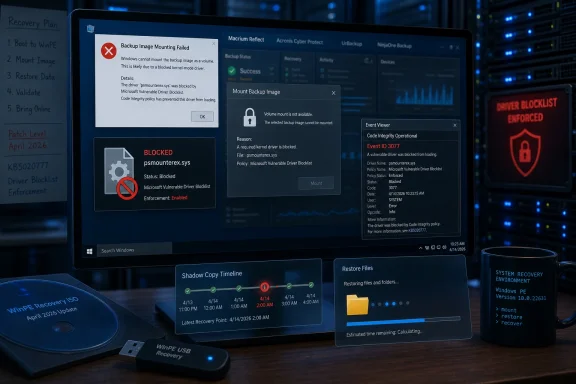
Microsoft confirmed that Windows security updates released on or after April 14, 2026, including KB5083769, can break disk-image mounting and related restore workflows in Macrium Reflect, Acronis Cyber Protect Cloud, UrBackup Server, and NinjaOne Backup by blocking psmounterex.sys. The company is not treating this as an accidental patch defect, but as the expected consequence of enforcing its vulnerable driver blocklist against a kernel component with a known privilege-escalation flaw. That distinction matters, because it tells administrators not to wait for Microsoft to simply roll the change back. The fix now lives with backup vendors, while the risk sits squarely with anyone whose recovery plan depends on an old driver Windows has decided should no longer load.
The uncomfortable truth in this incident is that both sides of the failure are real. Backup software is supposed to be the last line of defense when a workstation dies, ransomware detonates, or a server update goes sideways. A Windows security update that breaks backup-image mounting therefore lands with a special kind of operational irony.
But Microsoft’s explanation also makes clear why the company is unlikely to retreat. The April 2026 security updates added vulnerable versions of
That puts this story in the larger category of bring-your-own-vulnerable-driver attacks, not merely “Windows Update broke my app.” Attackers prize signed kernel drivers because they provide a way to turn a legitimate trust relationship into ring-zero control. Once a vulnerable driver is loaded, the distinction between “patched operating system” and “compromised machine” can collapse quickly.
Microsoft’s position is blunt: vulnerable versions of the driver will remain blocked. Applications that depend on the driver will keep failing until they are updated to use a safer implementation. For IT teams, that changes the incident response question from “Should we uninstall KB5083769?” to “How fast can we validate a backup product build that no longer depends on the blocked driver?”
Image-mounting is the mundane miracle that lets administrators treat a backup file as a readable volume. It is what turns a disaster recovery image into a browsable source for extracting one executive’s missing folder, one deleted database file, or one configuration directory from a previous state. If that layer fails, the backup repository can look healthy from a dashboard while the practical restore workflow is broken.
The affected products named in Microsoft’s support note and subsequent reporting include Macrium Reflect, Acronis Cyber Protect Cloud, UrBackup Server, and NinjaOne Backup. That list spans consumer power-user software, MSP tooling, small-business backup stacks, and enterprise-flavored cyber protection services. In other words, this is not confined to hobbyist imaging utilities or obscure freeware.
The diagnostic signature is also unusually specific. Administrators can look in Event Viewer under the Code Integrity Operational log for Event ID 3077, where Windows records that
That specificity is useful, but it also exposes a familiar Windows management problem. Many organizations discover restore fragility only when a restore is attempted. A green backup status is comforting, but it is not proof that image mounting, granular recovery, and bare-metal restoration still work after Patch Tuesday.
That is why the blocklist has become a hardening feature rather than an optional curiosity. It gives Microsoft a way to say: even if this driver is signed, and even if some application still ships it, Windows should refuse to load it because the security risk is known. In the abstract, most administrators would endorse that policy.
The problem is that kernel drivers are often invisible dependencies. A business may think it standardized on a backup product, not on a particular third-party driver inside that product. The driver may have been bundled years ago, inherited through a component vendor, or kept for compatibility with older image formats. When Microsoft blocks the driver, the dependency suddenly becomes visible in the most disruptive possible way.
This is the tradeoff modern Windows security keeps forcing into the open. The platform cannot both tolerate old kernel attack surface indefinitely and guarantee that every legacy integration will keep working. The more Microsoft hardens Windows at the kernel boundary, the more it will expose software that relies on aging privileged components.
That does not absolve Microsoft of responsibility for communication. Backup software is infrastructure, not decoration. If a blocklist update is likely to affect widely deployed recovery tools, the ideal path is early warning, vendor coordination, and clear administrative detection guidance before Patch Tuesday lights up help desks. Microsoft has supplied guidance now, but many administrators are encountering it only after jobs fail.
Backup agents are not applications administrators casually upgrade across a fleet. They sit near storage, VSS, file-system filters, authentication, encryption, retention policies, and disaster recovery workflows. A bad backup-agent update can be almost as dangerous as no update at all, because it may silently change what is protected, how restores behave, or whether old images remain accessible.
That is why the vendor side of this incident matters as much as Microsoft’s blocklist decision. Macrium, Acronis, UrBackup, and NinjaOne customers now need clear version guidance, not vague reassurance. They need to know which builds contain the vulnerable driver, which builds replace it, whether old recovery media is affected, and whether historical image files remain mountable from updated tools.
There is also a thornier question: what happens to existing backup chains? If a customer has months of images created by software that used
The phrase update your backup software is accurate, but it underplays the number of places where backup software lives. There may be agents on endpoints, management consoles, bootable rescue media, WinPE environments, technician USB drives, and documentation that assumes an older restore path. A patched production machine with an unpatched recovery ISO is the sort of detail that turns a manageable incident into a weekend outage.
This matters because administrators have muscle memory around VSS troubleshooting. They restart services, inspect writers, clear stale snapshots, check storage providers, and rerun jobs. Those steps may be reasonable first moves in an ordinary backup incident, but they do not fix a Code Integrity block. If Windows refuses to load the driver a backup workflow depends on, no amount of VSS ritual will make that driver acceptable again.
The clean diagnostic path is to correlate the backup error with Code Integrity logs. Event ID 3077 is the key signal. If the log shows
That distinction should shape escalation, too. A support ticket that says “VSS timeout after KB5083769” can go in circles. A ticket that says “Code Integrity enforcement blocked
But it solves the wrong problem. The blocked driver is not a random file caught in a false positive; Microsoft says it is a known vulnerable kernel driver. Re-enabling it restores the attack surface the April security update was meant to close. In environments where ransomware is a first-order risk, reviving a vulnerable kernel primitive to keep backup software happy is a dangerous bargain.
Unofficial registry workarounds that weaken blocklist enforcement fall into the same category. They may get a mounting workflow moving again, but they do so by asking Windows to accept the very driver class it has been told to reject. That is not a fix; it is a waiver.
The more defensible interim posture is narrower. Confirm whether backup creation still works. Test whether restores fail only on patched endpoints or also inside recovery media. Identify affected product versions. Then push the vendor for a supported build and validated migration path. If an emergency restore is required before a vendor update exists, organizations should document the exception, isolate the process, and understand they are accepting kernel-level risk.
This is where consumer advice and enterprise advice diverge. A home user may update Macrium or Acronis and move on. An IT department has to preserve evidence, assess fleet exposure, maintain restore readiness, and avoid introducing a security exception that quietly persists for years.
That is the contradiction Microsoft has been unable to smooth out. Patch faster, because attackers move quickly. Test longer, because business-critical workflows break. Enforce kernel hardening, because vulnerable drivers are dangerous. Preserve compatibility, because backup and recovery software is sacred infrastructure.
In theory, staged deployment solves this. In practice, the pressure on administrators is more complicated. Security teams want the April update deployed because it closes real risk. Operations teams want time to validate backup restores, BitLocker recovery behavior, line-of-business apps, and management tooling. Executives want both and often fund neither.
The vulnerable-driver blocklist makes that tension sharper because its failures can be delayed or workflow-specific. A system may boot fine, open Office fine, browse the web fine, and report a successful backup job. The failure may not reveal itself until someone tries to mount an image, browse a restore point, or perform a recovery task under pressure.
That is why this incident should change patch validation scripts. A monthly Windows update test ring that checks only boot success, VPN connectivity, and common applications is no longer enough. If an organization depends on image-based backups, the test ring must include a mount-and-restore exercise after cumulative updates land.
Recovery theater is common because backup validation is expensive and unglamorous. It consumes storage, time, and attention. It requires administrators to simulate failure when everyone is busy keeping production alive. Yet this incident is a reminder that the restore is the product. A backup that cannot be mounted, browsed, or restored when needed is an archive with aspirations.
There is a cultural issue here, too. Many organizations still treat backup software as a utility rather than a security dependency. Ransomware changed that. Backup agents, snapshot services, kernel drivers, immutable repositories, and recovery media are now part of the defensive stack. If one of those pieces relies on a vulnerable kernel driver, security teams have a legitimate reason to care.
Microsoft’s decision therefore forces a healthier but painful conversation between endpoint security and backup operations. The backup team cannot assume privileged drivers will be tolerated forever because they are useful. The security team cannot assume blocklist enforcement is operationally free because it is correct. Both need to know where the recovery path crosses the kernel boundary.
For Windows enthusiasts and small-office admins, the lesson is less bureaucratic but just as important. Do not merely check that your scheduled backup ran. Try mounting the image. Try restoring a file. Keep rescue media current. If you cannot prove the restore path still works after Patch Tuesday, you do not yet know whether you have a backup.
Source: WinBuzzer Microsoft Confirms KB5083769 Breaks Macrium and Acronis Backups
 Microsoft Chose Kernel Safety Over Backup Compatibility
The uncomfortable truth in this incident is that both sides of the failure are real. Backup software is supposed to be the last line of defense when a workstation dies, ransomware detonates, or a server update goes sideways. A Windows security update that breaks backup-image mounting therefore lands with a special kind of operational irony.But Microsoft’s explanation also makes clear why the company is unlikely to retreat. The April 2026 security updates added vulnerable versions of
psmounterex.sys to the Microsoft Vulnerable Driver Blocklist, the mechanism Windows uses to prevent known-dangerous kernel drivers from loading. The driver is associated with CVE-2023-43896, a high-severity buffer overflow that can allow local privilege escalation or arbitrary code execution.That puts this story in the larger category of bring-your-own-vulnerable-driver attacks, not merely “Windows Update broke my app.” Attackers prize signed kernel drivers because they provide a way to turn a legitimate trust relationship into ring-zero control. Once a vulnerable driver is loaded, the distinction between “patched operating system” and “compromised machine” can collapse quickly.
Microsoft’s position is blunt: vulnerable versions of the driver will remain blocked. Applications that depend on the driver will keep failing until they are updated to use a safer implementation. For IT teams, that changes the incident response question from “Should we uninstall KB5083769?” to “How fast can we validate a backup product build that no longer depends on the blocked driver?”
The Broken Piece Is Not Always the Backup Job
One reason this regression is messy is that “backup failure” is an imprecise phrase. Microsoft’s own guidance says full image backup creation may still succeed in some environments, while mounting a backup image as a virtual drive, browsing it, or restoring from it may fail. That is a crucial distinction, because a backup that can be created but not mounted on demand is only half a recovery strategy.Image-mounting is the mundane miracle that lets administrators treat a backup file as a readable volume. It is what turns a disaster recovery image into a browsable source for extracting one executive’s missing folder, one deleted database file, or one configuration directory from a previous state. If that layer fails, the backup repository can look healthy from a dashboard while the practical restore workflow is broken.
The affected products named in Microsoft’s support note and subsequent reporting include Macrium Reflect, Acronis Cyber Protect Cloud, UrBackup Server, and NinjaOne Backup. That list spans consumer power-user software, MSP tooling, small-business backup stacks, and enterprise-flavored cyber protection services. In other words, this is not confined to hobbyist imaging utilities or obscure freeware.
The diagnostic signature is also unusually specific. Administrators can look in Event Viewer under the Code Integrity Operational log for Event ID 3077, where Windows records that
psmounterex.sys was blocked in enforcement mode. The relevant policy ID, {D2BDA982-CCF6-4344-AC5B-0B44427B6816}, is the breadcrumb that separates this incident from generic VSS instability, storage-driver trouble, or a vendor’s own backup-service crash.That specificity is useful, but it also exposes a familiar Windows management problem. Many organizations discover restore fragility only when a restore is attempted. A green backup status is comforting, but it is not proof that image mounting, granular recovery, and bare-metal restoration still work after Patch Tuesday.
The Driver Blocklist Is Doing Exactly What It Was Built to Do
The Microsoft Vulnerable Driver Blocklist exists because Windows’ historical driver trust model was too generous for the threat landscape it now faces. For years, signed drivers were treated as a marker of legitimacy, but attackers learned to abuse legitimately signed drivers with exploitable flaws. A signed kernel module with a memory corruption bug can be just as useful to an intruder as unsigned malware, and sometimes more useful because it comes wrapped in credibility.That is why the blocklist has become a hardening feature rather than an optional curiosity. It gives Microsoft a way to say: even if this driver is signed, and even if some application still ships it, Windows should refuse to load it because the security risk is known. In the abstract, most administrators would endorse that policy.
The problem is that kernel drivers are often invisible dependencies. A business may think it standardized on a backup product, not on a particular third-party driver inside that product. The driver may have been bundled years ago, inherited through a component vendor, or kept for compatibility with older image formats. When Microsoft blocks the driver, the dependency suddenly becomes visible in the most disruptive possible way.
This is the tradeoff modern Windows security keeps forcing into the open. The platform cannot both tolerate old kernel attack surface indefinitely and guarantee that every legacy integration will keep working. The more Microsoft hardens Windows at the kernel boundary, the more it will expose software that relies on aging privileged components.
That does not absolve Microsoft of responsibility for communication. Backup software is infrastructure, not decoration. If a blocklist update is likely to affect widely deployed recovery tools, the ideal path is early warning, vendor coordination, and clear administrative detection guidance before Patch Tuesday lights up help desks. Microsoft has supplied guidance now, but many administrators are encountering it only after jobs fail.
Backup Vendors Now Own the Last Mile
Microsoft’s recommended fix is simple in wording and complicated in practice: update the backup application. That means installing a version that no longer relies on the vulnerable blocked driver, or that ships a protected driver implementation acceptable to Windows Code Integrity enforcement. For a home user, that may be a straightforward product update. For an MSP or enterprise admin, it becomes a validation project.Backup agents are not applications administrators casually upgrade across a fleet. They sit near storage, VSS, file-system filters, authentication, encryption, retention policies, and disaster recovery workflows. A bad backup-agent update can be almost as dangerous as no update at all, because it may silently change what is protected, how restores behave, or whether old images remain accessible.
That is why the vendor side of this incident matters as much as Microsoft’s blocklist decision. Macrium, Acronis, UrBackup, and NinjaOne customers now need clear version guidance, not vague reassurance. They need to know which builds contain the vulnerable driver, which builds replace it, whether old recovery media is affected, and whether historical image files remain mountable from updated tools.
There is also a thornier question: what happens to existing backup chains? If a customer has months of images created by software that used
psmounterex.sys for mounting, the immediate fix may be a new application build, but the operational concern is old restore data. Enterprises will want to test whether updated tools can mount older images without the blocked driver, and whether offline recovery environments need to be rebuilt.The phrase update your backup software is accurate, but it underplays the number of places where backup software lives. There may be agents on endpoints, management consoles, bootable rescue media, WinPE environments, technician USB drives, and documentation that assumes an older restore path. A patched production machine with an unpatched recovery ISO is the sort of detail that turns a manageable incident into a weekend outage.
VSS Errors Are the Symptom, Not the Diagnosis
Some affected systems surface the problem as Volume Shadow Copy Service timeouts or errors such asVSS_E_BAD_STATE. That is technically useful but operationally misleading. VSS is often where Windows backup failures become visible, but it is not necessarily where the root cause lives.This matters because administrators have muscle memory around VSS troubleshooting. They restart services, inspect writers, clear stale snapshots, check storage providers, and rerun jobs. Those steps may be reasonable first moves in an ordinary backup incident, but they do not fix a Code Integrity block. If Windows refuses to load the driver a backup workflow depends on, no amount of VSS ritual will make that driver acceptable again.
The clean diagnostic path is to correlate the backup error with Code Integrity logs. Event ID 3077 is the key signal. If the log shows
psmounterex.sys being blocked, the failure belongs in the April 2026 vulnerable-driver blocklist bucket, not in the generic VSS swamp.That distinction should shape escalation, too. A support ticket that says “VSS timeout after KB5083769” can go in circles. A ticket that says “Code Integrity enforcement blocked
psmounterex.sys with Event ID 3077 after April 14, 2026 updates” gives the vendor and administrator a concrete compatibility target.Uninstalling the Patch Solves the Wrong Problem
The temptation to roll back KB5083769 is understandable. When backups break after a Windows update, the shortest path to restoring service often appears to be removing the update and returning to yesterday’s known-good state. In a purely operational sense, that may even work.But it solves the wrong problem. The blocked driver is not a random file caught in a false positive; Microsoft says it is a known vulnerable kernel driver. Re-enabling it restores the attack surface the April security update was meant to close. In environments where ransomware is a first-order risk, reviving a vulnerable kernel primitive to keep backup software happy is a dangerous bargain.
Unofficial registry workarounds that weaken blocklist enforcement fall into the same category. They may get a mounting workflow moving again, but they do so by asking Windows to accept the very driver class it has been told to reject. That is not a fix; it is a waiver.
The more defensible interim posture is narrower. Confirm whether backup creation still works. Test whether restores fail only on patched endpoints or also inside recovery media. Identify affected product versions. Then push the vendor for a supported build and validated migration path. If an emergency restore is required before a vendor update exists, organizations should document the exception, isolate the process, and understand they are accepting kernel-level risk.
This is where consumer advice and enterprise advice diverge. A home user may update Macrium or Acronis and move on. An IT department has to preserve evidence, assess fleet exposure, maintain restore readiness, and avoid introducing a security exception that quietly persists for years.
April’s Patch Cycle Exposed the Cost of Compressed Trust
The KB5083769 backup story arrived amid a broader April 2026 patch cycle that administrators were already treating with suspicion. Reports around the same update family included BitLocker recovery prompts, boot loops on some systems, server-side trouble, RDP-related behavior changes, and other enterprise irritants. Not every reported symptom belongs to the same root cause, but they share the same administrative experience: a security update that demands urgency also demands caution.That is the contradiction Microsoft has been unable to smooth out. Patch faster, because attackers move quickly. Test longer, because business-critical workflows break. Enforce kernel hardening, because vulnerable drivers are dangerous. Preserve compatibility, because backup and recovery software is sacred infrastructure.
In theory, staged deployment solves this. In practice, the pressure on administrators is more complicated. Security teams want the April update deployed because it closes real risk. Operations teams want time to validate backup restores, BitLocker recovery behavior, line-of-business apps, and management tooling. Executives want both and often fund neither.
The vulnerable-driver blocklist makes that tension sharper because its failures can be delayed or workflow-specific. A system may boot fine, open Office fine, browse the web fine, and report a successful backup job. The failure may not reveal itself until someone tries to mount an image, browse a restore point, or perform a recovery task under pressure.
That is why this incident should change patch validation scripts. A monthly Windows update test ring that checks only boot success, VPN connectivity, and common applications is no longer enough. If an organization depends on image-based backups, the test ring must include a mount-and-restore exercise after cumulative updates land.
The Real Risk Is Recovery Theater
The worst outcome is not that a backup job fails loudly. Loud failures are irritating but useful. The worse outcome is recovery theater: dashboards show protected endpoints, backup repositories fill up on schedule, compliance reports look clean, and nobody notices that a critical restore path has been severed.Recovery theater is common because backup validation is expensive and unglamorous. It consumes storage, time, and attention. It requires administrators to simulate failure when everyone is busy keeping production alive. Yet this incident is a reminder that the restore is the product. A backup that cannot be mounted, browsed, or restored when needed is an archive with aspirations.
There is a cultural issue here, too. Many organizations still treat backup software as a utility rather than a security dependency. Ransomware changed that. Backup agents, snapshot services, kernel drivers, immutable repositories, and recovery media are now part of the defensive stack. If one of those pieces relies on a vulnerable kernel driver, security teams have a legitimate reason to care.
Microsoft’s decision therefore forces a healthier but painful conversation between endpoint security and backup operations. The backup team cannot assume privileged drivers will be tolerated forever because they are useful. The security team cannot assume blocklist enforcement is operationally free because it is correct. Both need to know where the recovery path crosses the kernel boundary.
For Windows enthusiasts and small-office admins, the lesson is less bureaucratic but just as important. Do not merely check that your scheduled backup ran. Try mounting the image. Try restoring a file. Keep rescue media current. If you cannot prove the restore path still works after Patch Tuesday, you do not yet know whether you have a backup.
The April Backup Break Leaves Administrators With Five Concrete Moves
The immediate story is aboutpsmounterex.sys, but the durable lesson is about validation. Microsoft has made clear that the driver will remain on the blocklist, so the operational path forward is not to argue Windows into trusting it again. It is to inventory, update, and test the recovery chain end to end.- Administrators should check the Code Integrity Operational log for Event ID 3077 before spending hours on generic VSS troubleshooting.
- Organizations using Macrium Reflect, Acronis Cyber Protect Cloud, UrBackup Server, or NinjaOne Backup should identify affected versions and track vendor builds that replace or remediate the blocked driver.
- Backup validation should include mounting an image, browsing its contents, and restoring sample files after Windows cumulative updates are deployed to test rings.
- Recovery media, technician tools, and offline restore environments should be updated alongside installed backup agents, because old boot media may preserve old assumptions.
- Disabling the vulnerable driver blocklist or uninstalling the April security update should be treated as a documented emergency exception, not a routine workaround.
- Security and backup teams should jointly review any product that ships kernel drivers, because signed does not automatically mean safe.
Source: WinBuzzer Microsoft Confirms KB5083769 Breaks Macrium and Acronis Backups
