

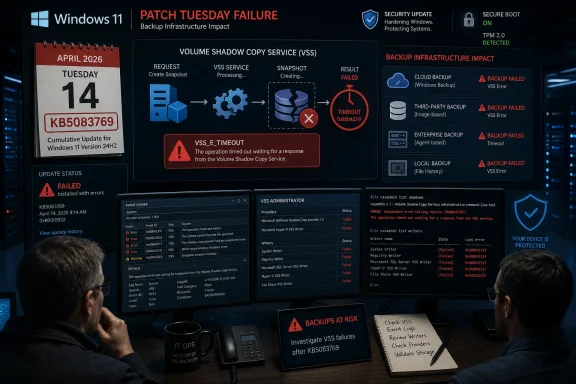
Microsoft’s April 14, 2026 security update KB5083769 for Windows 11 versions 24H2 and 25H2 is being blamed by users and backup vendors for breaking VSS-dependent backup jobs across products including Acronis Cyber Protect Cloud, Macrium Reflect, NinjaOne Backup, and UrBackup. The uncomfortable part is not merely that a Patch Tuesday release appears to have damaged backups; it is that the damage lands precisely where administrators expect Windows to be most boring. VSS is not a shiny shell feature, an AI sidebar, or a new Start menu experiment. It is plumbing — and when plumbing fails, every carefully written disaster-recovery policy starts to look theoretical.
Every Windows update regression has a constituency. Gamers notice frame-rate drops, admins notice broken VPN clients, and help desks notice printers with the timing of people who have meetings in ten minutes. But backup failures sit in a different category, because they undermine the thing IT depends on when everything else has already gone wrong.
KB5083769 is not an obscure optional preview. It is the April 2026 cumulative security update for Windows 11 24H2 and 25H2, carrying OS builds 26100.8246 and 26200.8246. Microsoft’s own release notes frame it as a conventional Patch Tuesday package: latest security fixes, quality improvements, servicing-stack changes, Secure Boot certificate work, and fixes inherited from prior March releases.
That context matters. Administrators are trained, often painfully, to treat monthly security updates as non-negotiable. Delaying patches invites exposure; deploying them invites regression. The bargain works only if the baseline operating system services underneath the stack remain dependable.
The reported failure mode is grimly familiar to anyone who has debugged Windows backup jobs: the backup product starts, requests a snapshot, waits for VSS, and eventually dies with a timeout or snapshot-creation failure. In Acronis’ case, the reported message says the backup failed because Microsoft VSS timed out during snapshot creation. UrBackup users have described file backups stalling after the update. Macrium users have reported VSS-related snapshot problems. MSPs have also reported NinjaOne Backup issues on affected Windows 11 endpoints.
The word “reported” is doing work here. As of May 1, Microsoft’s public KB page for KB5083769 lists known issues involving BitLocker recovery prompts on certain managed devices and Remote Desktop warning-display glitches, but it does not list a VSS backup-breakage issue. That leaves administrators in the familiar gray zone between vendor advisories, community reports, and the official Windows release-health record.
The old joke is that nobody cares about backups; they care about restores. VSS sits directly in that gap. It is the broker between the operating system, applications, storage providers, and backup agents. When it behaves, the user sees a green check mark in a backup console. When it does not, the backup vendor suddenly becomes the face of an operating-system failure it may not control.
That is why this incident cuts deeper than a broken app compatibility shim. Backup products from different vendors do not normally fail in the same way unless they are leaning on a shared substrate. In this case, the shared substrate appears to be VSS snapshot creation on Windows 11 after KB5083769.
For home users, that might mean a failed Macrium Reflect image or an Acronis job that silently becomes tomorrow’s problem. For businesses, it can mean missed recovery-point objectives, failed compliance evidence, and backup dashboards that turn red across an endpoint fleet. For MSPs, it can mean a week of uncomfortable customer conversations in which “the security update broke backups” sounds like an excuse even when it is probably true.
The broader industry has spent years telling organizations to assume compromise, harden identity, segment networks, and maintain immutable backups. That advice is still correct. But it assumes the client systems can still produce a consistent backup in the first place. A Windows regression in the snapshot layer is therefore not a minor inconvenience; it is a fault line under the recovery strategy.
Microsoft is explicit in the KB documentation that uninstalling security updates carries risk. The company also notes that the update contains the latest security fixes and improvements, plus changes around Secure Boot certificate transition work ahead of certificate expirations beginning in June 2026. In other words, this is not the kind of update administrators can casually throw overboard for a month without doing the math.
That math is not the same in every environment. A kiosk fleet with no local data, strong application control, and cloud-managed state may reasonably prioritize staying patched while a vendor workaround is tested. A workstation handling irreplaceable local engineering files may need working image backups before anything else. A regulated environment may have to document both sides: the vulnerability risk of rollback and the operational risk of failed backup evidence.
This is the part of Windows servicing that rarely fits into Microsoft’s consumer-facing update language. “Keep your device protected” is true, but incomplete. Protection includes both reducing the chance of compromise and preserving the ability to recover. If a patch impairs recovery tooling, the security story becomes more complicated than “install everything immediately.”
Administrators should resist the temptation to treat rollback as a universal fix or a forbidden act. It is neither. It is a risk decision that should be scoped, documented, and revisited quickly. The worst response is a quiet uninstall across the estate followed by a forgotten pause on updates.
That is a narrow issue by Microsoft’s description, but it arrived in a month when Secure Boot certificate updates are already a looming administrative concern. Microsoft has been warning that Secure Boot certificates used by most Windows devices begin expiring in June 2026, and KB5083769 includes related visibility and targeting improvements. The April update therefore sits at the intersection of monthly patching, firmware-era trust anchors, and BitLocker policy assumptions.
Microsoft also lists a Remote Desktop warning-dialog issue, triggered in some multi-monitor scaling scenarios, with a fix addressed in an April 30 preview update. That issue is annoying and potentially security-relevant, but it is at least visible and documented. The reported VSS failures are more troubling because they have not yet received the same official treatment on the KB page.
This asymmetry is frustrating but not unusual. Microsoft’s known-issue machinery often lags the first wave of community reports, especially when symptoms vary by vendor, edition, hardware, policy state, or installed software. From Redmond’s perspective, a known issue needs reproduction, scope, and a remediation path. From an administrator’s perspective, the backup job failed last night and the ticket is already open.
The gap between those two clocks is where third-party vendors and communities become the early-warning system. Acronis can warn its customers. UrBackup users can compare logs. Macrium users can test VSS repair routines. MSPs can correlate failures across client tenants. None of that carries the same authority as a Microsoft release-health entry, but it is often where the operational truth appears first.
When that request times out, everyone in the chain looks bad. The backup vendor gets the support ticket. The admin gets the failed SLA. Microsoft gets the blame, but often only after hours of log collection prove the failure happens below the application layer.
This is why independent backup vendors tend to be hypersensitive to Windows updates. Their software has to operate in the most hostile possible state: live systems, locked files, antivirus hooks, endpoint detection agents, storage filters, encryption, cloud sync tools, and whatever the user installed last year and forgot about. Add a cumulative update that changes timing or behavior in the VSS path, and a previously tolerant workflow can become brittle overnight.
It is tempting to ask why backup vendors do not avoid VSS entirely. Some workloads and file types can be backed up without it, and cloud-native services may use different mechanisms. But for a general-purpose Windows endpoint image or file backup, VSS remains the standard coordination layer. Avoiding it entirely is not modernization; it is usually giving up on consistency.
Microsoft’s own cloud backup features being reportedly unaffected is therefore less exculpatory than it first sounds. If a Microsoft feature does not rely on VSS in the same way, it will not be exposed to the same failure. That does not help the many businesses that use mature third-party backup products precisely because they need image-based recovery, cross-platform management, longer retention, or MSP-grade monitoring.
First, administrators need to prove the failure. A single failed backup after Patch Tuesday is not automatically a Windows regression. VSS can fail because of stale writers, storage pressure, antivirus interference, broken providers, third-party filter drivers, or application-specific writer failures. The useful signal is correlation: the same backup product failing across multiple Windows 11 24H2 or 25H2 endpoints after KB5083769, with VSS timeouts or snapshot-creation errors, and recovery after rollback.
Second, administrators need to avoid a patching dead end. Pausing updates is sometimes necessary, but it should come with an expiration date and ownership. A device that is rolled back and then quietly excluded from updates for weeks is a future incident report waiting to happen.
Third, organizations should distinguish between endpoints and servers, local and cloud state, critical and disposable workloads. Not every affected laptop deserves the same response as a finance workstation or executive device with local-only data. The goal is not ideological consistency; it is recoverability without reckless exposure.
Finally, IT teams should watch vendor advisories as closely as Microsoft’s release notes. Backup vendors may ship mitigations, adjust timeouts, change provider behavior, or publish scripts before Microsoft ships an operating-system fix. Conversely, a Windows out-of-band update or May Patch Tuesday cumulative update may make vendor-side workarounds obsolete.
KB5083769 is a textbook example. It includes security fixes, Secure Boot certificate-related changes, networking reliability improvements, Remote Desktop security-warning changes, Reset this PC fixes, AI component version bumps for applicable systems, and servicing-stack improvements. That bundle may be rational from an engineering and distribution perspective. From an admin’s chair, it means the blast radius of “the April update” is never just one thing.
This is where Microsoft’s Windows-as-a-service discipline still runs into enterprise reality. Administrators do not merely ask whether an update installs. They ask whether BitLocker survives reboot, whether Remote Desktop prompts are legible, whether offline images can be serviced, whether backup snapshots complete, whether endpoint agents behave, and whether help desk volume stays below panic level.
The company has improved release-health transparency over the years, and the Windows known-issue rollback system can mitigate certain classes of defects. But backup tooling occupies an awkward zone. The failure is visible in third-party software, depends on OS internals, and may not be triggered by Microsoft’s own consumer backup path. That makes it easier for the issue to look fragmented until enough reports stack up.
For Microsoft, the lesson should be blunt: VSS regressions deserve a faster public triage lane. The service is too foundational, and the vendors that depend on it are too important to Windows’ enterprise credibility. If Microsoft wants businesses to trust rapid cumulative servicing, it has to treat backup breakage as a first-order reliability event, not an application-compatibility footnote.
A healthy Windows update ring should include at least one machine that exercises the organization’s real backup stack before broad deployment. Not a synthetic “service running” check. A real snapshot. A real backup. A real restore validation where feasible. If VSS breaks in the pilot ring, that is exactly the kind of failure the ring exists to catch.
The difficulty is that backup jobs are slow, noisy, and environment-specific. They run overnight. They involve storage targets, retention policies, credentials, encryption keys, and bandwidth. They are harder to test quickly than whether Outlook opens. That inconvenience is why they belong in the test plan rather than outside it.
Organizations should also maintain recovery diversity. That does not mean buying three backup products for every endpoint. It means understanding where VSS is a single point of dependency and where other recovery paths exist. Cloud-synced user data, immutable server backups, endpoint image backups, offline media, and configuration management all play different roles. A VSS outage should be painful, not existential.
The best backup strategy assumes that backup software itself can fail. That assumption is not cynicism; it is experience. April’s Windows 11 reports are a reminder that the recovery layer is software too, and software inherits the fragility of the platforms beneath it.
In the meantime, the smart posture is controlled skepticism. Do not assume every KB5083769 machine is broken. Do not assume every backup product is equally affected. Do not assume rollback is safe simply because it makes last night’s job green. And do not assume Microsoft’s known-issue list is complete merely because it is official.
The most productive move is to collect evidence: Windows version, build number, backup product and version, VSS event logs, writer state, failure time, install time, and rollback result. That information helps vendors escalate, helps Microsoft reproduce, and helps IT leaders make defensible decisions. In incidents like this, anecdotes become useful only when they are structured.
There is a cultural point here too. Windows administrators have become accustomed to Patch Tuesday as a recurring weather system: plan around it, absorb the turbulence, move on. But the cloud era has not eliminated the old dependencies inside Windows. It has simply made the consequences of those dependencies more distributed.
Source: cyberpress.org Windows 11 April 2026 Patch Disrupts Third-Party Backup Tools
 The Backup Failure Is the Patch Tuesday Problem Microsoft Can Least Afford
Every Windows update regression has a constituency. Gamers notice frame-rate drops, admins notice broken VPN clients, and help desks notice printers with the timing of people who have meetings in ten minutes. But backup failures sit in a different category, because they undermine the thing IT depends on when everything else has already gone wrong.KB5083769 is not an obscure optional preview. It is the April 2026 cumulative security update for Windows 11 24H2 and 25H2, carrying OS builds 26100.8246 and 26200.8246. Microsoft’s own release notes frame it as a conventional Patch Tuesday package: latest security fixes, quality improvements, servicing-stack changes, Secure Boot certificate work, and fixes inherited from prior March releases.
That context matters. Administrators are trained, often painfully, to treat monthly security updates as non-negotiable. Delaying patches invites exposure; deploying them invites regression. The bargain works only if the baseline operating system services underneath the stack remain dependable.
The reported failure mode is grimly familiar to anyone who has debugged Windows backup jobs: the backup product starts, requests a snapshot, waits for VSS, and eventually dies with a timeout or snapshot-creation failure. In Acronis’ case, the reported message says the backup failed because Microsoft VSS timed out during snapshot creation. UrBackup users have described file backups stalling after the update. Macrium users have reported VSS-related snapshot problems. MSPs have also reported NinjaOne Backup issues on affected Windows 11 endpoints.
The word “reported” is doing work here. As of May 1, Microsoft’s public KB page for KB5083769 lists known issues involving BitLocker recovery prompts on certain managed devices and Remote Desktop warning-display glitches, but it does not list a VSS backup-breakage issue. That leaves administrators in the familiar gray zone between vendor advisories, community reports, and the official Windows release-health record.
VSS Is Not Just Another Windows Service
Volume Shadow Copy Service is one of those Windows components most people never think about until it fails. It coordinates point-in-time snapshots so backup software can capture files that are open, changing, or locked by running applications. In a Windows estate, that coordination is what separates a usable backup from a folder full of maybe-consistent data.The old joke is that nobody cares about backups; they care about restores. VSS sits directly in that gap. It is the broker between the operating system, applications, storage providers, and backup agents. When it behaves, the user sees a green check mark in a backup console. When it does not, the backup vendor suddenly becomes the face of an operating-system failure it may not control.
That is why this incident cuts deeper than a broken app compatibility shim. Backup products from different vendors do not normally fail in the same way unless they are leaning on a shared substrate. In this case, the shared substrate appears to be VSS snapshot creation on Windows 11 after KB5083769.
For home users, that might mean a failed Macrium Reflect image or an Acronis job that silently becomes tomorrow’s problem. For businesses, it can mean missed recovery-point objectives, failed compliance evidence, and backup dashboards that turn red across an endpoint fleet. For MSPs, it can mean a week of uncomfortable customer conversations in which “the security update broke backups” sounds like an excuse even when it is probably true.
The broader industry has spent years telling organizations to assume compromise, harden identity, segment networks, and maintain immutable backups. That advice is still correct. But it assumes the client systems can still produce a consistent backup in the first place. A Windows regression in the snapshot layer is therefore not a minor inconvenience; it is a fault line under the recovery strategy.
The Security Fix and the Recovery Plan Are Now in Conflict
The ugliest thing about the KB5083769 backup reports is not the likely workaround. It is the trade-off. Uninstalling the update may restore VSS behavior for some affected systems, according to vendor and user reports, but it also removes a cumulative security update released on Patch Tuesday.Microsoft is explicit in the KB documentation that uninstalling security updates carries risk. The company also notes that the update contains the latest security fixes and improvements, plus changes around Secure Boot certificate transition work ahead of certificate expirations beginning in June 2026. In other words, this is not the kind of update administrators can casually throw overboard for a month without doing the math.
That math is not the same in every environment. A kiosk fleet with no local data, strong application control, and cloud-managed state may reasonably prioritize staying patched while a vendor workaround is tested. A workstation handling irreplaceable local engineering files may need working image backups before anything else. A regulated environment may have to document both sides: the vulnerability risk of rollback and the operational risk of failed backup evidence.
This is the part of Windows servicing that rarely fits into Microsoft’s consumer-facing update language. “Keep your device protected” is true, but incomplete. Protection includes both reducing the chance of compromise and preserving the ability to recover. If a patch impairs recovery tooling, the security story becomes more complicated than “install everything immediately.”
Administrators should resist the temptation to treat rollback as a universal fix or a forbidden act. It is neither. It is a risk decision that should be scoped, documented, and revisited quickly. The worst response is a quiet uninstall across the estate followed by a forgotten pause on updates.
Microsoft’s Known-Issue Page Tells Only Part of the Story
KB5083769 already had a rough public life before the backup reports gained traction. Microsoft documented a BitLocker recovery prompt issue affecting a limited set of systems with an unrecommended Group Policy configuration, including explicit PCR7 inclusion in the TPM platform validation profile and a device state where PCR7 binding is not possible. The company says affected systems may need the recovery key on first restart after installing the update.That is a narrow issue by Microsoft’s description, but it arrived in a month when Secure Boot certificate updates are already a looming administrative concern. Microsoft has been warning that Secure Boot certificates used by most Windows devices begin expiring in June 2026, and KB5083769 includes related visibility and targeting improvements. The April update therefore sits at the intersection of monthly patching, firmware-era trust anchors, and BitLocker policy assumptions.
Microsoft also lists a Remote Desktop warning-dialog issue, triggered in some multi-monitor scaling scenarios, with a fix addressed in an April 30 preview update. That issue is annoying and potentially security-relevant, but it is at least visible and documented. The reported VSS failures are more troubling because they have not yet received the same official treatment on the KB page.
This asymmetry is frustrating but not unusual. Microsoft’s known-issue machinery often lags the first wave of community reports, especially when symptoms vary by vendor, edition, hardware, policy state, or installed software. From Redmond’s perspective, a known issue needs reproduction, scope, and a remediation path. From an administrator’s perspective, the backup job failed last night and the ticket is already open.
The gap between those two clocks is where third-party vendors and communities become the early-warning system. Acronis can warn its customers. UrBackup users can compare logs. Macrium users can test VSS repair routines. MSPs can correlate failures across client tenants. None of that carries the same authority as a Microsoft release-health entry, but it is often where the operational truth appears first.
The Vendor Ecosystem Is Carrying the Blast Radius
The Windows backup ecosystem has always depended on an uneasy division of labor. Microsoft provides the snapshot infrastructure. Vendors wrap it in scheduling, retention, deduplication, cloud storage, bare-metal recovery, reporting, and support. Customers buy the vendor product, but the vendor product still has to ask Windows for a coherent view of the disk.When that request times out, everyone in the chain looks bad. The backup vendor gets the support ticket. The admin gets the failed SLA. Microsoft gets the blame, but often only after hours of log collection prove the failure happens below the application layer.
This is why independent backup vendors tend to be hypersensitive to Windows updates. Their software has to operate in the most hostile possible state: live systems, locked files, antivirus hooks, endpoint detection agents, storage filters, encryption, cloud sync tools, and whatever the user installed last year and forgot about. Add a cumulative update that changes timing or behavior in the VSS path, and a previously tolerant workflow can become brittle overnight.
It is tempting to ask why backup vendors do not avoid VSS entirely. Some workloads and file types can be backed up without it, and cloud-native services may use different mechanisms. But for a general-purpose Windows endpoint image or file backup, VSS remains the standard coordination layer. Avoiding it entirely is not modernization; it is usually giving up on consistency.
Microsoft’s own cloud backup features being reportedly unaffected is therefore less exculpatory than it first sounds. If a Microsoft feature does not rely on VSS in the same way, it will not be exposed to the same failure. That does not help the many businesses that use mature third-party backup products precisely because they need image-based recovery, cross-platform management, longer retention, or MSP-grade monitoring.
Rollback Is a Tool, Not a Strategy
For affected machines, the practical advice circulating is straightforward: uninstall KB5083769, reboot, pause updates, and rerun backups. On some systems, that appears to restore VSS-dependent backup functionality. But the simplicity of the steps can obscure the operational hazard of using them broadly.First, administrators need to prove the failure. A single failed backup after Patch Tuesday is not automatically a Windows regression. VSS can fail because of stale writers, storage pressure, antivirus interference, broken providers, third-party filter drivers, or application-specific writer failures. The useful signal is correlation: the same backup product failing across multiple Windows 11 24H2 or 25H2 endpoints after KB5083769, with VSS timeouts or snapshot-creation errors, and recovery after rollback.
Second, administrators need to avoid a patching dead end. Pausing updates is sometimes necessary, but it should come with an expiration date and ownership. A device that is rolled back and then quietly excluded from updates for weeks is a future incident report waiting to happen.
Third, organizations should distinguish between endpoints and servers, local and cloud state, critical and disposable workloads. Not every affected laptop deserves the same response as a finance workstation or executive device with local-only data. The goal is not ideological consistency; it is recoverability without reckless exposure.
Finally, IT teams should watch vendor advisories as closely as Microsoft’s release notes. Backup vendors may ship mitigations, adjust timeouts, change provider behavior, or publish scripts before Microsoft ships an operating-system fix. Conversely, a Windows out-of-band update or May Patch Tuesday cumulative update may make vendor-side workarounds obsolete.
The April Patch Exposes a Larger Windows Servicing Bargain
The Windows servicing model asks customers to accept cumulative change as the price of security. That model has real advantages. It reduces fragmentation, simplifies compliance, and keeps most users on a broadly current baseline. It also means a single monthly update can carry security fixes, non-security quality changes, servicing-stack updates, platform plumbing, and feature-adjacent work in one package.KB5083769 is a textbook example. It includes security fixes, Secure Boot certificate-related changes, networking reliability improvements, Remote Desktop security-warning changes, Reset this PC fixes, AI component version bumps for applicable systems, and servicing-stack improvements. That bundle may be rational from an engineering and distribution perspective. From an admin’s chair, it means the blast radius of “the April update” is never just one thing.
This is where Microsoft’s Windows-as-a-service discipline still runs into enterprise reality. Administrators do not merely ask whether an update installs. They ask whether BitLocker survives reboot, whether Remote Desktop prompts are legible, whether offline images can be serviced, whether backup snapshots complete, whether endpoint agents behave, and whether help desk volume stays below panic level.
The company has improved release-health transparency over the years, and the Windows known-issue rollback system can mitigate certain classes of defects. But backup tooling occupies an awkward zone. The failure is visible in third-party software, depends on OS internals, and may not be triggered by Microsoft’s own consumer backup path. That makes it easier for the issue to look fragmented until enough reports stack up.
For Microsoft, the lesson should be blunt: VSS regressions deserve a faster public triage lane. The service is too foundational, and the vendors that depend on it are too important to Windows’ enterprise credibility. If Microsoft wants businesses to trust rapid cumulative servicing, it has to treat backup breakage as a first-order reliability event, not an application-compatibility footnote.
The Recovery Layer Needs Its Own Patch Discipline
There is also a lesson for IT departments, and it is less comfortable than blaming Redmond. Backup systems are often tested for restore success, but not always tested against update rings with the same discipline as VPNs, EDR agents, and line-of-business apps. This incident argues that they should be.A healthy Windows update ring should include at least one machine that exercises the organization’s real backup stack before broad deployment. Not a synthetic “service running” check. A real snapshot. A real backup. A real restore validation where feasible. If VSS breaks in the pilot ring, that is exactly the kind of failure the ring exists to catch.
The difficulty is that backup jobs are slow, noisy, and environment-specific. They run overnight. They involve storage targets, retention policies, credentials, encryption keys, and bandwidth. They are harder to test quickly than whether Outlook opens. That inconvenience is why they belong in the test plan rather than outside it.
Organizations should also maintain recovery diversity. That does not mean buying three backup products for every endpoint. It means understanding where VSS is a single point of dependency and where other recovery paths exist. Cloud-synced user data, immutable server backups, endpoint image backups, offline media, and configuration management all play different roles. A VSS outage should be painful, not existential.
The best backup strategy assumes that backup software itself can fail. That assumption is not cynicism; it is experience. April’s Windows 11 reports are a reminder that the recovery layer is software too, and software inherits the fragility of the platforms beneath it.
The Calendar Now Belongs to May
The immediate question is whether Microsoft acknowledges the VSS issue publicly and whether a fix arrives before or with the May 2026 Patch Tuesday release. An out-of-band update would signal that Microsoft sees this as urgent enough to interrupt the normal servicing cadence. A May cumulative fix would be more conventional, but it leaves affected administrators balancing rollback and exposure for longer.In the meantime, the smart posture is controlled skepticism. Do not assume every KB5083769 machine is broken. Do not assume every backup product is equally affected. Do not assume rollback is safe simply because it makes last night’s job green. And do not assume Microsoft’s known-issue list is complete merely because it is official.
The most productive move is to collect evidence: Windows version, build number, backup product and version, VSS event logs, writer state, failure time, install time, and rollback result. That information helps vendors escalate, helps Microsoft reproduce, and helps IT leaders make defensible decisions. In incidents like this, anecdotes become useful only when they are structured.
There is a cultural point here too. Windows administrators have become accustomed to Patch Tuesday as a recurring weather system: plan around it, absorb the turbulence, move on. But the cloud era has not eliminated the old dependencies inside Windows. It has simply made the consequences of those dependencies more distributed.
The Green Check Mark Is the Only One That Matters
The concrete message for Windows 11 administrators is narrower than the anxiety around it: verify backups on systems that received KB5083769, especially Windows 11 24H2 and 25H2 machines using third-party tools that rely on VSS. Treat successful installation of the update and successful completion of a backup as two separate facts. One does not imply the other.- Organizations should identify Windows 11 24H2 and 25H2 endpoints that installed KB5083769 and cross-check them against backup-job failures after April 14, 2026.
- Backup failures involving VSS timeouts or snapshot-creation errors should be escalated with logs to the relevant vendor before broad rollback decisions are made.
- Any uninstall of KB5083769 should be limited to affected systems, documented as a security exception, and paired with a plan to reapply a fixed update.
- Pilot update rings should include real backup and snapshot tests, not just application launch checks and reboot success.
- Administrators should monitor Microsoft’s release-health notes and backup-vendor advisories through the May 2026 servicing cycle.
Source: cyberpress.org Windows 11 April 2026 Patch Disrupts Third-Party Backup Tools
