

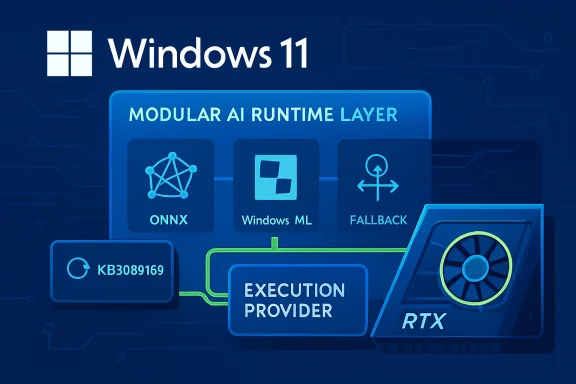
Microsoft has published KB5089168, a Windows Update-delivered refresh for the NVIDIA TensorRT-RTX Execution Provider, moving the component to version 2.2604.1.0 for Windows 11 version 24H2 and Windows 11 version 25H2 systems. The update targets one of the most important but least visible layers in Microsoft’s on-device AI stack: the execution provider that lets ONNX Runtime and Windows ML accelerate supported AI models on NVIDIA RTX GPUs. For users, it should arrive automatically through Windows Update; for developers, it signals Microsoft’s continued shift toward modular, hardware-aware AI components that can be updated outside full app releases or major Windows feature upgrades.
The NVIDIA TensorRT-RTX Execution Provider sits at the intersection of Windows ML, ONNX Runtime, and NVIDIA’s RTX GPU ecosystem. In practical terms, it allows Windows applications to run supported ONNX machine-learning models on local NVIDIA RTX hardware rather than relying only on the CPU, a generic GPU path, or cloud inference.
That distinction matters because Windows is increasingly becoming an AI runtime platform, not merely an operating system that hosts AI applications. Microsoft’s newer Windows ML strategy uses execution providers as plug-in acceleration layers, allowing apps to target a common inference framework while the system selects an appropriate backend for the installed hardware.
Historically, Windows AI acceleration has leaned on DirectML, a broad hardware abstraction layer that works across GPU vendors. DirectML remains important, but vendor-tuned execution providers can expose more specific optimizations, especially when they are built around mature inference engines such as TensorRT.
NVIDIA’s TensorRT heritage comes from datacenter and workstation inference, where graph optimization, kernel selection, quantization, and hardware-specific scheduling have long been central to performance. TensorRT for RTX adapts that idea to client PCs, focusing on smaller deployment footprint, faster engine creation, and portability across consumer RTX systems.
KB5089168 is therefore more than a routine component bump. It is another sign that Windows 11’s AI plumbing is being serviced like graphics drivers, codecs, and security components: quietly, incrementally, and through the same update mechanisms users already know.
Users who want to confirm installation can check Settings > Windows Update > Update history. After successful installation, the relevant entry should appear as Windows ML Runtime Nvidia TensorRT-RTX Execution Provider Update (KB5089168).
Key practical details include:
That model is becoming essential because the PC ecosystem is no longer a simple CPU-and-GPU story. Modern Windows devices may include NPUs, integrated GPUs, discrete GPUs, and specialized tensor hardware, each with different strengths.
For Windows users, the benefit is indirect but meaningful. When the execution provider improves, compatible apps can see better inference behavior without needing a full application rewrite.
The basic execution-provider workflow can be understood in four steps:
That shift is important because a Windows PC is not a controlled datacenter node. It may be a gaming desktop, creator workstation, laptop, or compact PC, and the AI workload may run alongside games, video editing, browser tabs, and background services.
The client focus creates different priorities:
If a system is behind on cumulative updates, it may lack the runtime behavior expected by the newer TensorRT-RTX package. That is why Microsoft gates the component behind the latest cumulative update rather than treating it like an isolated driver download.
For consumers, the practical message is simple: if the update does not appear, first verify that Windows Update is fully current. For managed enterprise devices, the answer may be more complicated because update rings, deferrals, and policy controls can delay component delivery.
There is also a broader servicing story here. Windows ML execution providers are increasingly treated as dynamic system components, not static pieces of a single Windows image.
That creates several operational consequences:
The tradeoff is that developers now depend more heavily on the user’s Windows servicing state. If Windows Update is paused, blocked by policy, or waiting for a reboot, an app’s best acceleration path may be unavailable or outdated.
Developers should treat this as a design constraint, not an edge case. A well-built Windows AI app should detect available providers, communicate acceleration status clearly, and fall back gracefully.
Recommended developer practices include:
That is the kind of abstraction Windows needs if local AI is to become a mainstream app capability rather than a fragmented vendor-specific feature.
Users should not expect KB5089168 to change gaming frame rates or general desktop performance. This is not a GeForce display driver, a DirectX update, or a broad graphics fix; it is an inference-runtime component for supported machine-learning workloads.
The update is most relevant to users with:
For everyday users, the most important point is that this update does not require manual action unless something goes wrong. If Windows Update is healthy, the component should arrive automatically on eligible systems.
That can be a strength. Enterprises already understand Windows Update for Business, update rings, deferral policies, compliance reporting, and phased deployment.
It can also be a concern. If a business application depends on a particular inference path, an execution-provider update could theoretically change performance behavior, compatibility, or troubleshooting patterns.
Enterprise administrators should evaluate KB5089168 through several lenses:
The enterprise advantage is that Microsoft’s model can reduce app-level packaging complexity. A software vendor can rely on Windows-certified components instead of bundling large hardware-specific packages, which may simplify deployment and reduce duplicated dependencies.
At the same time, Microsoft cannot afford to make Windows AI feel like an NVIDIA-only story. Copilot+ PCs, Qualcomm NPUs, AMD Ryzen AI systems, Intel Core Ultra devices, and future accelerators all need a credible path into the Windows ML ecosystem.
That creates a delicate balance:
If Microsoft gets this right, Windows becomes a more attractive platform for local AI development. If it gets it wrong, developers may retreat to vendor SDKs, browser-based inference, or cloud APIs.
TensorRT-RTX’s client-oriented design tries to reduce that pain by emphasizing faster build times and smaller deployment size. The Windows ML integration extends that idea by keeping the provider outside the app package and letting Windows handle compatible updates.
Still, developers need to plan for variability. Model size, supported operators, GPU architecture, driver state, and system load can all influence the experience.
Important technical concerns include:
For power users, this also means update history is now part of AI troubleshooting. A local inference issue may involve the app, the model, the NVIDIA driver, Windows ML, ONNX Runtime, or the execution provider package.
A sensible troubleshooting sequence looks like this:
Users should also verify the basics:
Things to monitor include:
If that happens, updates like KB5089168 will become routine but strategically important. They will not always make headlines, yet they will shape whether local AI on Windows feels fast, dependable, and broadly available.
KB5089168 is a quiet update with outsized implications: it updates the NVIDIA TensorRT-RTX Execution Provider to version 2.2604.1.0, reinforces Windows Update as the delivery channel for AI acceleration components, and gives RTX-equipped Windows 11 24H2 and 25H2 systems a newer foundation for local ONNX inference. The short-term impact will depend on compatible apps and hardware, but the long-term message is clear. Microsoft is building Windows into a modular AI runtime platform, and the execution provider layer is where much of that future will either come together or fragment.
Source: Microsoft Support KB5089168: Nvidia TensorRT-RTX Execution Provider update (version 2.2604.1.0) - Microsoft Support
 Background
The NVIDIA TensorRT-RTX Execution Provider sits at the intersection of Windows ML, ONNX Runtime, and NVIDIA’s RTX GPU ecosystem. In practical terms, it allows Windows applications to run supported ONNX machine-learning models on local NVIDIA RTX hardware rather than relying only on the CPU, a generic GPU path, or cloud inference.That distinction matters because Windows is increasingly becoming an AI runtime platform, not merely an operating system that hosts AI applications. Microsoft’s newer Windows ML strategy uses execution providers as plug-in acceleration layers, allowing apps to target a common inference framework while the system selects an appropriate backend for the installed hardware.
Historically, Windows AI acceleration has leaned on DirectML, a broad hardware abstraction layer that works across GPU vendors. DirectML remains important, but vendor-tuned execution providers can expose more specific optimizations, especially when they are built around mature inference engines such as TensorRT.
NVIDIA’s TensorRT heritage comes from datacenter and workstation inference, where graph optimization, kernel selection, quantization, and hardware-specific scheduling have long been central to performance. TensorRT for RTX adapts that idea to client PCs, focusing on smaller deployment footprint, faster engine creation, and portability across consumer RTX systems.
KB5089168 is therefore more than a routine component bump. It is another sign that Windows 11’s AI plumbing is being serviced like graphics drivers, codecs, and security components: quietly, incrementally, and through the same update mechanisms users already know.
What KB5089168 Actually Delivers
KB5089168 updates the Windows ML Runtime NVIDIA TensorRT-RTX Execution Provider component for Windows 11 24H2 and 25H2. Microsoft describes the release as containing improvements to the execution provider component, rather than as a feature update with a detailed consumer-facing changelog.Installation and visibility
The update is distributed automatically through Windows Update. Microsoft says the device must already have the latest cumulative update for Windows 11 version 24H2 or 25H2 installed before KB5089168 applies.Users who want to confirm installation can check Settings > Windows Update > Update history. After successful installation, the relevant entry should appear as Windows ML Runtime Nvidia TensorRT-RTX Execution Provider Update (KB5089168).
Key practical details include:
- Applies to Windows 11 version 24H2 and 25H2
- Updates the NVIDIA TensorRT-RTX Execution Provider to version 2.2604.1.0
- Requires the latest cumulative update for the installed Windows release
- Installs automatically through Windows Update
- Replaces the earlier KB5083460 package
- Appears in Windows Update history after installation
Why Execution Providers Matter
An execution provider is the part of ONNX Runtime that maps portions of a model graph to a specific compute backend. Instead of asking an app developer to write separate inference code for every GPU, NPU, or CPU target, ONNX Runtime can partition work and delegate supported operations to the most appropriate provider.The abstraction layer beneath Windows AI
This approach gives Windows a cleaner separation between application logic and hardware acceleration. A developer can build against ONNX Runtime or Windows ML APIs, while the execution provider handles the lower-level realities of supported operators, device memory, graph compilation, and kernel execution.That model is becoming essential because the PC ecosystem is no longer a simple CPU-and-GPU story. Modern Windows devices may include NPUs, integrated GPUs, discrete GPUs, and specialized tensor hardware, each with different strengths.
For Windows users, the benefit is indirect but meaningful. When the execution provider improves, compatible apps can see better inference behavior without needing a full application rewrite.
The basic execution-provider workflow can be understood in four steps:
- The app loads an ONNX model through Windows ML or ONNX Runtime.
- The runtime identifies available execution providers on the device.
- Supported parts of the model graph are assigned to the best provider.
- Unsupported operations fall back to another compatible backend where possible.
The RTX Angle: Why NVIDIA Gets a Specialized Path
NVIDIA RTX GPUs include Tensor Cores, driver-level AI optimizations, and a mature CUDA-adjacent software ecosystem. TensorRT-RTX is designed to exploit those capabilities for local inference workloads, especially where latency and throughput matter.Client AI instead of datacenter AI
Traditional TensorRT has been associated with servers, edge appliances, and managed inference deployments. TensorRT-RTX narrows the focus to client-centric scenarios, where installation size, fast startup, and variable consumer hardware are just as important as peak performance.That shift is important because a Windows PC is not a controlled datacenter node. It may be a gaming desktop, creator workstation, laptop, or compact PC, and the AI workload may run alongside games, video editing, browser tabs, and background services.
The client focus creates different priorities:
- Fast model engine creation matters because users will not tolerate long first-run delays.
- Small package footprint matters because apps already compete for storage and bandwidth.
- Portable cached engines matter because users may update drivers or move between RTX systems.
- Low latency matters because local AI features often sit inside interactive workflows.
- Resource awareness matters because the GPU may already be busy rendering graphics.
Windows 11 24H2 and 25H2: The Servicing Context
KB5089168 is specifically aimed at Windows 11 version 24H2 and Windows 11 version 25H2, two releases that share much of the same modern Windows platform foundation. That matters because Microsoft has increasingly tied new AI infrastructure to Windows 11’s newer servicing baseline.Why the prerequisite matters
The requirement for the latest cumulative update is not a throwaway line. AI execution providers depend on Windows ML plumbing, package deployment infrastructure, runtime registration, and compatibility checks that may themselves be updated through monthly Windows servicing.If a system is behind on cumulative updates, it may lack the runtime behavior expected by the newer TensorRT-RTX package. That is why Microsoft gates the component behind the latest cumulative update rather than treating it like an isolated driver download.
For consumers, the practical message is simple: if the update does not appear, first verify that Windows Update is fully current. For managed enterprise devices, the answer may be more complicated because update rings, deferrals, and policy controls can delay component delivery.
There is also a broader servicing story here. Windows ML execution providers are increasingly treated as dynamic system components, not static pieces of a single Windows image.
That creates several operational consequences:
- Feature improvements can arrive between annual Windows releases
- AI acceleration can improve without app redeployment
- Hardware vendors can align runtime updates with driver and SDK progress
- IT administrators need visibility into AI component versions
- Developers must account for devices having different provider versions
- Troubleshooting now includes Windows Update state, not only app state
Developer Impact: Less Bundling, More Runtime Dependency
For developers building Windows AI applications, KB5089168 reinforces Microsoft’s preferred model: rely on system-provided, Windows-certified execution providers where practical. Instead of bundling every vendor backend into an app, developers can use Windows ML’s catalog-based approach to acquire and register compatible providers.The tradeoff developers must manage
The advantage is obvious. App packages can be smaller, deployment is cleaner, and apps can benefit from execution-provider updates without shipping a new version.The tradeoff is that developers now depend more heavily on the user’s Windows servicing state. If Windows Update is paused, blocked by policy, or waiting for a reboot, an app’s best acceleration path may be unavailable or outdated.
Developers should treat this as a design constraint, not an edge case. A well-built Windows AI app should detect available providers, communicate acceleration status clearly, and fall back gracefully.
Recommended developer practices include:
- Check provider availability at runtime
- Avoid assuming the TensorRT-RTX provider is present on every RTX PC
- Expose useful diagnostics for support teams
- Cache compiled assets where supported and appropriate
- Test both accelerated and fallback paths
- Avoid hard failures when a provider update is pending
- Document expected Windows and driver requirements for users
That is the kind of abstraction Windows needs if local AI is to become a mainstream app capability rather than a fragmented vendor-specific feature.
Consumer Impact: Faster Local AI, Mostly Invisible Updates
Most Windows users will never manually install an execution provider, and that is probably the point. KB5089168 is designed to appear through Windows Update, sit quietly in update history, and improve the local AI path for apps that know how to use it.What users may notice
The most likely user-facing benefits are indirect. A compatible photo editor, video tool, communication app, local assistant, or creative utility may load an AI feature faster, run it with lower latency, or use the GPU more efficiently after the component is updated.Users should not expect KB5089168 to change gaming frame rates or general desktop performance. This is not a GeForce display driver, a DirectX update, or a broad graphics fix; it is an inference-runtime component for supported machine-learning workloads.
The update is most relevant to users with:
- NVIDIA GeForce RTX 30-series or newer hardware
- RTX workstation-class GPUs
- Windows 11 24H2 or 25H2
- Apps that use ONNX Runtime or Windows ML
- Local AI features that support GPU acceleration
- Current NVIDIA drivers and current Windows cumulative updates
For everyday users, the most important point is that this update does not require manual action unless something goes wrong. If Windows Update is healthy, the component should arrive automatically on eligible systems.
Enterprise Impact: Control, Compliance, and Fleet Visibility
In enterprise environments, KB5089168 raises a different set of questions. IT teams care less about whether an AI demo runs slightly faster and more about whether new runtime components are controlled, supportable, and visible across managed fleets.AI components become operational assets
The execution provider model means AI acceleration is no longer only an application dependency. It is also a Windows component dependency, delivered through the same infrastructure that handles many other platform updates.That can be a strength. Enterprises already understand Windows Update for Business, update rings, deferral policies, compliance reporting, and phased deployment.
It can also be a concern. If a business application depends on a particular inference path, an execution-provider update could theoretically change performance behavior, compatibility, or troubleshooting patterns.
Enterprise administrators should evaluate KB5089168 through several lenses:
- Which managed devices are eligible for the update
- Whether Windows Update policy allows execution-provider downloads
- Whether affected apps use Windows ML or ONNX Runtime acceleration
- How to identify installed provider versions across the fleet
- Whether pilot rings should validate AI workloads before broad rollout
- How support desks should interpret Windows ML update history entries
The enterprise advantage is that Microsoft’s model can reduce app-level packaging complexity. A software vendor can rely on Windows-certified components instead of bundling large hardware-specific packages, which may simplify deployment and reduce duplicated dependencies.
Competitive Implications: Microsoft’s AI Hardware Neutrality Test
KB5089168 is an NVIDIA-specific update, but the bigger story is Microsoft’s multi-vendor AI platform strategy. Windows ML is positioned as a layer that can work across CPUs, GPUs, and NPUs from multiple silicon vendors.NVIDIA’s advantage and Microsoft’s balancing act
NVIDIA enters this model with a strong software advantage. TensorRT is well known in inference circles, RTX GPUs are common in gaming and creator PCs, and NVIDIA has spent years building developer mindshare around accelerated AI workloads.At the same time, Microsoft cannot afford to make Windows AI feel like an NVIDIA-only story. Copilot+ PCs, Qualcomm NPUs, AMD Ryzen AI systems, Intel Core Ultra devices, and future accelerators all need a credible path into the Windows ML ecosystem.
That creates a delicate balance:
- NVIDIA benefits from a high-performance RTX-specific provider
- Microsoft benefits from making Windows the common AI runtime layer
- AMD and Intel need equally reliable provider servicing
- Qualcomm needs strong NPU support for Arm-based Windows devices
- Developers need one coherent model rather than vendor-specific chaos
If Microsoft gets this right, Windows becomes a more attractive platform for local AI development. If it gets it wrong, developers may retreat to vendor SDKs, browser-based inference, or cloud APIs.
Technical Considerations: Compilation, Caching, and Fallback
TensorRT-RTX is not just a switch that says “use GPU.” It involves compiling model graphs into optimized inference engines, selecting kernels, managing shapes, and sometimes caching provider-specific representations for faster subsequent startup.Why first-run behavior matters
Local AI workloads often fail the user-experience test before they fail the benchmark test. If an app takes too long to initialize an AI model, users may assume the feature is broken even if later inference would be fast.TensorRT-RTX’s client-oriented design tries to reduce that pain by emphasizing faster build times and smaller deployment size. The Windows ML integration extends that idea by keeping the provider outside the app package and letting Windows handle compatible updates.
Still, developers need to plan for variability. Model size, supported operators, GPU architecture, driver state, and system load can all influence the experience.
Important technical concerns include:
- Dynamic input shapes may complicate optimization
- Unsupported operators may force partial fallback
- Engine caches may need invalidation after runtime or driver changes
- GPU memory pressure can affect reliability
- First-run compilation may still be visible for larger models
- Background AI tasks must coexist with graphics workloads
- Provider updates may alter performance characteristics
For power users, this also means update history is now part of AI troubleshooting. A local inference issue may involve the app, the model, the NVIDIA driver, Windows ML, ONNX Runtime, or the execution provider package.
How to Check and Troubleshoot KB5089168
For most users, KB5089168 should be automatic. Still, enthusiasts and administrators may want to confirm whether the update is installed, especially if they are testing Windows ML applications or comparing inference behavior before and after the update.Practical verification steps
The easiest method is through Windows Settings. Microsoft specifically points users to Windows Update history, where the component should appear after installation.A sensible troubleshooting sequence looks like this:
- Open Settings.
- Go to Windows Update.
- Install any pending cumulative updates.
- Restart the PC if Windows asks for it.
- Return to Windows Update and check again.
- Open Update history.
- Look for Windows ML Runtime Nvidia TensorRT-RTX Execution Provider Update (KB5089168).
Users should also verify the basics:
- Windows 11 is on version 24H2 or 25H2
- The latest cumulative update is installed
- Windows Update is not paused
- A restart is not pending
- The PC has compatible NVIDIA RTX hardware
- The NVIDIA display driver is current enough for the workload
- The app actually uses Windows ML or ONNX Runtime acceleration
Strengths and Opportunities
KB5089168’s biggest strength is that it demonstrates Microsoft’s ability to service AI acceleration as a modular Windows platform capability rather than as a static feature frozen inside a yearly OS release. That model gives Microsoft, NVIDIA, developers, and users a faster path to incremental improvements, provided that update delivery and diagnostics remain transparent enough.- Better local AI performance potential for compatible ONNX Runtime and Windows ML workloads on RTX hardware.
- Reduced app packaging burden because developers can rely on Windows-managed execution providers instead of bundling large vendor libraries.
- Improved servicing velocity through Windows Update rather than waiting for major app or OS feature releases.
- Cleaner multi-vendor architecture if Microsoft maintains similar quality across NVIDIA, AMD, Intel, and Qualcomm providers.
- Stronger RTX PC value proposition for creators, developers, and enthusiasts running local AI workflows.
- More consistent deployment model for users who expect Windows Update to handle platform components automatically.
- A clearer foundation for future Copilot+ and local AI features that need low-latency inference on available hardware.
Risks and Concerns
The main risk is opacity. KB5089168 updates a critical AI runtime component, but Microsoft’s public description is limited to general improvements, which leaves developers, administrators, and advanced users with little detail about operator changes, performance fixes, regressions, or known issues.- Sparse release notes make it difficult to assess what changed beyond the version number.
- Windows Update dependency can complicate first-run app behavior when updates are paused, deferred, or blocked.
- Enterprise policy conflicts may prevent execution-provider downloads on managed devices.
- Version fragmentation can appear if different PCs receive different provider builds at different times.
- Troubleshooting complexity increases because issues may involve the app, model, driver, runtime, provider, or Windows servicing state.
- Fallback behavior may hide performance problems if apps silently revert to CPU or generic GPU paths.
- User expectations may be inflated if people mistake this for a general NVIDIA graphics or gaming performance update.
Looking Ahead
KB5089168 is part of a larger transition in Windows: AI acceleration is becoming a maintained platform layer, much like graphics, security, and media infrastructure. The update may be small in visible surface area, but it reinforces Microsoft’s plan to make local inference available through standardized APIs and dynamically serviced components.What to watch next
The next important signal will be whether Microsoft improves transparency around execution-provider updates. Developers and IT administrators need more than a KB entry; they need practical release notes that explain compatibility changes, performance fixes, and any known limitations.Things to monitor include:
- Whether future TensorRT-RTX updates include more detailed changelogs
- How quickly Windows 24H2 and 25H2 devices receive provider updates
- Whether Windows ML 2.x provider packaging stabilizes for mainstream developers
- How AMD, Intel, and Qualcomm provider updates compare in cadence and quality
- Whether major creative and productivity apps adopt Windows ML provider discovery
If that happens, updates like KB5089168 will become routine but strategically important. They will not always make headlines, yet they will shape whether local AI on Windows feels fast, dependable, and broadly available.
KB5089168 is a quiet update with outsized implications: it updates the NVIDIA TensorRT-RTX Execution Provider to version 2.2604.1.0, reinforces Windows Update as the delivery channel for AI acceleration components, and gives RTX-equipped Windows 11 24H2 and 25H2 systems a newer foundation for local ONNX inference. The short-term impact will depend on compatible apps and hardware, but the long-term message is clear. Microsoft is building Windows into a modular AI runtime platform, and the execution provider layer is where much of that future will either come together or fragment.
Source: Microsoft Support KB5089168: Nvidia TensorRT-RTX Execution Provider update (version 2.2604.1.0) - Microsoft Support
