

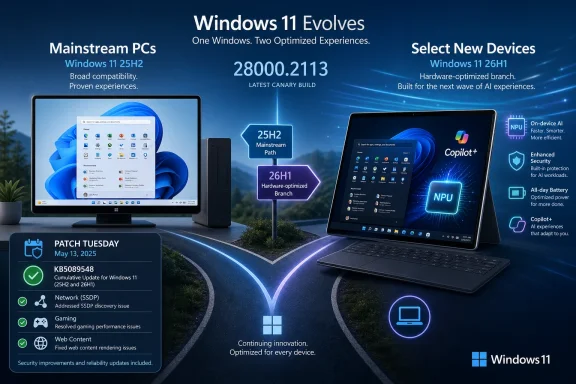
Microsoft updated Windows 11 version 26H1 on May 12, 2026 with cumulative update KB5089548, moving the hardware-specific branch to OS Build 28000.2113 for select new devices rather than existing Windows 11 PCs. That distinction is the story. The update is routine maintenance on paper, but it exposes a less routine shift in how Windows is being packaged, serviced, and explained. Microsoft is no longer merely shipping one Windows 11 train with different feature switches; it is openly maintaining a branch whose reason for existing is new silicon.
The KB number is forgettable. The strategy behind it is not. KB5089548 brings the expected Patch Tuesday payload: security fixes, quality improvements, and carryover changes from earlier preview updates. It updates Windows 11 26H1 to Build 28000.2113 and, by Microsoft’s own positioning, keeps the branch current for the devices it is meant to serve.
But 26H1 is not “the next Windows” in the way most people use that phrase. It is not the upgrade that will appear on a mainstream Windows 11 24H2 or 25H2 machine after a staged rollout, a safeguard hold, and a vaguely cheerful Windows Update prompt. It is a preinstalled experience for selected new devices expected around the early-2026 hardware cycle.
That means the most important part of KB5089548 is not what it fixes. It is what it does not do. It does not turn 26H1 into a broad feature update. It does not create a new migration target for ordinary PCs. It does not tell enterprises to rebase their fleets on a fresh annual release.
For Windows enthusiasts, that can feel anticlimactic. For IT departments, it is a relief wrapped in a new kind of complexity.
26H1 breaks that expectation. Microsoft describes it as hardware-optimized and tied to next-generation silicon, developed with device makers and silicon partners. The language matters because it pushes 26H1 out of the conventional “feature update” bucket and into something closer to a platform adaptation layer.
That does not mean Windows is fragmenting into chaos overnight. It does mean the public version number is becoming a less reliable guide to what a user should expect. A PC on 25H2 may remain on the recommended path for enterprise deployment while a new machine ships with 26H1 because its platform requires or benefits from the newer branch.
This is the kind of distinction that makes sense to OEMs, silicon vendors, and deployment engineers. It is much harder to communicate to ordinary users who have spent years hearing that Windows Update will eventually bring them the next version. In the old mental model, the question was “When do I get it?” In the 26H1 model, the better question is “Was my device built for it?”
That is the ordinary language of Windows servicing. A networking-related service should not hang. Games should not break because a web-rendered component behaves differently. The operating system should keep absorbing small fixes that prevent annoying edge cases from becoming support tickets.
Yet this kind of maintenance is exactly what a young hardware-bound branch needs. The first job of 26H1 is not to impress users with a redesigned shell or another AI-branded entry point. Its first job is to make sure the base system behaves predictably on devices that may combine new CPUs, NPUs, firmware paths, driver stacks, and OEM image assumptions.
That is why dismissing KB5089548 as “just a cumulative update” misses the point. A special branch lives or dies by boring reliability work. If Microsoft and its partners are going to ship Windows in closer lockstep with new hardware platforms, the unglamorous fixes become the foundation on which every promised experience depends.
That carve-out says more than a marketing deck would. Windows is increasingly being divided not only by version number, but by capability class. A machine with the required NPU and platform support is eligible for one set of local AI features; a conventional machine is not. The OS image, the driver model, the silicon capability, and the user-facing feature set are becoming parts of the same equation.
This is not completely new. Windows has always adapted to hardware. Tablet PCs, touchscreens, TPM requirements, virtualization-based security, and biometric authentication all created feature gradients. But Copilot+ raises the visibility of the split because Microsoft is turning local AI capability into a product category rather than a hidden implementation detail.
26H1 fits that trajectory. It is not merely a Windows branch with a few extra features. It is a signal that the Windows platform is being tuned for hardware generations where AI acceleration, power management, firmware behavior, and OEM integration are part of the same launch plan.
By drawing a line around 26H1, Microsoft reduces one category of confusion. Existing Windows 11 PCs are not being asked to chase a release that was not designed for them. Enterprises are not being nudged toward a broad deployment merely because the calendar rolled forward. Enthusiasts do not need to interpret the absence of 26H1 in Windows Update as a mysterious failure.
That clarity is useful, but it also creates a new support vocabulary. Help desks and administrators now need to explain that a higher version number may be irrelevant to a device. In procurement, two machines bought in the same year may legitimately arrive on different Windows branches depending on hardware platform and OEM configuration.
The benefit is that Microsoft can optimize without dragging the entire installed base along for the ride. The cost is that the Windows version matrix becomes harder to summarize in one sentence.
The selective nature of 26H1 could actually help enterprises. It allows a hardware evaluation team to test new devices on the branch they ship with while leaving the broader environment untouched. That creates a cleaner boundary between fleet servicing and hardware qualification.
Still, there is no free lunch. A hardware-bound branch means administrators must pay closer attention to procurement timing and image management. If an organization standardizes on a new class of Copilot+ devices, 26H1 may become part of the operational reality even if the rest of the fleet stays on 25H2. That introduces another line item in documentation, compliance reporting, help desk scripts, and vulnerability management dashboards.
The risk is not that 26H1 suddenly invades existing PCs. Microsoft says it will not. The risk is that Windows estates become more uneven by design, with branch differences justified by hardware capability rather than by user choice or deployment ring.
This is good when the coordination works. A new silicon platform can launch with an OS tuned for its power states, AI accelerators, sensors, and platform quirks. Users get a machine that behaves as an integrated product rather than a generic Windows installation awkwardly adapted after the fact.
It is less good when the coordination fails. Windows history is littered with devices whose hardware promised more than the software stack delivered. Sleep states misbehaved, graphics drivers lagged, firmware updates arrived late, and vendor utilities duplicated or undermined native Windows controls. A hardware-optimized Windows branch raises the stakes because the branch itself implies a tighter product contract.
The lesson for buyers is simple: 26H1 makes the OEM’s execution more important, not less. If Windows and hardware are being fused more closely, the device maker’s update discipline becomes part of the operating system experience.
Known-issue pages are acknowledgements, not omniscience. They reflect problems Microsoft has confirmed, documented, and chosen to publish. A branch available only on select new devices will naturally have a narrower real-world test surface than a mainstream Windows release deployed across millions of diverse PCs.
That does not mean users should distrust the status page. It means they should understand what it can and cannot tell them. No active known issues is a useful signal for administrators evaluating early hardware, but it does not replace pilot deployments, driver validation, application testing, or vendor-specific monitoring.
For home users, the practical implication is even simpler. If you do not own a device that ships with 26H1, the release health status is mostly informational. Your Windows experience remains governed by the branch your PC actually runs.
A 25H2 machine is not automatically behind because it does not receive 26H1. A 26H1 machine is not automatically a better general-purpose PC because it has a higher branch number. The distinction is about platform fit. That is a more mature way to treat operating systems, but it is also less satisfying for consumers trained by phone updates and app stores to expect universal availability.
This is where Microsoft’s naming scheme works against its own message. “26H1” sounds like the next chronological stop after “25H2.” If the company wants hardware-bound Windows branches to be understood by normal people, it may eventually need clearer branding than a half-year version stamp.
The old Windows world was not actually simple, but it looked simple from a distance. The new one may be more technically rational while appearing more fragmented to everyone outside the deployment and silicon ecosystem.
That matters because security is the one area where version confusion can become dangerous. Users should not hunt for unsupported images, registry hacks, or leaked installation paths merely to reach a branch intended for different hardware. A supported 25H2 system receiving monthly updates is in a better state than an improvised 26H1 installation on a device that was never meant to run it.
For administrators, the priority remains boring and familiar: keep supported machines patched, monitor release health, validate optional previews before broad adoption, and treat new hardware platforms as projects rather than impulse buys. 26H1 does not rewrite that playbook. It adds a new chapter for devices whose hardware roadmap diverges from the mainstream fleet.
That complexity is not inherently bad. Modern PCs are heterogeneous, and local AI workloads have real hardware requirements. Pretending every Windows 11 machine can deliver the same experience would be dishonest.
But the burden of clarity falls on Microsoft. If Windows becomes more modular, more hardware-aware, and more dependent on local acceleration, Microsoft must make the boundaries visible before users discover them through absence. Nothing fuels user distrust faster than a feature that appears in advertising but not on the machine in front of them.
26H1 is a test of whether Microsoft can communicate that distinction cleanly. So far, the company’s formal message is unusually direct: this branch is for select new hardware, not existing PCs. That directness should continue.
That sounds technical because it is. But it has everyday consequences. The Windows that arrives on a new laptop may increasingly be shaped by the silicon generation inside it. The Windows that remains on your desktop may be fully supported even if it lacks the newest branch label. The Windows an enterprise deploys may be chosen less by calendar fashion and more by fleet composition.
This is a healthier model if Microsoft handles it honestly. Windows has suffered in the past when one release tried to satisfy every device category, every form factor, and every enterprise timeline at once. A hardware-optimized branch can reduce that pressure.
It becomes unhealthy if the branches multiply without clear boundaries, if features are advertised without eligibility clarity, or if OEM-specific experiences make troubleshooting harder. The difference between platform maturity and fragmentation is governance.
Source: igor´sLAB Windows 11 26H1: Microsoft keeps the special branch on track for new …
 Microsoft’s Small Patch Says Something Bigger About Windows
The KB number is forgettable. The strategy behind it is not. KB5089548 brings the expected Patch Tuesday payload: security fixes, quality improvements, and carryover changes from earlier preview updates. It updates Windows 11 26H1 to Build 28000.2113 and, by Microsoft’s own positioning, keeps the branch current for the devices it is meant to serve.But 26H1 is not “the next Windows” in the way most people use that phrase. It is not the upgrade that will appear on a mainstream Windows 11 24H2 or 25H2 machine after a staged rollout, a safeguard hold, and a vaguely cheerful Windows Update prompt. It is a preinstalled experience for selected new devices expected around the early-2026 hardware cycle.
That means the most important part of KB5089548 is not what it fixes. It is what it does not do. It does not turn 26H1 into a broad feature update. It does not create a new migration target for ordinary PCs. It does not tell enterprises to rebase their fleets on a fresh annual release.
For Windows enthusiasts, that can feel anticlimactic. For IT departments, it is a relief wrapped in a new kind of complexity.
26H1 Is a Branch, Not a Destination
Microsoft’s modern Windows release model has trained users to think in annual milestones: 22H2, 23H2, 24H2, 25H2. Even when the actual enablement mechanics are subtle, the naming scheme implies a forward march. A higher number looks newer, and newer looks like something you should eventually receive.26H1 breaks that expectation. Microsoft describes it as hardware-optimized and tied to next-generation silicon, developed with device makers and silicon partners. The language matters because it pushes 26H1 out of the conventional “feature update” bucket and into something closer to a platform adaptation layer.
That does not mean Windows is fragmenting into chaos overnight. It does mean the public version number is becoming a less reliable guide to what a user should expect. A PC on 25H2 may remain on the recommended path for enterprise deployment while a new machine ships with 26H1 because its platform requires or benefits from the newer branch.
This is the kind of distinction that makes sense to OEMs, silicon vendors, and deployment engineers. It is much harder to communicate to ordinary users who have spent years hearing that Windows Update will eventually bring them the next version. In the old mental model, the question was “When do I get it?” In the 26H1 model, the better question is “Was my device built for it?”
The Patch Notes Are Boring Because the Platform Work Is Not
KB5089548’s listed improvements are not dramatic. Microsoft calls out security updates, general quality fixes, and changes previously included in optional preview updates. Among the concrete items are reliability improvements around SSDP notifications, intended to prevent the related service from becoming unreliable or unresponsive, and compatibility work for games that use embedded web content.That is the ordinary language of Windows servicing. A networking-related service should not hang. Games should not break because a web-rendered component behaves differently. The operating system should keep absorbing small fixes that prevent annoying edge cases from becoming support tickets.
Yet this kind of maintenance is exactly what a young hardware-bound branch needs. The first job of 26H1 is not to impress users with a redesigned shell or another AI-branded entry point. Its first job is to make sure the base system behaves predictably on devices that may combine new CPUs, NPUs, firmware paths, driver stacks, and OEM image assumptions.
That is why dismissing KB5089548 as “just a cumulative update” misses the point. A special branch lives or dies by boring reliability work. If Microsoft and its partners are going to ship Windows in closer lockstep with new hardware platforms, the unglamorous fixes become the foundation on which every promised experience depends.
Copilot+ Is Where the Branch Starts to Show Its Shape
The most revealing part of the update is the AI component block. KB5089548 updates components such as Image Search, Content Extraction, Semantic Analysis, and the Settings Model to version 1.2603.377.0. Microsoft also notes that these components apply to Copilot+ PCs and are not installed on normal Windows PCs or Windows Server.That carve-out says more than a marketing deck would. Windows is increasingly being divided not only by version number, but by capability class. A machine with the required NPU and platform support is eligible for one set of local AI features; a conventional machine is not. The OS image, the driver model, the silicon capability, and the user-facing feature set are becoming parts of the same equation.
This is not completely new. Windows has always adapted to hardware. Tablet PCs, touchscreens, TPM requirements, virtualization-based security, and biometric authentication all created feature gradients. But Copilot+ raises the visibility of the split because Microsoft is turning local AI capability into a product category rather than a hidden implementation detail.
26H1 fits that trajectory. It is not merely a Windows branch with a few extra features. It is a signal that the Windows platform is being tuned for hardware generations where AI acceleration, power management, firmware behavior, and OEM integration are part of the same launch plan.
Microsoft Avoids a Repeat of the Forced-March Upgrade Problem
There is a practical reason Microsoft is being explicit about 26H1 not coming to existing 24H2 and 25H2 systems through Windows Update. Windows users have long memories. Every time a new Windows version appears, a familiar cycle begins: compatibility anxiety, upgrade-block speculation, unsupported-workaround threads, and complaints from users who either cannot get the update or cannot avoid it.By drawing a line around 26H1, Microsoft reduces one category of confusion. Existing Windows 11 PCs are not being asked to chase a release that was not designed for them. Enterprises are not being nudged toward a broad deployment merely because the calendar rolled forward. Enthusiasts do not need to interpret the absence of 26H1 in Windows Update as a mysterious failure.
That clarity is useful, but it also creates a new support vocabulary. Help desks and administrators now need to explain that a higher version number may be irrelevant to a device. In procurement, two machines bought in the same year may legitimately arrive on different Windows branches depending on hardware platform and OEM configuration.
The benefit is that Microsoft can optimize without dragging the entire installed base along for the ride. The cost is that the Windows version matrix becomes harder to summarize in one sentence.
Enterprise IT Gets Stability, Then Another Variable
For organizations, Microsoft’s message is relatively conservative: Windows 11 24H2 and 25H2 remain the recommended releases for enterprise deployment, while 26H1 is relevant mainly for evaluating new hardware platforms. That is the right posture. IT departments do not want surprise branch changes in managed fleets, especially when endpoint management, security baselines, driver validation, application compatibility, and support lifecycles are already demanding enough.The selective nature of 26H1 could actually help enterprises. It allows a hardware evaluation team to test new devices on the branch they ship with while leaving the broader environment untouched. That creates a cleaner boundary between fleet servicing and hardware qualification.
Still, there is no free lunch. A hardware-bound branch means administrators must pay closer attention to procurement timing and image management. If an organization standardizes on a new class of Copilot+ devices, 26H1 may become part of the operational reality even if the rest of the fleet stays on 25H2. That introduces another line item in documentation, compliance reporting, help desk scripts, and vulnerability management dashboards.
The risk is not that 26H1 suddenly invades existing PCs. Microsoft says it will not. The risk is that Windows estates become more uneven by design, with branch differences justified by hardware capability rather than by user choice or deployment ring.
OEMs Become More Important to the Windows Experience
A preinstalled-only branch puts device makers back near the center of the Windows story. The quality of the user experience depends not only on Microsoft’s cumulative updates but also on the OEM image, firmware readiness, driver packaging, recovery environment, and post-sale update flow. A special Windows branch for select new devices makes that relationship more visible.This is good when the coordination works. A new silicon platform can launch with an OS tuned for its power states, AI accelerators, sensors, and platform quirks. Users get a machine that behaves as an integrated product rather than a generic Windows installation awkwardly adapted after the fact.
It is less good when the coordination fails. Windows history is littered with devices whose hardware promised more than the software stack delivered. Sleep states misbehaved, graphics drivers lagged, firmware updates arrived late, and vendor utilities duplicated or undermined native Windows controls. A hardware-optimized Windows branch raises the stakes because the branch itself implies a tighter product contract.
The lesson for buyers is simple: 26H1 makes the OEM’s execution more important, not less. If Windows and hardware are being fused more closely, the device maker’s update discipline becomes part of the operating system experience.
The Empty Known-Issues Box Is Encouraging, Not Definitive
Microsoft’s release health page currently lists no active known issues for Windows 11 26H1, and the KB page for KB5089548 does not list Microsoft-known issues with the update. That is good news. It is not a guarantee.Known-issue pages are acknowledgements, not omniscience. They reflect problems Microsoft has confirmed, documented, and chosen to publish. A branch available only on select new devices will naturally have a narrower real-world test surface than a mainstream Windows release deployed across millions of diverse PCs.
That does not mean users should distrust the status page. It means they should understand what it can and cannot tell them. No active known issues is a useful signal for administrators evaluating early hardware, but it does not replace pilot deployments, driver validation, application testing, or vendor-specific monitoring.
For home users, the practical implication is even simpler. If you do not own a device that ships with 26H1, the release health status is mostly informational. Your Windows experience remains governed by the branch your PC actually runs.
The Version Number Is Becoming a Poor Proxy for Modernity
The emotional trap in Windows versioning is that people equate newer with better and better with necessary. Microsoft has encouraged that instinct for decades, even when it has also warned enterprises to validate before deploying. 26H1 complicates the reflex.A 25H2 machine is not automatically behind because it does not receive 26H1. A 26H1 machine is not automatically a better general-purpose PC because it has a higher branch number. The distinction is about platform fit. That is a more mature way to treat operating systems, but it is also less satisfying for consumers trained by phone updates and app stores to expect universal availability.
This is where Microsoft’s naming scheme works against its own message. “26H1” sounds like the next chronological stop after “25H2.” If the company wants hardware-bound Windows branches to be understood by normal people, it may eventually need clearer branding than a half-year version stamp.
The old Windows world was not actually simple, but it looked simple from a distance. The new one may be more technically rational while appearing more fragmented to everyone outside the deployment and silicon ecosystem.
Security Servicing Remains the Anchor
The good news is that Microsoft is not asking users to trade security currency for branch novelty. Devices on 24H2 and 25H2 continue to receive monthly security and quality updates according to their servicing timelines. KB5089548 is part of that same maintenance discipline for 26H1, not a sign that the older supported branches are being abandoned.That matters because security is the one area where version confusion can become dangerous. Users should not hunt for unsupported images, registry hacks, or leaked installation paths merely to reach a branch intended for different hardware. A supported 25H2 system receiving monthly updates is in a better state than an improvised 26H1 installation on a device that was never meant to run it.
For administrators, the priority remains boring and familiar: keep supported machines patched, monitor release health, validate optional previews before broad adoption, and treat new hardware platforms as projects rather than impulse buys. 26H1 does not rewrite that playbook. It adds a new chapter for devices whose hardware roadmap diverges from the mainstream fleet.
The AI PC Era Needs Better Boundaries
The phrase “AI PC” has already been stretched by marketing departments, chip vendors, and software companies. Copilot+ at least gives Microsoft a more concrete capability class, but the practical boundaries still need constant explanation. Some AI components apply only to Copilot+ PCs. Some Windows branches apply only to select new devices. Some features depend on region, hardware, language, account state, or staged rollout.That complexity is not inherently bad. Modern PCs are heterogeneous, and local AI workloads have real hardware requirements. Pretending every Windows 11 machine can deliver the same experience would be dishonest.
But the burden of clarity falls on Microsoft. If Windows becomes more modular, more hardware-aware, and more dependent on local acceleration, Microsoft must make the boundaries visible before users discover them through absence. Nothing fuels user distrust faster than a feature that appears in advertising but not on the machine in front of them.
26H1 is a test of whether Microsoft can communicate that distinction cleanly. So far, the company’s formal message is unusually direct: this branch is for select new hardware, not existing PCs. That directness should continue.
The Real Upgrade Is the Servicing Model
What makes 26H1 notable is not a spectacular new interface or a consumer-facing killer app. It is the shift in servicing posture. Microsoft is acknowledging that the future of Windows may require branch-level accommodation for new hardware platforms while leaving the mainstream installed base on stable, recommended releases.That sounds technical because it is. But it has everyday consequences. The Windows that arrives on a new laptop may increasingly be shaped by the silicon generation inside it. The Windows that remains on your desktop may be fully supported even if it lacks the newest branch label. The Windows an enterprise deploys may be chosen less by calendar fashion and more by fleet composition.
This is a healthier model if Microsoft handles it honestly. Windows has suffered in the past when one release tried to satisfy every device category, every form factor, and every enterprise timeline at once. A hardware-optimized branch can reduce that pressure.
It becomes unhealthy if the branches multiply without clear boundaries, if features are advertised without eligibility clarity, or if OEM-specific experiences make troubleshooting harder. The difference between platform maturity and fragmentation is governance.
The 26H1 Lesson for Buyers, Admins, and Tinkerers
The useful lesson from KB5089548 is that Windows 11 26H1 should be treated as a hardware-context release. It is not a prize to chase. It is a branch to evaluate when the device in front of you actually ships with it.- Existing Windows 11 24H2 and 25H2 PCs should not expect 26H1 as an in-place Windows Update feature release.
- KB5089548 updates Windows 11 26H1 to OS Build 28000.2113 and is best understood as maintenance for a special hardware-optimized branch.
- Microsoft’s listed fixes include reliability work for SSDP notifications and compatibility improvements for games that use embedded web content.
- The AI component updates reinforce that Copilot+ PCs are becoming a distinct Windows capability class rather than merely a marketing label.
- Enterprise administrators should keep 24H2 and 25H2 as the mainstream deployment focus while evaluating 26H1 only with relevant new hardware.
- A clean known-issues page is encouraging, but it does not replace pilot testing on real devices with real drivers, firmware, apps, and users.
Source: igor´sLAB Windows 11 26H1: Microsoft keeps the special branch on track for new …
