

Microsoft acknowledged on May 15, 2026 that Windows 11 security update KB5089549, released for versions 24H2 and 25H2, can fail during installation with error 0x800f0922 on devices whose EFI System Partition has very little free space. That detail matters because this is not just another vague Windows Update failure. The update sits at the intersection of Patch Tuesday security fixes, Secure Boot certificate preparation, boot-manager servicing, and BitLocker recovery behavior. In other words, the part of Windows designed to keep machines trustworthy is now the part most likely to strand some of them half-updated.
The modern Windows update story is no longer mostly about broken Start menus, misbehaving printers, or a driver that makes a gaming laptop sulk. KB5089549 shows how much of the action has moved underneath the visible operating system, into boot files, trust anchors, recovery behavior, and firmware-facing partitions most users never see.
The affected update is the May 2026 cumulative security release for Windows 11 versions 24H2 and 25H2, moving systems to builds 26100.8457 and 26200.8457 respectively. It includes the usual security payload, quality fixes from the prior preview update, and a servicing stack component meant to make future updates more reliable. That is the standard Patch Tuesday bargain: accept a large bundle, get safer, move on.
But KB5089549 is not a routine bundle in practice. Microsoft’s own change log ties the release to Secure Boot certificate work, a new
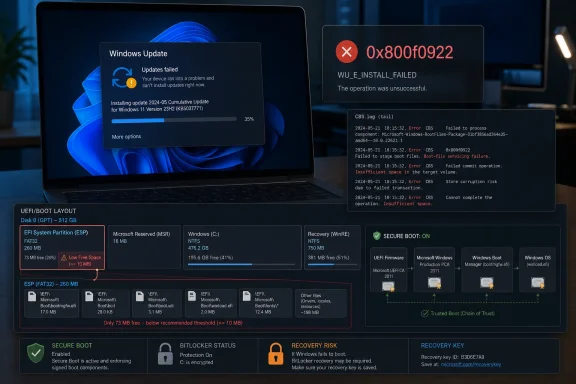
That is why the 0x800f0922 failure is more consequential than its familiar hex code suggests. The error has long been associated with update transactions that cannot complete, often because Windows lacks enough room in a reserved or system partition. In this case, Microsoft says the failure is especially tied to devices with limited free space on the EFI System Partition, particularly systems with 10 MB or less available.
For ordinary users, the symptom is blunt: the update appears to install, the machine reboots, progress reaches roughly 35 or 36 percent, and Windows backs out with a message that something did not go as planned. For administrators, the better clue lives in CBS logs, where messages about insufficient space and boot-file servicing failures reveal the real constraint. Windows is not failing because it dislikes May. It is failing because the small partition that anchors UEFI boot has become too crowded for the work Microsoft now wants it to do.
Secure Boot has altered that equation. The industry’s trust chain is aging, and Microsoft has been preparing Windows devices for updated Secure Boot certificates ahead of certificate expirations that begin in 2026. That preparation requires staging, validation, and cautious deployment because a mistake in the boot trust chain is not like a bad Notepad update. A bad boot trust change can make systems unbootable.
KB5089549 is part of that broader transition. Microsoft describes additional high-confidence device targeting data for determining which devices can automatically receive new Secure Boot certificates. The company also says eligible devices receive a new
That cautious language is doing a lot of work. Microsoft is not simply spraying new certificates at every PC and hoping for the best. It is using “successful update signals” and controlled rollout logic, because the compatibility surface includes firmware, TPM state, BitLocker policy, OEM boot files, and enterprise management tools. The more careful the rollout becomes, the more Windows Update starts to resemble a distributed trust migration rather than a software patch.
The failure mode suggests a simple but uncomfortable reality: some Windows devices do not have enough tidy boot-partition headroom for this era. OEMs have shipped systems with small ESPs. Users have upgraded from older Windows installations. Linux dual-boot setups, recovery tools, vendor diagnostics, and leftover boot files may consume space Microsoft would prefer to use. Windows can paper over that history until an update needs to service boot files and the partition says no.
This is the kind of failure that feels unfair to users because they did not knowingly fill the partition. There is no obvious “clean up EFI space” button in Settings, and the ESP is intentionally hidden because casual edits can render a machine unbootable. Yet the cumulative update model still delivers the boot servicing payload as part of a monthly security package. The user experiences one error code; the system is actually exposing years of partition-sizing assumptions.
BitLocker is doing what it was designed to do when it reacts to boot-chain changes. It protects encrypted data by binding trust to measured boot state. But that noble design can become a support nightmare when the operating system’s own servicing process changes boot files in a way that trips recovery expectations. A fleet of laptops asking for recovery keys is not a theoretical problem for help desks; it is an outage measured in queues, tickets, and executives unable to start meetings.
KB5089549 therefore carries a double promise. It brings May security fixes, and it is meant to repair the earlier boot-manager servicing behavior that sent some systems into recovery. If the update fails on affected machines, those devices may remain exposed to the security vulnerabilities addressed in May while also missing the BitLocker-related remediation. That is the practical trap: the fix for a boot-security problem depends on a boot-servicing update that may itself fail because the boot partition is too cramped.
This is where Microsoft’s cumulative model shows both its strength and weakness. Bundling fixes simplifies broad deployment when everything works. One package advances security, reliability, and servicing state. But when the package fails, the failure blocks unrelated benefits as well. A device that cannot install KB5089549 does not get to selectively accept only the security fixes or only the BitLocker remediation.
For home users, the rollback may at least preserve a bootable system. Windows attempts the installation, fails during reboot, undoes changes, and returns the PC to its prior state. That is better than a brick. But “better than a brick” is not the bar Microsoft should want for a monthly security update in 2026.
For enterprises, rollback is less comforting. Compliance dashboards may show missing patches. Security teams may need exceptions. Endpoint management systems may retry the same failed install. Technicians may face the ugly choice between waiting for Microsoft’s mitigation, deploying a Known Issue Rollback policy, or touching sensitive boot configuration on machines they would much rather leave alone.
KIR has become one of Microsoft’s most important tools for reducing the blast radius of Windows update regressions. It allows the company to disable or reverse specific problematic non-security changes without requiring every machine to install a fresh out-of-band update. In a world where Windows runs across vast hardware diversity, that is a sensible mechanism. It lets Microsoft react quickly while preserving the larger monthly update framework.
But KIR also underlines a persistent problem: the first deployment wave is still where some users discover the edge cases. Microsoft can test broadly, use telemetry, phase rollouts, and gate Secure Boot certificate changes behind eligibility signals, yet a condition as mundane as limited EFI free space still escaped into production. That is not shocking, but it is sobering. Windows’ installed base is a museum of hardware decisions, OEM partition layouts, firmware quirks, and enterprise policies.
The registry workaround Microsoft documents is similarly practical and unsettling. Affected customers may allow the update to install by changing an ESP padding-related registry value, then restarting and trying again. The existence of such a workaround suggests the failure is not mysterious; Windows is enforcing a space cushion that can be adjusted. But asking users to edit registry settings connected to boot servicing is not a mainstream remedy. It is a controlled intervention for people who understand the risk.
The better enterprise path is the Group Policy mitigation. That gives IT departments a managed way to apply Microsoft’s rollback without improvising on individual devices. Even so, the policy must match the Windows version, must be installed and configured, and still requires affected devices to restart. This is not “click Check for updates and forget it.” It is operational work.
The distinction matters because many headlines reduce the story to “Windows update fails with 0x800f0922.” That is true, but incomplete. The more important story is that Microsoft’s mitigation stack now includes telemetry-gated rollouts, KIR, version-specific Group Policy, and boot-partition heuristics. Windows servicing has become a complex control plane. When it works, users do not notice. When it fails, the fix can be more complicated than the symptom.
Secure Boot is one of the pillars of modern Windows security. It helps ensure that the firmware loads trusted boot components rather than unsigned or malicious code inserted before the operating system starts. It is also deeply dependent on certificates, databases, firmware behavior, and update sequencing. Changing that trust foundation at scale is delicate.
The new
Still, the rollout architecture puts pressure on the monthly update channel. If Secure Boot preparation rides inside cumulative updates, any cumulative update regression can delay certificate readiness. Conversely, if Microsoft slows the certificate rollout too much, devices may approach expiration windows without adequate preparation. KB5089549 is a reminder that security timelines and servicing reliability are now tightly coupled.
There is also a communications challenge. Most users have never heard of Secure Boot certificates, PCR7, or the ESP. They do know when Windows Update fails. They do know when a laptop reboots twice and says it is undoing changes. Microsoft must translate an infrastructure transition into guidance that does not sound like firmware archaeology.
The current guidance is clearer than the error code, but still technical. Check logs, look for EFI partition space messages, use a registry workaround, or apply a Known Issue Rollback policy. That is acceptable for sysadmins. It is not friendly for consumers whose only crime was buying a PC with a small or cluttered boot partition.
Some of that advice is harmless. System File Checker and DISM can repair component-store corruption, and pausing updates can stop a machine from repeatedly failing during inconvenient reboots. But Microsoft’s KB5089549 known issue is more specific. The stated trigger is limited free space on the EFI System Partition, especially around 10 MB or less available, with boot-file servicing failures visible in CBS logs.
That specificity should change the order of operations. If KB5089549 fails at roughly 35 or 36 percent during reboot and rolls back with 0x800f0922, administrators should not spend hours chasing ghosts in Windows Update cache folders before checking the ESP clue. The log entries Microsoft identifies are the breadcrumb trail. “SpaceCheck” is a much better lead than the hex code.
The distinction between the EFI System Partition and the older “System Reserved” partition also matters. Many consumer guides blur the terminology, but UEFI-based Windows installations rely on the ESP for boot files. Expanding, cleaning, or modifying it is not risk-free. A sloppy fix can break booting or interfere with vendor recovery tools.
This is why the registry workaround is preferable to amateur partition surgery for many users. It changes servicing behavior rather than asking someone to mount the ESP and start deleting unfamiliar files. But it still belongs in the category of deliberate remediation, not casual tinkering. Anyone managing important machines should back up first, document the change, and test on a small group before scaling.
There is a broader lesson here for Windows enthusiasts who like to keep systems lean. The hidden partitions are not wasted space. They are operational reserves. As Secure Boot, recovery, and servicing requirements grow, a tiny ESP that looked adequate five years ago can become a liability.
The presence of Secure Boot and BitLocker in the same update raises the risk profile. Organizations that rely on BitLocker recovery escrow, measured boot, Secure Boot enforcement, and patch compliance cannot simply shrug at failed installations. These are the controls auditors ask about and attackers try to bypass. A failed cumulative update leaves uncertainty about which machines received which boot-related improvements.
The KIR Group Policy offers a path forward, but it adds another deployment artifact to track. Administrators need to obtain the policy for Windows 11 24H2 and 25H2, configure it under Administrative Templates, restart affected devices, and then retry or allow the update process to proceed. In a small office, that is manageable. In a distributed enterprise with remote laptops and strict change windows, it becomes another project.
There is also the problem of fleet diversity. Some machines may install KB5089549 without issue. Some may fail because the ESP is nearly full. Some may have OEM files consuming boot-partition space. Some may be unmanaged enough to receive Microsoft’s automatic KIR resolution, while others are managed and therefore require explicit policy action. The same KB number can represent several different operational states.
That complexity argues for better preflight visibility. Microsoft already knows enough to report that devices with limited ESP space are at risk. Enterprise tooling should make that easy to query before Patch Tuesday, not after rollback. Admins should be able to ask their fleet: how much free space is on the ESP, which devices have non-Microsoft boot files consuming unusual amounts of room, and which machines are likely to fail boot-file servicing?
Some organizations can script that today, but it should not require bespoke detective work. If Windows Update is going to service the boot chain as part of routine security maintenance, Windows management tools need first-class health checks for the boot chain. Otherwise, every Secure Boot or BitLocker servicing change becomes a guessing game.
But the timing still matters. Patch Tuesday landed on May 12. The Secure Boot release note was added on May 13. The known issue arrived on May 15. By then, early adopters and some managed rings had already encountered the failure. That sequence is familiar: Microsoft ships, telemetry and complaints surface, documentation catches up, mitigation follows.
The Windows ecosystem may be too varied to eliminate that cycle entirely. But Microsoft should be judged not only by whether it eventually documents issues, but by whether its update pipeline anticipates predictable failure classes. Low EFI partition space is not an exotic condition. It is a known theme in Windows servicing history.
The company’s own mitigation confirms that the problem can be narrowed. If the ESP has 10 MB or less free, risk rises. If CBS logs show boot-file servicing failures and insufficient space, the diagnosis is strong. Those checks could be surfaced earlier in Windows Update itself. A user should not need to inspect CBS logs to understand that a hidden boot partition lacks room.
The error message also remains too vague. “Something didn’t go as planned. Undoing changes” may be friendly, but it is not actionable. A better Windows Update experience would say that the update could not service boot files because the EFI System Partition lacks required free space, then point to Microsoft’s supported mitigation. Windows has grown more secure and more complex; its failures need to become more specific too.
The irony is that Microsoft is doing the hard part—staged rollout, KIR, certificate targeting, servicing-stack integration—but still leaves users staring at a generic failure. The engineering sophistication is hidden. The frustration is visible.
That is necessary work. Attackers have long understood that the earlier code runs in the boot process, the more power it has. Secure Boot, TPM-backed measurements, and encrypted storage are central to defending modern systems. Letting certificates age out or boot components drift without maintenance would be irresponsible.
But necessary work can still be disruptive if the platform is not ready. The ESP was sized for an earlier world on many machines. OEM practices vary. Enterprise images may carry historical baggage. Dual-boot and recovery configurations complicate the picture. The more Windows security depends on boot-time state, the more those old details become live operational dependencies.
Microsoft’s challenge is to make that transition boring. Certificate renewal should not feel like a firmware incident. BitLocker remediation should not depend on users deciphering 0x800f0922. Boot partition constraints should be visible before they block a security update. The best version of this future is one where Windows quietly verifies readiness, repairs what it can, and tells administrators exactly what remains.
The worst version is a recurring cycle in which every boot-security improvement produces a new class of update failure. That would train users to delay patches and train administrators to distrust the monthly channel. Security maintenance cannot depend on heroics every second Tuesday.
The useful facts are concrete, and they point to a manageable but annoying incident rather than a universal Windows 11 meltdown.
 Microsoft’s Patch Tuesday Problem Has Moved Below the Desktop
The modern Windows update story is no longer mostly about broken Start menus, misbehaving printers, or a driver that makes a gaming laptop sulk. KB5089549 shows how much of the action has moved underneath the visible operating system, into boot files, trust anchors, recovery behavior, and firmware-facing partitions most users never see.The affected update is the May 2026 cumulative security release for Windows 11 versions 24H2 and 25H2, moving systems to builds 26100.8457 and 26200.8457 respectively. It includes the usual security payload, quality fixes from the prior preview update, and a servicing stack component meant to make future updates more reliable. That is the standard Patch Tuesday bargain: accept a large bundle, get safer, move on.
But KB5089549 is not a routine bundle in practice. Microsoft’s own change log ties the release to Secure Boot certificate work, a new
SecureBoot folder under C:\Windows on eligible devices, and boot-manager servicing designed to avoid BitLocker recovery surprises after boot-file updates. Those are not cosmetic changes. They touch the chain of trust that decides whether a Windows device can boot securely and whether BitLocker believes that boot path is still legitimate.That is why the 0x800f0922 failure is more consequential than its familiar hex code suggests. The error has long been associated with update transactions that cannot complete, often because Windows lacks enough room in a reserved or system partition. In this case, Microsoft says the failure is especially tied to devices with limited free space on the EFI System Partition, particularly systems with 10 MB or less available.
For ordinary users, the symptom is blunt: the update appears to install, the machine reboots, progress reaches roughly 35 or 36 percent, and Windows backs out with a message that something did not go as planned. For administrators, the better clue lives in CBS logs, where messages about insufficient space and boot-file servicing failures reveal the real constraint. Windows is not failing because it dislikes May. It is failing because the small partition that anchors UEFI boot has become too crowded for the work Microsoft now wants it to do.
The EFI Partition Was Never Meant to Be a Junk Drawer
The EFI System Partition, or ESP, is one of those pieces of Windows infrastructure that only becomes famous when it breaks. It is small, hidden from File Explorer by default, and shared by boot loaders, firmware files, vendor utilities, and sometimes the debris left behind by OEMs or multi-boot experiments. For years, that arrangement mostly worked because the ESP did not need to change very often.Secure Boot has altered that equation. The industry’s trust chain is aging, and Microsoft has been preparing Windows devices for updated Secure Boot certificates ahead of certificate expirations that begin in 2026. That preparation requires staging, validation, and cautious deployment because a mistake in the boot trust chain is not like a bad Notepad update. A bad boot trust change can make systems unbootable.
KB5089549 is part of that broader transition. Microsoft describes additional high-confidence device targeting data for determining which devices can automatically receive new Secure Boot certificates. The company also says eligible devices receive a new
SecureBoot folder containing sample scripts for IT-managed environments, including Active Directory automation for detecting and deploying Secure Boot certificate status updates.That cautious language is doing a lot of work. Microsoft is not simply spraying new certificates at every PC and hoping for the best. It is using “successful update signals” and controlled rollout logic, because the compatibility surface includes firmware, TPM state, BitLocker policy, OEM boot files, and enterprise management tools. The more careful the rollout becomes, the more Windows Update starts to resemble a distributed trust migration rather than a software patch.
The failure mode suggests a simple but uncomfortable reality: some Windows devices do not have enough tidy boot-partition headroom for this era. OEMs have shipped systems with small ESPs. Users have upgraded from older Windows installations. Linux dual-boot setups, recovery tools, vendor diagnostics, and leftover boot files may consume space Microsoft would prefer to use. Windows can paper over that history until an update needs to service boot files and the partition says no.
This is the kind of failure that feels unfair to users because they did not knowingly fill the partition. There is no obvious “clean up EFI space” button in Settings, and the ESP is intentionally hidden because casual edits can render a machine unbootable. Yet the cumulative update model still delivers the boot servicing payload as part of a monthly security package. The user experiences one error code; the system is actually exposing years of partition-sizing assumptions.
BitLocker Makes the Stakes Higher Than a Failed Reboot
The most awkward detail in KB5089549 is that it is supposed to fix a BitLocker recovery problem introduced by the April 2026 security update, KB5083769. Microsoft says the May update addresses an issue where some devices could enter BitLocker Recovery after boot files were updated on systems with certain TPM validation settings, including invalid PCR7 configurations. That is exactly the sort of bug enterprises dread: a security update changes boot measurements, BitLocker interprets the change as suspicious, and users are suddenly staring at recovery prompts.BitLocker is doing what it was designed to do when it reacts to boot-chain changes. It protects encrypted data by binding trust to measured boot state. But that noble design can become a support nightmare when the operating system’s own servicing process changes boot files in a way that trips recovery expectations. A fleet of laptops asking for recovery keys is not a theoretical problem for help desks; it is an outage measured in queues, tickets, and executives unable to start meetings.
KB5089549 therefore carries a double promise. It brings May security fixes, and it is meant to repair the earlier boot-manager servicing behavior that sent some systems into recovery. If the update fails on affected machines, those devices may remain exposed to the security vulnerabilities addressed in May while also missing the BitLocker-related remediation. That is the practical trap: the fix for a boot-security problem depends on a boot-servicing update that may itself fail because the boot partition is too cramped.
This is where Microsoft’s cumulative model shows both its strength and weakness. Bundling fixes simplifies broad deployment when everything works. One package advances security, reliability, and servicing state. But when the package fails, the failure blocks unrelated benefits as well. A device that cannot install KB5089549 does not get to selectively accept only the security fixes or only the BitLocker remediation.
For home users, the rollback may at least preserve a bootable system. Windows attempts the installation, fails during reboot, undoes changes, and returns the PC to its prior state. That is better than a brick. But “better than a brick” is not the bar Microsoft should want for a monthly security update in 2026.
For enterprises, rollback is less comforting. Compliance dashboards may show missing patches. Security teams may need exceptions. Endpoint management systems may retry the same failed install. Technicians may face the ugly choice between waiting for Microsoft’s mitigation, deploying a Known Issue Rollback policy, or touching sensitive boot configuration on machines they would much rather leave alone.
Known Issue Rollback Is a Safety Net, Not a Strategy
Microsoft’s mitigation path is revealing. The company says the issue is being addressed through Known Issue Rollback, or KIR, and that the resolution has already been propagated automatically to consumer devices and unmanaged business devices. A restart may help apply it faster. For enterprise-managed devices, administrators can deploy a special Group Policy tied to the KB5089549 rollback.KIR has become one of Microsoft’s most important tools for reducing the blast radius of Windows update regressions. It allows the company to disable or reverse specific problematic non-security changes without requiring every machine to install a fresh out-of-band update. In a world where Windows runs across vast hardware diversity, that is a sensible mechanism. It lets Microsoft react quickly while preserving the larger monthly update framework.
But KIR also underlines a persistent problem: the first deployment wave is still where some users discover the edge cases. Microsoft can test broadly, use telemetry, phase rollouts, and gate Secure Boot certificate changes behind eligibility signals, yet a condition as mundane as limited EFI free space still escaped into production. That is not shocking, but it is sobering. Windows’ installed base is a museum of hardware decisions, OEM partition layouts, firmware quirks, and enterprise policies.
The registry workaround Microsoft documents is similarly practical and unsettling. Affected customers may allow the update to install by changing an ESP padding-related registry value, then restarting and trying again. The existence of such a workaround suggests the failure is not mysterious; Windows is enforcing a space cushion that can be adjusted. But asking users to edit registry settings connected to boot servicing is not a mainstream remedy. It is a controlled intervention for people who understand the risk.
The better enterprise path is the Group Policy mitigation. That gives IT departments a managed way to apply Microsoft’s rollback without improvising on individual devices. Even so, the policy must match the Windows version, must be installed and configured, and still requires affected devices to restart. This is not “click Check for updates and forget it.” It is operational work.
The distinction matters because many headlines reduce the story to “Windows update fails with 0x800f0922.” That is true, but incomplete. The more important story is that Microsoft’s mitigation stack now includes telemetry-gated rollouts, KIR, version-specific Group Policy, and boot-partition heuristics. Windows servicing has become a complex control plane. When it works, users do not notice. When it fails, the fix can be more complicated than the symptom.
The Secure Boot Certificate Clock Is Ticking
The Secure Boot angle should not be treated as incidental. Microsoft has been warning that Secure Boot certificates used by most Windows devices begin expiring in June 2026. That looming deadline explains why certificate-related preparation is showing up in cumulative updates now. The company needs to refresh trust material across an enormous device population without triggering mass boot failures.Secure Boot is one of the pillars of modern Windows security. It helps ensure that the firmware loads trusted boot components rather than unsigned or malicious code inserted before the operating system starts. It is also deeply dependent on certificates, databases, firmware behavior, and update sequencing. Changing that trust foundation at scale is delicate.
The new
SecureBoot folder under C:\Windows is aimed at organizations that actively manage fleets. Microsoft says the folder contains sample scripts to detect Secure Boot certificate update status and automate deployment through a safe rollout mechanism in Active Directory environments. That is a sign the company knows enterprise admins will not accept a black-box certificate migration for their most sensitive systems.Still, the rollout architecture puts pressure on the monthly update channel. If Secure Boot preparation rides inside cumulative updates, any cumulative update regression can delay certificate readiness. Conversely, if Microsoft slows the certificate rollout too much, devices may approach expiration windows without adequate preparation. KB5089549 is a reminder that security timelines and servicing reliability are now tightly coupled.
There is also a communications challenge. Most users have never heard of Secure Boot certificates, PCR7, or the ESP. They do know when Windows Update fails. They do know when a laptop reboots twice and says it is undoing changes. Microsoft must translate an infrastructure transition into guidance that does not sound like firmware archaeology.
The current guidance is clearer than the error code, but still technical. Check logs, look for EFI partition space messages, use a registry workaround, or apply a Known Issue Rollback policy. That is acceptable for sysadmins. It is not friendly for consumers whose only crime was buying a PC with a small or cluttered boot partition.
The Old 0x800f0922 Advice Is Only Partly Useful
Error 0x800f0922 has a history, and that history can mislead troubleshooting. In past Windows update failures, the code has been linked to System Reserved partition space, VPN or network issues, .NET Framework problems, or corrupted update components. The internet is full of generic advice: run the Windows Update troubleshooter, reset update services, runsfc /scannow, run DISM health restoration, and try again.Some of that advice is harmless. System File Checker and DISM can repair component-store corruption, and pausing updates can stop a machine from repeatedly failing during inconvenient reboots. But Microsoft’s KB5089549 known issue is more specific. The stated trigger is limited free space on the EFI System Partition, especially around 10 MB or less available, with boot-file servicing failures visible in CBS logs.
That specificity should change the order of operations. If KB5089549 fails at roughly 35 or 36 percent during reboot and rolls back with 0x800f0922, administrators should not spend hours chasing ghosts in Windows Update cache folders before checking the ESP clue. The log entries Microsoft identifies are the breadcrumb trail. “SpaceCheck” is a much better lead than the hex code.
The distinction between the EFI System Partition and the older “System Reserved” partition also matters. Many consumer guides blur the terminology, but UEFI-based Windows installations rely on the ESP for boot files. Expanding, cleaning, or modifying it is not risk-free. A sloppy fix can break booting or interfere with vendor recovery tools.
This is why the registry workaround is preferable to amateur partition surgery for many users. It changes servicing behavior rather than asking someone to mount the ESP and start deleting unfamiliar files. But it still belongs in the category of deliberate remediation, not casual tinkering. Anyone managing important machines should back up first, document the change, and test on a small group before scaling.
There is a broader lesson here for Windows enthusiasts who like to keep systems lean. The hidden partitions are not wasted space. They are operational reserves. As Secure Boot, recovery, and servicing requirements grow, a tiny ESP that looked adequate five years ago can become a liability.
Enterprise IT Gets the Worst Version of the Bug
For managed environments, KB5089549 is not just an installation nuisance. It is a patch-governance problem. Security teams see a May update that should be installed. Endpoint teams see devices that cannot complete it. Help desks see users confused by rollback messages. Compliance teams see exceptions piling up for reasons that sound obscure even by Windows standards.The presence of Secure Boot and BitLocker in the same update raises the risk profile. Organizations that rely on BitLocker recovery escrow, measured boot, Secure Boot enforcement, and patch compliance cannot simply shrug at failed installations. These are the controls auditors ask about and attackers try to bypass. A failed cumulative update leaves uncertainty about which machines received which boot-related improvements.
The KIR Group Policy offers a path forward, but it adds another deployment artifact to track. Administrators need to obtain the policy for Windows 11 24H2 and 25H2, configure it under Administrative Templates, restart affected devices, and then retry or allow the update process to proceed. In a small office, that is manageable. In a distributed enterprise with remote laptops and strict change windows, it becomes another project.
There is also the problem of fleet diversity. Some machines may install KB5089549 without issue. Some may fail because the ESP is nearly full. Some may have OEM files consuming boot-partition space. Some may be unmanaged enough to receive Microsoft’s automatic KIR resolution, while others are managed and therefore require explicit policy action. The same KB number can represent several different operational states.
That complexity argues for better preflight visibility. Microsoft already knows enough to report that devices with limited ESP space are at risk. Enterprise tooling should make that easy to query before Patch Tuesday, not after rollback. Admins should be able to ask their fleet: how much free space is on the ESP, which devices have non-Microsoft boot files consuming unusual amounts of room, and which machines are likely to fail boot-file servicing?
Some organizations can script that today, but it should not require bespoke detective work. If Windows Update is going to service the boot chain as part of routine security maintenance, Windows management tools need first-class health checks for the boot chain. Otherwise, every Secure Boot or BitLocker servicing change becomes a guessing game.
Microsoft’s Transparency Is Better, But Still Reactive
To Microsoft’s credit, the KB5089549 documentation now describes the symptom, the failure point, the relevant logs, and the available workarounds. That is more useful than a generic “we are investigating” notice. The company also updated the change history on May 15, three days after the update’s release, which gives administrators a specific chronology.But the timing still matters. Patch Tuesday landed on May 12. The Secure Boot release note was added on May 13. The known issue arrived on May 15. By then, early adopters and some managed rings had already encountered the failure. That sequence is familiar: Microsoft ships, telemetry and complaints surface, documentation catches up, mitigation follows.
The Windows ecosystem may be too varied to eliminate that cycle entirely. But Microsoft should be judged not only by whether it eventually documents issues, but by whether its update pipeline anticipates predictable failure classes. Low EFI partition space is not an exotic condition. It is a known theme in Windows servicing history.
The company’s own mitigation confirms that the problem can be narrowed. If the ESP has 10 MB or less free, risk rises. If CBS logs show boot-file servicing failures and insufficient space, the diagnosis is strong. Those checks could be surfaced earlier in Windows Update itself. A user should not need to inspect CBS logs to understand that a hidden boot partition lacks room.
The error message also remains too vague. “Something didn’t go as planned. Undoing changes” may be friendly, but it is not actionable. A better Windows Update experience would say that the update could not service boot files because the EFI System Partition lacks required free space, then point to Microsoft’s supported mitigation. Windows has grown more secure and more complex; its failures need to become more specific too.
The irony is that Microsoft is doing the hard part—staged rollout, KIR, certificate targeting, servicing-stack integration—but still leaves users staring at a generic failure. The engineering sophistication is hidden. The frustration is visible.
The Patch Is a Warning About Windows’ Next Security Era
KB5089549 should be read as a preview of Windows’ next security maintenance era. The operating system is no longer just patching user-mode components, kernel vulnerabilities, and bundled apps. It is maintaining the boot trust chain, rotating certificates, coordinating with firmware-era assumptions, and trying not to trip BitLocker while doing it.That is necessary work. Attackers have long understood that the earlier code runs in the boot process, the more power it has. Secure Boot, TPM-backed measurements, and encrypted storage are central to defending modern systems. Letting certificates age out or boot components drift without maintenance would be irresponsible.
But necessary work can still be disruptive if the platform is not ready. The ESP was sized for an earlier world on many machines. OEM practices vary. Enterprise images may carry historical baggage. Dual-boot and recovery configurations complicate the picture. The more Windows security depends on boot-time state, the more those old details become live operational dependencies.
Microsoft’s challenge is to make that transition boring. Certificate renewal should not feel like a firmware incident. BitLocker remediation should not depend on users deciphering 0x800f0922. Boot partition constraints should be visible before they block a security update. The best version of this future is one where Windows quietly verifies readiness, repairs what it can, and tells administrators exactly what remains.
The worst version is a recurring cycle in which every boot-security improvement produces a new class of update failure. That would train users to delay patches and train administrators to distrust the monthly channel. Security maintenance cannot depend on heroics every second Tuesday.
The May Update Leaves Admins With a Narrow Playbook
For now, the practical response is not panic, and it is not blind retrying. The pattern is specific enough to support a disciplined response: identify affected machines, confirm the failure mode, apply Microsoft’s mitigation, and avoid risky partition edits unless there is a tested plan.The useful facts are concrete, and they point to a manageable but annoying incident rather than a universal Windows 11 meltdown.
- KB5089549 applies to Windows 11 versions 24H2 and 25H2 and advances systems to builds 26100.8457 and 26200.8457.
- Microsoft says affected devices may fail during the reboot phase at about 35 to 36 percent, roll back, and report error 0x800f0922.
- The documented trigger is limited free space on the EFI System Partition, especially devices with 10 MB or less available.
- The update includes Secure Boot certificate preparation, a new
SecureBootfolder on eligible devices, boot-manager servicing improvements, SSDP reliability work, and an Egypt daylight-saving-time change. - Microsoft is using Known Issue Rollback for mitigation, with automatic propagation for consumer and unmanaged business devices and a Group Policy route for enterprise-managed systems.
- Administrators should treat generic 0x800f0922 troubleshooting as secondary until they have checked the KB5089549-specific ESP and CBS log indicators.
References
- Primary source: cyberpress.org
Published: Mon, 18 May 2026 08:46:27 GMT
Microsoft Confirms Windows 11 Update Failure Causing Error 0x800f0922
Microsoft has officially acknowledged a critical installation failure affecting its May 2026 Patch Tuesday update, KB5089549, leaving Windows 11 users stranded with a cryptic error code and no clear path forward. cyberpress.org
- Related coverage: windowscentral.com
Windows 11’s May update is causing install failures and slow internet — here’s what we know | Windows Central
Some users are hitting install failures and internet slowdowns after the May 2026 Patch Tuesday update.www.windowscentral.com - Related coverage: windowslatest.com
Microsoft confirms Windows 11 KB5089549 issues due to low storage, says it's rolling out an emergency patch to fix install errors
Microsoft confirmed that it's aware of an issue where Windows 11 KB5089549 fails to install due to errors such as 0x800f0922. www.windowslatest.com
- Related coverage: anavem.com
KB5089549: May 2026 Security Update – Windows 11 (2026)
KB5089549 patches critical CVEs and improves stability on Windows 11 24H2/25H2. Updates builds to 26100.8457 and 26200.8457. Installation details included.www.anavem.com - Related coverage: thewincentral.com
Windows 11 update KB5089549 Fails to Install, Microsoft Confirms Error & Fix - WinCentral
Microsoft confirms a Windows 11 KB5089549 installation bug causing error 0x800f0922 during restart. Here’s the workaround and official fix details. - Read in Windows Issues on WinCentral thewincentral.com
- Related coverage: bleepingcomputer.com
Microsoft confirms Windows 11 security update install issues
Microsoft has confirmed that the May 2026 Windows 11 security update (KB5089549) fails to install on some systems and triggers 0x800f0922 errors.www.bleepingcomputer.com
- Related coverage: hoploninfosec.com
Windows 11 KB5089549 Update Fixes BitLocker & 120 Bugs
Microsoft released Windows 11 KB5089549 on May 12, 2026, fixing BitLocker recovery loops, 120 security flaws, and boosting AI features in 25H2/24H2.hoploninfosec.com - Related coverage: windowsreport.com
Windows 11 May 2026 Patch Tuesday Update, KB5089549, Out Now
May 2026 Patch Tuesday update for Windows 11 update fixes BitLocker recovery issues, improves Secure Boot rollout, and patches 137 CVEs. windowsreport.com
- Official source: support.microsoft.com
- Related coverage: winbuzzer.com
Microsoft Fixes BitLocker Recovery Bug Only for Windows 11
Microsoft has fixed the Windows 11 BitLocker recovery bug in KB5089549, but Windows 10 and Windows Server admins still need April key-access workarounds.winbuzzer.com - Related coverage: tomshardware.com
Microsoft to force updates to Windows 11 25H2 for PCs with older Windows 11 OS versions — 'intelligent' update system uses machine learning to determine when a device is ready | Tom's Hardware
Microsoft forces 25H2 rollout ahead of 24H2 end-of-supportwww.tomshardware.com

