

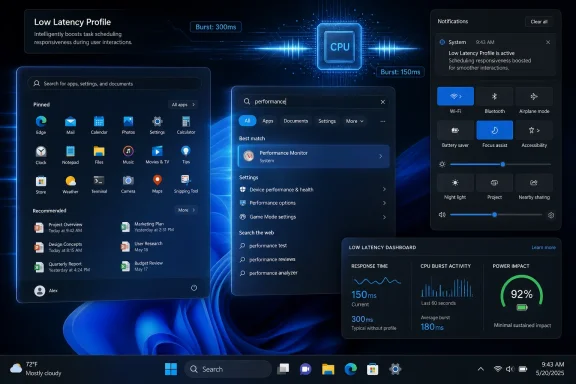
Microsoft’s May 26, 2026 preview update KB5089573 for Windows 11 versions 24H2 and 25H2 introduces a general performance improvement that accelerates app launches and core shell surfaces including Start, Search, and Action Center, with reports tying it to a short-burst CPU “Low Latency Profile.” That is the plain story, but not the whole story. Microsoft is not suddenly turning Windows into a lightweight operating system; it is teaching Windows to be more aggressive at the exact moments users notice delay. The result could make Windows 11 feel faster on ordinary PCs, while also exposing how much of modern desktop performance is about perception, scheduling, and milliseconds rather than benchmark theater.
For years, Windows performance complaints have had a peculiar shape. Users rarely say their CPU cannot finish a long encode, compile a large project, or run a game at the advertised frame rate; they say the Start menu hesitates, File Explorer lags, Search wakes up slowly, and a brand-new PC sometimes feels less immediate than an older machine running a leaner setup.
That distinction matters. The desktop is judged less by throughput than by latency. A half-second pause before Search becomes responsive can feel worse than a background task that takes ten seconds longer, because the former happens while the user is staring directly at the machine waiting for it to acknowledge intent.
KB5089573 appears to attack that problem directly. Microsoft’s own wording is restrained: the update “accelerates app launch and core shell experiences such as Start menu, Search, and Action Center.” Reporting from Windows-focused outlets has connected that line item to an internal feature called Low Latency Profile, which briefly increases CPU frequency when the user triggers high-priority interactions.
That framing is important because it separates the feature from classic “performance mode” thinking. This is not a global decision to run hotter all day. It is a tactical decision to spend a small amount of power at the moment the user is most likely to notice sluggishness, then return the system to idle.
Modern processors already boost opportunistically. Intel, AMD, and Arm chips have spent years improving the speed with which they climb and descend frequency states, and Windows has long had power plans, scheduler hints, foreground priorities, and heterogeneous-core logic. If Microsoft is adding a named, user-interaction-aware low-latency behavior, it suggests the default path has not been aggressive enough for the tiny bursts that define desktop feel.
That is not necessarily an indictment. Battery-powered computing has trained operating systems to conserve energy ruthlessly. The hard problem is not “make the CPU faster”; the hard problem is “make the system faster at the moment that matters without wasting power the rest of the time.”
Microsoft’s answer appears to be a narrower performance envelope. Rather than keep everything awake, Windows can bias the active shell path for a second or two. The user sees less lag; the battery meter, in theory, sees little sustained cost.
The company’s defenders have a point when they say other modern platforms do similar things. macOS, Linux desktops, Android, and iOS all rely on scheduler heuristics, quality-of-service classes, input responsiveness tricks, and bursty performance behavior. The difference is that Windows is now having this conversation in public because users have grown suspicious of an operating system that often feels heavier than its hardware should allow.
That preview status is easy to overlook, but administrators should not. Optional cumulative previews are where Microsoft increasingly stages the next month’s mainstream Windows behavior. Enthusiasts install them because they want the new bits; enterprises usually evaluate them because they want fewer surprises when Patch Tuesday turns optional into ordinary.
KB5089573 is also not just “the CPU boost update.” It includes other Windows 11 changes, including Shared Audio support for compatible Bluetooth LE Audio hardware, Windows Hello improvements, Search refinements, Dev Drive dialog changes, Secure Boot certificate preparation, and servicing-stack updates. That bundling is the Windows servicing model in miniature: a single cumulative package becomes the vehicle for features, fixes, policy plumbing, hardware enablement, and looming infrastructure deadlines.
For power users, the headline is responsiveness. For IT, the question is whether that responsiveness arrives with any operational surprises. A feature that changes CPU boosting behavior is unlikely to break line-of-business software by itself, but any shift in power behavior, thermals, fan curves, or battery drain deserves testing across hardware classes.
ViveTool is not magic; it toggles hidden Windows feature flags already present in the operating system. It is popular because Microsoft ships features before enabling them broadly, often using Controlled Feature Rollout to light them up for some users before others. For testers and hobbyists, this is part of the fun. For managed environments, it is a reminder that installed code and enabled behavior are no longer the same thing.
Microsoft’s rollout strategy is defensible. A staggered release lets the company watch telemetry, catch regressions, and stop a bad feature before it hits the entire installed base. But it also creates confusion. Two PCs can have the same KB installed and behave differently. A user can read that an update contains a performance improvement, install it, and see nothing obvious because the relevant feature flag has not yet been enabled on that device.
That ambiguity fuels the Windows rumor economy. Feature IDs circulate before documentation catches up. Screenshots become proof. Registry keys, PowerShell snippets, and command-line toggles spread through forums faster than Microsoft’s own release notes explain the practical effect.
The safest interpretation is simple: KB5089573 contains Microsoft’s officially acknowledged general performance work, but the exact Low Latency Profile behavior may still be controlled by staged rollout. If you force it on with third-party tooling, you are stepping outside the normal support path, even if the code came from Microsoft.
That is why reported gains around Start, Search, context menus, and app launch matter more than a synthetic benchmark score. Users experience the operating system as a series of short interactions. If the first 300 milliseconds improve, the machine feels better even if its peak compute score is unchanged.
This is also where Windows 11 has faced its most persistent criticism. Microsoft has modernized the shell visually, moved more surfaces to newer UI stacks, expanded cloud-connected search and account integration, and layered more intelligence into the desktop. Each individual decision may be justifiable. Together, they have sometimes made Windows feel less immediate than users expect.
A burst CPU profile does not erase that history. It does, however, acknowledge the correct battlefield. Microsoft does not need to convince users that Windows is fast in theory. It needs the Start menu to open now, the right-click menu to appear now, and the app launch animation to stop feeling like a negotiation.
Still, “no meaningful power impact” is a claim that depends on hardware, firmware, workload, and usage pattern. A plugged-in desktop will not care. A thin laptop with aggressive fan tuning might. A handheld gaming PC, passively cooled tablet, or enterprise fleet with strict thermal expectations could reveal edge cases.
The most likely downside is not dramatic battery collapse. It is variability. Some users may see a snappier shell with no tradeoff. Others may hear fans ramp more often during bursty desktop use. Older or poorly cooled systems may already be thermally constrained, limiting the benefit. Machines with custom power policies, disabled turbo behavior, or vendor utilities may not respond the way Microsoft expects.
There is also the philosophical concern: should Windows need to spike CPU frequency to make a context menu feel fast? Critics will argue that Microsoft is masking inefficiency rather than removing it. They are not entirely wrong. A boost strategy can compensate for overhead, but it cannot replace disciplined shell engineering.
The counterargument is that operating systems have always blended optimization and prioritization. The user does not care whether responsiveness came from cleaner code, better prefetching, faster frequency ramping, or smarter scheduling. The user cares that the machine reacts.
Performance work is politically useful inside Microsoft because it cuts across nearly every user faction. Gamers want less overhead. Developers want faster launch and file operations. Enterprise users want fewer complaints and smoother sign-ins. Casual users want the PC they bought to feel as premium as the spec sheet promised.
But the credibility problem is real. Windows users have seen too many “quality improvements” that did not translate into felt quality. They have seen features arrive half-finished, regressions linger, and settings migrate across generations of UI without fully replacing the old control surfaces. A low-latency CPU burst is useful only if it is part of a larger discipline.
That larger discipline would include reducing shell overhead, fixing Explorer delays, continuing to improve Search indexing behavior, limiting unnecessary background activity, and making feature rollout more transparent. Otherwise, Low Latency Profile risks becoming another layer of cleverness compensating for bloat.
Microsoft’s release notes say the update accelerates app launch and core shell experiences. They do not present a consumer-facing switch for Low Latency Profile. That suggests Microsoft sees the behavior as an operating-system-level optimization, not a user preference. In many ways, that is the right call; most users should not have to understand CPU boost windows to get a responsive Start menu.
Administrators, however, often need knobs precisely because invisible optimizations can complicate troubleshooting. If a fleet of laptops starts showing different thermal behavior after a cumulative update, IT needs to know whether the change is firmware, drivers, Windows power policy, endpoint security, or a new shell-triggered CPU profile.
The feature also intersects with procurement. Windows 11 responsiveness has become a real factor in hardware refresh conversations, especially as 24H2, 25H2, Copilot+ PCs, NPU requirements, and AI-branded experiences complicate the story. If Microsoft can make ordinary interactions faster on existing systems, it reduces pressure on users to blame aging hardware for every pause. If it cannot, the upgrade treadmill narrative gets stronger.
The right enterprise approach is boring but effective: test KB5089573 on representative hardware, compare shell responsiveness and battery behavior, watch thermals, and avoid forcing hidden feature flags outside pilot groups. Enthusiasts can chase the early win; IT should chase reproducibility.
That does not make it irrelevant to gamers. PC gaming quality is shaped by the whole system, not just the rendering path. Launchers, overlays, anti-cheat services, driver panels, capture tools, storefronts, shader compilation windows, and background update clients all live inside Windows. A more responsive shell can make the gaming PC feel less encumbered even if the in-game benchmark is unchanged.
The more interesting gaming implication is indirect. Microsoft has been under pressure to reduce Windows overhead as handheld PCs, compact gaming devices, and console-like launchers expose how clumsy the desktop can feel outside a keyboard-and-mouse workstation. A low-latency profile is not a handheld mode, but it belongs to the same family of work: making Windows feel less like a general-purpose OS dragging its feet before the user gets to the thing they actually opened the device to do.
For desktop gamers, the advice is simple. Install the preview only if you are comfortable with optional updates, do not assume feature flags are supportable, and measure what matters to you. If your complaint is Start lag, this update may help. If your complaint is shader stutter in a particular game, look elsewhere.
That gap is why a modest release-note entry can turn into a much larger story. “General Performance” sounds dull until users learn that Windows may briefly push CPU clocks higher for the interactions they perform hundreds of times a week. Suddenly the update sounds concrete, almost mechanical.
The danger is overselling it. A system with a corrupt profile, overloaded startup list, bloated shell extensions, slow storage, insufficient memory, broken drivers, or aggressive security scanning will not be transformed by a burst profile. Responsiveness is cumulative. Microsoft can improve one layer, but Windows remains an ecosystem of OEM utilities, silicon firmware, third-party software, and user habits.
Still, the focus is welcome. For too long, Windows performance discussions have been dominated by heavyweight scenarios while the everyday shell experience quietly accumulated friction. If Microsoft is now prioritizing the user’s first click, that is a healthier target.
That is the standard Microsoft has to meet. Low Latency Profile can be a meaningful step if it makes Windows 11 feel less hesitant across a wide range of PCs. But it will be judged harshly if it becomes another enthusiast-only tweak, another hidden rollout lottery, or another release-note promise that depends on hardware and feature flags users cannot see.
The preview timing gives Microsoft room to adjust. If KB5089573 exposes regressions, telemetry should catch them before wider release. If the feature works as intended, it may become one of those quiet Windows changes that users benefit from without ever learning its internal name.
That would be the ideal outcome. Windows does not need another brand. It needs fewer moments where the user clicks and waits.
 Microsoft Is Finally Optimizing the Wait You Actually Feel
For years, Windows performance complaints have had a peculiar shape. Users rarely say their CPU cannot finish a long encode, compile a large project, or run a game at the advertised frame rate; they say the Start menu hesitates, File Explorer lags, Search wakes up slowly, and a brand-new PC sometimes feels less immediate than an older machine running a leaner setup.That distinction matters. The desktop is judged less by throughput than by latency. A half-second pause before Search becomes responsive can feel worse than a background task that takes ten seconds longer, because the former happens while the user is staring directly at the machine waiting for it to acknowledge intent.
KB5089573 appears to attack that problem directly. Microsoft’s own wording is restrained: the update “accelerates app launch and core shell experiences such as Start menu, Search, and Action Center.” Reporting from Windows-focused outlets has connected that line item to an internal feature called Low Latency Profile, which briefly increases CPU frequency when the user triggers high-priority interactions.
That framing is important because it separates the feature from classic “performance mode” thinking. This is not a global decision to run hotter all day. It is a tactical decision to spend a small amount of power at the moment the user is most likely to notice sluggishness, then return the system to idle.
The CPU Boost Is Less a Turbo Button Than a Scheduling Confession
The temptation is to describe this as a processor boost, because that is how users understand it. Open Start, launch an app, right-click for a context menu, and Windows briefly gives the CPU more room to sprint. But the more interesting story is what the feature implies about Windows itself.Modern processors already boost opportunistically. Intel, AMD, and Arm chips have spent years improving the speed with which they climb and descend frequency states, and Windows has long had power plans, scheduler hints, foreground priorities, and heterogeneous-core logic. If Microsoft is adding a named, user-interaction-aware low-latency behavior, it suggests the default path has not been aggressive enough for the tiny bursts that define desktop feel.
That is not necessarily an indictment. Battery-powered computing has trained operating systems to conserve energy ruthlessly. The hard problem is not “make the CPU faster”; the hard problem is “make the system faster at the moment that matters without wasting power the rest of the time.”
Microsoft’s answer appears to be a narrower performance envelope. Rather than keep everything awake, Windows can bias the active shell path for a second or two. The user sees less lag; the battery meter, in theory, sees little sustained cost.
The company’s defenders have a point when they say other modern platforms do similar things. macOS, Linux desktops, Android, and iOS all rely on scheduler heuristics, quality-of-service classes, input responsiveness tricks, and bursty performance behavior. The difference is that Windows is now having this conversation in public because users have grown suspicious of an operating system that often feels heavier than its hardware should allow.
KB5089573 Turns an Optional Preview Into a Performance Test Bed
The update itself is not a mystery build pulled from a leaked lab. KB5089573 is a Microsoft-published preview cumulative update for Windows 11 version 24H2 and version 25H2, moving systems to OS builds 26100.8524 and 26200.8524 respectively. It is a non-security preview, which means Microsoft is putting production-quality changes in front of willing users before those changes roll into a broader security update cadence.That preview status is easy to overlook, but administrators should not. Optional cumulative previews are where Microsoft increasingly stages the next month’s mainstream Windows behavior. Enthusiasts install them because they want the new bits; enterprises usually evaluate them because they want fewer surprises when Patch Tuesday turns optional into ordinary.
KB5089573 is also not just “the CPU boost update.” It includes other Windows 11 changes, including Shared Audio support for compatible Bluetooth LE Audio hardware, Windows Hello improvements, Search refinements, Dev Drive dialog changes, Secure Boot certificate preparation, and servicing-stack updates. That bundling is the Windows servicing model in miniature: a single cumulative package becomes the vehicle for features, fixes, policy plumbing, hardware enablement, and looming infrastructure deadlines.
For power users, the headline is responsiveness. For IT, the question is whether that responsiveness arrives with any operational surprises. A feature that changes CPU boosting behavior is unlikely to break line-of-business software by itself, but any shift in power behavior, thermals, fan curves, or battery drain deserves testing across hardware classes.
The ViveTool Workaround Is a Symptom of Microsoft’s Controlled Rollout Culture
Reports say some users can enable the feature using ViveTool and feature ID 58989092 after installing KB5089573. That detail will delight the Windows enthusiast crowd and make many administrators wince.ViveTool is not magic; it toggles hidden Windows feature flags already present in the operating system. It is popular because Microsoft ships features before enabling them broadly, often using Controlled Feature Rollout to light them up for some users before others. For testers and hobbyists, this is part of the fun. For managed environments, it is a reminder that installed code and enabled behavior are no longer the same thing.
Microsoft’s rollout strategy is defensible. A staggered release lets the company watch telemetry, catch regressions, and stop a bad feature before it hits the entire installed base. But it also creates confusion. Two PCs can have the same KB installed and behave differently. A user can read that an update contains a performance improvement, install it, and see nothing obvious because the relevant feature flag has not yet been enabled on that device.
That ambiguity fuels the Windows rumor economy. Feature IDs circulate before documentation catches up. Screenshots become proof. Registry keys, PowerShell snippets, and command-line toggles spread through forums faster than Microsoft’s own release notes explain the practical effect.
The safest interpretation is simple: KB5089573 contains Microsoft’s officially acknowledged general performance work, but the exact Low Latency Profile behavior may still be controlled by staged rollout. If you force it on with third-party tooling, you are stepping outside the normal support path, even if the code came from Microsoft.
The Biggest Win May Be on Machines That Should Already Feel Fast
The irony of Low Latency Profile is that its best audience may not be underpowered PCs. A modern eight-core laptop with a fast NVMe SSD and plenty of memory can still feel oddly hesitant when the shell path is delayed by background work, power-state transitions, framework overhead, or UI plumbing. Those machines have performance headroom; Windows just needs to use it at the right instant.That is why reported gains around Start, Search, context menus, and app launch matter more than a synthetic benchmark score. Users experience the operating system as a series of short interactions. If the first 300 milliseconds improve, the machine feels better even if its peak compute score is unchanged.
This is also where Windows 11 has faced its most persistent criticism. Microsoft has modernized the shell visually, moved more surfaces to newer UI stacks, expanded cloud-connected search and account integration, and layered more intelligence into the desktop. Each individual decision may be justifiable. Together, they have sometimes made Windows feel less immediate than users expect.
A burst CPU profile does not erase that history. It does, however, acknowledge the correct battlefield. Microsoft does not need to convince users that Windows is fast in theory. It needs the Start menu to open now, the right-click menu to appear now, and the app launch animation to stop feeling like a negotiation.
This Is Not a Free Lunch, but It May Be a Cheap One
The central technical bet is that short boosts can improve responsiveness without meaningfully increasing power consumption. That is plausible. A processor that completes foreground work quickly can return to idle sooner, and idle remains the most efficient state for a modern system.Still, “no meaningful power impact” is a claim that depends on hardware, firmware, workload, and usage pattern. A plugged-in desktop will not care. A thin laptop with aggressive fan tuning might. A handheld gaming PC, passively cooled tablet, or enterprise fleet with strict thermal expectations could reveal edge cases.
The most likely downside is not dramatic battery collapse. It is variability. Some users may see a snappier shell with no tradeoff. Others may hear fans ramp more often during bursty desktop use. Older or poorly cooled systems may already be thermally constrained, limiting the benefit. Machines with custom power policies, disabled turbo behavior, or vendor utilities may not respond the way Microsoft expects.
There is also the philosophical concern: should Windows need to spike CPU frequency to make a context menu feel fast? Critics will argue that Microsoft is masking inefficiency rather than removing it. They are not entirely wrong. A boost strategy can compensate for overhead, but it cannot replace disciplined shell engineering.
The counterargument is that operating systems have always blended optimization and prioritization. The user does not care whether responsiveness came from cleaner code, better prefetching, faster frequency ramping, or smarter scheduling. The user cares that the machine reacts.
Windows K2 Is About Trust, Not Just Speed
The broader context is Microsoft’s Windows performance push, often discussed under the Windows K2 banner. The company has been trying to make Windows 11 feel more reliable, more responsive, and more coherent after years in which the OS became a delivery vehicle for AI features, Microsoft account nudges, Store surfaces, Teams remnants, Widgets, Copilot experiments, and shifting shell designs.Performance work is politically useful inside Microsoft because it cuts across nearly every user faction. Gamers want less overhead. Developers want faster launch and file operations. Enterprise users want fewer complaints and smoother sign-ins. Casual users want the PC they bought to feel as premium as the spec sheet promised.
But the credibility problem is real. Windows users have seen too many “quality improvements” that did not translate into felt quality. They have seen features arrive half-finished, regressions linger, and settings migrate across generations of UI without fully replacing the old control surfaces. A low-latency CPU burst is useful only if it is part of a larger discipline.
That larger discipline would include reducing shell overhead, fixing Explorer delays, continuing to improve Search indexing behavior, limiting unnecessary background activity, and making feature rollout more transparent. Otherwise, Low Latency Profile risks becoming another layer of cleverness compensating for bloat.
Enterprise IT Will Care About the Toggle Less Than the Rollout
For managed environments, the practical question is not whether enthusiasts can run a ViveTool command. It is when the behavior becomes default, how it is documented, whether it is policy-controllable, and how predictable it is across hardware.Microsoft’s release notes say the update accelerates app launch and core shell experiences. They do not present a consumer-facing switch for Low Latency Profile. That suggests Microsoft sees the behavior as an operating-system-level optimization, not a user preference. In many ways, that is the right call; most users should not have to understand CPU boost windows to get a responsive Start menu.
Administrators, however, often need knobs precisely because invisible optimizations can complicate troubleshooting. If a fleet of laptops starts showing different thermal behavior after a cumulative update, IT needs to know whether the change is firmware, drivers, Windows power policy, endpoint security, or a new shell-triggered CPU profile.
The feature also intersects with procurement. Windows 11 responsiveness has become a real factor in hardware refresh conversations, especially as 24H2, 25H2, Copilot+ PCs, NPU requirements, and AI-branded experiences complicate the story. If Microsoft can make ordinary interactions faster on existing systems, it reduces pressure on users to blame aging hardware for every pause. If it cannot, the upgrade treadmill narrative gets stronger.
The right enterprise approach is boring but effective: test KB5089573 on representative hardware, compare shell responsiveness and battery behavior, watch thermals, and avoid forcing hidden feature flags outside pilot groups. Enthusiasts can chase the early win; IT should chase reproducibility.
Gamers Should Not Confuse Desktop Snap With Frame Rates
Because the source story comes through a gaming-oriented outlet, it is worth drawing a boundary. This feature is about Windows responsiveness during common shell and launch actions. It is not a magic gaming performance patch, and users should not expect higher average frame rates simply because the Start menu opens faster.That does not make it irrelevant to gamers. PC gaming quality is shaped by the whole system, not just the rendering path. Launchers, overlays, anti-cheat services, driver panels, capture tools, storefronts, shader compilation windows, and background update clients all live inside Windows. A more responsive shell can make the gaming PC feel less encumbered even if the in-game benchmark is unchanged.
The more interesting gaming implication is indirect. Microsoft has been under pressure to reduce Windows overhead as handheld PCs, compact gaming devices, and console-like launchers expose how clumsy the desktop can feel outside a keyboard-and-mouse workstation. A low-latency profile is not a handheld mode, but it belongs to the same family of work: making Windows feel less like a general-purpose OS dragging its feet before the user gets to the thing they actually opened the device to do.
For desktop gamers, the advice is simple. Install the preview only if you are comfortable with optional updates, do not assume feature flags are supportable, and measure what matters to you. If your complaint is Start lag, this update may help. If your complaint is shader stutter in a particular game, look elsewhere.
The Feature Also Reveals How Hard It Is to Explain Windows Performance
Microsoft’s biggest communication problem is that performance is both measurable and subjective. App launch time can be timed. Start menu latency can be traced. CPU frequency behavior can be graphed. Yet the final judgment is emotional: does the PC feel instant, or does it feel like it is making excuses?That gap is why a modest release-note entry can turn into a much larger story. “General Performance” sounds dull until users learn that Windows may briefly push CPU clocks higher for the interactions they perform hundreds of times a week. Suddenly the update sounds concrete, almost mechanical.
The danger is overselling it. A system with a corrupt profile, overloaded startup list, bloated shell extensions, slow storage, insufficient memory, broken drivers, or aggressive security scanning will not be transformed by a burst profile. Responsiveness is cumulative. Microsoft can improve one layer, but Windows remains an ecosystem of OEM utilities, silicon firmware, third-party software, and user habits.
Still, the focus is welcome. For too long, Windows performance discussions have been dominated by heavyweight scenarios while the everyday shell experience quietly accumulated friction. If Microsoft is now prioritizing the user’s first click, that is a healthier target.
The Real Test Is Whether Users Stop Noticing Windows
The best operating-system performance improvement is the one users stop talking about because the delay disappears. Nobody wants to admire a Start menu opening quickly. They want to forget the Start menu exists as a performance object.That is the standard Microsoft has to meet. Low Latency Profile can be a meaningful step if it makes Windows 11 feel less hesitant across a wide range of PCs. But it will be judged harshly if it becomes another enthusiast-only tweak, another hidden rollout lottery, or another release-note promise that depends on hardware and feature flags users cannot see.
The preview timing gives Microsoft room to adjust. If KB5089573 exposes regressions, telemetry should catch them before wider release. If the feature works as intended, it may become one of those quiet Windows changes that users benefit from without ever learning its internal name.
That would be the ideal outcome. Windows does not need another brand. It needs fewer moments where the user clicks and waits.
The Milliseconds Microsoft Can No Longer Afford to Waste
The concrete lesson from KB5089573 is not that every Windows user should rush to force-enable a hidden feature. It is that Microsoft is finally treating shell responsiveness as a first-class product problem rather than a vague quality metric. That matters because the desktop experience is built out of small delays, and small delays compound into a reputation.- KB5089573 is a May 26, 2026 optional preview cumulative update for Windows 11 versions 24H2 and 25H2, moving systems to builds 26100.8524 and 26200.8524.
- Microsoft’s official release notes say the update accelerates app launch and core shell experiences including Start, Search, and Action Center.
- Reporting connects the improvement to a Low Latency Profile that briefly boosts CPU behavior during high-priority user interactions.
- Some users may need Microsoft’s staged rollout to reach their device before the feature is active, even after the update is installed.
- ViveTool feature-flag commands may work for enthusiasts, but they are not the same thing as a documented enterprise deployment method.
- The likely benefit is a snappier Windows 11 desktop, not a broad increase in gaming frame rates or sustained compute performance.
References
- Primary source: GameGPU
Published: Thu, 28 May 2026 11:01:24 GMT
Loading…
en.gamegpu.com - Related coverage: windowslatest.com

Microsoft's Windows 11 CPU boost is rolling out, and here's how to enable it right now
Windows 11’s hidden Low Latency Profile boosts CPU responsiveness for smoother UI and faster app launches. Here’s how to enable it now. www.windowslatest.com
- Related coverage: windowscentral.com
Windows 11's latest OS update is packing serious performance gains
Windows 11 update KB5089573 is now generally available as Microsoft's non-security preview update for May, and is packing genuinely notable performance improvements. www.windowscentral.com
- Official source: blogs.windows.com
Loading…
blogs.windows.com - Related coverage: xenospectrum.com

Windows 11の最新アップデートKB5089573で最大70%高速化されるCPUブースト機能が導入 | XenoSpectrum
MicrosoftはWindows 11のプレビューアップデート(KB5089573)にて、UI操作時にCPUクロックを瞬間的に最大化する新機能「Low Latency Profile」を導入した。「Race to Sleep」の設計思想のもと、OSの体感速度を劇的に向上させるこの技術のメカニズムから、一部ゲーム環境への影響、そしてネイティブUI化に向けた今後の展望までを詳しく解説。 xenospectrum.com
- Related coverage: computerbase.de
Optionales Mai-Update: Windows 11 lässt Apps mit CPU-Boost schneller starten
Mit dem optionalen Mai-Update erhält Windows 11 Neuerungen wie den CPU-Boost für schnellere App-Starts sowie Multi-Kamera-Unterstützung.www.computerbase.de