Microsoft’s May 26, 2026 preview update KB5089573 moves Windows 11 version 25H2 to build 26200.8524 and version 24H2 to build 26100.8524, while documenting a May security-update failure that can block installation on PCs with cramped EFI System Partitions. The preview itself is not the whole story; the real warning is that Windows servicing is still colliding with invisible disk-layout decisions made years earlier by OEMs, imaging tools, and upgrade paths. For users, the symptom is a familiar rollback message. For administrators, it is another reminder that Windows reliability now depends as much on partition hygiene as on patch quality.
KB5089573 arrives in the usual late-month slot: a non-security preview meant to stage fixes and refinements before the next Patch Tuesday cycle. These releases are optional for most unmanaged users, but they are closely watched by administrators because they often reveal what Microsoft plans to fold into the following month’s cumulative update. In that sense, KB5089573 is less a surprise package than a preview of Windows’ next maintenance baseline.
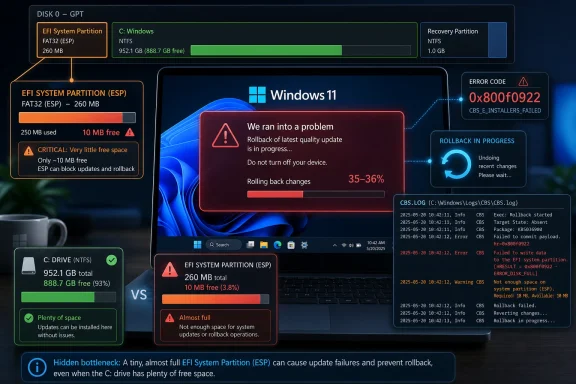
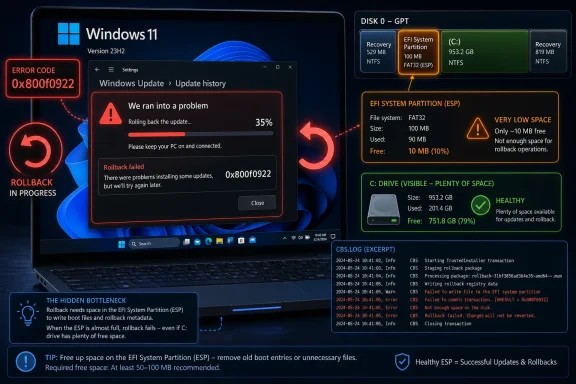
What makes this one stand out is the known-issue note attached to it. Microsoft says some devices may fail to complete installation of KB5089549, the May 2026 security update, with error code 0x800f0922. The failure is not described as a vague Windows Update hiccup. It is tied to limited free space on the EFI System Partition, especially systems with 10 MB or less available.
That distinction matters. A user can have hundreds of gigabytes free in File Explorer and still be blocked by a tiny hidden partition that Windows needs during boot-file servicing. The visible disk and the servicing-critical disk are not the same thing, and Windows does a poor job of making that distinction legible to ordinary users.
The failure pattern is also unusually specific. The update appears to install during the initial phase, then fails during reboot at roughly 35–36 percent, rolls back, and displays the dreaded “Something didn’t go as planned. Undoing changes.” CBS logs may show insufficient ESP space,
That specificity is useful for diagnosis, but it also exposes the fragility of the experience. Windows Update still turns a low-level boot-partition capacity problem into a generic rollback for the person staring at the screen.
The EFI System Partition, or ESP, is a small FAT-formatted partition used by UEFI systems to store boot loaders and related files. Most users never see it. Most administrators only think about it when imaging systems, troubleshooting boot failures, or dealing with BitLocker, Secure Boot, dual-boot setups, OEM recovery tooling, and firmware updates.
That invisibility is part of the problem. The ESP is small by design, and older Windows installations often inherited layouts that made sense at the time. But the boot ecosystem has become busier. Secure Boot assets, OEM utilities, recovery components, third-party boot files, and accumulated leftovers can consume space that Windows later assumes will be available.
Microsoft’s note that logs may identify third-party or OEM files outside Microsoft boot directories is especially telling. Windows servicing is not failing merely because Microsoft needs a little more room. It is failing because the ESP has become a shared staging ground where multiple actors leave artifacts, not all of them under Windows’ direct control.
That makes the bug feel less like a single bad update and more like a design debt collector. The ESP was supposed to be boring infrastructure. In 2026, it is still boring — until it becomes the only thing preventing a security update from landing.
This is the kind of workaround that makes sense to engineers and terrifies help desks. It is precise, targeted, and reversible in principle. It also requires administrative Command Prompt access and direct registry modification, which is exactly the class of fix Microsoft usually warns can cause serious problems if done incorrectly.
The reason Microsoft offers it is understandable. If an update is blocked because Windows’ servicing logic is demanding a safety margin the partition cannot provide, lowering that reserved padding can get the device through the update. For a machine that is otherwise healthy, that may be enough.
But it is not a satisfying user experience. A modern operating system should not require the average person to edit boot-servicing registry values to install a security update. Even for professionals, it is a mitigation to be deployed carefully, ideally after confirming the error pattern and checking the ESP condition rather than firing it blindly across a fleet.
There is also a philosophical tension here. Padding exists for a reason: it is a guardrail against filling a boot-critical partition too aggressively. Setting it to zero may be reasonable as a temporary mitigation, but it is not the same thing as actually cleaning or resizing the ESP. Microsoft’s own wording frames the permanent fix as still in progress.
That is good news for home users. It means many affected systems may recover without manual registry work, without repartitioning, and without a support call. It also means Microsoft can act more surgically than it could in the old cumulative-update era, when a bad change often forced blunt choices between living with the bug or rolling back the whole package.
But KIR is not magic. It is a rollback of a change, not a cure for the environmental condition that made the failure possible. If a system’s ESP has only a few megabytes free, it remains a fragile system. The next servicing operation that needs more room, or the next firmware or bootloader change that writes to the ESP, can still run into the same wall.
For enterprise-managed devices, the mitigation is more deliberate. Administrators must download and configure a special Group Policy matching Windows 11 version 24H2 or 25H2, then restart affected systems. That is standard KIR procedure, but it means managed fleets do not necessarily get the same automatic relief as consumer devices.
The split is intentional. Enterprises want control over changes that affect fleet behavior, especially when the mitigation temporarily disables an update change. But control has a cost: administrators must notice the advisory, obtain the policy, test it, deploy it, and verify that failed endpoints recover.
This preview advances Windows 11 24H2 and 25H2 to builds 26100.8524 and 26200.8524, respectively. That pairing is itself a sign of where Windows 11 servicing now sits: multiple release trains moving in close parallel, with much of the cumulative update machinery shared between them. A known issue documented against both versions is therefore not a niche branch problem.
The security update at the center of the failure, KB5089549, is the more urgent package because it belongs to the monthly security cadence. A preview update can usually be skipped. A security update cannot be ignored indefinitely, particularly in managed environments where compliance reporting, vulnerability management, and cyber insurance requirements all assume timely patch deployment.
That is why an installation failure at 35–36 percent matters more than the error dialog suggests. A failed update is not just an annoyance; it creates drift. Some machines move forward, some roll back, and administrators are left reconciling reports that show the same nominal OS version family in different patch states.
In small numbers, that is normal operations. At scale, it becomes a trust problem. If Windows Update says a machine is eligible but the reboot phase silently collides with a hidden partition constraint, administrators need better preflight signals than a rollback after downtime has already been spent.
For years, end-user advice focused on freeing space on the C: drive. Delete temporary files, uninstall games, empty downloads, run Storage Sense. That advice is still useful for many update failures, but it does not help when the bottleneck is a boot partition that users cannot see and should not casually modify.
The mismatch creates confusion. A user checks Settings and sees plenty of free storage. Windows Update fails anyway. The error code leads to generic troubleshooting. The machine rolls back. The user tries again. Nothing in the default experience clearly says: the problem is not your main drive, it is a small EFI partition created when this machine was built or installed.
OEMs and deployment teams share some responsibility here. Many ESPs were provisioned conservatively because they only needed to hold a limited set of boot files. Over time, those assumptions age badly. Dual-boot configurations, third-party encryption tools, backup products, firmware utilities, and vendor recovery features can all increase pressure on a partition that was never sized with generous headroom.
The industry has learned this lesson repeatedly with recovery partitions. Feature updates and WinRE servicing have exposed machines where the recovery partition was too small for newer components. Now the ESP is getting its turn in the spotlight. The common theme is that Windows’ hidden infrastructure is no longer static.
For IT pros, the practical conclusion is straightforward: partition layout is part of endpoint health. It is not enough to know OS build, TPM status, Secure Boot state, free C: drive space, and BitLocker posture. The size and free space of boot and recovery partitions increasingly determine whether a system can be serviced cleanly.
The documentation also separates audiences. Consumers and unmanaged business devices get KIR. Enterprise-managed devices get Group Policy. Users with stubborn failures get a registry workaround. Administrators get enough detail to correlate CBS logs and avoid chasing unrelated causes of 0x800f0922.
Still, good documentation after failure is not the same as good prevention before failure. Windows Update already performs compatibility and readiness checks. It should be able to warn that a device’s ESP is below a safe threshold before the user commits to a rebooting update cycle. If Windows can identify the condition in logs after rollback, the obvious question is why it cannot surface the risk earlier and more plainly.
There may be engineering reasons. Servicing decisions can depend on what the update needs to write, what rollback safety requires, what files already exist, and how much reserved padding is configured. But from the user’s perspective, the distinction is academic. The machine either can install the update or it cannot.
The bigger reputational problem is that Windows still makes too many update failures look alike. “Something didn’t go as planned” is emotionally honest but diagnostically empty. It tells the user that Windows has retreated. It does not tell them whether the cause was storage, policy, corruption, firmware, driver state, or Microsoft’s own bug.
The safer fleet response is not necessarily to push the registry workaround everywhere. It is to identify affected devices, deploy the KIR Group Policy where appropriate, and reserve the registry change for systems that continue to fail or cannot wait for the broader resolution. That preserves control while reducing unnecessary changes to boot-servicing behavior.
Longer term, administrators should treat this as a signal to audit partition baselines. Device procurement images, Autopilot provisioning flows, wipe-and-load task sequences, and upgrade paths should all be checked for ESP sizing and free-space headroom. A partition layout that worked for Windows 10 or early Windows 11 may not be the layout an organization wants to carry into Windows 11 25H2 and beyond.
This also intersects with security operations. Patch compliance dashboards often show whether an update is installed, pending, or failed. They do not always explain whether the failure is due to a remediable local partition constraint. The more precise the telemetry, the faster teams can separate one-off update weirdness from a systemic image-design flaw.
There is a cost angle too. A fleet with thousands of machines and a small percentage of ESP-starved endpoints can generate disproportionate support work. Every rollback consumes time, user confidence, and in some cases remote-hands effort. Hidden partition problems are cheap to ignore until they become visible through failed security updates.
That is not because the command is mysterious. It is because boot servicing is a bad place for improvisation. A typo in the registry path, an unrelated system issue, or a misunderstanding of which update is failing can turn a targeted mitigation into a new troubleshooting branch.
Users who are comfortable with Windows administration can inspect logs and confirm whether the failure matches Microsoft’s description. But the average person should not attempt to resize or manually clean the ESP unless they have a complete backup and know how to recover a non-booting system. The ESP is small, hidden, and essential; that combination rewards caution.
The better consumer experience would be for Windows to fix the condition automatically or guide users through a supported repair flow. If Windows detects that the ESP is crowded by stale OEM files or nonessential entries, it should be able to explain that safely. If it cannot safely clean them, it should say so and route the user to an appropriate recovery path.
Until then, the practical message is simple: do not assume that free space on C: rules out a storage-related update failure. This is a different kind of storage problem.
The most visible symptom is rollback during restart, typically around 35–36 percent completion. The user-facing message is the familiar “Something didn’t go as planned. Undoing changes.” The reported error code is 0x800f0922.
The most useful confirmation point is the CBS log. Entries referring to insufficient ESP space, boot-file servicing failure, or space consumed by third-party or OEM files outside Microsoft boot directories are the breadcrumbs administrators should look for. Without that confirmation, 0x800f0922 alone is too broad to be treated as definitive proof.
The important threshold in Microsoft’s note is 10 MB or less available on the EFI System Partition. That should not be read as a promise that 11 MB is always safe, but it gives administrators a useful risk marker. Devices near that range deserve attention even if they have not failed yet.
The broader explanation is that Windows’ servicing baseline keeps moving. Security features evolve. Boot trust gets stricter. Recovery and rollback expectations grow. OEM and third-party integrations persist. Cumulative updates have to service not only the visible operating system but the hidden scaffolding that lets the system boot, recover, and prove its integrity.
That moving baseline is not inherently bad. It is part of why Windows can keep adding security hardening to existing machines rather than freezing them in place. But it means old assumptions about tiny partitions, spare capacity, and “set it and forget it” deployment images become liabilities.
Microsoft’s challenge is to make that transition less painful. If Windows requires healthier hidden partitions, it should provide better health checks. If updates need ESP headroom, Windows Update should say so before reboot. If OEM files are crowding Microsoft servicing paths, the ecosystem needs clearer rules about what belongs in the ESP and what does not.
The answer cannot simply be to tell users to edit the registry. That is a bridge workaround, not a destination.
 A Preview Update Becomes a Map of a Deeper Servicing Problem
KB5089573 arrives in the usual late-month slot: a non-security preview meant to stage fixes and refinements before the next Patch Tuesday cycle. These releases are optional for most unmanaged users, but they are closely watched by administrators because they often reveal what Microsoft plans to fold into the following month’s cumulative update. In that sense, KB5089573 is less a surprise package than a preview of Windows’ next maintenance baseline.What makes this one stand out is the known-issue note attached to it. Microsoft says some devices may fail to complete installation of KB5089549, the May 2026 security update, with error code 0x800f0922. The failure is not described as a vague Windows Update hiccup. It is tied to limited free space on the EFI System Partition, especially systems with 10 MB or less available.
That distinction matters. A user can have hundreds of gigabytes free in File Explorer and still be blocked by a tiny hidden partition that Windows needs during boot-file servicing. The visible disk and the servicing-critical disk are not the same thing, and Windows does a poor job of making that distinction legible to ordinary users.
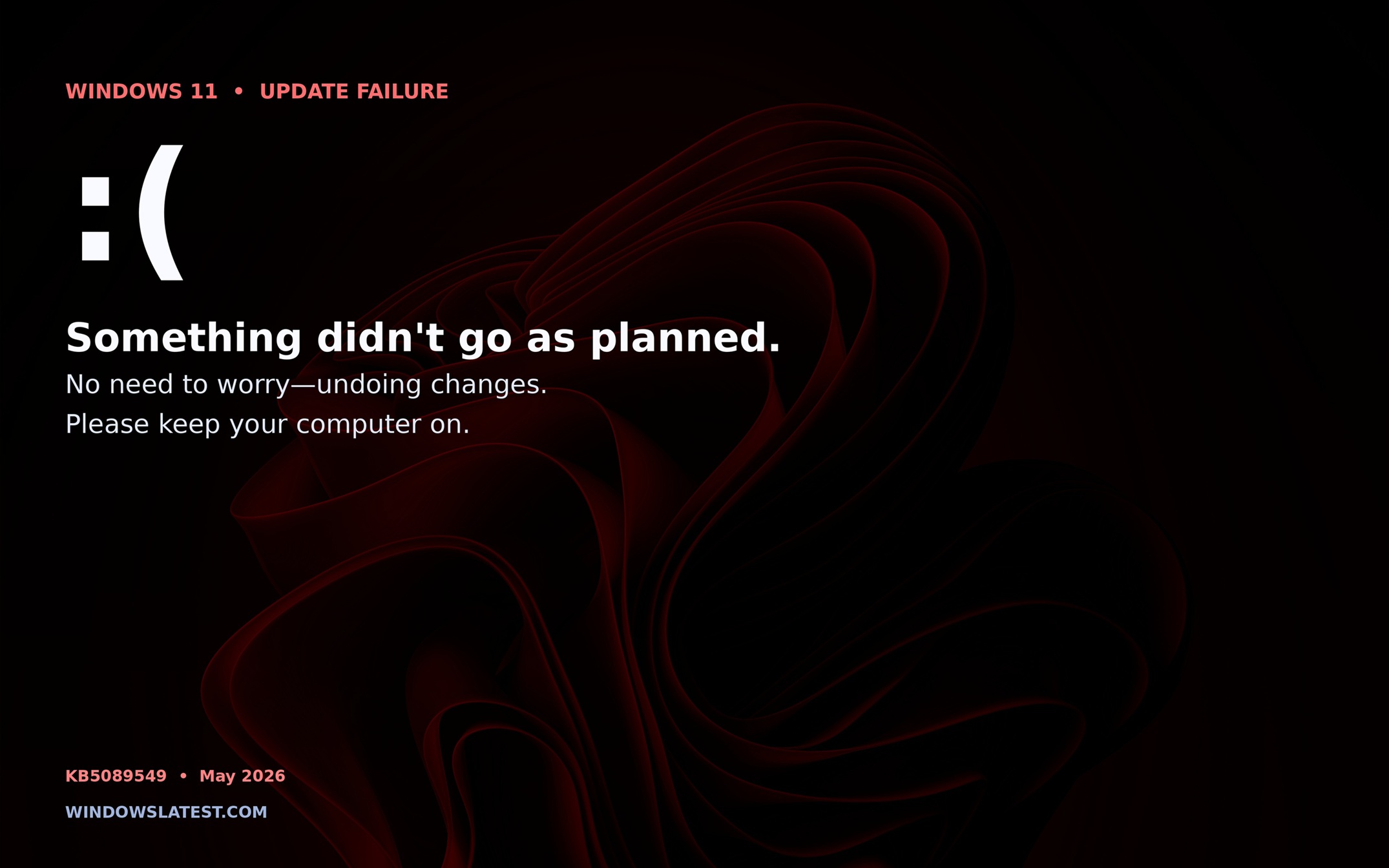
The failure pattern is also unusually specific. The update appears to install during the initial phase, then fails during reboot at roughly 35–36 percent, rolls back, and displays the dreaded “Something didn’t go as planned. Undoing changes.” CBS logs may show insufficient ESP space,
ServicingBootFiles failed, and references to third-party or OEM files outside Microsoft boot directories.That specificity is useful for diagnosis, but it also exposes the fragility of the experience. Windows Update still turns a low-level boot-partition capacity problem into a generic rollback for the person staring at the screen.
The Error Code Is Familiar, but the Cause Is Not Always Obvious
Error 0x800f0922 has long been one of those Windows codes that sends users into a search-result maze. It has been associated over the years with servicing failures, reserved partition issues, .NET update problems, VPN or network trouble, and other update-stage breakdowns. In this case, Microsoft’s documentation narrows the culprit: the EFI System Partition is too tight for the servicing operation.The EFI System Partition, or ESP, is a small FAT-formatted partition used by UEFI systems to store boot loaders and related files. Most users never see it. Most administrators only think about it when imaging systems, troubleshooting boot failures, or dealing with BitLocker, Secure Boot, dual-boot setups, OEM recovery tooling, and firmware updates.
That invisibility is part of the problem. The ESP is small by design, and older Windows installations often inherited layouts that made sense at the time. But the boot ecosystem has become busier. Secure Boot assets, OEM utilities, recovery components, third-party boot files, and accumulated leftovers can consume space that Windows later assumes will be available.
Microsoft’s note that logs may identify third-party or OEM files outside Microsoft boot directories is especially telling. Windows servicing is not failing merely because Microsoft needs a little more room. It is failing because the ESP has become a shared staging ground where multiple actors leave artifacts, not all of them under Windows’ direct control.
That makes the bug feel less like a single bad update and more like a design debt collector. The ESP was supposed to be boring infrastructure. In 2026, it is still boring — until it becomes the only thing preventing a security update from landing.
The Registry Workaround Is a Scalpel, Not a Consumer Feature
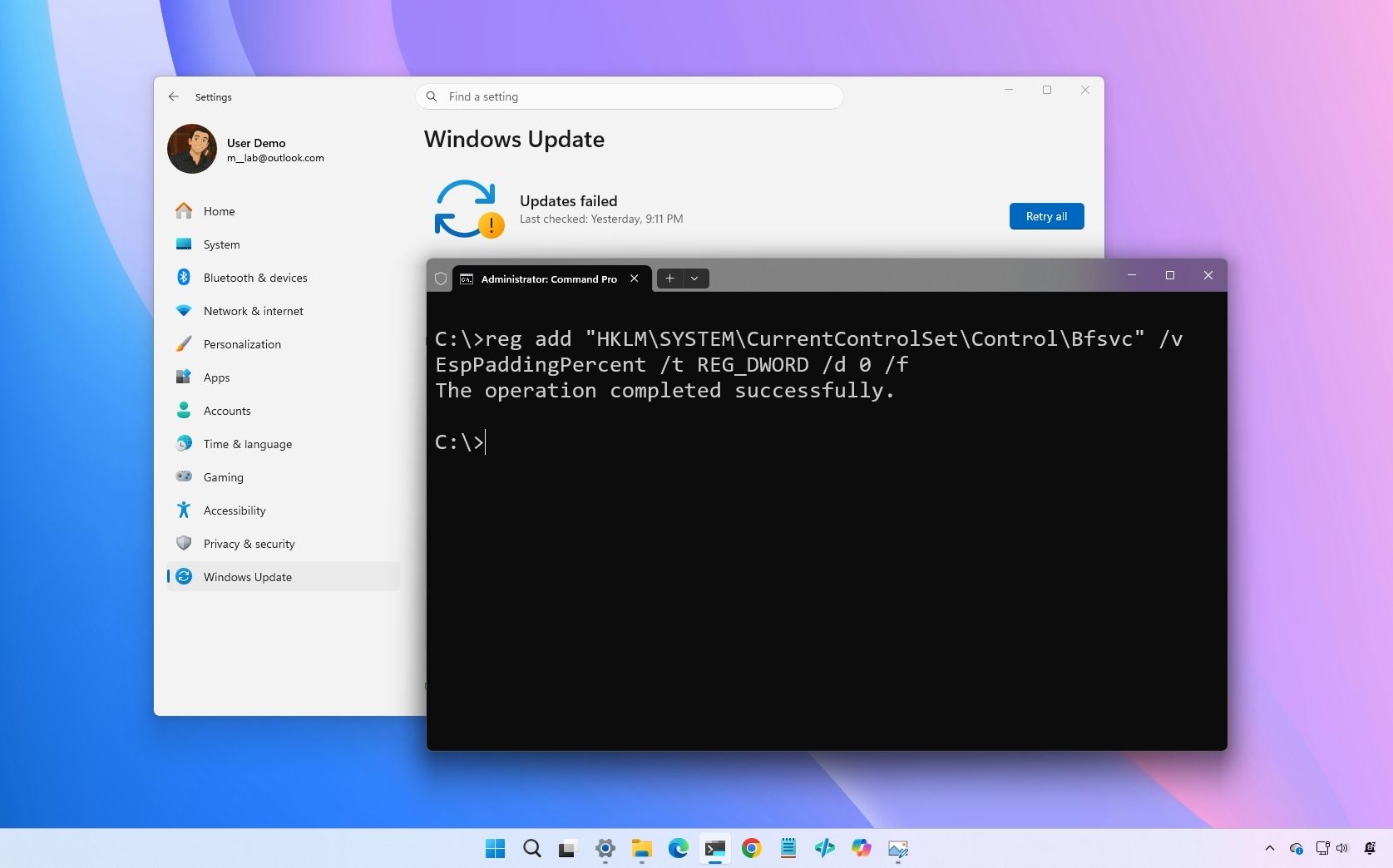
Microsoft’s first workaround is to change a registry setting namedEspPaddingPercent under the boot file servicing configuration path and set it to zero. In plain English, that appears to tell Windows to reduce or remove the padding it normally reserves when servicing the ESP. After a reboot, affected users can retry the update.This is the kind of workaround that makes sense to engineers and terrifies help desks. It is precise, targeted, and reversible in principle. It also requires administrative Command Prompt access and direct registry modification, which is exactly the class of fix Microsoft usually warns can cause serious problems if done incorrectly.
The reason Microsoft offers it is understandable. If an update is blocked because Windows’ servicing logic is demanding a safety margin the partition cannot provide, lowering that reserved padding can get the device through the update. For a machine that is otherwise healthy, that may be enough.
But it is not a satisfying user experience. A modern operating system should not require the average person to edit boot-servicing registry values to install a security update. Even for professionals, it is a mitigation to be deployed carefully, ideally after confirming the error pattern and checking the ESP condition rather than firing it blindly across a fleet.
There is also a philosophical tension here. Padding exists for a reason: it is a guardrail against filling a boot-critical partition too aggressively. Setting it to zero may be reasonable as a temporary mitigation, but it is not the same thing as actually cleaning or resizing the ESP. Microsoft’s own wording frames the permanent fix as still in progress.
Known Issue Rollback Softens the Blow, but It Does Not Erase the Weakness
Microsoft’s second mitigation is Known Issue Rollback, or KIR, which is one of the more important quiet changes in Windows servicing over the past several years. KIR lets Microsoft disable certain problematic non-security changes without requiring every affected machine to uninstall the entire update. For consumer devices and non-managed business devices, Microsoft says the mitigation has already propagated automatically, and a restart may help it apply sooner.That is good news for home users. It means many affected systems may recover without manual registry work, without repartitioning, and without a support call. It also means Microsoft can act more surgically than it could in the old cumulative-update era, when a bad change often forced blunt choices between living with the bug or rolling back the whole package.
But KIR is not magic. It is a rollback of a change, not a cure for the environmental condition that made the failure possible. If a system’s ESP has only a few megabytes free, it remains a fragile system. The next servicing operation that needs more room, or the next firmware or bootloader change that writes to the ESP, can still run into the same wall.
For enterprise-managed devices, the mitigation is more deliberate. Administrators must download and configure a special Group Policy matching Windows 11 version 24H2 or 25H2, then restart affected systems. That is standard KIR procedure, but it means managed fleets do not necessarily get the same automatic relief as consumer devices.
The split is intentional. Enterprises want control over changes that affect fleet behavior, especially when the mitigation temporarily disables an update change. But control has a cost: administrators must notice the advisory, obtain the policy, test it, deploy it, and verify that failed endpoints recover.
Optional Previews Are Where Microsoft Shows Its Next Patch Tuesday Hand
KB5089573 is a preview update, so many users will never install it manually. That does not make it irrelevant. Late-month previews are a key part of Microsoft’s cumulative update conveyor belt, and IT teams use them to understand what is coming before the mandatory security release window.This preview advances Windows 11 24H2 and 25H2 to builds 26100.8524 and 26200.8524, respectively. That pairing is itself a sign of where Windows 11 servicing now sits: multiple release trains moving in close parallel, with much of the cumulative update machinery shared between them. A known issue documented against both versions is therefore not a niche branch problem.
The security update at the center of the failure, KB5089549, is the more urgent package because it belongs to the monthly security cadence. A preview update can usually be skipped. A security update cannot be ignored indefinitely, particularly in managed environments where compliance reporting, vulnerability management, and cyber insurance requirements all assume timely patch deployment.
That is why an installation failure at 35–36 percent matters more than the error dialog suggests. A failed update is not just an annoyance; it creates drift. Some machines move forward, some roll back, and administrators are left reconciling reports that show the same nominal OS version family in different patch states.
In small numbers, that is normal operations. At scale, it becomes a trust problem. If Windows Update says a machine is eligible but the reboot phase silently collides with a hidden partition constraint, administrators need better preflight signals than a rollback after downtime has already been spent.
The Hidden Partition Has Become an Operational Dependency
The ESP problem is not new in concept. Windows has previously run into servicing trouble when system-reserved or recovery partitions were too small for modern update behavior. What has changed is the frequency with which these hidden partitions now matter to mainstream maintenance.For years, end-user advice focused on freeing space on the C: drive. Delete temporary files, uninstall games, empty downloads, run Storage Sense. That advice is still useful for many update failures, but it does not help when the bottleneck is a boot partition that users cannot see and should not casually modify.
The mismatch creates confusion. A user checks Settings and sees plenty of free storage. Windows Update fails anyway. The error code leads to generic troubleshooting. The machine rolls back. The user tries again. Nothing in the default experience clearly says: the problem is not your main drive, it is a small EFI partition created when this machine was built or installed.
OEMs and deployment teams share some responsibility here. Many ESPs were provisioned conservatively because they only needed to hold a limited set of boot files. Over time, those assumptions age badly. Dual-boot configurations, third-party encryption tools, backup products, firmware utilities, and vendor recovery features can all increase pressure on a partition that was never sized with generous headroom.
The industry has learned this lesson repeatedly with recovery partitions. Feature updates and WinRE servicing have exposed machines where the recovery partition was too small for newer components. Now the ESP is getting its turn in the spotlight. The common theme is that Windows’ hidden infrastructure is no longer static.
For IT pros, the practical conclusion is straightforward: partition layout is part of endpoint health. It is not enough to know OS build, TPM status, Secure Boot state, free C: drive space, and BitLocker posture. The size and free space of boot and recovery partitions increasingly determine whether a system can be serviced cleanly.
Microsoft’s Messaging Is Better Than the User Experience
Microsoft deserves some credit for documenting the failure in unusually concrete terms. The advisory identifies the update, the error code, the phase of failure, the approximate percentage, the low-space condition, the relevant log path, and the mitigation options. That is far better than a generic “we are aware of reports” note.The documentation also separates audiences. Consumers and unmanaged business devices get KIR. Enterprise-managed devices get Group Policy. Users with stubborn failures get a registry workaround. Administrators get enough detail to correlate CBS logs and avoid chasing unrelated causes of 0x800f0922.
Still, good documentation after failure is not the same as good prevention before failure. Windows Update already performs compatibility and readiness checks. It should be able to warn that a device’s ESP is below a safe threshold before the user commits to a rebooting update cycle. If Windows can identify the condition in logs after rollback, the obvious question is why it cannot surface the risk earlier and more plainly.
There may be engineering reasons. Servicing decisions can depend on what the update needs to write, what rollback safety requires, what files already exist, and how much reserved padding is configured. But from the user’s perspective, the distinction is academic. The machine either can install the update or it cannot.
The bigger reputational problem is that Windows still makes too many update failures look alike. “Something didn’t go as planned” is emotionally honest but diagnostically empty. It tells the user that Windows has retreated. It does not tell them whether the cause was storage, policy, corruption, firmware, driver state, or Microsoft’s own bug.
Enterprise IT Gets Another Reason to Audit the Boring Stuff
For enterprise administrators, the immediate task is triage. If KB5089549 failures appear with 0x800f0922 and rollback at roughly the documented reboot percentage, the ESP should be on the suspect list. CBS logs may confirm insufficient free space and show whether non-Microsoft boot-directory files are contributing to the problem.The safer fleet response is not necessarily to push the registry workaround everywhere. It is to identify affected devices, deploy the KIR Group Policy where appropriate, and reserve the registry change for systems that continue to fail or cannot wait for the broader resolution. That preserves control while reducing unnecessary changes to boot-servicing behavior.
Longer term, administrators should treat this as a signal to audit partition baselines. Device procurement images, Autopilot provisioning flows, wipe-and-load task sequences, and upgrade paths should all be checked for ESP sizing and free-space headroom. A partition layout that worked for Windows 10 or early Windows 11 may not be the layout an organization wants to carry into Windows 11 25H2 and beyond.
This also intersects with security operations. Patch compliance dashboards often show whether an update is installed, pending, or failed. They do not always explain whether the failure is due to a remediable local partition constraint. The more precise the telemetry, the faster teams can separate one-off update weirdness from a systemic image-design flaw.
There is a cost angle too. A fleet with thousands of machines and a small percentage of ESP-starved endpoints can generate disproportionate support work. Every rollback consumes time, user confidence, and in some cases remote-hands effort. Hidden partition problems are cheap to ignore until they become visible through failed security updates.
The Consumer Fix Is Patience, Not Partition Surgery
For home users, the best advice is deliberately conservative. If the update fails once and Microsoft’s KIR mitigation is already rolling out, restarting and retrying later may be enough. The registry workaround exists, but it should not be treated as a casual tweak copied from a forum post into an elevated terminal.That is not because the command is mysterious. It is because boot servicing is a bad place for improvisation. A typo in the registry path, an unrelated system issue, or a misunderstanding of which update is failing can turn a targeted mitigation into a new troubleshooting branch.
Users who are comfortable with Windows administration can inspect logs and confirm whether the failure matches Microsoft’s description. But the average person should not attempt to resize or manually clean the ESP unless they have a complete backup and know how to recover a non-booting system. The ESP is small, hidden, and essential; that combination rewards caution.
The better consumer experience would be for Windows to fix the condition automatically or guide users through a supported repair flow. If Windows detects that the ESP is crowded by stale OEM files or nonessential entries, it should be able to explain that safely. If it cannot safely clean them, it should say so and route the user to an appropriate recovery path.
Until then, the practical message is simple: do not assume that free space on C: rules out a storage-related update failure. This is a different kind of storage problem.
The Clues That Separate This Failure From Ordinary Update Noise
This incident has a clear signature, which makes it easier to distinguish from the usual Windows Update fog. The affected update path involves KB5089549, the May 2026 security update, with the known issue documented alongside KB5089573. The operating systems in scope are Windows 11 version 24H2 and version 25H2.The most visible symptom is rollback during restart, typically around 35–36 percent completion. The user-facing message is the familiar “Something didn’t go as planned. Undoing changes.” The reported error code is 0x800f0922.
The most useful confirmation point is the CBS log. Entries referring to insufficient ESP space, boot-file servicing failure, or space consumed by third-party or OEM files outside Microsoft boot directories are the breadcrumbs administrators should look for. Without that confirmation, 0x800f0922 alone is too broad to be treated as definitive proof.
The important threshold in Microsoft’s note is 10 MB or less available on the EFI System Partition. That should not be read as a promise that 11 MB is always safe, but it gives administrators a useful risk marker. Devices near that range deserve attention even if they have not failed yet.
The May Patch Story Is Really About Windows’ Moving Baseline
Every Windows servicing problem has a narrow explanation and a broader one. The narrow explanation here is that a May 2026 security update can fail on some Windows 11 24H2 and 25H2 devices when the EFI System Partition has too little free space, and Microsoft is mitigating it with KIR, Group Policy, and a registry setting while working on a future update.The broader explanation is that Windows’ servicing baseline keeps moving. Security features evolve. Boot trust gets stricter. Recovery and rollback expectations grow. OEM and third-party integrations persist. Cumulative updates have to service not only the visible operating system but the hidden scaffolding that lets the system boot, recover, and prove its integrity.
That moving baseline is not inherently bad. It is part of why Windows can keep adding security hardening to existing machines rather than freezing them in place. But it means old assumptions about tiny partitions, spare capacity, and “set it and forget it” deployment images become liabilities.
Microsoft’s challenge is to make that transition less painful. If Windows requires healthier hidden partitions, it should provide better health checks. If updates need ESP headroom, Windows Update should say so before reboot. If OEM files are crowding Microsoft servicing paths, the ecosystem needs clearer rules about what belongs in the ESP and what does not.
The answer cannot simply be to tell users to edit the registry. That is a bridge workaround, not a destination.
The Patch Notes Point to a Bigger Maintenance Discipline
The concrete lessons from KB5089573 and the KB5089549 failure are not exotic, but they are easy to miss because they live below the surface of normal Windows administration. A late-month preview has exposed the same operational truth that security teams encounter again and again: boring infrastructure becomes urgent only when it blocks the thing everyone agrees is mandatory.- Windows 11 version 24H2 and 25H2 systems affected by this issue may fail KB5089549 with error 0x800f0922 during the restart phase, even when the main Windows volume has plenty of free space.
- Devices with 10 MB or less free on the EFI System Partition are the clearest risk group identified by Microsoft.
- Consumer and unmanaged business devices should receive Microsoft’s Known Issue Rollback mitigation automatically, though a restart may help it apply sooner.
- Enterprise-managed devices need the matching Known Issue Rollback Group Policy for Windows 11 version 24H2 or 25H2, followed by a restart.
- The registry workaround that sets
EspPaddingPercentto zero should be treated as a targeted mitigation for confirmed cases, not a general-purpose tuning tip. - Administrators should add ESP size and free-space checks to endpoint health audits, especially for older devices, upgraded systems, and custom corporate images.
References
- Primary source: Microsoft Support
Published: Tue, 26 May 2026 22:56:39 Z
May 26, 2026—KB5089573 (OS Builds 26200.8524 and 26100.8524) Preview - Microsoft Support
 support.microsoft.com
- Related coverage: notebookcheck.net

Windows 11 update KB5089573: Shared audio & partition fix
Microsoft's KB5089573 preview adds Shared Audio and NPU tracking to Windows 11, while flagging an EFI partition install failure on older OEM hardware. www.notebookcheck.net
- Related coverage: windowsforum.com

KB5089573 May 2026 Preview: Windows 11 ESP Space Causes Install Rollback (0x800f0922)
Microsoft released the May 2026 non-security preview update KB5089573 for Windows 11 versions 25H2 and 24H2 on May 26, 2026, moving those systems to OS builds 26200.8524 and 26100.8524 while also documenting a serious installation failure tied to the earlier May security update. The preview is... windowsforum.com
- Related coverage: windowscentral.com
Microsoft confirms Windows 11 May update is failing with error 0x800f0922
Microsoft confirms that the Windows 11 May 2026 update fails with error 0x800f0922 on some computers, but a rollback and a fix are already available. www.windowscentral.com
- Related coverage: ninjaone.com

KB5089573 - Details, Issues, & Feedback - NinjaOne
Community reception of KB5089573 demonstrates cautious optimism tempered by historical skepticism regarding Windows update reliability. Users acknowledge t www.ninjaone.com
- Related coverage: notebookcheck.com

Windows 11 KB5089573 erscheint mit Fehlerbehebungen für Audio-Sharing und Systempartition
Die KB5089573-Vorschau von Microsoft erweitert Windows 11 um Shared Audio sowie NPU-Tracking und weist gleichzeitig auf einen Installationsfehler im Zusammenhang mit der EFI-Systempartition auf älterer OEM-Hardware hin. www.notebookcheck.com
- Related coverage: windowslatest.com
Microsoft confirms Windows 11 KB5089549 issues due to low storage, says it's rolling out an emergency patch to fix install errors
Microsoft confirmed that it's aware of an issue where Windows 11 KB5089549 fails to install due to errors such as 0x800f0922. www.windowslatest.com