

Microsoft released KB5089593 and KB5087594 on May 12, 2026, as Safe OS Dynamic Updates for Windows 11, updating the Windows Recovery Environment for versions 24H2/25H2 and 23H2 alongside related recovery updates for Windows 10 and older supported Windows Server branches. The headline is not that WinRE got another maintenance pass; it is that Microsoft’s recovery stack is now being serviced with the same urgency as the operating system it is meant to rescue. For administrators, that makes these small packages easy to overlook and risky to ignore. The timing, landing beside a noisy Patch Tuesday cycle and reported Windows 11 installation failures, is a reminder that Windows servicing now extends well beyond the visible cumulative update.
Dynamic Updates live in the least glamorous corner of Windows servicing. They do not bring a redesigned Start menu, a Copilot panel, or a File Explorer flourish. They update the machinery Windows uses while installing, upgrading, repairing, and recovering itself.
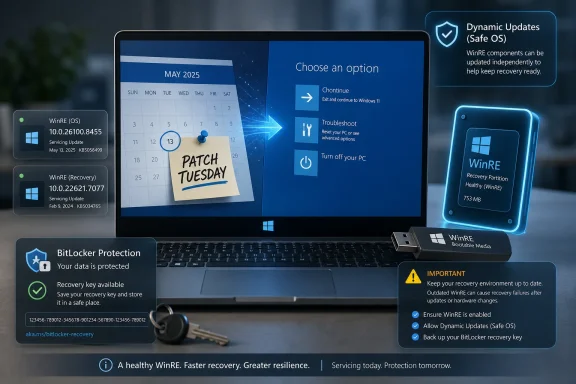
That is why KB5089593 and KB5087594 matter. KB5089593 targets Windows 11 versions 24H2 and 25H2 and updates WinRE to version 10.0.26100.8455. KB5087594 covers Windows 11 version 23H2 and moves its recovery environment to 10.0.22621.7077.
Microsoft also published related Safe OS Dynamic Updates for Windows 11 version 26H1, Windows 10 versions 21H2 and 22H2, Windows 10 version 1809 and Windows Server 2019, and Windows 10 version 1607 and Windows Server 2016. In other words, this was not a one-off package for a single Windows 11 branch. It was a coordinated recovery-stack refresh across a broad swath of Microsoft’s still-serviced Windows estate.
The practical point is simple: the recovery environment is part of the product surface now. It is where BitLocker recovery, reset operations, startup repair, rollback paths, and troubleshooting workflows converge. A stale WinRE image can turn a manageable update failure into a deskside visit, a rebuild, or a late-night incident bridge.
That distinction matters because enterprises rarely deploy Windows exactly as Microsoft imagines it. They maintain gold images, task sequences, provisioning packages, driver stores, Autopilot flows, language packs, Features on Demand, and custom recovery partitions. Dynamic Updates exist partly because Windows setup has to survive that mess without stripping out capabilities or stumbling over an old recovery component.
Microsoft’s notes for these packages use the usual spare phrasing: the updates make improvements to the Windows recovery environment. That language is not satisfying, but it is familiar. Microsoft often treats WinRE maintenance as plumbing, even when the plumbing is what keeps a failed boot from becoming data loss.
For Windows enthusiasts, this is the part of the update stack that feels invisible until it suddenly becomes everything. If a cumulative update fails and rolls back cleanly, WinRE helped make that failure boring. If a machine drops into recovery and BitLocker asks for a key users cannot find, the design of the recovery path becomes the whole experience of Windows.
That is the usual gravity of Patch Tuesday coverage: the cumulative update gets the attention because it is large, mandatory for many users, and visibly fails when something goes wrong. Dynamic Updates, by contrast, often arrive as supporting actors. They are downloaded and installed automatically through Windows Update, and many users will never know they are there.
But the pairing is not accidental. When a cumulative update has installation trouble, the health of setup and recovery components becomes more important, not less. The operating system’s ability to stage, roll back, repair, and re-enter service is part of the patch’s real-world reliability.
That does not mean KB5089593 or KB5087594 are fixes for every KB5089549 complaint. They are not advertised that way, and Microsoft’s language does not justify treating them as a universal workaround. The more defensible reading is that Microsoft is maintaining the recovery layer at the same time it is pushing major monthly security payloads, because failures in one layer often expose weaknesses in the other.
WinRE now sits uncomfortably close to some of Windows’ most sensitive workflows. It interacts with encrypted disks, recovery keys, rollback mechanisms, device reset paths, and offline servicing. If it is outdated, misconfigured, disabled, or too small to service properly, the consequences can be operational and security-relevant.
That is why Microsoft’s repeated WinRE updates have become a pattern worth watching. A recovery partition is no longer just dead space at the end of a disk. It is a miniature operating environment that needs maintenance, validation, and enough room to accept future fixes.
This is also where home users and enterprise admins have very different failure modes. A consumer machine may simply fail to install an update or drop into recovery after a bad reboot. A managed fleet can encounter the same problem multiplied across device models, disk layouts, encryption policies, and regional language configurations.
This is not just bookkeeping. Windows 11 is no longer a single mental model for administrators. The 23H2 generation, the 24H2/25H2 generation, and the 26H1 branch occupy different servicing realities even when the UI looks broadly familiar.
That matters for image management. If an organization maintains multiple Windows 11 images, it cannot assume one recovery update fits all. The recovery environment version should match the servicing branch, and deployment teams need to track those branches with the same seriousness they apply to cumulative updates and enablement packages.
For smaller shops, the lesson is less formal but still useful. When troubleshooting a Windows 11 update or recovery problem, “Windows 11” is not enough information. The exact version, build, recovery environment version, disk layout, and update history can all matter.
Windows 11 24H2 made this more visible by turning VBScript into a Feature on Demand. That change is easy to defend from a modernization and security perspective, but it also means older business workflows can depend on something that is no longer simply assumed to be present in the base OS. Upgrade plumbing has to carry these optional components forward without accidentally breaking a line-of-business script from 2009 that still runs payroll-adjacent work every Thursday.
This is the trap in treating Dynamic Updates as disposable. They are not just patching setup binaries for elegance. They help Windows preserve the customized state of a device as it crosses from one version to another.
For enthusiasts building clean USB installers, the stakes are modest. For enterprises with language packs, accessibility components, RSAT, legacy scripting dependencies, and application-specific FOD requirements, the stakes are higher. A failed preservation step can look like an app problem, a helpdesk problem, or a user profile problem long before anyone traces it back to servicing.
Automatic delivery, however, does not eliminate the need for verification. In managed environments, “Windows Update offered it” is not the same as “the recovery partition on every model accepted it.” Recovery partitions can be undersized, disabled, missing, customized, or out of sync with the running OS.
That is where administrators need to be more skeptical than the update UI encourages. The installed OS build may look healthy while WinRE remains stale. A compliance dashboard may show the monthly cumulative update installed while saying little about whether recovery media, offline images, or task-sequence content have been refreshed.
The operational habit should be boring but firm: check the WinRE version after servicing, especially on pilot rings and representative hardware. If KB5089593 is expected on 24H2 and 25H2 systems, the recovery environment should report 10.0.26100.8455. If KB5087594 is expected on 23H2 systems, it should report 10.0.22621.7077.
That spread says two things at once. Microsoft is still maintaining critical servicing components for older Windows branches. It is also keeping the recovery path alive for systems that may be difficult to upgrade, embedded in operational processes, or tied to server-era support commitments.
For Windows 10 desktops, the update lands in the shadow of migration pressure. Organizations still running Windows 10 22H2 have to plan for the end of standard support and, where applicable, paid extended security coverage. But while those plans are being argued over in budget meetings, the machines still need reliable recovery.
That is the awkward reality of late-life Windows support. The strategic message is “move forward.” The operational requirement is “do not let today’s fleet become unrecoverable.” Dynamic Updates serve the second goal even as Microsoft keeps pushing the first.
For consumers, the practical advice is straightforward: if you are creating Windows installation media in May 2026, use the current tool rather than an old ISO or a forgotten USB drive from last year. For IT teams, the point is broader. Media freshness is part of update hygiene.
Offline images should be treated as living artifacts. If they are used for bare-metal deployment, repair, in-place upgrade, or lab reproduction, they need a servicing plan. That includes cumulative updates, servicing stack changes where applicable, drivers, language content, FODs, and Dynamic Updates.
The industry often talks about “golden images” as if the gold does not tarnish. In Windows servicing, it absolutely does. The older the image, the more work setup has to do before it can safely become a modern system.
That is why Microsoft’s update stack is judged by its failure modes. Every operating system can have a bad patch. The difference between irritating and catastrophic is whether the machine can roll back, recover, and explain enough for a human to act.
For IT pros, the current moment argues for stronger pilot discipline. Test the May cumulative update, but also watch recovery behavior. Confirm whether devices can enter WinRE, whether BitLocker recovery workflows are documented, whether recovery keys are escrowed, and whether update rollback behaves consistently on the hardware you actually own.
The temptation is to treat WinRE as something to check only after disaster. That is backwards. Recovery should be validated when things are calm, because nobody wants to discover a broken recovery partition while a CFO’s laptop is stuck between patch states in an airport lounge.
This modularity has benefits. Microsoft can patch specific layers without waiting for a monolithic OS release. It can update installation logic, compatibility handling, and recovery components closer to the moment they are needed.
But modularity also creates accounting problems. A system can be current in one layer and stale in another. A deployment image can contain the latest cumulative update but an older setup dynamic update. A recovery partition can lag behind the running OS. A helpdesk script can check one build number and miss the component that actually failed.
That is the hidden cost of modern Windows. The old question “Are you patched?” now needs a more precise answer. Patched where, patched how, and patched in the environment that will boot when the main OS cannot?
For unmanaged Windows 11 PCs, most users should let Windows Update handle the packages. There is no reason for typical users to chase standalone Dynamic Updates unless they are building installation media, servicing offline images, or troubleshooting a specific recovery issue. The bigger consumer task is still to ensure backups exist before major servicing events.
For administrators, the calculus is different. These updates should be tracked in deployment rings, image-maintenance procedures, and post-patch validation. If the recovery environment is part of your incident response plan, it has to be part of your patch-management plan too.
The other practical move is documentation. Recovery keys, device encryption states, WinRE status, and known-good installation media should not live in tribal memory. A well-serviced recovery environment is only useful if the organization knows how to use it under pressure.
The May 2026 release gives admins several concrete checks to make before the next update storm arrives:
Source: Neowin Microsoft released Windows 11 KB5089593, KB5087594 updates for OS recovery
 Microsoft Quietly Services the Escape Hatch
Dynamic Updates live in the least glamorous corner of Windows servicing. They do not bring a redesigned Start menu, a Copilot panel, or a File Explorer flourish. They update the machinery Windows uses while installing, upgrading, repairing, and recovering itself.That is why KB5089593 and KB5087594 matter. KB5089593 targets Windows 11 versions 24H2 and 25H2 and updates WinRE to version 10.0.26100.8455. KB5087594 covers Windows 11 version 23H2 and moves its recovery environment to 10.0.22621.7077.
Microsoft also published related Safe OS Dynamic Updates for Windows 11 version 26H1, Windows 10 versions 21H2 and 22H2, Windows 10 version 1809 and Windows Server 2019, and Windows 10 version 1607 and Windows Server 2016. In other words, this was not a one-off package for a single Windows 11 branch. It was a coordinated recovery-stack refresh across a broad swath of Microsoft’s still-serviced Windows estate.
The practical point is simple: the recovery environment is part of the product surface now. It is where BitLocker recovery, reset operations, startup repair, rollback paths, and troubleshooting workflows converge. A stale WinRE image can turn a manageable update failure into a deskside visit, a rebuild, or a late-night incident bridge.
The Smallest Patch Can Own the Worst Day
Safe OS Dynamic Updates are designed for the phase of Windows where the normal operating system is not fully in charge. They can be injected into installation media or applied through Windows Update so that setup and recovery components are fresher than the base image that originally shipped.That distinction matters because enterprises rarely deploy Windows exactly as Microsoft imagines it. They maintain gold images, task sequences, provisioning packages, driver stores, Autopilot flows, language packs, Features on Demand, and custom recovery partitions. Dynamic Updates exist partly because Windows setup has to survive that mess without stripping out capabilities or stumbling over an old recovery component.
Microsoft’s notes for these packages use the usual spare phrasing: the updates make improvements to the Windows recovery environment. That language is not satisfying, but it is familiar. Microsoft often treats WinRE maintenance as plumbing, even when the plumbing is what keeps a failed boot from becoming data loss.
For Windows enthusiasts, this is the part of the update stack that feels invisible until it suddenly becomes everything. If a cumulative update fails and rolls back cleanly, WinRE helped make that failure boring. If a machine drops into recovery and BitLocker asks for a key users cannot find, the design of the recovery path becomes the whole experience of Windows.
Patch Tuesday’s Visible Drama Hid the Servicing Story
The May 2026 Patch Tuesday wave was already busy before the Dynamic Updates entered the frame. Microsoft released KB5087544 for Windows 10 and KB5089549 for Windows 11, while the Media Creation Tool was also updated. Reports quickly focused on KB5089549 installation problems affecting some Windows 11 users, with errors surfacing during installation and reboot phases.That is the usual gravity of Patch Tuesday coverage: the cumulative update gets the attention because it is large, mandatory for many users, and visibly fails when something goes wrong. Dynamic Updates, by contrast, often arrive as supporting actors. They are downloaded and installed automatically through Windows Update, and many users will never know they are there.
But the pairing is not accidental. When a cumulative update has installation trouble, the health of setup and recovery components becomes more important, not less. The operating system’s ability to stage, roll back, repair, and re-enter service is part of the patch’s real-world reliability.
That does not mean KB5089593 or KB5087594 are fixes for every KB5089549 complaint. They are not advertised that way, and Microsoft’s language does not justify treating them as a universal workaround. The more defensible reading is that Microsoft is maintaining the recovery layer at the same time it is pushing major monthly security payloads, because failures in one layer often expose weaknesses in the other.
WinRE Has Become a Security Boundary, Not Just a Repair Console
For years, many users thought of the Windows Recovery Environment as a blue-screen toolbox: reset this PC, restore from an image, uninstall an update, run Startup Repair, maybe open Command Prompt. That description is still accurate, but incomplete.WinRE now sits uncomfortably close to some of Windows’ most sensitive workflows. It interacts with encrypted disks, recovery keys, rollback mechanisms, device reset paths, and offline servicing. If it is outdated, misconfigured, disabled, or too small to service properly, the consequences can be operational and security-relevant.
That is why Microsoft’s repeated WinRE updates have become a pattern worth watching. A recovery partition is no longer just dead space at the end of a disk. It is a miniature operating environment that needs maintenance, validation, and enough room to accept future fixes.
This is also where home users and enterprise admins have very different failure modes. A consumer machine may simply fail to install an update or drop into recovery after a bad reboot. A managed fleet can encounter the same problem multiplied across device models, disk layouts, encryption policies, and regional language configurations.
The Version Split Tells the Real Windows 11 Story
The KB numbers also expose the increasingly fragmented reality of Windows 11 servicing. Version 23H2 receives KB5087594 and a WinRE version aligned with the 22621 branch. Versions 24H2 and 25H2 receive KB5089593 and a WinRE version aligned with the 26100 branch. Version 26H1 receives its own Safe OS Dynamic Update, with a still newer 28000-series WinRE build.This is not just bookkeeping. Windows 11 is no longer a single mental model for administrators. The 23H2 generation, the 24H2/25H2 generation, and the 26H1 branch occupy different servicing realities even when the UI looks broadly familiar.
That matters for image management. If an organization maintains multiple Windows 11 images, it cannot assume one recovery update fits all. The recovery environment version should match the servicing branch, and deployment teams need to track those branches with the same seriousness they apply to cumulative updates and enablement packages.
For smaller shops, the lesson is less formal but still useful. When troubleshooting a Windows 11 update or recovery problem, “Windows 11” is not enough information. The exact version, build, recovery environment version, disk layout, and update history can all matter.
Language Packs, Features on Demand, and the Upgrade Path Nobody Wants to Debug
Dynamic Updates also exist to preserve Language Packs and Features on Demand during upgrades. That detail sounds dry until you have supported a multilingual fleet or an application dependency buried inside an optional Windows feature.Windows 11 24H2 made this more visible by turning VBScript into a Feature on Demand. That change is easy to defend from a modernization and security perspective, but it also means older business workflows can depend on something that is no longer simply assumed to be present in the base OS. Upgrade plumbing has to carry these optional components forward without accidentally breaking a line-of-business script from 2009 that still runs payroll-adjacent work every Thursday.
This is the trap in treating Dynamic Updates as disposable. They are not just patching setup binaries for elegance. They help Windows preserve the customized state of a device as it crosses from one version to another.
For enthusiasts building clean USB installers, the stakes are modest. For enterprises with language packs, accessibility components, RSAT, legacy scripting dependencies, and application-specific FOD requirements, the stakes are higher. A failed preservation step can look like an app problem, a helpdesk problem, or a user profile problem long before anyone traces it back to servicing.
Automatic Delivery Is Convenient Until You Need Proof
Microsoft says these Recovery and Setup Dynamic Updates are downloaded and installed automatically through Windows Update. That is good news for unmanaged PCs and many lightly managed environments. It reduces the chance that a device’s recovery environment falls behind simply because nobody thought to service it.Automatic delivery, however, does not eliminate the need for verification. In managed environments, “Windows Update offered it” is not the same as “the recovery partition on every model accepted it.” Recovery partitions can be undersized, disabled, missing, customized, or out of sync with the running OS.
That is where administrators need to be more skeptical than the update UI encourages. The installed OS build may look healthy while WinRE remains stale. A compliance dashboard may show the monthly cumulative update installed while saying little about whether recovery media, offline images, or task-sequence content have been refreshed.
The operational habit should be boring but firm: check the WinRE version after servicing, especially on pilot rings and representative hardware. If KB5089593 is expected on 24H2 and 25H2 systems, the recovery environment should report 10.0.26100.8455. If KB5087594 is expected on 23H2 systems, it should report 10.0.22621.7077.
Windows 10 Still Gets Recovery Care as the Exit Narrows
The inclusion of Windows 10 updates is notable because Windows 10 is deep into its final mainstream chapter for most users. KB5087593 targets Windows 10 versions 21H2 and 22H2, moving WinRE to 10.0.19041.7290. KB5087592 covers Windows 10 version 1809 and Windows Server 2019, while KB5087590 covers Windows 10 version 1607 and Windows Server 2016.That spread says two things at once. Microsoft is still maintaining critical servicing components for older Windows branches. It is also keeping the recovery path alive for systems that may be difficult to upgrade, embedded in operational processes, or tied to server-era support commitments.
For Windows 10 desktops, the update lands in the shadow of migration pressure. Organizations still running Windows 10 22H2 have to plan for the end of standard support and, where applicable, paid extended security coverage. But while those plans are being argued over in budget meetings, the machines still need reliable recovery.
That is the awkward reality of late-life Windows support. The strategic message is “move forward.” The operational requirement is “do not let today’s fleet become unrecoverable.” Dynamic Updates serve the second goal even as Microsoft keeps pushing the first.
The Media Creation Tool Update Adds Another Layer
The updated Media Creation Tool belongs in this story because installation media is often where servicing drift begins. A USB stick created months ago can install a version of Windows whose setup components, recovery image, and compatibility database are already behind the machines it is being asked to repair or replace.For consumers, the practical advice is straightforward: if you are creating Windows installation media in May 2026, use the current tool rather than an old ISO or a forgotten USB drive from last year. For IT teams, the point is broader. Media freshness is part of update hygiene.
Offline images should be treated as living artifacts. If they are used for bare-metal deployment, repair, in-place upgrade, or lab reproduction, they need a servicing plan. That includes cumulative updates, servicing stack changes where applicable, drivers, language content, FODs, and Dynamic Updates.
The industry often talks about “golden images” as if the gold does not tarnish. In Windows servicing, it absolutely does. The older the image, the more work setup has to do before it can safely become a modern system.
The KB5089549 Noise Is a Warning About Recovery Readiness
The reported KB5089549 installation failures are not the same thing as these WinRE updates, but they are part of the same user experience. A user does not experience Windows as separate layers named cumulative update, Safe OS, setup update, servicing stack, and recovery image. A user experiences a spinning percentage, a reboot, an error code, and a hope that the machine comes back.That is why Microsoft’s update stack is judged by its failure modes. Every operating system can have a bad patch. The difference between irritating and catastrophic is whether the machine can roll back, recover, and explain enough for a human to act.
For IT pros, the current moment argues for stronger pilot discipline. Test the May cumulative update, but also watch recovery behavior. Confirm whether devices can enter WinRE, whether BitLocker recovery workflows are documented, whether recovery keys are escrowed, and whether update rollback behaves consistently on the hardware you actually own.
The temptation is to treat WinRE as something to check only after disaster. That is backwards. Recovery should be validated when things are calm, because nobody wants to discover a broken recovery partition while a CFO’s laptop is stuck between patch states in an airport lounge.
Microsoft’s Servicing Model Keeps Moving Down the Stack
One lesson from the last several years of Windows maintenance is that Microsoft keeps pushing servicing deeper into components users rarely see. The browser updates separately. Store apps update separately. Defender intelligence updates constantly. Drivers arrive through Windows Update, OEM channels, or enterprise tooling. Setup and recovery components now receive their own steady stream of Dynamic Updates.This modularity has benefits. Microsoft can patch specific layers without waiting for a monolithic OS release. It can update installation logic, compatibility handling, and recovery components closer to the moment they are needed.
But modularity also creates accounting problems. A system can be current in one layer and stale in another. A deployment image can contain the latest cumulative update but an older setup dynamic update. A recovery partition can lag behind the running OS. A helpdesk script can check one build number and miss the component that actually failed.
That is the hidden cost of modern Windows. The old question “Are you patched?” now needs a more precise answer. Patched where, patched how, and patched in the environment that will boot when the main OS cannot?
The Practical Shape of This May Servicing Wave
The safest way to read the May 12 Dynamic Updates is neither panic nor indifference. They are routine in form, but important in placement. They refresh the recovery layer at a moment when the monthly Windows 11 patch is drawing installation complaints, and they span enough Windows versions to suggest coordinated maintenance rather than isolated cleanup.For unmanaged Windows 11 PCs, most users should let Windows Update handle the packages. There is no reason for typical users to chase standalone Dynamic Updates unless they are building installation media, servicing offline images, or troubleshooting a specific recovery issue. The bigger consumer task is still to ensure backups exist before major servicing events.
For administrators, the calculus is different. These updates should be tracked in deployment rings, image-maintenance procedures, and post-patch validation. If the recovery environment is part of your incident response plan, it has to be part of your patch-management plan too.
The other practical move is documentation. Recovery keys, device encryption states, WinRE status, and known-good installation media should not live in tribal memory. A well-serviced recovery environment is only useful if the organization knows how to use it under pressure.
The Recovery Partition Is Now Part of Patch Management
The useful conclusion from KB5089593 and KB5087594 is not that every Windows user needs to memorize another pair of KB numbers. It is that the recovery partition has joined the operational perimeter. It is no longer an afterthought safely ignored until something breaks.The May 2026 release gives admins several concrete checks to make before the next update storm arrives:
- Windows 11 24H2 and 25H2 systems receiving KB5089593 should show WinRE version 10.0.26100.8455 after installation.
- Windows 11 23H2 systems receiving KB5087594 should show WinRE version 10.0.22621.7077 after installation.
- Windows 10 21H2 and 22H2 systems receiving KB5087593 should show WinRE version 10.0.19041.7290 after installation.
- Deployment images and bootable media should be refreshed rather than reused indefinitely from older Patch Tuesday cycles.
- Organizations should verify WinRE health, BitLocker recovery-key escrow, and rollback behavior on pilot hardware before broad cumulative-update deployment.
- Reported KB5089549 installation problems should be treated as a reason to strengthen recovery validation, not as proof that the Dynamic Updates themselves are faulty.
Source: Neowin Microsoft released Windows 11 KB5089593, KB5087594 updates for OS recovery
